-
-
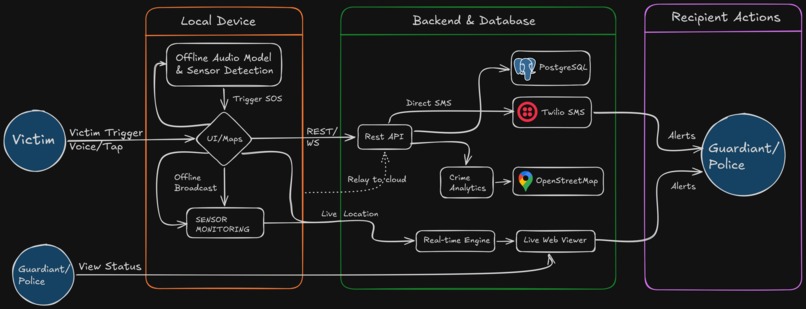
HLD
-
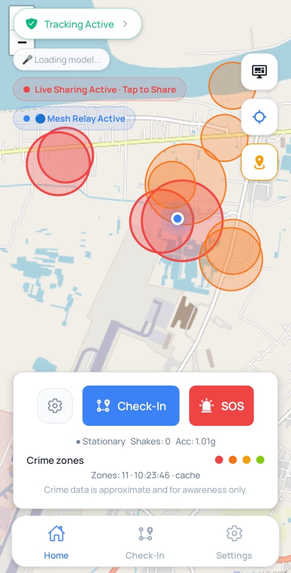
PAGE 1
-
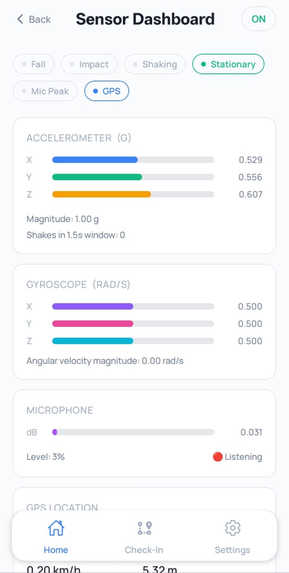
PAGE 2
-

LOGO
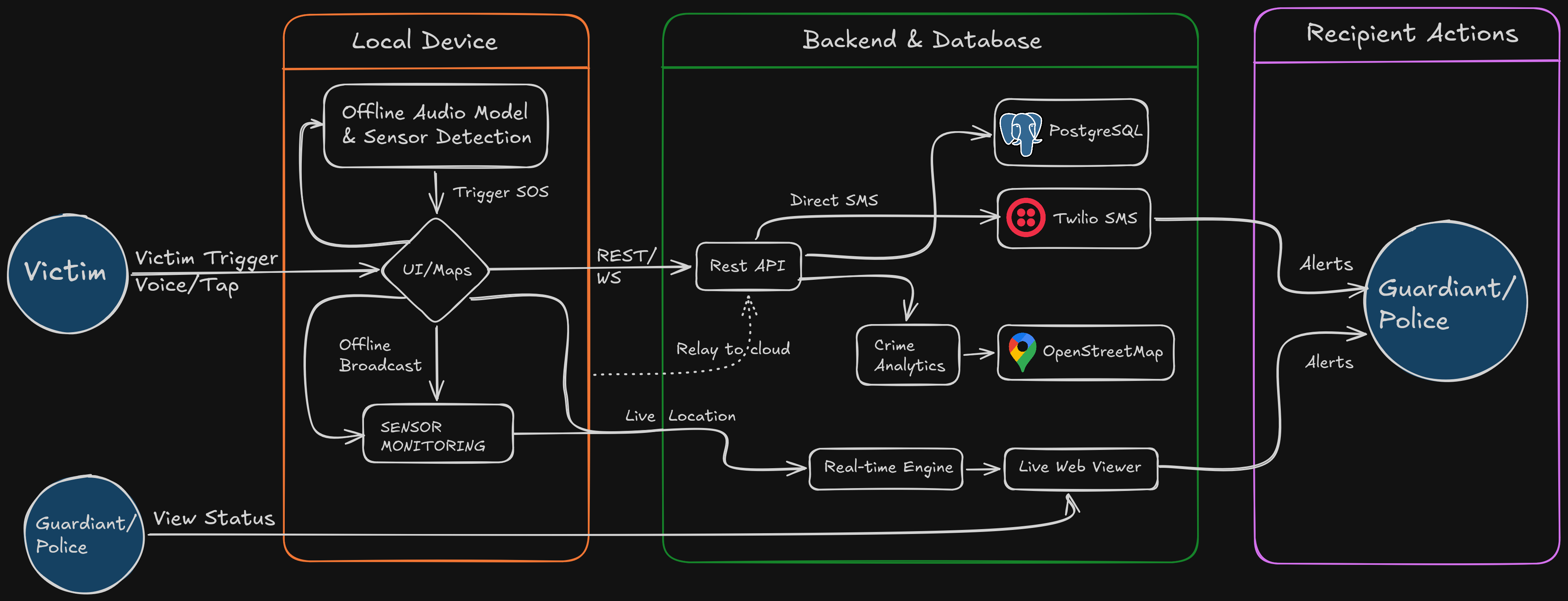

About the Project
In an emergency, can someone stay calm enough to unlock their phone, find an SOS button, and press it at the right moment?
Often, they may not be able to. They may run for help, shout, or repeatedly cry “Help, help!” We built Abhaya around this possibility.
Most existing SOS applications depend on a single manual action. But in a real emergency, a person may not be able to unlock the phone, find the button, or press it in time.
Abhaya takes a different approach.
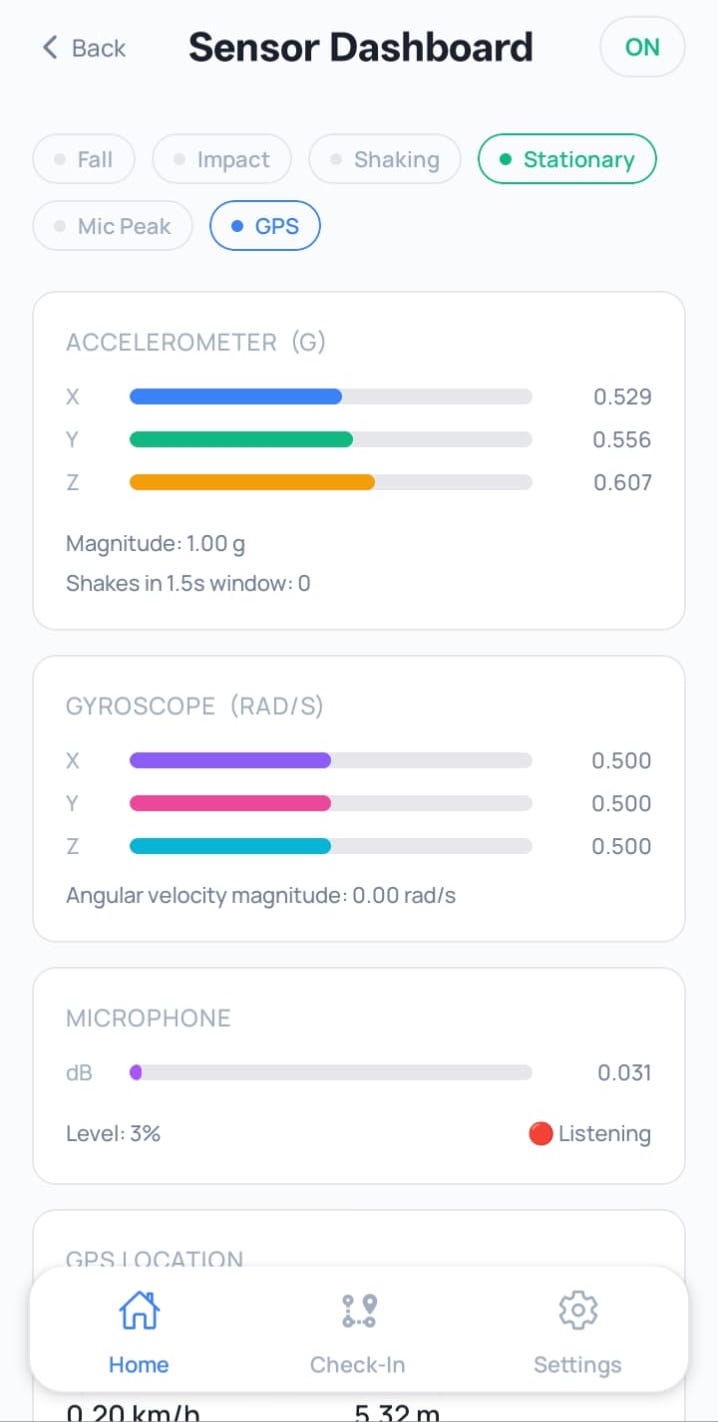
If a user starts running for help, the app can use the mobile phone’s built-in sensors to detect a configured rapid-movement pattern and trigger an automatic SOS. If the user shouts for help or says the keyword Abhaya, our Edge ML model can recognize the voice signal and start the SOS process.
The app also provides many other modern ways to trigger SOS, including manual tap, press and hold, triple tap, voice keyword detection, and sensor-based movement detection. After a trigger is detected, Abhaya starts a short countdown so the user can cancel the alert if it was activated accidentally.
Once the SOS is confirmed, Abhaya can share the user’s latest location, alert emergency contacts via SMS, create a live safety link, and let trusted people follow the situation. Features like route check-ins, crime-data maps, role-based contacts, haptic feedback, and Discreet Mode extend it beyond a traditional panic button.
Our goal is to build a modern, out-of-the-box safety solution that recognizes people may react differently in emergencies. Abhaya provides multiple ways to get help when using the phone normally may not be possible.
What Inspired Us
We realized that in a real emergency, people may not have the time—or even the ability—to calmly unlock their phone and press an SOS button. They could be running, unable to speak, carrying something, or trying not to attract attention.
That made us ask:
What if getting help didn’t depend on pressing a button?
How can a mobile phone recognize several meaningful safety signals and begin a controlled SOS flow without relying on only one visible button?
How We Built It
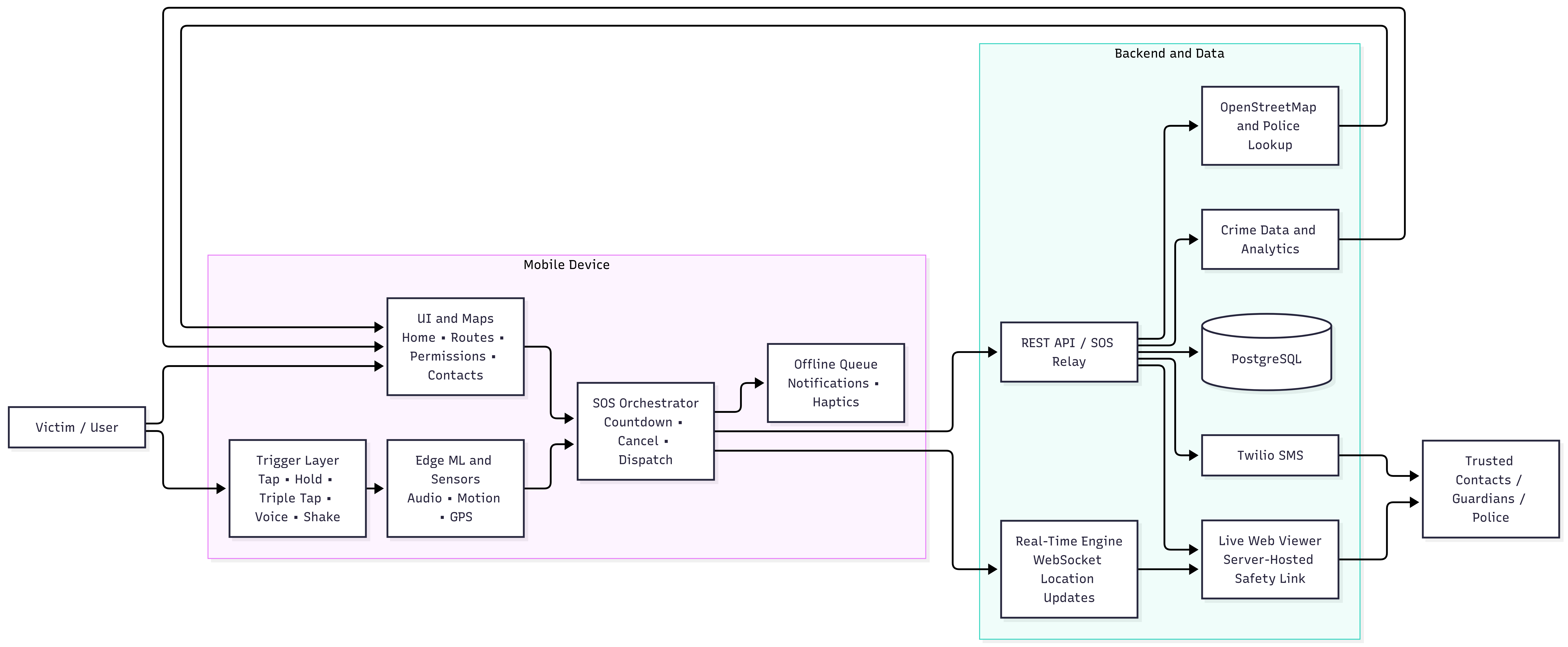
We wanted Abhaya to feel simple for the person using it, while doing a lot of the hard work quietly in the background. So we built it as a mobile-first safety system with a backend service and a public live-viewer flow.
The mobile application is built with React Native and Expo. It brings everything together in one place—from a clear permission explainer and home map to route check-ins, emergency contact management, sensor dashboard, subscription settings, and a low-attention Discreet Mode for premium users.
Behind the app, the backend is built with Node.js, Express, Prisma, and PostgreSQL. It manages user profiles, emergency contacts, route history, safety sessions, public viewer tokens, and SOS relay endpoints. For communication, SMS delivery is connected through Twilio, while OpenStreetMap-based services provide map data and nearby police-location information. A real-time WebSocket engine keeps live location updates flowing during an active safety session.
One of the most important parts of Abhaya is that not everything needs to depend on the internet. Our Edge ML and sensor layer is designed to keep critical detection close to the device. Voice and sensor signals can be evaluated locally before the application starts the SOS countdown. This reduces dependence on continuous network availability during the first detection step and helps keep the experience fast, responsive, and practical when every second matters.
In simple terms, we built Abhaya so that the phone can do more than wait for someone to press a button—it can actively help recognize when assistance may be needed.
High-Level Structure
Key Features
Situation-Based SOS Triggers
Abhaya supports multiple trigger paths so the user is not dependent on one interaction method:
- Manual safety action
- Press-and-hold gesture
- Triple-tap gesture
- Voice keyword through the optional Edge ML audio model
- Configured motion detection such as rapid shaking
- Missed route check-in escalation, where enabled by the journey flow
The countdown and cancellation step help reduce accidental emergency notifications.
Live Location and Safety Sessions
When a safety session begins, Abhaya creates a server-hosted link that trusted recipients can open. The session can provide the user identity, current status, last known location, start time, expiration, acknowledgement state, and resolution state. This gives recipients more useful information than a single static alert.
Route Check-In
Users can define a destination and expected arrival time. During the journey, the app maintains an active check-in state. The user can mark the route as completed, and the journey can be reviewed later through route history. A missed check-in can become an additional signal for escalation, depending on the configured flow.
Role-Based Emergency Contacts
Contacts can be assigned meaningful roles such as primary responder, family member, friend, nearby helper, or medical contact. This makes the response plan easier to understand and allows the incident interface to communicate statuses such as:
Primary responder — notified
Friend — viewer opened
Family member — not reached
Crime Data and Map Context
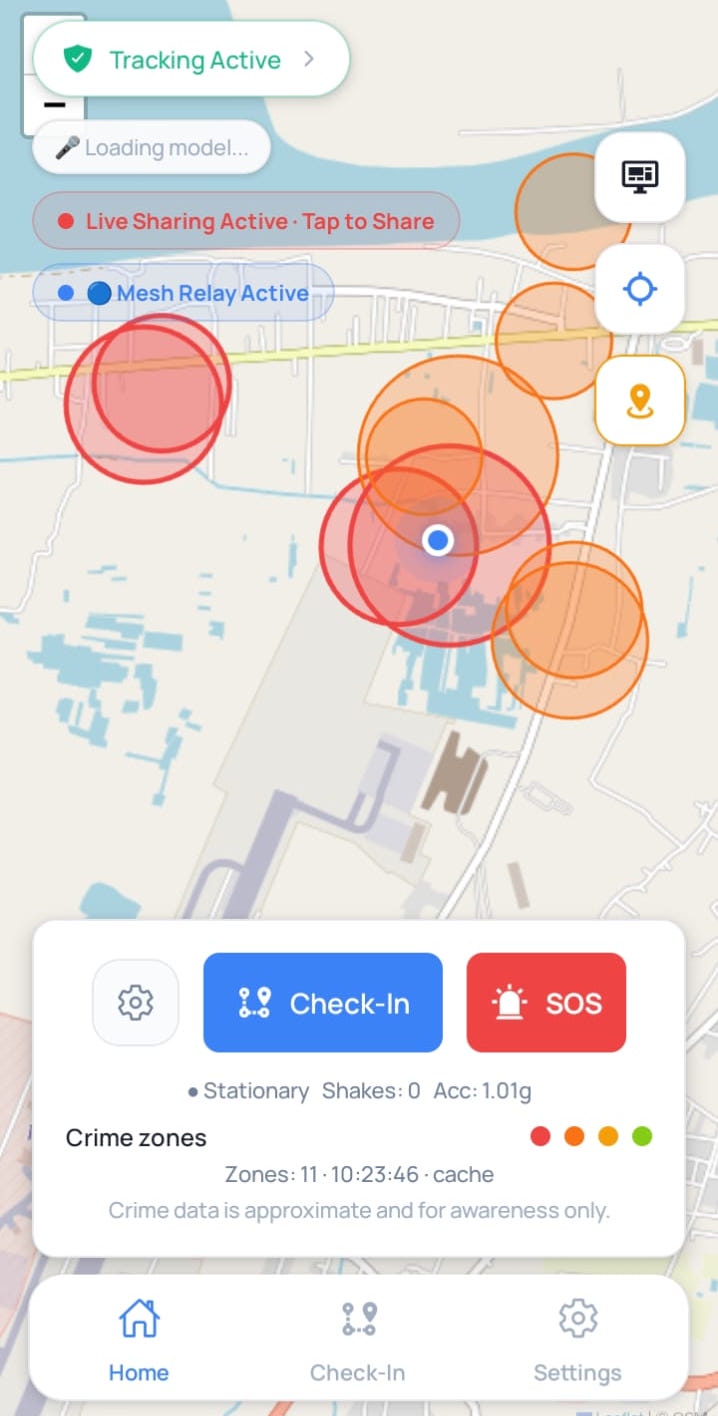
The home map can display safety-related crime-data zones and nearby context. These visual overlays are intended to support awareness and route planning; they are not presented as a guarantee that an area is safe or unsafe.
Discreet Mode
Discreet Mode provides:
A low-attention interface for situations where drawing attention may be unsafe.
It uses a neutral confirmation surface, configurable low-attention triggers, haptic countdown feedback, and a notification-shade update. It is a premium feature. It is not completely invisible and does not guarantee that Android restrictions can be bypassed.
What We Learned
Abhaya taught us that safety is not just about adding more detection features. It is about building a trustworthy chain from signal to decision to response.
We learned to balance on-device processing and backend services, while keeping the app useful even when the network is unreliable. We also learned that permissions like location, microphone, notifications, and background access need to be explained clearly so users know what they are allowing.
Most importantly, we learned to design for things going wrong. GPS can fail, requests can time out, permissions can be denied, and Android can suspend background tasks. So we built around cancellation, retries, offline persistence, clear status messages, and honest limitations.
And we realized one more thing: the alert is only as good as the help that follows it. A useful SOS should give the recipient the location, live link, contact role, acknowledgement, and clear context about what happened.
Challenges We Faced
Balancing Automatic Detection and False Alarms
Automatic SOS is powerful but sensitive. Motion, voice, or environmental signals can be ambiguous. We addressed this by using a configurable trigger model, confidence information for the Edge ML keyword flow, a countdown, and an explicit cancellation path.
Background Execution and Android Restrictions
A safety feature that only works while the app is open is incomplete, but mobile operating systems restrict background execution for privacy and battery reasons. We implemented background-aware notification and pending-state handling while keeping the product language honest: the app supports continued safety behavior where the platform and permissions allow it, but it does not promise unrestricted background execution.
Reliable Emergency Delivery
The notification pipeline crosses several boundaries: the mobile device, the REST API, the database, the SMS provider, and the recipient’s device. Each boundary can fail independently. We added API fallbacks, persisted pending SOS state, delivery results, and recipient response states to make failures visible instead of silently presenting a false success state.
Avoiding Duplicate Notifications
A live safety session and an SOS alert can both appear to be notification events. Treating them as unrelated flows can cause duplicate messages to recipients. The architecture therefore separates session creation, live tracking, and emergency delivery responsibilities so the system can evolve toward one consistent incident pipeline.
Privacy and Trust
The app handles phone numbers, location, microphone access, emergency contacts, and potentially sensitive incident information. We designed contextual permission screens, role-based contact presentation, neutral messaging for Discreet Mode, and clear limitations to make the system more understandable and trustworthy.
Closing
When an emergency happens, every second matters—and every person may react differently.
Abhaya brings together Edge ML, built-in mobile sensors, live maps, crime-data context, route monitoring, emergency contacts, SMS delivery, and real-time location sharing into one connected safety workflow.
But Abhaya is not about making unrealistic promises. It is about making sure that when someone needs help, there is more than one way to ask for it.
It is about giving trusted people the right information at the right time, while keeping the entire experience calm, transparent, and practical.
Because sometimes, the person who needs help may not be able to reach a button.
Abhaya — situation-aware mobile safety that stays ready when the user may not be able to reach the SOS button.
Built With
- android
- crime-data-analytics
- edge-ml
- emergency-response
- expo-location
- expo-sensors
- expo.io
- express.js
- gps
- machine-learning
- mobile-sensors
- node.js
- openstreetmap
- postgresql
- prisma
- react-native
- react-native-maps
- real-time-tracking
- rest-api
- revenuecat
- socket.io
- twilio
- typescript
- voice-recognition
- websockets


Log in or sign up for Devpost to join the conversation.