-
-
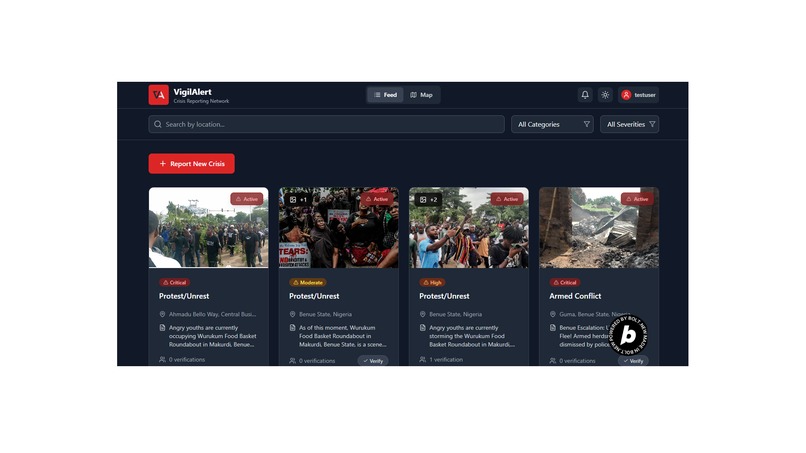
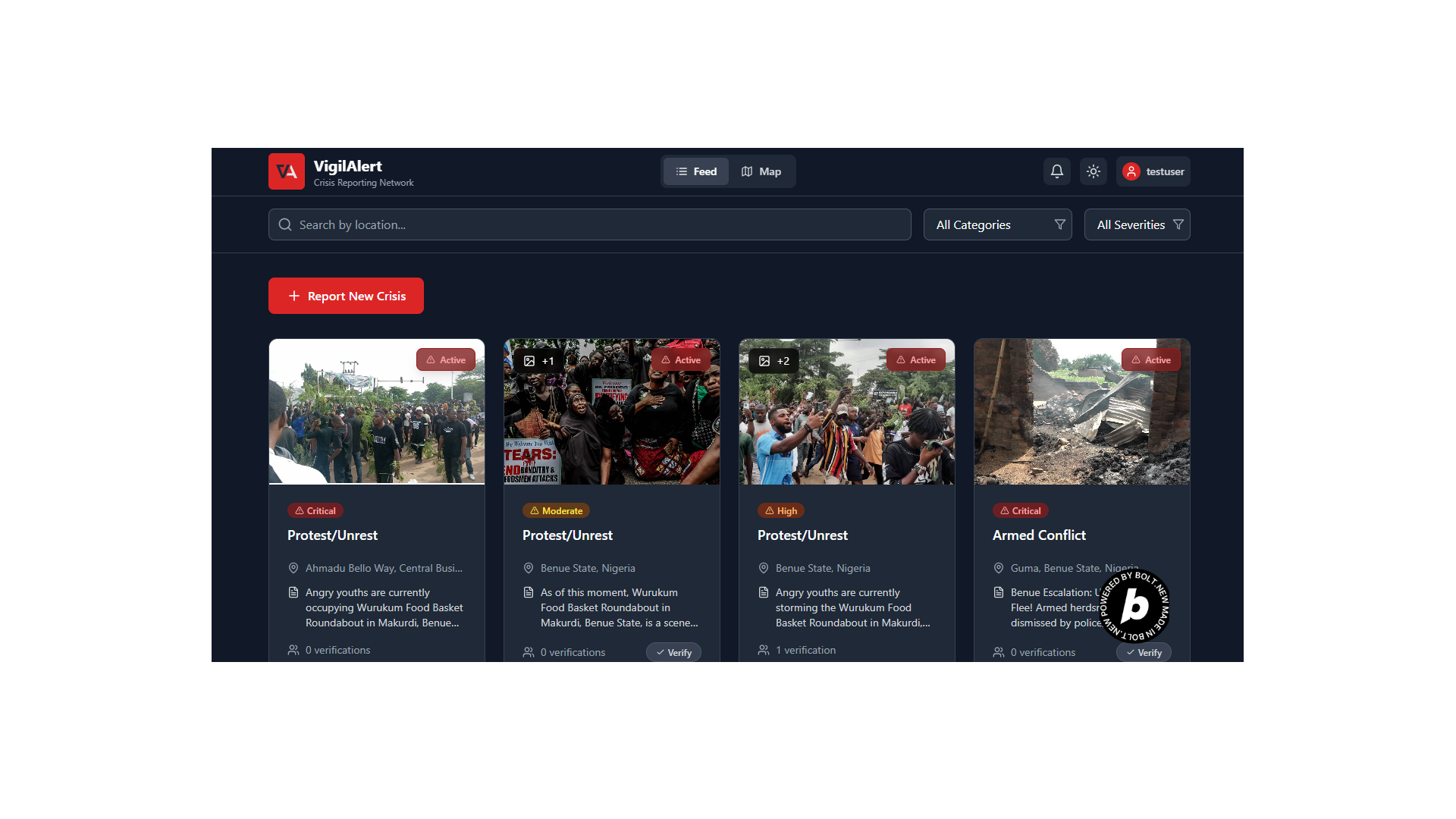
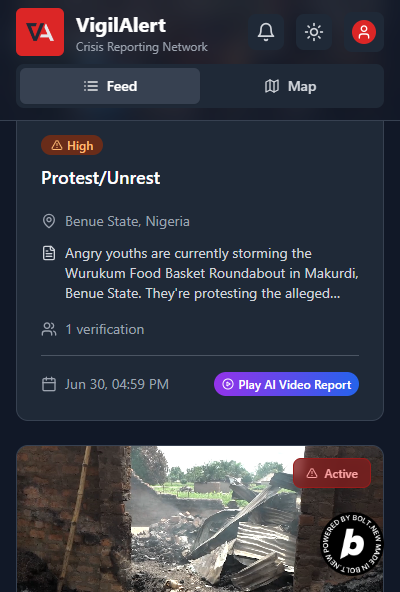
feed
-

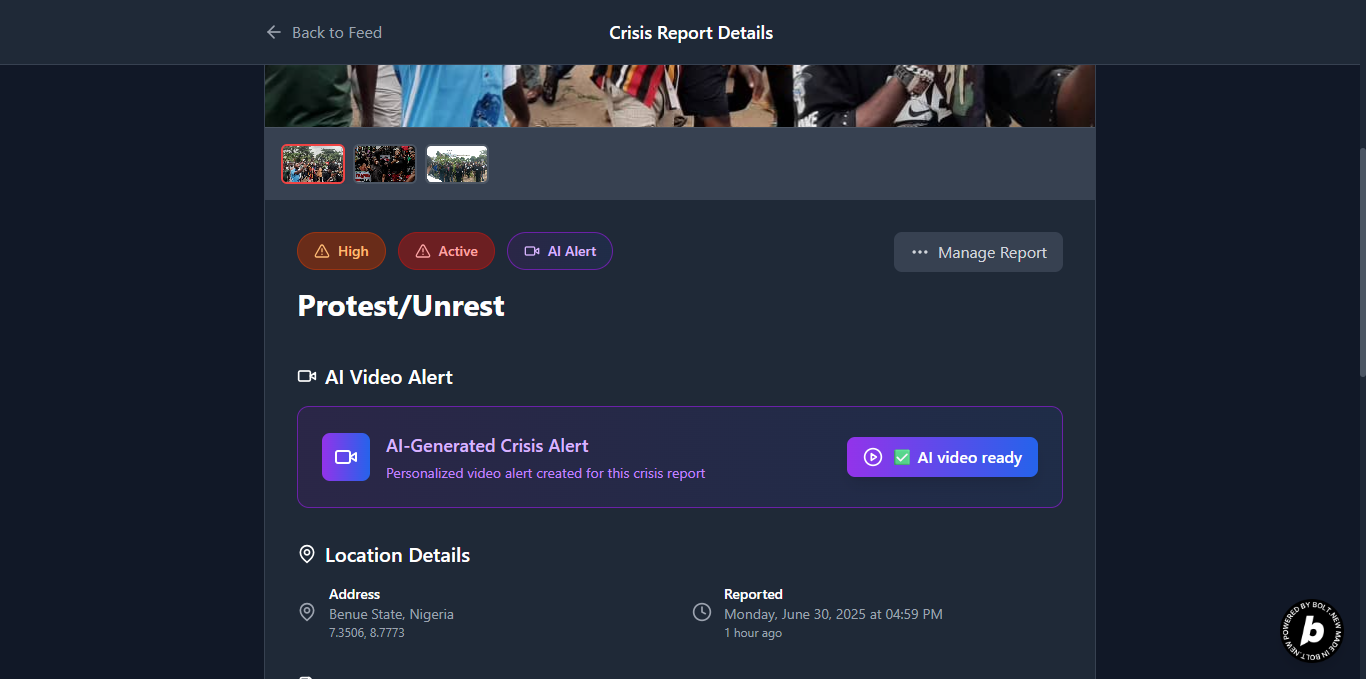
Ai video generated
-
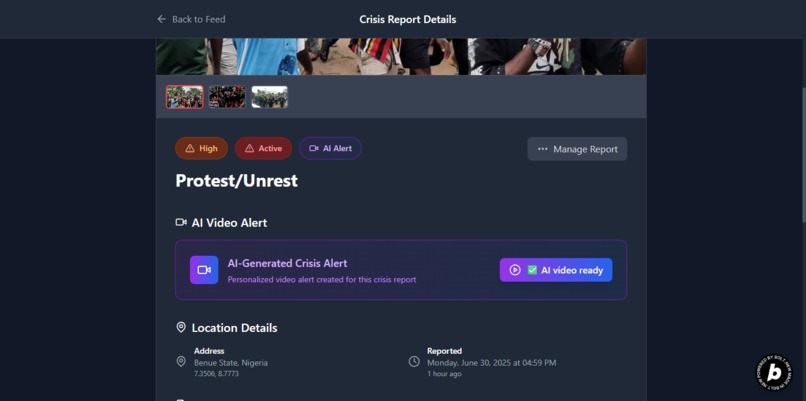
Detailed report page
-
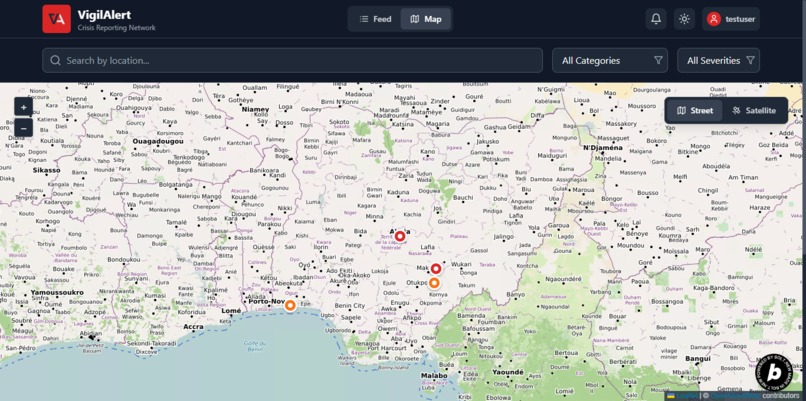
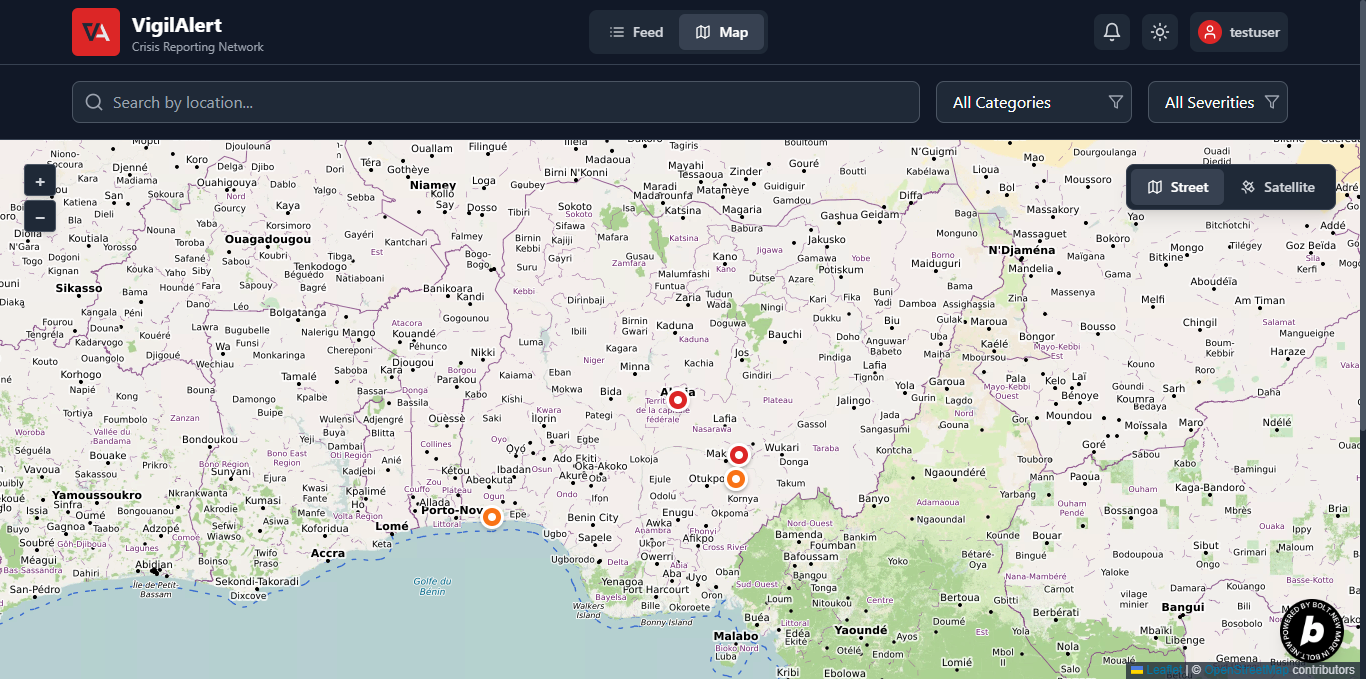
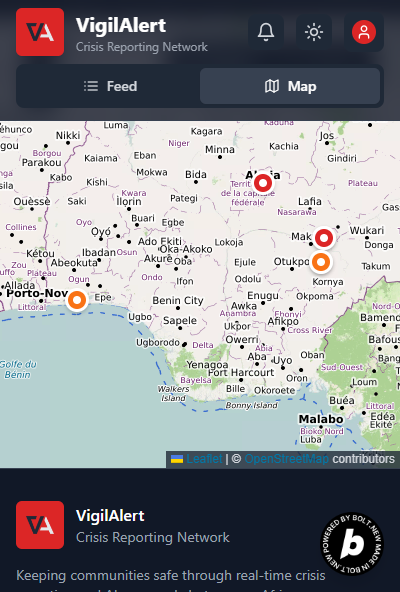
Map feed
-
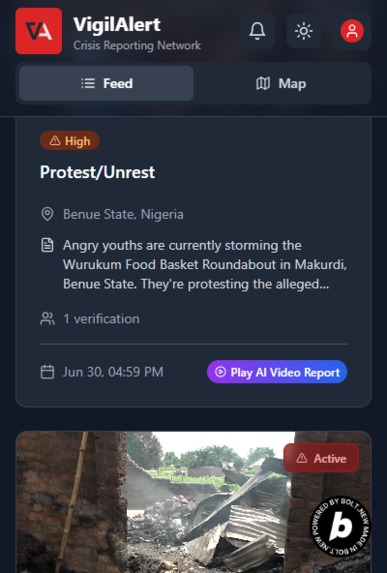
mobile responsive
-
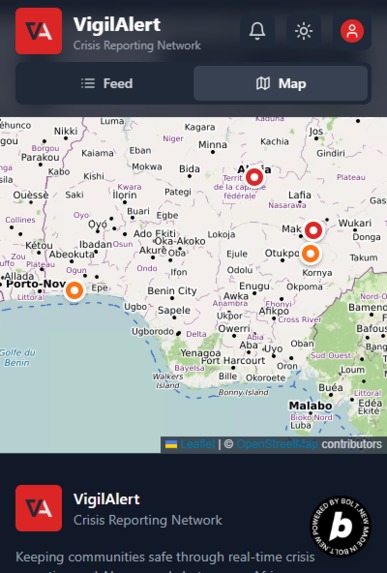
Mobile responsive_map

Inspiration
The Spark: A Personal Reality I didn’t build VigilAlert because I read about a problem. I built it because I live in it. The reality of unknowingly walking into danger isn’t some distant concept for me. it’s part of everyday life where I’m from. I’ve seen the devastating consequences up close. A young man from my street was heading to a neighbor’s graduation ceremony. He never made it. On the way, he passed through a town under attack by armed bandits and was killed. A little girl, just two houses away from mine, lost her father in a religious clash. He had unknowingly entered a neighborhood where religious violence had just erupted some hours Ago. He was caught in the chaos and didn’t survive. I’m from Benue State, a region in Nigeria that has experienced waves of attacks from Fulani Militias. Sometimes Entire families have been killed while travelling. simply because they unknowingly passed through villages and towns under siege. Most of them weren’t reckless. They didn’t ignore warnings. There just were no warnings. These aren’t headlines or statistics to me they’re names, faces, memories. And these tragedies keep happening. This deep, personal understanding of the problem gave me an urgent reason to act, to create something that could offer the warnings that were never there. And I’m not just speaking from personal experience. I've heard countless similar stories across Nigeria, across Africa, and around the world, where people pay with their lives simply because they didn’t know what was ahead.
What it does
VigilAlert is a modern, mobile-first web app designed for real-time reporting, discovery, and verification of conflict zones, crisis alerts, and danger spots across Africa. At its core, VigilAlert helps users stay safe and informed by crowdsourcing real-time reports of kidnappings, road blockades, armed conflicts, religious clashes, and more all backed by verified media, severity levels, and community validation. Users can report incidents, verify ongoing threats, and track danger zones, with or without maps
Key Functionalities: Real-time Report Feed View a continuously updated feed of crisis reports, sorted by severity and recency. Each report includes the category, location, time, description, severity badge, and verification count.
Intuitive Map View Toggle between the feed and a Mapbox-powered map showing color-coded pins based on severity: 🔴 Critical • 🟠 High • 🟡 Moderate • 🟢 Low. Clicking a pin reveals a mini report card with summary and link to full details.
Easy Report Creation Submit new danger alerts in seconds with fields for category, severity, location (typed or map-click), description, and up to 2 media uploads (photos/videos). Clean validation and UX ensure speed.
Location-Based Alerts Get notified if a new crisis is reported near your selected state or current GPS location. Perfect for travelers or locals moving between regions.
AI-Generated Video Warnings Relevant reports include Tavus-powered dynamic video alerts, e.g., “Kidnapping reported in Kachia. Citizens are advised to avoid the area.” These videos make warnings more accessible, especially for non-readers or fast scrollers. (Submitted to the Conversational AI challenge using Tavus-powered video warnings)
Report Verification System Logged-in users can upvote reports to verify accuracy and signal ongoing risk. Verification count appears on each report, boosting trust.
User Report Management Logged-in users can edit or delete their own reports and mark resolved incidents as “Safe.” Report ownership is enforced via Supabase RLS.
Guest-Friendly Access No sign-in required to view or filter reports, crisis info remains open and public for all, including journalists, NGOs, and concerned citizens.
Mobile-First Optimization Built to work on low-end devices and poor network conditions, with a clean, readable interface even for users unfamiliar with map-based tools.
How I built it
I built VigilAlert by prompting Bolt.new, carefully guiding it at each step. Sometimes I gave it high-level goals like “add a mobile-first crisis report form,” and other times I specified exact tools or stacks, like asking it to use Supabase, React Leaflet, or Tavus for specific integrations.
Bolt handled the scaffolding, but I stayed in control, refining layouts, fixing bugs, and ensuring the app stayed lightweight, fast, and real-world ready.
TechStack Frontend -Framework: React.js (with Vite) -Language: TypeScript -Styling: Tailwind CSS, PostCSS, Autoprefixer -Routing: React Router DOM -Icons: Lucide React -State Management: React Context API (used for toast messages and realtime alerts) -Country/State Picker: react-country-region-selector -Linting: ESLint (with TypeScript and React Hooks plugins)
Mapping & Location -Map Framework: Leaflet (via React Leaflet) -Tile Providers: -OpenStreetMap: Street map view -Esri ArcGIS: Satellite imagery -Geolocation Services: -Nominatim API (OpenStreetMap): Geocoding and reverse geocoding -Browser Geolocation API: To detect user position -Map Click Support: Users can select location directly on the map
Backend (Supabase) -Database: PostgreSQL (via Supabase) -Auth: Email-based login/signup using Supabase Auth -Realtime: Subscriptions for live updates and notification triggers -File Storage: For storing uploaded media (images/videos) -Row-Level Security (RLS): Enforces report ownership on edit/delete
AI Integration -Tavus API: Used to generate AI-powered video alerts per report. Example: “Kidnapping in Abuja. Citizens are advised to avoid this area”. Videos are embedded inline and update automatically when ready
Challenges I ran into
1. Real-Time Data Sync Issues Ensuring reports updated instantly for all users was harder than expected. Supabase's real-time subscription didn’t refresh the feed correctly for the user who submitted a report, causing stale views. Fix: I updated the HomePage.tsx subscription logic to always refetch on INSERT and UPDATE, regardless of report ownership.
2. Designing for Non-Map Users Not everyone understands map interfaces. I had to build a dual system where maps are optional, and the list feed remains the primary view for discovery and alerts.
3. UI Overlaps and Alignment Problems The UI had some layout bugs, the map dropdown overlapped other elements, profile cards had badge collisions, and media carousels sometimes distorted images. Fix: I fixed this with better z-index, margin/padding, and cleaner image container styles (object-cover, border-radius, etc.).
4. Asynchronous Tavus AI Integration Tavus AI videos aren’t generated instantly, so I had to design around that. Early issues included incorrect API auth, blocking form submission, and missing video status UI. Fix: I decoupled video generation from report submission (ReportForm.tsx), added tavus_video_id tracking, and built dynamic status indicators in ReportCard.tsx and FullReportPage.tsx.
5. Token-Efficient Prompt Strategy with Bolt.new While this wasn’t a one-prompt project, I deliberately minimized the number of Bolt.new prompts used to conserve tokens and avoid unnecessary resets. That meant planning each prompt carefully, validating core features ahead of time, and ensuring nothing broke the output structure or exceeded limits. It was a constant balance between ambition and efficiency.
6. Balancing Speed with Accuracy Realtime crisis info must be fast, but not sloppy. I constantly had to check that the app didn’t just work, it had to feel urgent, trusted, and precise even under poor network or on low-end devices.
Accomplishments that we're proud of
1. Addressing a Real-World, Life-Saving Problem Our greatest achievement is directly solving a problem that has cost real lives VigilAlert isn’t just a tech demo, it’s a deeply personal solution to a life-threatening problem I’ve seen affect real people in my community. It empowers everyday users with timely information that could prevent kidnappings, attacks, or worse.
2. Integrated AI for real-time safety Successfully used Tavus AI to generate dynamic video alerts, making reports faster to understand — especially for users with low literacy or limited attention.
3. Handled real-time data like a pro Built a clean Supabase-powered system with live syncing and safe media upload logic, even on poor networks or low-end phones.
5. Designed for map and non-map users Created a dual-view interface: a severity-sorted list feed for accessibility, and a map for users who prefer a visual overview.
**6. Kept it clean and production-ready Wrote modular, maintainable code using React, TypeScript, Supabase, and Leaflet, deployed with CI and a custom domain.
7. Balanced ambition and constraint Managed complex features within limited Bolt.new prompts and real-world API quirks, without compromising the user experience.
8. Shipped a real life saving app, working platform VigilAlert is live, usable, and shareable, hosted on Netlify, built with open APIs, and ready for real-world impact.
What I learned
1. The Power of Technology to Save Lives
I learned firsthand that I can use technology to solve problems that seem beyond my individual capacity, even life-and-death issues.
VigilAlert showed me how thoughtful, localized innovation can directly protect people and communities. That realization alone changed how I view my skills as a developer.
2. AI Needs UX Guardrails
Working with Tavus AI taught me that while AI can enhance accessibility and engagement, it must be wrapped in thoughtful UX, with fallback messaging, status indicators, and seamless user flows.
3. Supabase is a Full-Stack Powerhouse
I explored the full potential of Supabase, from real-time sync to secure media storage and role-based access with Row Level Security.
It simplified complex backend needs without sacrificing performance.
4. Prompting is a New Literacy
Building this app with Bolt.new taught me that prompting isn’t just a shortcut, it’s a creative, strategic skill.
The better I could describe my vision, the better the output.
5. Accessibility Matters More Than Aesthetics
Designing for non-map users pushed me to simplify everything, including layouts, flows, and interactions.
Sometimes the most useful features aren’t flashy, they’re just obvious, easy, and inclusive.
6. Impact > Complexity
I learned not to chase technical complexity for its own sake.
What matters is building something that works for the people who need it most, and shipping it in a form they can use immediately.
What's next for VigilAlert
1. Robust Report Verification System
We'll implement more sophisticated upvoting mechanisms to verify reports, display clear verification counts, and potentially adjust severity dynamically when verifications surge. This will significantly boost the credibility, accuracy, and real-time value of the platform's data.
2. Comprehensive Notification System
A top priority is refining real-time alerts for both local and GPS-based proximity incidents. Users will be able to fine-tune notification preferences, such as setting precise radius thresholds, ensuring that alerts are timely, personal, and actionable.
3. Global Conflicts Feed
I plan to introduce a curated, read-only tab featuring major global conflicts and humanitarian crises, wars, disasters, political unrest, completely separate from user-submitted reports. This will be managed by trusted admins and offer users valuable global context.
4. Admin Controls and Content Moderation
A full-featured admin dashboard will enable trusted moderators to verify reports, flag or remove abuse, curate the global feed, and manage “resolved” status tags. These tools are essential for scaling trust, ensuring content quality, and preventing misinformation or spam.
5. Lingo Localization
To serve Africa’s diverse linguistic landscape, we’ll implement multi-language support, starting with major regional languages. This ensures users across different nations and literacy levels can access and understand life-saving information in their native tongue.
6. Further Map Usability Enhancements
We’ll enhance map navigation by introducing intelligent pin clustering in high-density areas and refining geolocation fallback behavior to ensure better accuracy when detecting a user's current position, especially useful in unstable network conditions.
7. Native Mobile App
We'll build native iOS and Android versions using React Native or Expo to bring better performance, offline support, and deeper integration with device features like GPS, push notifications, and background geofencing for safety alerts.
8. Community Partnerships
We’ll collaborate with local governments, NGOs, emergency responders, the police, and military units to validate reports, coordinate verified responses, and extend the platform’s operational utility. These partnerships will transform VigilAlert from an app into a public safety network.
9. Sustainable Growth Strategy
To remain free for users while scaling impact, we’ll explore monetization via premium dashboards, alert subscriptions for institutions, and grants from humanitarian organizations, keeping our mission user-first and corruption-resistant.
Challenges and Bonuses
Challenges am submitting for
- Conversational AI Video Challenge
- Startup Challenge
- Deploy Challenge
- custom domain name challenge
*Bonus am submitting for *
- Inspirational Story
- Sharpest Problem Fit
- Future Unicorn
- We Didn’t Know We Needed This
- Most Likely to Get Funded
- Uniquely Useful Tool
Built With
- autoprefixer
- context
- entri
- esri
- javascript
- lucide
- netlify
- nominatim
- openstreetmap
- postcss
- react
- react-country-region-selector
- react.js
- supabase
- tailwind
- tavus
- typescript
- vite

Log in or sign up for Devpost to join the conversation.