-
-
TapTalk
-
Overall User flow of App
-
User Flow of PTV Guidance
Inspiration
Watching a parent, grandparent, or a friend who's new to iPhone get stuck on something we'd consider commonplace knowledge - finding the right app, understanding what an icon does - is a familiar frustration for a lot of us. Smartphones assume a level of visual literacy and confidence that not everyone has: elderly users who never grew up with touchscreens, teenagers picking up their first iPhone, anyone who just finds the grid of icons overwhelming. We wanted to build something that meets people where they are - not another manual to read, but a voice that explains, listens, and helps in the moment they're stuck.
What it does
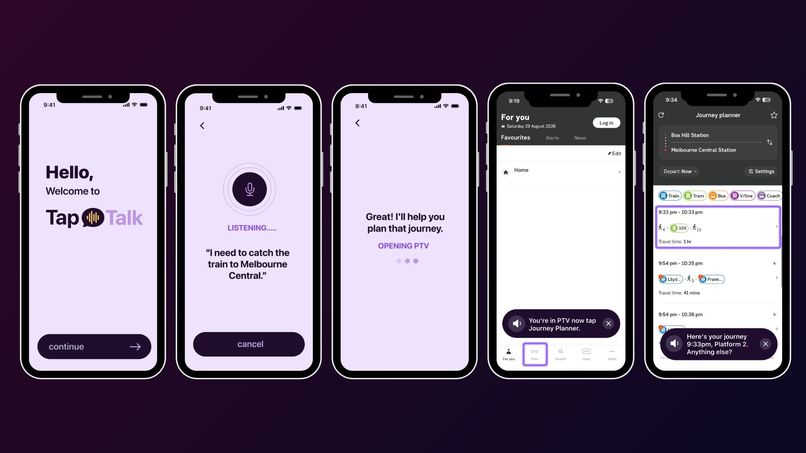
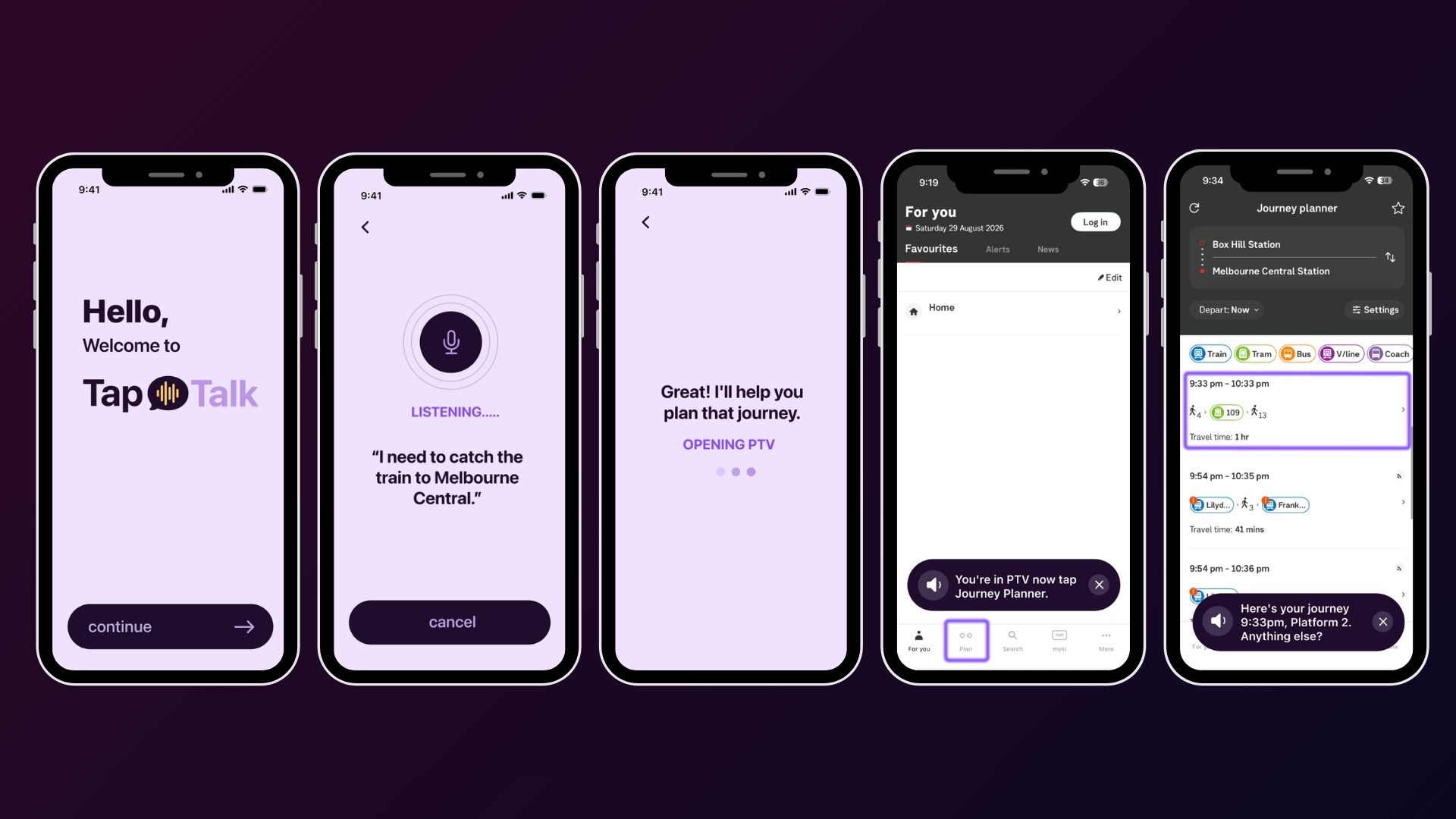
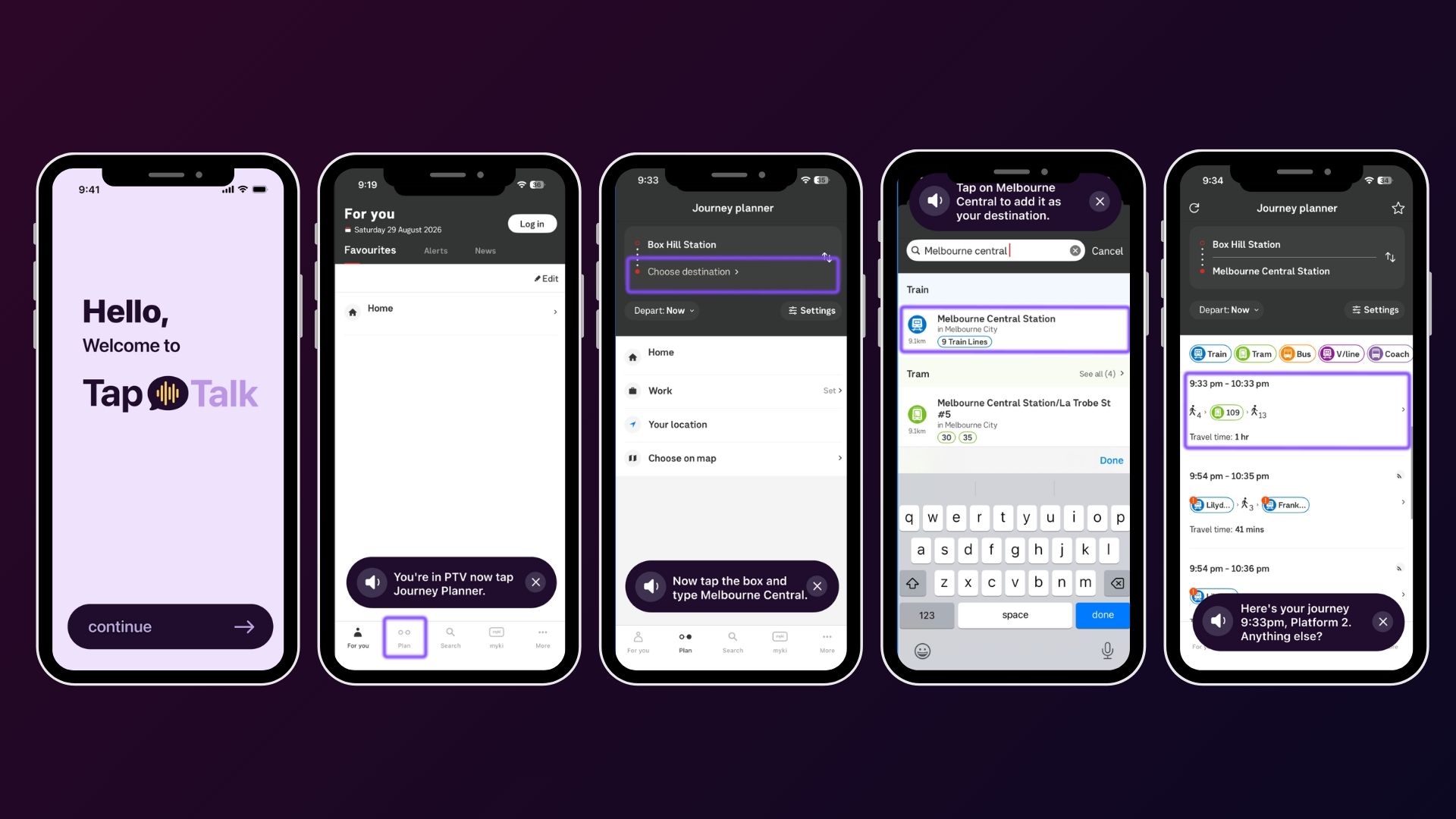
TapTalk is a conversational, voice-first companion that guides you through using your phone - not just a command executor like Siri, but a guide that stays with you until the task is actually done.
- Tell it your goal out loud - say something like "I'm catching the train" and TapTalk listens, works out what you're trying to do, and opens the right app for you.
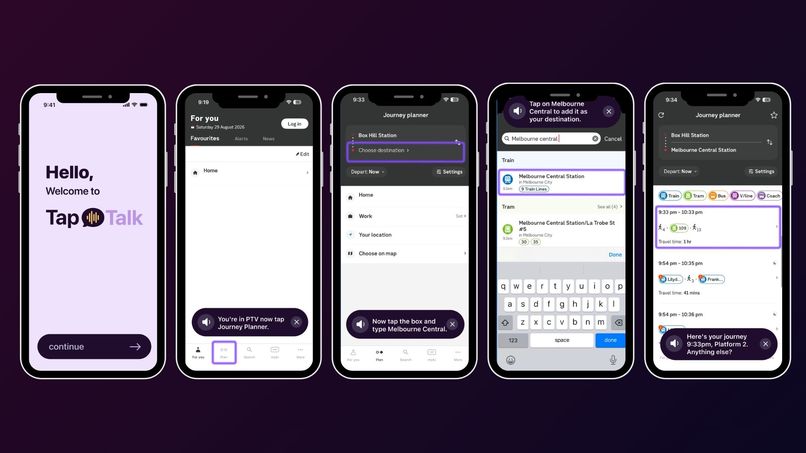
- It stays with you, screen by screen - once you're in the app, TapTalk watches what's on your screen and speaks the next step out loud (e.g. "Tap Journey Planner"), then waits for the next screen and does it again, a real loop, not a one-shot answer.
- Tap-to-Explain - tap any app icon and TapTalk speaks a short, plain-language explanation of what it does.
- Stuck detection - tap around without success three times in a row, and TapTalk notices and proactively offers help, without waiting to be asked. Every response is spoken aloud, so it's genuinely a voice guiding you, not just text on screen.
How we built it
- SwiftUI app built in Xcode, targeting iOS.
- ElevenLabs Scribe turns spoken input into text.
- Apple's on-device Foundation Models interpret that text to understand the user's actual goal.
- A Task Planner decides what happens next: either open the right app directly via its URL Scheme / Universal Link, or ask the user a follow-up question if key information is missing.
- Once the target app is open and the user activates screen guidance, ReplayKit captures the live screen frame.
- Vision (OCR / on-screen image understanding) reads what's actually on that screen.
- That understanding is passed back to Foundation Models, which turns it into a single plain-language next step (e.g. "Tap Journey Planner").
- ElevenLabs' text-to-speech speaks that instruction aloud to the user.
- The loop repeats on the next screen until the task is complete
- A simple rolling-timestamp "stuck detector" watches for 3+ unresolved taps in a short window and proactively offers help.
- Supported and built with Claude
Challenges we ran into
- Keeping the guidance loop reliable across arbitrary screens. Every app screen looks different, so leaning on Vision/OCR plus Foundation Models to reliably identify "what matters on this screen right now" and turn it into one clear instruction, rather than an overwhelming description, took real tuning.
- Designing for more than one audience at once. Elderly users, first-time iPhone teenagers, and low-vision users don't need the same thing. We scoped TapTalk clearly as a plain-language companion for people who are sighted but unfamiliar or overwhelmed
- Making the voice reliable on demo day. A live demo that goes silent because of bad venue wifi or a missing API key is worse than no demo at all.
Accomplishments that we're proud of
- Going from a Figma concept to a working Xcode project in a short hackathon timeline, with the build ending up recognisably close to what we originally designed.
- A conversational, multi-step guidance loop - listen, plan, open, watch the screen, speak the next step, repeat, instead of a single command-and-done interaction.
- Good teamwork under time pressure: splitting up design, voice/AI integration, and app development in parallel and still ending up with a coherent product.
What we learned
How to combine on-device Apple Foundation Models with ElevenLabs' voice stack into a real understand → plan → act → observe → speak loop and how much of "accessibility" is really about tone and plain language, not just screen-reader compatibility.
What's next for TapTalk
- Replace the keyword matcher with real on-device or server-side language understanding, so it can handle open-ended requests, not just a scripted list.
- A genuinely VoiceOver-compatible mode for blind and low-vision users, designed with actual accessibility consultants rather than assumed.
- More languages, using ElevenLabs' multilingual voices.
- A real Home Screen widget + Shortcuts integration, so "opening an app" and "guiding a task" can hook into first-party iOS automation.
- User testing with the actual people TapTalk is for: elderly users and people new to iPhone.
Built With
- avaudiosession
- avfoundation
- claude
- elevenlabs
- figma
- ios
- speech-framework
- swift
- swiftui
- xcode


Log in or sign up for Devpost to join the conversation.