-
-
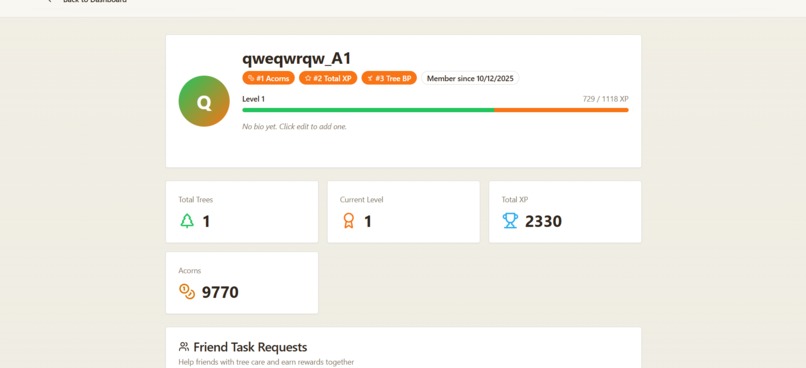
User's profile pages
-
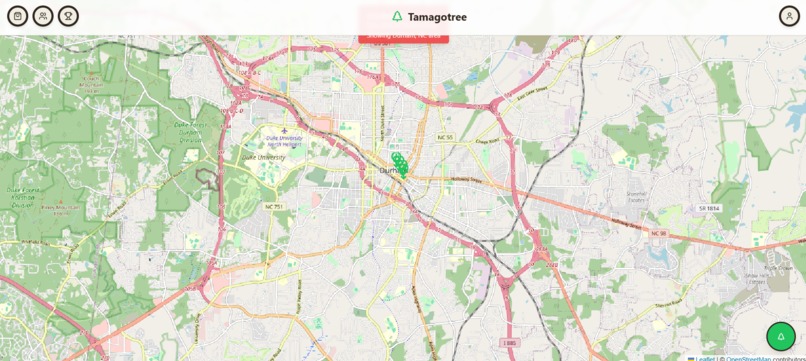
Map in Action
-
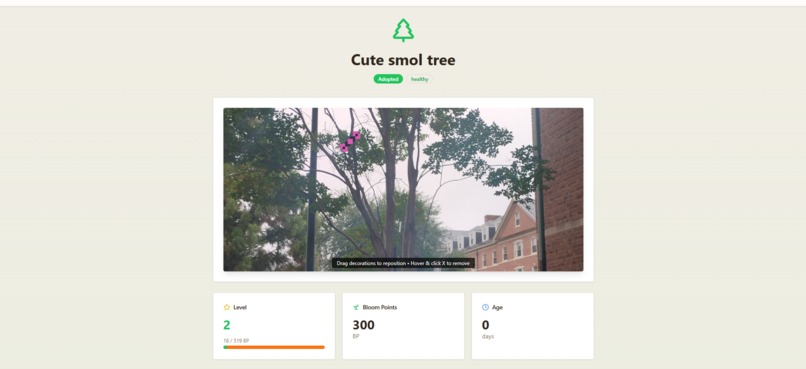
Tree page
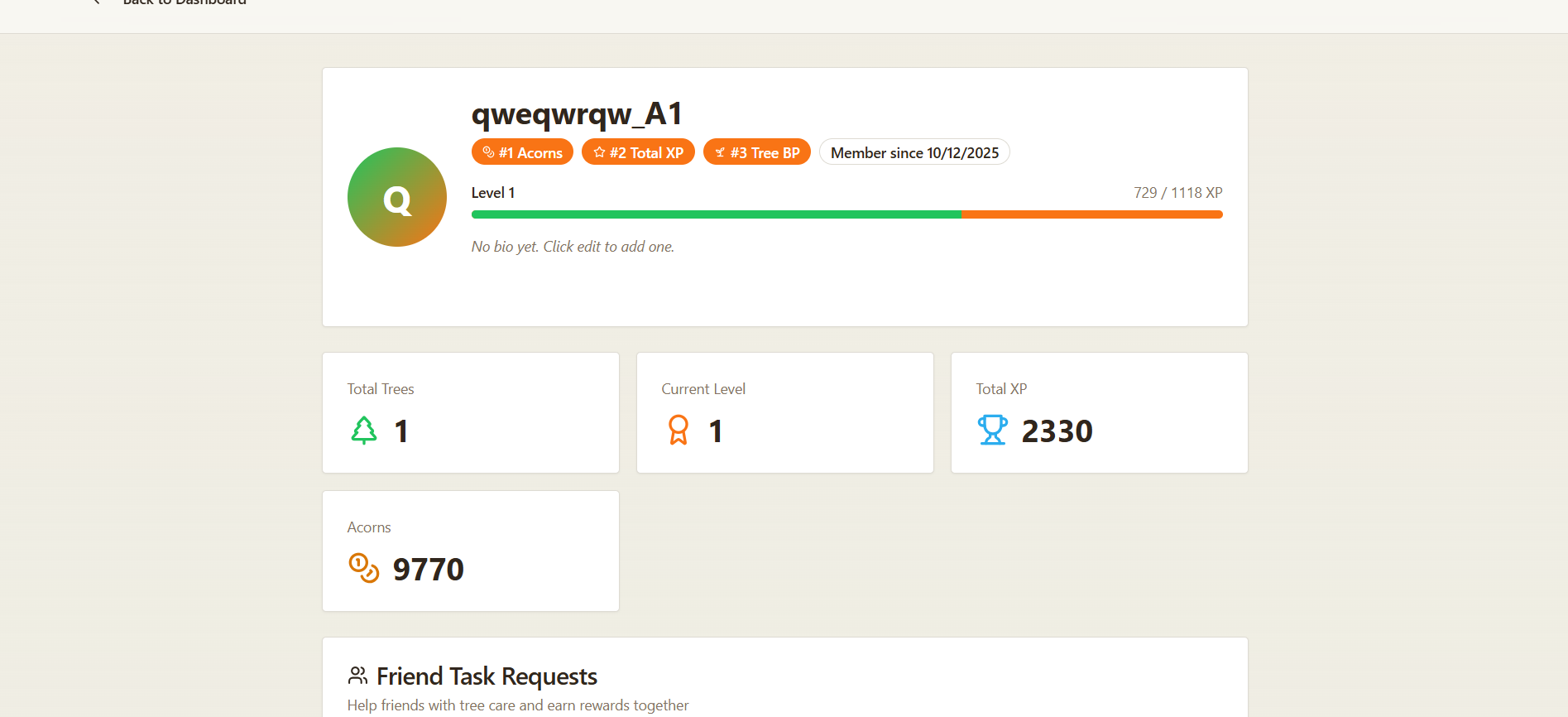
Tamagotree
Fight climate change one tree at a time - A gamified community-driven tree care platform for Durham, NC
Prevents new-tree death in urban heat islands with citizen-scheduled watering.
Inspiration
Urban heat islands are killing newly planted trees in cities across America. While living in Durham, NC, we saw communities plant trees with good intentions, but without ongoing care, many died within their first year. We were inspired to create a solution that combines technology, gamification, and community action to solve this problem. By making tree care fun and rewarding, we can mobilize citizens to become active participants in the fight against climate change, one tree at a time.
What it does
Tamagotree is a gamified tree care platform that turns urban tree maintenance into an engaging community experience. Users can:
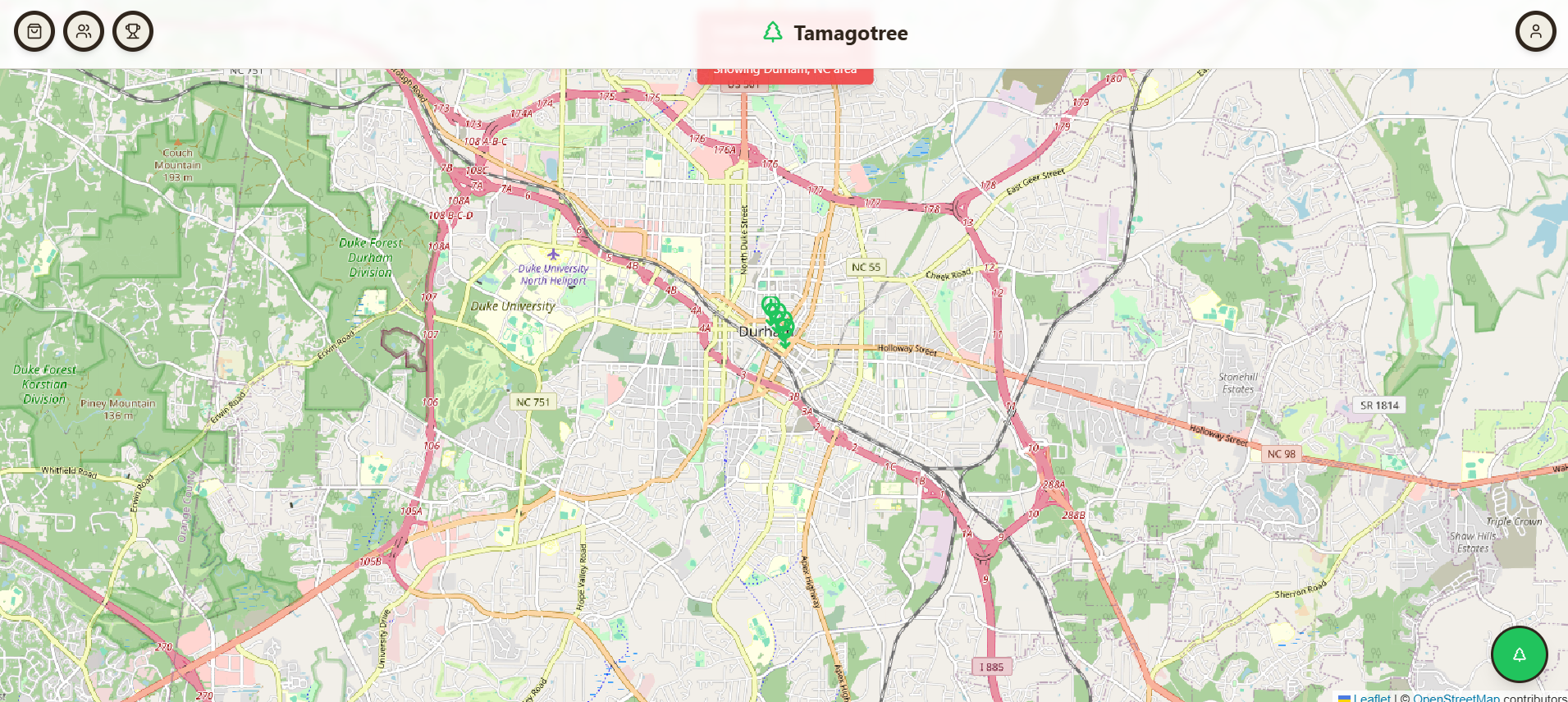
- Discover and adopt real trees in their neighborhood through an interactive map
- Complete daily quests (watering, singing, leaf cleanup) with photo verification
- Earn rewards (Acorns, XP, Branch Points) for consistent tree care
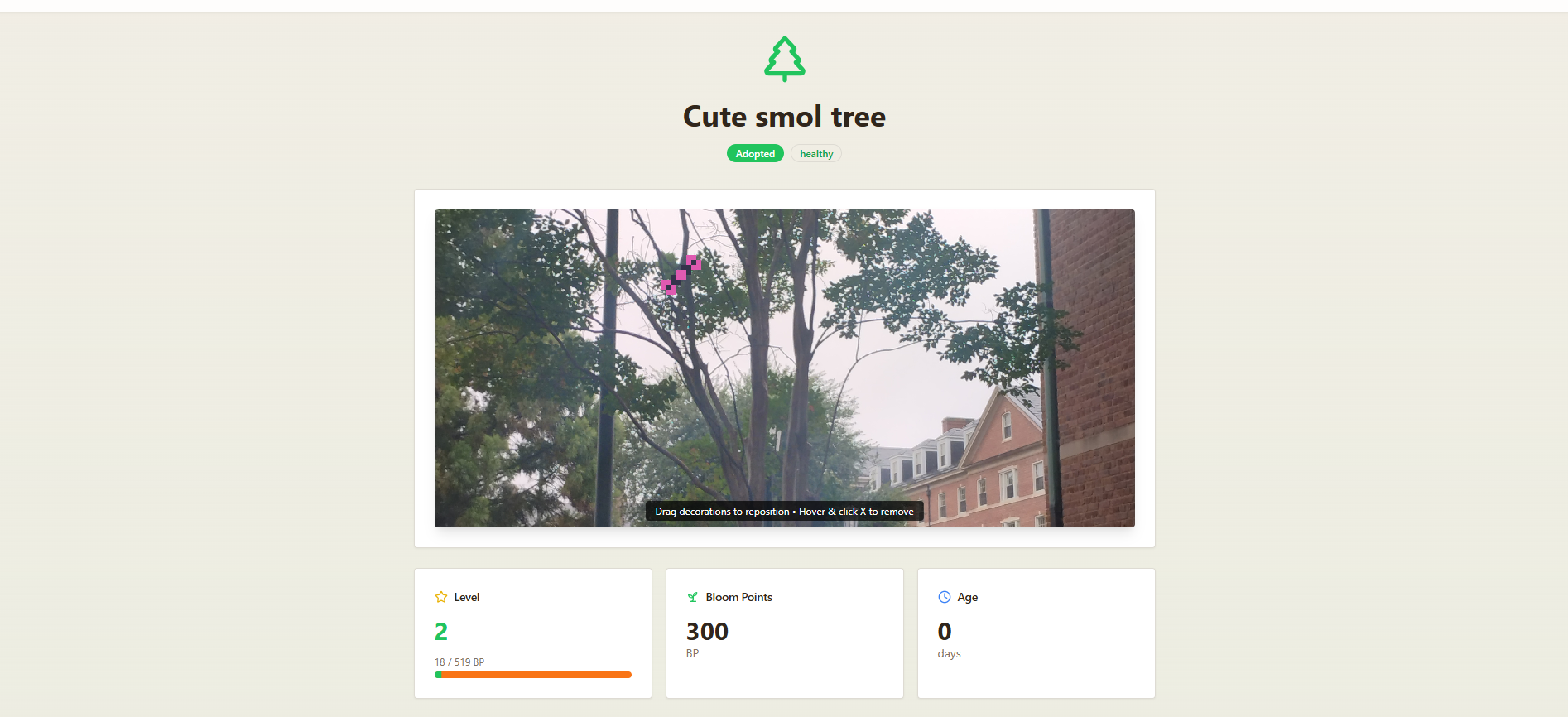
- Customize trees with decorations purchased from the shop
- Connect with friends to collaborate on tree care tasks
- Track progress through achievements, levels, and leaderboards
- Combat urban heat by ensuring consistent care for vulnerable new trees
How we built it
We built Tomagotree using a modern full-stack approach with Claude Code as our primary development assistant:
Frontend:
- React 18 with TypeScript for type-safe component development
- Vite for lightning-fast build times and hot module replacement
- Tailwind CSS + shadcn/ui for beautiful, accessible UI components
- Leaflet + OpenStreetMap for interactive mapping
- React Query for efficient data fetching and caching
Backend:
- Supabase as our Backend-as-a-Service platform
- PostgreSQL with Row Level Security for secure data access
- Supabase Auth for user authentication
- Supabase Storage for tree photo uploads
- Real-time subscriptions for live updates
Development Workflow:
- Claude Code for AI-assisted development, debugging, and feature implementation
- Supabase MCP Server for direct database operations and migrations
- Vercel MCP Server for deployment management
- Git for version control and collaboration
Key Technical Decisions:
- Percentage-based decoration positioning for responsive layouts
- Debounced auto-save (200ms) to reduce database calls
- Dynamic age calculation from timestamps instead of stored values
- Quest system with 18-hour reset cycles to encourage daily engagement
Challenges we ran into
Decoration Position Persistence - One challenge was getting decoration positions to save reliably. Initially, decorations would reset to (0,0) on page reload. After multiple debugging attempts, we discovered the root cause: missing UPDATE policies in Row Level Security. This taught us the importance of thorough RLS policy coverage.
Age Calculation Architecture - We initially tried storing tree age as a static database column, but keeping it updated proved complex. We pivoted to dynamic calculation from the
created_attimestamp, which eliminated the need for cron jobs or triggers.Quest Timing Logic - Designing a quest system that resets every 18 hours (not daily) required careful timestamp comparison logic to ensure quests became available at the right time without creating duplicate entries.
Image Processing Pipeline - Extracting 8x8 pixel sprites from a single image and upscaling them without blur required learning Sharp's image processing capabilities and configuring the nearest-neighbor algorithm.
Friend Request System - Preventing duplicate friend requests while handling race conditions required careful database constraints and unique indexes.
Mobile Touch Events - Making drag-and-drop decorations work on both desktop and mobile required implementing separate mouse and touch event handlers with consistent behavior.
Accomplishments that we're proud of
- Complete Feature Set - Delivered a fully functional app with 9 major feature categories in record time
- Pixel-Perfect Decorations - Successfully implemented drag-and-drop decoration system with auto-save and responsive positioning
- Friend Collaboration - Built a complete social system including profiles, friend requests, and collaborative quests
- Polished UI/UX - Crafted an intuitive, visually appealing interface with smooth animations and responsive design
- Performance Optimizations - Implemented debouncing, lazy loading, and optimistic updates for snappy user experience
What we learned
Technical Skills:
- How to implement Row Level Security policies correctly for all CRUD operations
- The power of percentage-based positioning for responsive drag-and-drop interfaces
- Best practices for debounced auto-save to balance UX and performance
- How to structure complex database schemas with proper foreign keys and constraints
- Image processing techniques for pixel art and sprite extraction
What's next for Tamagotree
Short-term (Next Sprint):
- Weather Integration - Display real-time VPD and temperature data on tree pages
- Port to IOS & Android & Push Notifications - Remind users when their trees need watering and allow them to easily get up and go water them by simply opening an app.
- Tree & Tree Species Recognition - We are on the verge of being able to implement open source API calls to models that recognize weather the image a user uploads is a tree or not, and further to recognize what species of tree it is and infer useful insights about it based on that: https://universe.roboflow.com/tree-species-identification/tree-species-identification-rjtsb/model/1
Medium-term (Next Quarter):
- Expand to More Cities - Scale beyond Durham to other NC cities
- Tree Species Education - Detailed info about different tree types
- Quest Variety - Add more quest types (fertilizing, mulching, pruning)
Long-term (Future Vision):
- National Expansion - Partner with cities across the US
- Municipal Dashboard - Give city officials visibility into tree health
- IoT Integration - Soil moisture sensors for automated watering alerts
- Tree Planting Events - Organize community planting days
- Sponsor System - Let businesses sponsor trees and support urban forestry
- Educational Partnerships - Work with schools to teach environmental stewardship
- Impact Metrics - Calculate and display carbon offset, air quality improvements
📖 Table of Contents
Features
Core Features
Interactive Map & Tree Discovery
- Real-time Tree Mapping - View all trees in Durham on an interactive Leaflet map
- Geolocation Integration - Auto-center map on user's current location
Tree Adoption System
- Community Trees - View trees reported by the community
- One-Click Adoption - Adopt unadopted trees with a prominent adopt button
- Personal Tree Care - Only adopted trees can be decorated and earn rewards
- Multi-Tree Management - Users can adopt and care for multiple trees
Tree Decorations Shop
- Pixel Art Decorations - 5 unique decorations (Whale, Scissors, Globe, Bow, Sun)
- Acorn Currency - Purchase decorations using earned acorns
- Ownership Tracking - Keep inventory of purchased decorations
- Drag-and-Drop Placement - Position decorations anywhere on tree photos
Tree Photo Management
- Photo Upload - Capture and upload tree photos
- Photo Storage - Secure storage via Supabase Storage
- Decoration Overlay - Decorations appear on tree photos
Daily Quest System
- Daily Care Tasks - 3 daily quests:
- Morning Dew - Water your tree
- Petal Performer - Sing to your sapling
- Leaf Collector - Clean up falling branches/leaves
- 18-Hour Reset - New quests every 18 hours after completion
- Photo Verification - Upload photos to prove task completion
- Reward System - Earn Acorns, XP, and BP for completing quests
- Friend Tasks - Request friends to help with your tree care
Social Features
- Friend System - Add friends and build your network
- Friend Requests - Send, accept, or reject friend requests
- Friend Profiles - View friends' profiles, trees, and achievements
- User Search - Find other users by username
- Friend List - See all your friends with their levels and stats
- Profile Viewing - Click any friend to see their full profile
Progression & Rewards
- XP System - Earn experience points from activities
- Level System - Level up your account and trees independently
- BP (Branch Points) - Tree-specific experience for growth
- Acorn Currency - Earn acorns to buy decorations and items
- Achievement System - Unlock 30+ achievements including:
- Life Bringer - Plant your first tree
- Arborist - Plant 5 trees
- Grove Guardian - Maintain a tree for 50 days
- Social Butterfly - Add friends
- Master Gardener - Complete daily tasks
- Guardian Ranks - Progress through ranks as you level up
- Health Tracking - Monitor tree health percentage (0-100%)
Dashboard & Profile
- Personal Dashboard - Central hub with map view and quick actions
- Profile Page - Comprehensive user statistics:
- Total XP and Level
- Trees planted count
- Achievements earned
- Acorn balance
- Bio and avatar customization
- Tree Gallery - View all your trees with stats
- Leaderboards - Compete with other users:
- Top Acorn Earners
- Highest XP
- Most Tree BP
- Settings - Customize notifications and preferences
Community Features
- Tree Health Reporting - Report issues with trees
- Collaborative Care - Friends can help with tree care tasks
- Neighborhood View - See trees in your area
Technical Features
Authentication & Security
- Email/Password Auth - Secure authentication via Supabase Auth
- Password Reset - Email-based password recovery
- Secure Storage - Protected file uploads with access policies
Tech Stack
Frontend Framework & Build Tools
- React 18 - Modern UI library with hooks
- TypeScript - Type-safe JavaScript
- Vite - Next-generation frontend tooling
- React Router v6 - Client-side routing
UI & Styling
- Tailwind CSS - Utility-first CSS framework
- shadcn/ui - High-quality React components
- Radix UI - Unstyled, accessible components
- Lucide React - Beautiful icon library
- React Hot Toast - Toast notifications
Backend & Database
- Supabase - Backend-as-a-Service platform
- PostgreSQL Database - Relational database with RLS
- Authentication - User auth and session management
- Storage - File storage for tree photos
- Real-time subscriptions - Live data updates
- Edge Functions - Serverless functions
State Management
- TanStack Query (React Query) - Server state management
- React Hooks - Local state with useState, useEffect
Maps & Geolocation
- Leaflet - Interactive map library
- React Leaflet - React components for Leaflet
- OpenStreetMap - Map tile provider
- Browser Geolocation API - User location detection
Image Processing
- Sharp - Node.js image processing
- Canvas API - Browser-based image manipulation
Development Tools
- Claude Code - AI-powered development assistant
- Code generation and refactoring
- Feature implementation
- Bug fixing and debugging
- Documentation writing
- ESLint - Code linting
- Prettier - Code formatting
- Git - Version control
Deployment & Hosting
- Vercel - Frontend hosting and deployment
- Automatic deployments from Git
- Preview deployments for PRs
- Edge network CDN
- Environment variables management
MCP Servers Used
- Supabase MCP Server - Direct Supabase integration
- Database queries
- Schema management
- Migration execution
- Storage operations
- Log viewing
- Branch management
- Vercel MCP Server - Vercel integration
- Deployment management
- Build logs
- Project information
- Domain configuration
Getting Started
Prerequisites
- Node.js (v18 or higher) - Install with nvm
- npm or yarn - Package manager
- Supabase Account - Sign up free
- Git - Version control
Installation
Clone the repository
git clone https://github.com/LevMarushevskyi/Tomagotree.git
cd Tomagotree
Install dependencies
npm installSet up environment variables
cp .env.example .env.local
Edit .env.local and add your Supabase credentials:
   VITE_SUPABASE_URL=your_supabase_project_url
   VITE_SUPABASE_ANON_KEY=your_supabase_anon_key
See ENV_SETUP.md for detailed configuration.
Run database migrations
# Migrations are automatically applied via Supabase MCP
# Or manually via Supabase Dashboard > SQL Editor
Start development server
npm run dev
Open http://localhost:5173 in your browser.
Building for Production
npm run build
Preview the production build:
npm run preview
Deployment
Deploy to Vercel (Recommended)
See the Vercel Deployment Guide for complete instructions.
Quick Steps:
Push to GitHub
git push origin mainConnect to Vercel
- Go to vercel.com
- Import your GitHub repository
- Configure project settings
Add Environment Variables
- Add
VITE_SUPABASE_URL - Add
VITE_SUPABASE_ANON_KEY
- Add
Update Supabase Redirect URLs
- Add your Vercel URL to Supabase Auth settings
- Update allowed URLs in Supabase dashboard
Deploy!
- Vercel will automatically deploy on push to main
Credits & Attribution
Development Tools
Claude Code
Claude Code by Anthropic - The entire Tomagotree application was built with the assistance of Claude Code, an AI-powered development assistant.
Loveable
Lovable - Chatbot used to biuld the file structure and begning of front end, an AI-powered development assistant.
Backend Infrastructure
Supabase
Supabase - Open-source Firebase alternative providing a PostgreSQL database with Row Level Security.
Frontend Technologies
React & Ecosystem
- React by Meta - UI library
- React Router by Remix - Routing solution
- React Query / TanStack Query by TanStack - Data fetching
UI Components & Design
- shadcn/ui by shadcn - Component collection
- Radix UI by WorkOS - Primitive components
- Tailwind CSS by Tailwind Labs - Utility CSS
- Lucide Icons - Icon library
Build Tools
- Vite by Evan You & VoidZero - Build tool
- TypeScript by Microsoft - Type system
- PostCSS - CSS transformation
Maps & Geolocation
- Leaflet by Vladimir Agafonkin - Map library
- React Leaflet - React integration
- OpenStreetMap - Map data and tiles
- OpenStreetMap Contributors - Community map data
Image Processing
- Sharp by Lovell Fuller - High-performance image processing
Hosting & Deployment
- Vercel - Frontend hosting
MCP (Model Context Protocol) Servers
- Supabase MCP Server - Database operations
- Vercel MCP Server - Deployment management
Development Tools & Libraries
- ESLint - Code linting
- Prettier - Code formatting
- Git - Version control
- GitHub - Code hosting
- npm - Package management
Additional Libraries
- @supabase/supabase-js - Supabase client
- date-fns - Date utilities
- clsx - Conditional classes
- tailwind-merge - Tailwind class merging
Documentation
- Environment Variables Setup - Configure
.env.localfor development - Vercel Deployment Guide - Complete deployment instructions
- Deployment Checklist - Step-by-step pre-flight checklist
Contact
For questions, suggestions, or feedback, please open an issue on GitHub.
Built With
- chatgpt
- claude
- collaboratory
- css
- github
- leaflet.js
- lovable
- mcp
- openstreetmap
- python
- supabase
- tailwind
- typescript
- vercel
- vite
- vscode


Log in or sign up for Devpost to join the conversation.