-
-
App-icon
-
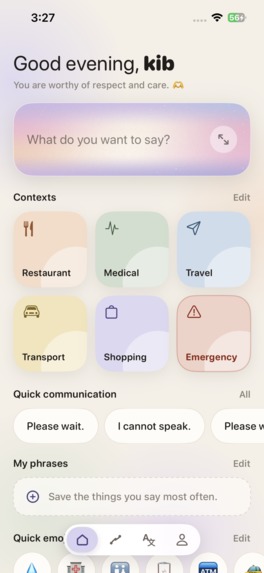
Home
-
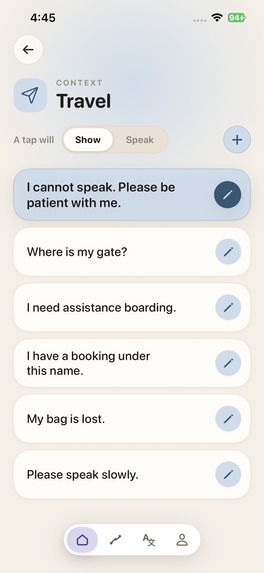
contexts
-
quick emoji
-
For today
-
My card
Inspiration
On a bus, I watched a man struggle to tell the conductor where he needed to go. I tried to help - and realised he couldn't speak. People who can't rely on speech, because of ALS, stroke, autism, a laryngectomy and many other reasons, use AAC (augmentative and alternative communication) apps to talk. When I looked at them, almost all were designed for children: picture grids, cartoon symbols, bright primary colours. Nothing an adult would want to hold up to a stranger on a bus.
I wanted to build the app that man needed: calm, adult, and fast enough to use in the moment.
What it does
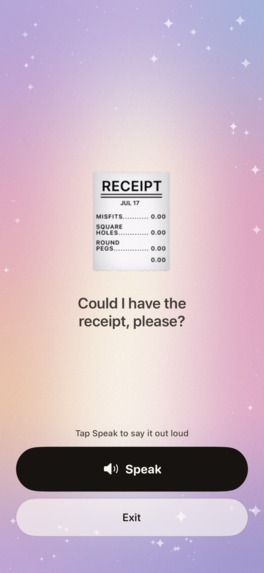
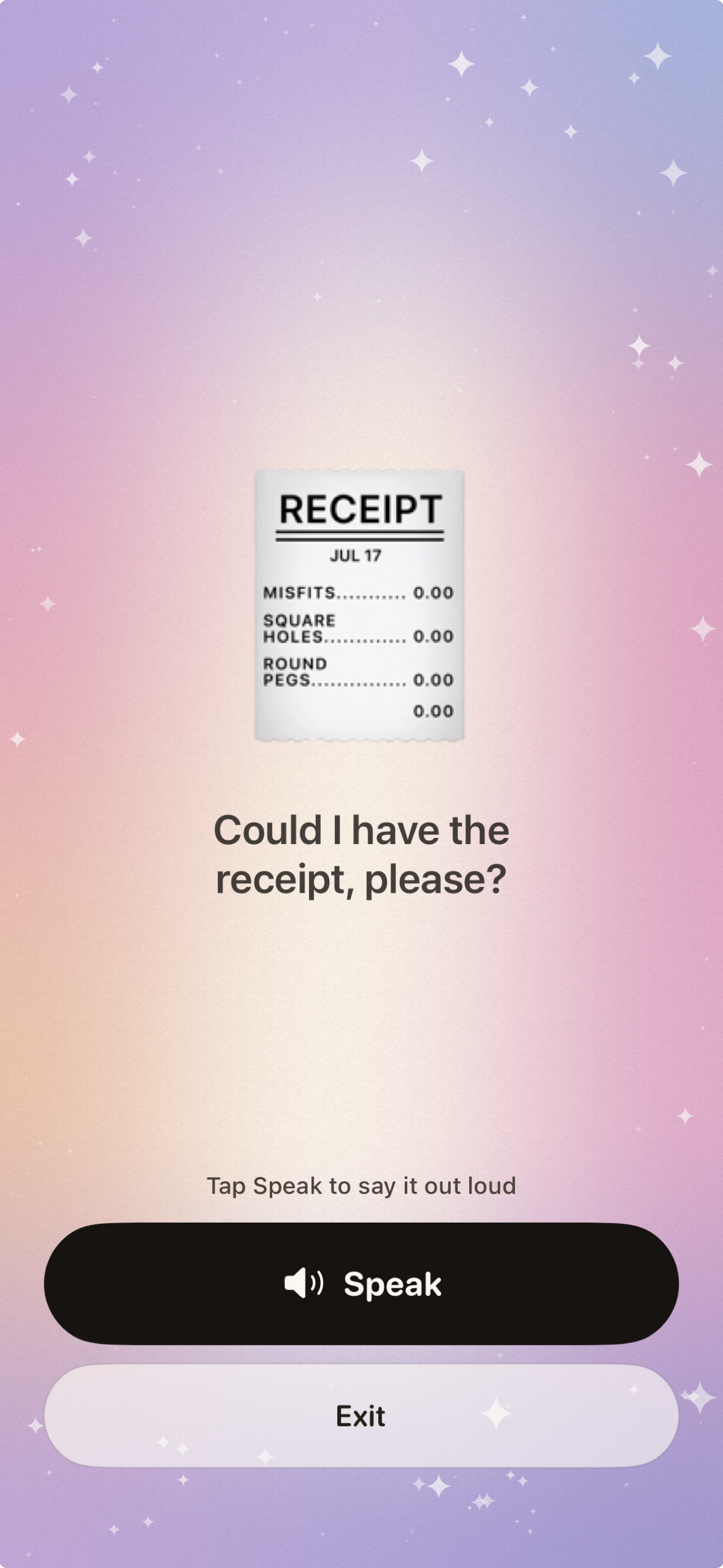
Tacit lets you tap or type what you want to say, then show it full-screen to the person in front of you or speak it aloud. One rule shapes every screen: two taps to be understood, from anywhere in the app.
- Show Mode — type a rough note like "bus station where" and Enhance turns it into a clear sentence: "Where is the bus station?" Show it large, or tap Speak. Undo and redo let you step back to your own words at any time, and a Wordings button offers three alternative phrasings.
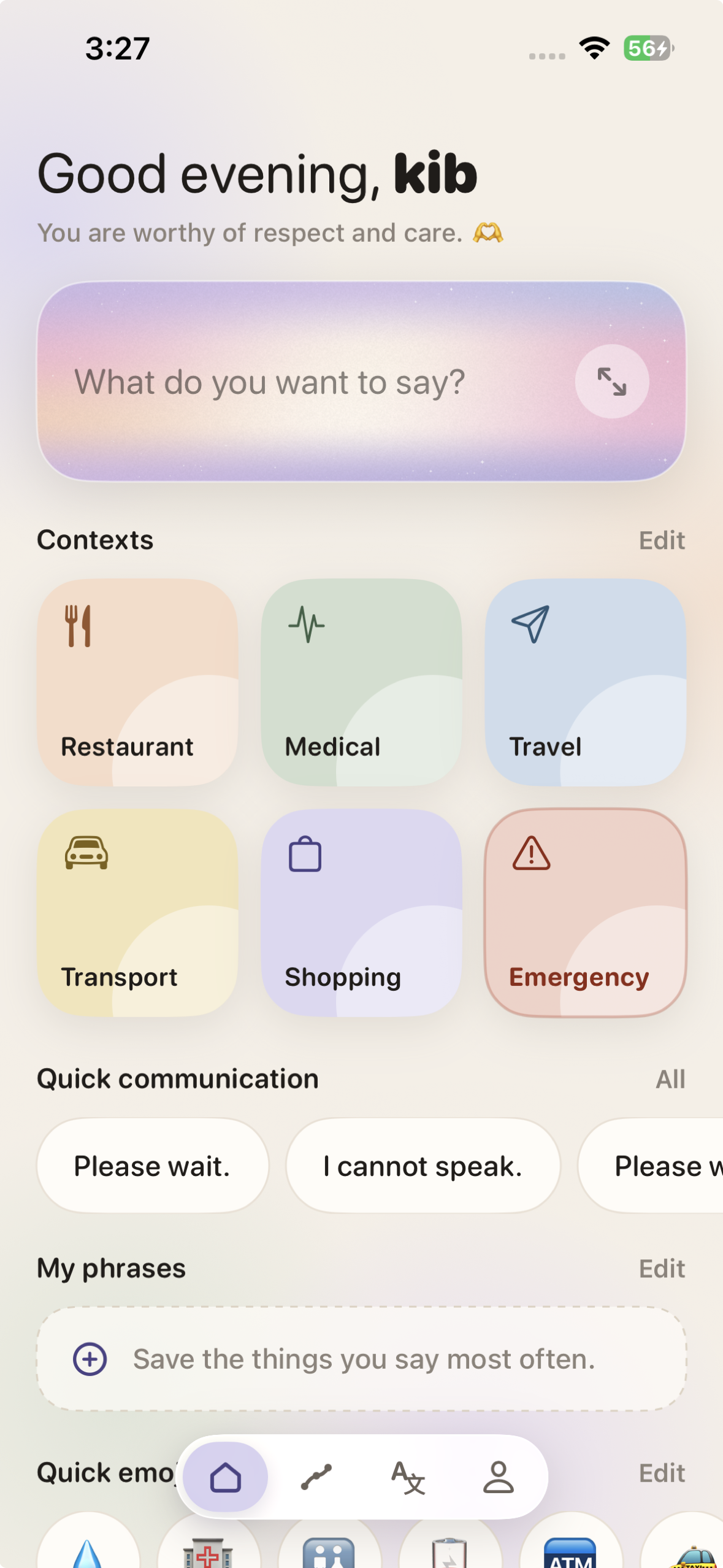
- Quick emoji — a row of one-tap needs for things a nod or a point can't say: water, restroom, hospital, charging a phone, a taxi. Reorder it, remove items, or add your own.
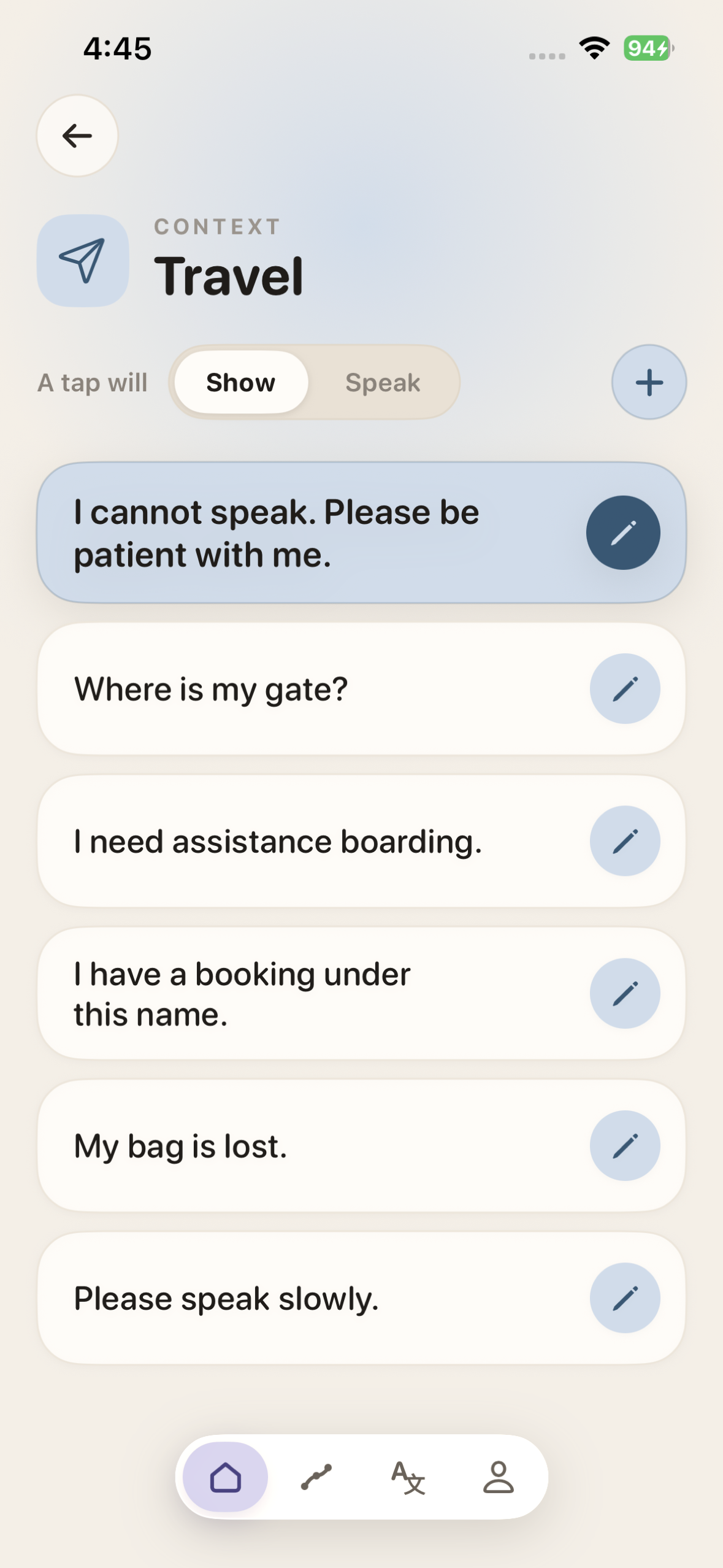
- Contexts — one tap for the situation you are in: Restaurant, Medical, Travel, Transport, Shopping and Emergency, each with ready phrases you can edit. Create your own contexts too.
- Translate — your words, translated and shown large in the other person's language. Choose Smart Auto (on-device when the offline pack is installed, cloud until then), Cloud AI, or On-Device Only, and download a language pack in one tap to translate with no signal at all.
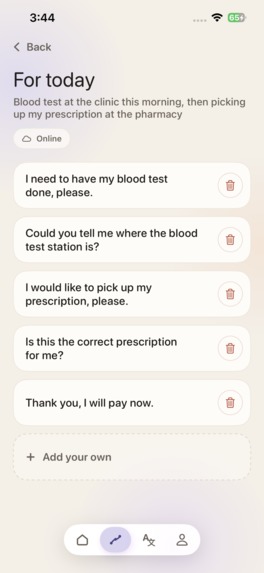
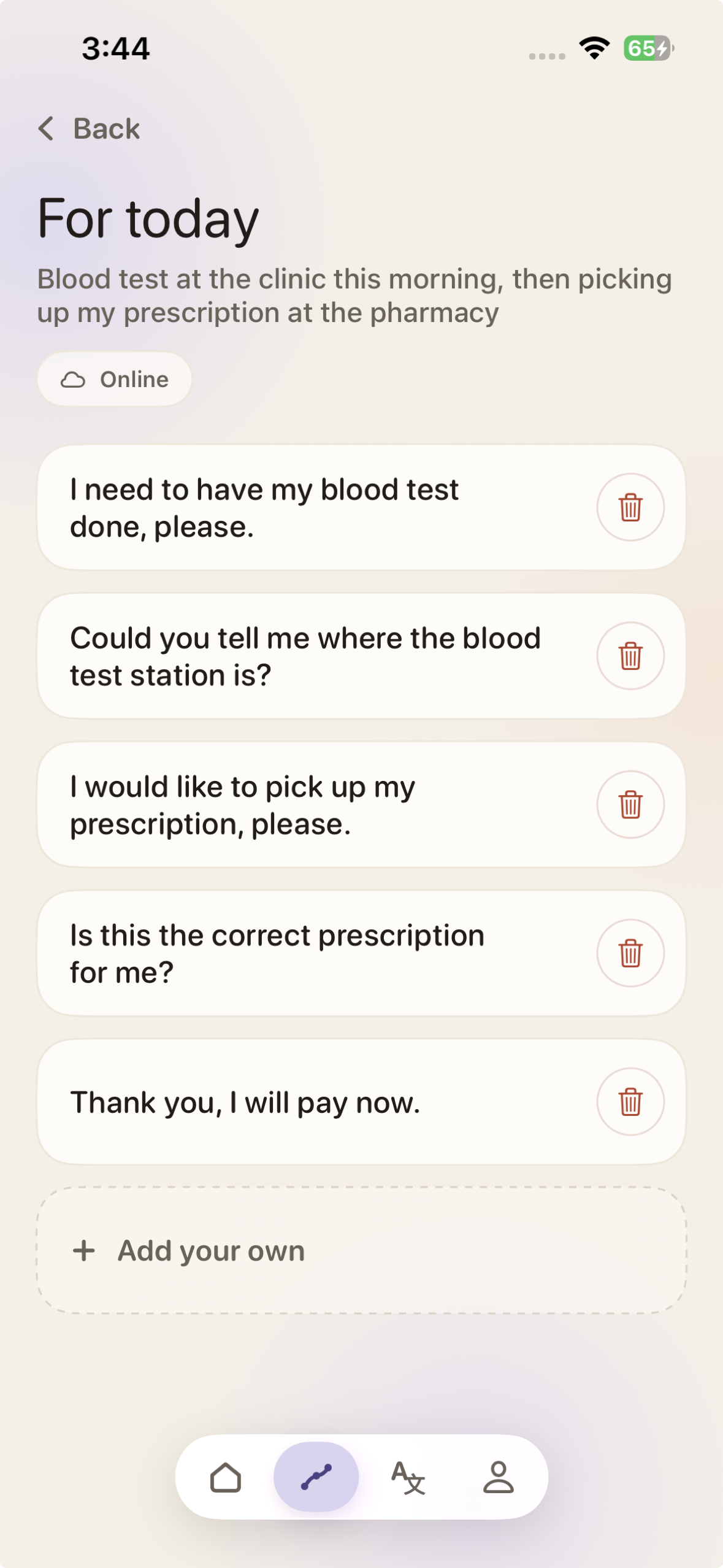
- Today — describe your day ("dentist this afternoon, and I need to explain where it hurts") and Tacit prepares the phrases you'll need.
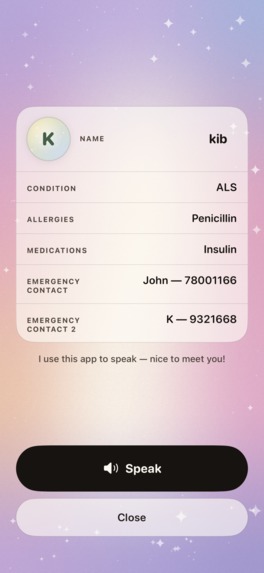
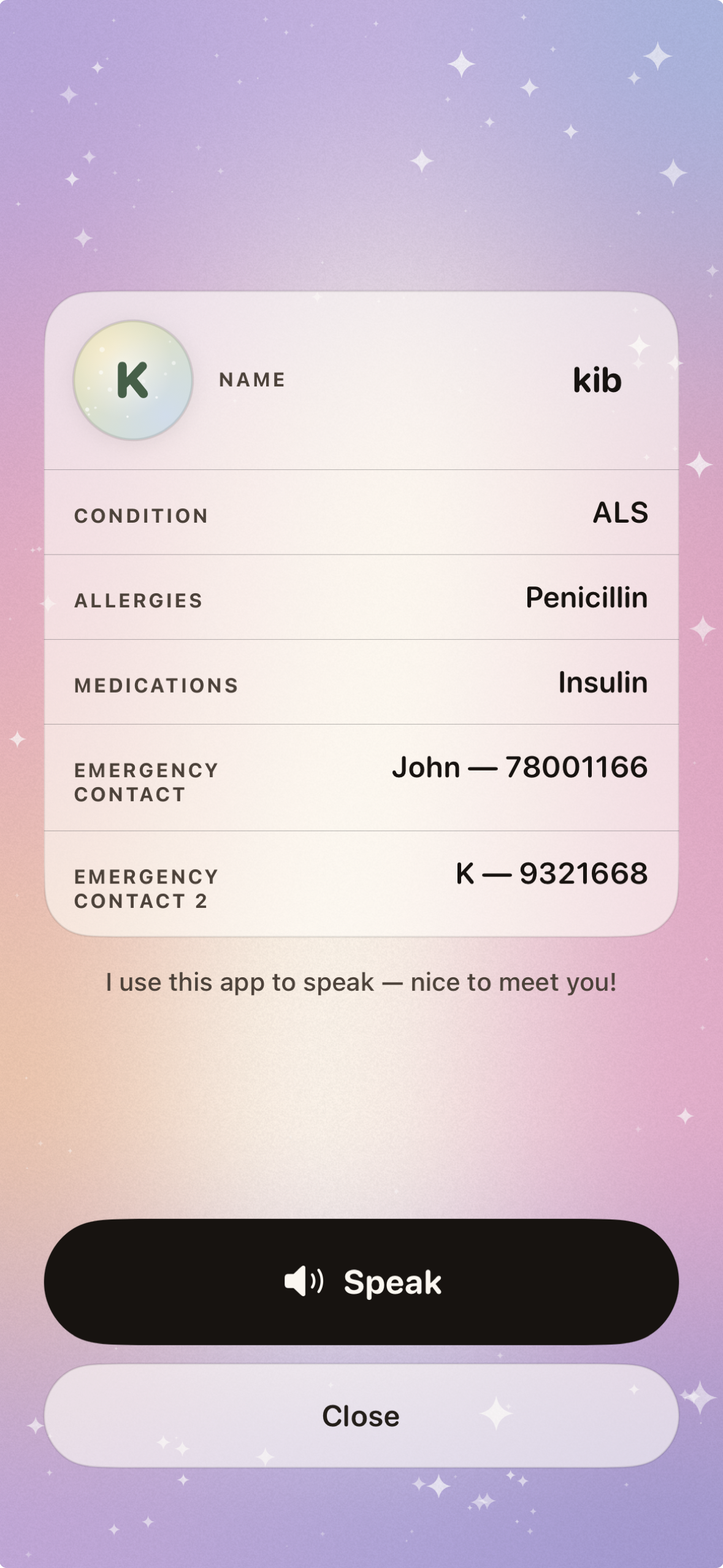
- My Card — your name, condition, allergies, medications and emergency contacts, ready to show. It never leaves your phone.
- Choose a voice — pick from the natural-sounding voices on your iPhone, hear each one with a single tap, and set the speaking speed. Tacit always uses the highest-quality voice available, never the robotic default.
- Knows your phone — Settings shows whether your iPhone runs AI on-device (iPhone 15 Pro and newer on iOS 26) or through Tacit's private cloud relay, and explains exactly what that means for your data.
How I built it
Tacit is a native iOS app written in Swift and SwiftUI. It supports iOS 18 and later, so it reaches every iPhone from the XS onwards, while newer iPhones on iOS 26 automatically unlock on-device AI.
- AI that adapts to the phone it's running on. Tacit picks the best of three engines that the phone can actually run. On Apple Intelligence iPhones (iPhone 15 Pro and newer, iOS 26) it uses Apple's Foundation Models on-device, so nothing leaves the phone. On every other iPhone, a private Supabase Edge Function calls Groq (gpt-oss-20b) with zero data retention: no AI key ships in the app, and text is never stored or used for training. With no signal at all, a built-in offline phrase engine takes over. If an engine fails, Tacit drops to the next one instead of showing an error, and if all of them fail, the user's own words stay exactly as typed.
- Structured output, not prompt-and-hope. Every AI response is generated against a strict schema: Generable types on device, strict JSON schemas on the relay. Tacit also checks what comes back: near-identical phrasings are rejected, and a thin day plan is retried on the next engine.
- Smart Auto translation. Built on Apple's Translation framework, with three modes. Smart Auto (the default) translates on the iPhone when the offline pack is installed and uses the private relay until then, so a new user gets a translation on the first tap instead of waiting for a 200 MB download. Cloud AI always uses the relay, and On-Device Only runs entirely on the iPhone with no internet connection. Any language's offline pack downloads in one tap.
- Type that fits, not just type that's big. Show Mode sizes the message by its length, from 78pt for a few words down to 30pt for a paragraph, then shrinks it until the longest word fits on one line, so "PLEASE" never breaks into "PLEAS / E".
- A natural voice. Built on AVSpeechSynthesizer, Tacit ranks every voice installed on the iPhone (premium, enhanced, standard) and always uses the best one, never the robotic default.
- Calm, adult design. Backgrounds are a live SwiftUI MeshGradient that slowly drifts, instead of a heavy image, and Enhance shows a slow "breathing" field of specks rather than a spinner. The app supports Reduce Motion, Dynamic Type and Increase Contrast.
- Subscriptions with RevenueCat. One entitlement is shared by the monthly ($4.99) and yearly ($29.99) plans, each with a 14-day free trial. An active subscription is remembered on the device, so subscribers can open Tacit with no internet connection.
- Privacy by structure. Phrases, custom contexts and today's plan are stored on the device with SwiftData. My Card (condition, allergies, medications, emergency contacts) is structurally excluded from every code path that talks to the network. It isn't just switched off.
Challenges I ran into
- Designing for the moment someone is standing in front of you. Tacit is used under pressure: at a counter, on a bus, in a hospital, with a stranger waiting. Every screen had to be fast enough for that, so I set one rule: two taps to be understood, from anywhere in the app. Writing and showing are one screen, not two, and AI never shows an error; if it can't help, your own words are kept. It also had to feel adult. Rounded type at display size read as childish, and spinner-like or directional animations felt busy, so both were cut.
- Privacy or reach? Building only for the newest iPhones would have kept every word on the device, since Apple's on-device model needs iPhone 15 Pro or newer on iOS 26. But that would have left out most people who need this app. I chose to support iOS 18 and later and add a private cloud relay for older phones. After comparing providers, I picked Groq: zero data retention, better sentences from the model I tested, and a cost of a fraction of a cent per request. Newer phones still run everything on-device.
- Getting a small model to write real sentences. Asked for three phrasings, the on-device model returned one. When a schema field was named "short", it returned fragments like "peanuts". Renaming fields to describe the content ("statement", "request", "polite") fixed it: field names are part of the prompt.
- Translation without the wait. Apple's on-device translation needs roughly 200 MB per language, which is a wall for someone who needs a translation right now. Smart Auto solves it: the private relay translates instantly on the first tap, and the phone switches to fully offline translation once the language pack is downloaded.
What I'm proud of
- A live app, built solo. Many sleepless nights later, Tacit is live on the App Store.
- A name that carries the idea. Tacit means "understood without being said." That is exactly what the app is for, and I'm proud the name says it before the app does.✨
- Something that can genuinely help. Tacit could give a voice to people who can't rely on speech, in the everyday moments where being understood matters most: a bus, a counter, a hospital.
- Two taps to be understood, from anywhere in the app.
- It never leaves you without a voice. Tacit works without AI, without a network, and without an Apple Intelligence phone.
- Privacy that's built in, not promised. No sign-up, no ads and no tracking. Your name, photo, saved phrases and My Card stay on your phone. AI runs on-device wherever the phone allows, and anything sent to the cloud relay is processed with zero data retention, never stored or used for training.
What I learned
- Understanding the people I'm building for. Before this, I had never really thought about life without speech. I learned how many people it touches (ALS, stroke, autism, a laryngectomy, even temporary voice loss after surgery), and that most of them understand everything around them; what they lack is a quick way to be heard. Getting the chance to understand them has been the most meaningful part of this project.
- Learning from people, not just research. I visited local NGOs that work with people who can't rely on speech, and spent time listening to them and the people who support them. It showed me what no article could: the patience it takes to be understood every day, and how much it means when someone simply waits and listens. This is only the beginning, and I want to keep learning from them as Tacit grows.
- Being heard is about dignity, not just words. The hardest moments weren't about vocabulary. They were about being rushed, talked over, or spoken to as if you can't understand. That changed what I was building: not a tool that says words, but one that helps people be treated as the capable adults they are.
- Shipping is a lesson of its own. Going from an idea on a bus to a live App Store app taught me everything a prototype never does: App Review, subscriptions, privacy disclosures, and the hundred small details that decide whether an app is ready for real people.
- I didn't do this alone. The NGOs and the people I met there, people in AAC communities online, and friends and family who tested Tacit and told me honestly what wasn't working, all shared their time with me, and I'm very grateful.❣️
What's next
- A community for Tacit users. A space where people who can't rely on speech, and the families and carers around them, can connect, share the phrases and contexts that work for them, and learn from each other.
- Draw to be understood. A sketch canvas in Show Mode, so when words aren't enough, a quick drawing (a map, a shape, where it hurts) can say it instead.
- Personal Voice. Let people losing their speech, to ALS or throat cancer, speak in their own recorded voice.
- Built with the people who use it. Keep working with NGOs, speech-language pathologists and AAC users to shape every phrase set and feature.
- More languages for the app itself, so it reaches people beyond English.
Built With
- apple-translation
- avfoundation
- foundation-models
- groq
- ios
- revenuecat
- supabase
- swift
- swiftdata
- swiftui

Log in or sign up for Devpost to join the conversation.