-
-
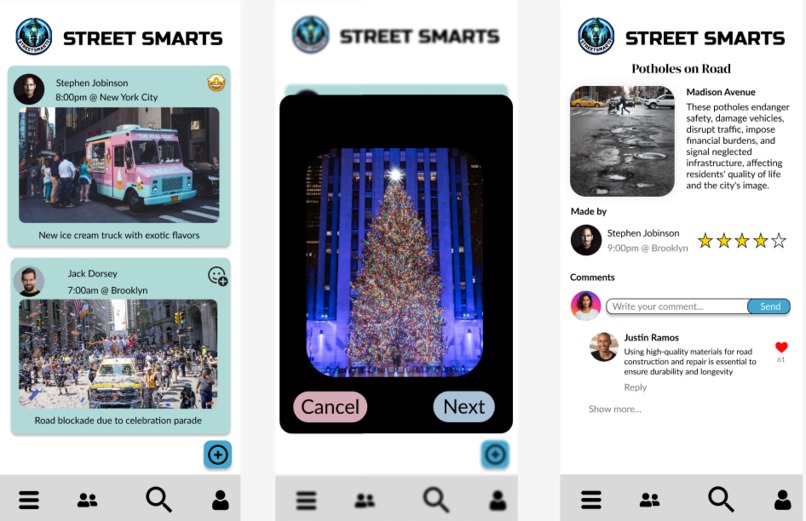
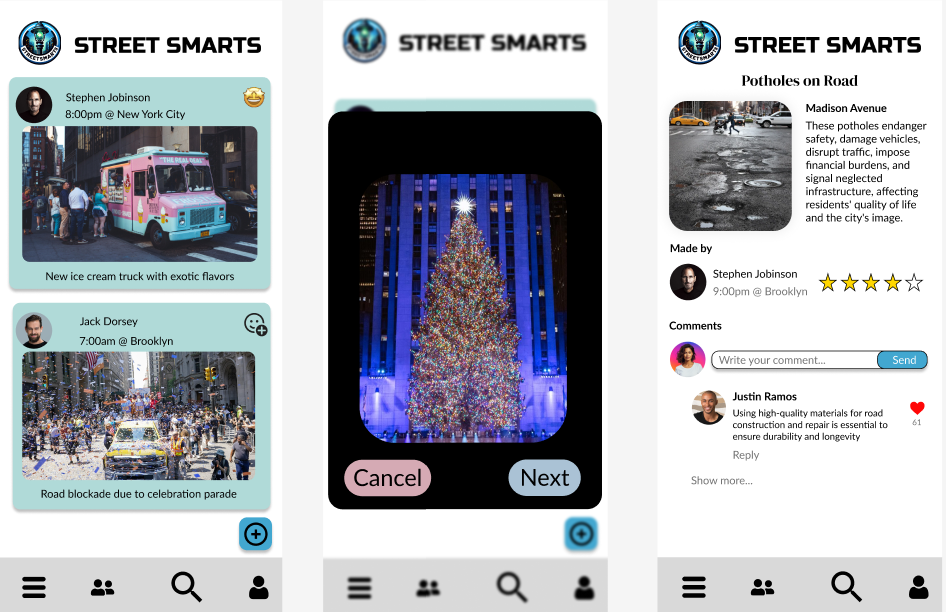
Figma Design Examples
-
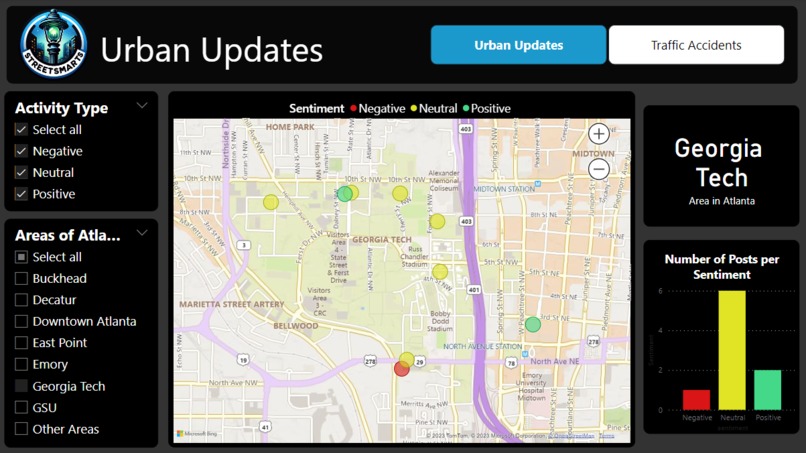
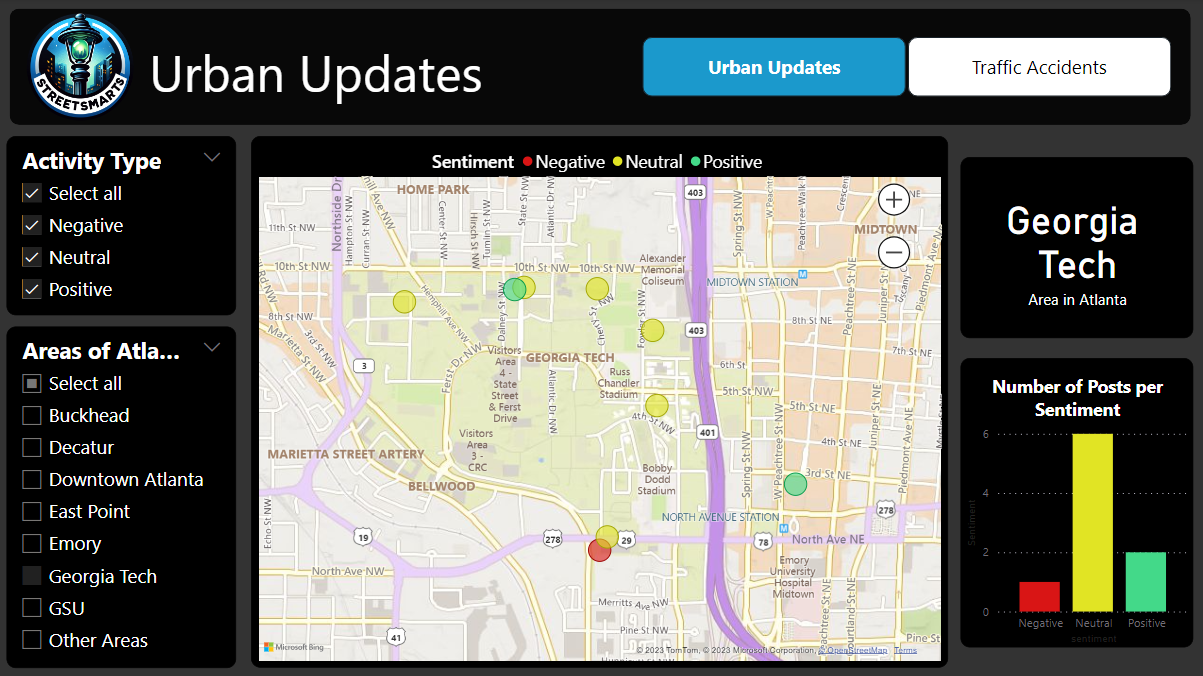
Data Viz Urban Updates
-
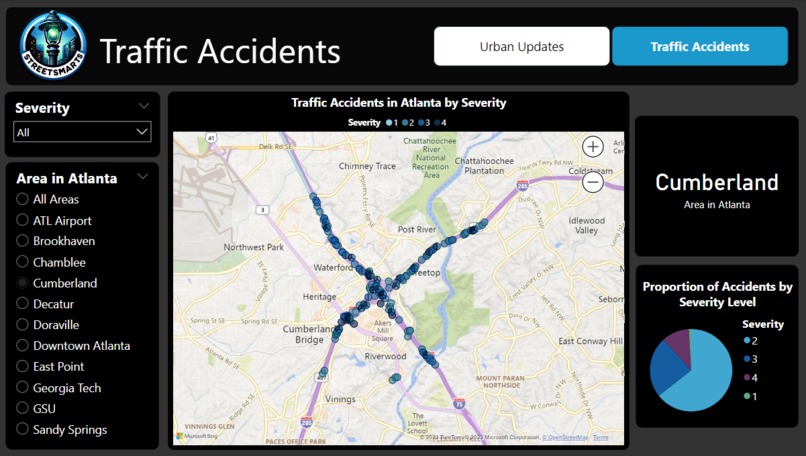
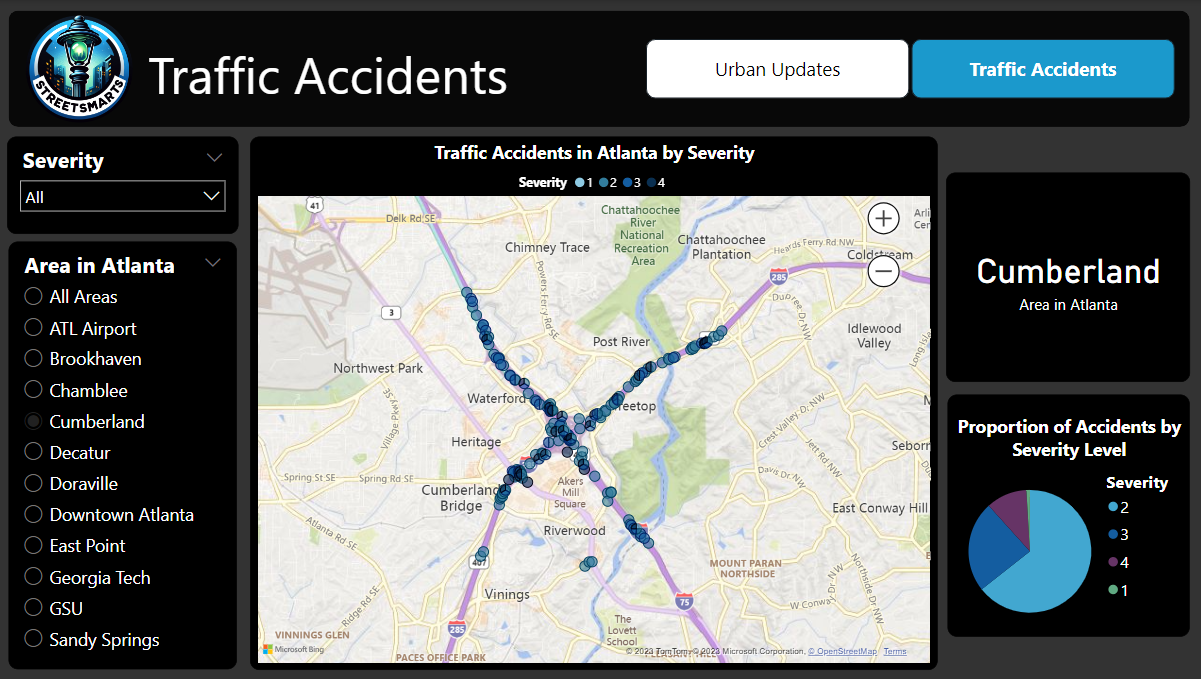
Data Viz Traffic Accidents
-
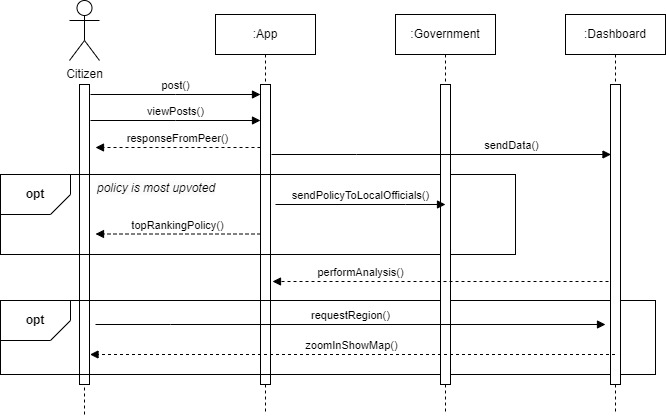
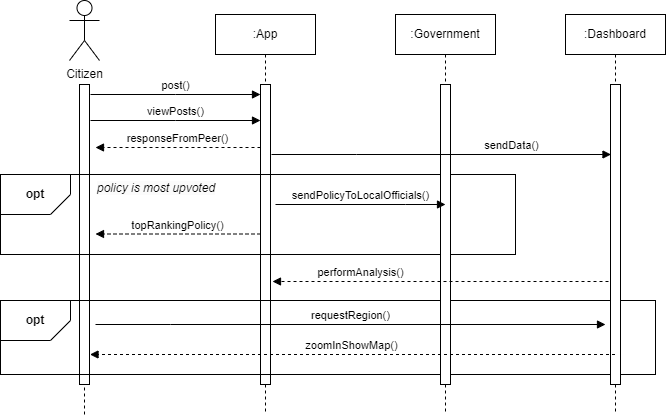
Sequence Diagram
-
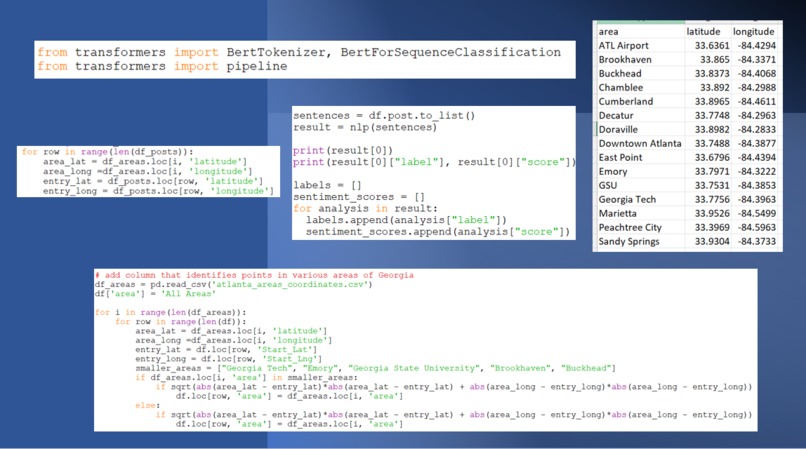
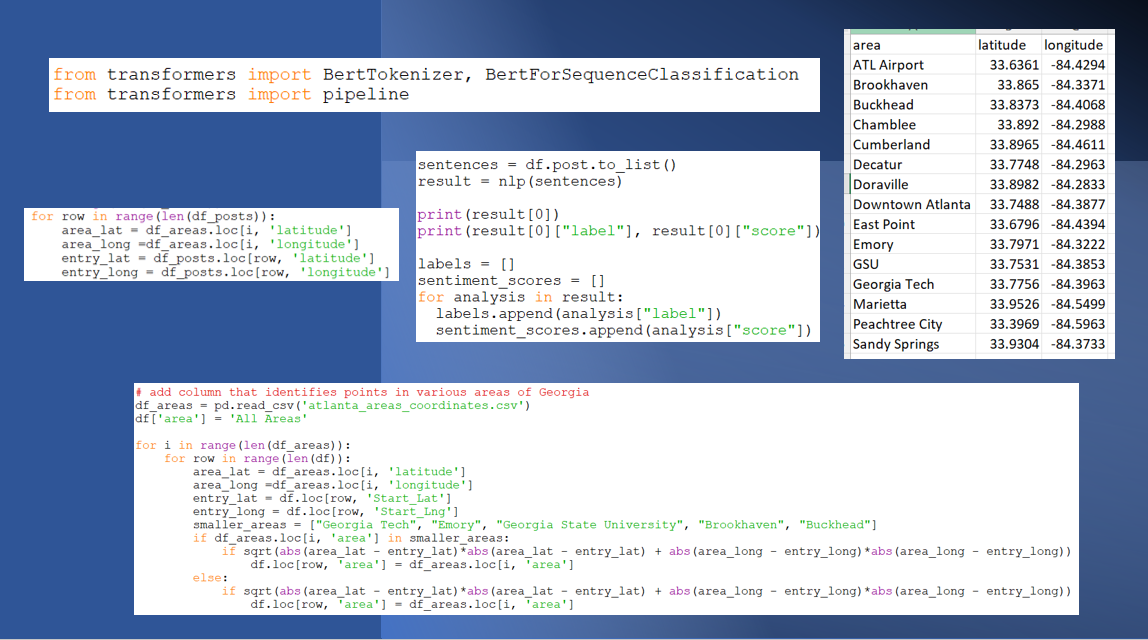
Code Samples

💡 Inspiration
The inspiration behind the creation of the Street Smarts platform stems from a commitment to enhancing human interaction within urban environments, aiming to foster a sense of community and belonging that counters the isolation and anonymity often found in densely populated areas. This platform is designed to be a dynamic, interactive hub for city residents, providing live updates on local safety, new businesses, traffic changes, and more, thus keeping citizens well-informed and engaged with their surroundings. Beyond just disseminating information,
Street Smarts actively involves its users in the urban discourse by highlighting key community issues, spurring policy recommendations, and facilitating meaningful communication among commuters and residents in similar areas. This approach not only assists with practical aspects of city living but also plays a crucial role in strengthening the social fabric of urban communities, transforming the experience of city living into one that is more connected, informed, and community-focused.
💻 What it does
We made an app prototype for citizens in cities to connect with each other and share new experiences. These experiences can range from simple road updates to extravagant events. Additionally, app users can also promote policies that they would like to see implemented.
Users log into the app with Google accounts and view a feed of friends' posts, reacting with emojis. They can post photos with descriptions, which appear on the feed. The "search policies" tab offers three categories of top weekly city issues for users to explore, like solutions, or propose new ones. A profile page shows engagement stats and a list of quests to be completed.
We created a Power BI visualization to serve as a data repository and mapping function. All app data is compiled and undergoes analysis that can be shared with policy-makers and allows for transparency of user data usage.
Users first choose a specific region within the city, Atlanta in this example, so that the map can zoom accordingly to reveal all activity in that area. Using NLP techniques, sentimental analysis is conducted on each post to determine whether the update is positive, negative, or neutral in nature. Users can then filter the records by each sentiment category. Those looking for community events may search for positive entries while those watching for road delays may look at the negative entries. A bar graph will update to display the total number of posts per sentiment category in the selected region creating a comprehensive view of engagement across the city. Safety is critical to creating a well-trusted city. Users looking to stay alert about the latest traffic accident information can choose their region once again and view all recorded accidents categorized by their severity. Policy-makers can track areas with the highest rate of accidents and aim to install speed bumps, traffic lights, or other such precautionary measures.
Our goal is to provide mapping functionality to compare activity across popular areas within the city.
⚙️ How we built it
| Application | Purpose |
| Firebase Authentication, Scrapy, geojson.io | Backend Development |
| Python (NumPy/Pandas), Kaggle, Power BI | Data Analysis |
| Google Collab, Bert Tokenization/Sequence Classification | NLP and Sentimental Analysis |
| Figma, draw.io, Adobe Illustrator, Canva | Design |
🧠 Challenges we ran into
Complex Data Integration: Integrating various data sources such as traffic updates, event information, and user-generated content into a cohesive and reliable system.
Accurate Sentiment Analysis: Developing a robust Natural Language Processing (NLP) system for accurate sentiment analysis of user posts, essential for categorizing and presenting relevant information.
User Interface Design: Creating an intuitive and engaging user interface that combines features like policy search, mapping functions, and social interaction, ensuring ease of use for diverse user groups.
🏅 Accomplishments that we're proud of
Innovative Sentiment Analysis Implementation: Successfully integrated advanced Natural Language Processing (NLP) techniques for sentiment analysis, categorizing posts effectively and enhancing user experience with tailored content.
Effective Data Visualization with Power BI: Developed a comprehensive data visualization system using Power BI, enabling clear analysis of city data trends and community feedback, beneficial for both users and policymakers.
Seamless Integration of Multiple Technologies: Achieved seamless integration of technologies like Firebase Authentication, Scrapy, geojson.io, and Google Collab, creating a robust and efficient app platform.
📖 What we learned
Bridging Geospatial Data with User Interaction: Mastered the integration of geospatial data handling with user interaction, utilizing tools like geojson.io for mapping and spatial analysis in a user-focused application context.
Advanced Use of Firebase for Real-Time Data Management: Gained in-depth knowledge in using Firebase for real-time data synchronization and user authentication, extending its capabilities to enhance app performance and security.
Complex Urban Data Interpretation: Developed a nuanced understanding of interpreting and contextualizing urban data, such as traffic patterns, safety incidents, and community activities, through a digital platform perspective.
🚀 What's next for Street Smarts
Implementing Machine Learning for Predictive Analytics: Incorporate machine learning algorithms to predict urban trends and incidents, such as traffic congestion or event popularity, enhancing user experience with anticipatory suggestions and aiding in proactive urban planning.
Expanding to Smart City Integration: Plan to integrate the app with emerging smart city technologies, like IoT sensors and smart traffic systems, to allow real-time data flow from city infrastructure, providing more accurate and timely information for a responsive urban environment.
Built With
- collab
- data-science-toolkit
- figma
- firebase
- geojson
- kaggle
- natural-language-processing
- powerbi
- python
- web-scrape-master


Log in or sign up for Devpost to join the conversation.