Track alignment
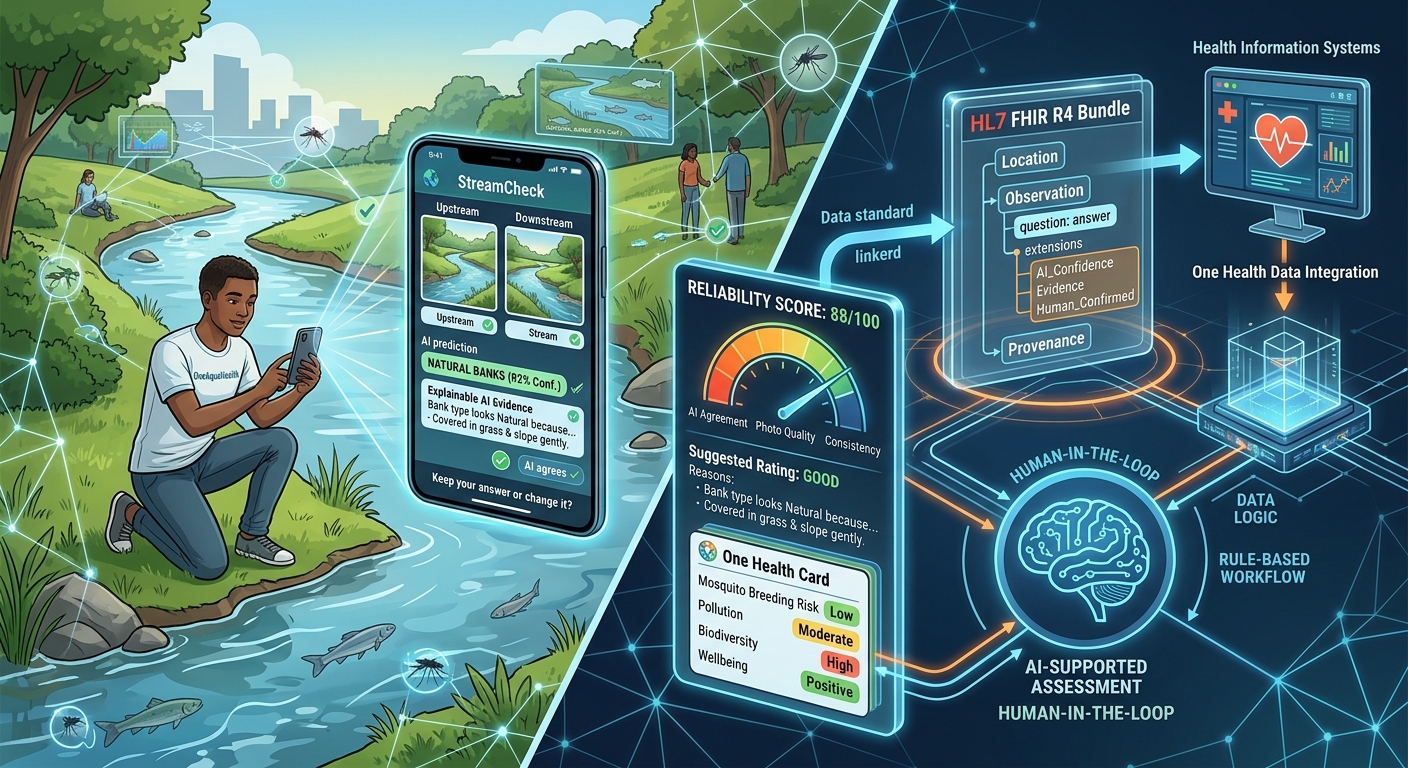
Primary: Track 3, AI-Supported Assessment. Citizen observations are inconsistent and error-prone. StreamCheck uses AI to support the assessment without replacing human judgement: AI prompts, validation checks, explainable AI and a human-in-the-loop workflow are the core of the product.
Secondary: Track 7, Digital Health Standards. Every assessment exports as an HL7 FHIR R4 Bundle, so validated stream observations can flow into health information systems.
Inspiration
Citizen science lets OneAquaHealth monitor many urban streams cheaply, but every One Health decision built on that data inherits its noise. Two volunteers at the same canal can call the same water "clear" and "muddy", or the same banks "natural" and "artificial". We didn't want to build another dashboard on top of noisy data. We wanted to improve the data at the moment it is collected, without taking the decision away from the citizen.
What it does
StreamCheck is a mobile web app that mirrors the questions and options of the OneAquaHealth Citizen Science App.
- The citizen takes the same photos as in the official app: upstream, downstream and surroundings.
- While they answer, a vision AI reads the photos and predicts each photo-readable answer, with a confidence and one sentence of evidence in everyday words, such as "both banks are covered in grass and slope gently down to the water".
- After each section, a Quick check appears only where it matters:
- The AI disagrees with a confident reading: "Our AI thinks the bank type looks Natural because... Keep your answer or change it?"
- The citizen wasn't sure: the AI offers its reading, which they can accept or reject.
- Answers contradict each other, like a "Dry" stream with a water height: a rule explains which ones.
- Agreement shows a small green tick and never interrupts.
- The citizen always decides. Every flag and decision is stored with the submission as an audit trail.
- Each submission gets a reliability score out of 100 with a transparent breakdown: AI agreement, photos and consistency.
- Before rating the stream Good, Moderate or Poor, the citizen sees a suggested rating worked out from their own answers, with reasons.
- A One Health card turns answers into plain-language notes for people, animals and the environment: mosquito breeding risk with dengue relevance, pollution risk, low biodiversity, and positive wellbeing.
- Every assessment can be exported as HL7 FHIR R4 or sent straight to a public FHIR test server.
Target users: citizen scientists and community groups doing stream assessments, and the researchers and agencies who use their data.
Expected impact: cleaner, more consistent citizen data with a reliability score on every submission, so researchers know which observations to trust. Citizens learn while assessing, because every check explains what to look for. The FHIR output connects ecosystem observations to health systems, which is the One Health link.
How we built it
- Backend: Python and FastAPI. The official form is written once as Pydantic models, and that single schema drives the interface, the AI prompt and the validation, so they can never drift apart.
- AI: Google Gemini 2.5 Flash, used zero-shot, with no training or fine-tuning. The model must reply in JSON constrained to our schema, giving a value, confidence and evidence for each field. It is told to be conservative and to say "not sure" rather than guess. Questions a photo can't answer, like sewage discharge, are never predicted.
- Swappable AI: the vision model sits behind a one-method interface, so a different model, or an offline on-device one, is one file away.
- Deterministic logic: everything after the photo reading is rule-based: the comparison, consistency rules, reliability score, suggested rating, One Health notes and FHIR mapping. It's covered by 69 automated tests.
- FHIR R4: a transaction Bundle with a Location for the site, one Observation per question, extensions carrying the AI's confidence, evidence and agreement plus the reliability score, and a Provenance resource recording that a human confirmed the values.
- Frontend: plain HTML, CSS and JavaScript, mobile-first, one section per screen, with large tap targets and screen-reader labels.
- Deployment: SQLite, Docker and Render.
- We used AI coding assistants, including Claude Code, to speed up development. The idea, the design choices, the testing and every decision about what the AI may and may not do were ours.
Challenges we ran into
- The AI can be confidently wrong. In our first real test, the model was "very sure" that apartment blocks were inside the riparian zone, when they were far behind the park. That is exactly why the human keeps the final say. We overruled it, the decision was recorded, and we tightened the prompt so anything beyond 10 m from the bank is ignored.
- Explanations had to sound human. Raw model output read "because The stream has...", so we reshaped every message into one natural sentence.
- Staying honest. We refused to fake any AI result in the demo. If the AI is unavailable, the citizen is told plainly and can still finish the form.
Accomplishments that we're proud of
- In a real run, the AI caught a wrong answer and explained why. In the same run, we overruled the AI where it was wrong. Both decisions were kept in the audit trail.
- A FHIR export that records not just the observations, but who decided them and how confident the AI was.
- The whole pipeline works end to end on a phone and is deployed publicly.
What we learned
- Responsible AI here means designing for disagreement: show evidence, ask rather than override, and record the human's choice.
- A vision model's self-reported confidence isn't calibrated, so a reliability score has to combine it with photos and internal consistency.
- Health data standards like FHIR can carry environmental observations, as long as provenance is explicit.
What's next
- Validate the AI against expert assessments. Every submission already stores the citizen's answer, the AI's reading and the final decision, which is the dataset needed to measure accuracy per question.
- Integrate as a step inside the official OneAquaHealth app, between "answer" and "submit".
- Run an offline model on the phone, so it works at the stream with no network and no cost per photo.
- Agree official FHIR codes for the form fields with OneAquaHealth and health-system partners.
Built With
- css3
- docker
- fastapi
- google-gemini
- hl7-fhir
- html5
- javascript
- leaflet.js
- openstreetmap
- pydantic
- python
- render
- sqlalchemy
- sqlite

Log in or sign up for Devpost to join the conversation.