-
-
Full Preview
SplunkLens
Inspiration
Every developer knows the pain of losing their "flow state." You're deep into writing code, a production error pops up, and suddenly you have to switch contexts: open a browser window, log into Splunk, try to remember the exact syntax for a Splunk Search Processing Language (SPL) query, and sift through logs.
We wanted to build the shortest possible path between a bug and a log. The inspiration for SplunkLens was simple: never leave your editor for Splunk again. We wanted to let developers query production systems in plain English, right where they are already working.
What it does
SplunkLens is a VS Code extension that brings Splunk directly into your IDE. It allows developers to query their Splunk logs using natural language.
You simply type what you want (e.g., "Show me all failed logins from the last 2 hours"), and SplunkLens handles the rest. It uses the Gemini API to instantly translate your plain English into strict Splunk SPL, executes the search securely via the Model Context Protocol (MCP), and returns the results in a clean, VS Code-native interface. You can expand log details, spot high-severity events instantly, or export the data to CSV without ever touching a browser tab.
How we built it
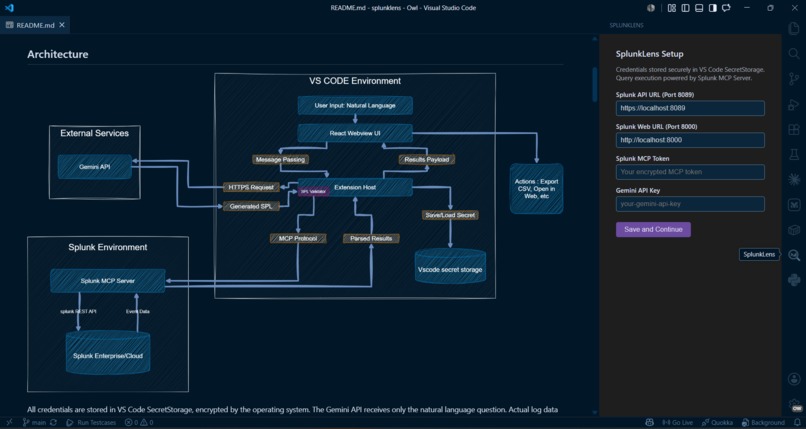
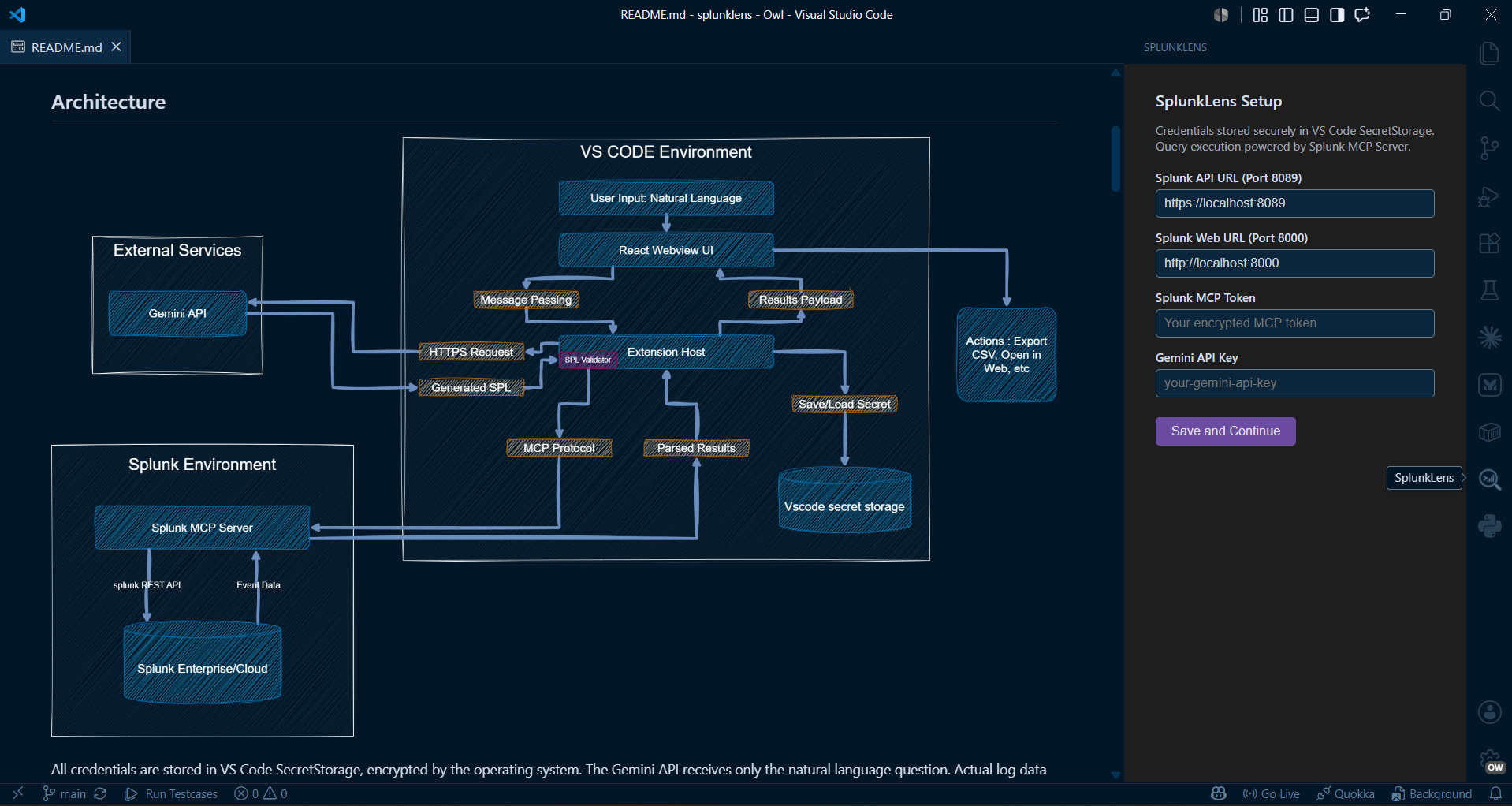
We designed SplunkLens with a robust, highly decoupled architecture:
The Host: Built using the VS Code Extension API (extension.ts), which securely manages API keys and Splunk MCP tokens using VS Code's native SecretStorage.
The AI Layer: We integrated the Gemini API with strict system prompts and fallback regex parsing to guarantee the LLM outputs valid, safe SPL inside a clean JSON structure, actively blocking dangerous commands like delete or drop.
The Execution: We utilized the Model Context Protocol (MCP) SDK to establish a secure, streamable HTTP connection to the Splunk server to execute the generated SPL.
The UI: A React-based Webview that mimics the native VS Code design system. We built a custom messaging bridge between the React frontend and the Node.js extension backend to handle state, loading spinners, and data transfer asynchronously.
Challenges we ran into
Prompt Engineering for Deterministic Output: We faced a significant challenge in ensuring the Gemini model consistently returned pure, parsable JSON without adding conversational filler like "Here is your SPL query:". We solved this by implementing an aggressive cleaning layer in the extension that strips Markdown code blocks and uses custom regex fallbacks to extract the query even if the model's JSON formatting is imperfect.
Managing Asynchronous Race Conditions: Because we wanted to provide a highly responsive "Stop" button, we had to manage multiple competing asynchronous processes like the AI translation, the MCP network call, and the user's manual abort request. We engineered a custom race condition handler using AbortController and Promise.race() to ensure that the extension immediately releases network resources as soon as the user cancels a request, preventing "hanging" background queries.
Token Management & Sensitivity: We encountered difficulties in securely handling tokens across both the host extension and the webview UI without exposing them to browser logs or disk snapshots. We strictly utilized VS Code's SecretStorage API to ensure that sensitive data like the MCP token and Gemini API key never touch the persistent file system or the webview's internal state.
Accomplishments that we're proud of
Production-Ready Security: We didn't cut corners on security. No hardcoded credentials exist anywhere; everything routes through VS Code's encrypted SecretStorage.
A Flawless Developer Experience: The React Webview genuinely feels like a native part of VS Code. It automatically inherits the user's theme variables and provides a snappy, zero-latency feel.
The AI Integration: Getting an LLM to reliably output strict, executable SPL without hallucinating syntax errors is notoriously difficult.
What we learned
Developing SplunkLens forced us to push the boundaries of how VS Code extensions handle asynchronous data and cross-platform build pipelines. We gained deep, hands-on experience with the Model Context Protocol (MCP), mastering secure client-server communication. We also learned exactly how VS Code isolates its webviews, forcing us to think critically about asynchronous data passing and cross-platform build pipelines.
What's next for Splunklens
Custom Log Dashboards: Allowing users to save their most frequently used plain-English queries as pinned "Views" in the sidebar.
Real-time Tailing: Implementing WebSocket support to stream logs live into the editor as they happen.
Data Visualizations: Expanding the React Webview to support native charting (bar charts, timecharts) directly alongside the code.


Log in or sign up for Devpost to join the conversation.