Inspiration
Building a production-ready Splunk add-on is a slog: understanding globalConfig, how inputs stream data, scaffolding with ucc-gen, packaging it, run AppInspect, read the failures, fix, repeat. I've been doing that loop by hand for years - its tiring; so we taught an agent to do it, and put it inside Splunk where the data, tools, and AI already live.
What it does
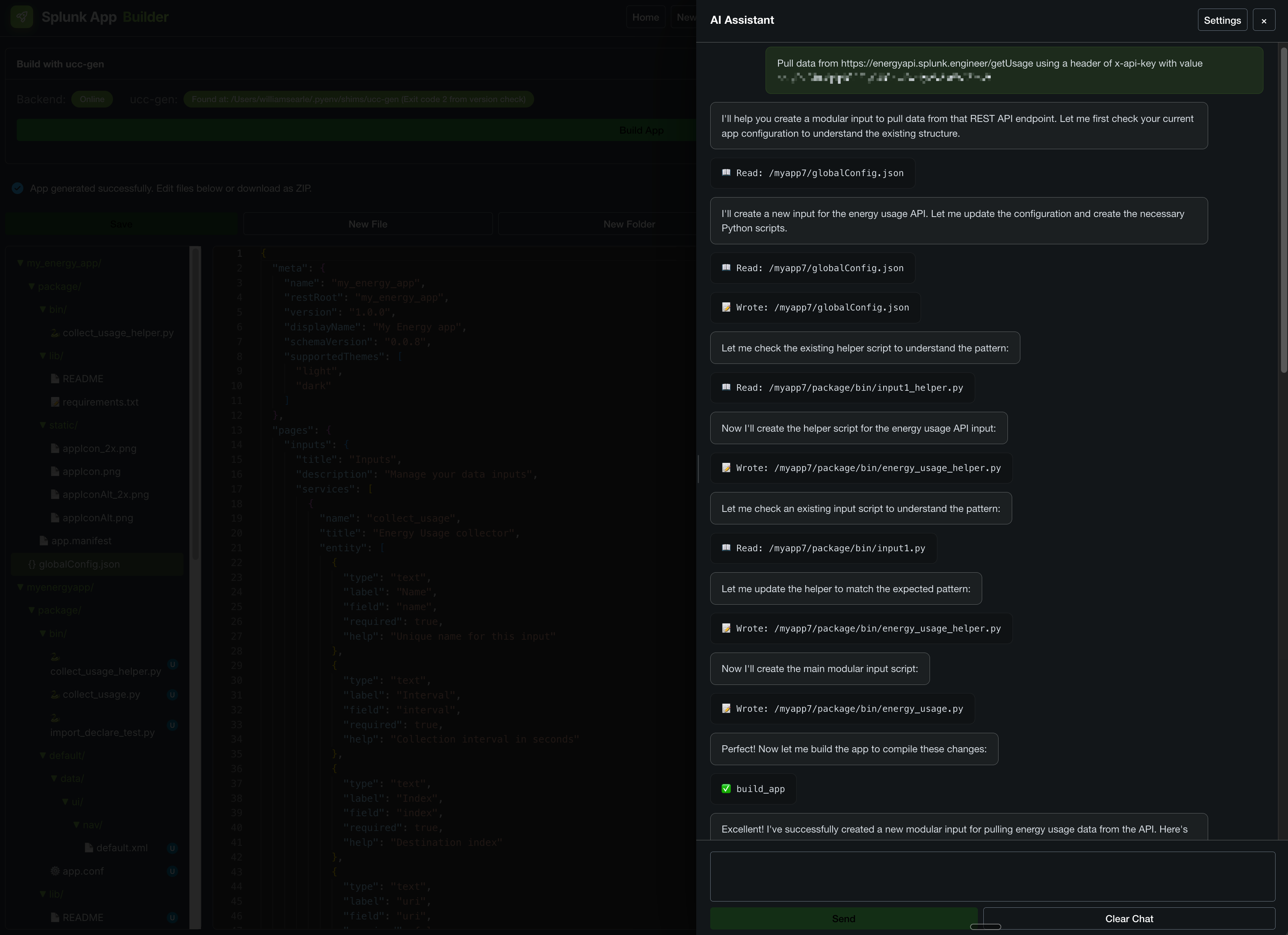
Splunk UCC AI-Assisted App Builder is a full add-on IDE that runs natively inside Splunk. You describe what you need in plain English and a tool-calling AI agent authors the globalConfig.json, creates the boilerplate app, orchestrates the app-specific code for your usecase, then drives a self-correcting build loop: ucc-gen build -> AppInspect -> read the findings -> auto-fix the source -> re-run, until the package is AppInspect-clean and shippable. It also has a wizard, a Monaco file editor, live GitHub import/export, and a one-place Configuration tab for the AI provider - all without leaving Splunk.
How we built it
- A native Splunk (UCC) app with the standalone React IDE embedded and its API over Splunk REST endpoints.
- The agent leverages the Splunk Agent SDK (
splunklib.ai), in a clean isolated subprocess, calling 7 builder tools also registered on the Splunk MCP Server for use outside the app. - The verification oracle is AppInspect (a Splunk Developer Tool) and
ucc-gen(the official UCC framework) - the same official tooling Splunk ships. - A unified Configuration page (encrypted in
storage/passwords) allows custom external AI services for the AI assistant to leverage. - GitHub Actions CI builds, validates and tests it — including the official
splunk/appinspect-cli-actionand a live Splunk-in-Docker integration run.
Challenges we ran into
- Splunkd's shared interpreter pollutes imports across apps - solved by spawning the Agent SDK in a pristine subprocess.
- Python version split: persistent REST handlers run 3.9, but the Agent SDK stack needs cp313 - fixed with
python.required = 3.13and a pure-pythonurllib3pin. - AppInspect packaging hygiene for compiled, vendored AI deps (aarch64 when developing on Silicone Mac,
.keepfiles, permissions, reload triggers). - CSRF on the embedded SPA's proxy calls (Splunk Web needs both
X-Splunk-Form-KeyandX-Requested-With). - Stopping the agent from looping on a no-op fix (a no-progress breaker + a URL-encoding bug in the project reset).
Accomplishments that we're proud of
- A genuinely usable IDE running inside Splunk on the Splunk Agent SDK - not a mockup.
- Natural language -> AppInspect-clean add-on in ~40 seconds (e.g. a working Equine Energy API add-on, clean in 3 self-correcting iterations).
- Uses three Splunk AI/developer capabilities together: MCP Server, AppInspect (Developer Tools), and the Agent SDK.
- Fully open source (with a generated license inventory) and CI-green, including a live Splunk-in-Docker integration test.
What we learned
How to drive the Splunk Agent SDK (splunklib.ai) end-to-end, register app functions as Splunk MCP Server tools, and use AppInspect as a deterministic verification oracle for an agent loop, plus the real-world constraints of running modern AI dependencies inside Splunkd's runtime.
What's next for Splunk UCC AI-Assisted App Builder
- Have the builder generate the CI/CD it was built with - emit a GitHub Actions pipeline (official AppInspect + Splunkbase publish) for every add-on it creates.
- Route the main IDE's assistant through the Agent SDK so the polished UI is powered natively by
splunklib.ai. - Multi-account AI providers, deeper UCC feature coverage (alert actions, OAuth, custom commands), and one-click Splunkbase packaging.

Log in or sign up for Devpost to join the conversation.