-
-
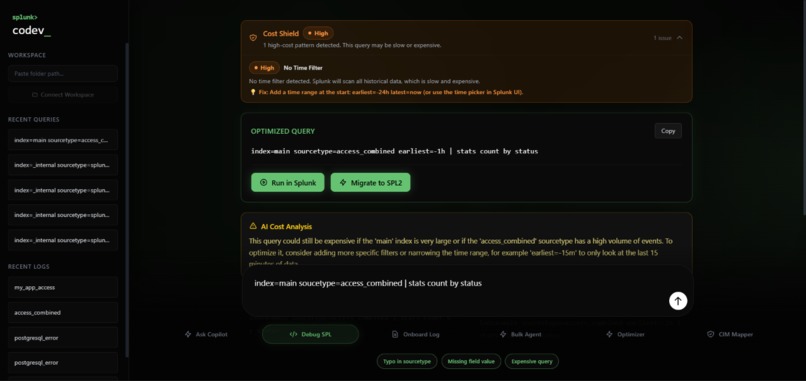
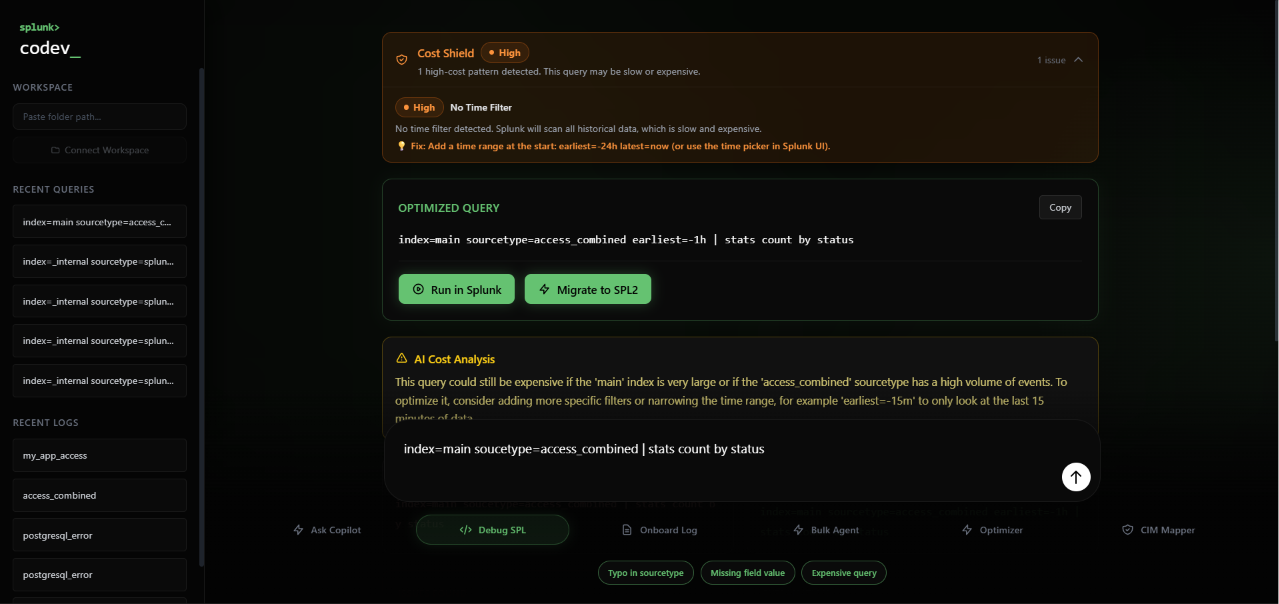
Cost Shield detects a missing time filter, blocks the expensive query, and suggests an optimized fix in real time
-
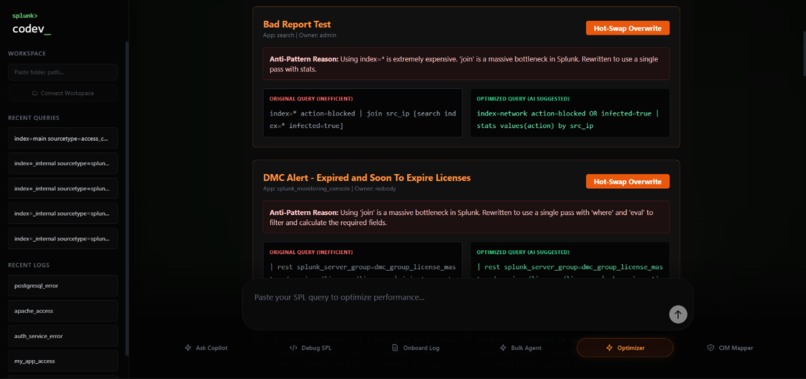
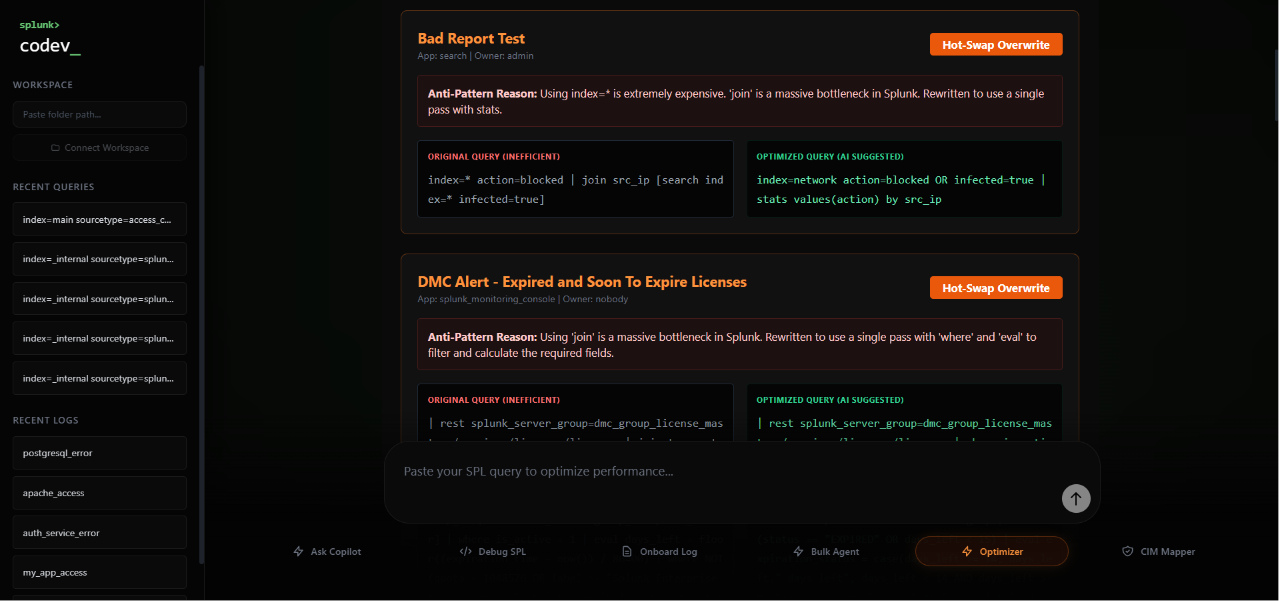
Saved Search Optimizer identifies anti-patterns like index=* joins and rewrites them — one click to deploy.
-
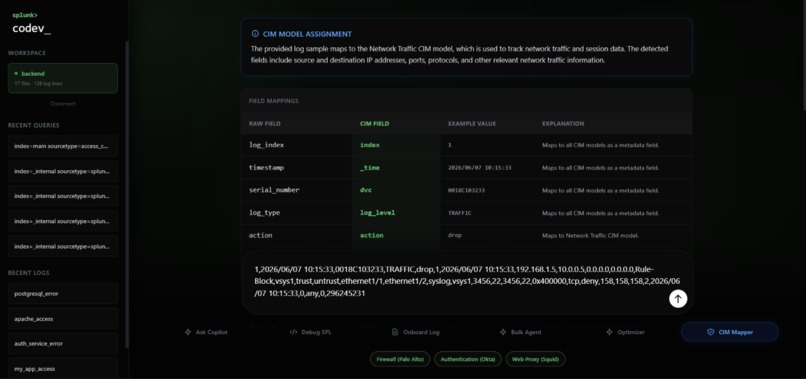
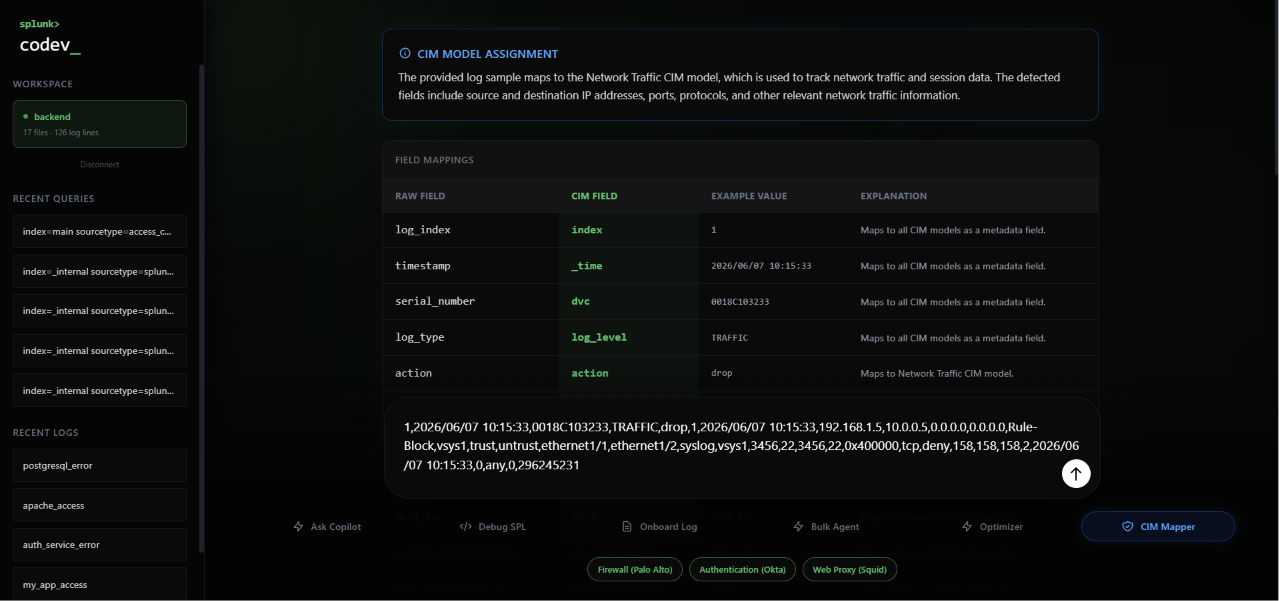
CIM Auto-Mapper identifies fields from raw logs and maps them to official Splunk CIM standards automatically.
-
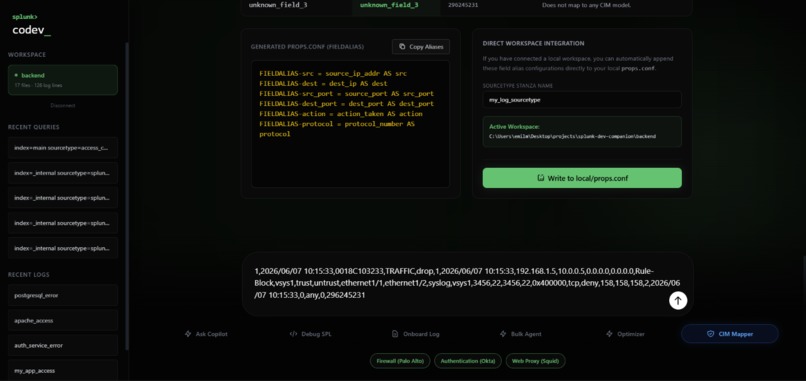
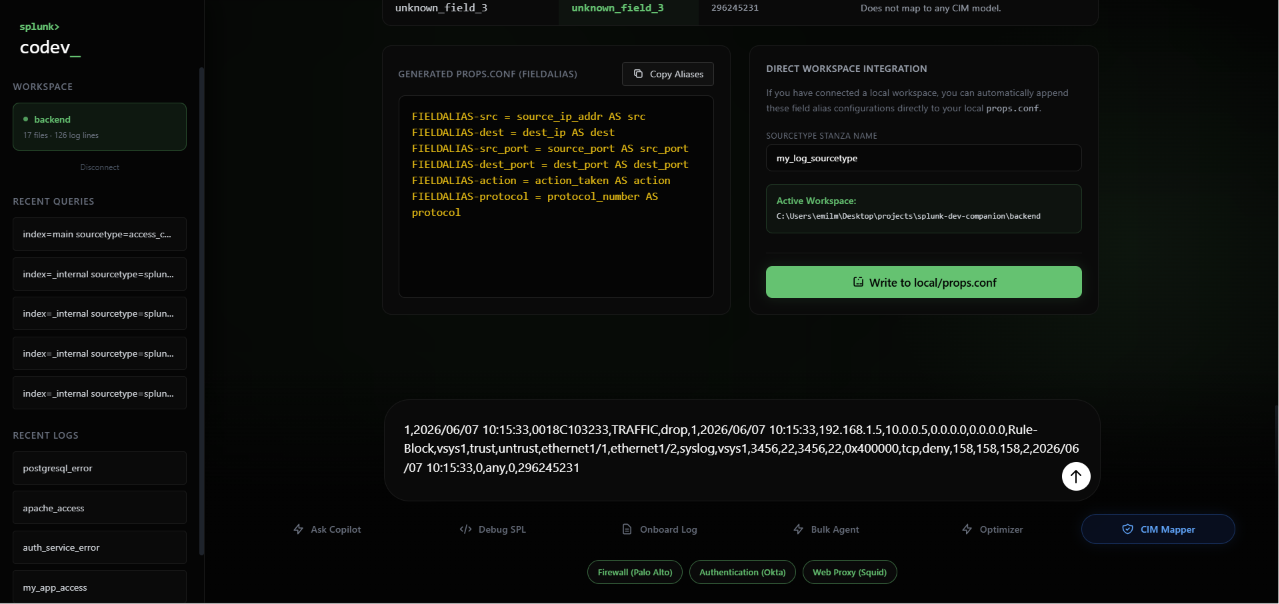
Generated FIELDALIAS configurations written directly to your local props.conf — no copy-pasting
-
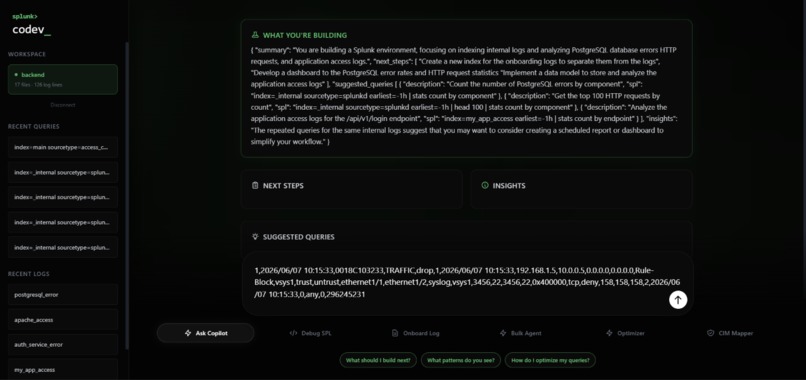
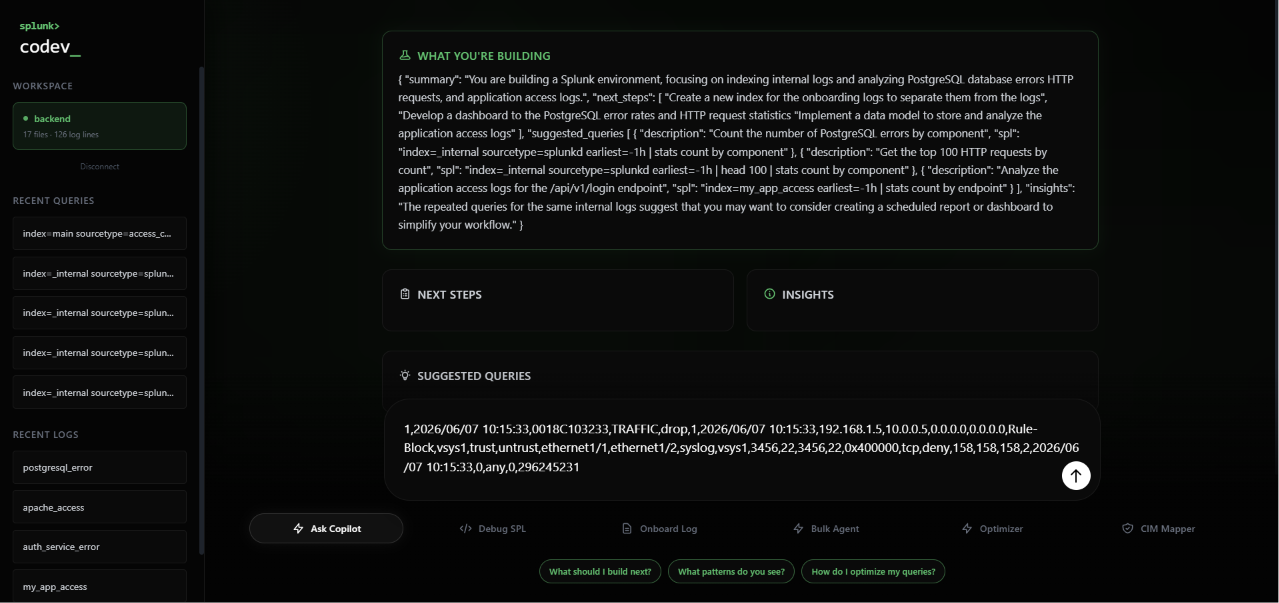
Ask Copilot
-
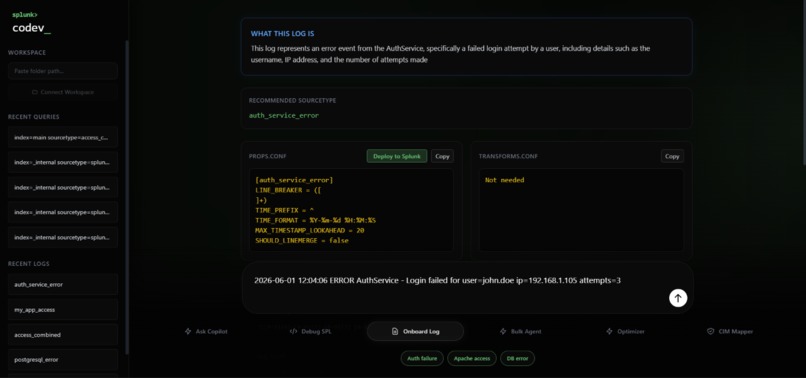
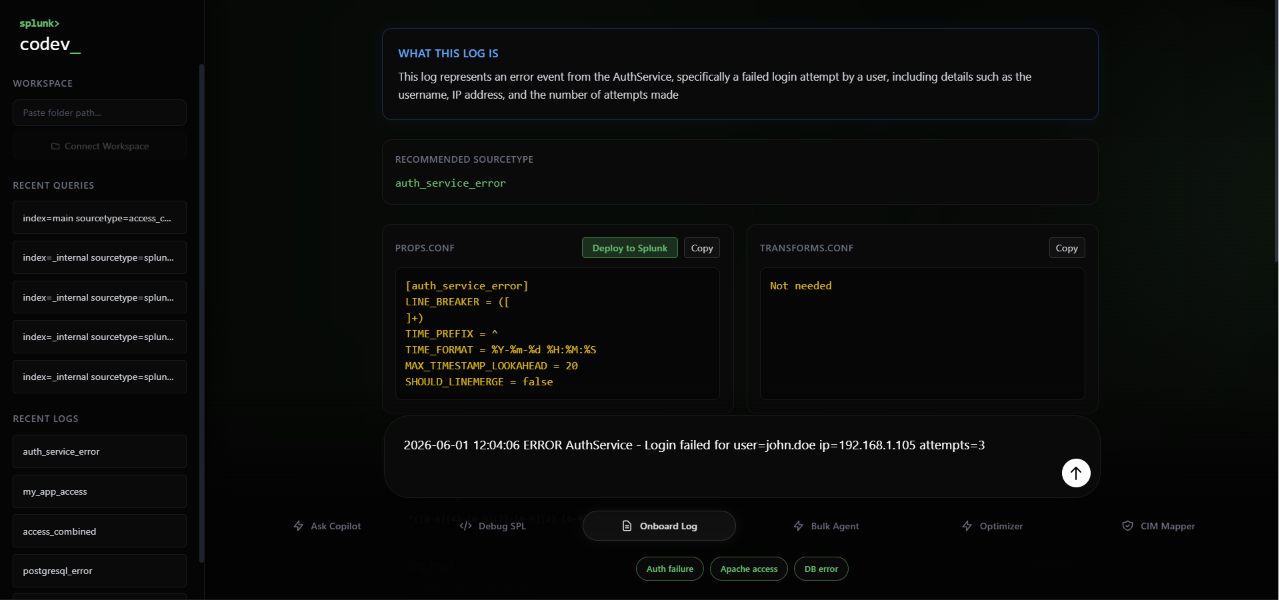
Paste a raw log and instantly identify the sourcetype, generate props.conf configuration, and offer one-click deployment directly to Splunk.
-
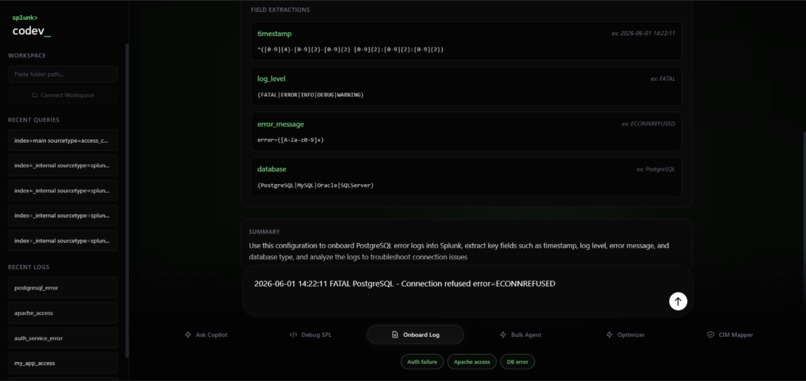
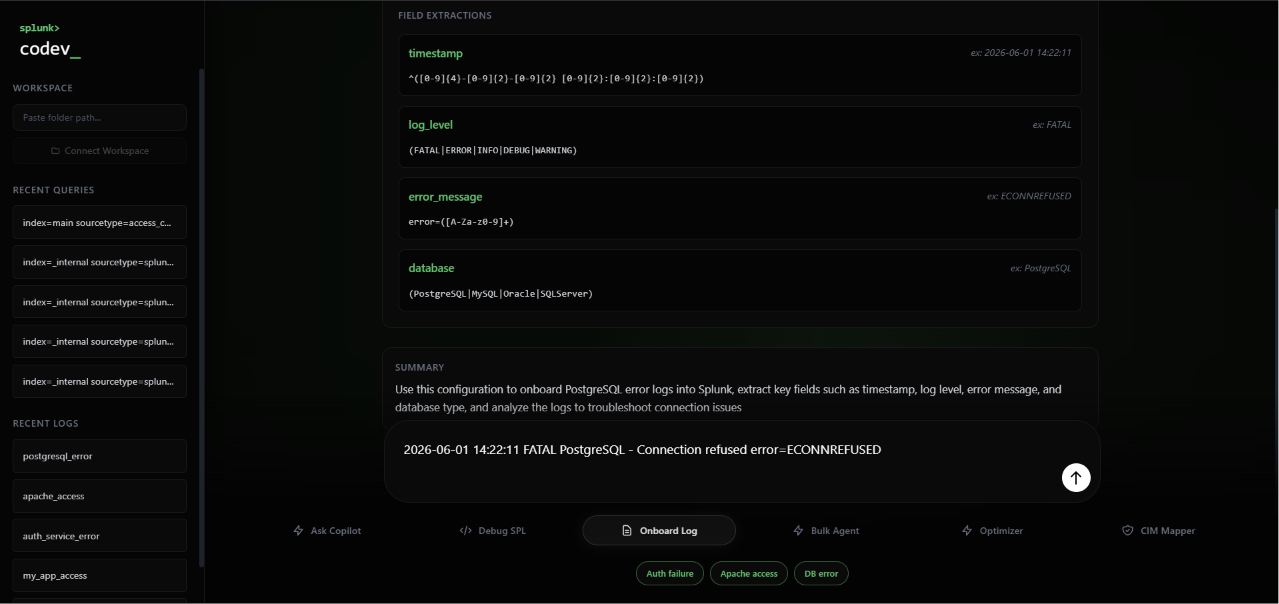
automatically extract key fields — time, log level, error message, Db type with regex patterns and examples pulled directly from the raw log
Splunk Co>Dev
An AI-Powered Engineering Copilot for Safe, Efficient, and Observable Splunk Development
Inspiration
Writing Search Processing Language (SPL) is one of the most powerful yet unforgiving skills in the Splunk ecosystem. New developers and analysts spend hours learning query syntax, CIM field mappings, dashboard creation, deployment workflows, and optimization techniques before they can contribute meaningfully to their teams.
The moment that inspired Co>Dev was deceptively simple: watching a junior developer execute index=* sourcetype=* without a second thought. That single unconstrained search overwhelmed the search head, degraded performance for the entire team, and generated unnecessary cloud costs — and the developer had no idea any of it was happening.
The problem wasn't negligence. The problem was visibility.
We asked ourselves one question:
What if the development environment could actively protect users from costly mistakes while simultaneously helping them build faster?
And then we kept going.
What if it didn't just warn developers about risky queries?
What if it could automatically map logs to CIM, generate configurations, deploy dashboards, optimize saved searches, and continuously monitor itself while doing it?
That question became Splunk Co>Dev — an AI-powered engineering copilot built specifically for Splunk developers and administrators who need safety, speed, and automation in a single closed-loop system.
Co>Dev prevents costly SPL mistakes, automates CIM onboarding, deploys Splunk assets from natural language, and continuously monitors its own impact through a closed-loop telemetry system.
What It Does
Splunk Co>Dev combines deterministic safety controls with AI-powered automation to simplify the entire Splunk development lifecycle through four core modules.
Query Mode — Cost Shield & SPL Debugger
Writing SPL is powerful, but a single inefficient query can consume excessive resources, impact platform performance, and generate unnecessary cloud costs.
Query Mode acts as both a safety layer and an educational assistant.
- Blocks dangerous SPL patterns before execution using a local deterministic validation engine.
- Fixes syntax errors and SPL mistakes automatically.
- Explains query logic in plain English.
- Warns users about computationally expensive search patterns.
- Executes validated searches directly against Splunk.
- Retrieves live search results.
- Migrates legacy SPL1 queries to modern SPL2 syntax with detailed explanations.
Every query also receives a dynamic Query Efficiency Score based on live search job metrics:
$$ E = 100 - \left( \frac{\text{scanCount}}{10^6}\times30 + \frac{\text{runDuration}}{60}\times40 + \frac{\text{diskUsage}}{10^8}\times30 \right) $$
Where:
- scanCount measures the number of events scanned.
- runDuration measures search execution time.
- diskUsage measures storage consumed by the search.
This teaches developers not just whether a query works — but whether it performs efficiently in production.
CIM Compliance Auto-Mapper
Mapping custom log sources into Splunk's Common Information Model (CIM) is one of the most repetitive and error-prone onboarding tasks.
Co>Dev automates the process end-to-end.
- Accepts raw log samples.
- Automatically identifies important fields.
- Maps fields to official Splunk CIM standards.
- Converts fields such as
source_ip_addrinto CIM-compliant equivalents likesrc. Determines the appropriate CIM data model, including:
- Network Traffic
- Authentication
- Web
- Endpoint
- Change Analysis
- And others
Generates FIELDALIAS configuration blocks automatically.
Writes updates directly into local
props.conffiles.
No copy-pasting.
No manual mapping.
No configuration guesswork.
Bulk Agent Mode — Natural Language Deployment
Co>Dev allows users to describe desired Splunk assets using natural language.
For example:
"Create a 403 error alert every 10 minutes and a dashboard tracking HTTP 500 status codes."
Co>Dev automatically:
- Generates production-ready Simple XML dashboards.
- Creates scheduled searches.
- Generates cron schedules.
- Creates reports and alerts.
- Configures deployment settings.
- Deploys assets directly into Splunk through the REST API.
What previously required multiple manual configuration steps can now be completed through a single instruction.
Saved Search Optimizer
Many Splunk environments accumulate years of saved searches that become increasingly inefficient over time.
Co>Dev continuously helps teams identify and improve these searches.
- Retrieves active saved searches through Splunk's REST API.
Identifies inefficient patterns including:
jointransactionappenddedup- Missing index constraints
- Unbounded time ranges
Uses AI-assisted analysis to generate optimized alternatives.
Explains every optimization recommendation.
Allows optimized searches to be deployed back into Splunk with a single click.
This reduces search costs while improving overall platform performance.
Closed-Loop Telemetry
Every action performed by Co>Dev is observable.
Query analyses, CIM mappings, dashboard deployments, saved-search optimizations, and operational events are asynchronously logged back into Splunk through the HTTP Event Collector (HEC).
This allows teams to build dashboards that monitor:
- Co>Dev usage
- Query optimization statistics
- Deployment history
- CIM mapping activity
- Cost savings
- Operational efficiency
In other words:
Co>Dev can be monitored using the same Splunk platform it helps automate.
The loop is complete.
Architecture
Developer
    │
    ▼
Query Cost Shield
(Deterministic Validation)
    │
    ▼
AI Processing Layer
(Groq + Llama Models)
    │
    ▼
Splunk REST API
(Job Execution / Deployment)
    │
    ▼
Dashboards • Alerts • Searches
    │
    ▼
HTTP Event Collector (HEC)
    │
    ▼
Splunk Monitoring Dashboard
(Co>Dev Telemetry)
How We Built It
We built Co>Dev as a full-stack application designed to interact natively with Splunk Enterprise at every layer.
Frontend
- React SPA
- Custom dark-theme UI
- Real-time streaming responses
- Dynamic dashboards
- Server-Sent Event integration
Backend
- Node.js
- Express.js
- RESTful architecture
- Session caching
- Workspace management
- Dynamic port allocation
AI Layer
- Groq API
- llama-3.3-70b-versatile
- llama-3.1-8b-instant
- Structured JSON generation
- Real-time token streaming
Splunk Integration
- Splunk REST API (Port 8089)
- HTTP Event Collector (Port 8088)
- Search Job Lifecycle Management
- Dashboard Deployment
- Saved Search CRUD Operations
- Alert Management
Configuration Layer
- Automated FIELDALIAS generation
- Direct
props.confupdates - Local workspace integration
- File validation and safe append operations
The most important architectural decision was keeping the Cost Shield entirely outside the LLM.
Dangerous query detection runs through a deterministic local validation engine before any AI interaction occurs. This guarantees zero-latency enforcement and eliminates the possibility of AI hallucinations affecting safety decisions.
Challenges We Ran Into
Self-Signed SSL Certificates
Local Splunk Enterprise environments use self-signed HTTPS certificates that Node.js rejects by default.
We implemented authenticated HTTPS agents capable of securely communicating with Splunk while maintaining a seamless user experience.
Building Deterministic AI Safety
Initially, we considered using AI to determine whether a query was safe.
This quickly proved unreliable.
Models can hallucinate, misclassify expensive searches, and introduce latency at critical moments.
Instead, we designed a local deterministic validation engine that evaluates every query before it reaches the AI layer. The LLM only activates once a query has been approved by the Cost Shield.
Safe Configuration Writes
Updating existing props.conf files sounds simple until duplicate stanzas, malformed structures, and platform-specific edge cases are introduced.
We built validation logic that safely detects existing configurations, preserves file integrity, and prevents accidental corruption.
Real-Time SSE Streaming
Maintaining smooth Server-Sent Event token streaming while handling dropped connections, concurrent users, and high-frequency updates required careful buffer management and graceful recovery mechanisms.
Accomplishments That We're Proud Of
Closed-Loop Observability
Every action Co>Dev performs is logged back into Splunk through HEC.
Teams can build dashboards that monitor the AI assistant using the same platform it automates, creating a fully observable feedback loop.
Deterministic Cost Shield
Preventing dangerous SPL before execution provides teams with a reliable safety net regardless of user experience level.
Unlike AI-based validation, deterministic enforcement guarantees predictable behavior every time.
Zero-Copy CIM Integration
Going from a raw pasted log sample to a live written props.conf entry with a single button click was one of the most challenging engineering problems we solved.
It also became one of the smoothest workflows in the final product.
End-to-End Natural Language Deployment
Describing a dashboard or alert in plain English and watching it appear live inside Splunk without touching XML, configuration files, or API endpoints fundamentally changes the developer experience.
What We Learned
We began the project believing AI could safely handle every decision in the workflow. One of the biggest lessons we learned was that this assumption was wrong.
Early on, we experimented with using an LLM to determine whether a query was safe to execute. While the model could explain SPL and identify obvious issues, it was inconsistent when evaluating operational risk. Sometimes it would overestimate danger, and other times it would miss expensive search patterns entirely.
That realization led us to build the Cost Shield — a deterministic validation layer that evaluates queries before they ever reach the AI. The result was faster, more reliable, and significantly safer than relying solely on model reasoning.
We also gained a much deeper appreciation for how complex Splunk environments become at scale. Tasks that seem simple on the surface — CIM mapping, props.conf management, dashboard deployment, or saved search optimization — quickly reveal hidden operational challenges once automation is introduced.
Finally, we learned that the most trustworthy AI systems are not the ones that automate everything. They are the ones that combine intelligent assistance with deterministic guardrails, giving users both speed and confidence.
What's Next for Splunk Co>Dev
Git Integration
Automatically pull workspace configurations, generate updates, and push refined props.conf files directly through Git workflows.
Adaptive Query Risk Scoring
Expand beyond regex validation by incorporating historical Splunk telemetry and search analytics to generate adaptive risk scores for every query.
Automated Index Provisioning
Create and configure Splunk indexes directly from the Co>Dev interface without requiring access to the admin console.
Multi-Tenant Access Controls
Introduce role-based permissions that allow multiple teams to share a single Co>Dev deployment securely.
SPL2 Native Execution
Provide full SPL2 generation, migration, validation, and execution support for compatible Splunk Cloud environments.
Vision
Our vision is simple:
Make Splunk development as easy as describing what you want, while ensuring every action remains safe, efficient, and observable.
Built With
- agents
- custom
- express.js
- filesystem
- groq
- http
- javascript
- llama3
- node.js
- react
- rest-api
- server-sent
- splunk
- splunk-hec
- tailwind-css

Log in or sign up for Devpost to join the conversation.