-
-
App icon
-
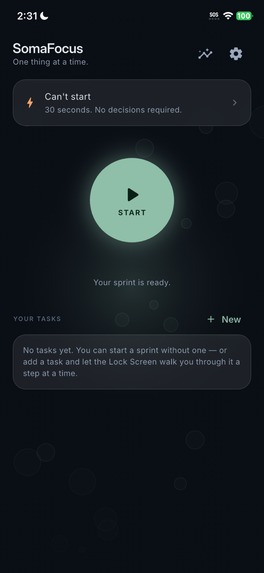
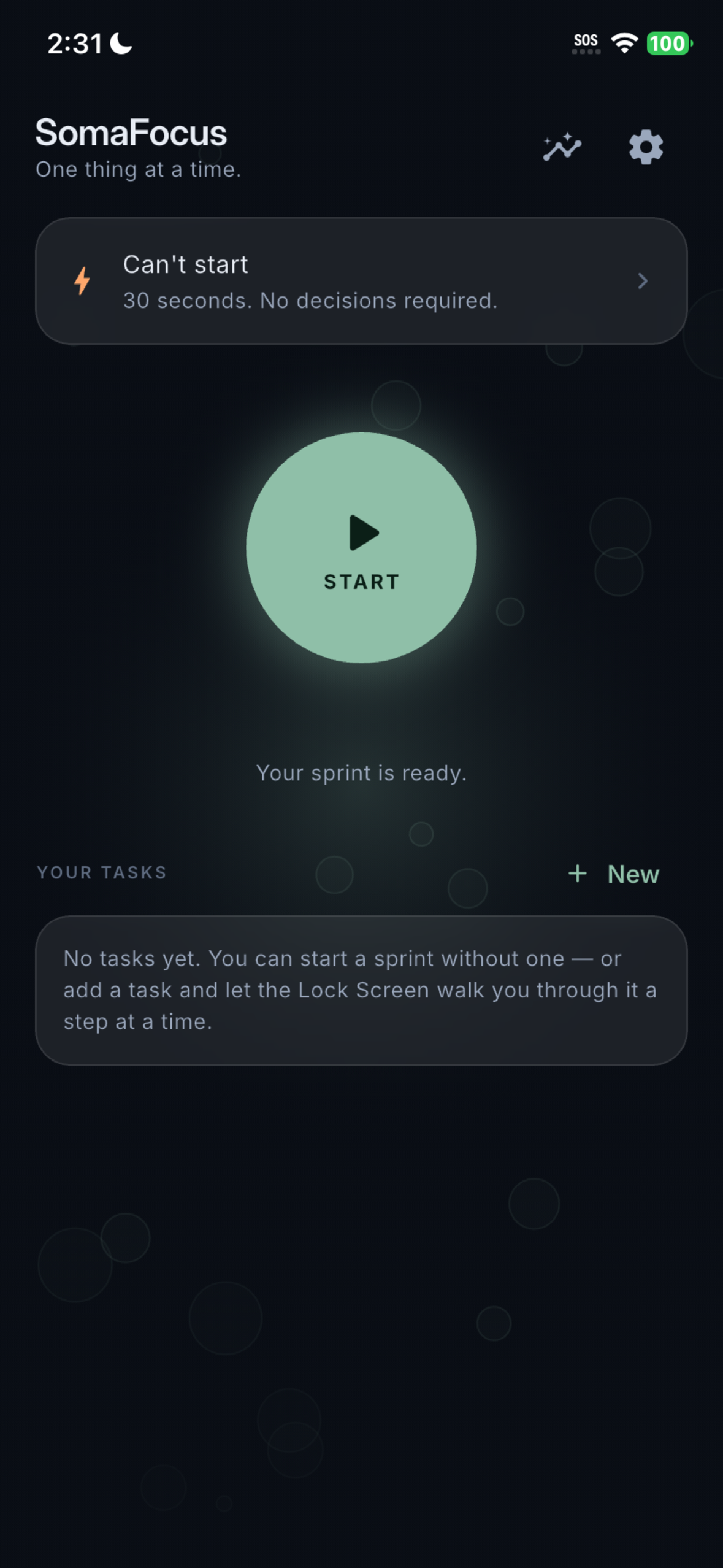
Hardware Action Button launches a 30-sec somatic circuit with zero decisions required to break executive dysfunction paralysis instantly.
-
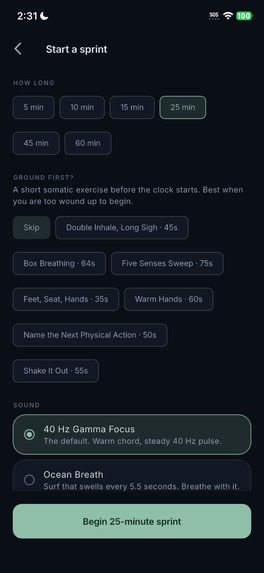
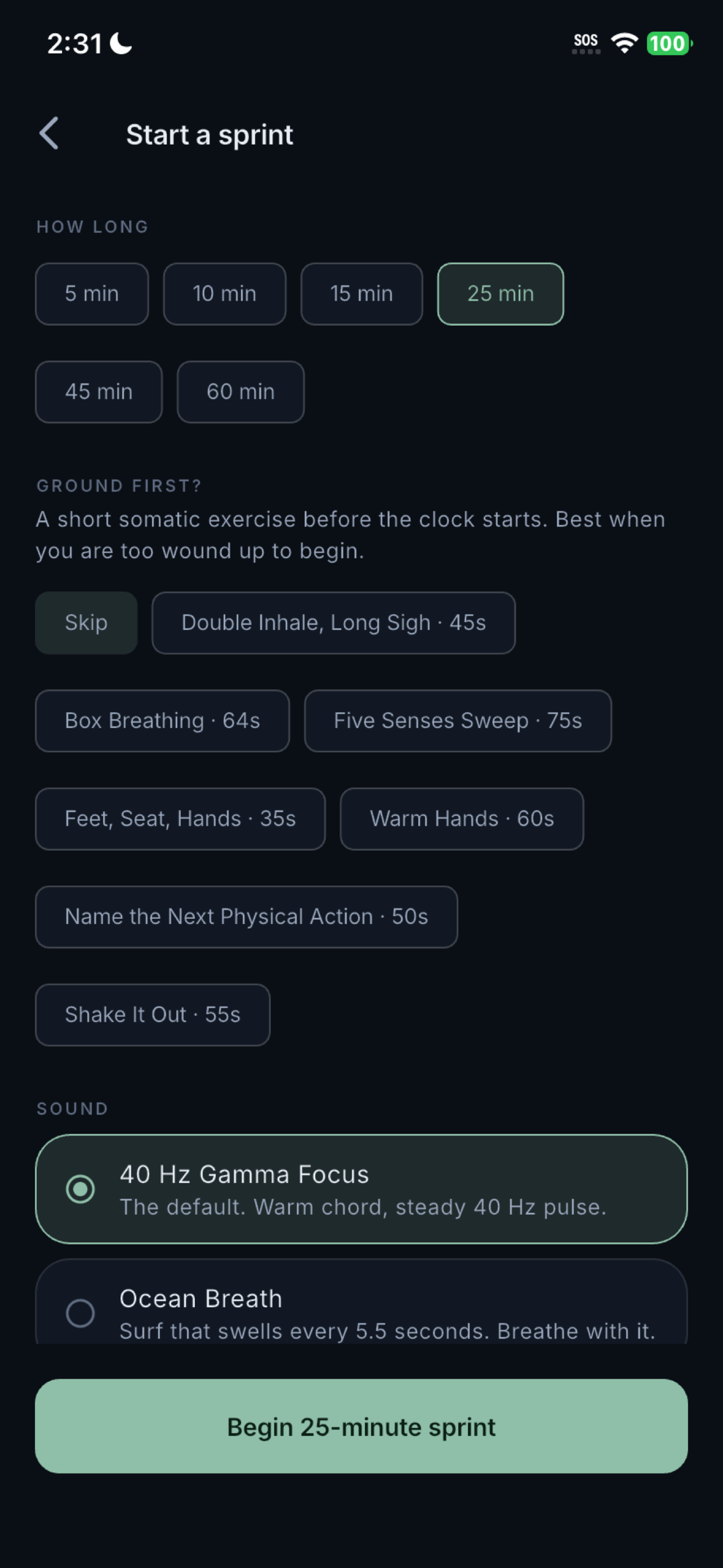
Pre-sprint somatic grounding: physiological sigh breathwork and 16 algorithmic soundscapes downregulate anxiety before task initiation.
-
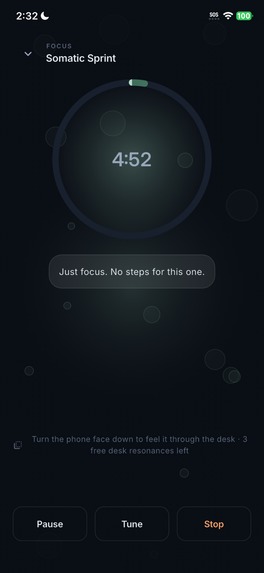
Real-time 40 Hz AM audio & sensory haptics entrain wandering attention into deep focus without recorded audio files or annoying alarms.
-
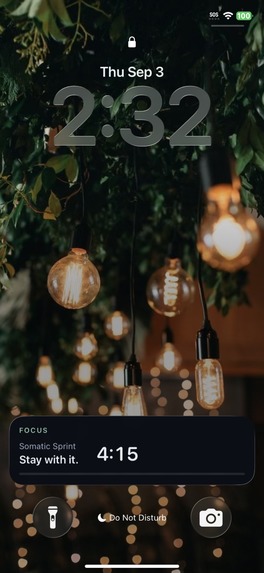
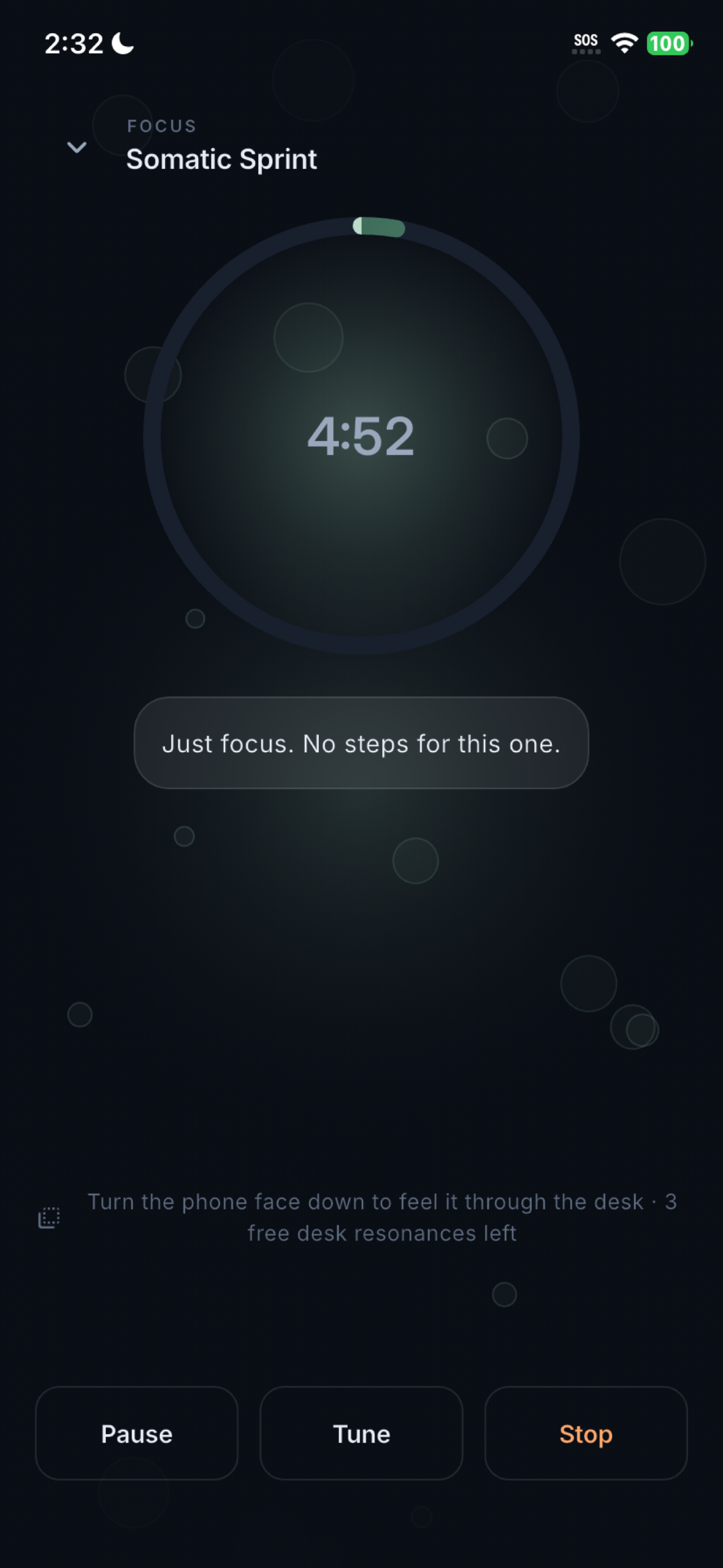
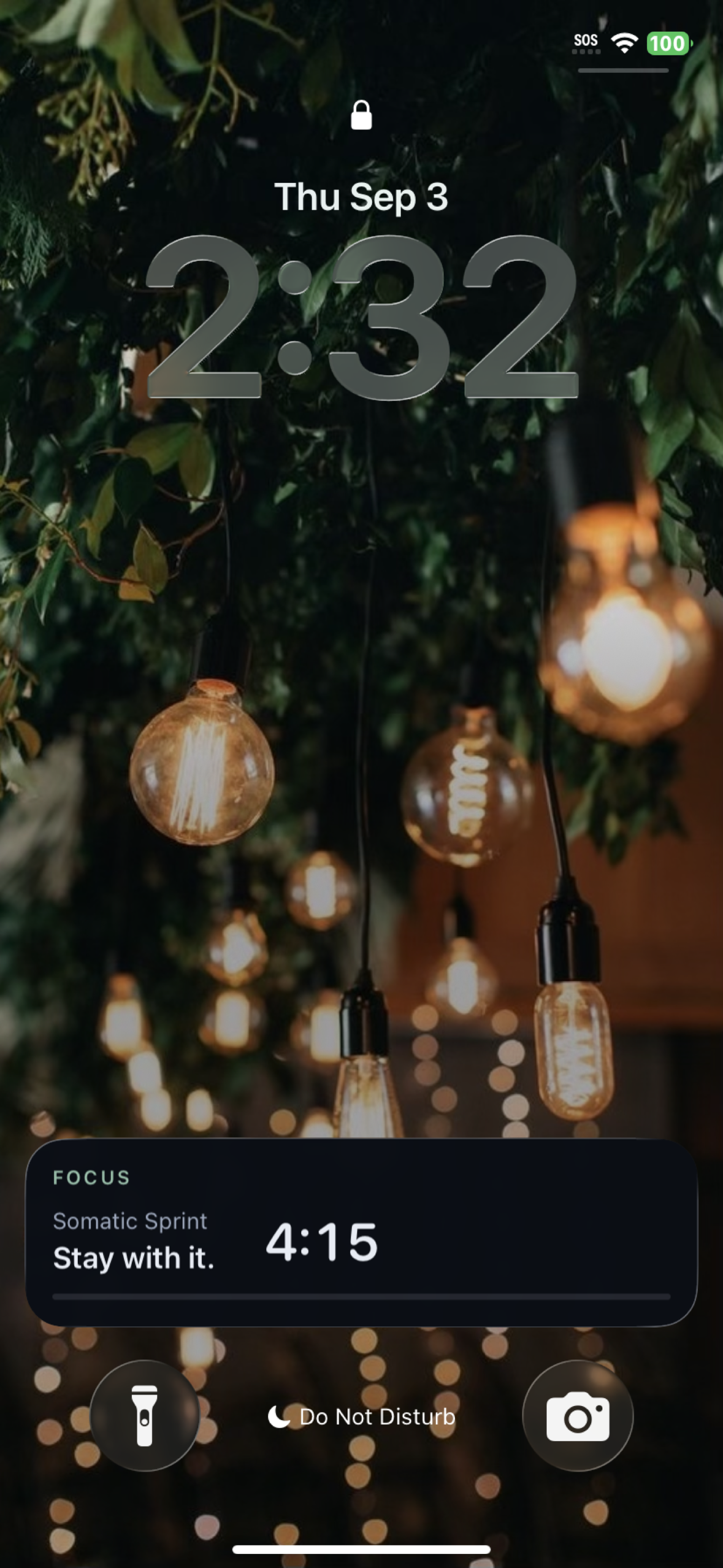
Glanceable Lock Screen & Dynamic Island pacing keep your active step and countdown visible so you never unlock to remember what to do.
Inspiration
I have ADHD, and my biggest focus problem has always been painfully simple: I lose track of what I was doing the moment I look away from my screen.
The pattern was always the same. I'd start a focus timer, stand up to grab a glass of water, and by the time I sat back down thirty seconds later, whatever I was supposed to be working on had completely vanished from my brain. Getting back on track meant unlocking my phone, digging for the app, waiting for it to load, and reconstructing my mental context from scratch. But that tiny bit of friction was usually all it took for my executive function to stall—and before I knew it, I was forty minutes deep into Reddit or checking emails I didn't need to answer.
Every productivity app I tried was built with the exact same blind spot: a timer hidden behind an app icon. That is completely backwards. The precise moment you need to be reminded of what you're doing is when you're not looking at the app.
The second realization was sensory. Staring at an ominous countdown clock doesn't calm task paralysis—it just ramps up anxiety and makes me freeze. When I'm stuck, what actually grounds me is physical sensation: the warmth of a coffee mug, tapping my foot to a steady beat, or low frequencies resonating through my desk. In cognitive neuroscience, this is well understood as rhythmic sensorimotor coupling—the way an external sensory pulse naturally coaxes motor activity and wandering attention into sync.
Modern phones already carry world-class haptic engines and stereo speakers in our pockets all day. So I decided to build SomaFocus: an app where the interface lives directly on your Lock Screen, and the pacing mechanism is built from sound and touch rather than numbers counting down.
What it does
At its core, SomaFocus runs focused work sprints with one strict rule: only your current step is ever on screen.
Instead of forcing you to keep the app open, your active step and countdown stay pinned to the iOS Lock Screen and Dynamic Island (or an ongoing notification on Android). If you walk away to make tea, you just glance at your phone on the counter and see: “Drafting section 2 (14m left)”. You never have to unlock your phone and gamble with notifications.
While you work, SomaFocus generates a continuous procedural soundscape paired with a synchronized haptic heartbeat. There isn't a single recorded audio file or pre-rendered image asset in the entire bundle. Every audio sample is synthesized in real time from mathematical parameters, and the animated backgrounds are drawn procedurally via Flutter's CustomPainter. The app is lightweight, launches instantly, and never feels repetitive.
The sound library includes 16 procedural soundscapes. Rather than just picking arbitrary frequencies that sounded cool, several are tuned to real physical and astronomical phenomena:
Omsits at 136.1 Hz—Hans Cousto's 32nd octave of the Earth's orbital year and the acoustic basis of traditional Indian tanpura tuning.Perseusis tuned to the fundamental B-flat that the supermassive black hole in the Perseus cluster radiates into surrounding gas (57 octaves below middle C, pitched up into human hearing just like NASA's sonification).Vela Pulsarmodulates at 11.194 Hz, matching the actual rotation frequency of the famous cosmic pulsar.
Four core modes I designed for specific ADHD hurdles:
- Freeze Breaker: A 30-second somatic emergency circuit wired directly to the iPhone Action Button. When executive dysfunction hits and you can't even figure out how to start, you don't open an app or make decisions—you just press the hardware button and let the prompt guide you through grounding your breath and picking a single micro-step.
- Desk Puck: Place your phone face down on your desk, and the OLED screen drops to true black to eliminate visual distractions. Every 90 seconds, it sends a low-frequency resonant acoustic pulse into the wood of your desk. The desk itself becomes your tactile pacing clock.
- Bio-Reactive Tactile Tempo: When you're restless or nervous, you fidget. SomaFocus samples accelerometer motion at 50 Hz, uses autocorrelation in Dart to detect your fidgeting cadence, matches its haptic pulse to your rhythm, and then gradually decelerates the pulse down to a calm 60 BPM over five minutes.
- Focus Shield: Built natively on Apple's Screen Time framework (
ManagedSettings), this lets you pick tempting apps (social media, games) and puts a hard OS-level block on them for the duration of your sprint. No gentle nagging or bypassable reminders—real system-level boundaries.
Best of all, SomaFocus is 100% offline by default. All tasks, notes, and sprint histories live inside a local SQLite database. There are no accounts to create, no servers syncing your private notes, and zero third-party tracking. The only network calls are App Store receipts via RevenueCat and minimal crash diagnostics that report preset IDs and durations—never your personal task content.
How I built it
The architecture is built on a clean split: Flutter and Dart for the UI and state logic, native Swift and Kotlin for real-time DSP and platform hardware.
Finding the right boundary between Flutter and native code took some experimentation. Real-time audio rendering operates under brutal deadlines—if a render callback is delayed by even a fraction of a millisecond, the user hears an audible click or drop. So all procedural synthesis runs in low-level native code (AVAudioEngine on iOS and AudioTrack on Android).
However, I wanted the sprint state machine, pacing transitions, tempo analysis, and envelope math to be fully testable without running an emulator. So all of that lives in pure, decoupled Dart with zero Flutter dependencies. For example, when running Bio-Reactive Tempo, the native iOS code simply grabs accelerometer samples at 50 Hz, strips out gravity, and hands a clean 1-second batch across the method channel. Pure Dart handles the autocorrelation, peak detection, and octave correction. This meant I could unit-test my math against synthetic tap signals with known tempos, rather than waving a test phone around at my desk and hoping for the best.
The 40 Hz Gamma Carrier Engine
A standard smartphone speaker physically cannot produce a clean 40 Hz acoustic wave—the speaker diaphragm is simply too small. If you send it a pure 40 Hz sine wave, you get either complete silence or dirty harmonic distortion. To get around this hardware limit, I used amplitude modulation (AM) over an audible ~220 Hz carrier wave:
$$y(t) = A(t)\,\bigl[1 - d + d\sin(2\pi f_m t)\bigr]\sin(2\pi f_c t)$$
Here, $f_c \approx 220\text{ Hz}$ acts as the audible anchor, while $f_m = 40\text{ Hz}$ provides the rapid amplitude pulse. The ear hears the pleasant carrier tone, but your brain decodes the rapid 40 Hz envelope beating—delivering the sensory grounding effect through the built-in speaker without requiring bulky headphones.
The full procedural audio signal chain runs identically in Swift and Kotlin:
Tonal voices (fundamental + inharmonic partials, detuned pairs, slow pitch drift)
  → Stereo panning → 40 Hz AM modulation + sub-bass + band-limited swept noise (4-pole LP, 1-pole HP)
  → Breath / strike envelope → Schroeder reverb → Soft-knee saturation clipper → Ramped master gain
On the database side, I used Drift (SQLite) for local persistence, native ActivityKit in Swift for the Lock Screen Live Activity, and Apple's ManagedSettings extension for the Focus Shield.
Challenges I ran into
1. The 1.59 million sin() bottleneck (and melting mid-range phones)
My early prototype calculated every oscillator sample from scratch using standard trigonometric functions. For a rich preset with detuned voices and multiple harmonic partials, eight voices meant calculating up to 1.59 million sin() calls and 44,100 exp() calculations every single second.
On an M-series Mac running the simulator, this was barely a blip. But the moment I tested it on a mid-range Android phone while Flutter was rendering animated UI transitions, the CPU couldn't keep up with the audio buffer deadline. The result was constant audio stuttering and glitchy pops.
To solve this without sacrificing sound quality, I replaced real-time trig calls with a 2048-point wavetable and linear interpolation. I also optimized the sub-hertz filter sweeps and breath envelopes to calculate only twice per buffer and linearly interpolate between them, dropping exp() calls from 44,100/sec to just 86/sec. Automated tests verified that the maximum error between the wavetable and pure trigonometric math stayed below −108 dBFS—well below the 16-bit audio quantization floor. In other words: zero audible loss, zero CPU spikes, and buttery-smooth 60 FPS UI.
2. The fractional-period trap in autocorrelation (and octave doubling)
When detecting a user's tapping or fidgeting rhythm from accelerometer data, autocorrelation is the go-to algorithm. But my initial implementation kept making a classic mistake: it would suddenly jump to double or half the user's actual tempo.
Autocorrelation peaks naturally appear at both the fundamental period $T$ and harmonic multiples like $2T$. My first attempt at octave correction just checked if there was a matching peak at exactly half the detected lag distance. But that failed on a third of my test cases.
The realization was that real-world periods are rarely clean integers. At 50 Hz sampling, a 90 BPM tempo has a period of 33.3 samples. The detector would grab the harmonic peak at sample 67. When dividing $67 / 2 = 34$, it completely missed the actual fundamental peak sitting at 33.3! I had to rewrite the peak detector to search across a localized fractional window and calibrate the subharmonic energy threshold to 0.70. Once tuned, tempo detection became rock solid, hitting within 0.7% accuracy across the entire 40 to 220 BPM range.
3. The mystery of the drifting Lock Screen timer
During early testing, I noticed something baffling: after my phone sat on my desk for 15 minutes, the timer in the Flutter app was running minutes behind the countdown on the iOS Lock Screen.
My immediate instinct was to blame Apple's ActivityKit—I spent hours digging through my Swift extension looking for some subtle bug in how the Live Activity was updating. But here's the catch: ActivityKit renders natively from an absolute target Date, which physically cannot drift. The Lock Screen was telling the exact truth.
The broken clock was my Flutter app. I was using a standard Dart Timer.periodic(1.second) to drive the in-app state. When an iPhone is locked or backgrounded, iOS aggressively throttles background execution. While the app was suspended, those timer ticks simply never fired—so every second the phone spent in my pocket was a second the app completely forgot to count.
Instead of trusting periodic ticks, I refactored the engine to anchor against wall-clock timestamps. When the app returns to the foreground, it calculates the elapsed seconds and runs catch-up cycles through the state machine so no state transitions are lost.
4. The headphone unplug panic
Picture this: you're sitting in a quiet office or library using SomaFocus to stay grounded, you unplug your headphones, and iOS immediately reroutes the audio to the phone's built-in speaker at full volume. For an app designed to reduce anxiety and sensory overload, blasting a 40 Hz drone into a silent room is about the worst user experience imaginable.
By default, AVAudioEngine just halts when an audio output route vanishes. I had to build custom route-change listeners on both iOS and Android. If headphones or Bluetooth devices disconnect, the audio engine immediately pauses and preserves its exact parameter state. Once you reconnect your headphones, playback resumes with a gentle fade-in.
5. CoreHaptics dying on device lock
Another subtle iOS gotcha: iOS automatically tears down CHHapticEngine when the device locks. In my early implementation, the engine's stoppedHandler reset my native reference to nil. When the user unlocked their phone, a simple guard let engine else { return } check silently bypassed haptic playback, leaving the rest of the sprint completely lifeless without logging an error.
I refactored the native haptic manager to automatically reinstantiate and restart the engine lifecycle whenever the app returns to the active state. I also learned that Apple strictly prohibits background haptic playback while a phone is locked—so rather than letting users wonder why vibrations stop when the screen goes dark, I added a clear explanation in the Settings screen explaining the OS constraint.
6. The singing bowl that buzzed like a mosquito
One of our testers tried the Tibetan singing bowl soundscape and asked why there was an annoying high-pitched mosquito buzzing sound hidden inside it.
I had designed the preset with slightly detuned oscillator pairs to create a gentle acoustic 'shimmer.' But I had specified the detune in cents (a musical ratio). Because cents scale proportionally with frequency, a 26-cent detune on a 136 Hz fundamental creates a soothing 2 Hz beat frequency, but that same 26-cent detune on an 1117 Hz harmonic overtone produced a rapid 17 Hz beat rate. In psychoacoustics, when beats occur between 15 and 30 Hz, the human ear stops hearing a pleasant pulse and instead perceives harsh 'roughness' and buzzing.
My original unit tests were just checking the cents value. I rewrote the audio validation suite to calculate the literal Hz beat rate across every single partial, ensuring that no preset ever wanders into the auditory roughness band.
7. The Riverpod cache trap and inverted Android vibrations
There were plenty of smaller platform quirks too. On Android, testing on an older device with no advanced amplitude control revealed that our binary vibration fallback had inverted logic—silence vibrated at max power while rhythmic beats were dead quiet! And on the Flutter side, a FutureProvider in Riverpod held onto cached sprint stats even after a session finished because it lacked an auto-dispose listener, requiring a full app restart just to see updated charts.
Accomplishments that I'm proud of
- 923 automated tests (used as scientific instruments): I didn't just write unit tests to check if widgets render; I used tests to empirically solve audio and math problems. Automated test sweeps dialed in the exact octave detection thresholds, verified that audio filter sweeps never clip, confirmed that dark mode accent colors meet OKLCH chroma standards (swapping an overly intense 0.134 teal for a soothing 0.061 eucalyptus green), and proved that wavetable synthesis had zero audible degradation.
- Zero bundled media assets: There are zero
.wav,.mp3, or.pngfiles bundled in the project. Every frequency, reverb tail, and ambient noise texture is procedurally calculated on the fly, and every visual background is drawn with code. The resulting app binary is tiny, lightning-fast to launch, and completely self-contained. - Privacy by architecture, not just a promise: Most modern productivity tools require you to create an account, log in with Google, and store your daily tasks on their servers. SomaFocus does none of that. It runs 100% offline via local SQLite. I even intentionally skipped adding third-party push notification services—every single alert or Lock Screen update is triggered locally on the device itself. Your ADHD thoughts, sprint notes, and focus habits never touch the cloud.
- Scientific honesty in copy: It's tempting in the wellness and ADHD space to make grandiose pseudo-scientific claims about 'rewiring your vagus nerve' or 'curing executive dysfunction.' I made a deliberate choice to keep every claim strictly grounded in established literature on rhythmic entrainment and sensorimotor coupling. I even built an automated lint test that scans all in-app copy against medical claims to ensure the app never overpromises.
What I learned
- Benchmarking beats audio intuition every single time. Whenever I tried to 'eyeball' audio DSP parameters or guess how a filter would sound, I was almost always wrong. The detune buzzing, the noise thresholds, the autocorrelation tolerances—every single breakthrough came from writing a quick benchmark, plotting the data, and letting math and measurements guide the design.
- Embrace platform constraints instead of fighting them. Early on, I fought against iOS battery management and locked-screen haptic restrictions. But mobile operating systems have those rules for good reason. Accepting platform limitations, anchoring to wall-clock time, and clearly communicating constraints to the user in the UI makes an app feel far more polished and dependable than trying to hack around the system.
- Sensory feedback requires obsessive subtlety. Building an app for neurodivergent and overstimulated brains taught me that less is always more. A notification that is slightly too bright, a vibration that is a fraction too sharp, or an audio loop that has a tiny click when it loops will immediately pull someone out of their flow state. Getting the sensory details right requires extreme care.
What's next for SomaFocus
- Apple Watch companion app: The wrist is the ultimate natural home for subtle tactile pacing. Feeling a gentle somatic pulse against your wrist while keeping your phone out of sight is the next logical step.
- Custom procedural soundscape builder: Letting users tweak oscillator parameters, carrier frequencies, and filter sweeps to build their own personalized grounding presets.
- Deeper real-world user testing: Gathering qualitative feedback from more neurodivergent users across diverse work environments—from loud open-plan offices to quiet study desks.
Built With
- activitykit
- app-intents
- audiotrack
- avfoundation
- corehaptics
- coremotion
- dart
- digital-signal-processing
- drift
- dynamic-island
- familycontrols
- flutter
- kotlin
- live-activities
- revenuecat
- riverpod
- screen-time-api
- sqlite
- storekit
- swift
- swiftui
- widgetkit

Log in or sign up for Devpost to join the conversation.