-
-
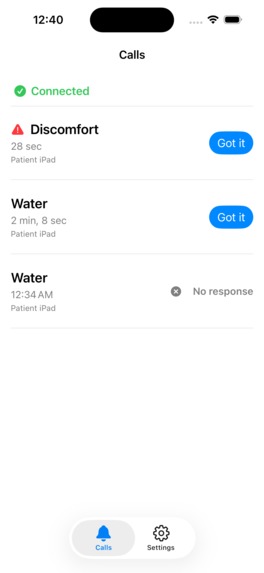
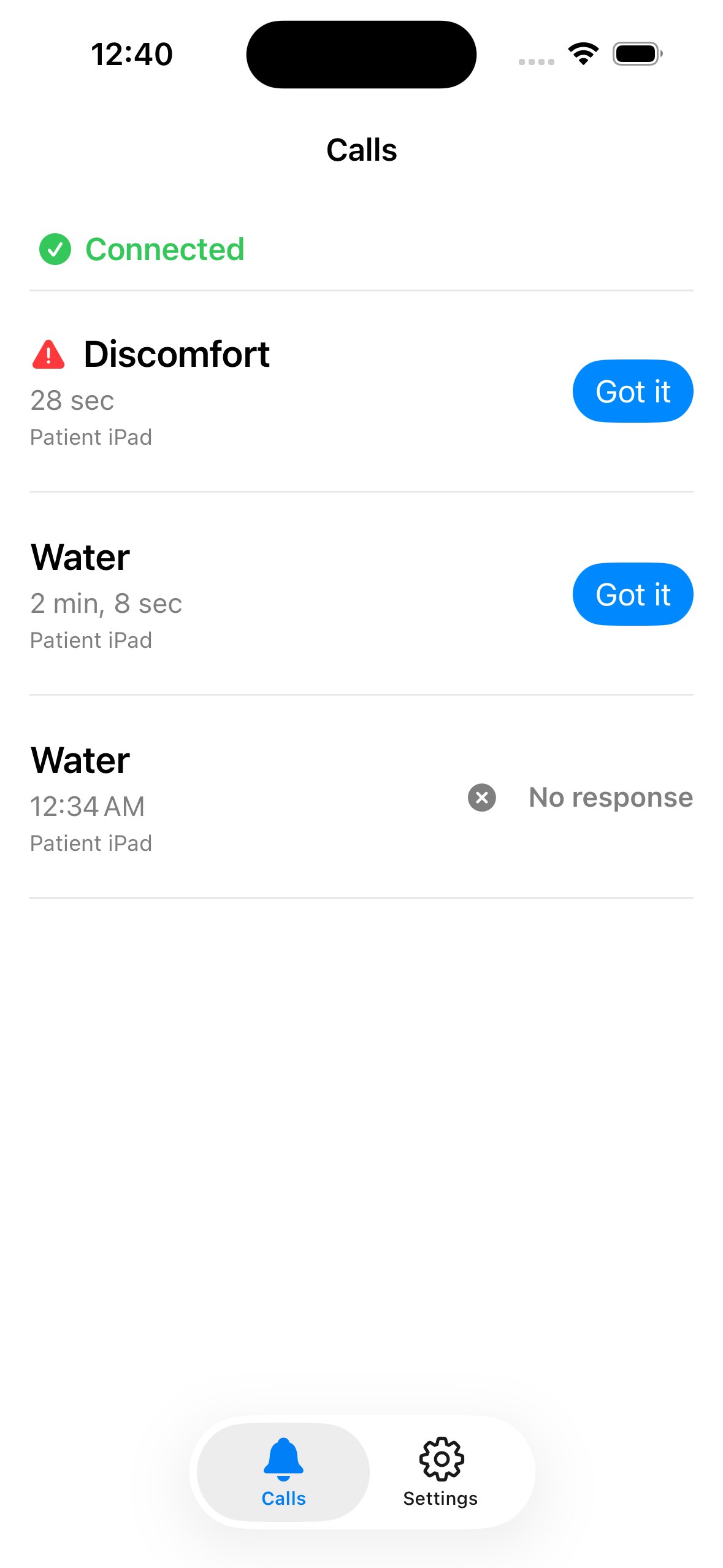
Caregiver side. Each call carries its own state: acknowledged, still waiting, or unanswered after three minutes.
-
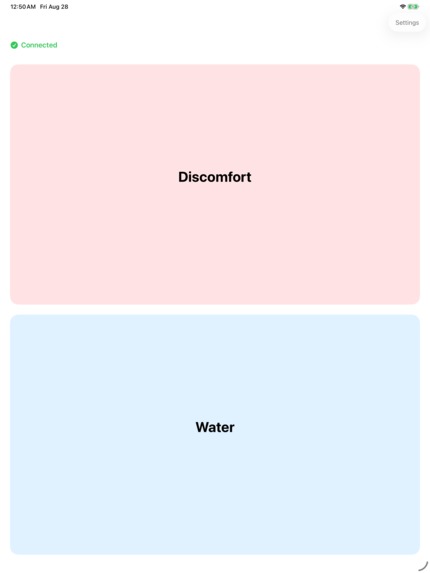
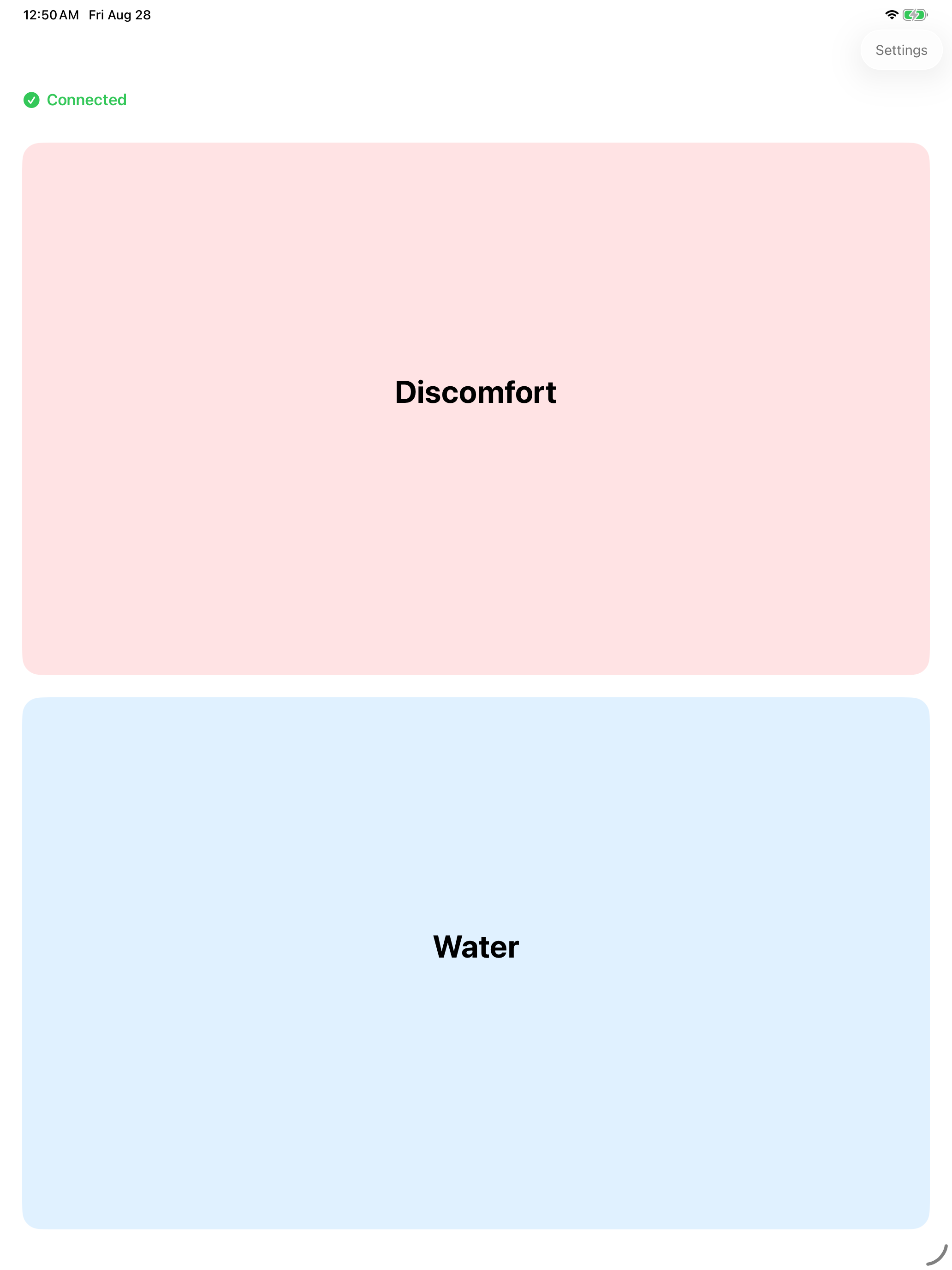
Patient side, beside the bed. One tap to send. No swiping, no long press, so iOS Eye Tracking can drive it directly.
-
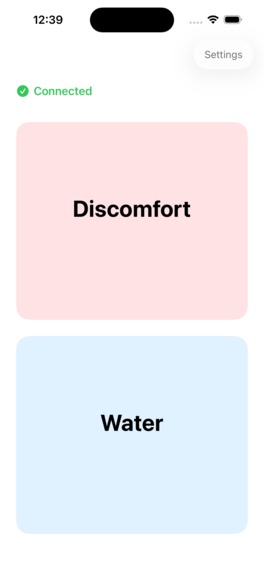
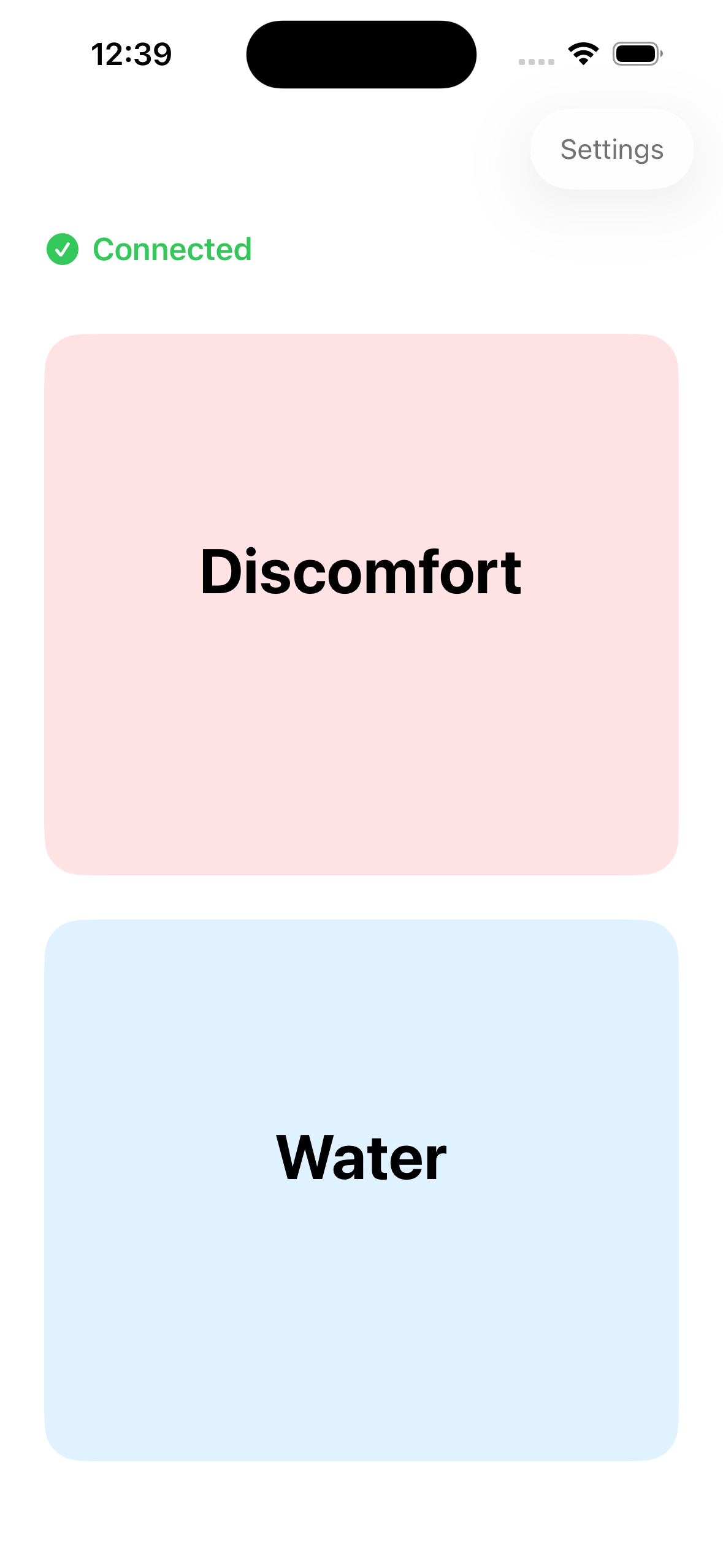
The patient side runs on iPhone too. Both roles live in one app; you choose which device is which on first launch.
-
App icon, 1024×1024, uncropped.
Inspiration
Hospitals have call bells. Homes don't.
Someone recovering in bed after a stroke can often press a button but cannot call out. So can many people living with ALS or severe motor impairment. Their caregiver is in the next room, or has stepped out for ten minutes. There is no way to reach them.
The existing options don't fit. A physical bell only works within earshot. A messaging app requires the ability to type. A cloud-based system fails exactly when home internet does, and home internet fails often.
What was missing was something that works in the room with no network, and that someone who cannot speak or swipe can still operate.
What it does
Two devices, one app, two roles.
Patient side sits on a tablet beside the bed. Full-screen buttons, one tap to send. It ships with two items, "Discomfort" and "Water". The caregiver can add, rename and reorder more: "Turn over", "Too hot", whatever this particular person actually needs.
Caregiver side goes in their pocket. When a call arrives, the phone raises an alarm and speaks the item name aloud, so the caregiver knows what is needed without looking at the screen. Urgent calls repeat until acknowledged or until three minutes pass.
After tapping, the patient sees whether the call was delivered and whether it was acknowledged. Each call carries its own state on both screens: delivered, waiting, or unanswered. For someone who cannot ask again, knowing they were heard is the whole point.
Accessibility was the starting point:
- Every control is a single tap. No swiping, no long press. That is what lets iOS Eye Tracking and Dwell Control operate it directly. The app implements no eye tracking of its own; it stays out of the way of the system's.
- VoiceOver fully supported, and verified on device. During testing I found that a long-press entry point was unusable with VoiceOver, so the design changed to a two-step tap.
- Large targets, high contrast, and connection state shown by icon, text and colour together, never by colour alone.
- The caregiver's alarm is not silenced by the ring switch.
Every feature is free. There are three optional tip options on the caregiver side. They unlock nothing. There is no entitlement check anywhere in the codebase, and the patient side has no purchase UI and no way to spend money at all.
How I built it
- Swift 6, SwiftUI + UIKit in an MVVMC architecture. Every screen is Models / View / ViewModel / HostController, with a single
doActionentry point per ViewModel - Core Bluetooth. The patient is the peripheral, the caregiver the central. A compact binary wire format avoids fragmentation, and state restoration lets calls arrive after iOS has reclaimed the app from memory
- SwiftData for on-device storage. Nothing leaves the devices
- RevenueCat for the tip options, deliberately confined to a single directory so the dependency's blast radius is visible
- Spec-driven development using Spectra. Behaviour was written into specs before the code. The repo carries 12 capability specs (4,647 lines) and 7 archived changes, each with its proposal, design note and task list
The whole thing is open source under MIT.
Challenges I ran into
Three defects, all found the day before submission, all of which had survived checklist entries marked ✅ passed.
1. The alarm never armed after iOS reclaimed the app. A caregiver whose phone had been idle would get one notification chime instead of a repeating alert. The cause: audio session activation was tied to the caregiver screen appearing. When the app is woken by a Bluetooth event in the background, that screen never appears.
Diagnosing it took two wrong turns. First, stopping the debugger in Xcode looked like a testing artifact. It isn't: iOS treats system reclaim and user force-quit completely differently, and the former still restores Bluetooth state. Second, a test 13 hours later worked perfectly, because I had opened the app in between and the "preparation succeeded" path writes no log at all.
That second one produced the most transferable lesson: when success leaves no trace, you cannot tell "it didn't happen" from "it happened but wasn't recorded."
2. Non-urgent calls lost their spoken announcement. Two causes, each hiding the other. The speech was being drowned by the first 1.5 seconds of the alarm tone, and a policy check was stopping playback immediately after it started. Fixing only the first produced no visible change. That is why looking for a single cause never found it.
3. A two-day-old conclusion turned out to be wrong. I had recorded that a custom notification sound was "unreliable" and switched to the system default. The file was fine, and all four specs checked out. The failure had come from defect #1, so the custom sound went back in.
And then: two weeks in the review queue. 2026 has been rough for App Store review times as AI-generated submissions flood the pipeline. Nothing to do but wait.
What I'm proud of
The app works, but the thing worth pointing at is the paper trail.
Every manual device test is written down with its actual result and OS version. That includes the ones that failed, and the entries that were marked passed and later turned out to be wrong. Every architectural decision that cost something to learn is in DECISIONS.md. The specs were written before the code and are still the source of truth.
That is what caught those three defects: a process that demands every claim be re-tested and every result recorded.
What I learned
A ✅ records what happened that one time. It is not a permanent fact. One check was marked passed on Aug 11 with "spoken announcement works" written beside it. It regressed by Aug 14, and a person noticed during ordinary use. No test caught it. That sentence now sits at the top of the release checklist.
Shortening the test loop matters more than fixing any single bug. One defect could originally only be reproduced by leaving devices idle overnight. Once I realised that stopping the Xcode debugger triggers the same code path as a system reclaim, it became a three-second cycle. Both earlier misdiagnoses had happened under the once-a-night rhythm.
Verification steps that need extra hardware get postponed indefinitely. My multi-caregiver test needs three devices while every other check needs two. It was always "next time." A real defect was hiding there, and it is documented in the repo rather than quietly omitted.
Why this benefits people
The people SideBell is for cannot advocate for themselves. That is the definition of the problem: someone who cannot speak or move easily also cannot tell you that the current arrangement isn't working.
Who it reaches. Not a large number, and it would be dishonest to imply otherwise. There is no path here to millions of users. There is a path to mattering a great deal in a few thousand households. A person with ALS in the middle stages. Someone recovering from a stroke. An elderly parent who has had a fall. And with each of them, the one family member trying to cook dinner while listening for a sound from the next room.
What changes for them. Before: shouting, banging on a wall, or waiting. After: a tap, and the caregiver's phone says "Water" out loud from their pocket. The patient's screen then shows whether the call was delivered and whether someone acknowledged it. For a person who cannot ask twice, not knowing whether you were heard is its own distress.
Why it can actually be adopted. Every barrier that usually stops assistive technology from reaching a home has been removed:
- No purchase. Every feature is free, permanently. The tip options unlock nothing.
- No account, no subscription, no server. Nothing to sign up for and nothing to cancel.
- No new hardware. Families in this situation almost always already have a spare tablet and a phone.
- No internet. Bluetooth only, so it works in an old apartment, in a rural house, during an outage, or in a hospital ward with no guest Wi-Fi.
- No new motor skill to learn. Single-tap targets only, which is what lets iOS Eye Tracking and Dwell Control drive the app directly. Someone who can only move their eyes can still call for help.
- Open source, MIT. If this project stops being maintained, the people relying on it are not stranded.
What it deliberately does not claim. It is not a medical alert service, it will not reach a caregiver who has left the house, and it cannot send a call if the app has been force-quit or the device has run out of battery. All three are stated in the app on first launch, in the App Store listing, and in the README. For a tool someone's safety may rest on, an honest boundary is worth more than an impressive claim.
A note for judges on testing
There is nothing to unlock. Every feature is free. The three tip options grant no entitlement, and no promo code is needed because there are no premium features behind one. You can verify this in the source: the codebase contains no entitlement check at all, and the patient side has no purchase UI and no path to spend money.
Bluetooth is unavailable in the Simulator, so seeing calls actually travel requires two real devices. The 43-second demo video shows the full loop on two physical devices in a single unbroken take. The patient taps, the caregiver's phone alarms and speaks, and the acknowledgement returns to the patient's screen.
What's next for SideBell
- Remote push as a complement to Bluetooth, not a replacement, for when the caregiver steps out of range. CloudKit on a single shared iCloud account first, because that answers the one question that matters: whether silent push is fast enough to be trusted
- Indonesian and Vietnamese. In home care in Taiwan, the person actually operating the caregiver's phone is often a migrant care worker: 212,000 of them work as home caregivers. Filipino workers are already served by the English build. Low cost, high value
- Fix the multi-caregiver acknowledgement relay. Right now, if two caregivers are connected and one acknowledges, the other's alarm keeps going until timeout
- Reach the people who need it: ALS associations, assistive technology centres, occupational therapists. They see the families that hospital systems don't reach
Built With
- accessibility
- avfoundation
- core-bluetooth
- eye-tracking
- ios
- ipados
- revenuecat
- swift
- swiftdata
- swiftui
- uikit
- voiceover
- xcodegen

Log in or sign up for Devpost to join the conversation.