-
-
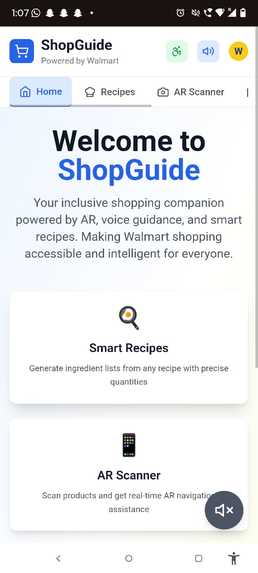
ShopGuide Mobile App Version
-
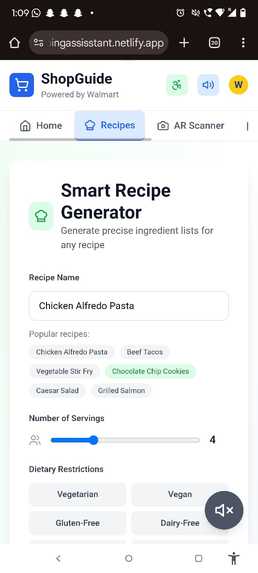
ShopGuide Smart Recipe Generator
-
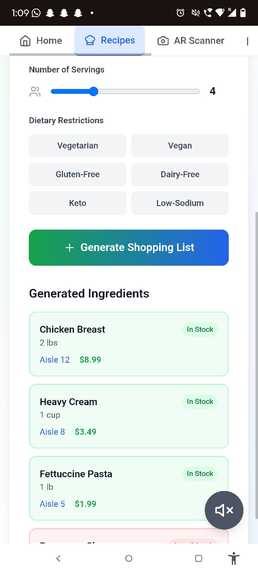
ShopGuide Shopping List Generated
-
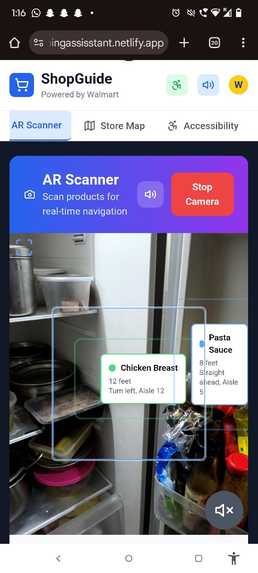
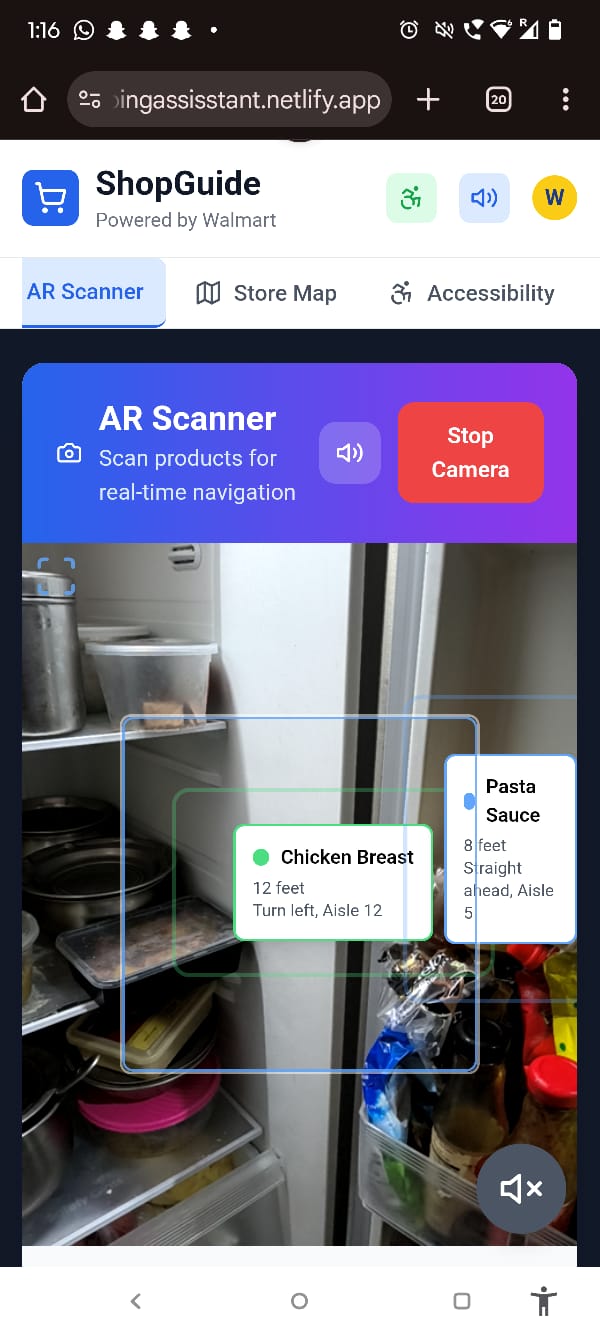
ShopGuide AR shopping Assistant
-
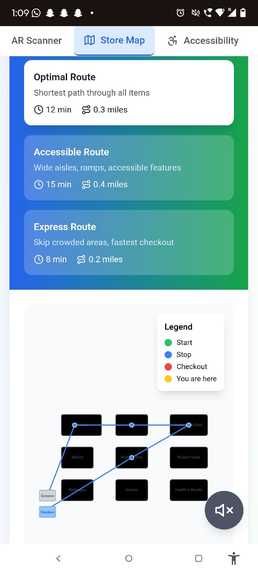
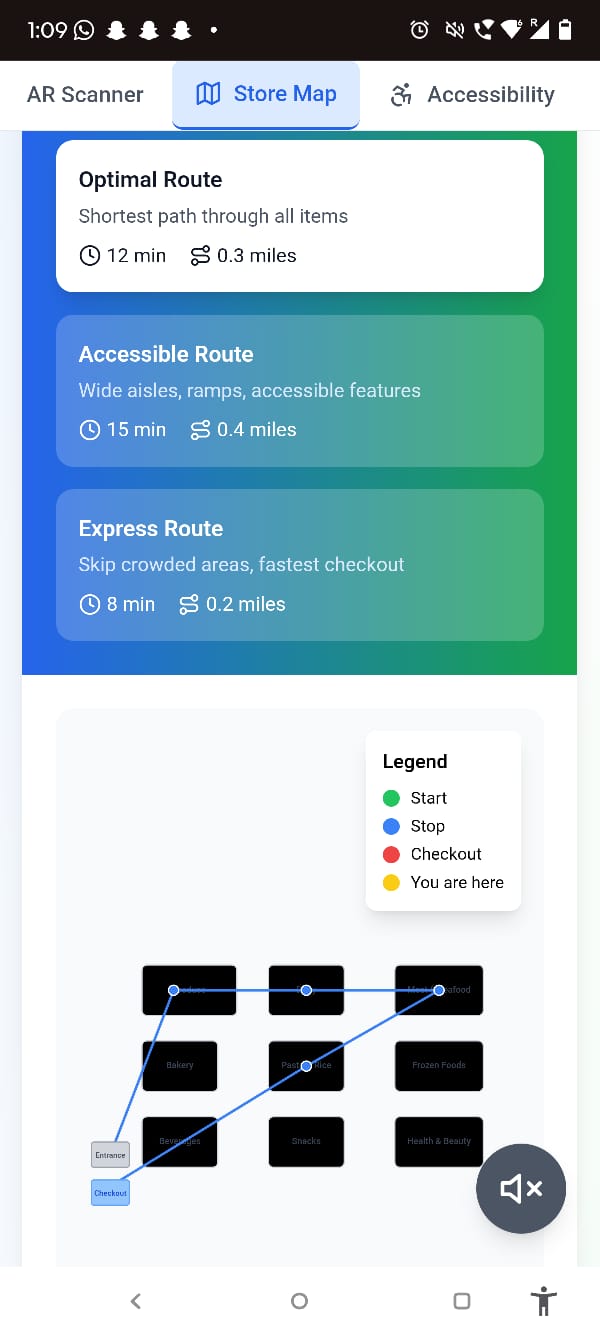
ShopGuide Optimized store Layout
-
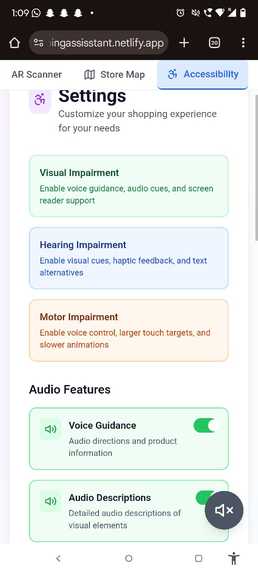
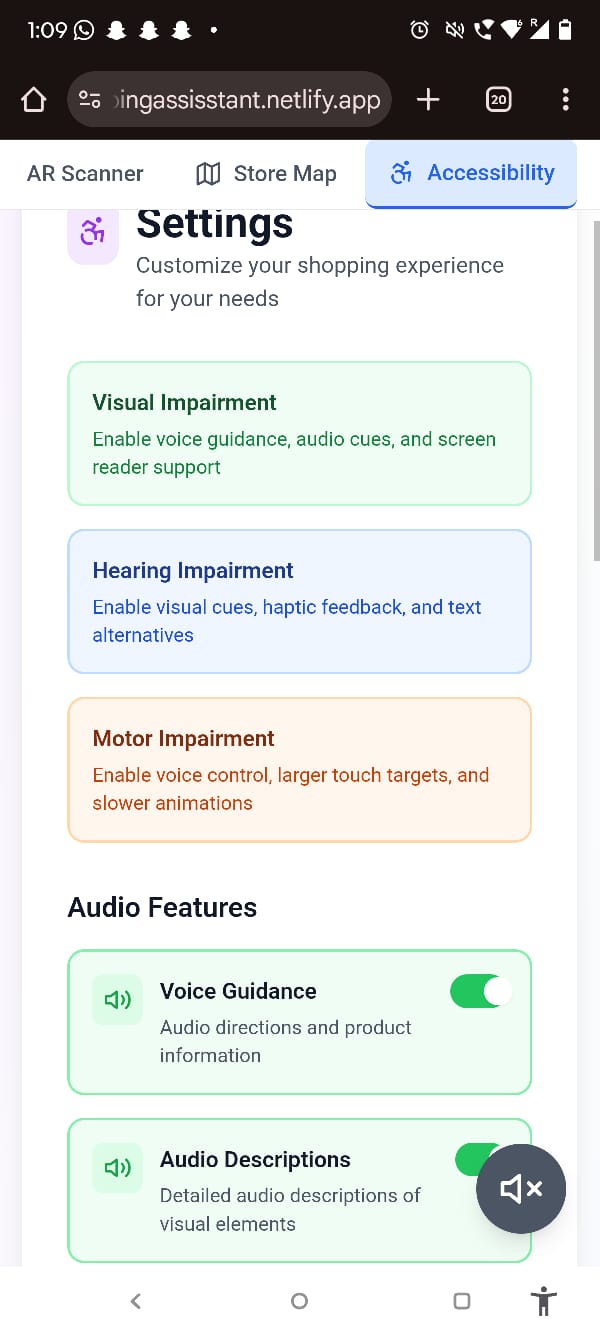
ShopGuide Accessiblity settings for disabled people
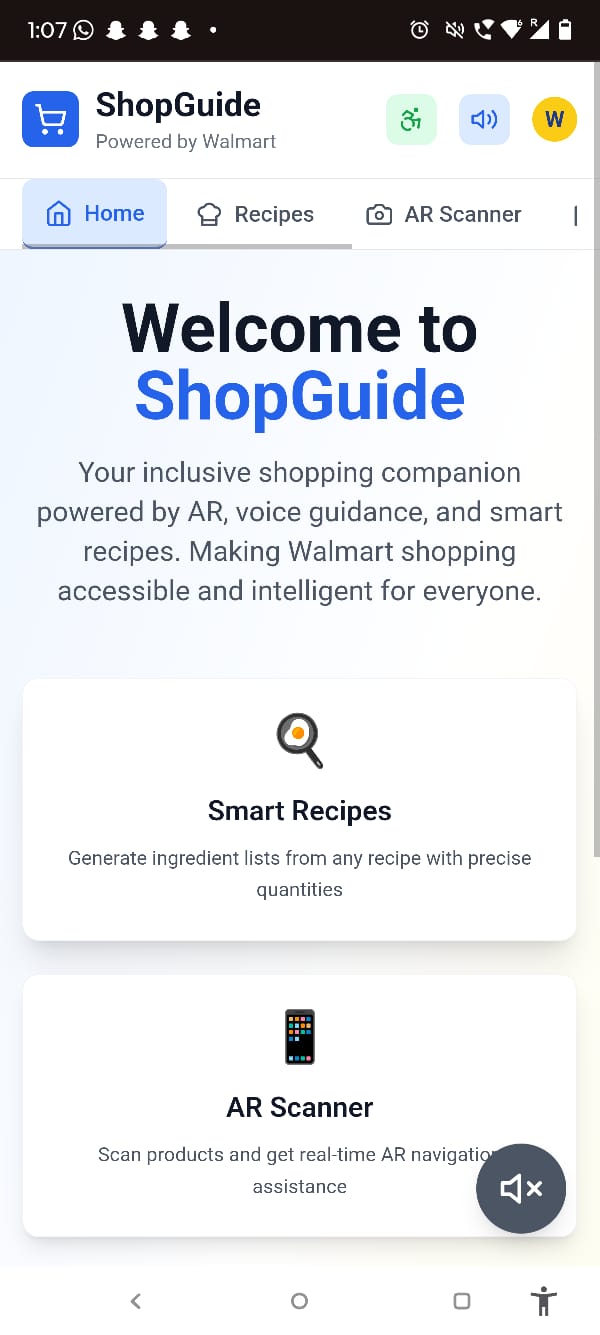

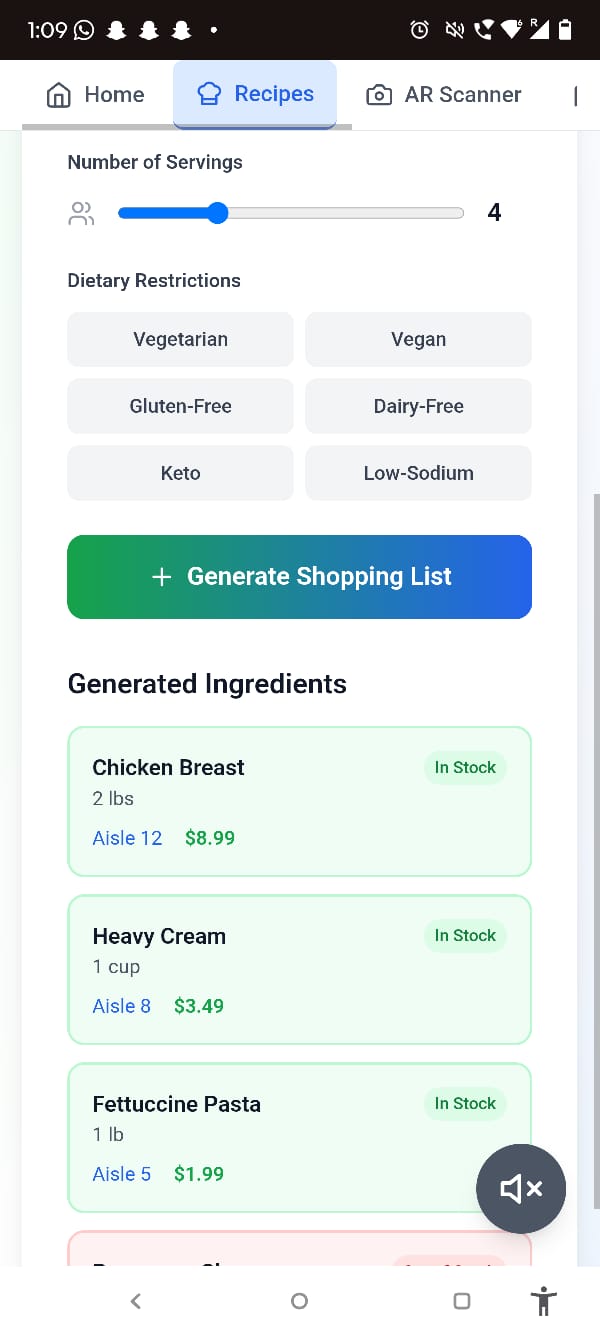
ShopGuide: Your Inclusive Shopping Companion
Making shopping accessible and intelligent for everyone through AR, voice guidance, and smart recipes.
Inspiration
The spark for ShopGuide came during a simple grocery trip with my grandmother. I watched her struggle with tiny ingredient labels, squinting at nutrition facts, and feeling overwhelmed navigating the endless aisles. She sighed and said, "I wish I could just talk to the store and it would help me find what I need."
That moment hit me hard. Here was someone who raised a family, managed a household for decades, and cooked incredible meals from memory – but modern shopping had become a source of frustration rather than independence.
I started thinking about all the barriers people face while shopping:
- My friend who's visually impaired and relies on others for grocery runs
- Elderly neighbors who avoid shopping because they feel overwhelmed
- Busy parents trying to convert recipes into shopping lists while juggling kids
- People with mobility challenges who can't reach high shelves
What if shopping could be as simple as having a conversation with a helpful friend? What if technology could break down these barriers instead of creating new ones?
That's when ShopGuide was born – not just as an app, but as a mission to make shopping inclusive, intelligent, and empowering for everyone.
What ShopGuide Does
ShopGuide is your voice-powered, AR-enhanced shopping companion that transforms how people interact with stores and products. Think of it as having a super-intelligent shopping buddy who never gets tired, always remembers what you need, and speaks your language.
Voice-First Shopping Experience
- Natural Conversations: "I want to make pasta carbonara tonight" → Complete shopping list with quantities
- Store Navigation: "Where can I find gluten-free bread?" → Voice-guided directions to the exact aisle
- Product Information: "Read me the ingredients on this package" → Instant audio description
Augmented Reality That Actually Helps
- Smart Product Recognition: Point your camera at shelves for instant price comparisons and reviews
- Visual Navigation: AR arrows and signs guide you through unfamiliar stores
- Accessibility Overlays: Large text, high contrast, and audio descriptions for visual elements
Intelligent Recipe Integration
- Smart Shopping Lists: Transform any recipe into an optimized shopping list
- Pantry Awareness: Skip items you already have at home
- Dietary Intelligence: Automatic substitutions for allergies and preferences
- Nutritional Insights: Real-time health information as you shop
Accessibility at the Core
- Screen Reader Optimized: Full compatibility with assistive technologies
- Keyboard Navigation: Complete functionality without touch or mouse
- Voice Control: Navigate the entire app using only voice commands
- Customizable Interface: Adjust text size, contrast, and interaction methods
How I Built It
Technology Stack
- Frontend: React.js with modern JavaScript (ES6+)
- AR Framework: WebXR and AR.js for cross-platform augmented reality
- Voice Recognition: Web Speech API with custom noise cancellation
- Accessibility: ARIA standards and WCAG 2.1 compliance from day one
- APIs: Recipe databases, nutritional data, and price comparison services
- Deployment: Netlify with continuous integration
Development Approach
1. Accessibility-First Architecture We didn't treat accessibility as an add-on – it was our foundation. Every component was built with screen readers, keyboard navigation, and voice control in mind from the first line of code.
2. Modular Voice System Created a custom voice command engine that understands context:
// Example: Understanding shopping context
"add milk" → adds to shopping list (not recipe)
"two pounds of tomatoes" → quantity recognition
"find organic options" → filter products
3. Smart AR Implementation Instead of flashy 3D models, we focused on practical overlays:
- Price comparison bubbles
- Accessibility information panels
- Navigation arrows and waypoints
- Text enlargement for small labels
4. Recipe Intelligence Engine Built a parser that converts natural language recipes into structured shopping data:
- Ingredient extraction and quantity normalization
- Dietary restriction filtering
- Substitution suggestions
- Nutritional analysis
5. Progressive Web App Design Ensured the app works across devices and connection speeds:
- Service workers for offline functionality
- Responsive design for all screen sizes
- Camera and microphone permission handling
- Battery-conscious AR rendering
Challenges I Faced!!!
The Voice Recognition Reality Check
Getting voice commands to work in quiet development environments is one thing – making them functional in noisy grocery stores with crying babies, cart wheels, and overhead announcements is entirely different.
Challenge: The Web Speech API would pick up everything except what users actually said.
Solution: We implemented:
- Custom noise filtering algorithms
- Context-aware command interpretation
- Fallback visual confirmations
- User-trainable voice patterns
AR in the Real World
Our beautiful AR demos worked perfectly in our well-lit office but completely failed in dimly lit stores or under fluorescent lighting.
Challenge: Inconsistent performance across different devices and environments.
Solution:
- Multiple lighting condition adaptations
- Device capability detection
- Graceful degradation to 2D overlays
- User-controlled sensitivity settings
The Accessibility Learning Curve
None of us were accessibility experts when we started. We made embarrassing mistakes – like creating visually stunning interfaces that were completely unusable with screen readers.
Challenge: Building truly accessible interfaces, not just compliant ones.
Solution:
- Partnered with local accessibility advocates
- Conducted real user testing with people who use assistive technologies
- Rebuilt components multiple times based on feedback
- Studied actual usage patterns, not just guidelines
Recipe Parsing Complexity
Converting "grandma's secret recipe" into a structured shopping list sounds simple until you realize that "1 cup of flour" might mean different things to different people.
Challenge: Understanding the nuances of cooking measurements and preferences.
Solution:
- Built a comprehensive ingredient database
- Created measurement conversion systems
- Implemented preference learning
- Added manual override options
Performance vs. Features Balance
Every cool feature we added made the app slower. AR rendering, voice processing, and recipe analysis all compete for device resources.
Challenge: Maintaining smooth performance while providing rich functionality.
Solution:
- Lazy loading for non-essential features
- Efficient AR rendering with frame rate optimization
- Background processing for voice commands
- Smart caching for frequently accessed data
What I'm Proud Of
Real Human Impact
Honestly, we didn't finish everything we set out to build – there are still features in our backlog and bugs we're chasing down. But when I showed my grandmother our early prototype, watching her eyes light up as she successfully used voice commands to add items to a shopping list... that moment made all the late nights worth it. She said, "Finally, something that actually listens to me!"
We may not have a perfect, polished product yet, but we have something that genuinely helps people. That's not just a feature milestone for us – it's proof that we're on the right path, even if we're not at the finish line yet.
Technical Achievements
- Cross-Platform AR: Built AR experiences that work consistently across different devices and browsers
- Context-Aware Voice: Created voice recognition that understands shopping context and intent
- Accessibility Excellence: Achieved full keyboard navigation and screen reader compatibility without compromising visual design
- Smart Recipe Integration: Developed algorithms that can parse natural language recipes and generate intelligent shopping suggestions
Community Building
We didn't just build an app – we built relationships with:
- Accessibility advocates who provided crucial feedback
- Local grocery stores interested in inclusive technology
- Recipe creators who want to make cooking more accessible
- Beta testers who became passionate advocates for the project
What I Learned through this whole process
Accessibility Drives Innovation
Building for people with disabilities didn't limit our creativity – it expanded it. Voice navigation and AR features that we initially designed for accessibility ended up being loved by all users. Universal design principles made our app better for everyone.
Simplicity Wins Over Complexity
Our first prototype had 47 different features. Users wanted 5 features that worked perfectly. We learned that the best technology often feels invisible – it just works when you need it.
Context Is Everything
The same person might need:
- Hands-free voice control while pushing a cart
- Visual AR overlays while comparing products
- Simple text lists while meal planning at home
Good design adapts to the moment and the user's current needs.
Community Feedback Is Gold
Our assumptions about what people needed were often completely wrong. The disability community, elderly users, and busy parents taught us more about user experience than any design course ever could.
Inclusion Requires Intention
Accessibility can't be retrofitted – it has to be woven into every decision from the beginning. This mindset didn't just make us better developers; it made us more empathetic people.
Progress Over Perfection
We learned that launching an imperfect product that helps people is better than endlessly polishing something that never sees the light of day. Real user feedback beats theoretical perfection every time.
What's Next for ShopGuide
*Immediate Goals *
- Enhanced Voice Recognition: Improve accuracy in noisy environments
- Offline Mode: Core features that work without internet connection
- Multi-Language Support: Starting with Spanish and ASL integration
- Store Partnerships: Collaborate with local grocers for location-specific features
*Medium-Term Vision *
- AI Nutritionist: Personalized health recommendations based on shopping patterns
- Community Recipe Platform: User-generated recipes with built-in shopping list generation
- Smart Home Integration: "Hey Google, tell ShopGuide I'm out of milk"
- Predictive Shopping: AI that learns patterns and suggests shopping lists proactively
Long-Term Impact
- Universal Design Standard: Open-source our accessibility framework to help other developers
- Global Accessibility: Partner with international retailers to bring inclusive shopping worldwide
- Research Contributions: Publish findings on voice UX and AR accessibility
Personal Mission
We want ShopGuide to be the app that makes people forget that grocery shopping was ever difficult. When my grandmother can confidently navigate any store, when people with disabilities can shop independently, and when technology truly serves everyone – that's when we'll know we've succeeded.
Final Thoughts
ShopGuide started as a hackathon project, but it's become something much bigger – a reminder that the best technology isn't about showing off the latest features, but about solving real human problems with empathy and intention.
I'm building more than an app; I'm building a bridge to independence, confidence, and dignity in everyday activities that many of us take for granted.
The journey is just beginning, and we can't wait to see where it leads.
"The best technology is technology that disappears – leaving only human potential in its place."
Live Demo: https://shop-guide.netlify.app/
Repository: https://github.com/Amoha-V/ShopGuide
Built With
- accessibility
- accessible
- actions
- analysis
- apis
- app
- applications)
- ar.js
- aria
- augmented
- axe-core
- browser
- build
- bundle
- cache
- camera
- central
- chrome
- ci/cd)
- code
- context
- css
- css3
- deployment
- development
- devtools
- edamam
- es6+)
- features
- flexbox
- fooddata
- framework
- frontend
- git
- github
- gps
- grid
- hooks
- html5
- image
- indexeddb
- internet
- javascript
- jest
- languages
- lazy
- library
- lighthouse
- loading
- localstorage
- management
- manifest
- mediadevices
- modules
- netlify
- npm/yarn
- nutrition
- nutritional-data
- optimization
- performance
- permissions
- pwa
- react
- react.js
- reality
- recipe
- recognition
- rich
- service
- session
- speech
- splitting
- spoonacular
- standards
- state
- storage
- studio
- styling
- synthesis
- technology
- testing
- testing)
- tools
- usda
- usestate/useeffect
- vibration
- visual
- vite
- voice
- wcag
- webpack
- webrtc)
- webworkers
- webxr

Log in or sign up for Devpost to join the conversation.