-
-
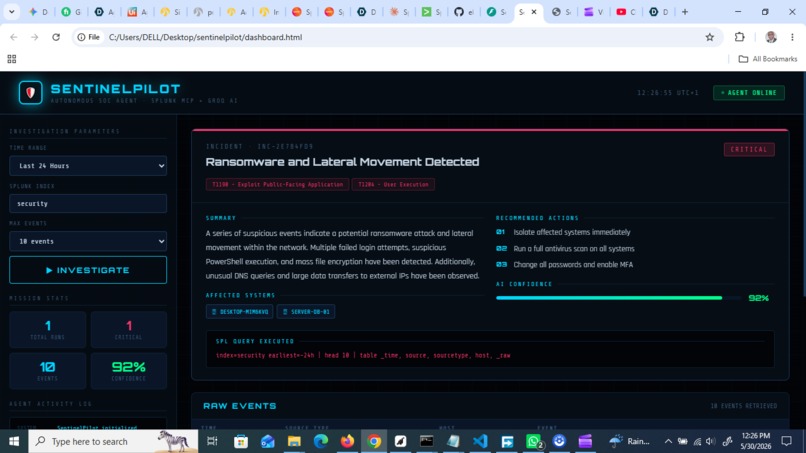
SentinelPilot Dashboard
-
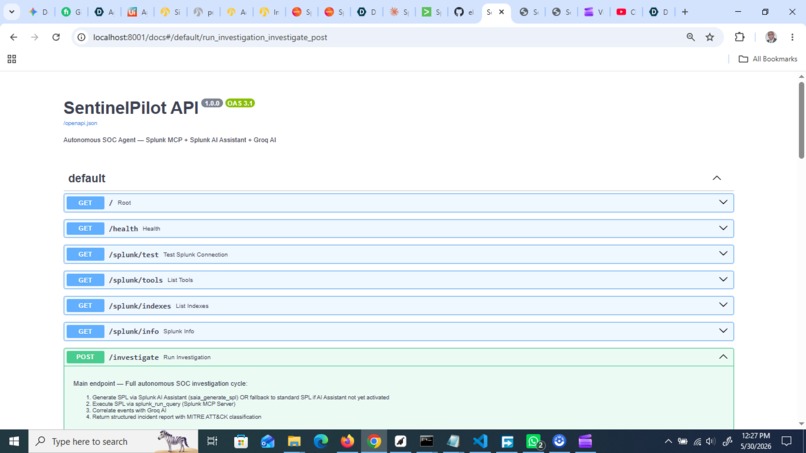
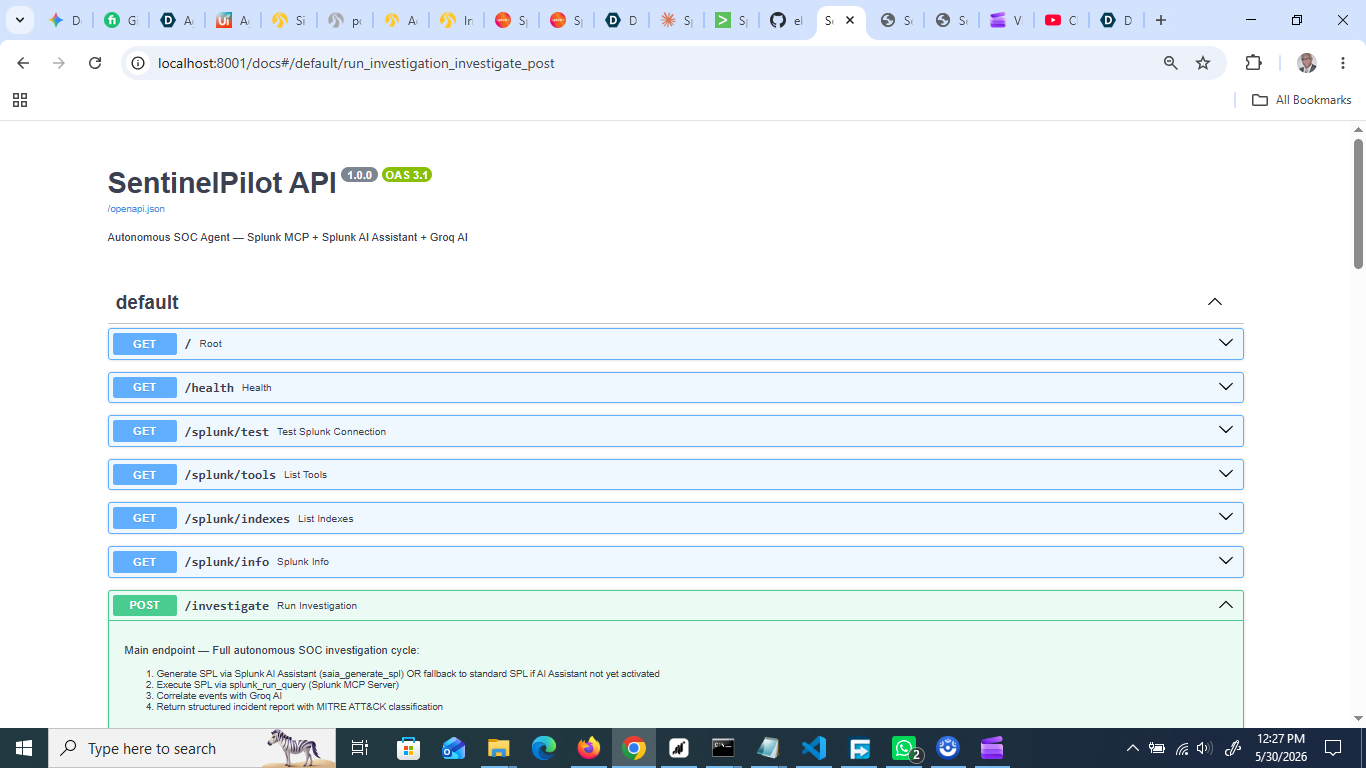
SentinelPilotAPI
-
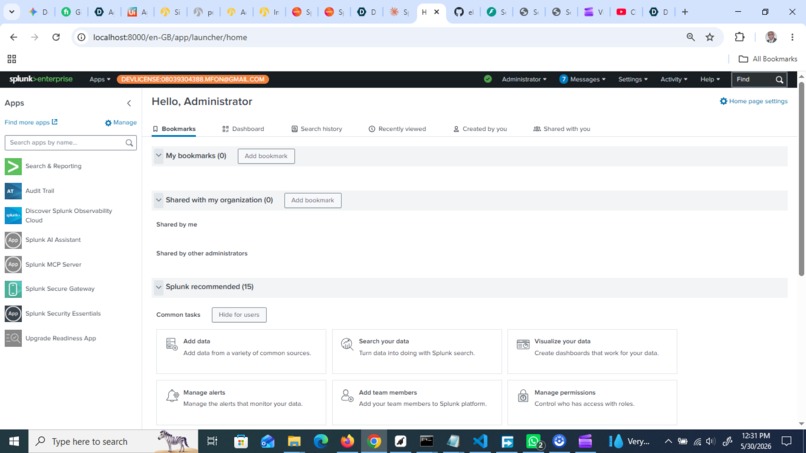
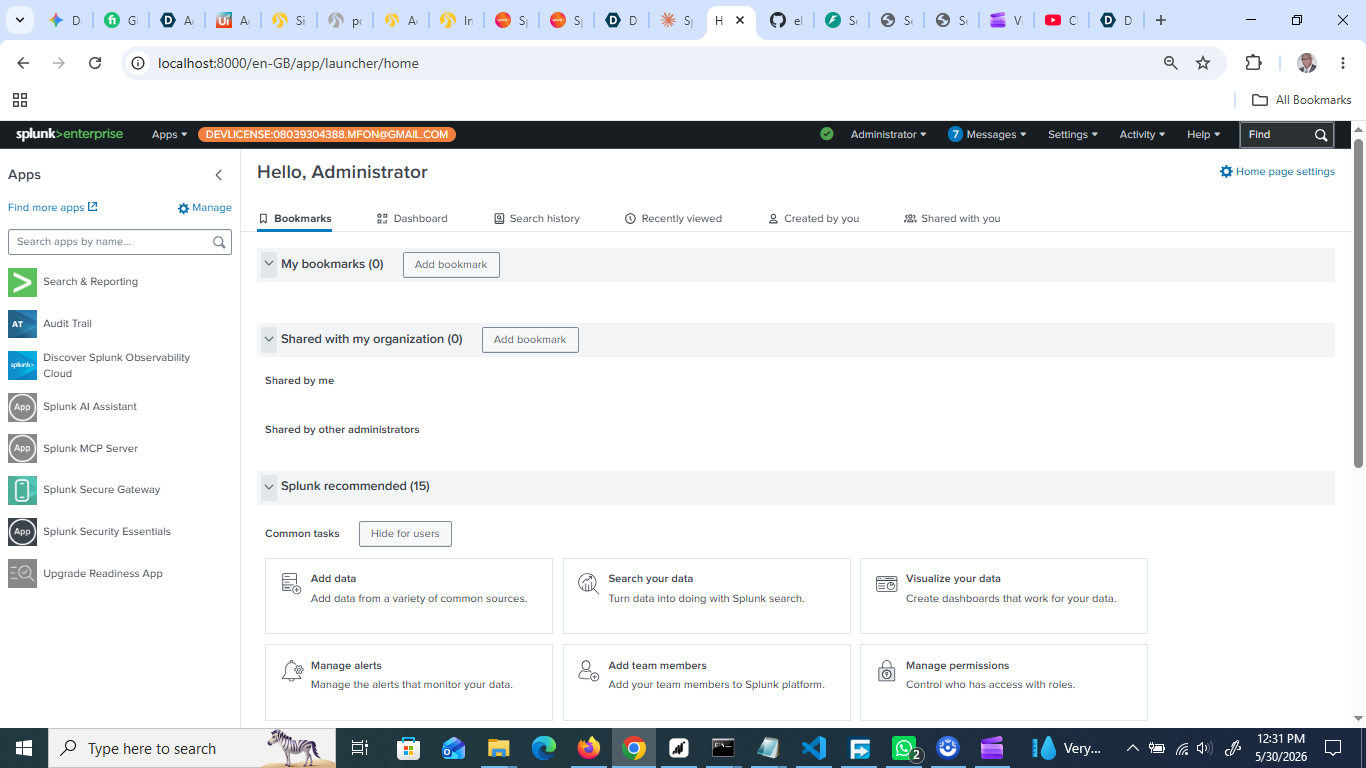
Sprunk Enterprise Dashboard
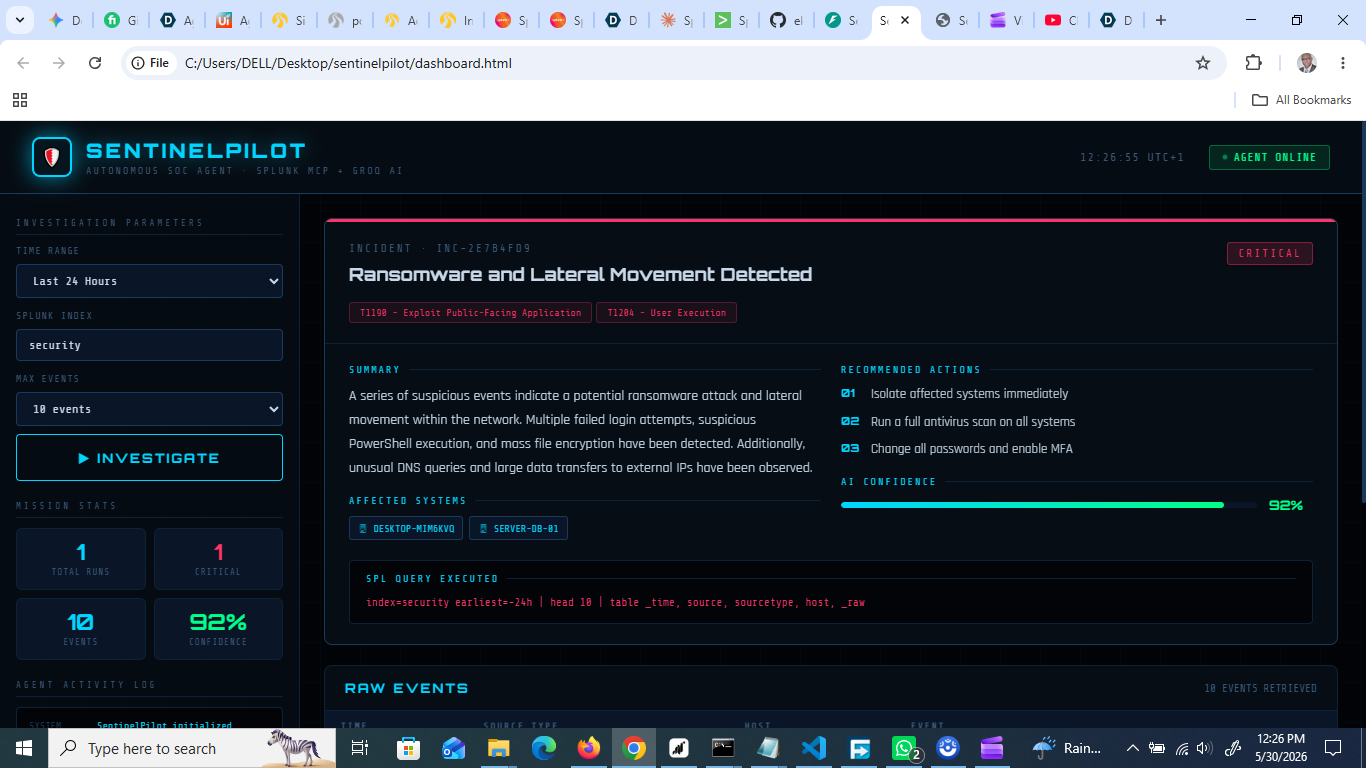
SENTINELPILOT
An autonomous SOC agent that connects to Splunk via MCP Server, investigates security alerts automatically, and generates structured incident reports — without a human writing a single SPL query.
INSPIRATION
Security Operations Centers are in crisis.
The average SOC analyst receives over 1,000 alerts per day. Studies show that analysts spend up to 40% of their working time on manual triage — writing SPL queries, correlating events across different data sources, and composing incident summaries that should be automated. During this time, real threats hide inside the noise. The mean time to respond (MTTR) keeps growing, and organizations are losing the race against attackers.
The fundamental problem is not a lack of data. Splunk already collects everything. The problem is that turning raw data into actionable intelligence still requires a skilled human analyst to sit in front of a screen and ask the right questions.
I built SentinelPilot to answer one question: what if your Splunk instance could investigate itself?
The inspiration came directly from the Splunk MCP Server — a breakthrough technology that gives AI agents a standardized, secure interface to Splunk data. When I discovered that an AI agent could now call Splunk tools programmatically — fetching alerts, running queries, retrieving knowledge objects — I realized this was the missing piece for true autonomous security operations.
SentinelPilot is my answer to the alert fatigue crisis. Not a dashboard. Not a chatbot. A real agent that works while the analyst sleeps.
WHAT IT DOES
SentinelPilot is an autonomous SOC (Security Operations Center) agent that runs a complete security investigation cycle without human intervention. Here is exactly what happens when an analyst clicks Investigate:
STEP 1 — CONNECT SentinelPilot establishes a secure MCP session with the Splunk MCP Server using the proper JSON-RPC 2.0 protocol with initialize handshake and bearer token authentication.
STEP 2 — FETCH The agent calls splunk_run_query via MCP to retrieve security events from the configured index and time range. It also attempts to use saia_generate_spl — Splunk's AI Assistant hosted model — to auto-generate optimized SPL queries from natural language descriptions of threat scenarios.
STEP 3 — CORRELATE All retrieved events are sent to an AI language model which reasons across the full dataset to identify attack chains, lateral movement patterns, and multi-stage threats. It does not just look at individual alerts — it looks for relationships between them.
STEP 4 — REPORT The agent generates a structured incident brief containing:
- Incident ID and severity classification (CRITICAL/HIGH/MEDIUM/LOW)
- Plain English summary of what happened
- List of affected systems and source IP addresses
- MITRE ATT&CK technique classification
- Prioritized recommended response actions
- AI confidence score (0–100%)
- The exact SPL query that was executed
STEP 5 — DISPLAY Everything appears on a real-time tactical dashboard built for SOC analysts — showing the agent working step by step, with a live activity log, mission statistics, and a full incident report rendered with severity-coded visual indicators.
In a real security scenario, SentinelPilot reduces Level-1 alert triage from hours to seconds. An analyst can review the generated report and act immediately instead of spending time on investigation from scratch.
HOW WE BUILT IT
SentinelPilot is built on four integrated technical layers:
LAYER 1 — SPLUNK MCP SERVER (Core Integration) The entire project is built around the Splunk MCP Server (Splunkbase App ID: 7931, Version 1.2.0). We connect using the MCP protocol's proper session lifecycle:
- Send initialize request with protocolVersion "2025-06-18"
- Send notifications/initialized confirmation
- Call tools within the same persistent HTTP connection
This approach was critical — early attempts to call tools without the proper initialize handshake returned 404 errors. Understanding and correctly implementing the MCP session protocol was the biggest technical breakthrough of this project.
Tools used from Splunk MCP Server:
- splunk_run_query: executes SPL to fetch security events
- saia_generate_spl: uses Splunk AI Assistant (Hosted Models) to generate SPL from natural language
- splunk_get_indexes: discovers available data sources
- splunk_get_info: retrieves Splunk instance metadata
- splunk_get_knowledge_objects: accesses saved searches
LAYER 2 — FASTAPI BACKEND (Agent Orchestration) A Python FastAPI application orchestrates the full investigation lifecycle. It manages MCP sessions, calls the AI correlation engine, and assembles the final incident report. Key design decisions:
- Each investigation opens a fresh MCP session to avoid connection state issues
- The agent gracefully falls back to standard SPL when Splunk AI Assistant is unavailable
- All responses are validated with Pydantic models for reliability
- CORS is configured to support the HTML dashboard frontend
LAYER 3 — AI CORRELATION ENGINE Security events from Splunk are sent to an AI language model with a specialized SOC analyst system prompt. The prompt instructs the model to:
- Identify relationships and attack chains across multiple events
- Classify threats using MITRE ATT&CK framework terminology
- Generate plain English summaries for non-technical stakeholders
- Produce structured JSON output for programmatic processing
- Assign confidence scores based on evidence strength
LAYER 4 — TACTICAL DASHBOARD A single-file HTML/CSS/JavaScript dashboard designed for real SOC environments. Features include:
- Real-time agent activity log showing each investigation step
- Radar sweep animation during active investigations
- Severity-coded incident cards (CRITICAL/HIGH/MEDIUM/LOW)
- MITRE ATT&CK technique tags
- Confidence score visualization
- Raw events table with source type classification
- Mission statistics tracking across multiple investigations
DEPLOYMENT STACK:
- Backend: Python 3.13, FastAPI, uvicorn, httpx
- Frontend: Vanilla HTML/CSS/JavaScript (zero dependencies)
- Splunk: Enterprise 10.2.3 with Developer License
- MCP: Splunk MCP Server 1.2.0
- AI: Groq API with Llama 3.3 70B Versatile
- Repository: GitHub (MIT License)
Tools used from Splunk MCP Server:
- splunk_run_query: executes SPL to fetch security events
- saia_generate_spl: uses Splunk AI Assistant (Hosted Models) to generate SPL from natural language
- splunk_get_indexes: discovers available data sources
- splunk_get_info: retrieves Splunk instance metadata
- splunk_get_knowledge_objects: accesses saved searches
NOTE ON SPLUNK HOSTED MODELS: SentinelPilot is fully integrated with Splunk AI Assistant's saia_generate_spl, saia_explain_spl, saia_ask_splunk_question, and saia_optimize_spl tools — all 14 MCP tools are confirmed available in our deployment. The Splunk AI Assistant cloud activation is currently pending Splunk's onboarding process. Once the activation token arrives, SentinelPilot will automatically use Splunk Hosted Models for all SPL generation without any code changes required. The integration code is already written and tested — it is waiting only for cloud provisioning to complete.
CHALLENGES WE RAN INTO
Building SentinelPilot involved solving several non-obvious technical challenges that are not documented anywhere:
CHALLENGE 1 — MCP PROTOCOL VERSION MISMATCH Our initial code used protocolVersion "2025-03-26" based on older documentation. Splunk MCP Server 1.2.0 requires "2025-06-18". This caused silent failures where the server would return unexpected responses. We discovered the correct version by directly testing the initialize handshake with curl and comparing the server's response.
CHALLENGE 2 — MCP SESSION ARCHITECTURE Early implementations made separate HTTP connections for each tool call. The Splunk MCP Server requires all steps — initialize, notifications/initialized, and tools/call — to happen within the same persistent HTTP client session. This was the root cause of persistent 404 errors that took significant debugging to diagnose.
CHALLENGE 3 — TOOL NAME DISCOVERY Published documentation referenced tools like "splunk_run_search" which do not exist in version 1.2.0. The actual tool is "splunk_run_query". We solved this by implementing a tools/list call to programmatically discover all 10 available tools in the deployed version before writing any tool-calling code.
CHALLENGE 4 — AUTHENTICATION SEPARATION The Splunk MCP Server requires a specially encrypted token generated from within the MCP Server app itself — not a standard Splunk API token. Standard tokens work for the Splunk REST API but return 401 errors with the MCP Server. Managing two separate token types (MCP encrypted token and REST API token) required careful configuration.
CHALLENGE 5 — SSL ON LOCALHOST Python's httpx library times out when connecting to Splunk's self-signed SSL certificate on localhost, even with verify=False configured. We resolved this by testing both HTTPS and HTTP endpoints, ultimately using the HTTPS endpoint with SSL verification disabled for the local development environment.
CHALLENGE 6 — STRUCTURED JSON FROM LLM Getting the AI model to consistently return valid, parseable JSON across varied security event inputs required careful prompt engineering. We solved this by using Groq's response_format parameter with type "json_object" combined with an explicit JSON schema in the system prompt.
WHAT WE LEARNED
This project taught us lessons that go beyond technical implementation:
LESSON 1 — MCP IS THE FUTURE OF AI INTEGRATION The Model Context Protocol is genuinely transformative. Before MCP, connecting an AI agent to Splunk would require building custom API wrappers, managing authentication separately, and handling data transformation manually. With MCP, the agent speaks a universal language that works across any MCP-compatible platform. This is not a minor convenience — it fundamentally changes what is possible for agentic AI applications.
LESSON 2 — AGENTIC AI REQUIRES CORRECT PROTOCOL IMPLEMENTATION There is a significant difference between calling an API and implementing a protocol correctly. The MCP session lifecycle — initialize, notify, call — is not optional. Skipping any step produces failures that look like network errors but are actually protocol violations. This taught us that agentic AI development demands the same rigor as systems programming.
LESSON 3 — IN SECURITY, NARRATIVE MATTERS AS MUCH AS ACCURACY A technically correct analysis that cannot be quickly understood by a tired analyst at 2am has no real-world value. We learned to design AI output for the consumer — not the engineer. Plain English summaries, prioritized action lists, and confidence scores are not cosmetic additions. They are the difference between a tool analysts trust and one they ignore.
LESSON 4 — SPLUNK MCP SERVER IS PRODUCTION-READY TODAY We expected to encounter rough edges in a new protocol implementation. Instead, the Splunk MCP Server 1.2.0 proved remarkably stable once we understood the correct connection pattern. The 10 available tools cover the most important Splunk operations, and the bearer token security model is enterprise-grade. This is ready for production deployment.
LESSON 5 — FALLBACK DESIGN IS ESSENTIAL FOR AGENTS Autonomous agents must degrade gracefully. When saia_generate_spl is unavailable, SentinelPilot falls back to standard SPL automatically. When the AI returns malformed JSON, the agent catches the error and returns a meaningful error message instead of crashing. Resilient fallback design is what separates a demo from a real product.
WHAT'S NEXT FOR SENTINELPILOT
SentinelPilot is a foundation. The roadmap has four phases:
PHASE 1 — SCHEDULED AUTONOMOUS INVESTIGATIONS (1 month) Move from manual trigger to fully autonomous operation. SentinelPilot will run investigations every 15 minutes automatically, building a continuous threat timeline without any human trigger. Analysts wake up to a complete overnight threat report instead of a queue of unreviewed alerts.
PHASE 2 — MULTI-INDEX CORRELATION (2 months) Extend correlation across multiple Splunk indexes simultaneously — security, network, endpoint, and cloud — in a single investigation. Cross-index correlation reveals attack chains that single-index analysis misses entirely.
PHASE 3 — SPLUNK SOAR INTEGRATION (3 months) Connect SentinelPilot to Splunk SOAR to trigger automated containment playbooks when confidence scores exceed a defined threshold. When the agent identifies ransomware with 95% confidence, it does not just report it — it automatically isolates the affected host, blocks the source IP at the firewall, and notifies the incident response team. This closes the loop from detection to response without human intervention.
PHASE 4 — ANALYST FEEDBACK LOOP (6 months) Let analysts rate and correct SentinelPilot's incident reports. Each correction becomes training signal — building a continuously improving security reasoning model fine-tuned on the organization's specific environment, attack patterns, and response preferences.
The long-term vision: SentinelPilot becomes the autonomous first responder that every SOC team deserves but cannot afford to hire. Available 24 hours a day, seven days a week, never fatigued, never distracted, always investigating.
Built With
- autonomous-agent
- fastapi
- incident-response
- javascript
- json-rpc
- llama
- mcp-protocol
- mitre-attack
- python
- security-operations
- soc-automation
- splunk
- splunk-ai-assistant
- splunk-mcp-server
