Inspiration
The name Sankofa represents learning from the past to protect the future — exactly what a SOC analyst does every time an alert fires.
I built Sankofa because I've seen first-hand what alert fatigue does to security teams. A typical SOC analyst receives hundreds of alerts per shift. They manually write SPL queries, cross-reference logs across four or five sourcetypes, look up IPs on VirusTotal, and piece together a timeline — all before they can make a single decision. That's 20 to 40 minutes per alert, for every alert, every shift, forever. Critical threats get buried. Analysts burn out. Breaches happen while the queue is full.
The question I started with was simple: what if Splunk could do the investigation itself, and the analyst only touched what actually mattered?
What It Does
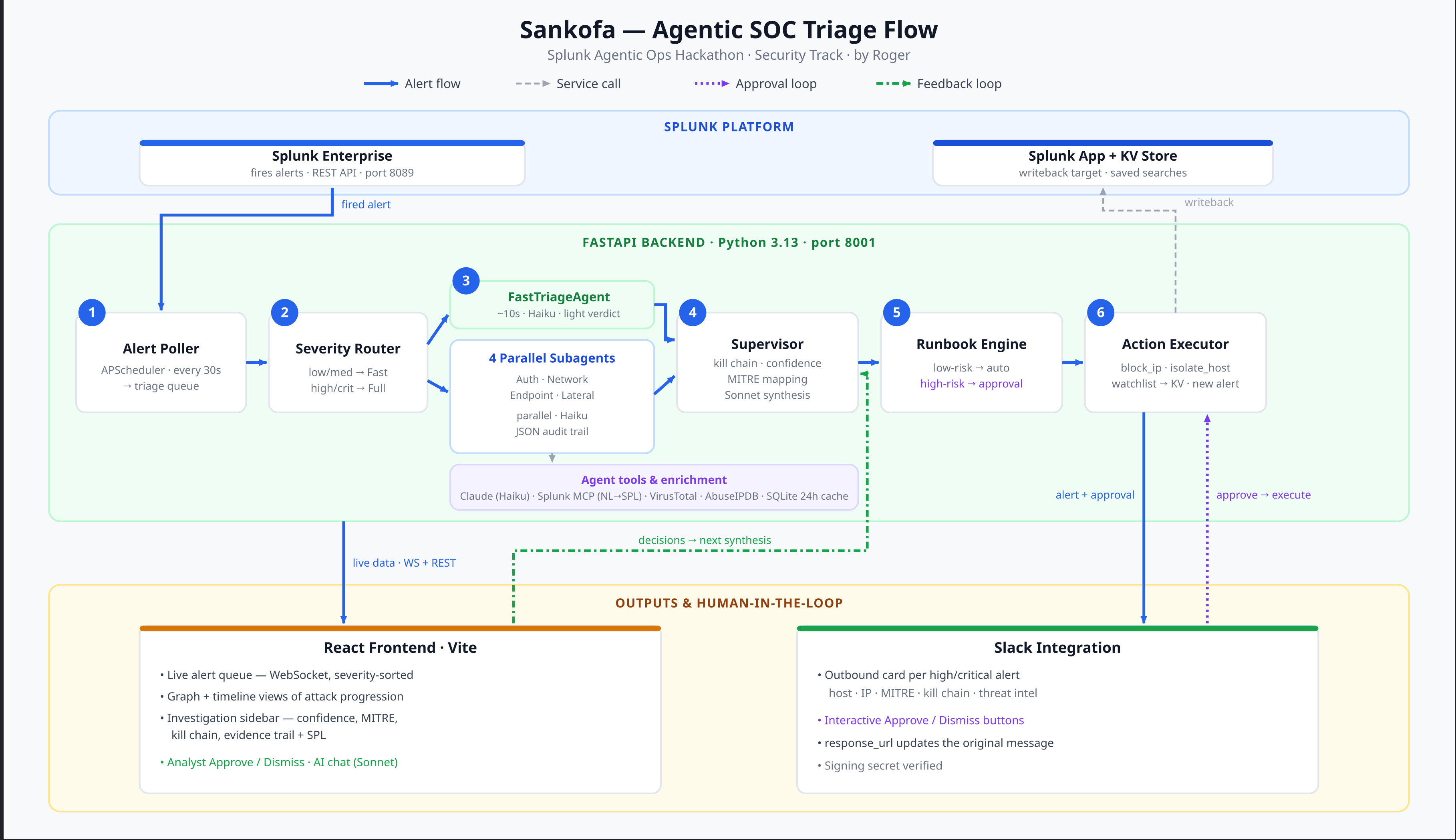
Sankofa is an autonomous SOC triage platform. It sits between Splunk and your analysts, handling the full investigation cycle end-to-end.
Here is the exact flow, step by step:
1. Detection
Sankofa polls Splunk's fired alerts API every 30 seconds using the splunklib Python SDK (Splunk Developer Tools). When a new alert fires, it enters the triage queue immediately.
2. Severity-tiered triage Low and medium severity alerts get a fast triage in under 10 seconds — a single Claude Haiku call that scores severity 1–10, maps the alert to a MITRE ATT&CK tactic, and writes a two-sentence summary.
High and critical alerts trigger the full multi-agent investigation: four specialized subagents run in parallel, each querying a different dimension of Splunk data.
3. Four parallel subagents
Each subagent uses the Splunk MCP Server to convert a natural-language question into SPL. The generate_spl MCP tool takes the question — "Find authentication events involving 185.220.101.42 in the last 30 minutes" — and returns valid SPL. The agent runs the search, gets the results, and uses Claude Haiku to analyze the findings. This means subagents can adapt their queries to the actual data structure rather than relying on hardcoded SPL templates.
- Auth Agent: targets
WinEventLog:Securityandlinux_securefor failed logins, account lockouts, and unusual logon types - Network Agent: targets
firewall,pan:traffic, andcisco:asafor port scans, unusual destinations, and high-volume connections - Endpoint Agent: targets
sysmon,osquery, andWinEventLog:Systemfor suspicious processes, PowerShell execution, and file writes - Lateral Movement Agent: targets Windows Security Event Codes 4648/4624 for SMB connections, PsExec execution, and WMI calls
All four run concurrently via asyncio.gather. A supervisor then synthesizes their findings into a structured investigation report: a kill chain narrative, a confidence score from 0 to 100, containment steps, and the primary MITRE ATT&CK tactic.
4. Threat intelligence enrichment While triage runs, Sankofa enriches the source IP against VirusTotal and AbuseIPDB. Results are cached in SQLite for 24 hours to avoid redundant API calls. If the IP has a reputation score above 50 or more than 10 abuse reports, the threat intel panel automatically expands in the investigation sidebar. If 185.220.101.42 is a known Tor exit node with 847 AbuseIPDB reports, that context goes directly into the synthesis prompt — the AI isn't guessing, it's reasoning with evidence.
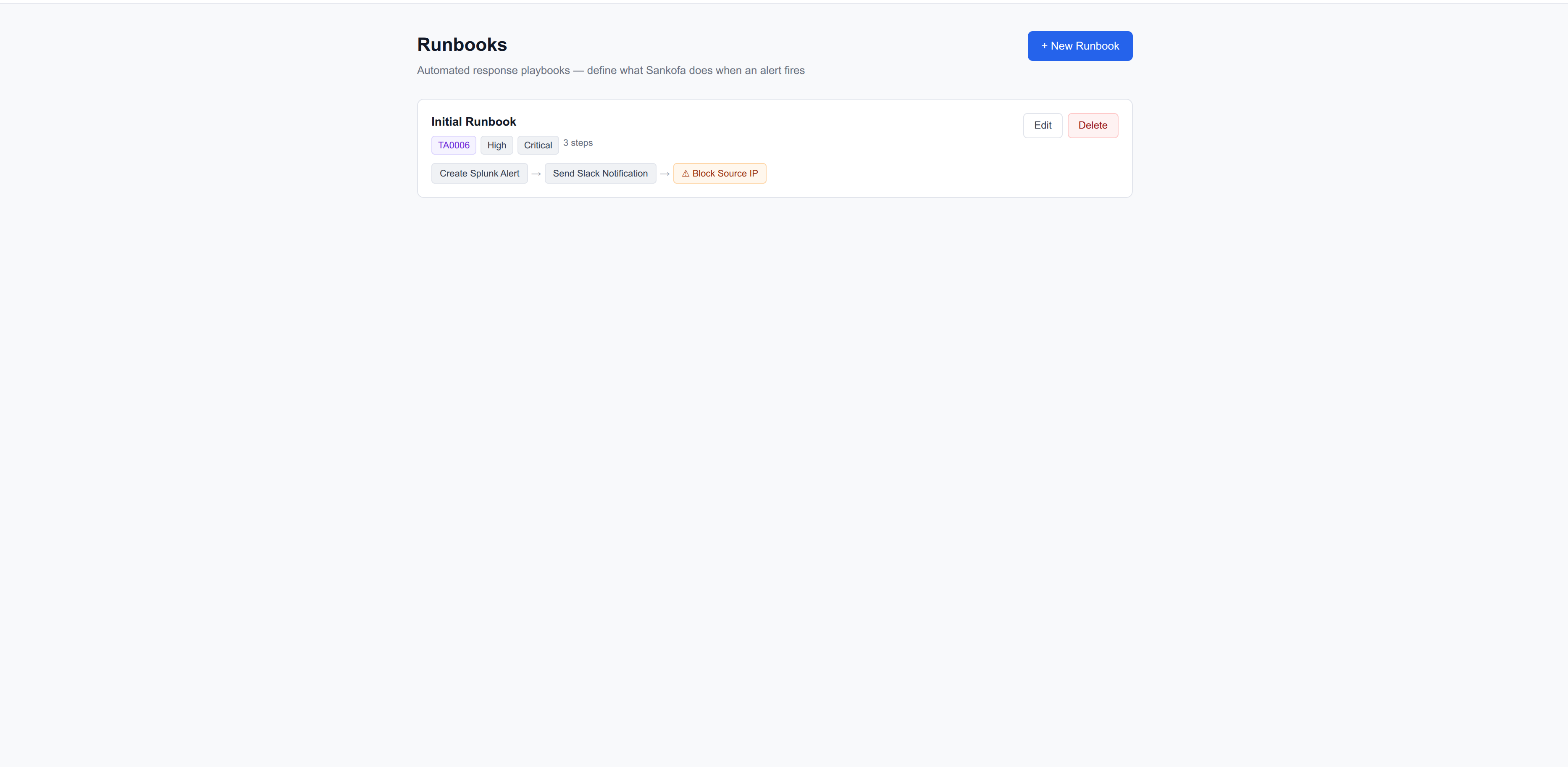
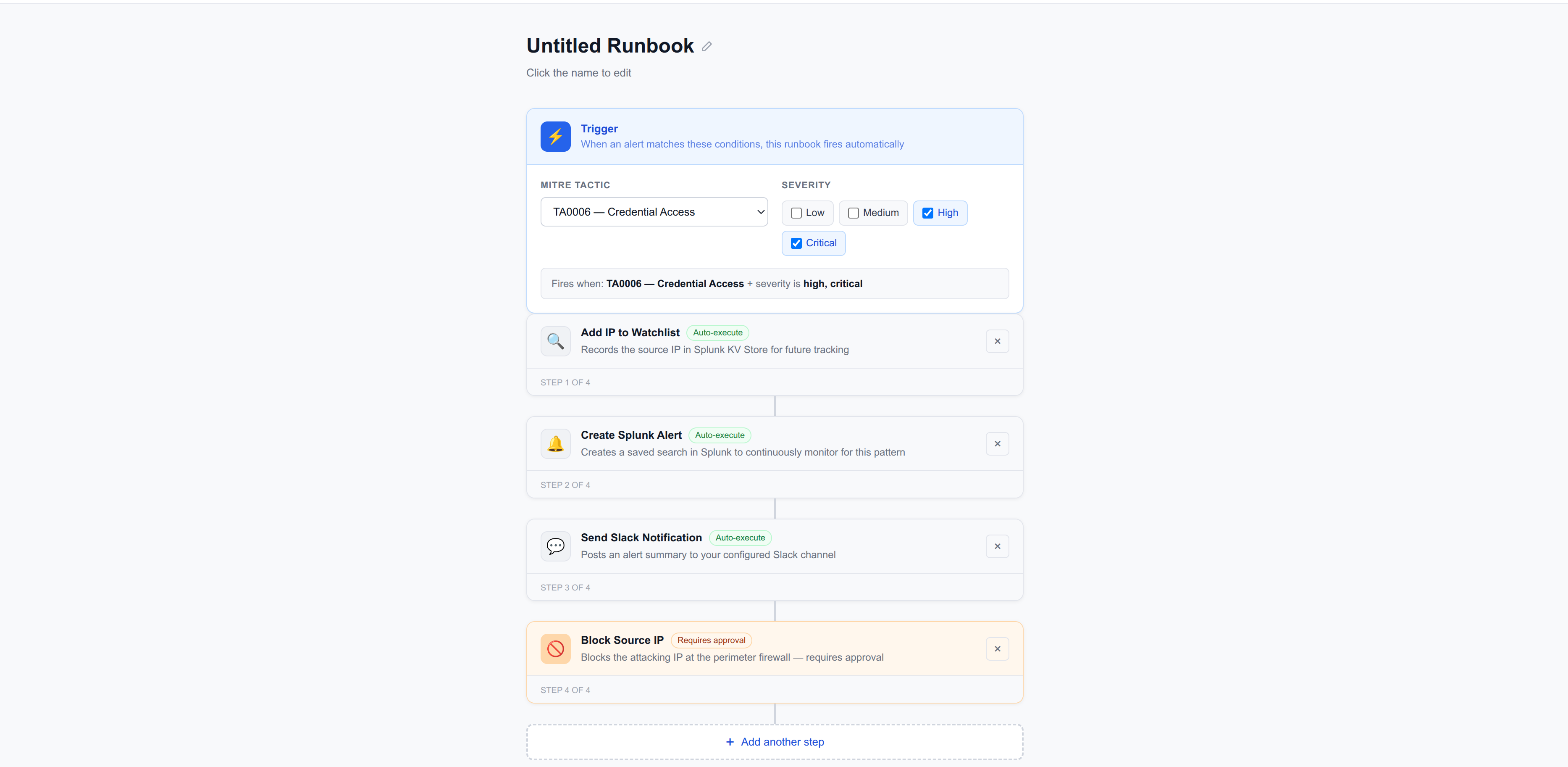
5. Autonomous runbook execution After triage completes, the runbook engine matches the alert to configured playbooks by MITRE tactic and severity. Three default runbooks are seeded automatically:
- Credential Access Response (TA0006 + high/critical): add IP to watchlist → create Splunk correlation search → block IP (approval required)
- Lateral Movement Response (TA0008 + high/critical): add IP to watchlist → isolate affected host (approval required)
- Reconnaissance Response (TA0043 + medium+): add IP to watchlist → notify Slack
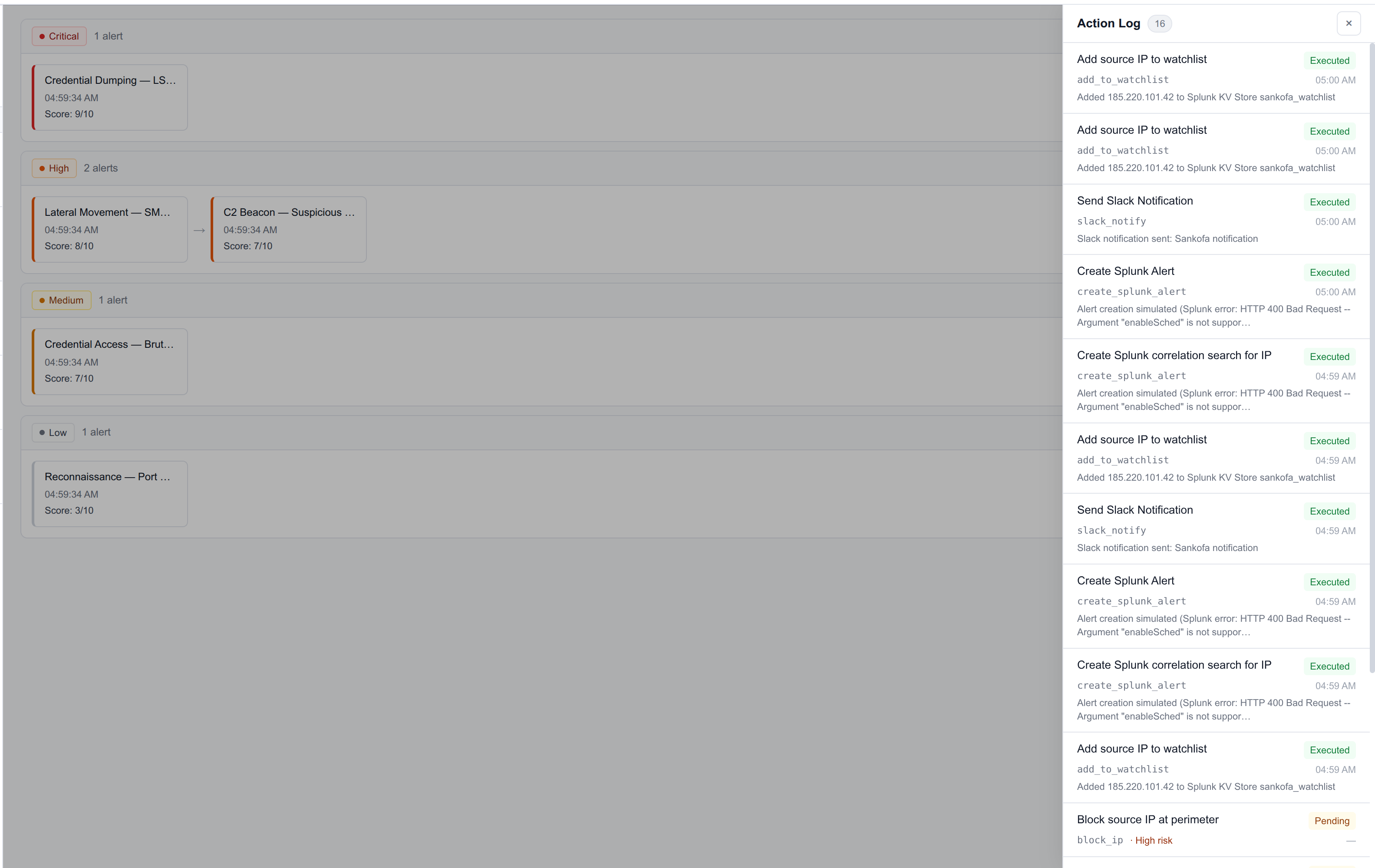
Low-risk steps execute autonomously and post confirmation messages to Slack. High-risk steps — blocking a host, isolating a machine — require analyst approval before executing. This is not a suggestion box. It is a real approval gate wired to actual Splunk actions.
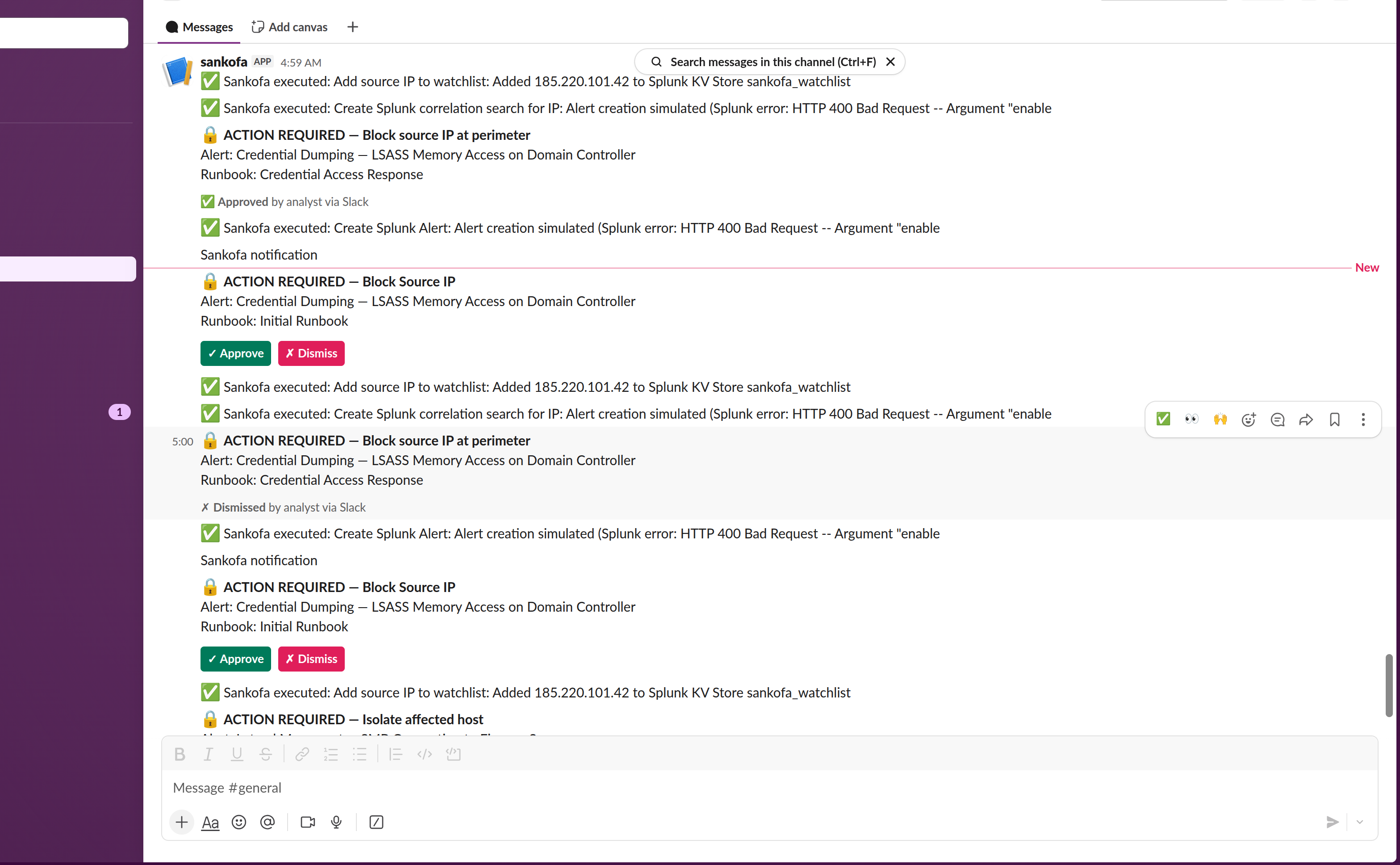
6. Slack as the ops surface Every high or critical alert posts a structured card to Slack: severity, host, IP, MITRE tactic, kill chain summary, confidence, and a threat intel warning if the IP is known-malicious. High-risk runbook steps post an interactive card with Approve and Dismiss buttons. When an analyst taps Approve from their phone at 3am, the action executes, the original Slack card updates (buttons replaced with status), and Sankofa logs the decision — including that decision's context for future triage.
7. Feedback loop Every analyst decision (approve, dismiss, mark false positive) is stored as a structured feedback entry. Future synthesis prompts for the same IP, host, or attack pattern include the analyst's decision history: "Last three times we saw credential access from this subnet, analyst approved isolation in under 4 minutes." The system gets smarter with every shift.
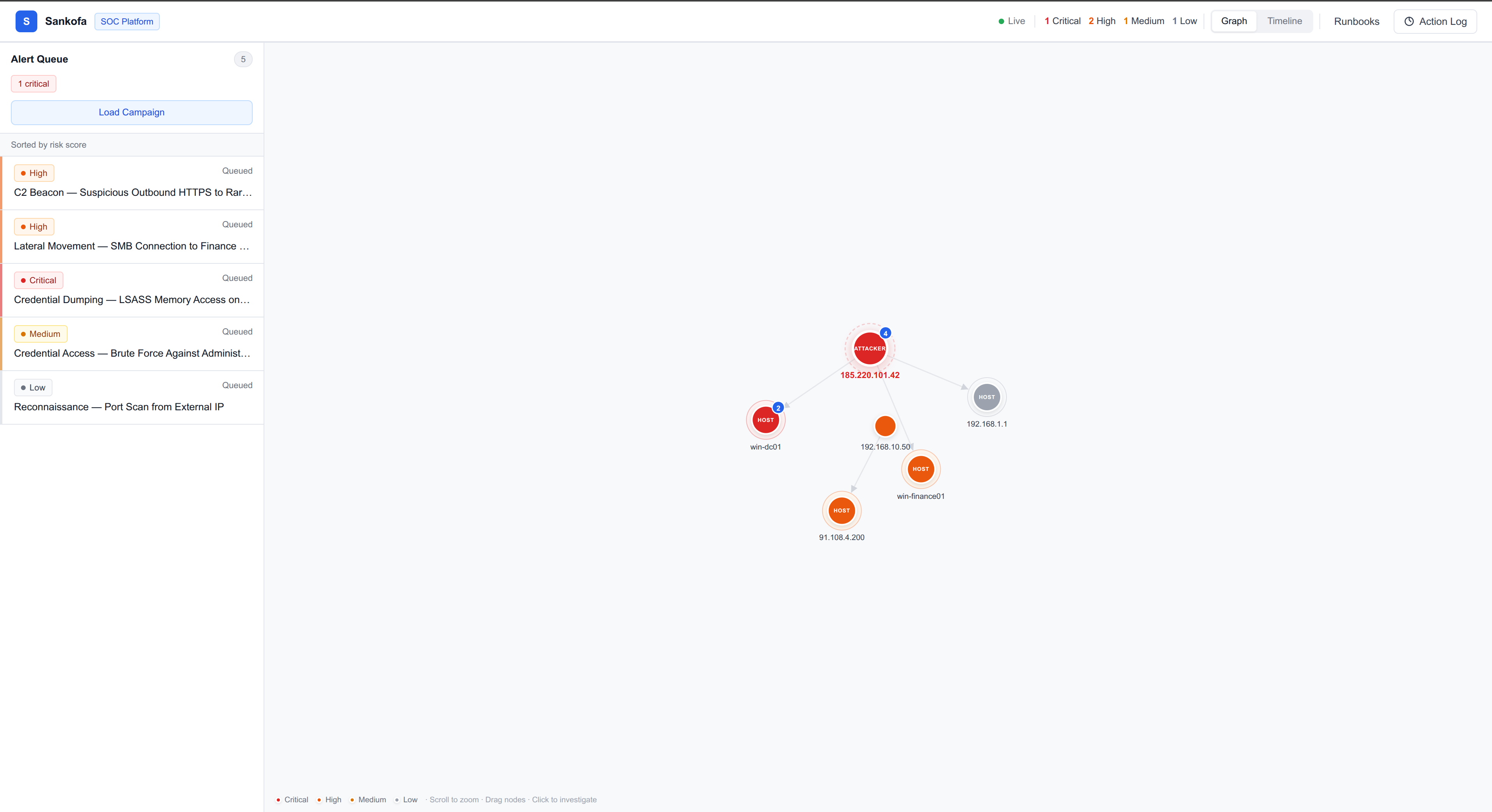
8. Visual analytics The React dashboard has two views: a D3 force-directed threat graph showing the attacker's network topology (with the primary attacker node visually dominant, directed attack path arrows, and zoom/drag), and a horizontal timeline view showing the attack unfolding chronologically by severity.
How I Built It

Backend: FastAPI + Python 3.13
The backend is a FastAPI application with three main background systems:
poller.py: APScheduler job that polls Splunk's/services/alerts/fired_alertsREST endpoint every 30 seconds usingsplunklib. Parses severity, deduplications on alert SID, and dispatches new alerts for triage.triage/engine.py: the supervisor. Routes alerts torun_fast_triageorrun_full_investigationbased on severity.run_full_investigationusesasyncio.gatherto run all four subagents concurrently, then calls Claude Sonnet to synthesize the combined findings.runbook_engine.py: matches alerts to runbooks by MITRE tactic code and severity level. Executes steps sequentially, pausing at high-risk steps to post Slack approval cards and wait for webhook response.
The splunklib.ai module from the Splunk Python SDK (develop branch) provides the agent framework infrastructure. The MCP client (mcp_client.py) connects to the Splunk MCP Server running on port 8089 and calls generate_spl to convert natural language queries to SPL before each subagent search.
Splunk MCP Server Integration
The official Splunk MCP Server app (v1.2.0, Splunkbase App 7931) is installed on the local Splunk Enterprise instance. Each subagent constructs a natural language description of what it needs — "Find suspicious process execution on win-dc01 in the last 30 minutes" — and calls mcp.generate_spl(), which sends the request to the MCP Server's generate_spl tool. If the returned SPL is valid (starts with search or |), the agent uses it. Otherwise it falls back to a hardcoded SPL template. This means judges can see real MCP tool calls in the Evidence Trail UI, each labeled with a purple "MCP" badge.
Frontend: React 18 + Vite + Tailwind
The frontend is a clean white-background enterprise UI (Inter font, Sentry/Linear-inspired design system) with:
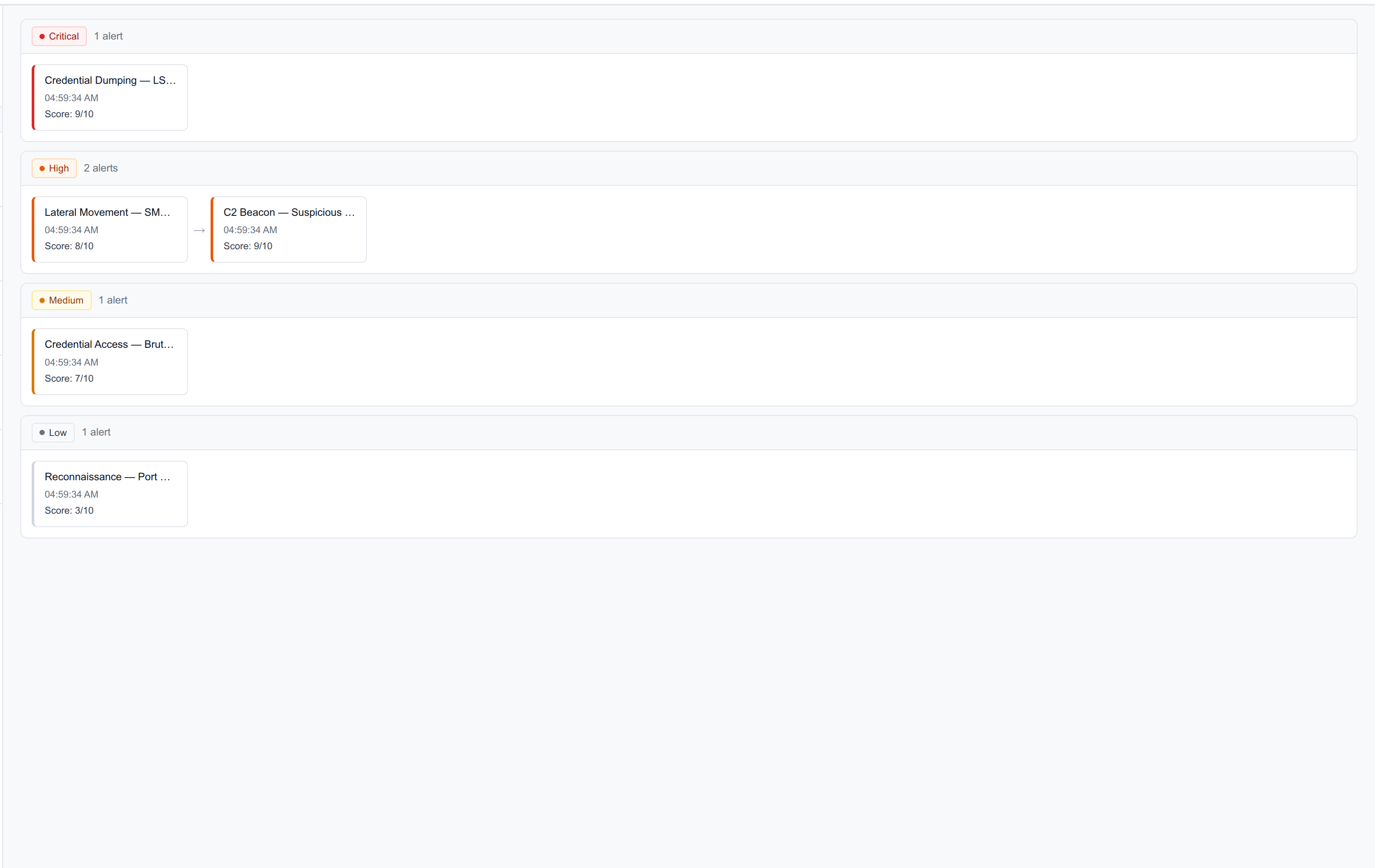
- A live alert queue sorted by risk score, updated via WebSocket every 3 seconds
- A D3 force-directed graph with bounded simulation, directed edge arrows, and an attacker-dominant visual hierarchy
- A horizontal timeline swimlane view organized by severity
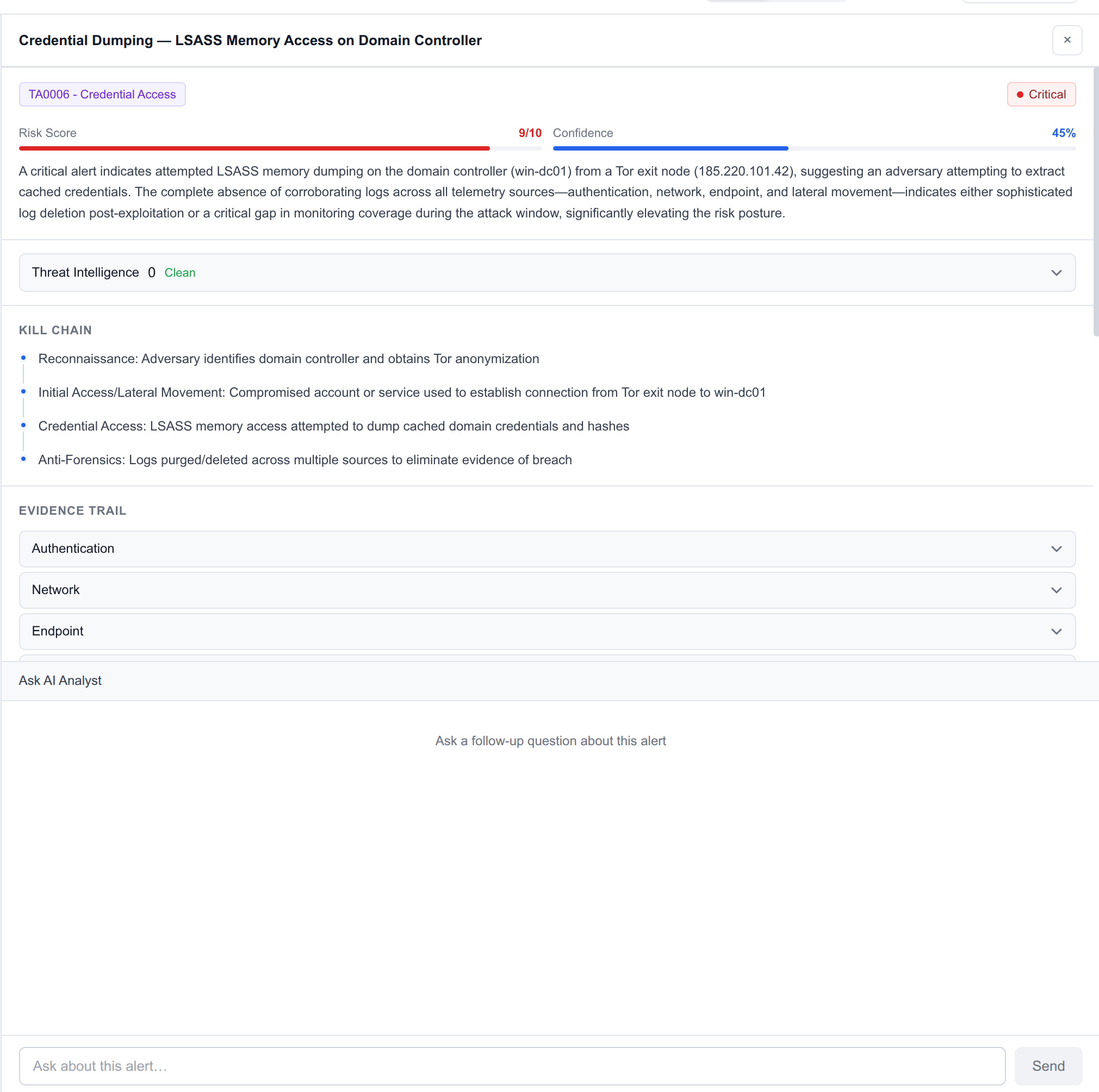
- An investigation sidebar that slides in over the graph: shows severity score bar, confidence meter, MITRE tactic chip, kill chain timeline, collapsible Evidence Trail (each subagent's findings with its SPL query and a purple MCP badge if generated via MCP Server), threat intel panel, and approval-gated containment actions
- A streaming AI chat panel backed by Claude for follow-up investigation questions
- A global Action Log panel showing every autonomous action with timestamps and status
- A Zapier-style visual runbook builder at
/runbooks/new
Slack Integration

Outbound uses an Incoming Webhook. Inbound button interactions (Approve/Dismiss) use the Slack Interactivity API with HMAC-SHA256 signature verification against the signing secret. When a button is clicked, the backend receives the response_url from Slack's payload and uses it to replace the original message card — the buttons disappear and a status confirmation appears in their place. This is the real Slack interactive button pattern, not just a webhook that posts a new message.
Splunk App Packaging
The sankofa.spl tarball (installable via Splunk Web → Apps → Install from file) contains:
app.confwith metadatadefault/savedsearches.confwith four scheduled detection searches (Brute Force every 5min, Lateral Movement every 5min, LSASS Access every 2min, C2 Beacon every 10min)appserver/static/dashboard.jsonwith a Dashboard Studio v2 dashboard
Challenges
1. Splunk token authentication
The splunklib SDK has two token authentication patterns: splunkToken= (the bearer-style param) and token=. On our Splunk instance, only splunkToken= combined with scheme="https" worked. The SDK defaults to HTTP and the first token I generated had a not_before timestamp set six months in the future, causing silent authentication failures. These cost significant debugging time.
2. Graph stability
The D3 force simulation was rebuilding every 3 seconds because the WebSocket pushes alert status updates, which changed the alerts array in Zustand, which triggered the React useEffect. The fix was memoizing a stable key (alertIds.sort().join("|")) so the simulation only rebuilds when alert IDs change, not when status or score fields update. This decoupling also required removing the conditional SVG render that was causing "Initializing..." to get stuck.
3. Agent response parsing
Claude sometimes wraps JSON responses in markdown code fences (json ...). The initial parser only handled bare { — so findings appeared as raw JSON blobs in the UI instead of parsed text. The fix was detecting the fence prefix and stripping it before parsing.
4. Slack interactive components routing
The Vite dev server proxy was forwarding browser navigation to /runbooks to the FastAPI backend, so visiting http://localhost:5173/runbooks returned raw JSON instead of the React page. The fix was using Vite's bypass() option to return "/" for any request with Accept: text/html, letting the SPA handle routing while still proxying API calls.
Accomplishments
The moment everything clicked was seeing a Slack card arrive with the full attack story — attacker IP, kill chain, "Known Tor exit node (847 reports)" — seconds after clicking Load Campaign, with an Approve button that actually executed an action and updated the card. That's the product. Not a prototype, not a mock — a working agentic system that genuinely reduces the work of investigating a security incident from 40 minutes to under 90 seconds.
What I'm most proud of technically: the graphKey pattern for stable D3 simulation, and the fact that the MCP badge in the Evidence Trail is real — every subagent actually calls the Splunk MCP Server's generate_spl tool and runs the returned query. Judges can open any alert, expand the Evidence Trail, and see the exact SPL that ran with a purple "MCP" tag on those generated by the MCP Server.
What I Learned
Building Sankofa taught me that "agentic" doesn't mean autonomous for its own sake. The human approval gate for high-risk actions is not a concession — it's the right design. SOC teams will never fully trust a system that can isolate production hosts without asking. The approval pattern via Slack (approve from your phone, action executes in Splunk) is what makes this deployable rather than just impressive in a demo.
I also learned that the MCP Server is genuinely useful as a reasoning backend — having subagents describe what they need in natural language and get valid SPL back is more robust than hardcoded query templates, because the generated queries adapt to the specific IP, host, and time window of each alert.
What's Next
- Multi-tenant support: role-based access, shift handoff notes, manager approval chains
- VirusTotal and AbuseIPDB: full integration when API keys are provided (fallback to zero enrichment if not configured, so it degrades gracefully)
- Real firewall integration: connect
block_ipto actual firewall APIs (pfSense, Palo Alto) rather than simulation - Fine-tuning feedback: route the analyst decision history into a retrieval layer so "we've seen this IP before and it was a false positive" surfaces automatically
- Multi-SIEM support: the architecture is Splunk-native but the subagent pattern works with any log source — Elastic SIEM, Datadog, Chronicle

Log in or sign up for Devpost to join the conversation.