-
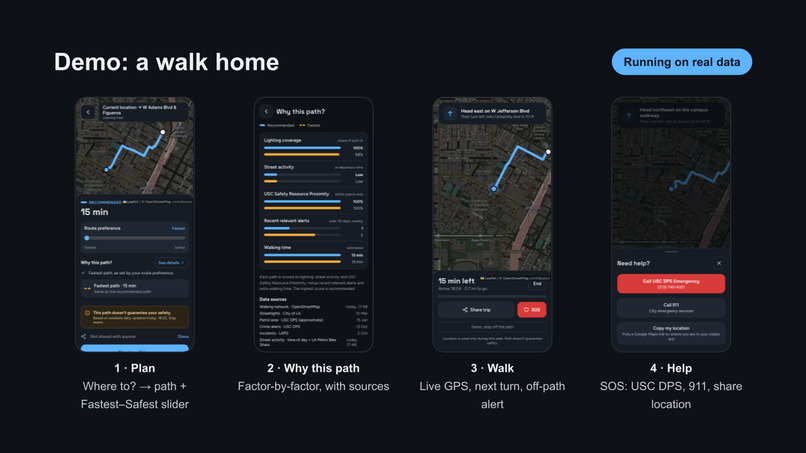
demo
Inspiration
Every USC student knows the feeling: a Trojans Alert buzzes your phone, and twenty minutes later you're leaving Leavey at 11 p.m. wondering which way home is actually okay. Google Maps will happily give you the fastest walk, but it has no idea that one street is dark, another is empty after 9 p.m., and a third had a robbery last week.
We wanted a map that answers the question students are really asking: "Which way should I walk right now?" And we wanted it to explain itself, so students stay informed instead of blindly trusting an app.
What it does
Safety Path recommends a safety-aware walking route around USC and compares it to the fastest one. You enter where you're going and when you're leaving, and it:
- Draws a recommended route and the fastest route side by side, with walk times
- Explains "Why this route?" in plain language, e.g. "Streetlights are 1.9× denser along this route" or "Adds 0.5 min vs. the fastest route"
- Lets you tune a safety slider from "just get me there" to "avoid risk as much as possible"
- Offers live navigation with GPS tracking, automatic rerouting if you drift off course, and a one-tap SOS sheet to call USC DPS or 911
- Installs to your home screen as a web app
How we built it
Data. We combined six sources into one picture of the streets around campus:
| Source | What it gives us |
|---|---|
| OpenStreetMap | The walkable street network |
| LAPD NIBRS crime data | 21.9K pedestrian-relevant incidents near USC (2024–2026) |
| USC DPS alerts | 221 scraped alerts, 205 geocoded onto the map |
| LA City streetlights | 7,927 poles with wattage |
| DPS patrol area | Where USC officers patrol |
| LA Metro Bike Share | Live dock activity as a foot-traffic signal |
The LAPD data started as ~499K citywide records. We filtered it to incidents that matter to someone walking: robberies, assaults and similar crimes, on streets, sidewalks and transit stops. We also removed duplicate offenses from the same incident and threw out bad dates.
Routing. Every street segment gets a cost, and we run Dijkstra's algorithm on it. With safety level $s$, segment length $\ell$, and factors scaled to $[0,1]$:
$$ \text{cost} = \ell \cdot \Big(1 + s\,\big(4.0\,R + 1.0\,D + 1.0\,(1-B) + 1.5\,(1-L) + 0.5\,P + 1.0\,A\big)\Big) $$
where $R$ is crime risk, $D$ is darkness exposure, $B$ is busyness, $L$ is lighting, $P$ is 1 if the segment is outside the DPS patrol area, and $A$ marks alleys. At $s = 0$ the cost is just distance, so the router returns the fastest route.
Crime risk spreads each incident onto nearby streets with a Gaussian falloff, weighted by severity $w_i$, recency, and how close it happened to the hour you're walking:
$$ R = \sum_i w_i \cdot 2^{-\Delta t_i / 1\,\text{yr}} \cdot \Big(0.35 + 0.65\, e^{-\Delta h_i^2/18}\Big) \cdot e^{-d_i^2 / (2 \cdot 70^2)} $$
Here $d_i$ is the distance in meters and $\Delta h_i$ is the difference in hour of day. USC DPS alerts count double.
Darkness comes from the sun's actual position at your departure time. We use the NOAA solar-elevation approximation to compute elevation $\theta$ and set $D = \text{clamp}\big(\tfrac{3 - \theta}{9}, 0, 1\big)$, so routes change at dusk and not at an arbitrary "night" cutoff.
Stack. The backend is pure Python 3.12 standard library, with a hand-written HTTP server, geocoder and Dijkstra implementation. The frontend is vanilla JavaScript + Leaflet, packaged as an installable PWA with a service worker for offline loading.
Challenges we ran into
- Messy real-world data. The LAPD export had dates from the year 1800, times defaulting to
00:00when unknown, and one incident split across several rows. Cleaning it took longer than expected. - Turning text alerts into coordinates. DPS alerts say things like "police activity at 28th Street and University Ave." We had to parse intersections out of free text and geocode them. 16 of 221 alerts were still too vague to place.
- Weights are judgment calls. In early versions, lighting sometimes outweighed crime, so the router picked a brightly lit street that had more incidents. Balancing factors without ground-truth data was the hardest design problem.
- Measuring foot traffic. There's no public live pedestrian count, so we used bike-share dock activity as a stand-in. It's imperfect, but it's real-time.
- Phones. Browsers stop GPS when the screen locks, especially on iPhone, and aggressive service-worker caching kept serving old versions of our app during testing.
- Bias. Crime data reflects where incidents are reported and policed, not just where danger is. We didn't want an app that labels neighborhoods "bad," so we weighed lighting, activity and patrol coverage alongside crime and framed every explanation positively.
What we learned
- How to take a raw government dataset from 499K rows to something a model can use, and how much of data work is cleaning
- Graph algorithms in practice: Dijkstra on a real street network, and how a single cost function shapes every route
- Spatial modeling with Gaussian kernels, recency decay, and time-of-day weighting
- That explainability matters as much as the algorithm: a route students don't understand is a route they won't trust
- Building an installable PWA with geolocation, offline caching and live rerouting
What's next
- Replace our approximate patrol rectangle with DPS's official boundary
- Fit the factor weights to real outcomes instead of hand-tuning them
- Route sharing with friends, plus game-day and event

Log in or sign up for Devpost to join the conversation.