-
-
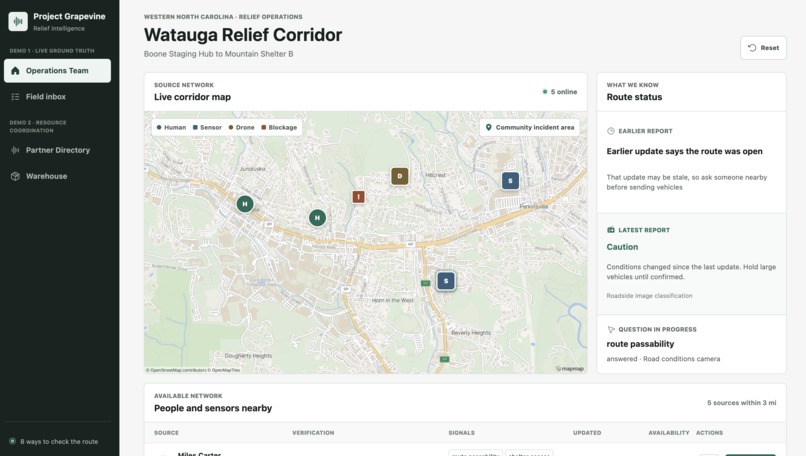
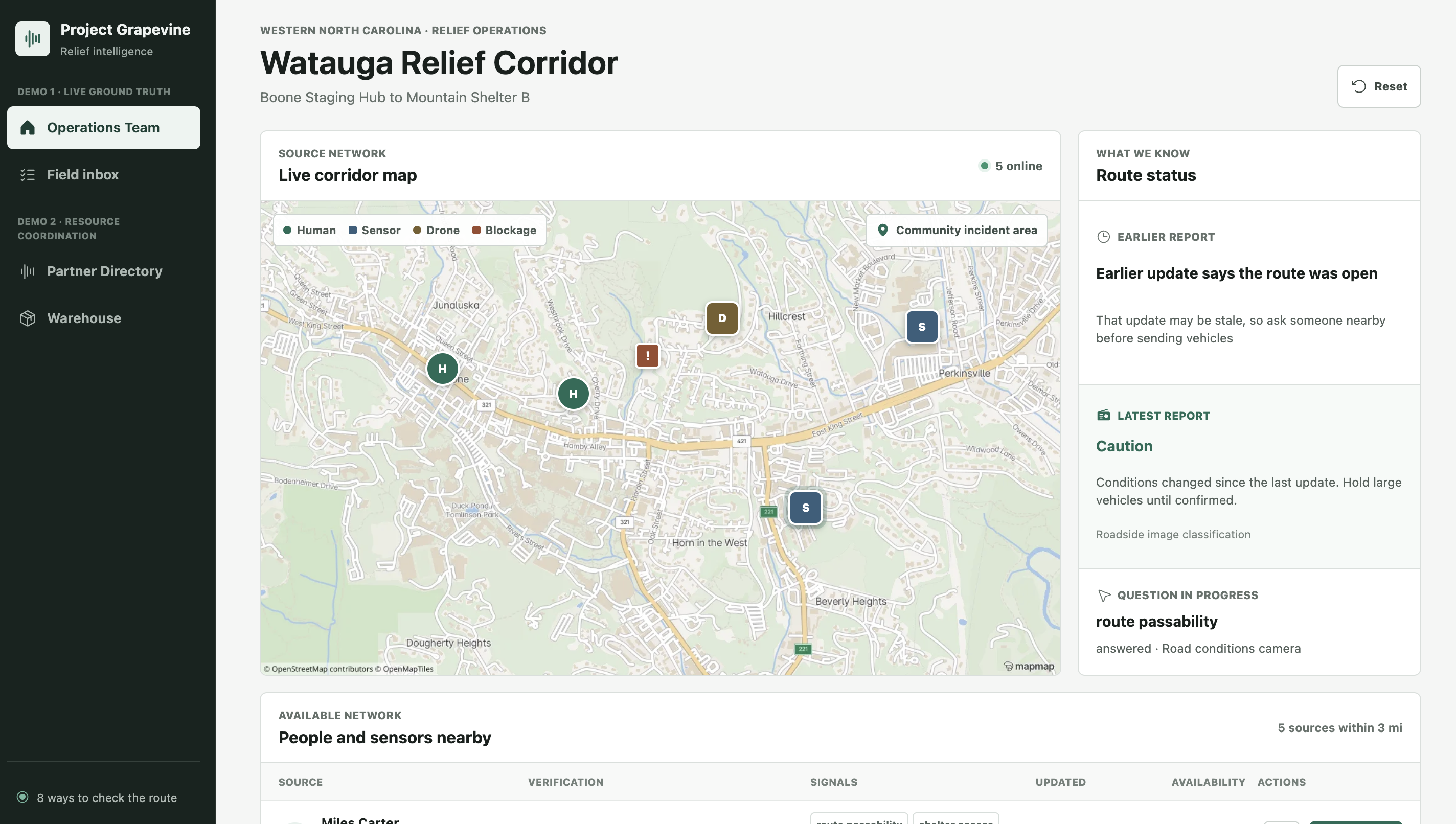
Grapevine Ops Center
-
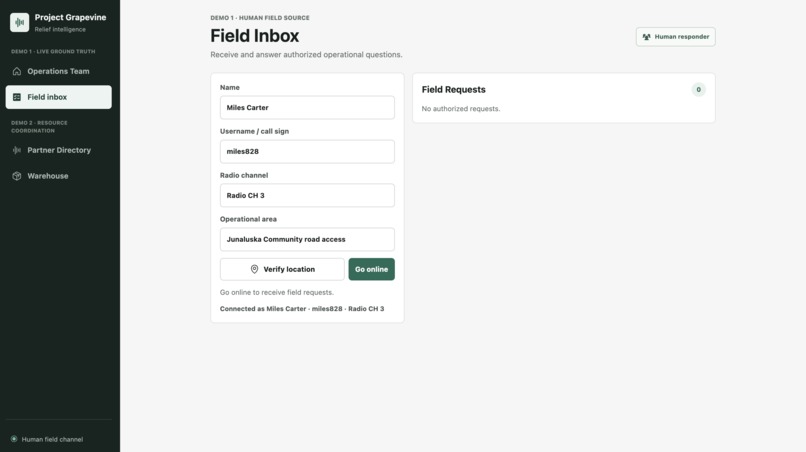
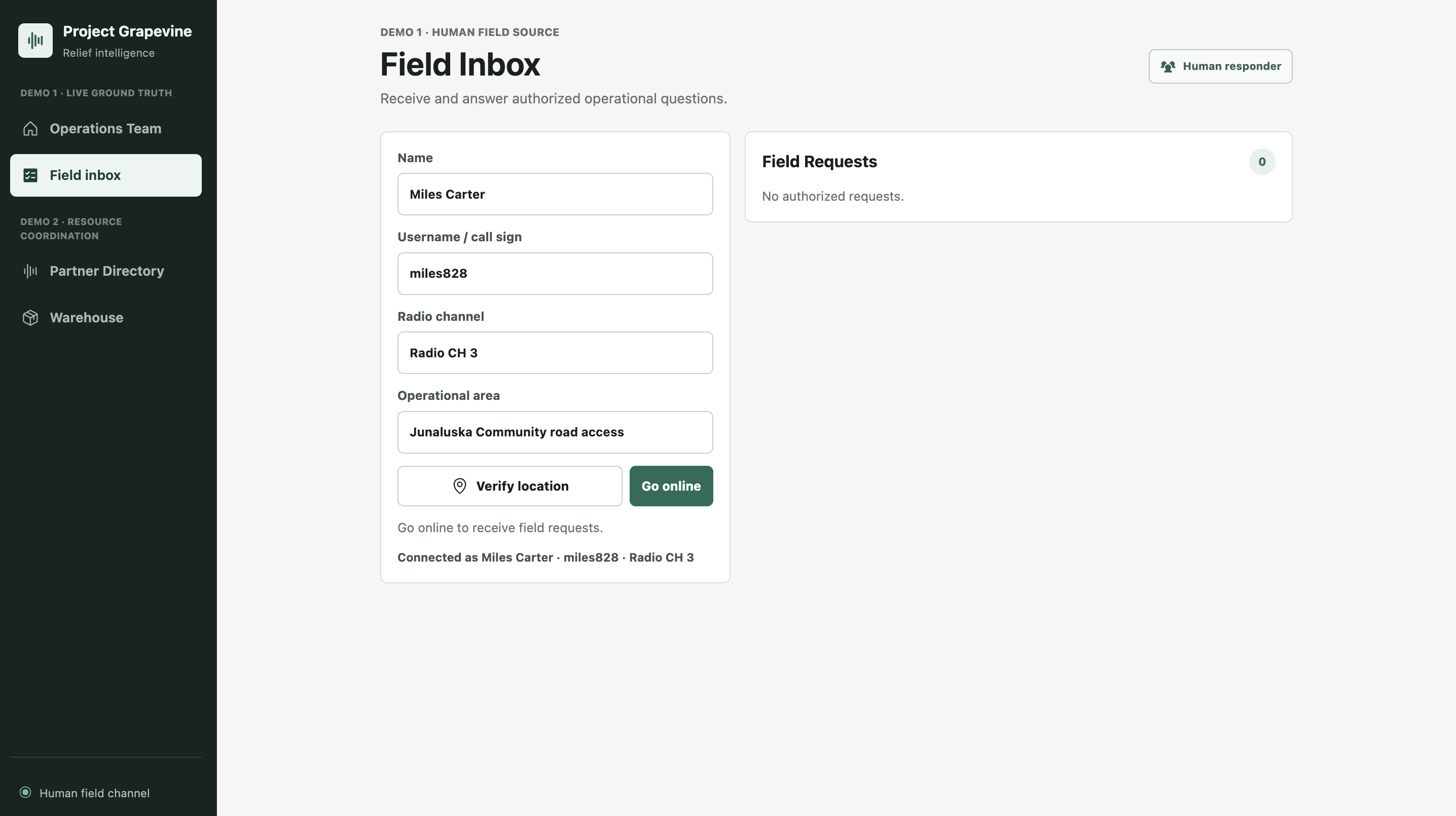
Grapevine Field Inbox "moblie app"
-
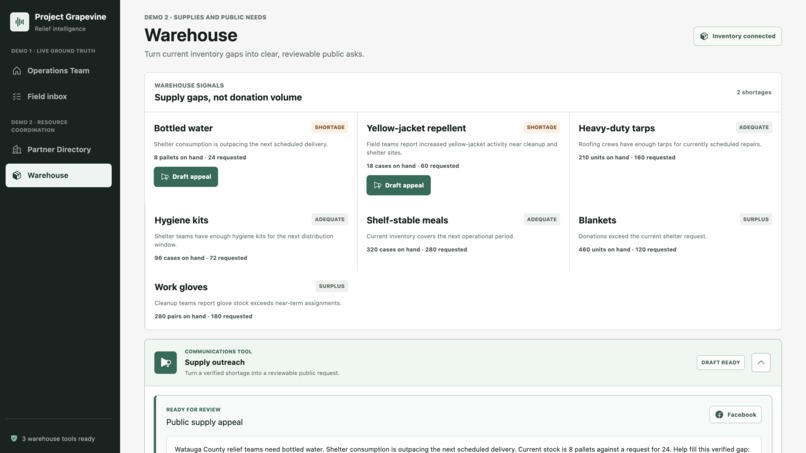
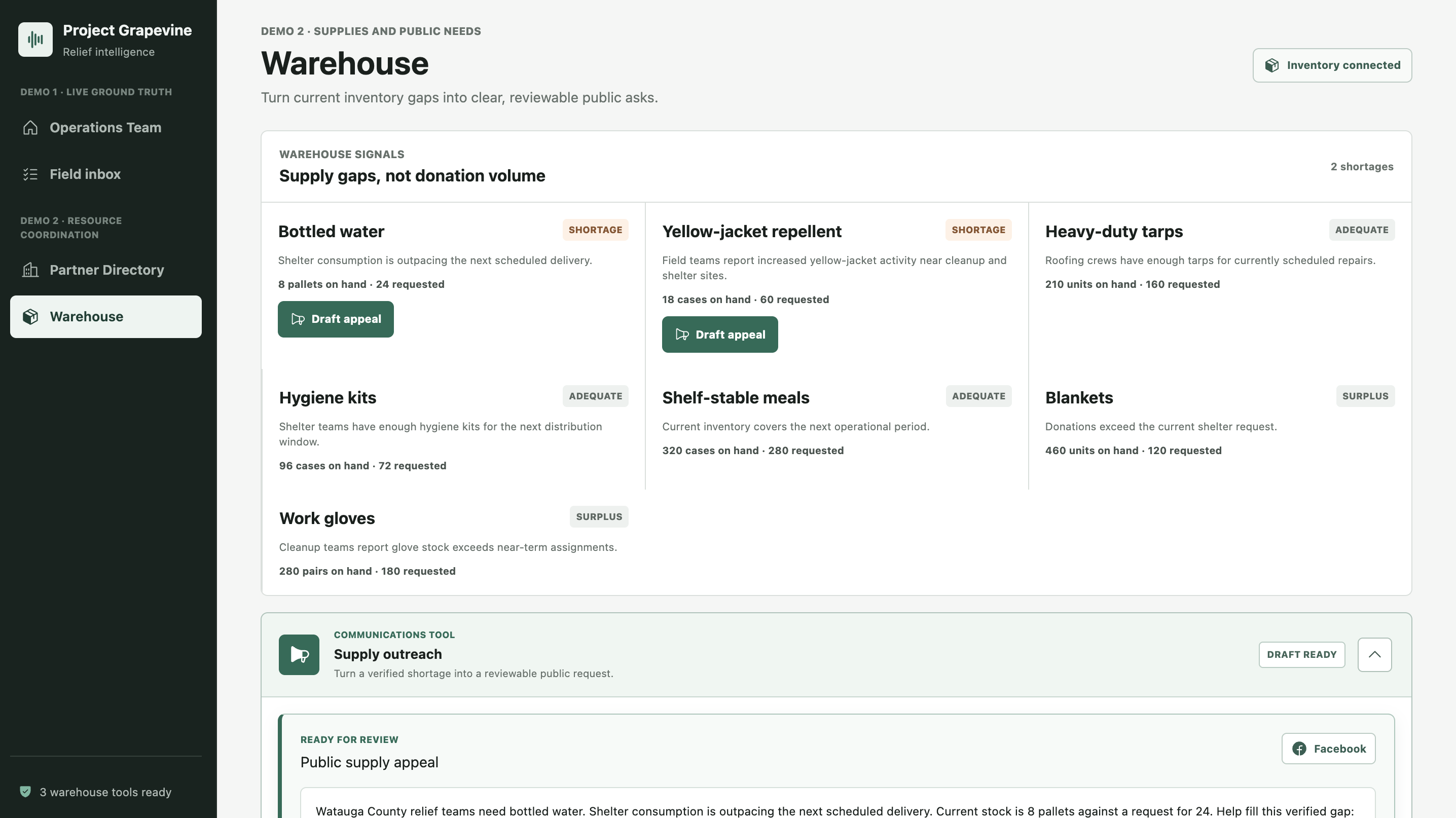
Grapevine Warehouse Inventory
-
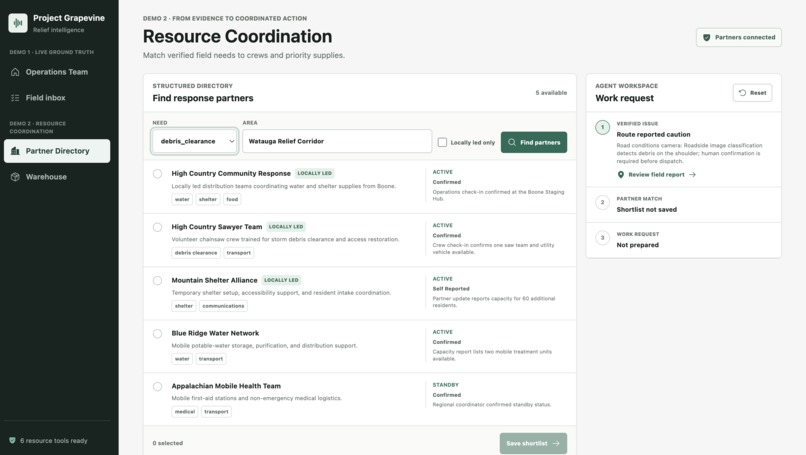
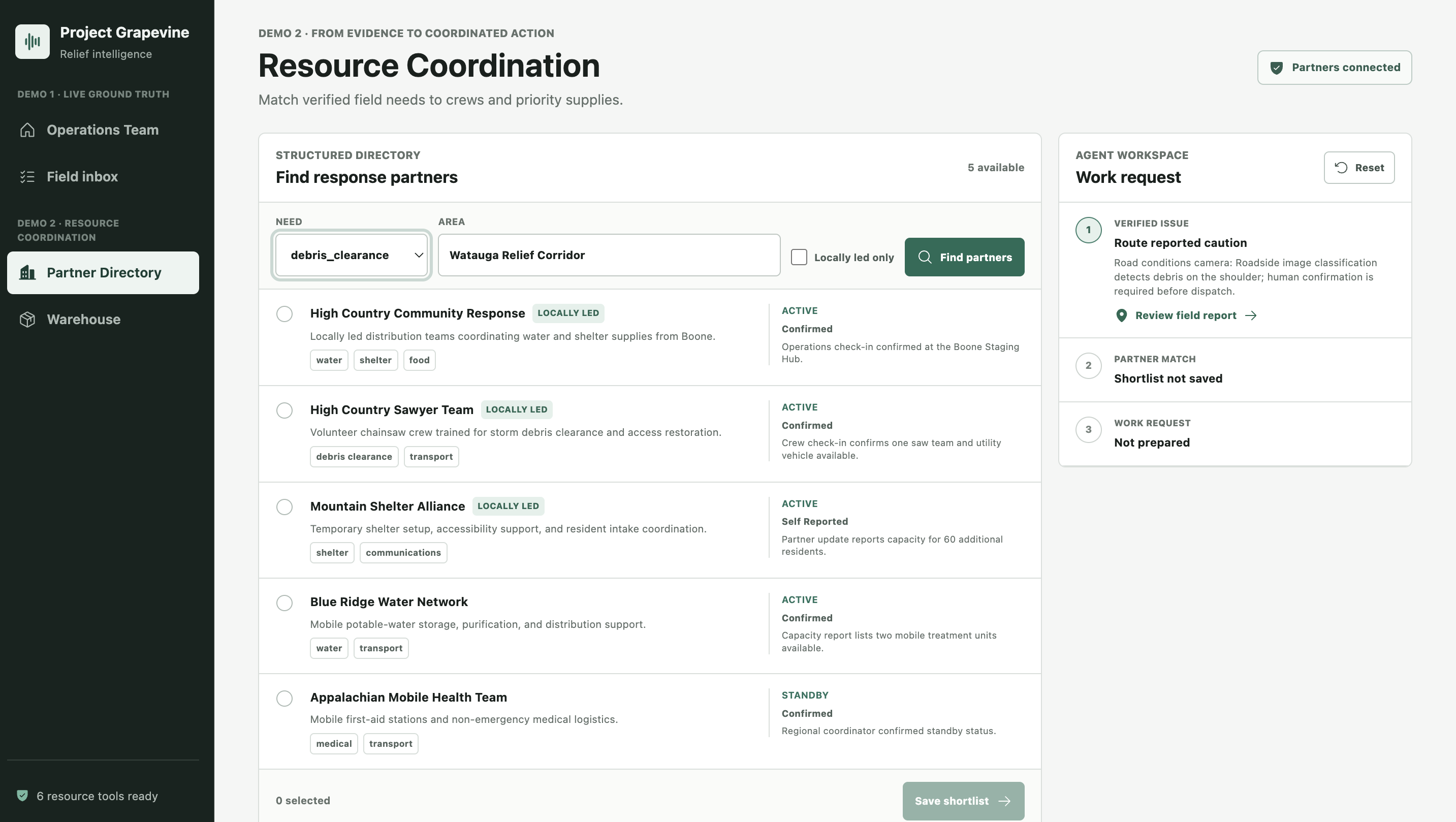
Grapevine Partner Directory
Inspiration
We grew up in Boone, North Carolina, in the heart of the western Appalachian Mountains. Almost two years ago, Hurricane Helene devastated the region. As we worked to support relief efforts back home, one major problem kept coming up: logistics.
Roads and bridges were gone, and conditions could change by the hour. But people still had their phones. Locals, responders, and volunteers were sharing what they saw through social media, texts, and calls, creating a constant stream of updates from the field. Meanwhile, people coordinating supplies could be miles away, working from information that was already outdated.
The ground truth was out there. Getting it to the right people fast enough to act on it was the hard part.
That experience stuck with us. When we started thinking about what to build for this hackathon, we kept coming back to one question: what could this look like if AI agents and WebMCP were part of the response infrastructure?
Project Grapevine is our fictional simulation of that idea. The name is a play on "heard it through the grapevine," except we're exploring what that network could look like when people, sensors and AI agents can all contribute to it.
In our scenario, a large relief organization is trying to move supply trucks into communities affected by a devastating flash flood. They have an AI agent helping coordinate logistics, responders on the ground and sensors reporting current conditions.
What it does
Project Grapevine gives an AI agent tools to help coordinate a disaster response while keeping people in control of consequential decisions.
The simulation starts with a common problem: the command center needs to move supplies into an affected area, but its route information may already be outdated. Instead of relying on stale information, the agent can use WebMCP tools to find people and simulated sensors near the route (aerial drone footage) and request current conditions directly from the field.
Grapevine connects two workspaces:
Live Ground Truth: The agent checks the regional baseline, identifies nearby responders and sensors, and prepares a structured request asking whether a route is passable. Once a person authorizes the request, a responder or sensor can report current conditions. That response flows back to the agent as structured evidence, including information about the source and its quality.
Resource Coordination: At the same time, the agent can review the crisis brief, search available relief partners, evaluate what resources they can provide, and build a shortlist. From there, it prepares a work plan for human review and approval.
The important part is how those workflows connect. Grapevine won't allow the coordination plan to be approved until current route evidence has been received. A passable report unlocks final approval. A caution or blocked report keeps it locked.
The agent does the legwork: finding sources, gathering information, comparing resources and preparing a plan. People provide the ground truth, and a person makes the final call.
How we built it
We built Grapevine around the idea that an agent shouldn't have to navigate a website the same way a person does. Instead, the application exposes specific workflows directly to the agent through WebMCP.
We started building Project Grapevine on August 31. Everything here, including all ten WebMCP tools across the workspaces, was built new for this submission.
Each workspace registers its own tools using document.modelContext.registerTool. The Live Ground Truth workspace exposes five tools for finding available sources, checking existing information, asking a source for an update, retrieving the response and rating its quality. Resource Coordination exposes another five for reading the crisis brief, finding response partners, reviewing their capabilities, creating a shortlist and preparing a coordination request.
We used Zod schemas to keep inputs structured and validated, while WebMCP tool annotations distinguish between read-only operations and actions that require human control. The agent can do a lot of the work on its own, but it can't make the final decision.
Behind the scenes, a Cloudflare Worker and D1 database maintain shared workflow state across the agent, operations dashboard and field responder inbox. An agent can stage a request at the command center, have it appear on a responder's device, and then pull that response back into the workflow as new evidence. React manages the visible approval states and keeps the final coordination action locked until the required ground truth has been collected.
One intentional design decision was what we didn't expose to WebMCP. The field responder inbox registers no tools at all. It's a human surface by design. The agent coordinates the request, but the person in the field provides the ground truth.
Challenges we ran into
One of our biggest challenges wasn't figuring out what the agent could do. It was designing around what it should do.
Building with WebMCP means thinking about two users at the same time: the agent using the tools and the humans doing the work. That made the UX more complicated than we expected. We had to think through the full workflow, what information the agent needed, what a person needed to see and where automation should stop.
Just because an agent can take an action doesn't mean it should. Especially in a disaster response situation
That became one of the most important design principles behind Grapevine. We intentionally added approval gates before consequential actions. An agent can identify a response partner and prepare a work request, for example, but a person has to approve it before it's sent. The same is true for publishing a request to Facebook. The agent can do the research and prepare the action, but the human still makes the call.
Those controls aren't instructions buried in a prompt. They're enforced by the application itself.
We think that's an important consideration when designing with WebMCP. Human experience still matters. In many cases, the best agent workflow isn't the one that automates everything. It's the one that removes friction while being deliberate about where human judgment belongs.
Trust was another part of that challenge. Simulated sensors are clearly identified, different source types have different capabilities, and the agent can evaluate the quality of the evidence it receives. If information is incomplete or conflicting, Grapevine surfaces that uncertainty rather than pretending it has an answer.
Accomplishments that we're proud of
We're proud that we took a real-world event with real coordination challenges and turned it into a working example of how humans and AI agents could collaborate differently during disaster response events.
Hurricane Helene hit our hometown in September 2024. We watched our own community struggle, respond and come together in its aftermath. That experience became the foundation for Grapevine.
We're also proud that Grapevine became a working end-to-end workflow rather than just a demonstration of an agent calling a few tools or navigating a website.
What we learned
Designing for People & Machines
Building Grapevine changed how we thought about WebMCP's capabilities. We began by thinking about which parts of a Ops dashboard should be exposed to an agent. We ended up thinking much more about workflows, decisions and handoffs between people, agents and machines.
For example, in our demo, the agent uses drone reconnaissance to identify a possible fallen tree, asks a responder to visually confirm it and then helps coordinate a team to clear the road.
The same idea applies elsewhere in the workflow. Water-depth readings can become evidence for supply-route planning. Warehouse inventory can identify a shortage, which the agent can turn into a drafted public appeal based on what's actually needed at that moment.
Voice input
In the demo, we purposely used ChatGPT's voice input instead of typing instructions. We talked to the agent, and it orchestrated the workflows from there. That got us thinking about future applications.
Could a two-way radio or dedicated line connect directly to a command center agent? A responder could report conditions from the field while the agent gathers information, updates the workflow and coordinates next steps. It's a use case we think is both plausible and very doable.
What's next for Project Grapevine - Human-Agent Disaster Response
We built this to prove what WebMCP can really do, but we think the framework behind it can go much further.
Disaster response gave us a clear way to explore the idea. Information is distributed, conditions change fast, and acting on something that's even a few hours out of date can have real consequences. But that problem isn't unique to disaster response. The opportunity we see is to give an agent the ability to reach further into a distributed network of people, systems and information, gather the ground truth it needs, and bring it back to a person in a form they can actually use.
We plan to carry this model forward under a different brand and continue exploring what human-agent interaction can look like with WebMCP. That includes connecting real data sources, machines and larger networks of people while creating better ways for humans to provide context, evidence and decisions directly back into an agent's workflow. We're targeting healthcare, retail and gig economies.
Built With
- cloudflare-d1
- cloudflare-workers
- openstreetmap
- pnpm
- react
- typescript
- vite
- vitest
- webmcp
- zod

Log in or sign up for Devpost to join the conversation.