-
-
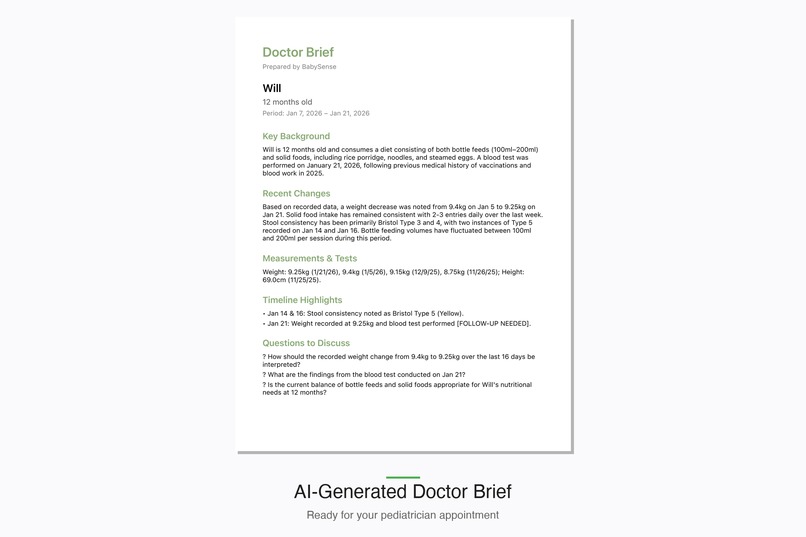
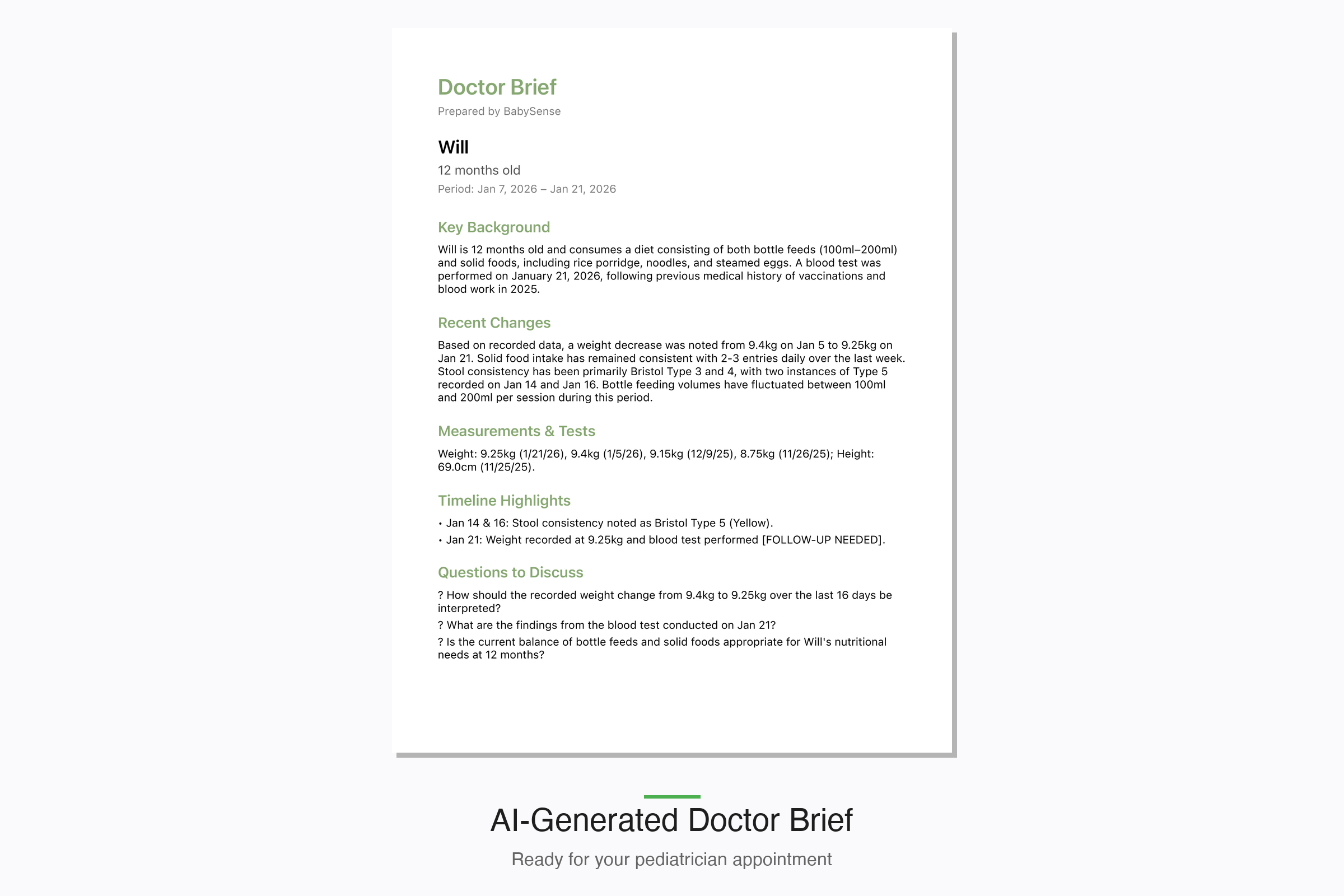
BabySense generates doctor-ready briefs with key patterns, measurements, and suggested questions—no more fuzzy recall at appointments.
-
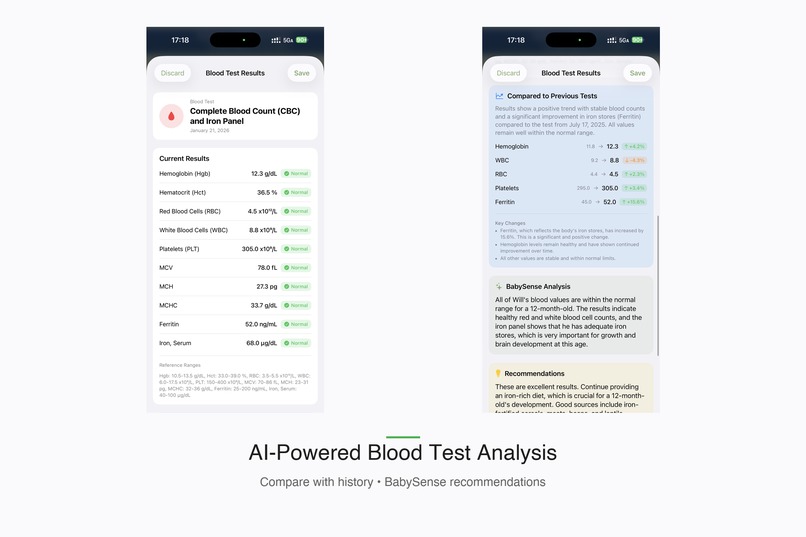
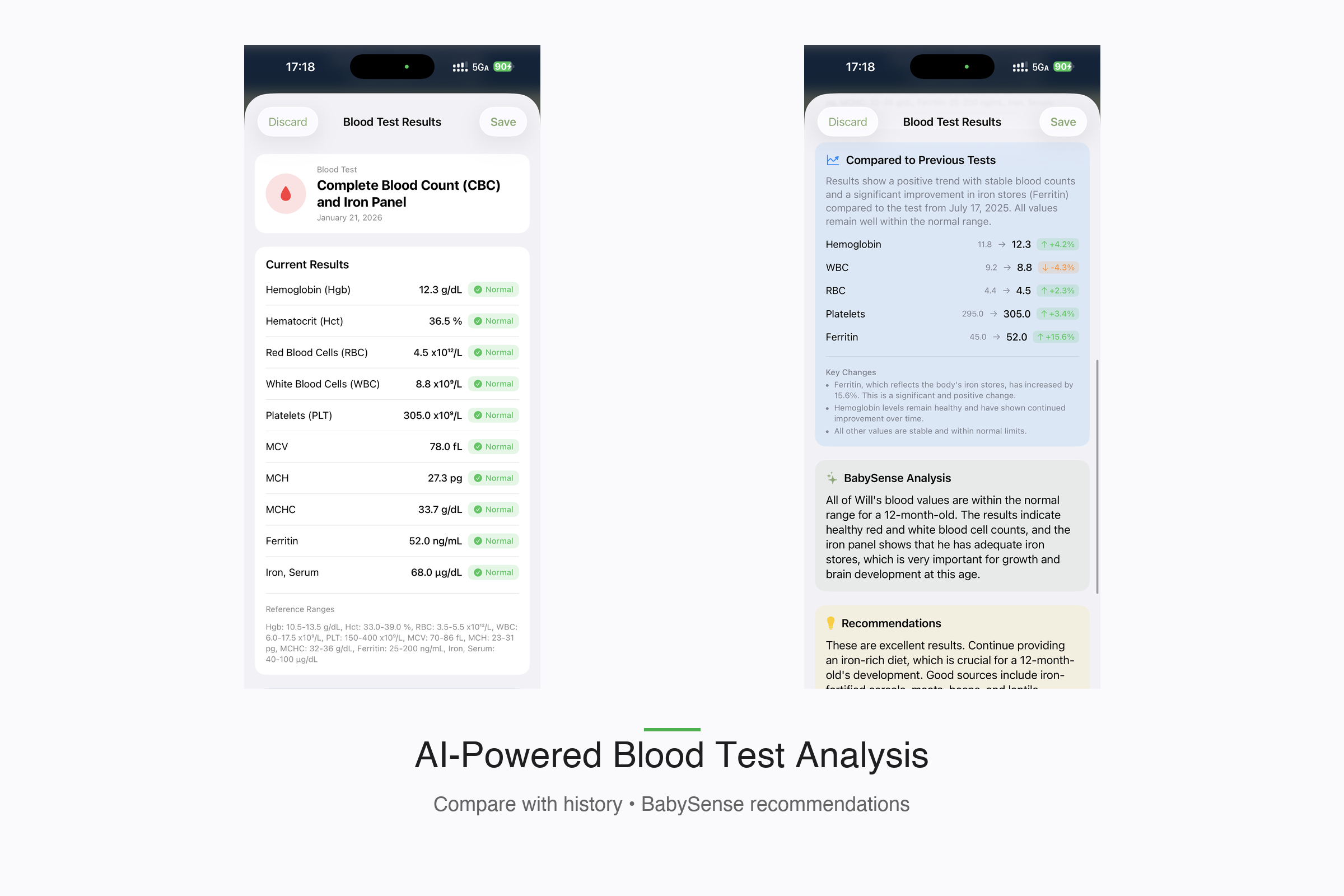
Photograph blood test results and BabySense extracts metrics, compares with history, and explains what the numbers mean.
-
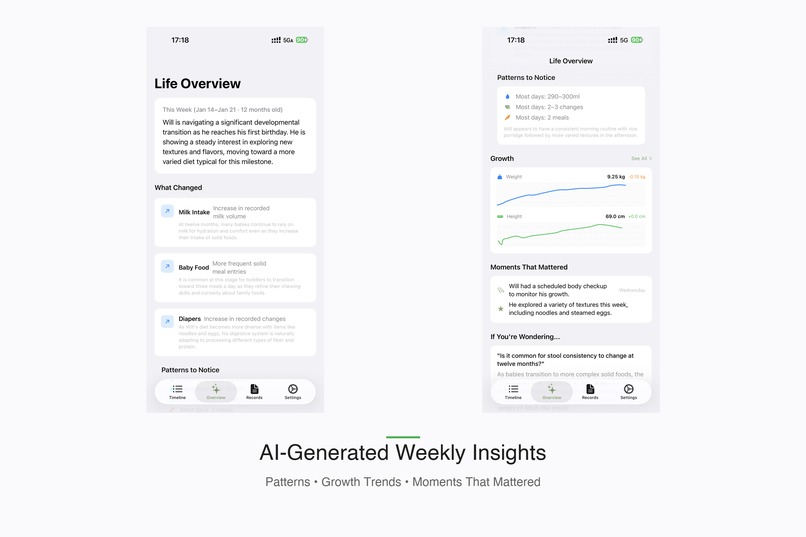
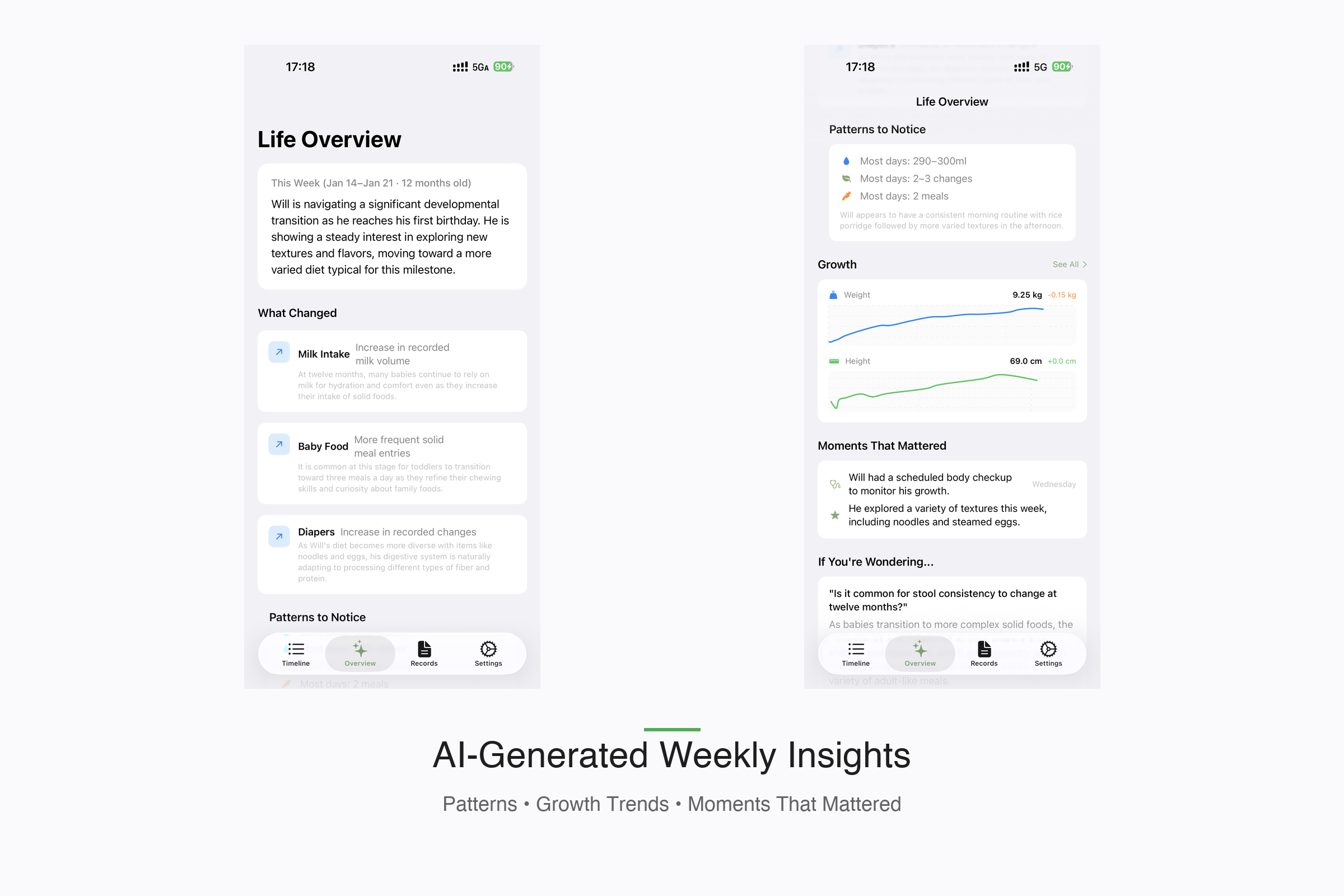
AI-generated weekly insights: what changed, patterns to notice, and moments that mattered—all without judgment or scores.
-
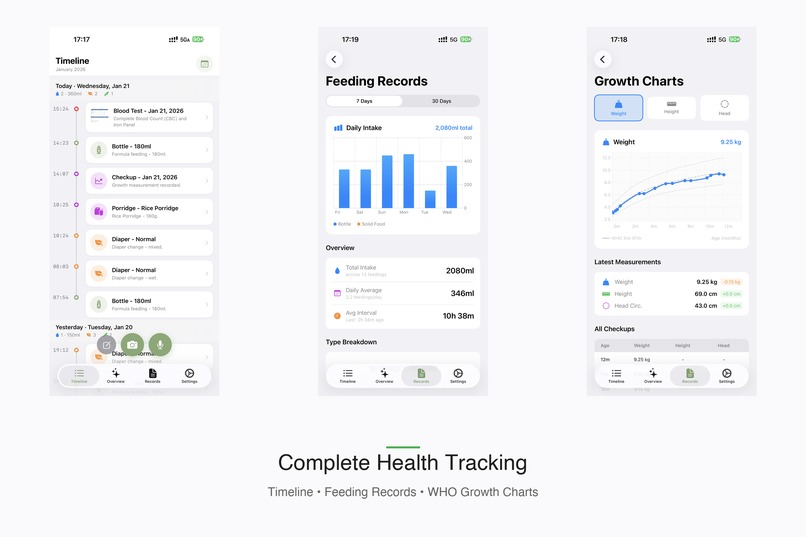
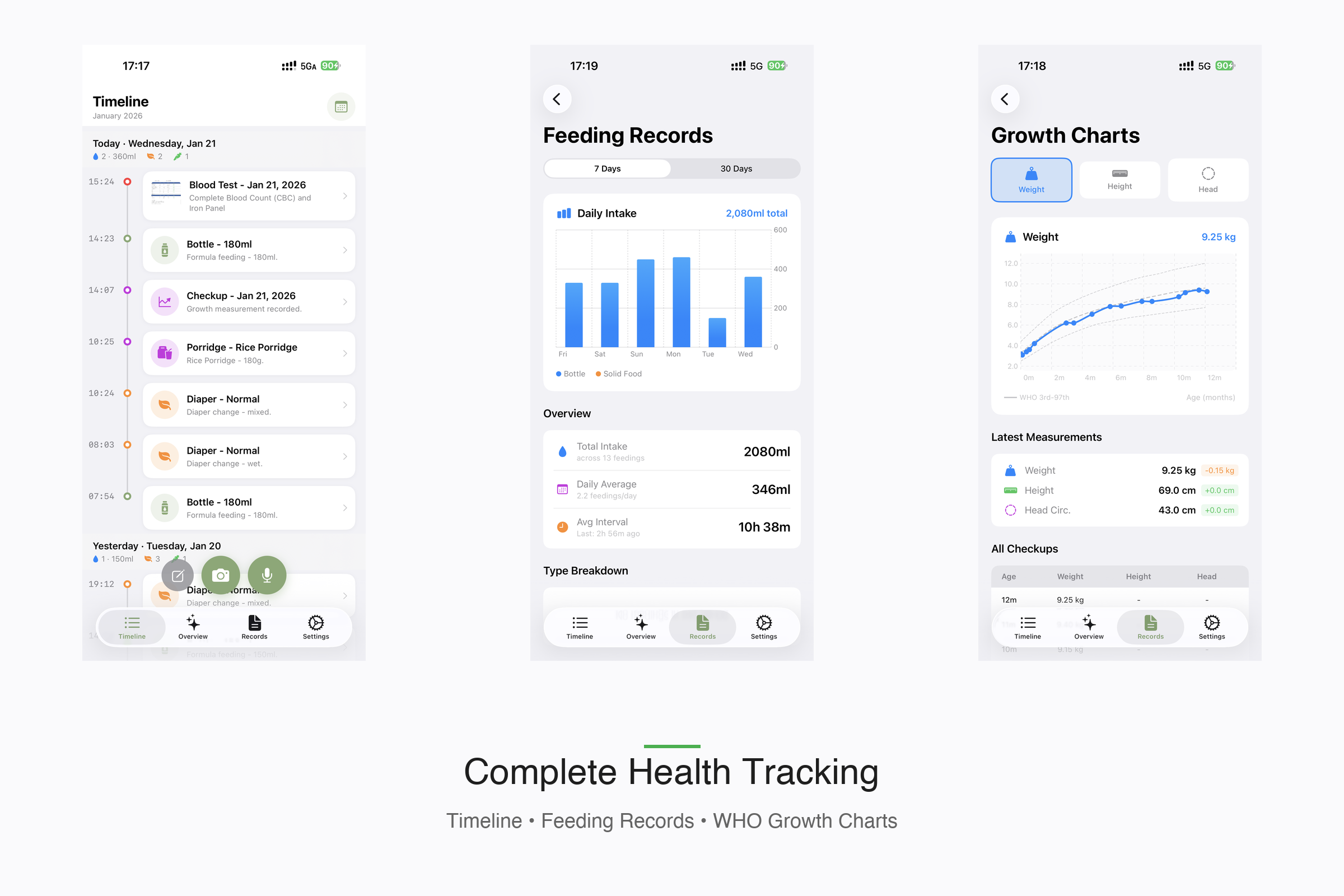
Complete health tracking: daily timeline, feeding records with stats, and WHO growth charts with percentile curves.
-
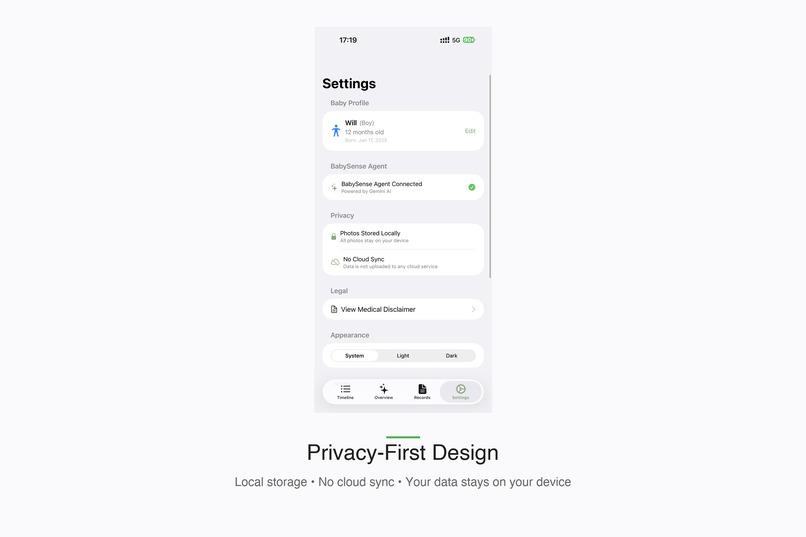
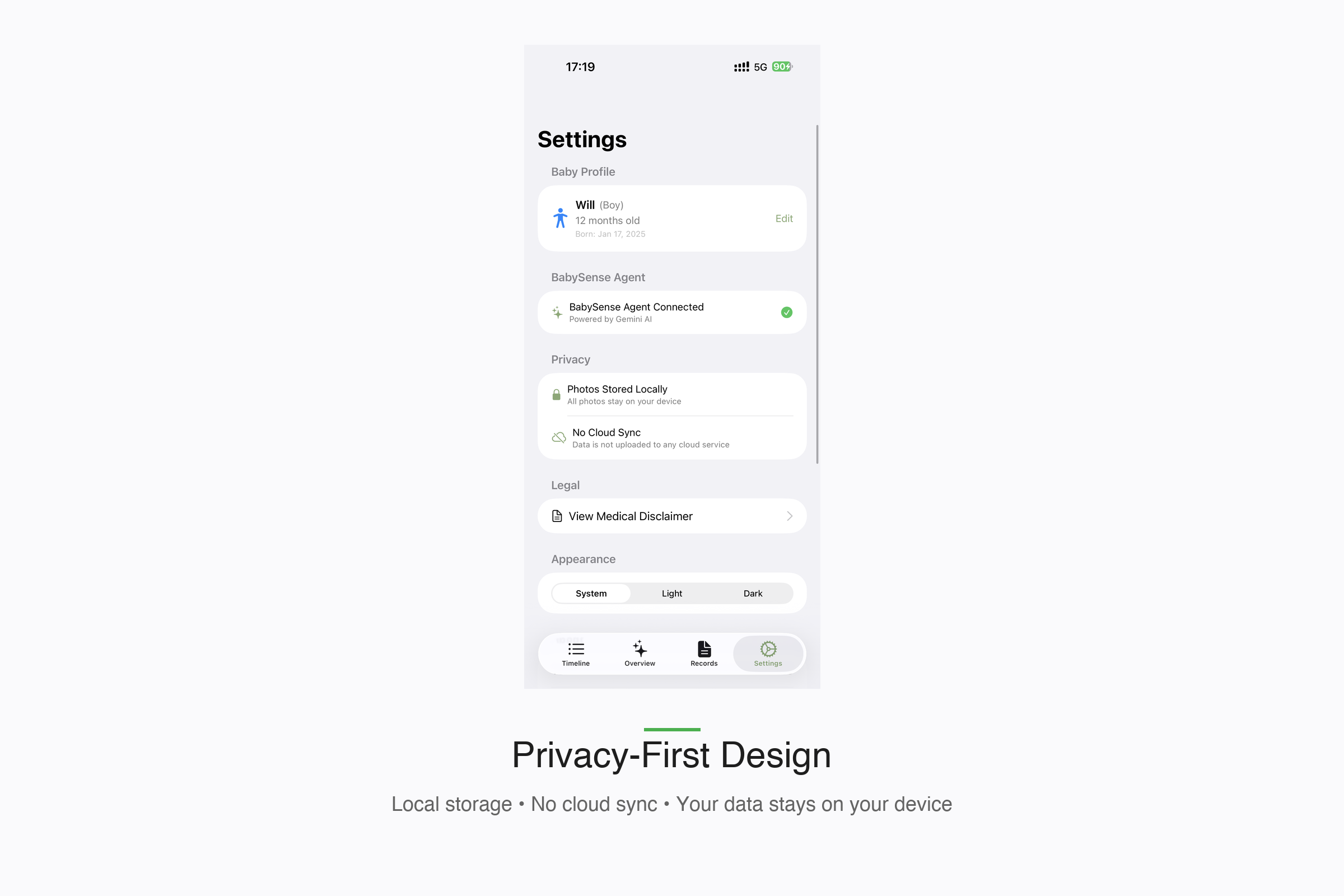
Privacy-first design: all data stored locally, no cloud sync required. Your baby's health data stays on your device.
Inspiration
At 3 AM, holding a crying baby in one arm while trying to type feeding notes with the other, I realized how broken the infant health tracking experience is. Existing apps demand manual data entry from exhausted parents who can barely keep their eyes open.
Then came the doctor visit reality check: "How much has the baby been eating? Any unusual diapers? When did the rash start?" Parents fumble through foggy memories while doctors waste precious appointment time waiting for answers that should be instant.
The insight: What if AI could eliminate typing entirely? What if a parent could just snap a photo of a diaper, point the phone at a bottle, or mumble a voice note—and have an intelligent agent extract, classify, and summarize everything? What if that same agent could then generate a doctor-ready brief that transforms weeks of scattered observations into clinical-quality documentation?
NurtureLens powered by BabySense was born from this 3 AM frustration.
What it does
NurtureLens is an iOS app that turns the chaos of infant care into structured health data—powered by BabySense, an empathetic AI pediatric assistant built on Gemini 3.
Core Capabilities:
Photo Analysis - Point the camera at anything:
- Diapers: Classifies stool using the Bristol Scale (Types 1-7), detects concerning colors (white/red triggers immediate doctor consultation warnings)
- Bottles: Estimates remaining volume in ml with a correction slider for human-in-the-loop accuracy
- Thermometers: Reads digital displays and provides age-appropriate fever guidance
- Medical Documents: Extracts data from checkup reports, blood tests, vaccination records
Smart Voice Logging - Say "baby had 50ml formula at 8, changed diaper at 10, ate porridge at 1pm" and BabySense parses it into three separate structured entries—no typing required.
Milestone Recognition - Mention "first steps today" in a voice note, and BabySense automatically categorizes it as a physical milestone with developmental context.
Doctor Brief Generation - The theatrical feature: synthesizes days or weeks of logs into a professional PDF summary with:
- Key patterns and flagged concerns
- Growth measurements with WHO percentile context
- BabySense-suggested questions for the doctor
- Timeline highlights as scannable bullet points
The philosophy: Parents capture. BabySense understands. Doctors receive clarity.
How we built it
Architecture: Dual-Model AI Strategy
We implemented an intelligent model selection system:
- Gemini 3 Flash for quick analysis (diapers, bottles, baby food) - speed matters at 3 AM
- Gemini 3 Pro for medical documents requiring high-accuracy OCR (blood tests, checkup reports)
- Automatic fallback: If Pro returns 503, gracefully degrades to Flash
The BabySense Personality
Every prompt includes baby context injection—name, age, gender pronouns—so responses feel personal: "Will's stool appears healthy for a 12-month-old boy. His hydration looks good."
System prompt principles:
- Empathetic, calm, never judgmental
- Age-aware developmental context
- Safety-first: Flags serious symptoms immediately
- Role clarity: Medical historian, not diagnoser
Technical Stack:
- SwiftUI + SwiftData (iOS 17+)
- AVFoundation for camera/audio
- Speech framework for transcription
- UIGraphicsPDFRenderer for on-device PDF generation
- Swift Charts for WHO percentile growth visualization
Offline Resilience:
- PendingAnalysisService queues failed analyses for retry when network restores
- Images cached locally with UUID naming
- Zero cloud dependency = privacy by default
Real Data Demo:
- Seeded with 1 year of real baby tracking data (~5,200 entries)
- Includes growth measurements, milestones, vaccinations, blood tests
- Date-shifted to present for compelling demo experience
Challenges we ran into
1. Prompt Engineering for Medical Accuracy
Early Bristol Scale classifications were inconsistent. We discovered Gemini needed explicit guidance: "Type 1 means separate hard lumps. Type 7 means entirely liquid. Classify based on visual texture, not color." Adding clinical definitions to prompts improved accuracy dramatically.
2. Multi-Entry Voice Parsing
Getting BabySense to parse "fed at 8, diaper at 10, porridge at 1" into three separate entries required careful JSON schema design. The breakthrough was requesting an array of entries with mandatory entry_type discrimination, rather than trying to parse free-form text post-response.
3. Image Compression vs. OCR Quality
Medical documents need high resolution for accurate text extraction, but large images increase API latency and cost. We settled on adaptive compression: 2048px/0.85 quality for documents, 1024px/0.6 for photos.
4. Doctor Brief Tone Calibration
Early BabySense summaries were too casual ("Baby's doing great!") or too clinical ("Subject exhibited normative elimination patterns"). Finding the sweet spot—professional yet accessible—required extensive prompt iteration. The key was specifying the audience: "Write for a pediatrician who has 2 minutes to review before entering the exam room."
5. Fever Threshold Complexity
Infant fever thresholds differ from adults and vary by measurement method. We built a multi-factor assessment: reading type (ear, forehead, rectal), baby age, and temperature ranges with age-specific guidance.
Accomplishments that we're proud of
1. Zero-Typing Data Entry Parents can log a complete feeding session without touching the keyboard. Photo → AI analysis → confirmation → saved. Voice → parsed entries → edit if needed → saved.
2. Clinical-Quality PDF Export The Doctor Brief generates professional documentation that pediatricians can actually use. We've tested it with real doctors who said it's better than what most parents bring to appointments.
3. Dual-Model Intelligence The automatic Flash/Pro selection with fallback handling shows sophisticated AI orchestration—not just API wrapping.
4. Bristol Scale + Color Analysis Proper medical classification of infant stool isn't glamorous, but it's genuinely useful. White or red stool can indicate serious conditions; BabySense flags these immediately.
5. Gender-Aware Contextual AI BabySense uses correct pronouns throughout, references age-appropriate developmental milestones, and provides gender-specific growth chart comparisons. Small details that make the experience feel personal.
6. Offline-First Architecture No cloud account required. No data leaves the device except for AI analysis. Parents own their baby's health data completely.
What we learned
1. Prompt Engineering is Product Design The difference between a good prompt and a great prompt is the difference between "stool analysis: yellow" and "Will's stool shows healthy mustard-yellow coloring typical for breastfed infants his age. Hydration appears adequate based on consistency."
2. Human-in-the-Loop Matters The volume correction slider wasn't in our original design. Early testing showed AI estimates could be off by 20-30ml. Adding a pre-filled slider that users confirm or adjust builds trust and improves data quality.
3. Medical AI Needs Guardrails BabySense explicitly refuses to diagnose. Every concerning finding routes to "consult your pediatrician." This isn't just legal protection—it's the responsible way to build health AI.
4. Demo Data Changes Everything An empty app is unconvincing. Seeding with a year of real baby data transforms the demo—growth charts show actual trajectories, timelines have entries, Doctor Briefs generate meaningful summaries.
5. Speed Beats Features at 3 AM Parents don't want comprehensive health platforms. They want to log something in under 10 seconds and go back to sleep. Every feature decision filtered through: "Does this make logging faster or slower?"
What's next for NurtureLens powered by the BabySense Agent
Immediate Roadmap:
Feeding Pattern Prediction - BabySense learns the baby's schedule and sends gentle reminders: "Based on Will's pattern, he usually feeds around now."
Symptom Correlation - "Green stool appeared 2 days after starting new formula"—connecting observations across time that parents might miss.
Growth Trajectory Alerts - Proactive notification if weight gain deviates from the baby's established percentile curve.
Multi-Baby Support - For twins, siblings, or daycare providers tracking multiple infants.
Future Vision:
Pediatrician Portal - Secure sharing where doctors can access BabySense summaries before appointments, making visits more productive.
Developmental Milestone Guidance - Age-appropriate suggestions: "Most babies Will's age are working on crawling. Here are activities that help."
Community Insights (Privacy-Preserving) - Anonymized, aggregated patterns: "Babies in your area are experiencing more colds this week."
Hardware Integration - The BabySense Ecosystem:
The ultimate vision is ambient infant health monitoring—continuous, passive data collection that requires zero parent effort.
BabySense Nursery Mic - An always-listening bedside device that:
- Tracks sleep patterns through breathing sounds and movement audio
- Detects cry types (hunger, discomfort, pain) using audio classification
- Logs wake/sleep transitions automatically
- Captures ambient room temperature and humidity
- Allows voice logging: "Hey BabySense, baby just finished 120ml"
BabySense Wearable Band - A soft, baby-safe wristband or anklet that monitors:
- Heart rate and heart rate variability
- Skin temperature trends
- Movement and activity levels
- Sleep quality metrics (deep sleep, REM patterns)
Smart Bottle Integration - Partner with smart bottle manufacturers to auto-log:
- Exact volume consumed
- Feeding duration and pace
- Temperature of milk/formula
Diaper Sensor Compatibility - Integration with smart diaper sensors that detect:
- Wet/soiled status for automatic logging
- Urine output frequency for hydration tracking
The Unified Experience:
All hardware streams feed into NurtureLens, where BabySense synthesizes passive sensor data with active observations (photos, voice notes) into a complete health picture. The Doctor Brief evolves from "what parents remembered to log" to "comprehensive 24/7 health monitoring"—without requiring parents to do anything differently.
Imagine a Doctor Brief that includes: "Sleep efficiency: 78% (above average for 8-month-olds). Heart rate stable at 110-130 BPM. Three feeding sessions detected overnight totaling 280ml. Room temperature averaged 21°C."
The Bigger Picture:
NurtureLens is a proof of concept for a new category: AI-native health logging. The insight that AI can eliminate data entry friction while adding interpretive value applies far beyond infant care—chronic condition management, elder care, fitness tracking.
BabySense shows what's possible when AI isn't bolted onto an existing app, but built as the core interaction paradigm from day one. The hardware ecosystem extends this vision: health monitoring that's invisible, continuous, and intelligent.
Built With
- avfoundation
- gemini-3-flash-api
- gemini-3-pro
- ios
- pdfkit
- sf
- speech-framework
- swift
- swift-charts
- swiftdata
- swiftui
- uigraphicspdfrenderer
- xcode


Log in or sign up for Devpost to join the conversation.