-
-
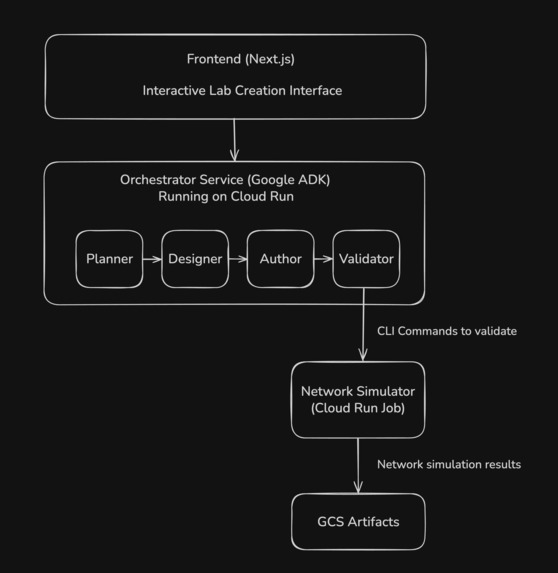
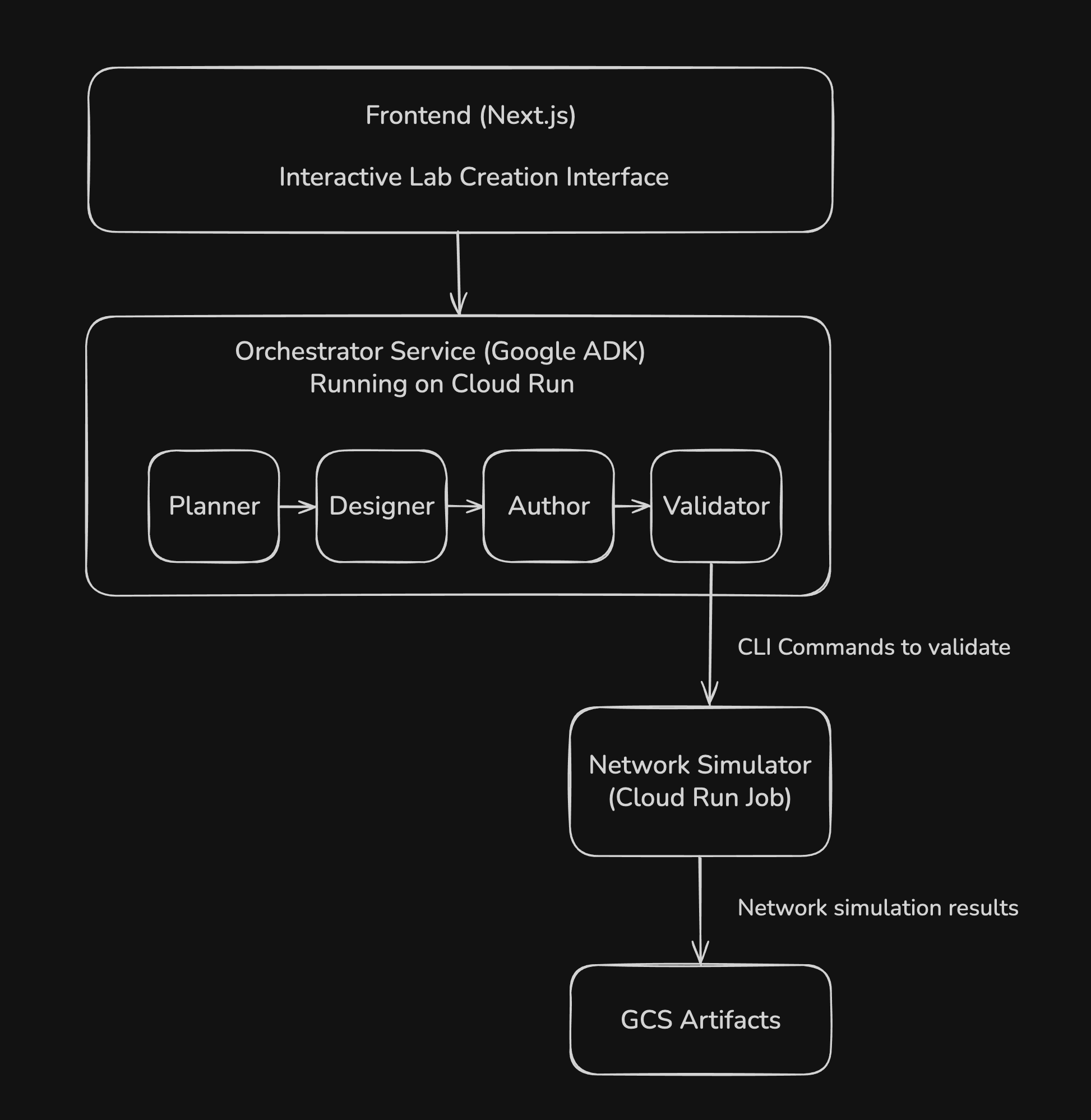
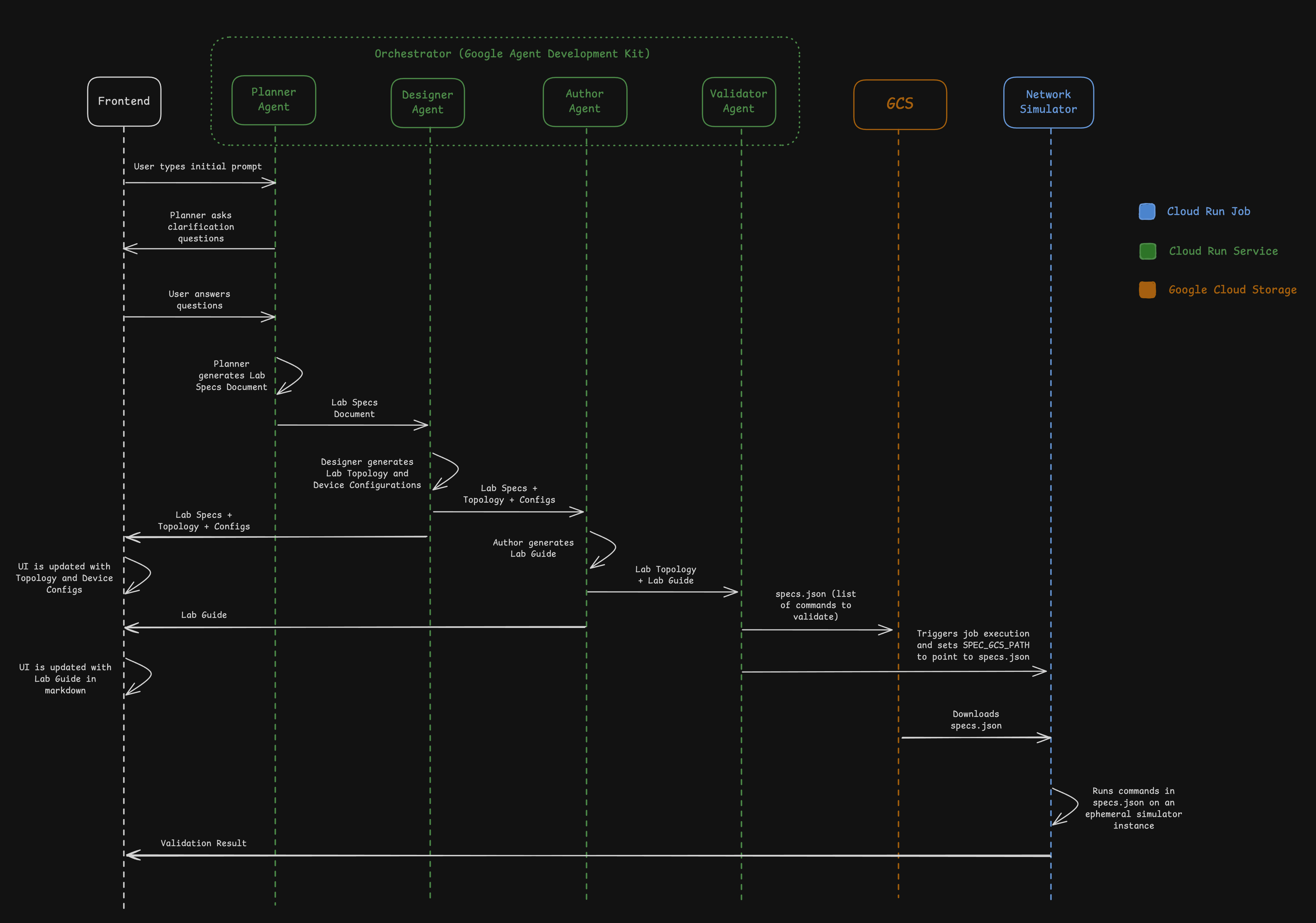
Architecture Diagram
-
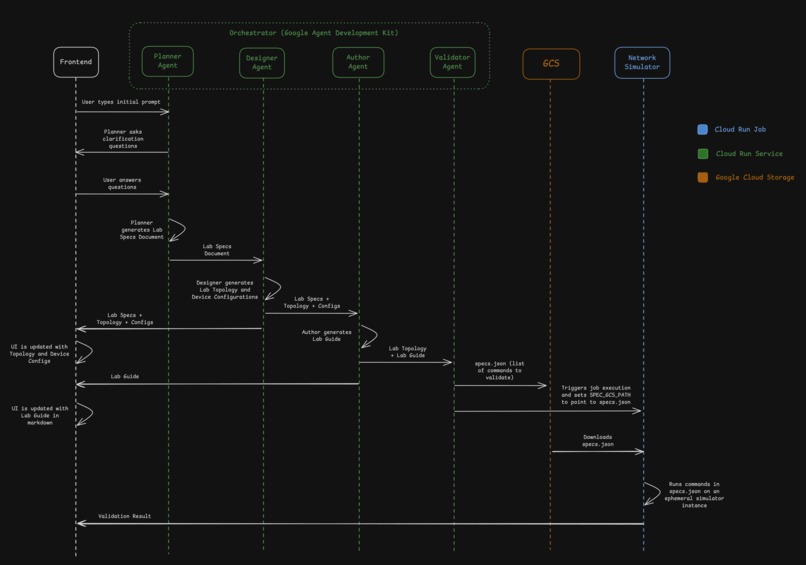
Detailed Flow Diagram
-
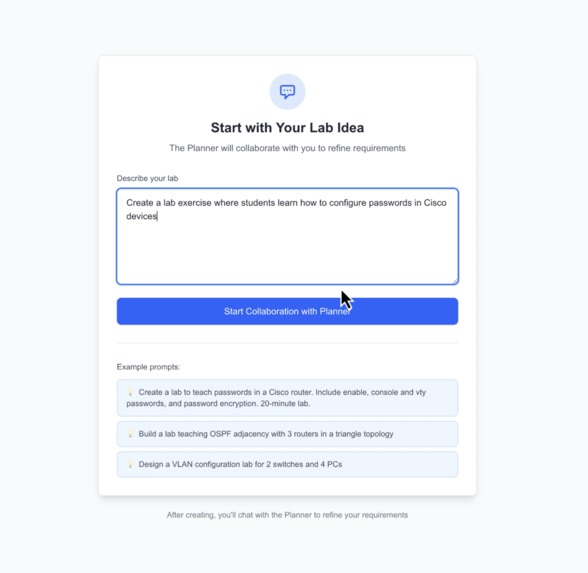
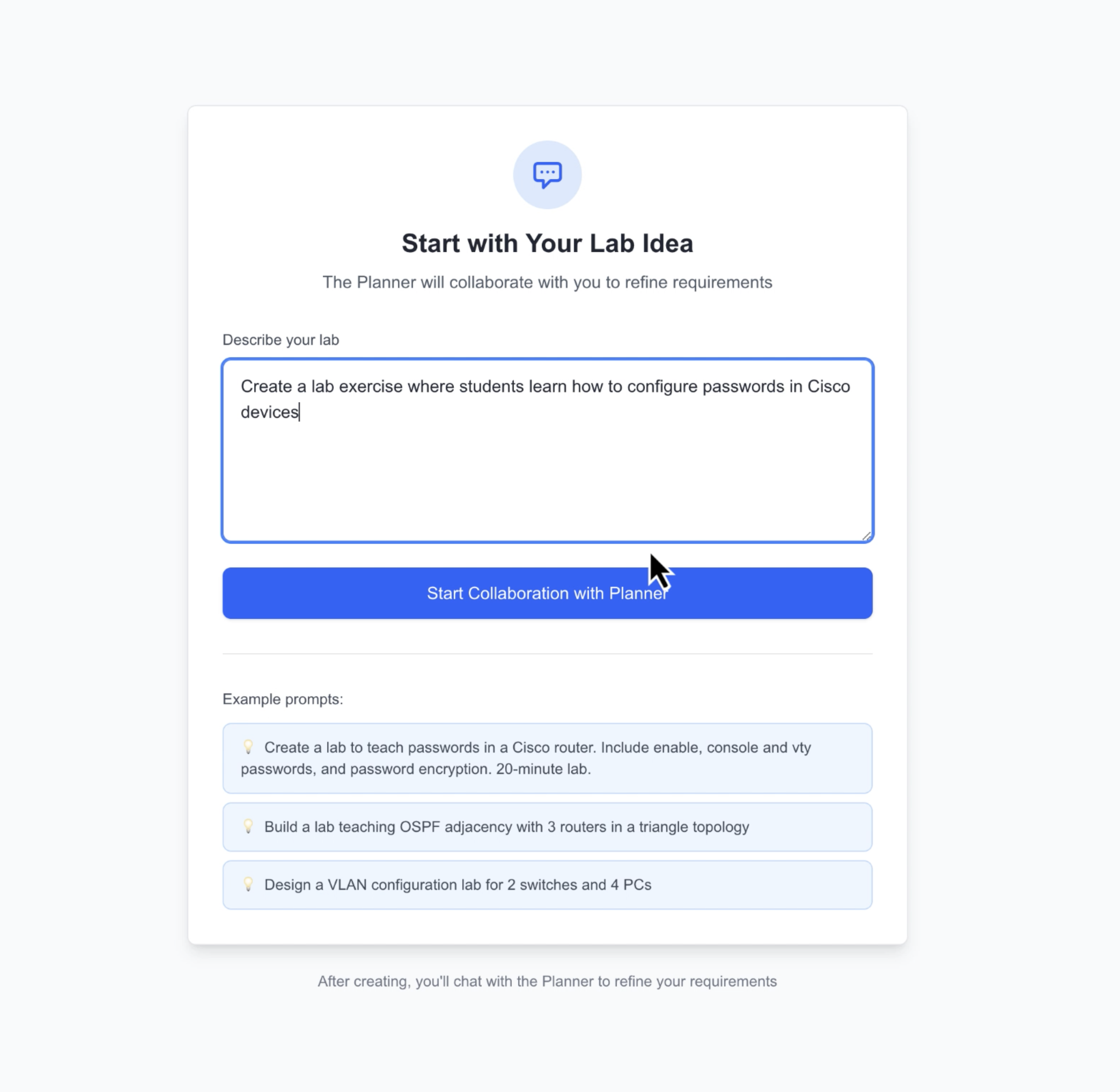
Initial Prompt
-
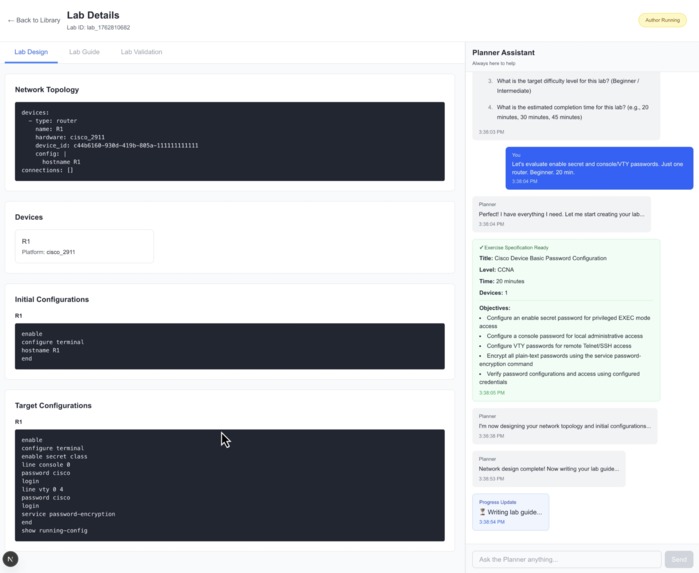
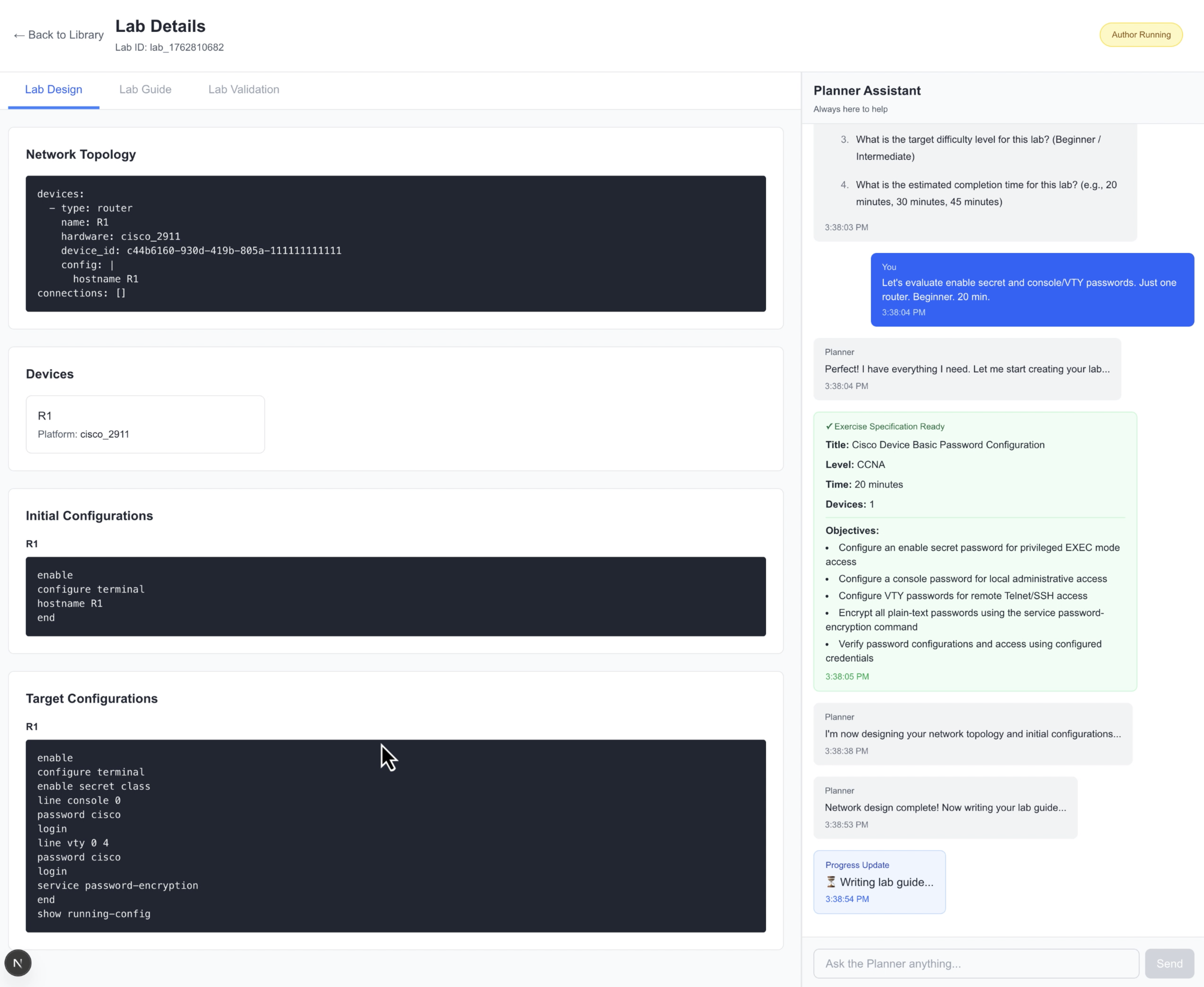
Lab Designer Agent Output
-
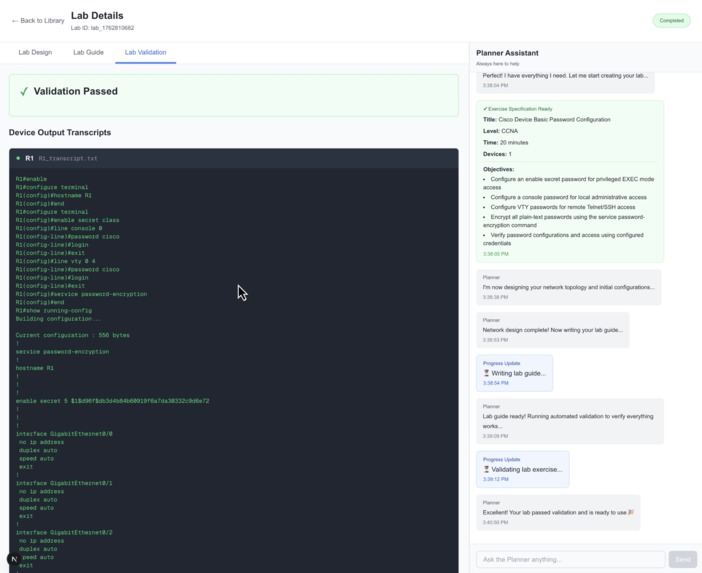
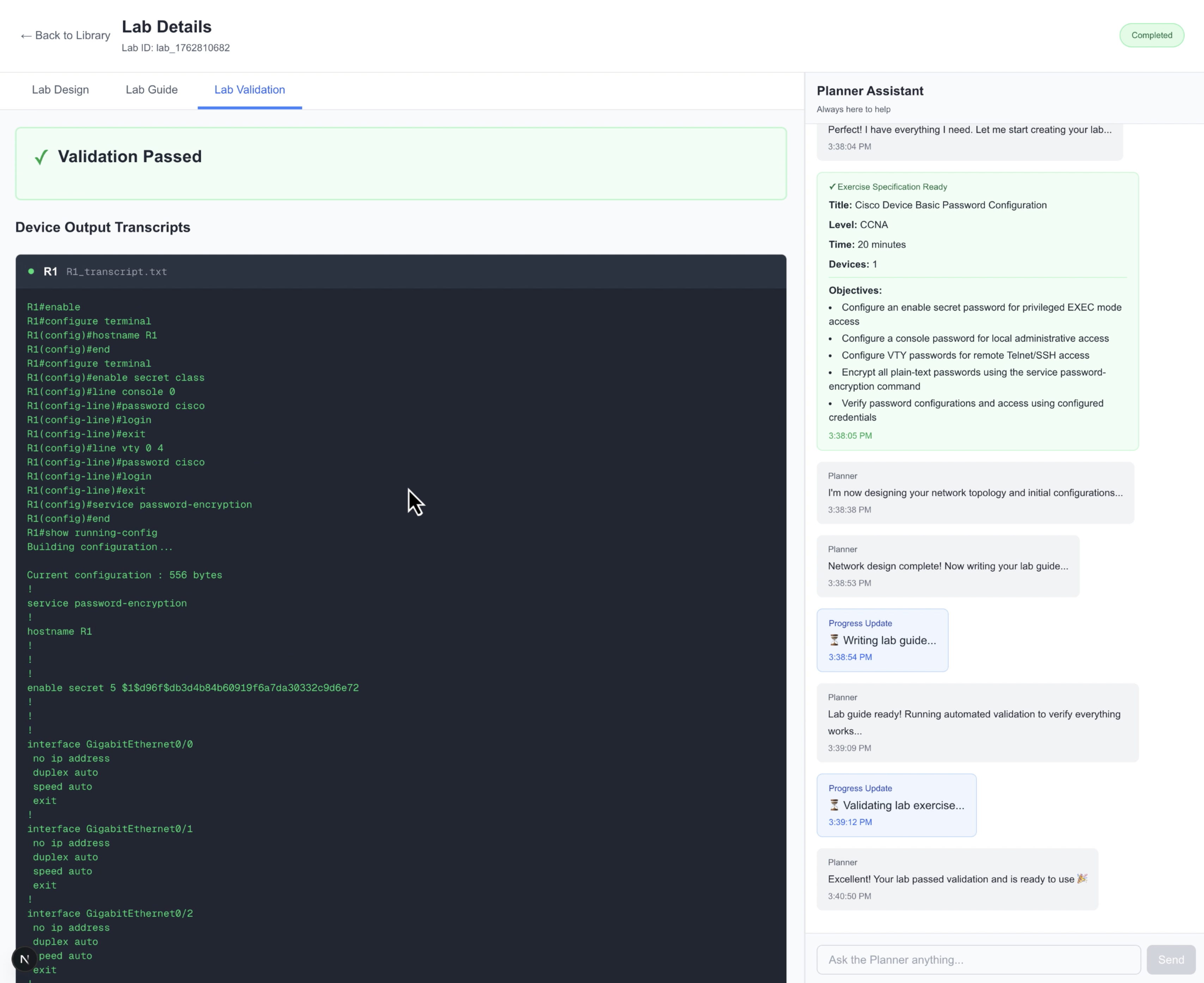
Validator Agent Output
-
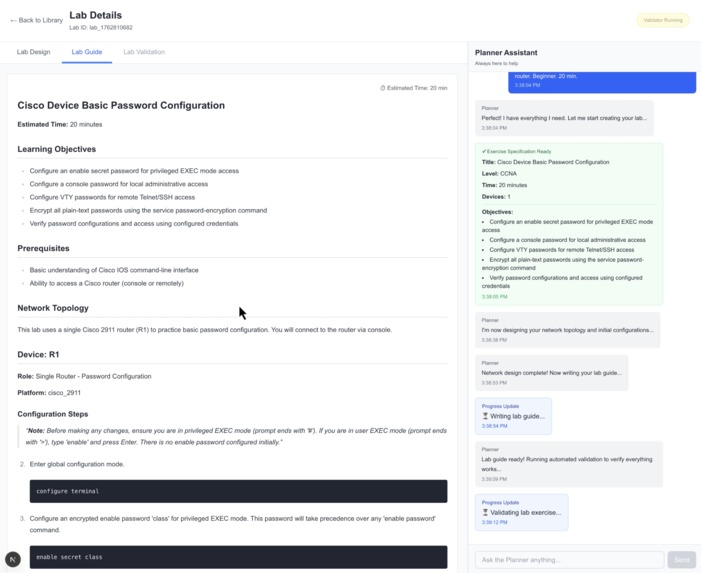
Lab Guide Writer Agent Output
-
Logo and Demo Website
NetGenius Instructor Copilot (NIC) - Hackathon Submission
Inspiration
As a Cisco Certified Academy Instructor with 25 years of experience teaching the CCNA curriculum, I've witnessed firsthand the significant challenge instructors face in creating fresh, engaging lab exercises. Developing quality hands-on labs is incredibly time-consuming—from planning learning objectives to designing network topologies, writing step-by-step instructions, and most critically, validating that students can actually complete the exercise successfully.
I've seen countless hours spent by instructors crafting labs, only to discover during class that a configuration step was missing or a verification command didn't work as expected. This frustration, multiplied across thousands of networking instructors worldwide, inspired me to explore how AI could transform this workflow.
What it does
NetGenius Instructor Copilot (NIC) is an AI-powered lab generation system that automates the entire lifecycle of networking lab creation:
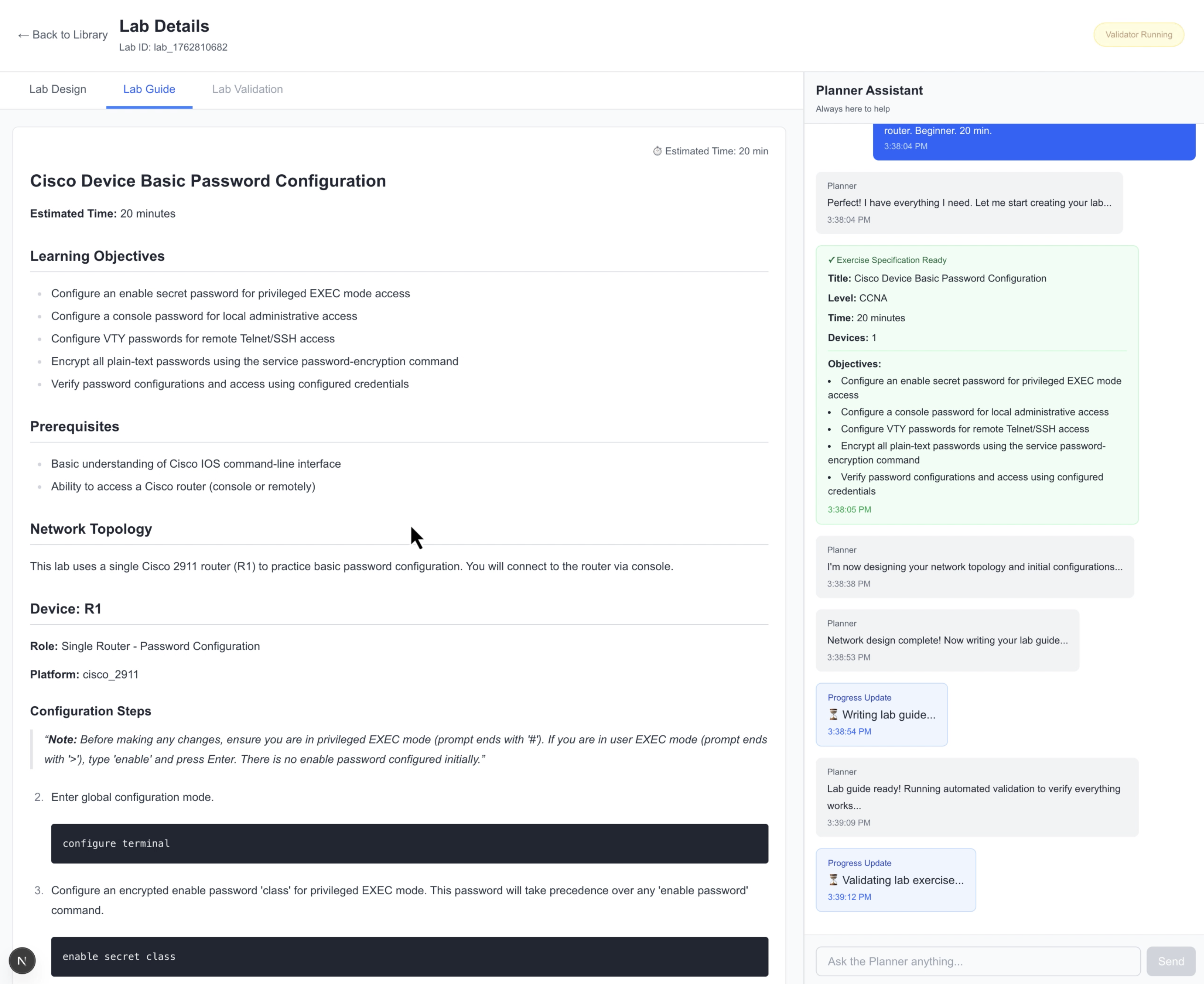
Interactive Planning: An AI Planner agent engages instructors in a conversational Q&A session to gather complete requirements—topic coverage, difficulty level, device count, and time constraints.
Intelligent Design: A Designer agent creates network topologies in YAML format and generates both initial configurations (starting point) and target configurations (desired end state).
Automated Authoring: An Author agent writes comprehensive student-facing lab guides with clear objectives, step-by-step instructions, and verification commands—all formatted in professional markdown.
Headless Validation: A Validator agent triggers a Cloud Run Job that spins up a complete network simulation, applies configurations, executes student steps, and verifies the lab is solvable before publication.
The result? What typically takes instructors 2-4 hours can be accomplished in 5-10 minutes, with the critical advantage of guaranteed accuracy through automated validation.
How we built it
The project leverages Google's Agent Development Kit (ADK) as its core orchestration framework, demonstrating ADK's power in coordinating complex multi-agent workflows:
Architecture Components
1. Frontend (Next.js + Vercel)
- React-based web interface for lab creation
- Real-time progress tracking with streaming updates
- Interactive chat interface for Q&A with the Planner agent
2. Orchestrator (FastAPI + Google ADK + Cloud Run)
- Four specialized ADK agents working in sequence:
- Planner:
LlmAgentwith multi-turn conversation capabilities using ADK's session management - Designer:
LlmAgentwith tool integration for topology validation - Author:
LlmAgentwith structured output for markdown generation - Validator: Custom
BaseAgentdemonstrating ADK's extensibility for external service integration
- Planner:
- Session state management handled automatically by ADK
- Deployed as a Cloud Run Service for scalability
3. Headless Runner (Cloud Run Jobs)
- Network simulation engine executing in isolated containers
- Applies configurations and runs student commands in headless mode
- Generates GCS artifacts (device histories, verification results)
- Scales to zero when not in use
Key Technologies
- Google ADK: Multi-agent orchestration with
SequentialAgentpattern - Gemini 2.5 Flash: Underlying LLM for all AI agents
- FastAPI: Python web framework for REST API
- Next.js: React framework with server-side rendering
- Cloud Run: Serverless container platform
- Cloud Run Jobs: On-demand batch processing
- Google Cloud Storage: Artifact storage and retrieval
ADK Integration Highlights
The project showcases several ADK patterns:
- Multi-turn Conversations: Planner agent maintains context across Q&A turns using ADK's session state
- Tool Integration: Designer agent validates outputs using custom tools
- Structured Output: All agents produce Pydantic-validated schemas
- Custom Agent Extension: Validator demonstrates extending ADK's
BaseAgentfor proprietary integrations - Automatic Error Handling: ADK's built-in retry logic ensures robustness
Challenges we ran into
1. Integrating Multi-turn Chat with Sequential Agent Pipeline
Challenge: The initial architecture had the Planner agent only available at the start, then disappeared once the pipeline began. Users had no way to clarify requirements or ask questions after the process started. Additionally, coordinating the timing between when the Planner finished, when to trigger the remaining agents (Designer, Author, Validator), and how to keep all outputs accessible was complex.
Solution: Implemented a major architectural refactor with an "always-on Planner" design. The Planner chat panel now persists throughout the entire workflow in a 2-panel layout (content area + chat). Created a new /chat endpoint that allows multi-turn conversations at any stage. Added state management to track when the Planner has gathered enough information to trigger the downstream pipeline, while preserving all conversation history and agent outputs.
2. Extracting Structured Data from Agent Outputs
Challenge: Agents would sometimes wrap JSON outputs in markdown code fences (json ...), return nested structures, or alternate between dict objects and JSON strings. This caused parsing failures when passing data between agents—for example, the Designer's topology couldn't be validated if it was wrapped in markdown.
Solution: Implemented robust unwrapping logic that detects and extracts JSON from markdown wrappers before parsing. Added type checking to handle both dictionary objects and JSON strings. Created helper functions like extract_json_from_markdown() and added defensive parsing throughout the pipeline.
3. Managing Progress Visibility and Message Ordering
Challenge: Users couldn't see what was happening during the multi-minute agent pipeline execution. Messages appeared out of order, internal debug messages leaked into the user-facing chat, and status transitions weren't visible (agents would jump from "pending" to "completed" without showing "running" state).
Solution: Implemented a comprehensive progress tracking system with:
- Explicit "running" states for each agent with 2-second delays to make transitions visible
- Message classification to filter internal debug output from user-facing conversation
- In-memory message storage for immediate visibility (not waiting for disk writes)
- Proper UTC timestamp formatting (ISO 8601) for message ordering
- Progress messages embedded in the chat interface showing current agent and stage
4. Cloud Run Deployment Configuration Issues
Challenge: The application worked perfectly locally but failed on Cloud Run due to missing dependencies (gcloud CLI for validation), missing environment variables (GOOGLE_API_KEY), and outdated Docker base images (deprecated apt-key command).
Solution: Updated Dockerfile to use gpg --dearmor instead of deprecated apt-key, added gcloud CLI installation to the container, configured environment variable passing in Cloud Run deployment scripts, and added comprehensive CORS configuration for cross-origin requests from the Vercel-hosted frontend.
Accomplishments that we're proud of
1. Successful ADK Multi-Agent Pipeline
We built a working multi-agent system using Google ADK that handles a real-world, complex workflow end-to-end. The seamless coordination between Planner, Designer, Author, and Validator agents demonstrates ADK's power in production scenarios.
2. Automated Lab Validation
The headless validation stage is a game-changer. No other lab generation tool validates that students can actually complete the exercise. This feature alone saves instructors countless hours of classroom debugging.
3. Intuitive User Experience
Despite the complexity under the hood, the frontend provides a ChatGPT-like experience that feels natural to instructors. The progress tracker gives transparency into each agent's work.
4. Cloud Run Integration
The application showcases Cloud Run's versatility—running a stateful FastAPI service for the orchestrator and event-driven Cloud Run Jobs for compute-intensive simulations. Resources scale to zero when idle, keeping costs minimal.
5. Production-Ready Architecture
With proper error handling, retry logic (via ADK), artifact storage in GCS, and clean separation between public orchestrator and private simulation engine, the system is architected for real-world deployment.
6. Intelligent Auto-Retry System (Backend Only)
The RCA (Root Cause Analysis) agent automatically diagnoses validation failures and routes fixes back to the appropriate agent. When validation fails, the RCA agent classifies the issue as DESIGN (topology problem → Designer), INSTRUCTION (lab guide error → Author), or OBJECTIVES (spec issue → human escalation), then generates specific patch instructions for automatic retries. This feature is fully implemented in the backend using ADK's multi-agent orchestration but not yet exposed in the UI due to time constraints.
What we learned
About Google ADK
Session State is Powerful: ADK's automatic session management eliminated the need for manual state tracking between agents, significantly simplifying the orchestration code.
LlmAgent Versatility: The same
LlmAgentclass handles multi-turn Q&A (Planner), tool integration (Designer), and structured output (Author)—demonstrating ADK's flexibility.Custom Agent Extension: Extending
BaseAgentfor the Validator was straightforward, showing how ADK integrates with existing services.Prompt Engineering Matters: Even with sophisticated frameworks like ADK, careful prompt design is critical for agent behavior and output quality.
About Cloud Run
Seamless Scaling: Cloud Run Services and Jobs complement each other perfectly—persistent API services alongside ephemeral batch workloads.
Cost Efficiency: Scale-to-zero means development and testing costs are negligible, while production scales automatically with demand.
Container Portability: Containerized agents work identically in local development and Cloud Run, simplifying the development workflow.
About Multi-Agent Systems
Agent Specialization: Focused agents (Planner, Designer, Author, Validator) outperform monolithic approaches.
Sequential Pipelines Work: For workflows with clear stages, ADK's
SequentialAgentpattern is intuitive and reliable.Validation is Essential: The Validator agent catches errors that would otherwise surface during classroom use—a critical quality assurance step.
What's next for NetGenius Instructor Copilot (NIC)
NetGenius as a whole is an actively developed project that spans much more than just this hackathon project. We're a small, bootstrapped team building this in our spare time with a clear vision: transform networking education through AI.
Our foundation is the NetGenius Network Simulator—a proprietary headless simulation engine we consider our "secret sauce" and maintain as closed-source. On top of this simulator, we're building two complementary AI agents:
- NetGenius Instructor Copilot (this hackathon project) - An AI assistant that helps instructors create labs
- NetGenius AI Tutor (previous hackathon project) - An AI assistant that helps students learn networking concepts
This hackathon submission represents real progress toward our long-term vision. Here's what's next:
Short-term Enhancements
Lab Editing: Allow instructors to request modifications after initial generation (e.g., "add a troubleshooting component" or "simplify the IP addressing scheme"). The system would restart the pipeline with updated requirements while preserving the original lab as a version.
Automatic Validation Iteration: Expose the already-implemented backend feature that automatically retries lab generation when validation fails. The system analyzes validation errors and feeds them back to the Designer and Author agents to correct issues, iterating until the lab passes validation or reaches a maximum retry limit.
Topology Renderer/Visualizer: Add a visual topology diagram generator so instructors can see the network layout graphically—not everyone is YAML-fluent. This would render device connections, interfaces, and IP addressing in an interactive diagram.
Long-term Vision
Enhanced Network Simulator Capabilities: Expand the proprietary NetGenius network simulator to support advanced concepts like dynamic routing protocols (OSPF, EIGRP, BGP), enabling more sophisticated lab scenarios.
Student Lab Execution Platform: Publish labs for students to execute in a sandboxed browser-based environment, powered by the NetGenius network simulator in interactive mode. Students would access labs through a web interface without needing local simulation software.
Automatic Grading: Implement AI-powered grading that evaluates student lab submissions by comparing their configurations and command outputs against the target state, providing instant feedback and partial credit.
Community Lab Sharing: Build a marketplace where instructors can share, rate, and remix AI-generated labs, fostering collaboration across institutions and creating a library of peer-reviewed exercises.
Mobile Interface: Develop iOS/Android apps for instructors to create and manage labs on the go, bringing the full power of NIC to mobile devices with an optimized touch interface.
Built With
- adk
- nextjs
- python
- typescript

Log in or sign up for Devpost to join the conversation.