Inspiration
Every year, over 350,000 cardiac arrests occur outside of hospitals in the US alone, and survival rates sit below 10%. The biggest factor? Bystanders who want to help but freeze because they don't know what to do. We've all seen someone collapse or get hurt and felt that moment of panic: "I should help, but how?" Traditional first-aid training fades from memory, and pulling out your phone to Google instructions means taking your hands off someone who needs them. We didn't set out to replace doctors or paramedics; we wanted to build something that helps ordinary people keep someone stable in those critical minutes before professional help arrives. When we saw Meta's Ray-Ban smart glasses with their built-in camera and speakers, it clicked: what if the glasses could see what you see and talk you through exactly what to do, hands-free, until EMS gets there?
What it does
Medkit turns Meta Ray-Ban smart glasses into a real-time, hands-free first-aid coaching system. You say "Hey Medkit" to activate it, and the AI sees through your glasses camera while listening to you describe the situation. It asks clarifying questions, assesses severity, and delivers concise, one-sentence-at-a-time instructions.
Critically, Medkit does not diagnose conditions or provide medical treatment. It is strictly a decision-support tool that follows established Red Cross and AHA first-aid playbooks to help bystanders take safe, immediate actions while EMS is en route. The system always leads with "Call 911" for life-threatening situations and displays a persistent banner: "Decision support only — call emergency services." It won't guess when it's uncertain. It asks clarifying questions instead. The goal is never to replace medical professionals, but to bridge the gap between an emergency happening and trained responders arriving on scene.
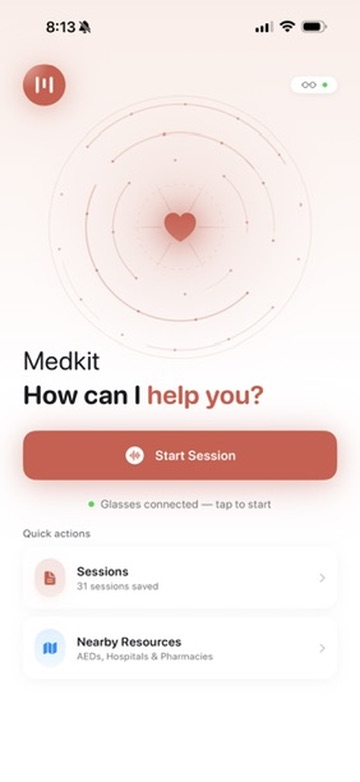
The system supports CPR (with a 110 BPM metronome that plays through the glasses speakers), severe bleeding, choking, burns, fractures, allergic reactions, and more , along with step-by-step checklists, countdown timers for pressure holds and rescuer switches, and a map showing nearby AEDs, pharmacies, and hospitals.
Privacy is built into the pipeline from the start. Before any camera frame is sent to the cloud for analysis, MediaPipe face blurring runs on-device to protect the identity of everyone in the scene: the patient, other bystanders, and anyone else. No raw video is uploaded; only blurred frames are analyzed, and no persistent video is stored server-side.
If you go quiet during an active emergency, Medkit proactively checks in, "Still pressing on the wound?", "Still applying chest compressions?", etc. because silence during treatment might mean you need encouragement, not that you're done. Every session is automatically recorded locally: video, full transcripts, and an EMS-ready report that can be handed directly to paramedics when they arrive, giving them a timeline of what happened, what was observed, and what actions were taken before they got there.
How we built it
The system has three main layers: the iOS app, the cloud backend, and the AI pipeline.
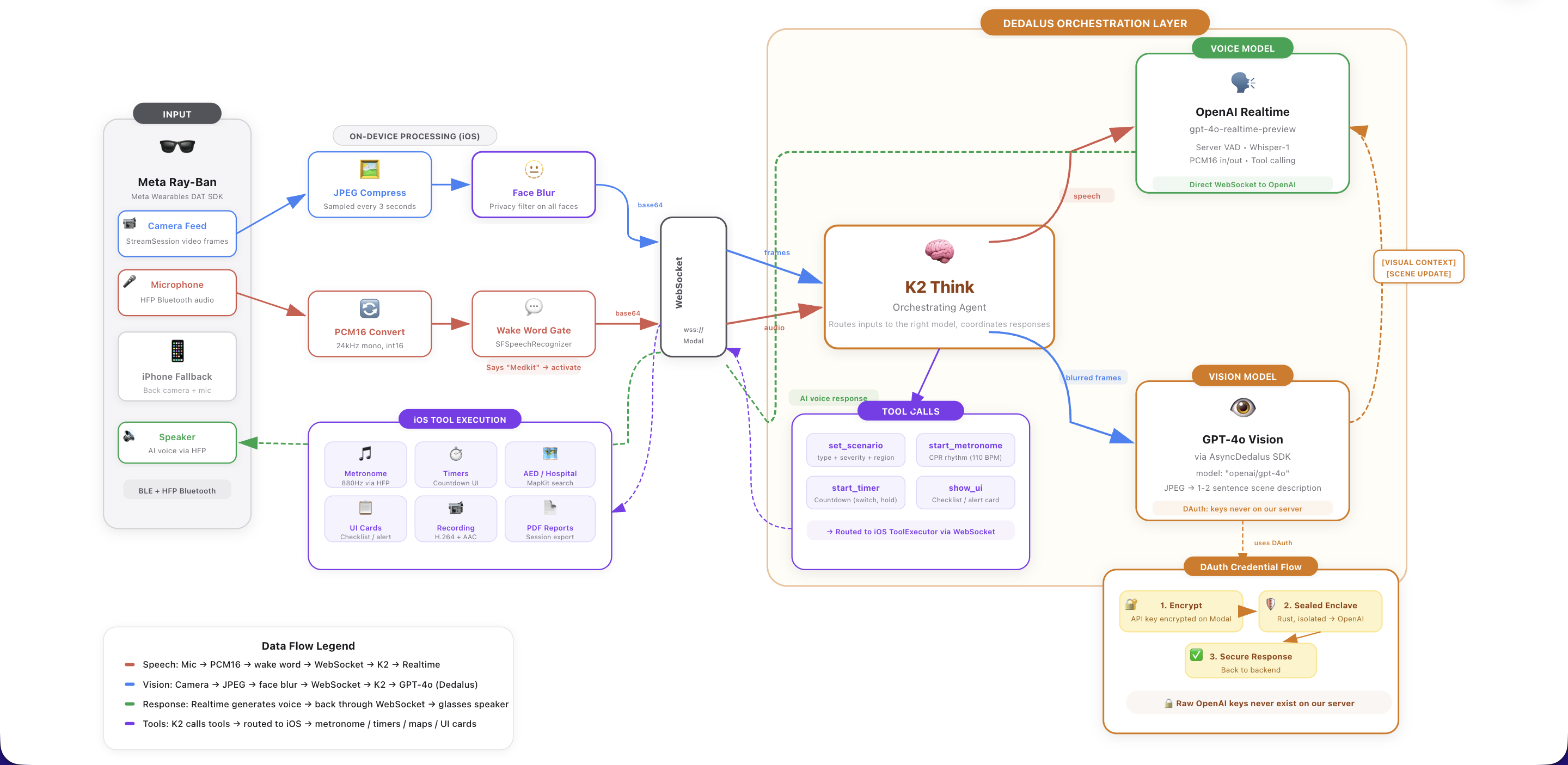
Meta Wearables Device Access Toolkit (DAT) is the foundation of the iOS app. We use MWDATCore and MWDATCamera to establish a streaming session with the Ray-Ban glasses, pulling live video frames at high resolution and capturing audio through the glasses' microphone via HFP Bluetooth. The DAT SDK handles device discovery, pairing, and permission management through AutoDeviceSelector and the Wearables class. We sample frames every 3 seconds and stream PCM16 24kHz audio continuously over a WebSocket to our backend. Before any frame leaves the device, MediaPipe face blurring processes it to anonymize all faces. This runs on every frame by default, ensuring no identifiable faces ever reach our cloud services.
Dedalus powers our backend AI pipeline. We route all GPT-4o Vision calls through the Dedalus SDK, which provides DAuth credential isolation: our API keys are encrypted client-side and only decrypted inside sealed hardware enclaves, keeping sensitive credentials secure even in a serverless environment. Dedalus handles the scene analysis calls where we send blurred camera frames with context (current scenario state, what the user just said) and get back factual 1-2 sentence observations like "Hands placed on center of chest, performing compressions" or "Small cut on left index finger, minor bleeding."
K2 Think serves as our orchestrator, sitting at the center of four concurrent async loops that run simultaneously:
- iOS → Realtime: Streams audio and video frames from the glasses to OpenAI's Realtime API
- Realtime → iOS: Routes AI voice responses, transcripts, and tool calls back to the phone
- Scene Analysis: Runs periodic vision analysis through Dedalus, injecting visual context into the conversation
- Proactive Follow-ups: Monitors silence duration during active emergencies and triggers context-aware check-ins (first at 30s, then every 45s, max 3 without response)
The orchestrator also manages tool call routing: when the AI decides to start a metronome, set a timer, or display a checklist, K2 Think parses the function call, updates scenario state server-side, and forwards the command as JSON to the iOS app for local execution.
Modal hosts the entire backend as a serverless ASGI application. Each WebSocket connection spins up a dedicated Orchestrator instance with its own OpenAI Realtime session, session logger, and state machine. Modal handles scaling, secrets management, and container image building with all our Python dependencies.
On the iOS side, we built the app in SwiftUI with several specialized components:
- AudioManager handles bidirectional audio, capturing from the glasses mic, detecting the wake word using Apple's
SFSpeechRecognizer(matching against 7 phrase variations), and playing AI responses back through the glasses speakers - SessionLogger records video at 30 FPS using
AVAssetWriterwith H.264 encoding, logs timestamped transcripts, and generates both PDF exports and plaintext EMS reports - A SceneKit-based 3D wireframe body model highlights the relevant body region with animated sphere overlays and dynamic camera focus
- MapKit integration shows nearby AEDs, hospitals, and pharmacies with search and filtering
Challenges we ran into
Getting the Meta Wearables DAT SDK working was our biggest early challenge. Swift concurrency with the Meta SDK was another pain point. Putting @MainActor on the entire ObservableObject class caused conformance issues with the SDK's callbacks, so we had to move to @MainActor on individual methods and use Task { @MainActor in } blocks instead. We also needed explicit import Combine statements when using @Published without class-level @MainActor.
Coordinating four concurrent async loops without race conditions required careful state management, especially in preventing the scene analysis loop from injecting observations while the AI is mid-response, and ensuring the follow-up loop doesn't stack check-ins. We solved this with shared flags like _response_in_progress and _awaiting_vision.
The on-demand vision pipeline was particularly tricky: when the user stops speaking, we snapshot the frame, cancel the auto-response from the Realtime API (before any audio is generated), wait for the VLM analysis through Dedalus, inject the visual context, and then re-trigger the response, all without the user noticing any delay.
Getting the safety guardrails right was an ongoing challenge. Early prompts generated helpful but dangerously overconfident responses. We iterated heavily to ensure the system asks clarifying questions when uncertain, never invents medical steps outside established playbooks, and always defers to professional medical judgment. The line between "helpful coaching" and "practicing medicine" is one we had to be very deliberate about.
Accomplishments that we're proud of
We're proud that the system actually works end-to-end, from saying "Hey Medkit" to getting real-time, visually-informed coaching through smart glasses with a metronome beating in your ear during CPR. The on-demand vision pipeline that captures a frame at the exact moment you stop speaking, analyzes it, and weaves that visual context into the AI's response feels seamless.
The proactive follow-up system is something we haven't seen in other voice assistants: it understands that silence during CPR is different from silence during a conversation, and it adapts its check-ins based on the specific scenario ("Still pressing on the wound?" vs "You're doing great, keep going").
The privacy-first architecture is something we took seriously from day one. Face blurring runs before any data leaves the device, no raw video hits the cloud, and session data stays local unless the user explicitly exports it. In a medical emergency, people are at their most vulnerable. We wanted to make sure using Medkit never compromises anyone's privacy.
The EMS handoff report is a feature we're really excited about. When paramedics arrive, the bystander can hand them a comprehensive report with the timeline of events, what was observed, what instructions were given, and what tools were used, all generated automatically. It turns a panicked "I don't know, I tried to help" into a structured briefing that gives responders a head start.
What we learned
We learned that latency is everything in emergency applications. Every architectural decision was filtered through "does this add perceptible delay?", which is why we chose OpenAI's Realtime API over a transcribe-then-respond pipeline, why scene analysis runs on a separate loop rather than blocking responses, and why tool execution happens locally on the phone.
We also learned that safety constraints make the product better, not worse. Forcing the system to ask questions before acting, to stay within established playbooks, and to always defer to EMS made the coaching more trustworthy and more useful.
Working with the Meta DAT SDK taught us a lot about hardware-software integration: Bluetooth audio routing, frame format conversion, and the nuances of maintaining a stable streaming session with wearable devices.
What's next for Medkit
Offline mode is our top priority, using on-device models so Medkit works even without cell service, which is critical for remote emergencies. We're exploring Apple's Core ML for on-device scene analysis and a smaller language model for basic guidance.
Direct EMS integration: automatically dispatching emergency services with location data and the real-time situation summary, so the bystander doesn't have to pause helping to make a call.
Multi-language support to make Medkit accessible globally, especially in areas where language barriers prevent bystanders from following standard first-aid instructions.
Training mode where users can practice scenarios with simulated emergencies, building muscle memory before a real situation occurs.
Built With
- apple-speech-framework
- avfoundation
- dedalus-sdk
- fastapi
- gpt-4o-vision
- k2-think
- mapkit
- mediapipe
- meta-wearables-device-access-toolkit
- modal
- next.js
- openai-realtime-api
- pdfkit
- python
- radix
- scenekit
- swift
- swiftui
- tailwind-css
- typescript
- ui
- websockets


Log in or sign up for Devpost to join the conversation.