-
-
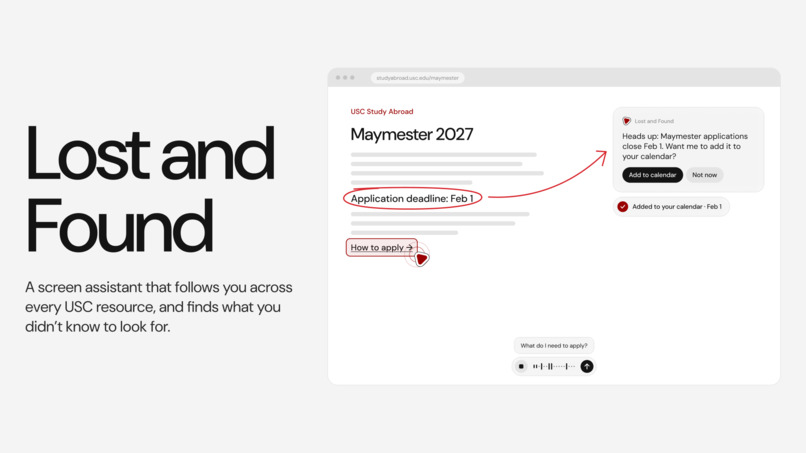
lost and found!
-

the problem: it’s hard to find the things you know you need
-
the problem: and even harder to find the things you don’t know about
-
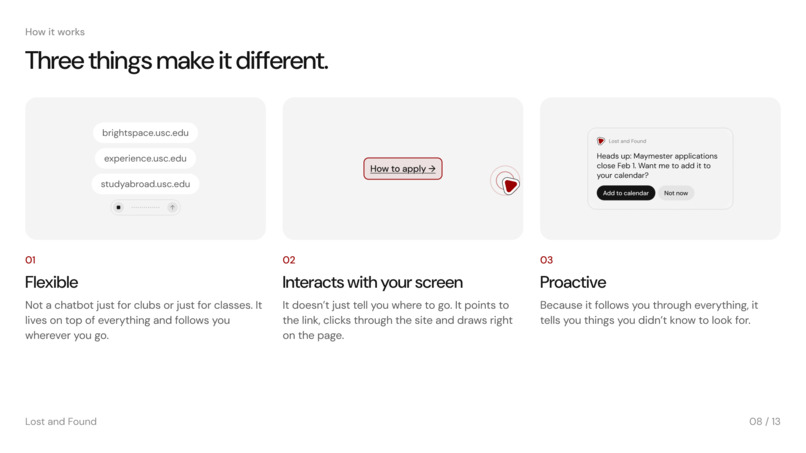
3 things
-
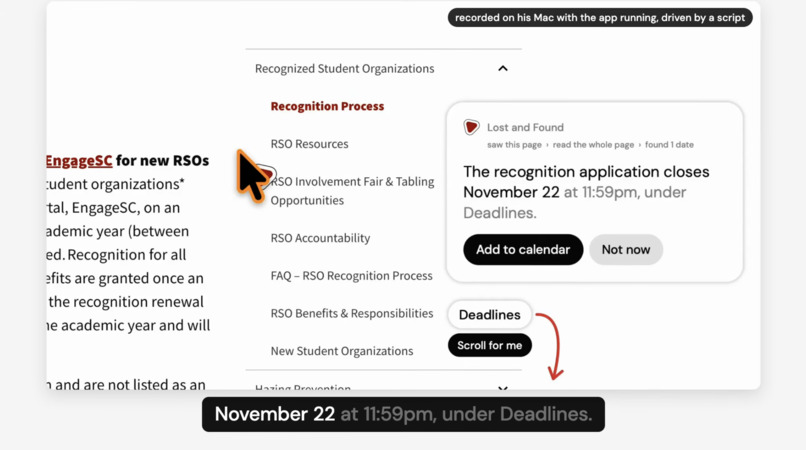
in action: helping a campus leader fill out the rso form
-
in action: helping a campus leader fill out the rso form
-
in action: drawing out explanations on your screen
-
have all the right opportunities

What it is
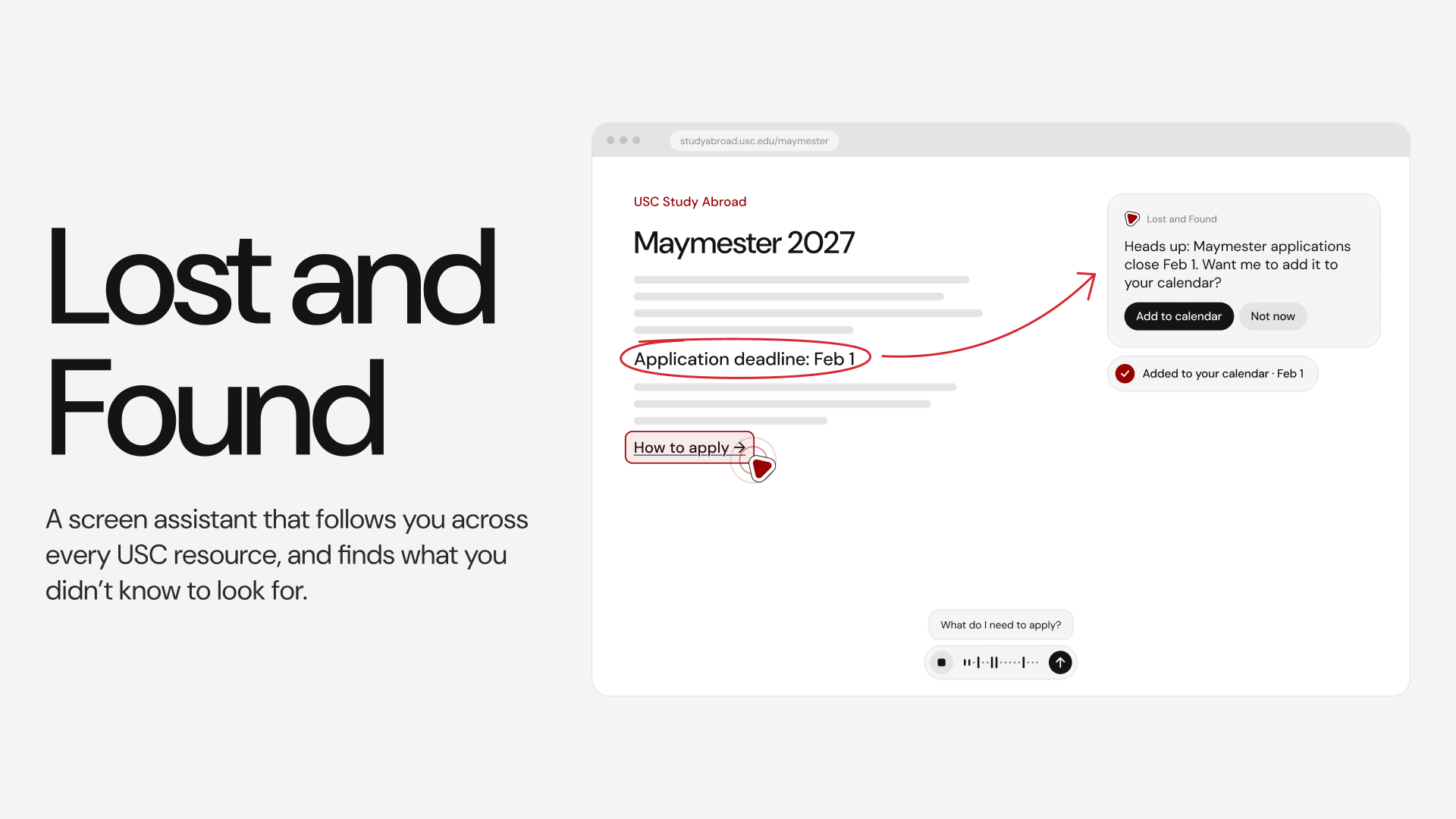
A screen assistant that follows you across USC's resources, and finds what you didn't know to look for.
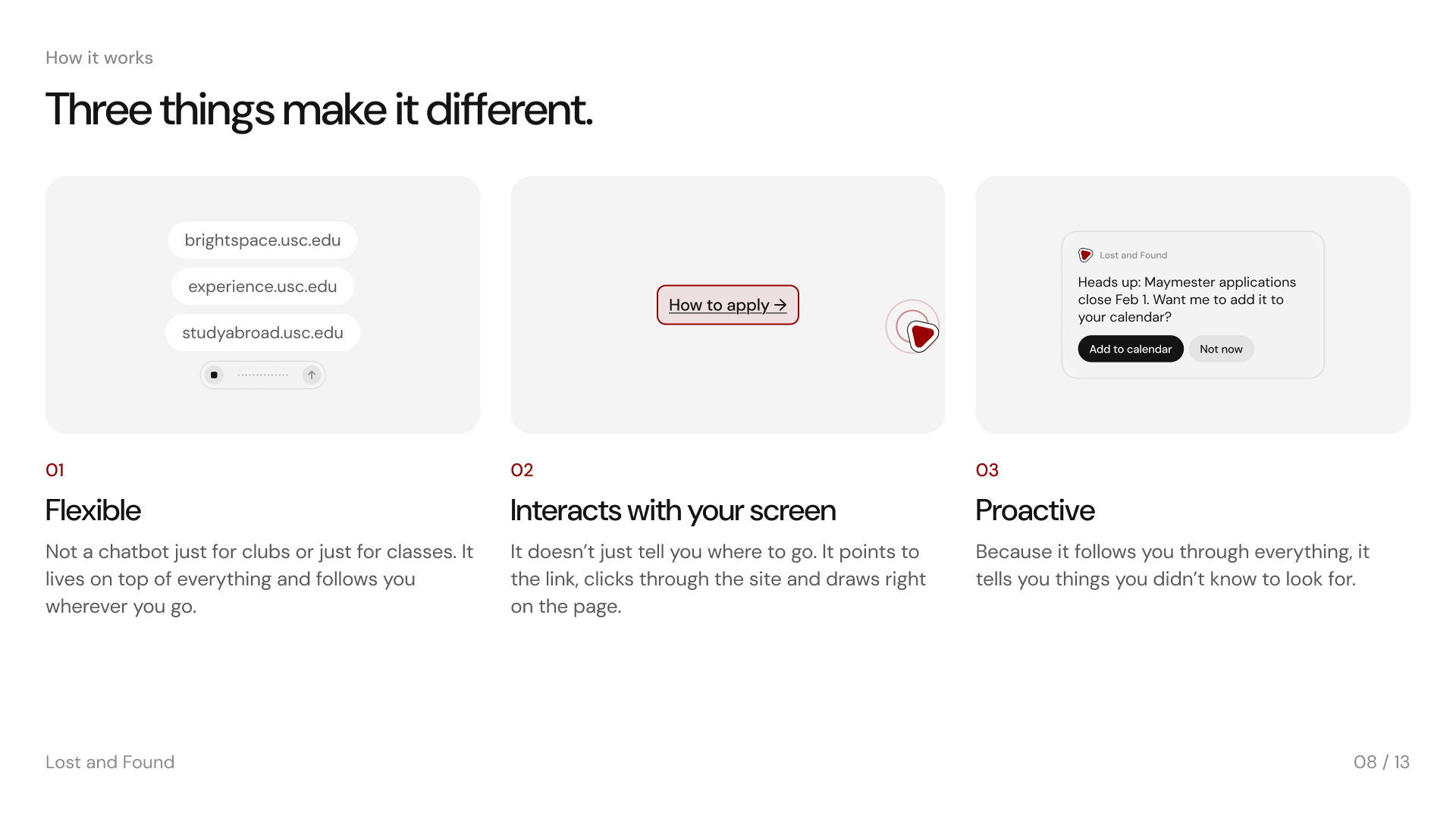
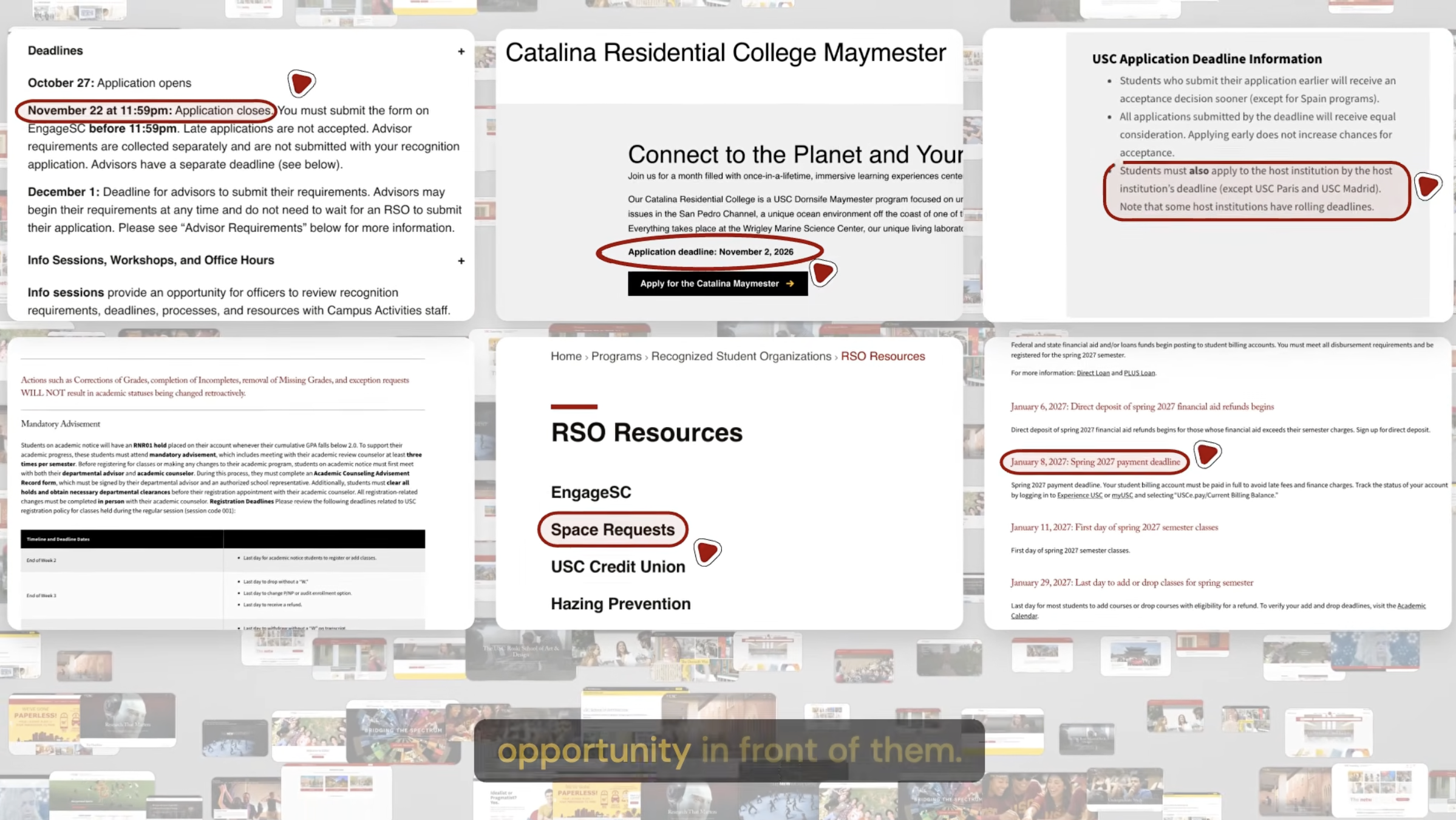
Lost and Found is a Mac app with no window of its own. It sits on top of whatever page you have open. It has already read 24 of USC's own pages, including the sections you have to click to open. When a page holds a deadline you'd miss, it says so before you ask. Hold the right Option key and ask anything out loud, and it answers aloud and draws on the page itself.
Inspiration
USC has a lot of resources, but they're all in different places: Brightspace, student health, funding, every school's own site. Just finding your transcript is hard.
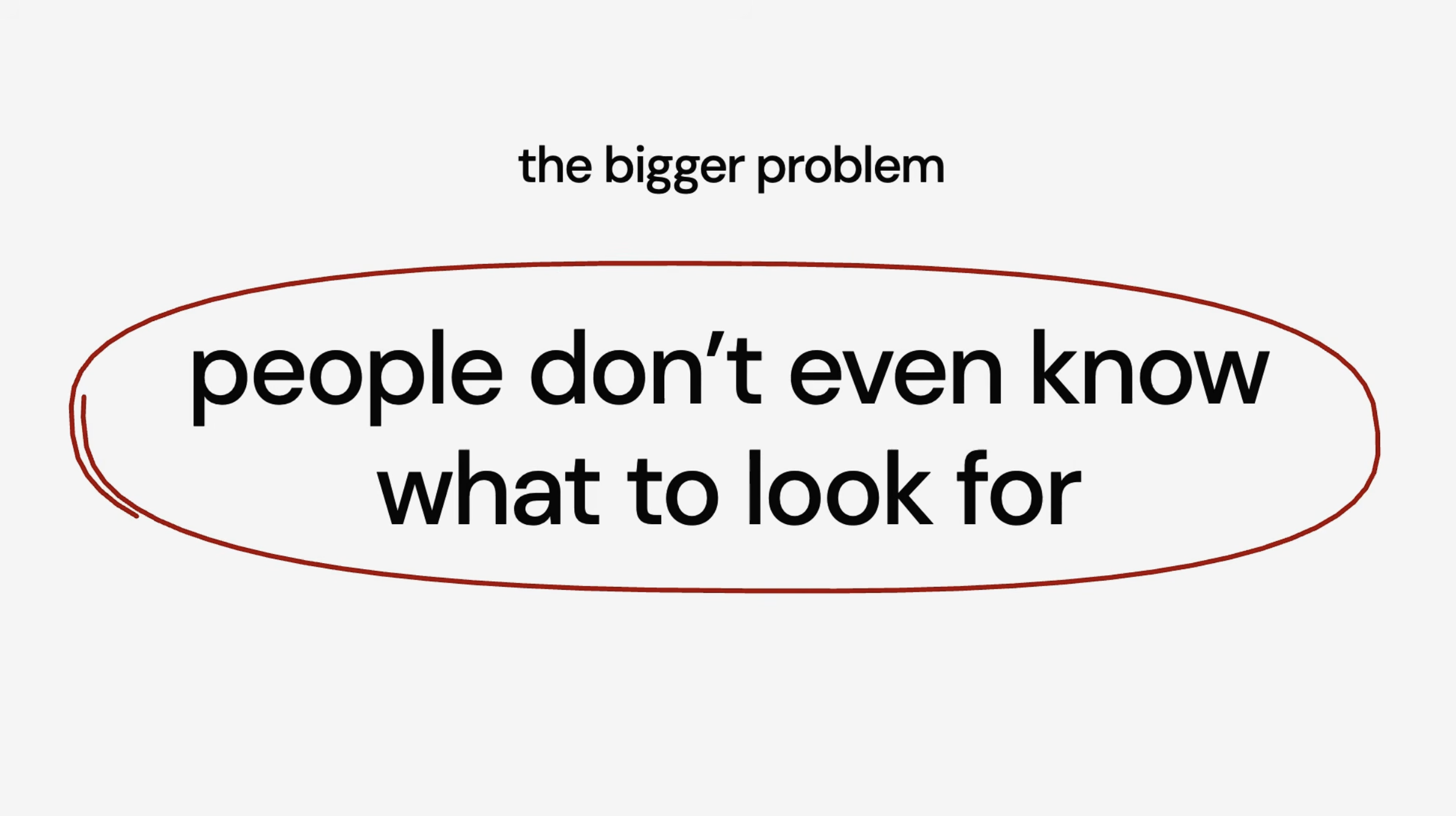
The bigger problem is that sometimes people don't even know what to look for. We kept hearing things like, "I've been wanting a club like this since freshman year, but I didn't hear about it until it was too late." People don't know what they don't know. How would you ask about Greif funding if you didn't know Greif had funding? A chatbot can't help there. It can only ever answer the question it's given.
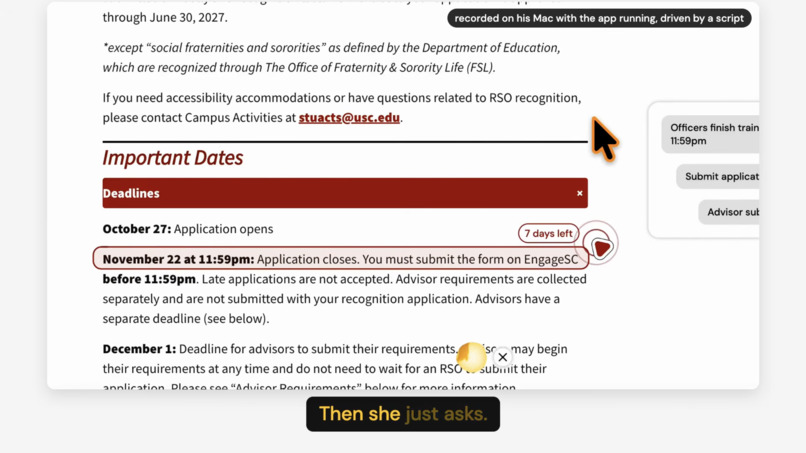
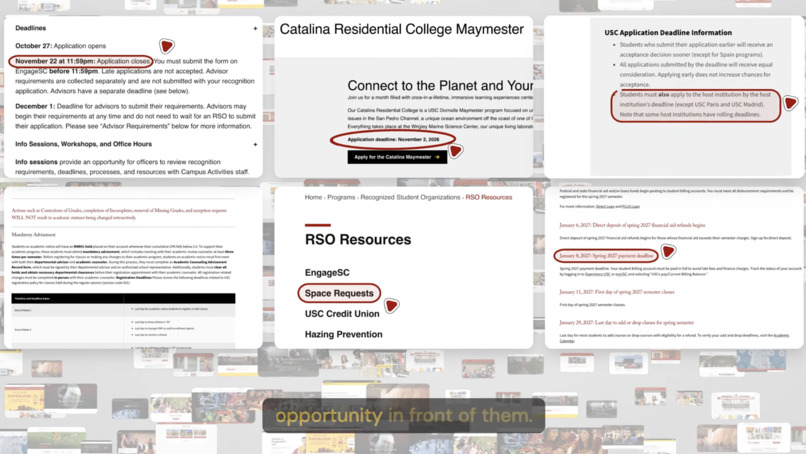
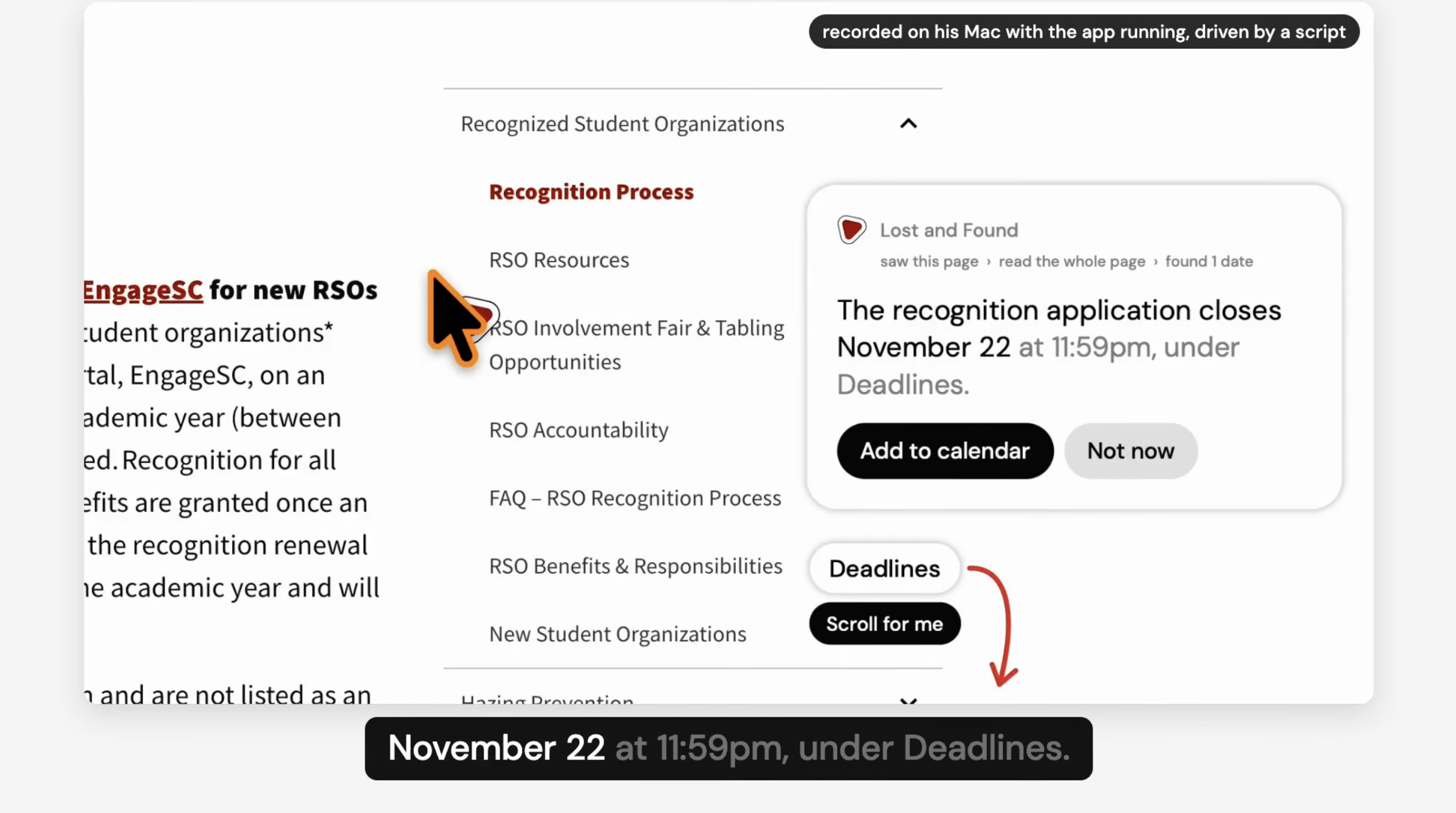
You can see the problem on USC's own pages. The club recognition page keeps its deadline inside a section you have to click open: November 22 at 11:59pm, and late applications are not accepted. The Catalina Maymester page still shows its "Apply" button under a deadline that closed 13 days ago.
What it does
Imagine you're a campus leader re-registering for RSO status:
- You open the page and do nothing. Lost and Found speaks first, once: the recognition application closes November 22 at 11:59pm, and late applications aren't accepted. That deadline is hidden inside a section you'd have to click open to see. It also lists the three things still ahead of you and points down the page to where "Deadlines" is.
- Tap "Scroll for me" and it scrolls to Deadlines and boxes the heading.
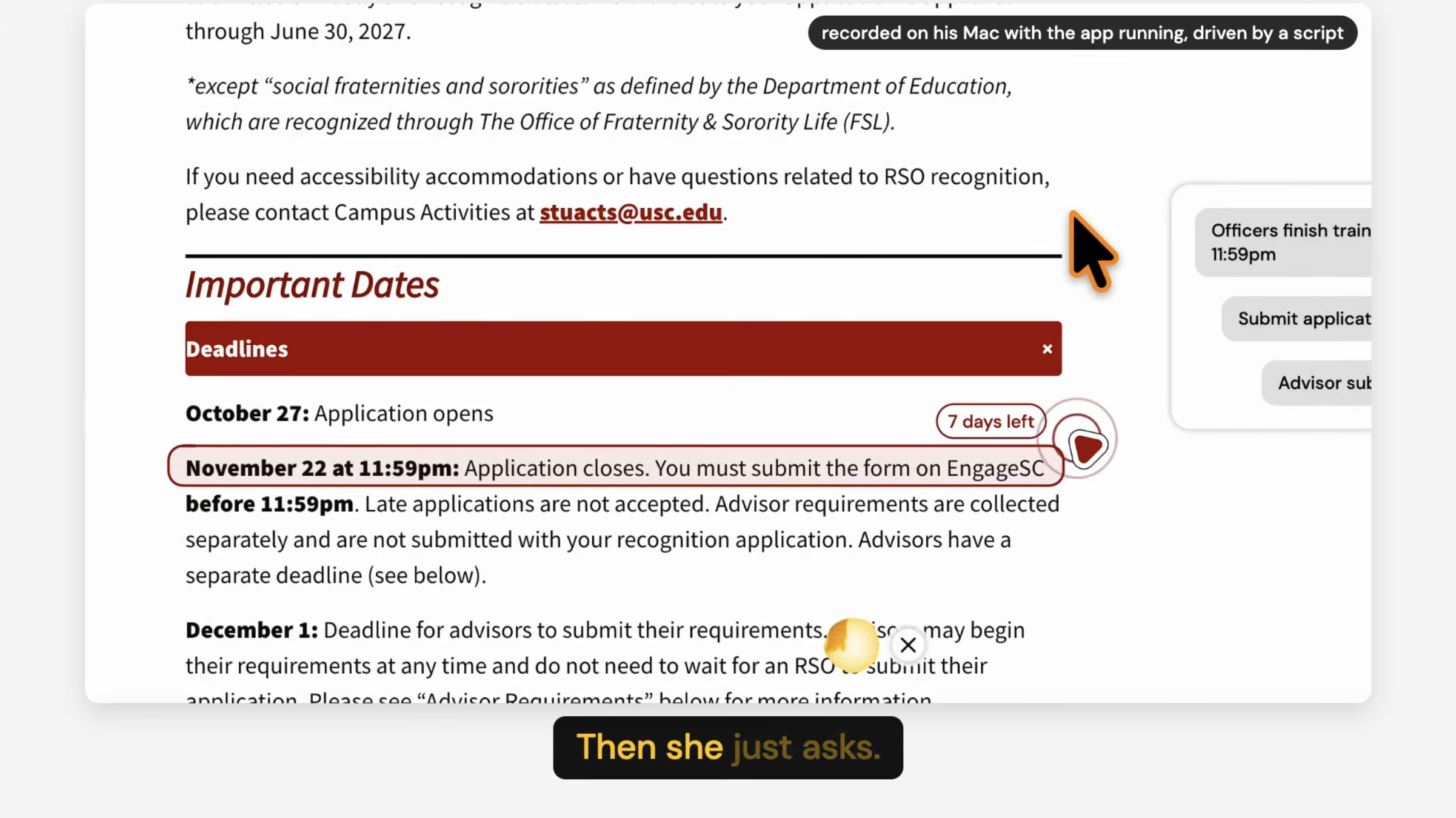
- Tap "Open it for me" and it clicks the section open, boxes the exact line, and writes "7 days left" next to it.
- Tap "Add to calendar," or just say "add it to my calendar," and it opens a calendar entry for November 22 that's ready to add.
- Say "show me" and it walks you through the three steps one at a time, with the one you're on marked "Next."
- Click a step when you're done and it ticks it off and moves to the next one.
- Hold the key and ask, "Can you help me find where to book this event?" It rings "RSO Resources" in the page's own menu, answers you, and asks if you want it to take you there.
- Tap "Take me there" and it opens the RSO Resources page, then rings "Space Requests" when the page loads, without you asking.
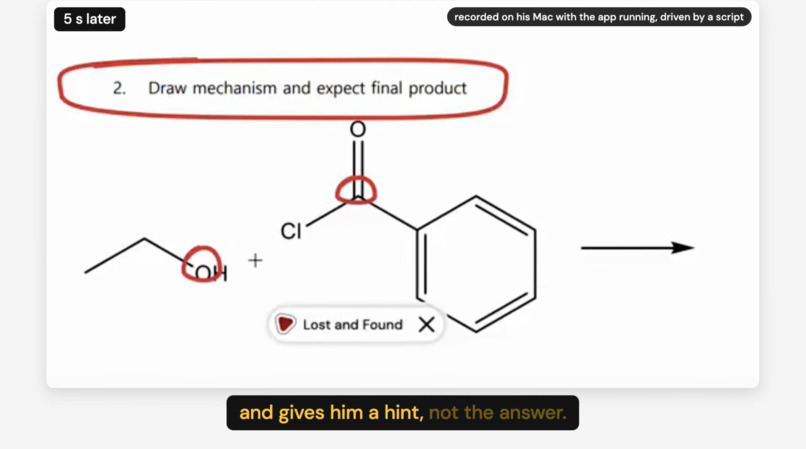
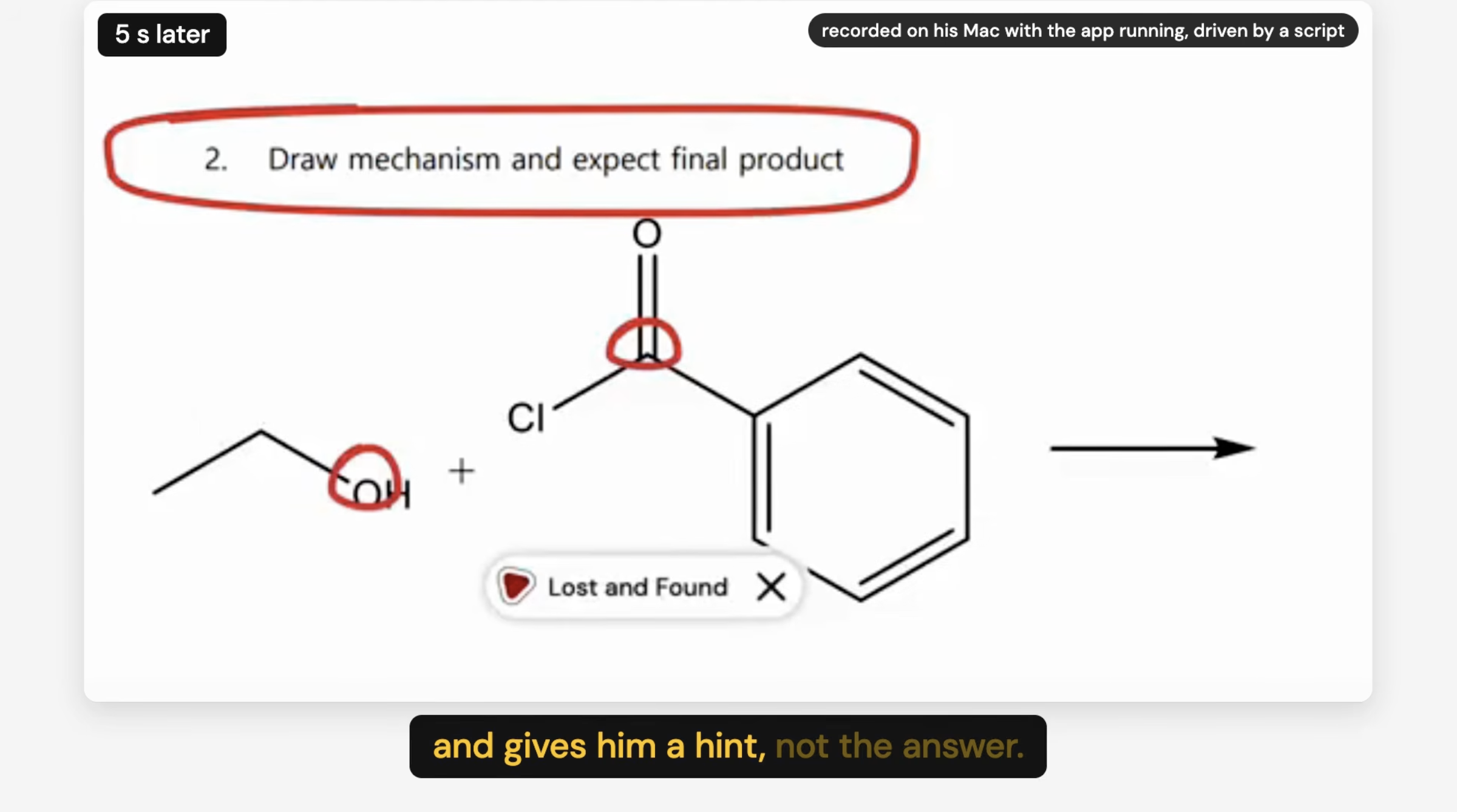
It also works on your own homework. On a chemistry worksheet that says "draw the mechanism," you can ask "what happens first?" and it gives you a hint and rings the two atoms it's talking about, right on the drawing. Ask it to draw how the steps connect and you get a board of six questions to answer in order. Ask "so what's the final product?" or even "just tell me the answer," and it gives you the next hint up. It doesn't name the product.
A few other things it does:
- If you draw a loop around something while you're asking, it answers about just that part.
- If you hold the key again while it's talking, it stops and listens.
- It remembers the conversation, so follow-ups work, and it can tell you what's still ahead for you even after you've moved to another page.
- Say "show me my notes" and it writes up the whole sitting: what you asked, the steps and their dates, what's done, and what it couldn't tell you.
- If you say "yeah" or "okay so" to a friend with the key held down, it stays quiet.
How we built it
The Mac side is Swift. It does the seeing, hearing, drawing and speaking: it captures the display with ScreenCaptureKit, reads the words on it with Apple's Vision text recognition, records the mic, and draws in a see-through window that lets your clicks pass through to the page underneath. It knows nothing about AI.
The thinking side is TypeScript on Node. It decides what to say and what to mark, and it knows nothing about pixels. It only works in lines of text and the boxes they sit in.
When you ask a question, this is what happens:
- Key down: the mic opens, the screen gets captured, and its words are read on the Mac.
- Key up: a fast model (Claude Haiku 5.5) has already been drafting a short first line while you were still talking, so you hear something within a second.
- The real answer comes from Claude Opus 5.5 in pieces (what to say, which line to mark, what to draw), and the app acts on each piece as it arrives.
- The voice (Cartesia Sonic) starts about a tenth of a second after each sentence.
- Then it rests. The marks stay, the answer stays on a small card, and it remembers what was said.
The part we're proudest of is that the AI never guesses where anything is. It quotes the line it means, and our code finds that line in the words the Mac read off the screen.
Speaking first works without sending your screen anywhere. The app reads the display on the Mac once a second, and only speaks up if you're on one of the 24 pages it already knows. What it asks the AI about is its own saved copy of that page, not your screen. Those answers get asked once when the app starts, which is why the card shows up basically instantly.
There are also two rules we enforce in code after the AI answers, because we didn't want to just trust it:
- Dates. If the AI says a date that isn't on your screen or on a USC page the app has read, that sentence doesn't get said, and it tells you it left something out. The "7 days left" math is done by the calendar in code, not the AI.
- Your own work. On a problem you're supposed to solve, any hint that contains the answer gets dropped and swapped for a safe one. This caught a real leak in one of our runs.
What leaves your Mac: when you ask a question, the audio goes to Cartesia and a picture of your display plus your question goes to Anthropic. If you drew a loop, only the looped part is used. When it speaks first, it only sends its own copy of the USC page. On any page it doesn't know, nothing gets sent. There's no account and no profile, it can only open https pages on usc.edu, and it never types.
Impact and campus relevance
We interviewed 13 students, from freshmen to seniors: club presidents, people who built their own tools because USC's were so annoying, and people who aren't really involved in anything. Johnny and I have both led clubs here too (Formula Electric, Spark SC, TerraLabs).
We found a lot of problems. RSO re-registration always has more steps than you expect, nobody can find their transcript, people only find clubs through friends, and three freshmen didn't know Maymesters existed until I told them.
But some of these have a more operational solution, like a shorter club registration process. One club president told us he wouldn't even use an AI tool to fill out the form, because the hard part is just knowing what to fill out. AI shouldn't force itself in where it doesn't fit.
So where does AI actually make sense? For us, it was in taking in a super large body of information and then being proactive about surfacing the right thing, like a helpful senior helping out a freshman. A senior doesn't wait for you to ask the perfect question. They just tell you the thing you didn't know you needed to know. That's the part of the problem we built for.
All of our user research is in the appendix of our slides: https://www.figma.com/slides/m9YVcweppLanqBrrFH26LE
- It answers the question you didn't know to ask. A chatbot waits for you. This speaks first, from a section of the page you never opened.
- The 24 pages are the ones with dates and steps on them: club recognition and RSO resources, study abroad and Maymester, financial aid dates and scholarships, the registration calendar, the degree-progress report, testing accommodations, basic needs and emergency meal swipes, the Greif Center, academic counseling, and the Brightspace student guides.
- It takes you to the next place instead of describing it.
Technical and AI execution
- The AI quotes, the code finds. No match, no mark.
- Dates and homework answers are both checked in code after the AI responds.
- First words come within a second of letting go of the key, and a full answer starts 4 to 5 seconds after.
- We tested it three ways: 253 automatic checks, a separate program that plays 24 scripted students through the real AI and voice and checks every frame (1,912 checks pass, 2 fail, and both fails are it saying "December first" where the page says "December 1"), and a lot of walking through it by hand.
Feasibility and implementation
- USC doesn't have to connect anything. It reads public pages from one list, and you add a page by adding its address. We added ten in one evening, and an office could do the same.
- It costs about 2 to 3 cents per question, plus about 60 cents a day to read all 24 pages ahead. There's a spending limit built in.
- It needs mic and screen recording permission. It only asks for permission to scroll and click if you tell it to do that.
User experience and design
- There's no chat box. The page is the interface. So instead of leaving pages to ask questions, you can ask where you are.
- Hold down option to ask a question with voice, less typing!
- Every answer leaves one small card with one thing to do next, and a "Not now."
- Marks are drawn with a pen in under a second so your eye follows it, and they go around the words, never over them.
- It's a tutor, not an answer key.
- Everything it says is also shown as text, you can tap a question instead of speaking, marks are never color alone, and it follows Reduce Motion.
Challenges we ran into
- The hearing service runs about half a second behind, so we draft the first line while you're still talking.
- The first look at a page used to take up to 17 seconds. Reading all the pages ahead once a day made it instant.
- On a worksheet that said "draw the mechanism," it once drew the mechanism, which is the whole answer. Now the board holds questions instead.
What we learned
The hard part of "it noticed for me" isn't the AI. It's knowing where the line is on the screen after you scroll. And any rule the product can never break has to live in code after the AI, where you can actually count it.
What's next
- Remembering what's still ahead for you next week
- "Remember this page," so it works on any syllabus you open, not only the 24
- A page in the menu that says in plain words what it sees and sends, with a pause switch
- Walking a whole task across several pages as one plan
- A campus version that keeps the AI key on a server
Built with
Swift, AppKit, ScreenCaptureKit, Apple Vision, AVFoundation, TypeScript, Node.js, Claude Opus 5.5 and Claude Haiku 5.5 (Anthropic SDK), Cartesia Ink and Sonic, zod, DialKit, raea
Built With
- anthropic
- appkit
- apple-vision
- avfoundation
- cartesia
- claude
- node.js
- screencapturekit
- swift
- typescript
- zod
