-
-
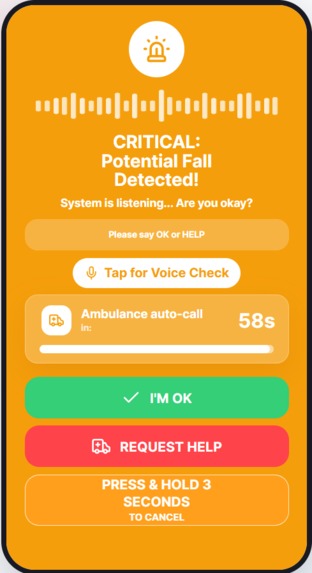
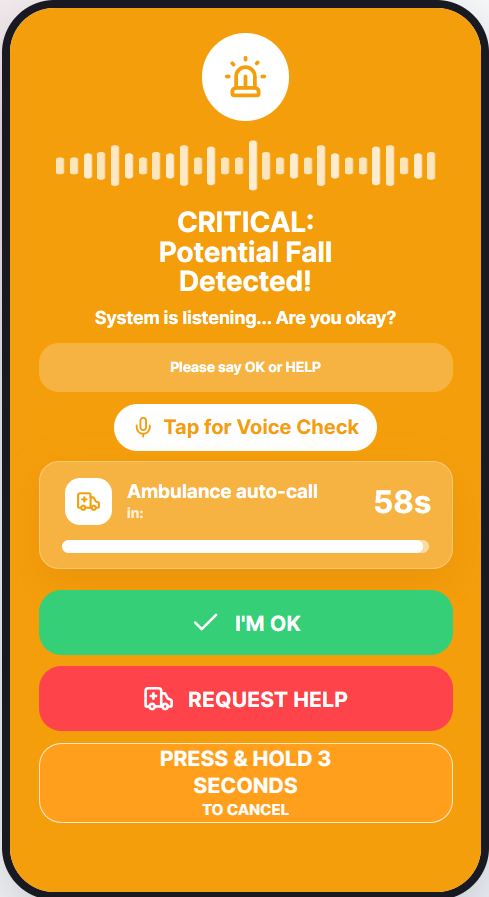
After a fall is detected, Lifeline checks for OK or Help before escalating
-
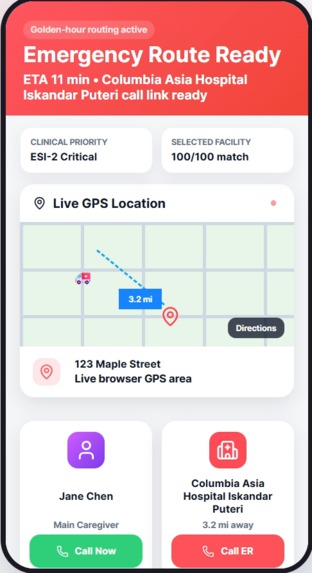
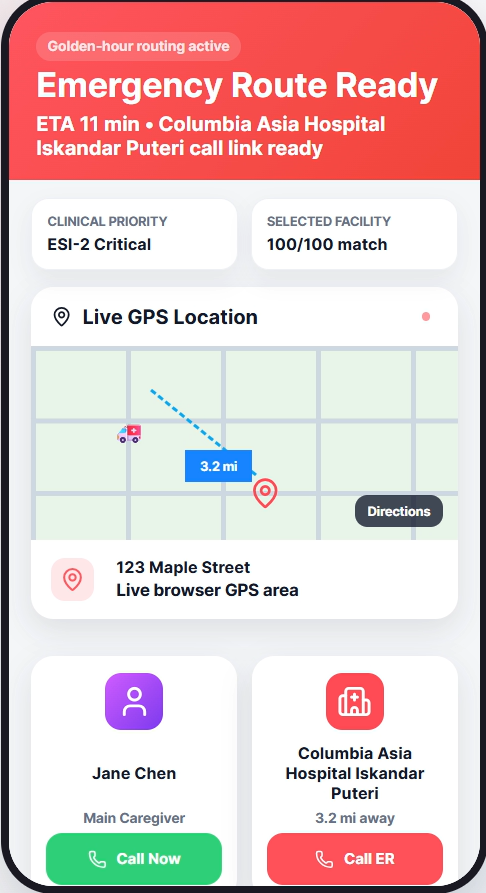
Lifeline recommends suitable care and prepares a real call link and map route
-
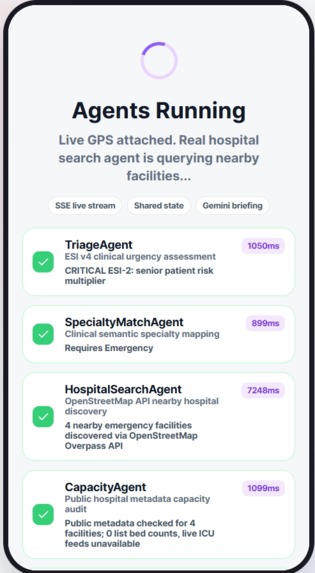
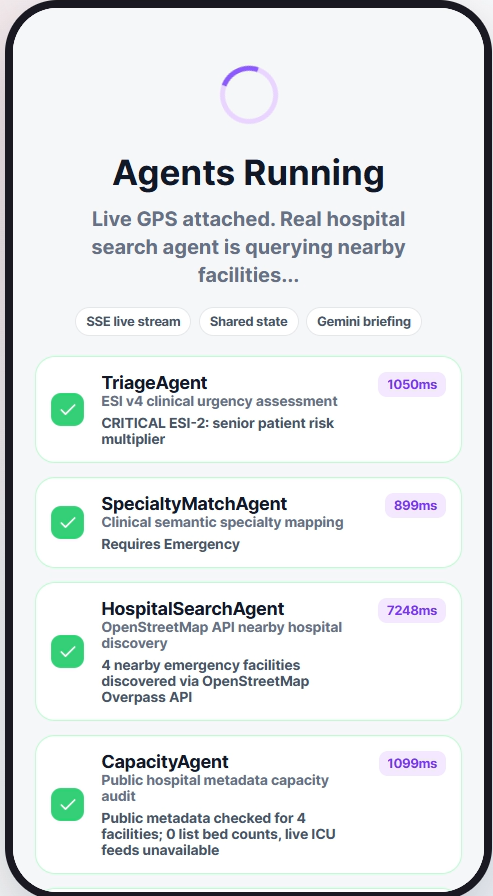
Live emergency agents assess severity, match care needs, and search nearby hospitals
-
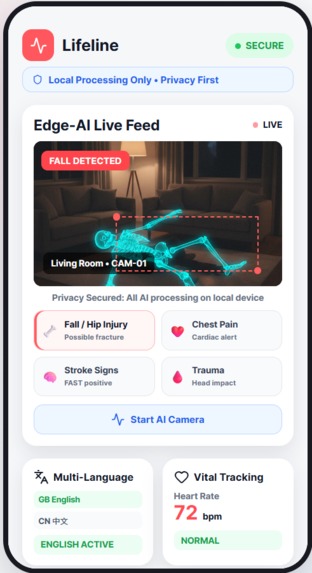
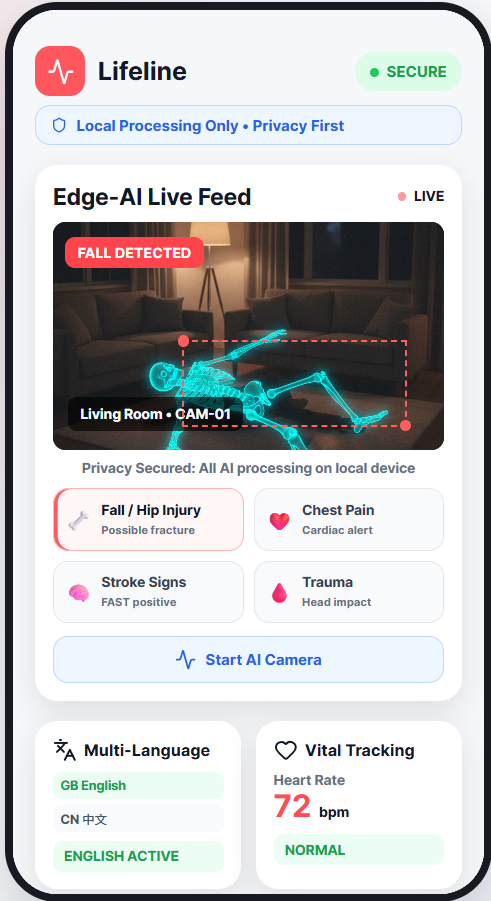
Real-time fall detection using browser-based vision and MoveNet
Inspiration
Picture it: 3 a.m. An older adult falls alone in the living room.
A typical fall detection system may raise an alert, but the hardest part comes next:
Can the patient respond? What kind of care might they need? And is the nearest hospital actually the right one?
We built Lifeline because fall detection should not end at a notification. It should become a real emergency workflow.
What it does
Lifeline is a mobile-first emergency companion for seniors living alone.
When a possible fall is detected, Lifeline can:
- Detect fall-like motion using browser-based computer vision.
- Ask the patient if they are okay using voice prompts.
- Listen for responses such as “OK” or “Help.”
- Start a visible countdown when there is no safe response.
- Run a live multi-agent emergency workflow.
- Assess emergency severity and required medical capabilities.
- Search real nearby hospitals through the OpenStreetMap Overpass API.
- Rank hospitals using ETA, specialty match, public metadata, and phone availability.
- Generate a concise dispatcher briefing with Gemini.
- Prepare real phone links and Google Maps directions.
The important part is that Lifeline does not pretend to dispatch an ambulance or reserve a hospital bed.
It provides decision support and clear next steps using real data where available.
How we built it
The frontend is built with React, Vite, and TypeScript as a mobile-first emergency interface.
Fall detection uses one unified camera workflow.
For real use, TensorFlow.js MoveNet detects human fall-like posture from the browser camera.
For safe demonstrations, we added a pen-based simulation using Canvas computer vision. This allows us to trigger the same emergency workflow without asking anyone to actually fall.
The backend runs on FastAPI and Python, while Server-Sent Events (SSE) stream live agent progress back to the interface.
The agent pipeline handles:
- Emergency triage
- Specialty matching
- Real hospital discovery
- Public hospital metadata
- Hospital ranking and routing
- Gemini-generated dispatcher briefing
For hospital discovery, Lifeline calls the OpenStreetMap Overpass API.
For reasoning, Gemini generates a concise emergency briefing based on the case.
The final interface then prepares real call links and Google Maps directions to the selected hospital.
Challenges we ran into
One of the biggest challenges was keeping the demo realistic and transparent.
Healthcare applications can easily look impressive by inventing hospital capacity, fake dispatch events, or simulated integrations.
We deliberately avoided that.
If live ICU or bed availability is not available from a public source, Lifeline says so instead of fabricating it.
Another challenge was real-time agent orchestration.
We wanted the agents to feel visibly alive, but not fake. We used Server-Sent Events so the interface updates as the backend agents actually run.
Computer vision was also difficult to demonstrate safely.
A real fall is not something we wanted anyone to perform for a demo, so we built a pen-based fall simulation using live camera frames and motion tracking.
This gave us a safe way to demonstrate the complete workflow while keeping the real use case focused on human fall detection.
Accomplishments that we're proud of
We are proud that Lifeline is not just a fall alert screen.
The demo moves through an end-to-end workflow:
Fall detection → voice confirmation → countdown → live agents → real hospital search → call and map routing
We are also proud that the backend agents are real, rather than frontend labels pretending to process something.
Their progress is streamed live, including real latency from hospital API calls and Gemini reasoning.
Most importantly, Lifeline stays transparent about what is real.
It uses real hospital discovery and real call/map links, but it does not claim to contact emergency services or reserve beds without those integrations.
What we learned
We learned that healthcare AI is not only about model output.
It is about workflow, trust, and timing.
A fall detection model alone is not enough.
A useful emergency system also needs communication, triage reasoning, routing intelligence, explainability, and clear human-actionable next steps.
We also learned that transparent limitations are more trustworthy than polished but fake certainty.
If a dataset does not provide live hospital capacity, the product should say that clearly.
Finally, we learned that multi-agent systems are most convincing when each agent has a clear role, a real input, and a visible output.
What's next for Lifeline
Next, we want to connect Lifeline with real caregiver and emergency infrastructure.
Possible next steps include:
- WhatsApp or SMS caregiver alerts
- Verified hospital capacity feeds where available
- Live travel-time and ETA data
- Mobile PWA installation
- Expanded multilingual voice support
- Wearable or IoT fall sensor integration
- Caregiver profiles and emergency contacts
- Clinical validation of fall and triage logic
- Integration with emergency-service workflows where legally and technically possible
Our goal is simple:
When a senior falls, Lifeline helps the right people reach the right care faster.
Built With
- canvasapi
- css3
- fastapi
- geminiapi
- javascript
- lucidereact
- movenet
- openstreetmap
- overpassapi
- pydantic
- python
- react
- serversentevents
- speechrecognitionapi
- tensorflow.js
- typescript
- uvicorn
- vite
- webspeechapi


Log in or sign up for Devpost to join the conversation.