-
-

Leno app icon
-
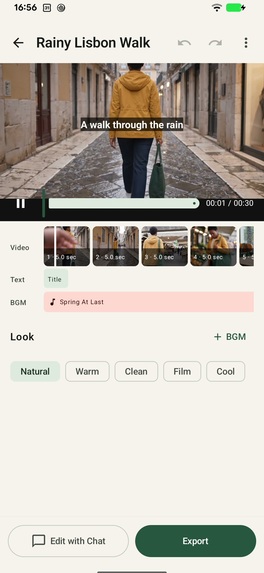
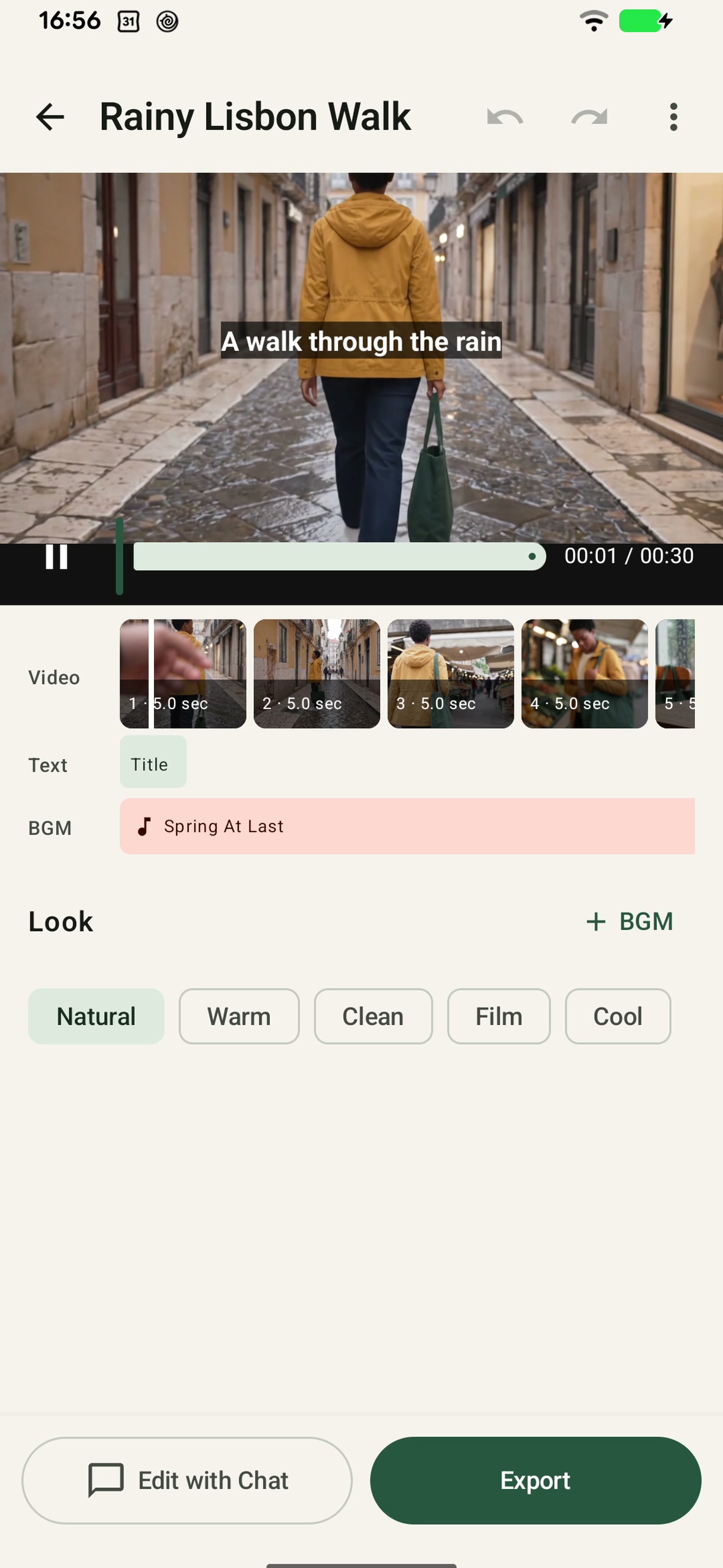
Leno's AI-generated First Cut in the Android editor

Inspiration
I watch a lot of family and travel vlogs. I also have plenty of clips from my own life. But most of those clips never become a video.
The reason is not that I do not care about the memories. It is that I do not want video editing to become another hobby.
Even when the footage is already there, turning it into something watchable means sitting through everything again, finding the moments worth keeping, deciding the order, trimming, adding text, balancing audio, and making dozens of small editing decisions.
The memory is captured, but the story often stays unfinished.
Leno came from one question:
What if the first useful timeline already existed?
Leno is for people who want to preserve a family day, a trip, or an ordinary moment and end up with something they will actually watch or share — without having to become video editors.
Three product rules shaped the app:
No empty timeline.
No original-video upload.
No credits for manual editing.
What it does
Leno is an AI-first vlog editor.
Users select ordinary phone clips, choose a target length and style, and Leno creates a complete First Cut. The AI decides which moments to use, how to order them, where to trim, what text to show, and how music should fit the edit.
Free supports 30, 60, and 90 second finished videos. Plus and Pro also support 3, 5, and 10 minute targets.
After the First Cut, users only need to correct what matters. Direct Edit handles precise changes such as clip order, trim, split/delete, text, source audio/BGM balance, and filters. AI adjustment handles intent-level requests. Undo, preview, and local 1080p export are built into the same workflow.
The goal is not maximum editing freedom. The goal is to remove the empty-timeline problem and keep the remaining editing surface deliberately small.
How we built it
Leno uses a local-first architecture: AI understands the footage and makes edit decisions, but the original media stays on-device.
The apps create temporary low-resolution analysis proxies, send those for semantic understanding, then map the resulting edit decisions back onto ranges in the original source media. Final 1080p rendering happens locally on the device.
Android is native Kotlin with Jetpack Compose and Media3. iOS is native SwiftUI with AVFoundation. A Cloudflare Worker coordinates the AI workflow, with requests going through Cloudflare AI Gateway to Google Vertex AI and Gemini 3.8 Flash.
RevenueCat is the source of truth for Plus / Pro purchase, restore, and subscription entitlement. Leno separately tracks AI credits server-side because usage is based on user-visible AI operations and newly analyzed source-media duration rather than exported-video count. Paid AI work is authorized on the server instead of trusting a client-reported plan.
Challenges we ran into
Making AI editing useful without turning Leno into another complicated editor
The easiest path would have been to keep adding controls.
We repeatedly did the opposite. When a control made the app feel like a traditional NLE, we removed it, collapsed it, or made it contextual.
The design rule became: create the First Cut first, then expose only the correction the user is likely to need.
That also changed small interaction details. Editing text starts from the captions that already exist for the selected clip instead of presenting an empty state. Music editing first makes the current BGM placement visible before asking where a new track should begin.
Keeping original media local while still giving AI enough context
Uploading original 1080p or 4K footage would be slow, expensive, and privacy-unfriendly.
Leno instead uses temporary low-resolution proxies for semantic analysis, then maps the result back onto the original source timeline for local rendering.
This choice improved privacy, cost, and UX at the same time.
Making AI billing understandable
Charging by generated-video count does not match where the actual AI cost happens.
Leno charges new source analysis by duration and avoids charging for that analysis again when the same source fingerprint is reused. Credits are calculated per user-visible AI operation, not per internal provider call.
Once a First Cut exists, ordinary manual editing and local export consume no credits.
Accomplishments that we're proud of
- A real end-to-end AI First Cut pipeline rather than a mocked demo
- The AI makes editing decisions instead of generatively replacing the user's footage
- Original source media remains local and final 1080p rendering happens on-device
- One editing model supports both precise Direct Edit and semantic AI adjustment
- Android and iOS use native media stacks while preserving the same product behavior
- RevenueCat subscription state is verified server-side before paid AI work is admitted
- Reusing the same analyzed source does not consume source-analysis credits again
- Android and iOS have both completed real-device 10-minute First Cut → editor → local 1080p export E2E against the production backend
What we learned
AI video editing is less about adding more UI and more about deciding what the user should no longer have to decide.
A good First Cut can remove dozens of small choices before the user ever sees an editor.
We also learned that privacy, cost, and UX can point in the same architectural direction. Low-resolution semantic analysis plus local rendering is cheaper, keeps original footage on-device, and still produces an edit the user can directly correct.
What's next
The initial release supports finished videos up to 10 minutes on Plus / Pro.
The next major R&D surface is chapter-based long-form family and YouTube editing beyond 10 minutes, especially for 30–60 minutes or more of source footage. That includes hierarchical chapter planning, conversation-aware editing and B-roll selection, stronger background/resume behavior, and better personalization from persistent editing preferences.
The product direction stays the same:
Add intelligence before adding editor complexity.
RevenueCat Design Award
Leno's main design decision is to avoid presenting an empty timeline as the starting point.
The primary flow is intentionally short: select videos, choose duration and style, then let AI produce a complete First Cut before asking the user to edit anything.
The editor uses progressive disclosure instead of a permanently dense toolbar. Direct Edit handles precise corrections while AI adjustment handles intent-level changes. Existing state is shown before asking for a new decision — for example, caption editing begins from the selected clip's current text, and music editing shows where BGM is already applied.
Judges should look at the source-selection-to-First-Cut transition, the small number of pre-generation decisions, contextual editing controls, the separation between precise and semantic editing, and progress states that make longer AI work understandable without turning the UI into a technical dashboard.
HAMM Award
Leno monetizes the AI work that creates and revises a First Cut.
- Free: 15 one-time credits shared across multiple generations/projects until spent, up to 10 minutes of new source and a 90-second finished video
- Plus: JPY 1,480 / USD 14.99 per month, 120 credits per billing period, finished videos up to 10 minutes
- Pro: JPY 3,980 / USD 39.99 per month, 360 credits per billing period, finished videos up to 10 minutes
New source analysis uses one credit per source minute. Annotation-only AI edits use one credit per finished minute, while visual AI edits use three credits per finished minute. The same analyzed source fingerprint does not consume source-analysis credits again. AI-free local edits and exports consume no credits.
RevenueCat owns purchase, restore, and entitlement state; Leno's Worker + D1 layer separately enforces the product-specific credit allowance and prevents client-side plan claims from authorizing AI cost.
The model follows a simple principle: charge for the AI work that has variable cost, not for ordinary editing after the First Cut exists.
The free tier gives users enough one-time credits to experience the core workflow before deciding whether recurring AI processing is worth paying for. Leno has only recently launched, so test purchases are not presented as conversion or revenue evidence.
Built With
- android-media3
- app-attest
- avfoundation
- cloudflare-ai-gateway
- cloudflare-d1
- cloudflare-workers
- devicecheck
- gemini-3.8-flash
- google-vertex-ai
- jetpack-compose
- kotlin
- play-integrity
- revenuecat
- swift
- swiftui

Log in or sign up for Devpost to join the conversation.