<img>HashCommand
Add image hash information to your splunk searches.
About
Datasets often contain an image as part of the informtion. This new command takes an images URL and returns three images hashes to use in data processing.
- average hashing
- perception hashing
- difference hashing
The hash will the same for mathing images. The algorithm works even if the image has been resized or slightly modified.
The core library used is ImageHash, https://pypi.python.org/pypi/ImageHash, provides more information on each algorithm.
By comparing the hashs I was able to prune my photo library from 20G to 14G. I had photos going all the wayback to 1995. Over the years I accumulated alot of digital cluter with in my photo collection. Removing the dupicates was easy, but I found I had resized copies here and there and was able to use image hashing to safely remove even resize dupes.
Example
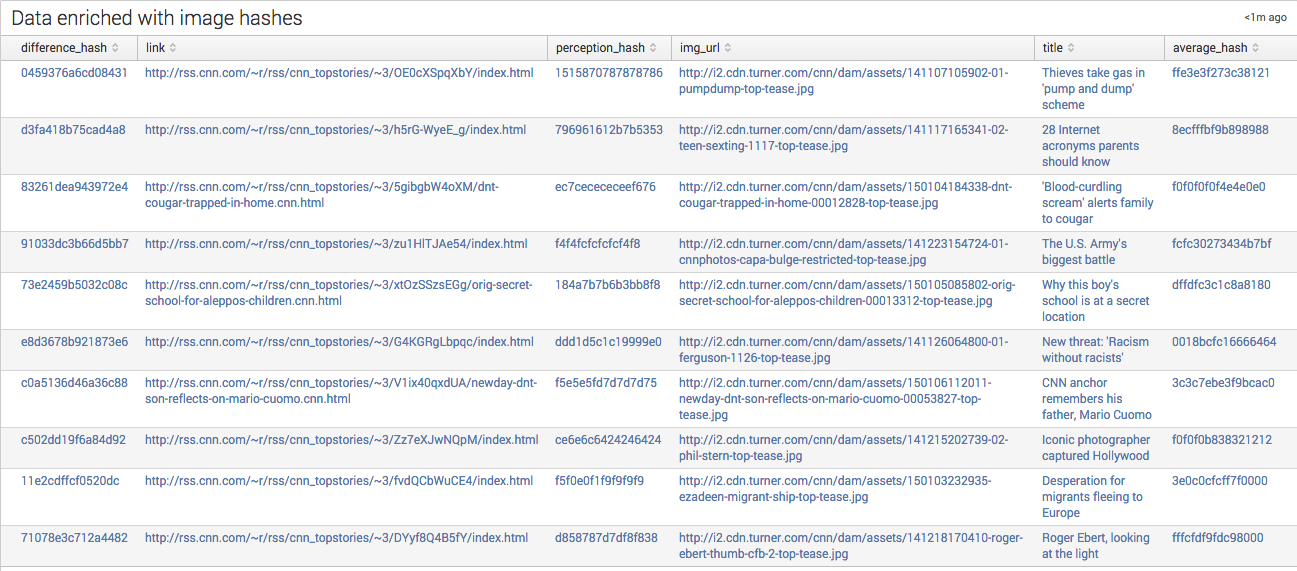
There is an Image Hash Example dashborad that deminstrares usage.
Syntax
| imghash field=<field| defaults to img_url>
The field passed should contain a full URL. Note this also includes using
file:// for processing images on a local drive.
If there is an error of some sort a -1 will be returned. See troubleshoting below for more.
Usage
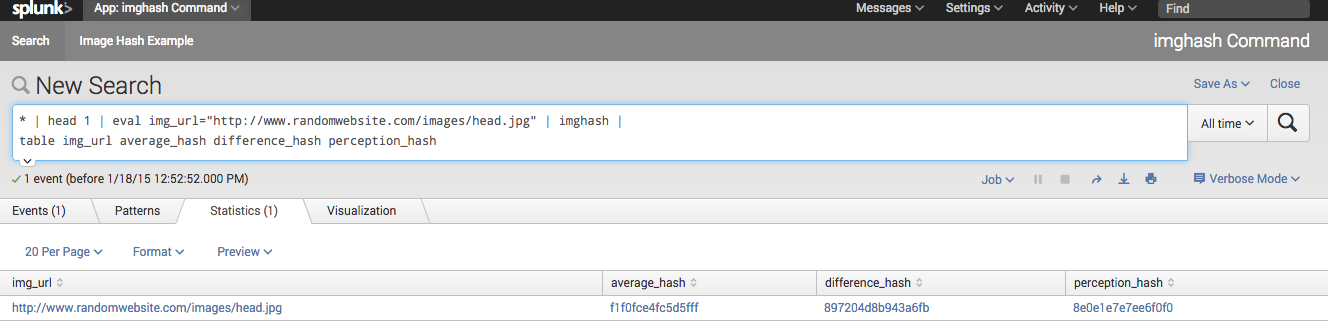
* | head 1 | eval img_url="http://www.randomwebsite.com/images/head.jpg" | imghash |
table img_url average_hash difference_hash perception_hash
| img_url | average_hash | difference_hash | perception_hash |
|---|---|---|---|
| http://www.randomwebsite.com/images/head.jpg | f1f0fce4fc5d5fff | 897204d8b943a6fb | 8e0e1e7e7ee6f0f0 |
Requirements
Tested against splunk 6.2 on OSX 10.10.
The follow PKGS are included for OSX 10.10. If using a different OS the following packages should be updated with versions from your system. Simply install the pks with PIP and move them from yur site-packages to this apps bin directory. The install process compiles some C code to keep things running swiftly.
- PIL or Pillow
- numpy
- scipy
Troubleshoting
Logs are written to the search's search.log, accesable via. the job inspector.
To enalbe logging to $SPLUNK_HOME/etc/apps/ImgHashCommand/imghash.log update
the log handeler in loggin.conf
  [logger_ImgHashCommand]
  handlers = file
Currently all messages are logged in a produciton system I'd change the log level to 'WARNING'.
---
Built With
- pil
- pytohn
- splunk


Log in or sign up for Devpost to join the conversation.