-
-
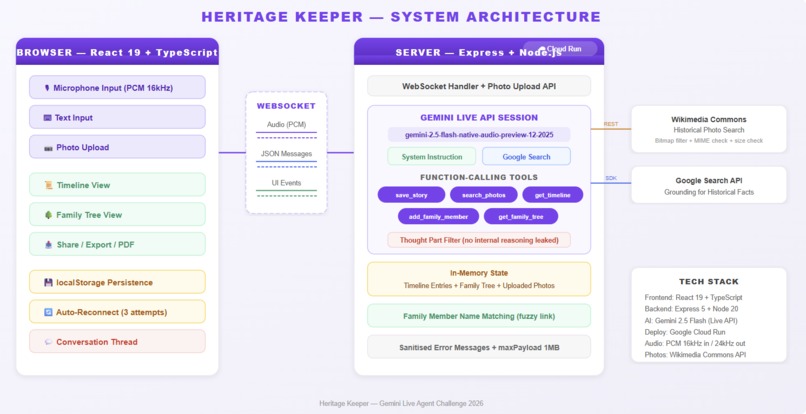
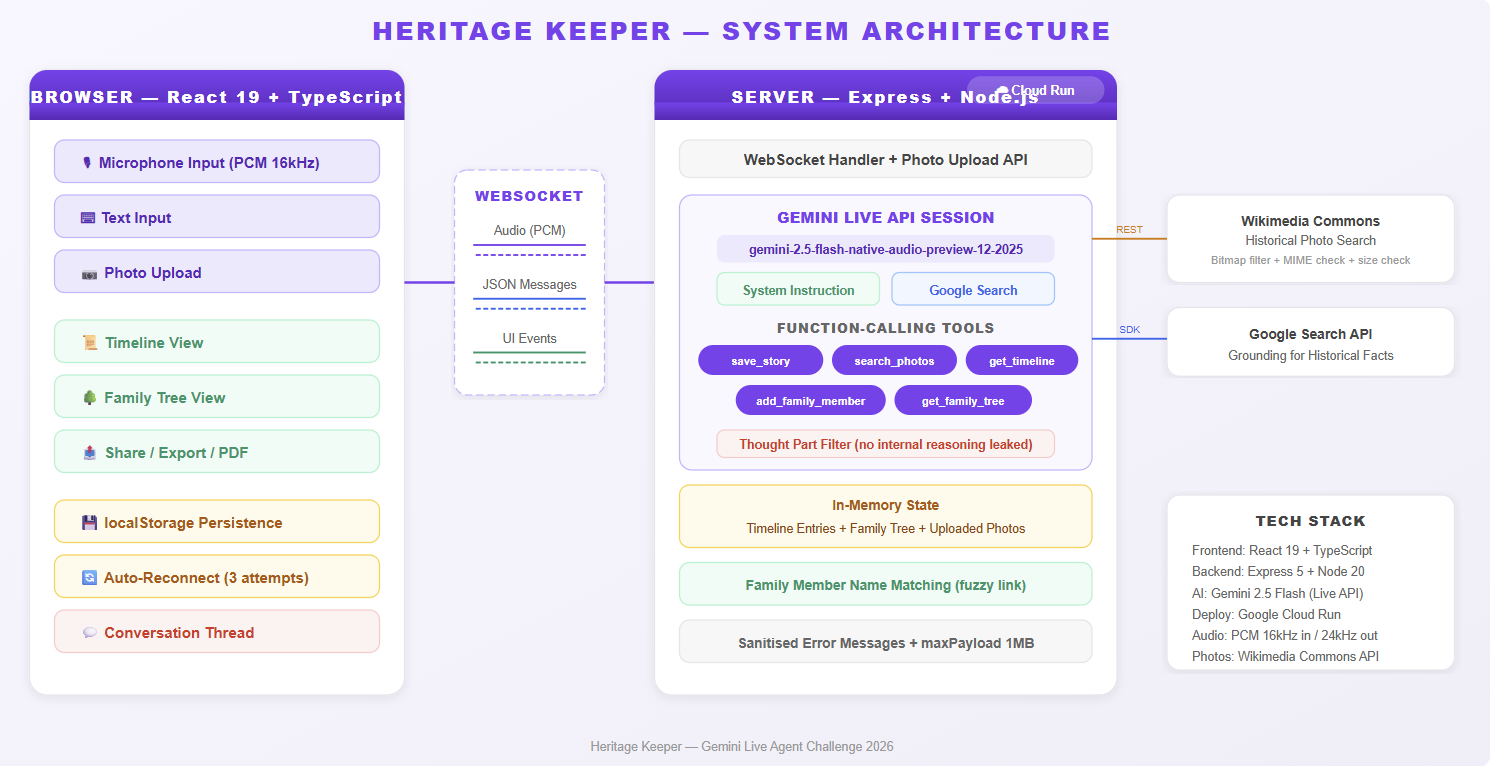
Heritage Keeper system architecture - Browser, WebSocket, Express on Cloud Run, Gemini Live API, 5 tools, Firestore, Wikimedia
-
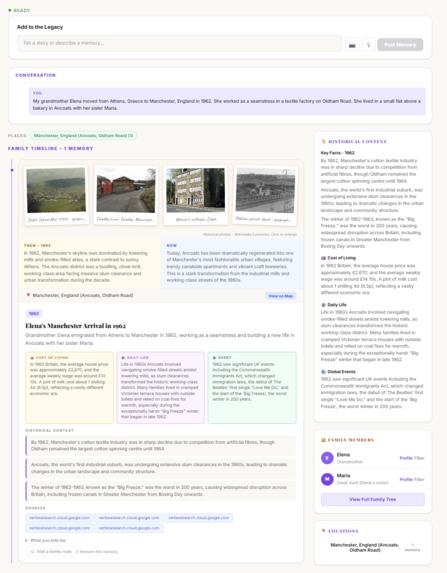
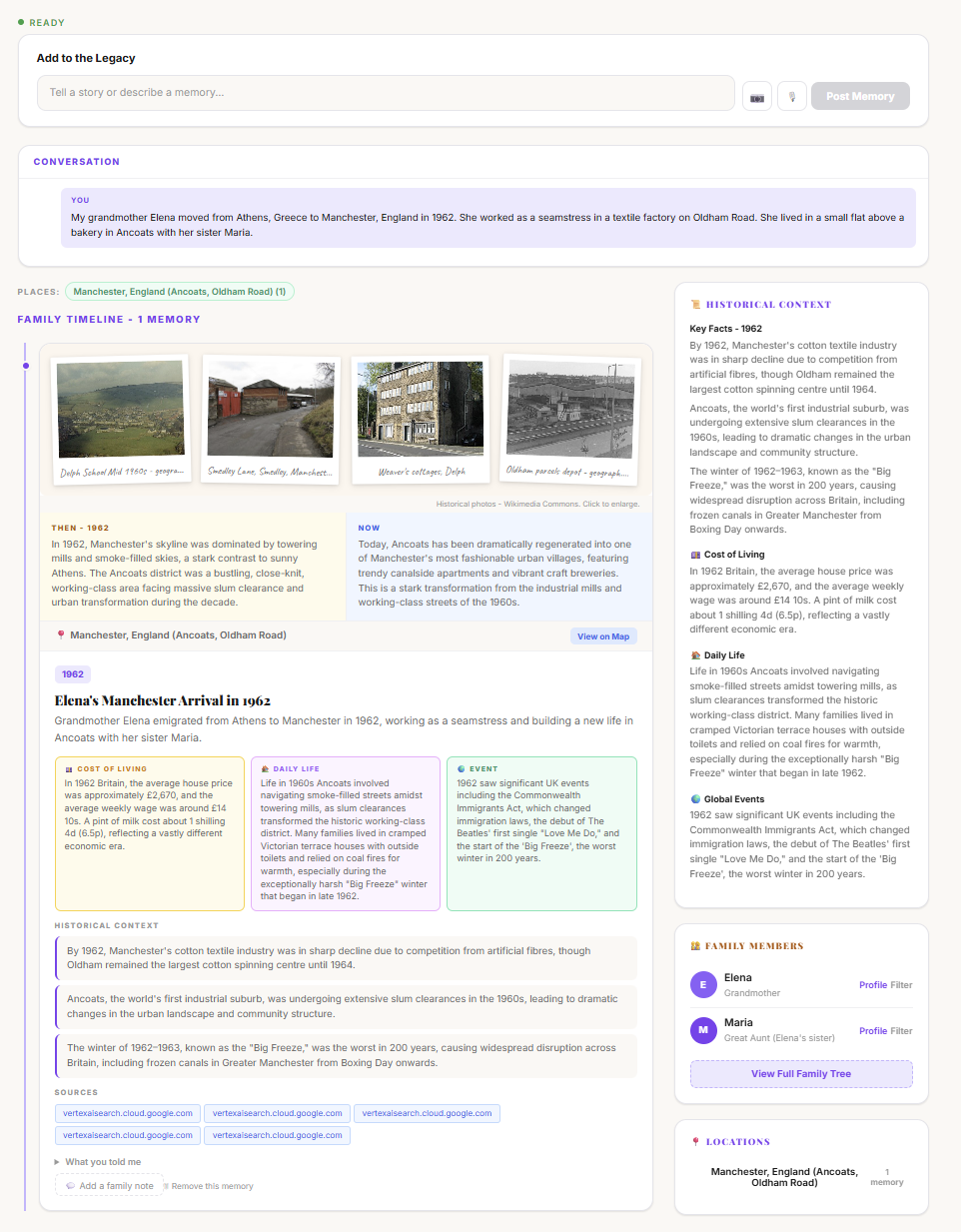
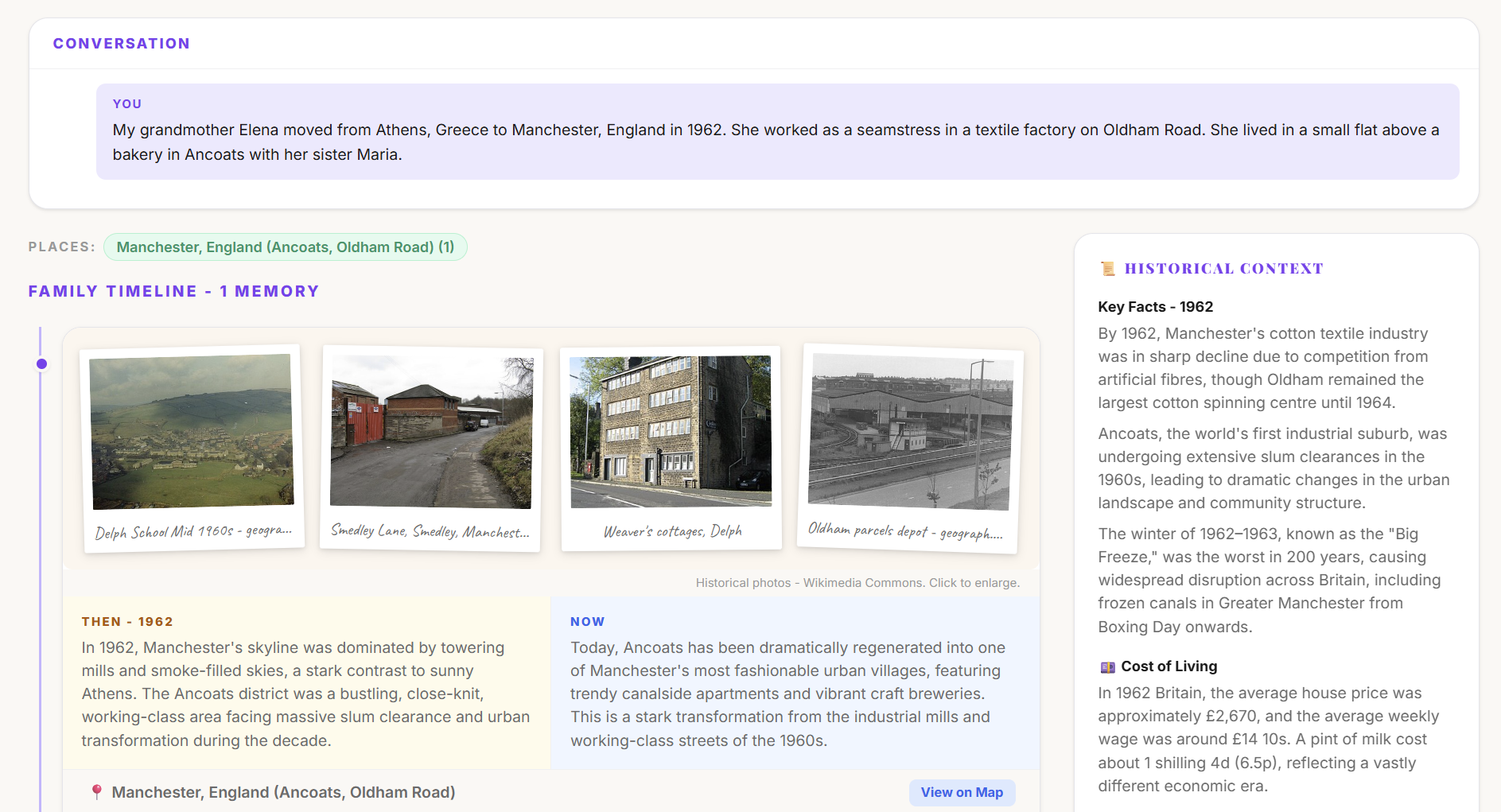
AI-populated timeline with Polaroid photos, Then vs Now, Cost of Living, Daily Life context - all from one conversation.
-
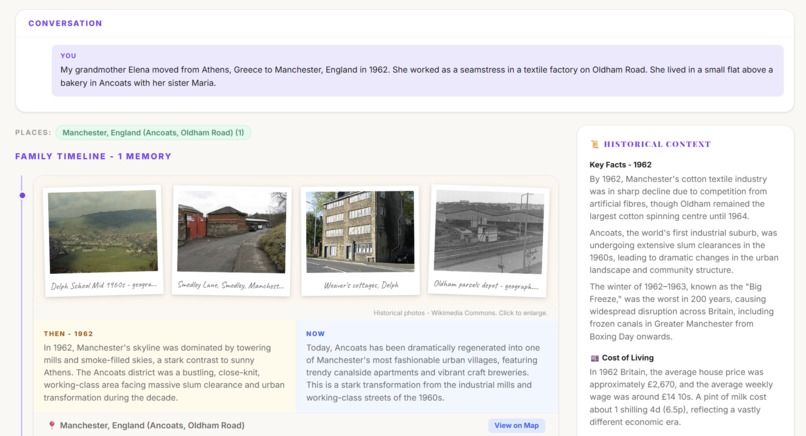
Historical photos from Wikimedia Commons, grounded facts, and cultural context cards appear in real time as you speak.
-
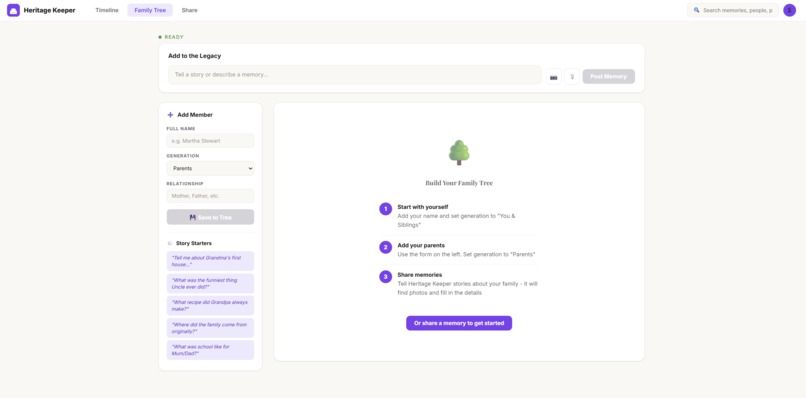
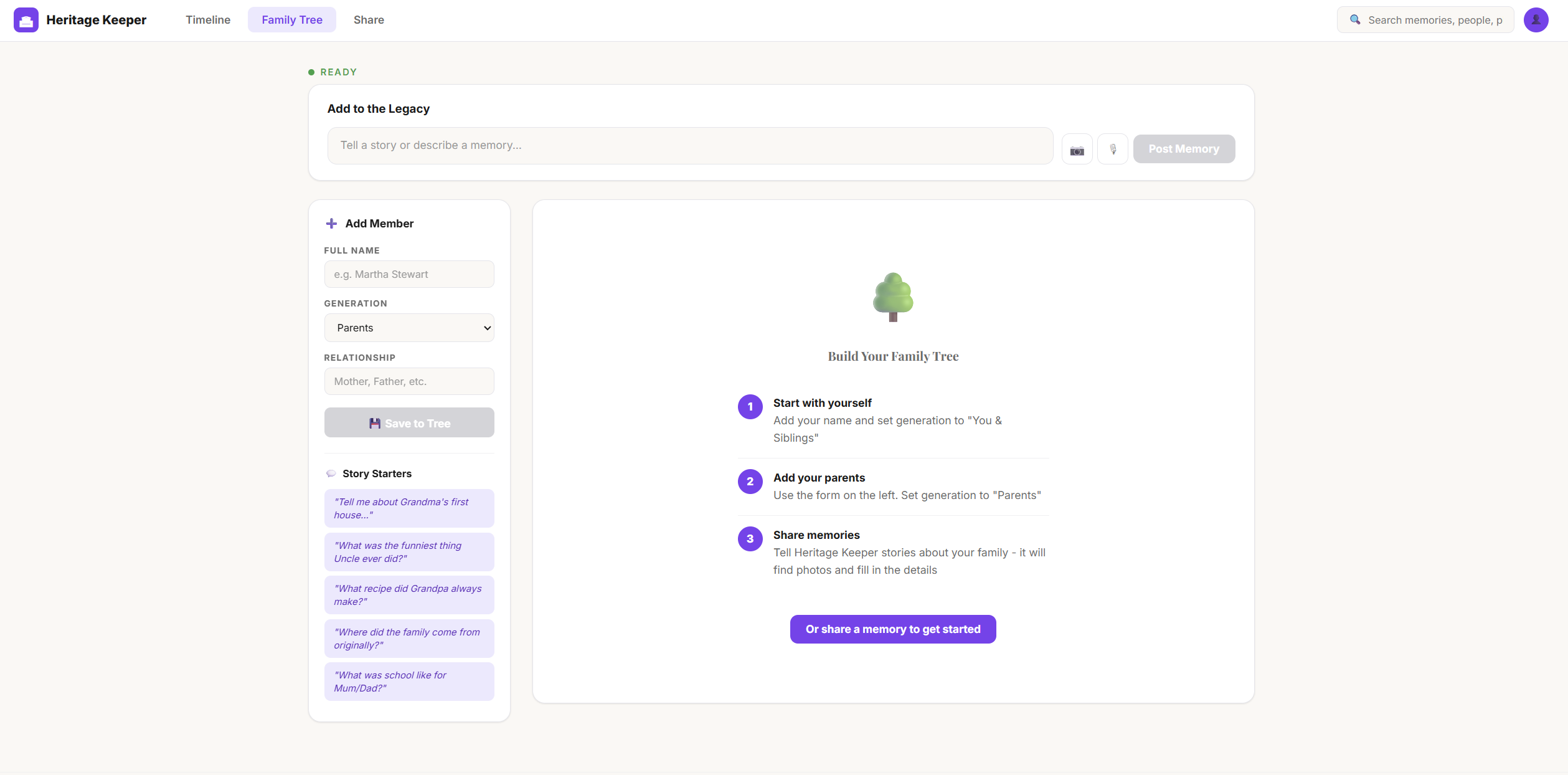
Build your family tree with a guided 3-step wizard or let the AI agent build it from your stories automatically.
-
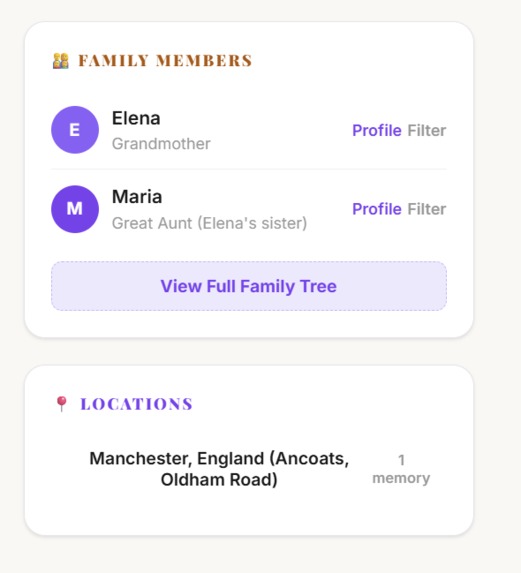
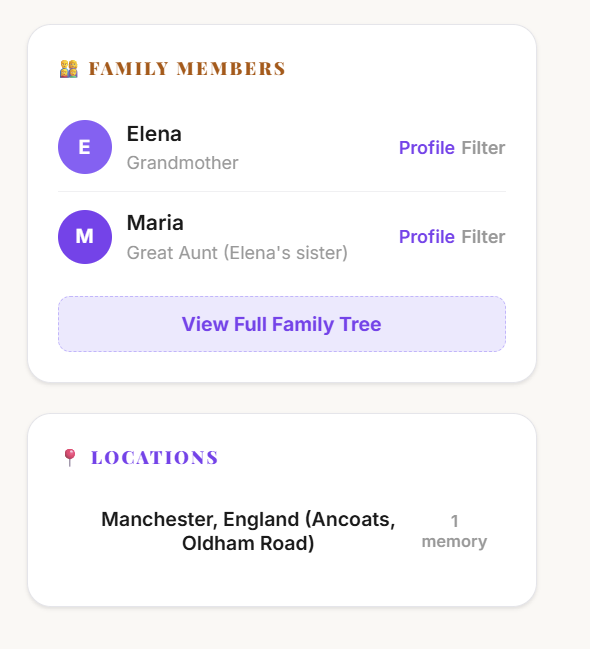
Family members auto-detected from stories. Filter by person or location. Click Profile to see their memories.
-
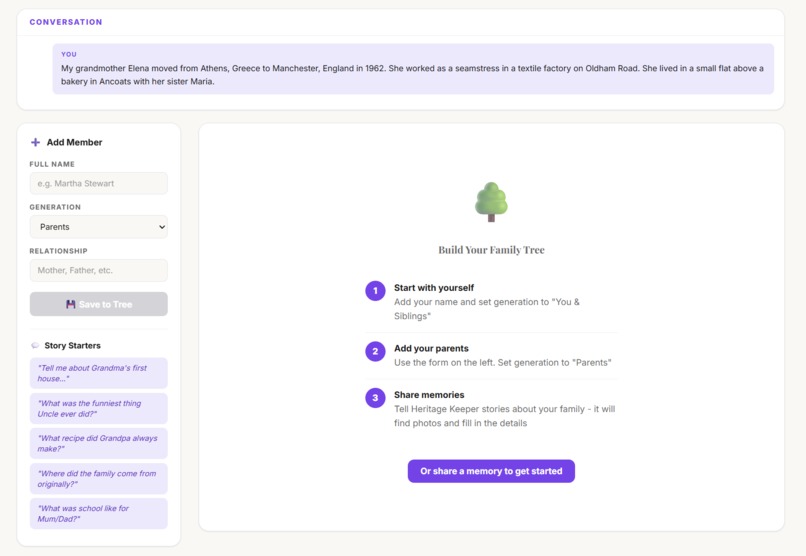
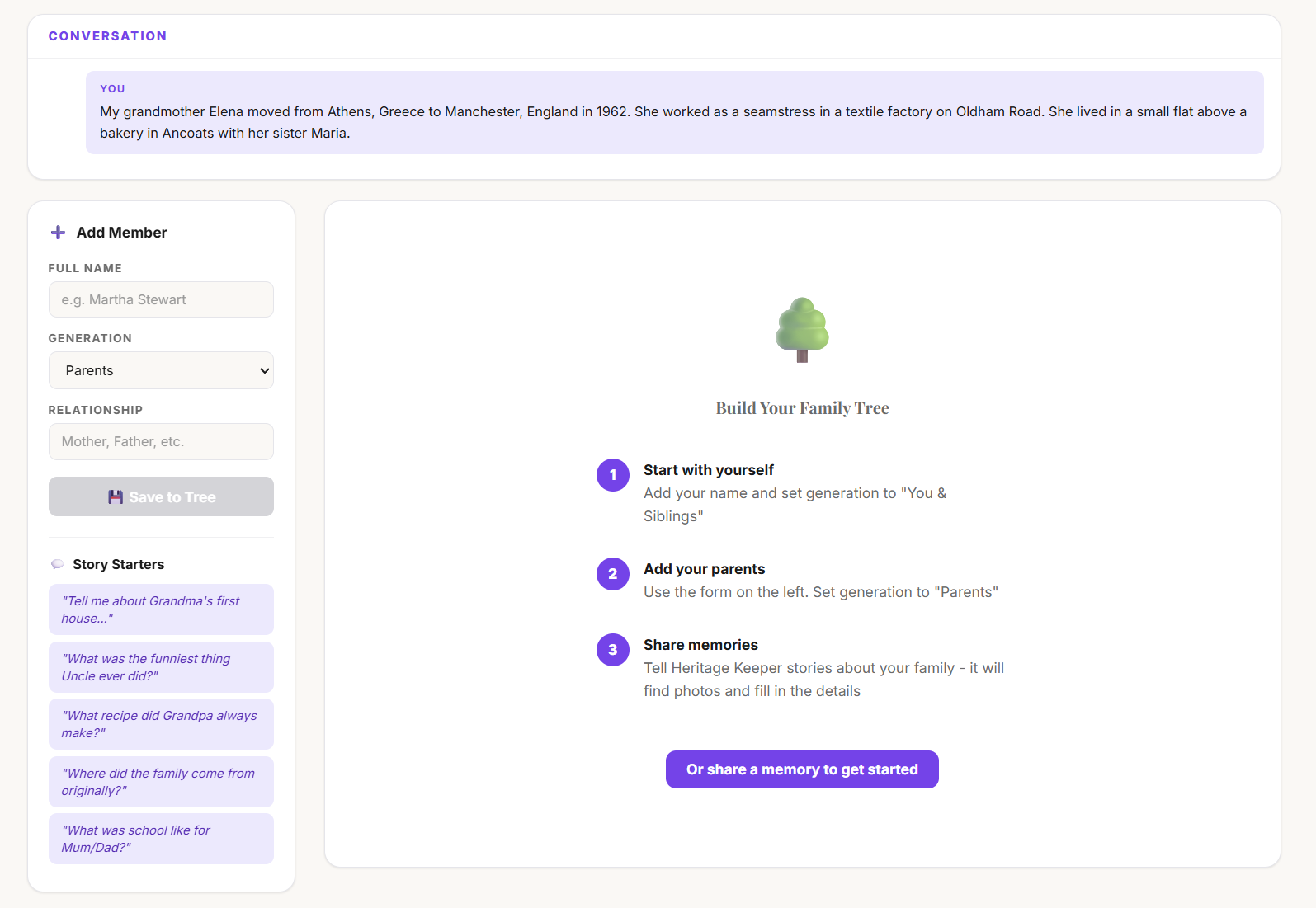
The Heritage Keeper agent listens to your memory and begins building the family tree and timeline simultaneously.
-

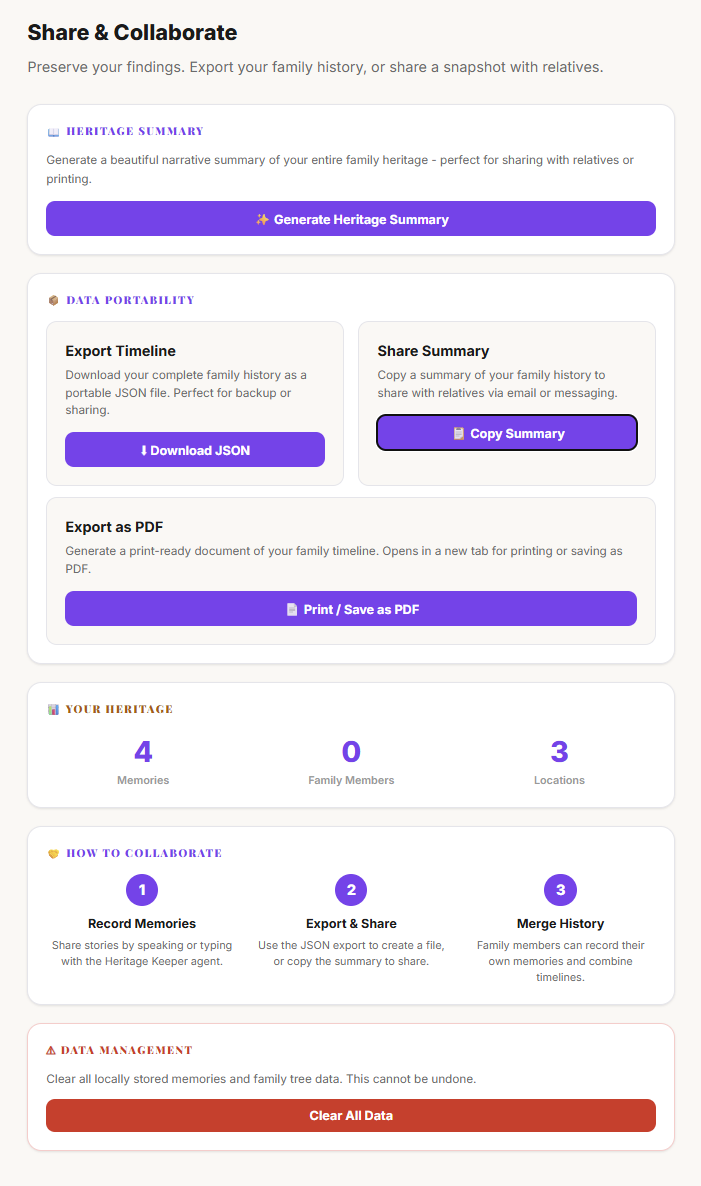
Generate an AI Heritage Summary, export as PDF or JSON, view stats, and manage your family history data.
Inspiration
Every family has stories worth preserving - but most are never written down. They live in the memories of grandparents and parents, shared over dinner tables and family gatherings, then gradually forgotten. Traditional genealogy tools like Ancestry or FamilySearch require manual data entry - forms, dates, records. Nobody wants to do that.
We asked: what if preserving family history was as easy as having a conversation? What if you could simply talk about your grandmother, and AI would find photographs from her era, build your family tree, and tell you what a loaf of bread cost back then?
What it does
Heritage Keeper is a voice-first AI agent that transforms family storytelling into a living, illustrated memoir. You simply talk about your memories - or type them - and the agent autonomously:
- Saves each story to an illustrated timeline with extracted dates, locations, and people
- Finds historical photographs from Wikimedia Commons matching the era and place, displayed as Polaroid-style scrapbook cards
- Builds a family tree automatically from the people you mention, with SVG connector lines between generations and a guided 3-step onboarding wizard
- Adds cultural context - cost of living ("Average house: £2,500. Weekly wage: £15"), daily life ("No central heating, coal fires, outside toilets"), and world events
- Grounds historical facts using Google Search with clickable source links to avoid hallucinations
- Analyses uploaded family photos using Gemini Vision - describing people, estimating the era, and suggesting questions to ask family members
- Auto-links photos to family members - name someone in a photo and it automatically sets as their profile picture in the tree
- Plots locations on a world heritage map with interactive pins showing where your family's story spans across the globe
- Generates a Heritage Summary - a beautiful AI-written narrative weaving all your stories into a cohesive family history
- Family notes - relatives can add corrections and additional context to any memory with inline handwritten-style annotations
- Member profiles - click any family member to see all their stories, photos, and set their profile picture. Double-click to rename unnamed members like "Grandfather" to their real name
- Filter by person or location - click a family member or location pin to see only their stories
- Exports as PDF - a print-ready document including the Heritage Summary, full timeline, and family tree
- Conversation thread - scrollable chat history showing the full back-and-forth with the Heritage Keeper agent
- Auto-reconnect - if the connection drops, exponential backoff reconnection keeps the conversation alive
- Session persistence - stories and family tree survive page refreshes (localStorage) and server restarts (Firestore)
The result is a browsable scrapbook timeline with warm Polaroid photos, a visual family tree with profile pictures, a world heritage map, and an AI-generated narrative - all built from natural conversation.
How we built it
Heritage Keeper runs on Gemini 2.5 Flash native audio through the Live API, enabling real-time bidirectional voice streaming with function calling. The architecture:
- Frontend: React 19 + TypeScript with a scrapbook-inspired UI - Polaroid photo cards with CSS rotation, handwritten Caveat font for captions and notes, Playfair Display serif for headings, warm cream backgrounds
- Backend: Express 5 server on Google Cloud Run, connected to Gemini via the @google/genai SDK
- Real-time communication: WebSocket proxy streams PCM audio (16kHz capture, 24kHz playback) between browser and Gemini Live API. Auto-reconnect with exponential backoff (1s, 2s, 4s) handles dropped connections
- Agent voice: Custom "Kore" voice configured via speechConfig for a warm, friendly Heritage Keeper persona
- Agent tools: 5 function-calling tools (save_story, search_photos, add_family_member, get_family_tree, get_timeline) that the agent calls autonomously during conversation
- Google Search grounding: Enabled alongside function calling so historical facts have verifiable sources displayed as clickable links
- Gemini Vision: Analyses uploaded family photos - describing people, estimating the era, and suggesting questions. Uses server-stored API key (never sent from client)
- Persistence: Firestore for server-side session storage with fire-and-forget writes + localStorage for instant client-side caching. Session IDs allow reconnection to the same heritage data
- Heritage Map: Leaflet with OpenStreetMap tiles and Nominatim geocoding. Purple pins for each location, popups with memory previews, auto-fit bounds
- Photos: Wikimedia Commons API with bitmap-only filtering, MIME type checks, dimension thresholds, and regex-based relevance filtering to exclude flags, logos, and maps
- Family tree: SVG connector lines between generations, guided 3-step onboarding wizard, profile photos auto-linked from tagged pictures, double-click rename for unnamed members
- Thought filtering: The native audio model includes internal reasoning ("thought" parts) - we filter part.thought to prevent chain-of-thought leaking to users
- Search: 10-field search across title, summary, year, location, story text, people, historical facts, cost of living, daily life, and events - with results banner and family member filtering
Challenges we ran into
Model naming chaos: The Gemini Live API model names change frequently between preview releases. We went through gemini-live-2.5-flash-preview (which silently disconnected with code 1008) before finding the correct gemini-2.5-flash-native-audio-preview-12-2025. The error only appeared after adding diagnostic logging to the WebSocket close handler - the SDK's default onclose gives no useful information.
Thought part leaking: The native audio model includes internal reasoning ("thought" parts) in its responses. Without filtering, users saw the model's chain-of-thought ("Interpreting 'Funny Bob'... I'm hesitant to categorise this as a story..."). The fix was a single line - if (part.text && !part.thought) - but finding it took hours of debugging.
Audio binary crashing the JSON parser: When Gemini sends audio data, it arrives as raw base64 alongside JSON messages. Our initial message parser tried JSON.parse() on everything - including binary audio data like "BwACAAUABg..." - which threw SyntaxError and killed the handler. The turn_complete event never fired, leaving the UI stuck on "Thinking..." forever. The fix: a robust parser that tries JSON, falls back to checking message.data, and gracefully skips non-JSON binary data.
Photo relevance: Wikimedia Commons returns flags, logos, maps, and diagrams alongside actual photographs. We built a multi-layer filtering system: filetype:bitmap search modifier, MIME type validation (JPEG/PNG only), minimum dimension checks (200x150), and a regex pattern matching against irrelevant terms (flags, coats of arms, seals, insignia, heraldry) to surface only genuine historical photos.
Family member timing: The agent calls save_story first, then add_family_member. When save_story tries to match people against the tree, the member hasn't been added yet. We solved this with frontend-side fuzzy name matching that runs after both tool calls complete, using the current React state which always has the latest data.
Accomplishments that we're proud of
- Zero manual data entry: The entire family tree, timeline, photo collection, and heritage map build automatically from natural conversation. No forms, no dropdowns, no date pickers.
- Triple multimodal input: Voice (Gemini Live native audio), text, and photo upload with Gemini Vision analysis - three ways to contribute to your family heritage.
- Cost of Living and Daily Life context: More emotionally resonant than generic trivia. Knowing "a house cost £2,500 and the weekly wage was £15" grounds the story in lived reality far better than knowing what song was number one.
- Google Search grounding with visible sources: Historical facts display clickable source links - users can verify the facts themselves. This transforms AI-generated context from "maybe true" to "verifiably true."
- The Heritage Summary: One button generates a beautiful 2-3 paragraph narrative weaving all stories together into a cohesive family history. Included in the PDF export.
- The world heritage map: Purple pins showing where your family's story spans, with popups previewing memories from each location. Transforms a list of places into a visual journey.
- Scrapbook aesthetic: Polaroid photo cards with CSS rotation, handwritten Caveat font for captions and notes, warm cream backgrounds, serif titles - it feels like a real family album, not a database.
- Smart photo-to-tree linking: Name someone in a photo's lightbox and their family tree profile picture updates automatically. No extra steps.
- Family notes: Any relative can add corrections and context to memories - displayed in handwritten font, deletable, inline editing with no popups.
- 30+ features built by a solo developer in under 48 hours, deployed and running on Google Cloud Run.
What we learned
- The Gemini Live API's function calling during audio streaming is genuinely powerful - the agent decides autonomously when to save a story, search for photos, or add a family member. This is real agent behaviour, not scripted workflows.
- Google Search grounding adds credibility that pure generation lacks. When facts have clickable sources, the entire experience feels trustworthy.
- Heritage preservation is deeply personal. Design choices matter: the "Cost of Living" and "Daily Life" context cards resonated far more than music or film trivia. People want to feel what their ancestors' daily lives were like.
- Thought filtering is essential for native audio models. The model's internal reasoning is fascinating but confusing to end users - filtering part.thought was a small code change with massive UX impact.
- Auto-reconnect with exponential backoff is essential for Live API agents. WebSocket connections drop and seamless recovery keeps the experience feeling magical rather than fragile.
- The scrapbook aesthetic (Polaroid cards, handwritten fonts, warm backgrounds) created a stronger emotional connection than a clean modern UI. Heritage is personal - the design should feel personal too.
What's next for Heritage Keeper
- User accounts with Firebase Auth - proper authentication so families can return to their heritage across sessions and devices
- Family collaboration - multiple family members contributing to the same timeline, adding their own memories and corrections in real-time
- Genealogy API integration - FamilySearch or Ancestry data enrichment to fill gaps in the family tree with historical records
- AI-generated illustrations - Gemini image generation creating cover art for each story
- Mobile app - React Native for recording stories on the go, especially during family gatherings
- Structured interviews - guided two-person recording format ("Ask your grandmother about...") inspired by StoryCorps
- Video messages - record and attach video alongside audio stories for richer memories
- Heritage sharing - shareable links so relatives can view the timeline without needing an account
- Visual tree diagram - interactive box-and-line ancestor chart with drag-to-connect relationships (matching Ancestry/FamilySearch standard)
- Face recognition - automatic people tagging in uploaded photos using Gemini Vision
Built With
- docker
- express.js
- firebase-admin
- firestore
- gemini-live-api
- gemini-vision
- google-cloud-run
- google-genai-sdk
- google-search-grounding
- html5-audio-api
- leaflet.js
- node.js
- openstreetmap
- react
- typescript
- vite
- websocket
- wikimedia-commons-api

Log in or sign up for Devpost to join the conversation.