-
-
teckstack/flow breakdown
Octo
Inspiration
Clinicians make dozens of medication decisions a day with the chart open in front of them. The information they need to catch a dangerous interaction or a dose that ignores a failing kidney is usually already on the screen. It is just spread across a med list, a problem list and a lab panel, and nobody has time to cross-reference all three by hand.
The tools that exist do not help much. EHR alerts fire so often that clinicians click through them without reading. Chatbots need you to retype the chart into a text box, which nobody does with patient data. And the AI assistants that can see your screen send the whole screenshot to a server.
I wanted something different: a buddy that lives on your Mac, looks at what you are looking at, answers out loud, and draws the answer on the chart in place. And in a medical setting, it should do that without the patient's data ever leaving the machine.
That's Octo.
I'm submitting Octo to the Oracle of the Deep track. It is a pipeline of models that sees what a person cannot take in at once: on-device text recognition, a biomedical named-entity model fine-tuned during the hackathon, a clinical rules engine, and a vision-grounded language model. The output is not a report. It is drawn directly on the data it came from.
It also fits the Impiricus challenge to invent the next way to engage healthcare professionals. Octo meets clinicians inside the chart, at the moment of a decision, and can carry a clearly labeled, opt-in sponsored medical information card alongside independent evidence. No SMS, no portal, no interruption.
What it does
Octo lives in the MacBook notch. Hover over it and a small card unfolds. Hold ctrl + option anywhere and talk. When you let go, Octo reads the screen, answers by voice, and draws on top of whatever app you are in.
It has three modes, and by default it picks the right one per question.
Rx mode is for charts. Open a med list and ask "anything I should worry about here?" Octo reads the medications, doses, conditions, labs, age and sex off the screen, checks them against interaction and dosing rules, and draws the findings in place: a red link between two drugs that interact, a yellow underline under a dose that is too high for the patient's kidney function, a numbered badge next to each finding. Then it explains the findings conversationally in a couple of sentences. Circle a single drug with your cursor while holding the hotkey, and the question is scoped to that drug. Ask "what's new on this?" and it pulls the latest trial from PubMed and holds up a card you can click.
General mode works on any screen. Ask what something means, where a setting is, or what a chart is showing, and Octo answers and flies its cursor to the thing it is talking about. Ask for a paper, a picture or a video about what you are looking at, and it finds one and holds up a card.
Agent mode does things. "Open the report and export it as a PDF." Octo opens the app, finds the menu, clicks through the steps, and finishes the task, narrating as it goes while its cursor traces what it's doing. For an app it has never used before, it looks up the steps on the web first.
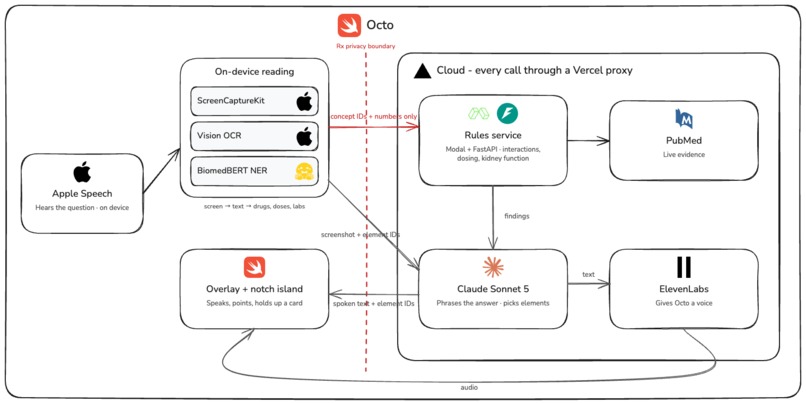
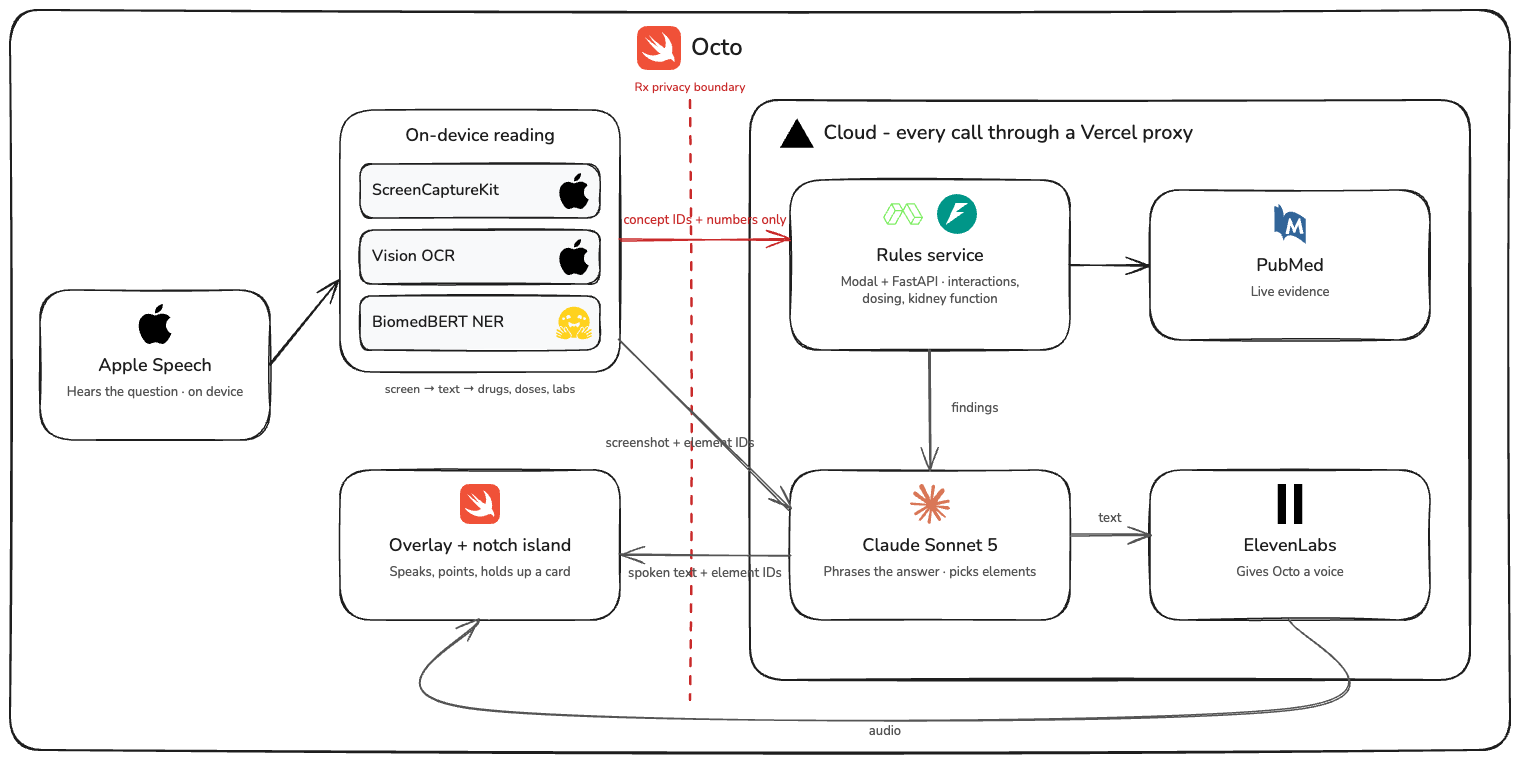
The privacy boundary is the part I care most about. In Rx mode, the screenshot never leaves the Mac. Text recognition and clinical entity extraction both run on device. What goes to the rules service is a list of drug concept IDs, condition IDs and a few numbers, and the app asserts this before every request.
How I built it
Octo is a native macOS app in Swift and SwiftUI, with a small cloud backend behind it.
Capture and reading → When you release the hotkey, ScreenCaptureKit grabs the display under your cursor at full Retina resolution, and Apple Vision runs on-device OCR. Vision's word boxes are padded, which collapses the gaps between spreadsheet cells, so I wrote a segmenter that re-splits each line by looking for real gaps in the ink. Every element gets a numbered tag.
Clinical extraction → A named-entity model finds drugs, doses, frequencies, conditions and labs in the OCR text. I fine-tuned BiomedBERT on BC5CDR plus synthetic dose and frequency data on a Modal GPU during the hackathon, and it reaches an F1 of 0.89 on the chemical and disease test set. A 15,000-name RxNorm lexicon normalizes drug names to concept IDs.
Clinical rules → A Python FastAPI service on Modal holds the interaction pairs, label dosing limits and renal adjustment rules, and computes kidney function from the creatinine, age and sex on screen. It returns findings with severity and references. Evidence lookups hit PubMed live.
Grounding → The language model never emits pixel coordinates. It sees a screenshot with numbered tags and returns element IDs. Every drawing in Rx mode is built from the rule engine's results, not from prose, so Octo cannot draw something the rules did not find.
Language and voice → Claude Sonnet 5 handles general answers, narrates the clinical findings, plans agent steps and runs the web search for papers and videos. When it narrates Rx findings, the app checks that every number in the narration came from the rules engine and falls back to a templated sentence if one did not. Speech comes in through Apple's on-device recognizer and goes out through ElevenLabs.
Proxy → Every cloud call goes through a Cloudflare Worker that holds the API keys. Nothing sensitive ships in the app.
The notch → The island is one large transparent window pinned to the top of the screen and pushed onto a private window-server layer so it can sit above the menu bar. Expanding and collapsing is a SwiftUI spring inside that window, so the notch silhouette morphs into the card instead of a window popping open.
Agent mode → Actions are executed through Core Graphics events: open an app, click a numbered element, type, press keys, scroll. Claude decides one action at a time from a fresh screenshot, up to ten steps.
Challenges I ran into
Vision hides the cell gaps. Apple's OCR returns word boxes padded to the line height, which turns a 16-pixel gap between spreadsheet cells into a 3-pixel one. Table reconstruction was hopeless until I re-split every line using a brightness profile of the actual pixels.
Cloud speech was too slow to feel like a companion. Whisper through the cloud took anywhere from two to ten seconds. I moved transcription to Apple's on-device recognizer, which is instant, and kept the cloud path as an option.
Windows cannot go above the menu bar. AppKit clamps every window below it, and the notch is in the middle of it. I studied open-source notch projects and ended up using the window server's private layering to place the island, with a graceful fallback to a normal high window level.
Keeping the model honest. A language model will happily invent a dose or an interaction. I fixed this structurally: the model sees column names and findings, never raw data; drawings come from rule results, never from text; and narration that drops or adds a number is rejected.
Accomplishments that I'm proud of
I SUBMITTED WITH 1 MINUTE LEFT
- A full on-device reading pipeline: capture, OCR, table reconstruction and clinical entity extraction with nothing leaving the Mac but concept IDs.
- A fine-tuned biomedical NER model trained, evaluated and deployed inside the hackathon window.
- Findings drawn on the chart in place, in the app the clinician is already using, with red for major and yellow for warnings.
- A notch-resident interface that feels like part of macOS rather than a floating window.
- Three modes sharing one brain: the same screen reading and voice loop powers chart checks, general questions and controlling the Mac.
Built With
- anthropic-api
- appkit
- apple-speech
- apple-vision-ocr
- avfoundation
- biomedbert
- claude-sonnet-5
- cloudflare-workers
- elevenlabs
- fastapi
- fireworks-ai
- hugging-face-transformers
- modal
- pubmed-api
- python
- pytorch
- rxnorm
- scikit-learn
- screencapturekit
- skylight
- swift
- swiftui
- typescript
- whisper


Log in or sign up for Devpost to join the conversation.