## Inspiration
Every pitch in a city like San Francisco happens in person, across a table or standing next to someone, and it happens on a phone. You hold it up, flip between LinkedIn, a website and a deck, and you present and drive on the same screen. The other person watches you scroll. Nobody has built a tool for that ninety seconds.
The iPhone Duo has two faces. Stand it on its edge at the corner of a table and one half faces them, the other faces you. That is a presenter display and an audience display in one object, with no setup. We built the app that should exist for it.
## What it does
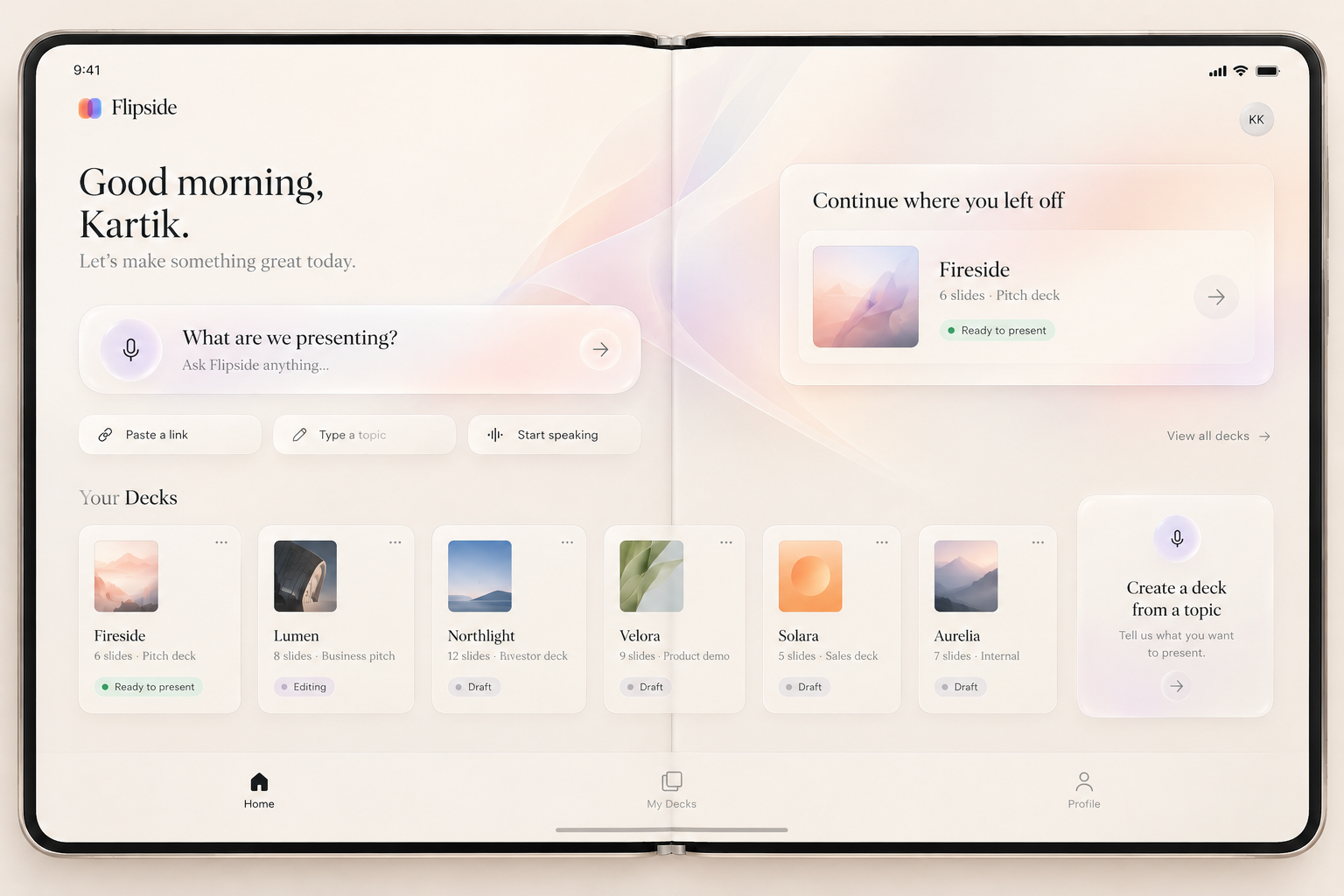
Flipside is a presentation app for iPhone Duo. The show on their side, the notes on yours.
- Stand the phone at about 90 degrees. The half facing the client shows the cards. The half facing you is a Liquid Glass control desk: an AI bar that is always listening, your notes with the cue phrase highlighted, section tabs to jump anywhere, a queue you drag to reorder, a timer, a pointer, and a live monitor of what they see.
- Say the cue phrase at the end of your notes and the deck advances by itself.
- The client asks a question mid-pitch. A direct one puts the answer card on their side while you keep talking. A softer one shows you an Add button first.
- Say a topic and a deck writes itself, streaming card by card onto their side with a glowing border while it builds. Ask it about Flipside and it pitches itself.
- Your finger on your half puts a dot on theirs. They can tap their side and a second dot shows up on your monitor.
- Lay it flat and the same desk gets wider, the queue becomes a list, you reorder and edit.
- Fold it shut and the meeting is over. Type their email and the recap goes out.
## How we built it
Native SwiftUI, Swift 6, built and demoed on the iPhone Duo simulator in Xcode 27.1 and Bitrig's 3D simulator.
- The hinge drives the app. `.onHingeChange` gives us angle and status; a small mapper with hysteresis turns that into present, edit and ended, and a fold progress value drives the morph between desk layouts.
- The two faces are one `ArrangementView` with the split style, so the audience half and the presenter half are two views of one shared `AppState`. Every change on our side and its effect on theirs is one `withAnimation`.
- `reservedRegions(kind: .division)` finds the seam so nothing important sits on the crease.
- Every control is `.glassEffect()`, with the highlight angle tied to the hinge angle so folding the phone moves the light across the glass.
- Each pitch card has a living scene drawn in SwiftUI: a small Duo that folds in 3D and can be dragged, a card that streams in, a phone that closes and sends.
- Generation streams JSON lines, one card per line, through the same insert animation used for questions. Every run is saved to disk so the best one can be replayed on stage.
- On-device speech keeps a rolling transcript. It matches cue phrases and section names, and hands questions to the model, which returns none, jump, add or answer.
- Two people, four hours, one repo, xcodegen so the project file never conflicts. Claude Code did most of the typing; the product, the fold-to-mode model and the desk are ours.
## Challenges we ran into
- The outer display can only be drawn on during an active camera session, and the simulator has no camera. We dropped it on day zero and designed around the two-face pose instead, which turned out to be the better product.
- The simulator can't fold from the command line. We wrote a launch script that walks the fake hinge through angles and a stage strip on the seam that triggers every demo action, so we could test and record without a real phone.
- Three agents in one checkout at once. We lost twenty minutes and three files, then went to one agent per person and one branch each.
- The presenter half has to be the same structure at 90, 135 and 180 degrees with only sizes changing. Anything that dissolved or cascaded with fold progress looked broken at some angle. We rebuilt it as one layout.
## Accomplishments that we're proud of
- The fold is the interface. No button switches modes. Standing is present, flat is edit, closed is done.
- The deck that pitches Flipside was made by Flipside.
- The client can interrupt and the answer lands on their side without the presenter touching anything.
- Both halves feel like one app, in Liquid Glass, and it moves the way Apple's own apps move.
## What we learned
- Design for the pose people actually use. A phone standing on a table corner between two people is a real product surface and nobody had treated it as one.
- Hinge angle is a better input than any gesture. It's continuous, physical and impossible to do by accident.
- One shared state object across both faces makes the animation problem disappear.
## What's next for Flipside
Real device on October 23. The listener gets smarter about what the client asked. Media in the cards, video and images that grow in next to text without the text jumping. Then the people who do this pitch every week: realtors, founders, sales, doctors explaining the expensive thing.
Built With
- avfoundation
- bitrig
- devicehub
- gpt-4o-mini-transcribe
- gpt-5
- ios-27
- iphone-duo
- liquid-glass
- metal
- openai-api
- speech
- swift
- swiftui
- xcode
- xcodegen

Log in or sign up for Devpost to join the conversation.