-
-
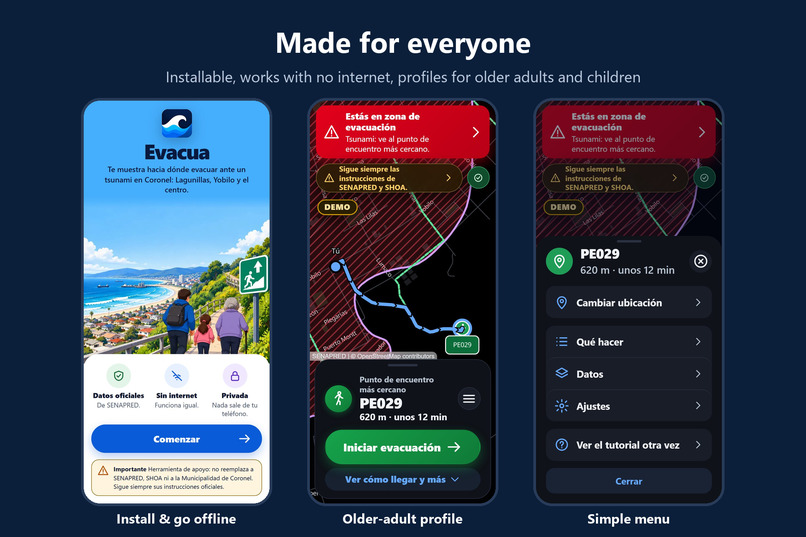
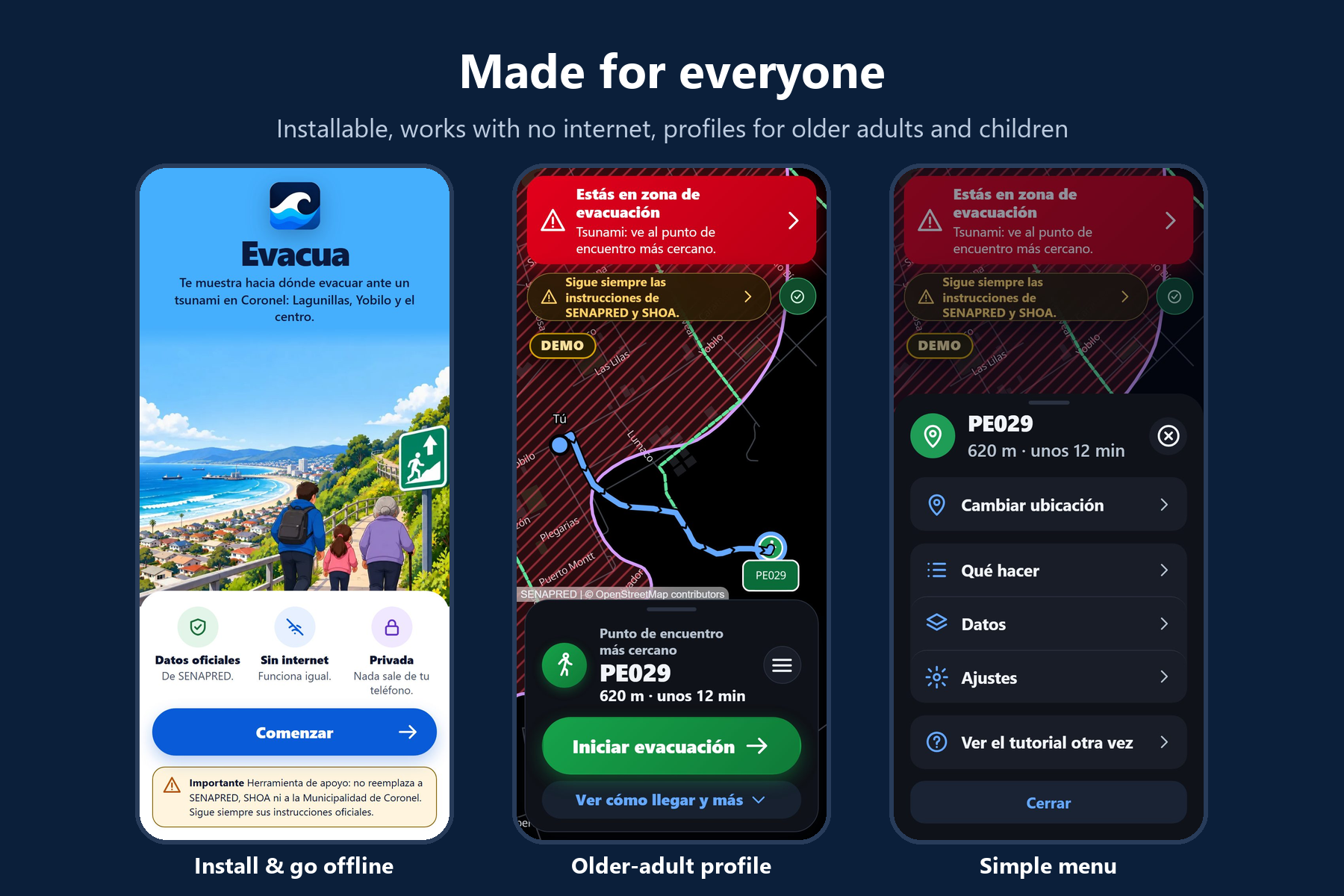
Install it from the browser and use it offline. Older-adult profile: very large text, one big button, voice.
-
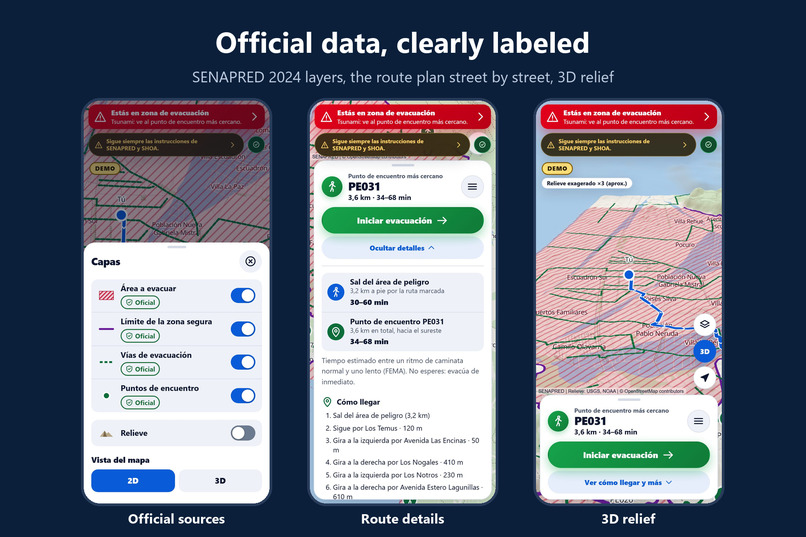
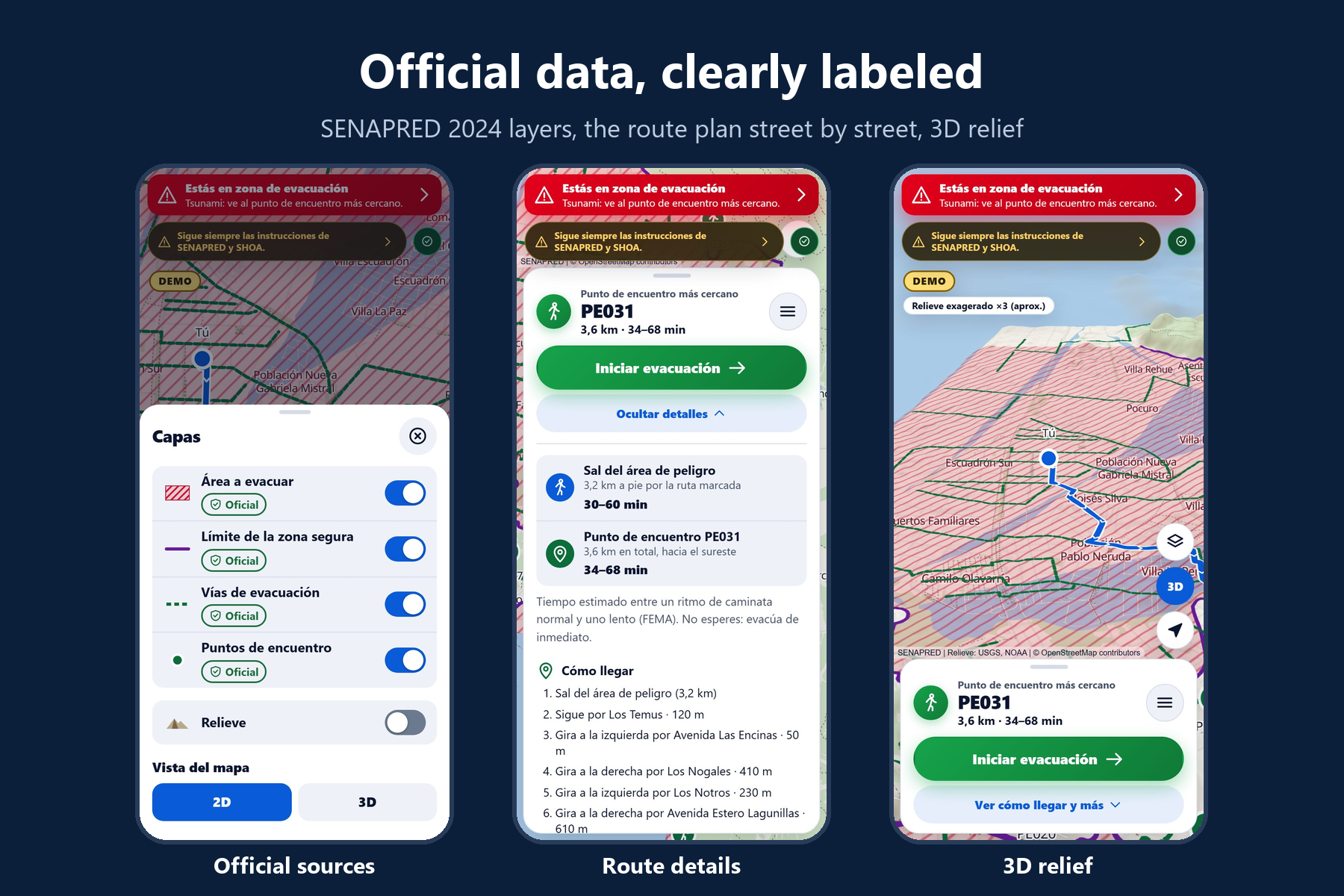
Official SENAPRED 2024 tsunami layers, each showing its source, a street-by-street plan and a 3D view of the high ground.
-
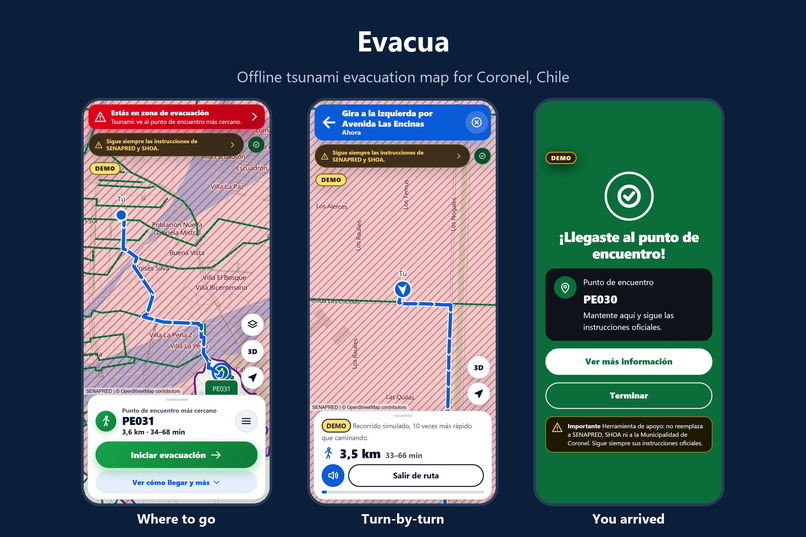
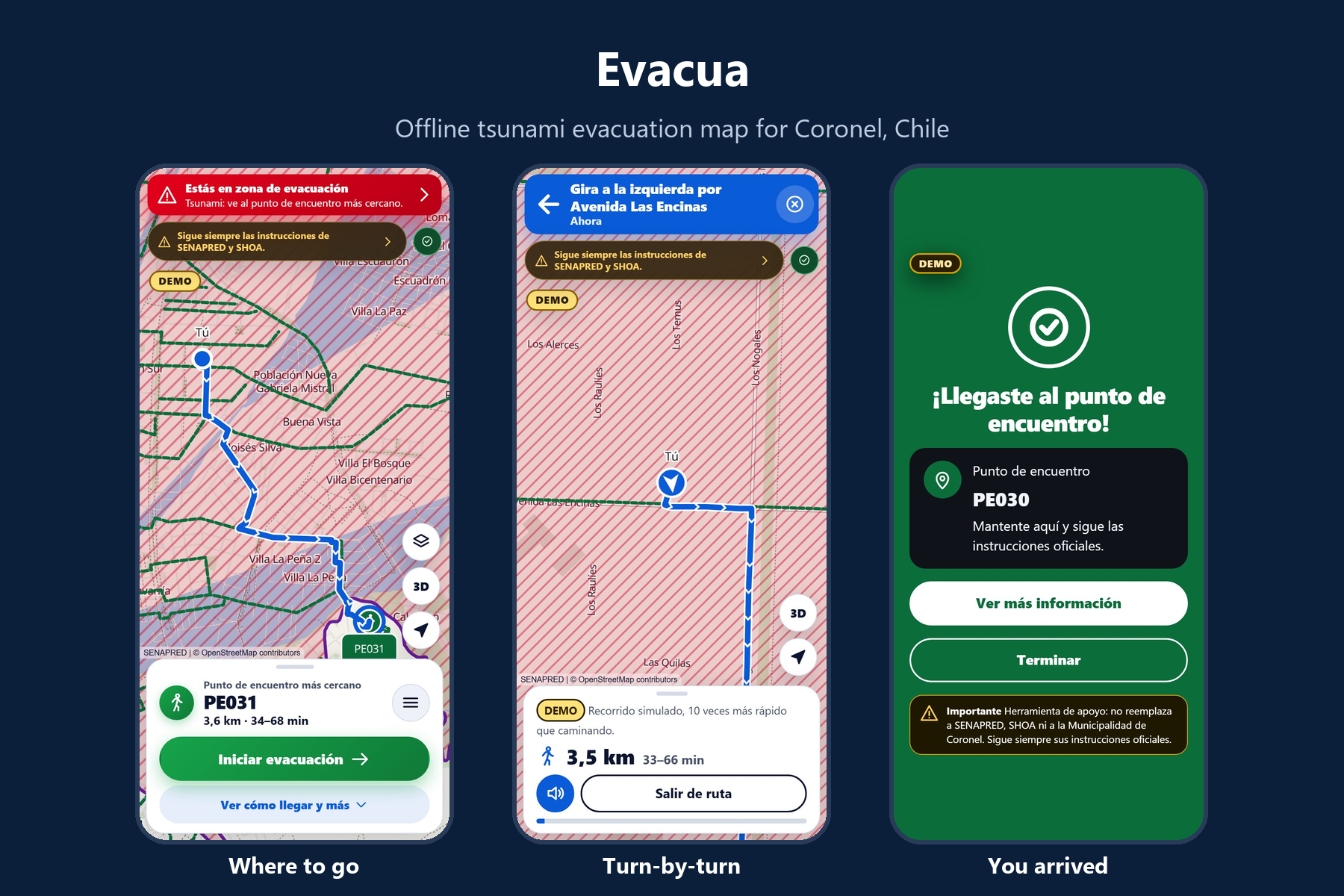
Nearest official meeting point, turn-by-turn voice directions and a clear arrival screen (DEMO walk).
Inspiration
Chile's coast lives with tsunami risk, and the 2010 earthquake and tsunami hit the Biobío region hard. After a big earthquake, phone networks often fail or saturate exactly when people need to know where to go. SENAPRED (Chile's disaster agency) publishes official evacuation areas, routes and meeting points, but as GIS layers, not as something a scared person can use on a phone with no signal. I wanted a map that answers three questions offline: Am I in danger? Where do I go? How do I get there on foot?
What it does
Evacua is an installable web app (PWA) for one pilot area of Coronel, Chile: Lagunillas, Yobilo and Coronel Centro.
- Works with no internet. After the first visit, the map, the official data and the routing engine are stored on the phone. It keeps working in airplane mode.
- Official data only. SENAPRED's 2024 tsunami layers: the evacuation area, 40 evacuation routes and 19 meeting points. Every layer shows a badge with its source ("Official verified source"); nothing is invented.
- Safety-first routing. If you are inside the evacuation area, it finds the shortest walking way out of it, then the nearest official meeting point without walking back in. Times are shown as a range (average and mobility-impaired walking paces from FEMA P-646), never as a promise.
- Turn-by-turn navigation with street names, read aloud, and a clear arrival screen.
- Three profiles: adult; older adult (very large text, one big button, automatic voice); child (short phrases and Find your grown-up or teacher and follow the plan).
- Private by design: no accounts, no analytics, no backend. Your location stays in memory and never leaves the phone.
- Spanish and English, light and dark themes, a 3D relief view of the hills.
For the demo, judges can pick a labeled DEMO location and watch a simulated walk (10× faster), since nobody is in Coronel.
How I built it
- Vite + React + TypeScript (strict), fully static and hosted on Vercel, with a strict Content Security Policy (no inline scripts, no third-party scripts, fonts or CDNs at runtime).
- MapLibre GL JS with offline vector tiles extracted from an OpenStreetMap (Protomaps) build, self-hosted fonts, and a high-contrast map style of my own.
- Data pipeline scripts download SENAPRED's ArcGIS layers and build a pedestrian graph from OpenStreetMap (about 26,000 nodes). Everything is validated with zod: every feature must carry its source, URL, retrieval date, license and verified flag, or the build fails.
- Routing runs on the phone: A with a binary heap over a compact graph, plus a fast point-in-polygon index to know which street nodes are safe.
- Workbox service worker precaches about 6.6 MB, so the whole app works offline.
- Testing: 183 unit tests (Vitest) and 40 end-to-end tests (Playwright), including offline reloads, CSP violations and axe accessibility checks (WCAG 2.2 AA). Lighthouse: Accessibility 100, Best Practices 100.
- Built by one person with Claude Code as an AI coding assistant (fully disclosed in
AI_DISCLOSURE.md).
Challenges I ran into
- Strict CSP vs. libraries. zod 4 probes
new Function, which the CSP correctly blocked. I switched it to JIT-less mode. MapLibre's worker also had to be bundled and served from the same origin. - Routing that is actually safe. "Nearest meeting point" is not the same as fastest way out of danger: from one street, the plain nearest point left the danger zone only after 1.7 km. Routing now leaves the evacuation area first.
- Edges of the data. The official area is clipped to the data's boundaries, but the street network extends a bit further. A simulation over hundreds of starting points showed some routes ending at a "safe" street just past the edge, with no data behind it. Now nothing past the edge counts as safe.
- Trails and hills. Some routes crossed wooded hills on dirt tracks. Trails now count four times their length, so routes follow streets unless there is no reasonable street way.
- Privacy surprises. Some browsers offer cloud voices that would send the spoken text (which names nearby streets) to a server. Evacua only uses on-device voices.
Accomplishments that I'm proud of
- It really works in airplane mode, on a real phone, with official data on every layer.
- Every safety number in the code has a cited source; the app never draws a route without data behind it.
- Accessible from the start: large touch targets, keyboard navigation, voice with text always on screen, nothing conveyed by color alone.
What I learned
That in safety software the hardest part is honesty, not code: labeling what is official and what is a demo, showing time as a range, saying "you are outside the pilot area" instead of guessing, and testing with simulations instead of trusting a few examples.
What's next
- Validate it with SENAPRED, the Municipalidad de Coronel and local residents, and get written data-reuse terms.
- Add the rest of Coronel and the other 12 coastal communes of Biobío as per-commune downloads (official data exists for all of them; adding a commune means adding data, not code).
- Vertical evacuation buildings and accessible routes, once official data exists.
Evacua is a support tool. It does not replace SENAPRED, SHOA or the Municipalidad de Coronel. Always follow the official instructions.
Built With
- claude
- maplibre
- openstreetmap
- playwright
- pwa
- react
- typescript
- vercel
- vite
- vitest
- workbox
- zod


Log in or sign up for Devpost to join the conversation.