
Technical Deep Dive: Backend Architecture & Integration Logic
This document outlines the architectural decisions behind the Microsoft Teams integration and the Automated Agent Discovery mechanism within CrewRadar.
1. Microsoft Teams & Entra ID (Azure AD) Integration
The core value of CrewRadar is its ability to bridge the gap between Atlassian Jira and Microsoft 365. Below is the logic used in the backend to achieve this synchronization.
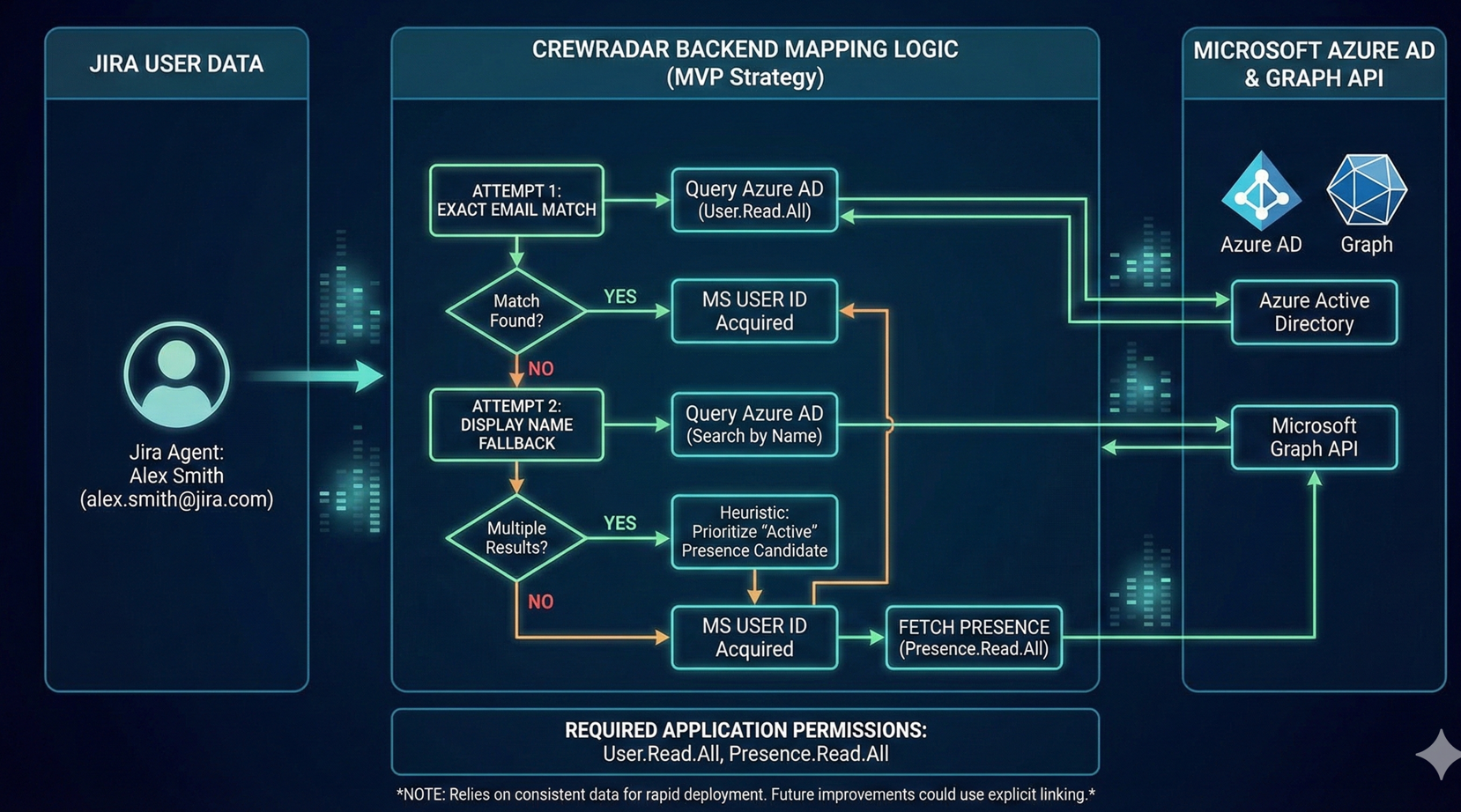
The Matching Logic (User Correlation) To sync presence status, the system must correlate a Jira User with a Microsoft Teams User. I designed a two-tier matching strategy that reflects standard enterprise environments:
- Primary Match (Email-based):
- The system first attempts to match the Jira account email with the Azure AD
mailoruserPrincipalName. - Why: In professional organizations, the identity provider (IdP) ensures that a user's email is identical across Jira and Microsoft Teams (e.g.,
employee@company.com). This provides an exact, enterprise-grade match.
- The system first attempts to match the Jira account email with the Azure AD
- Fallback Match (Display Name):
- If the email is hidden or does not match (common in some test environments), the system falls back to a search by Display Name.
- Smart Logic: If multiple users are found with the same name, the code prioritizes the user who is currently "Online" or has active presence data.
Requirement for Testing: For the integration to work, the Jira user's email or display name must exist within the connected Azure AD (Microsoft Entra ID) Tenant. This mirrors a real-world production environment where users are centrally managed.
2. "Live Agents" Group Discovery Logic
The backend automatically fetches agents by scanning for a specific group pattern (jira-servicemanagement-users-*).
Developer Note on Group Selection:
I intentionally chose to programmatically target groups starting with the prefix jira-servicemanagement-users- for the following reasons:
- Standard Convention: This is the default group name created automatically by Atlassian for any new Jira Service Management instance.
- "Out of the Box" Experience: By targeting this default convention, CrewRadar works immediately for the hackathon judges without requiring manual configuration or group mapping setup.
- Speed & Stability: This hardcoded approach ensured a stable and fast development cycle for the competition.
Future Roadmap (Post-Evaluation): Post-evaluation, I plan to introduce a configuration UI in the Admin Panel. This will allow organizations to select custom groups (e.g., "L1 Support", "Tier 2 Agents") instead of relying on the default JSM group.
Log in or sign up for Devpost to join the conversation.