Inspiration
A construction site has many moving parts, and each person holds a different piece of the picture. The heat forecast is in one app, lightning in another, the flood gauge on an agency site, and the gator sighting in one person's text messages. Each of these hazards can be known ahead of time, but nobody turns them into a decision. So the go/no-go call often comes down to instinct on the morning of the job. We wanted one place that pulls it all together, keeps crews safe, and warns the team early enough to plan around delays.
What it does
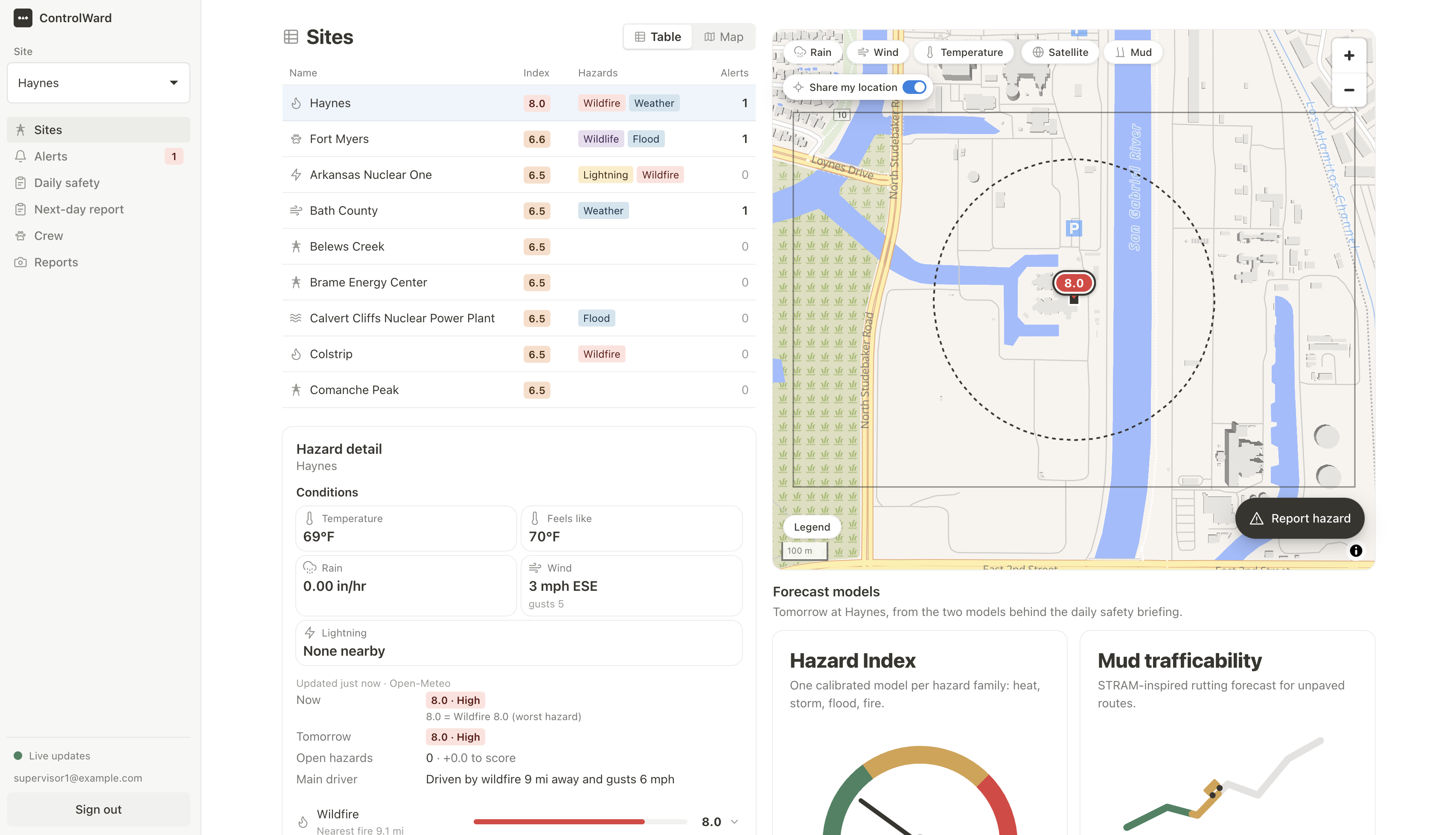
ControlWard gives each of 60 real power plant sites (from the EIA-860M registry) one combined risk picture.
- Live conditions: It pulls weather, heat, rain, soil, river levels, wildfire and lightning data on a schedule and gives each site a score from 0 to 10.
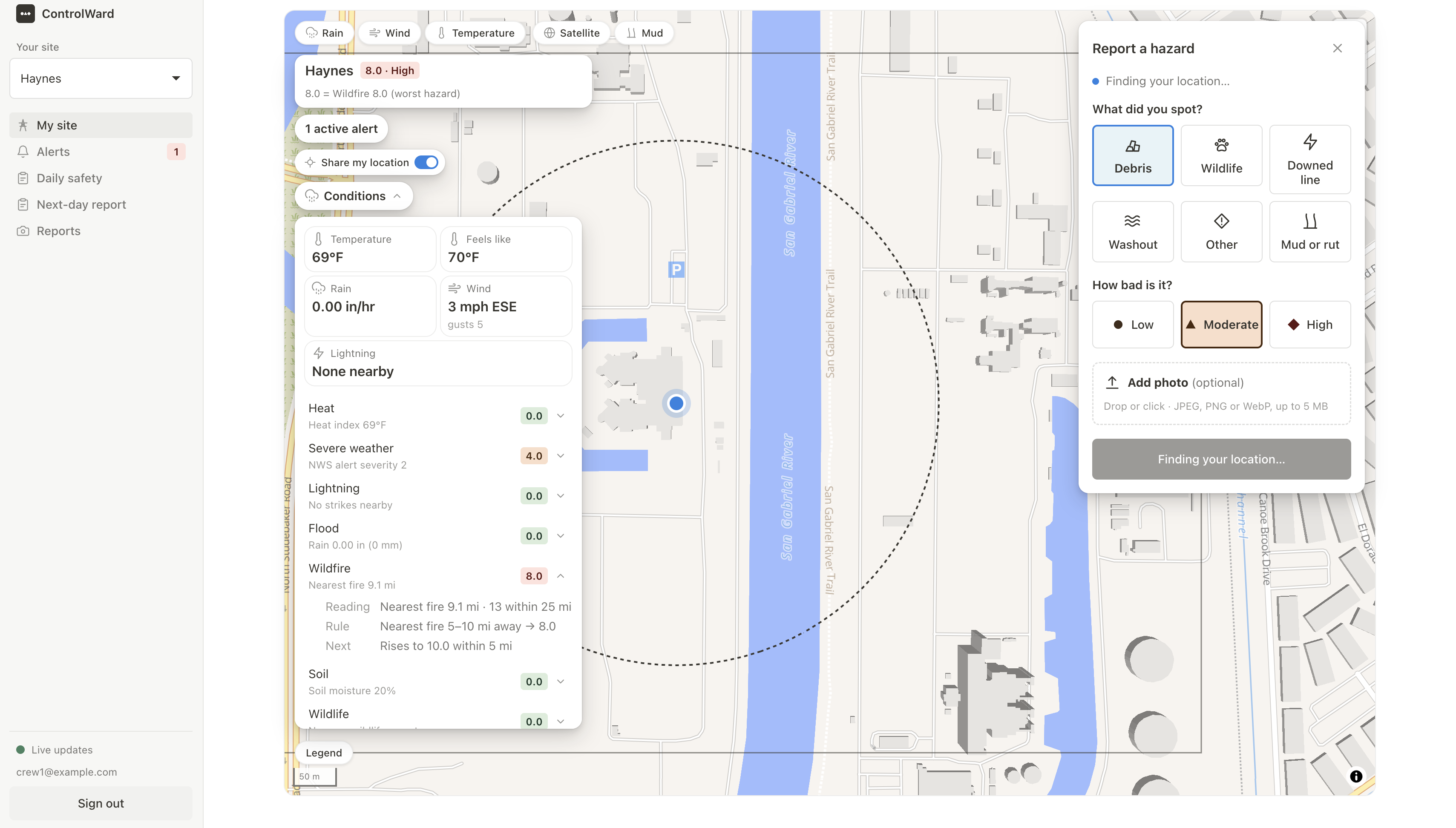
- Instant alerts: A lightning strike within 10 miles triggers a stop-work alert with a 30-minute all-clear countdown, and each new strike restarts the countdown. Heat, flood and wildfire warnings follow their own rules. Crew members can acknowledge every alert, and alerts can also go out as web push notifications.
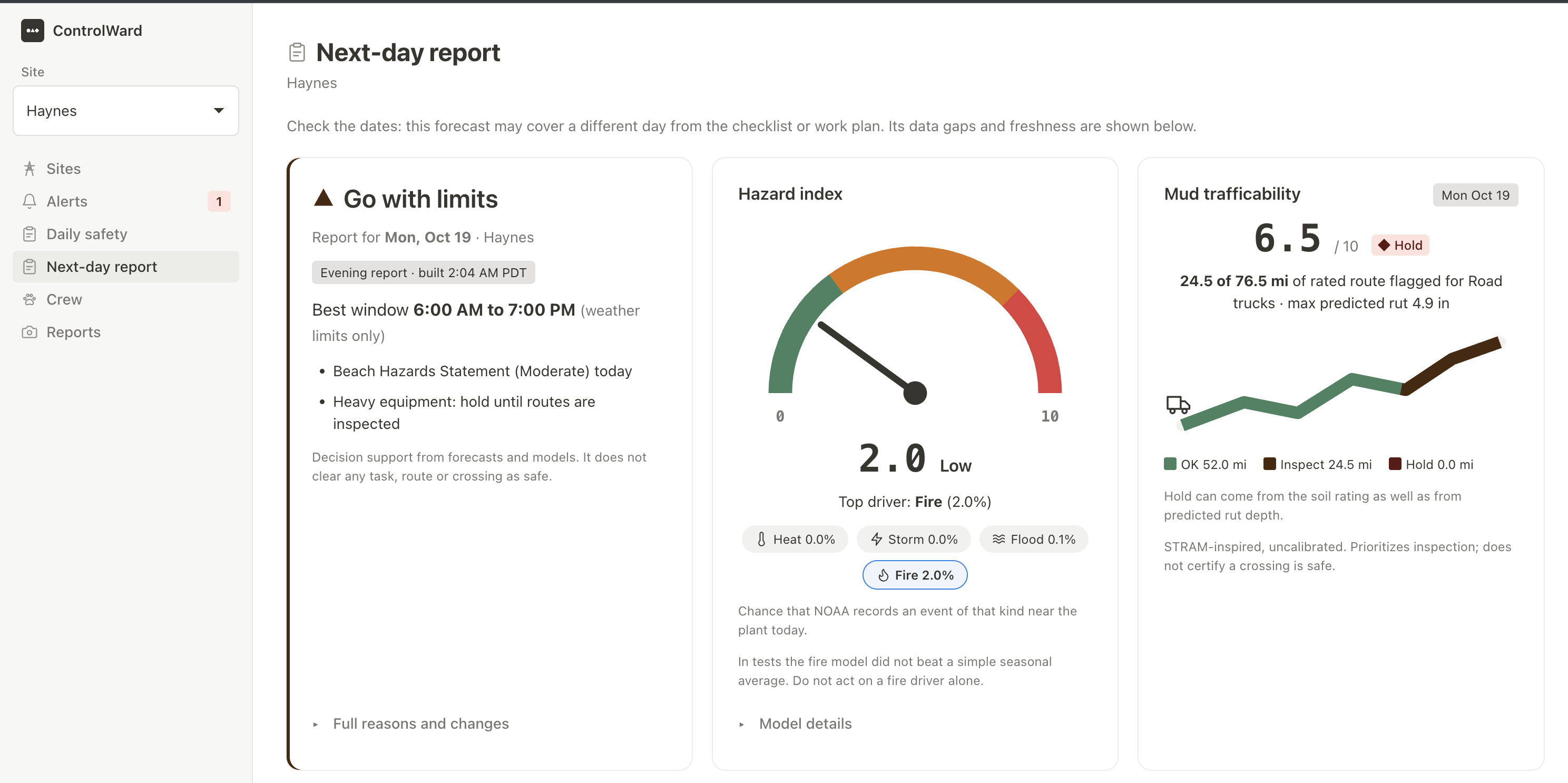
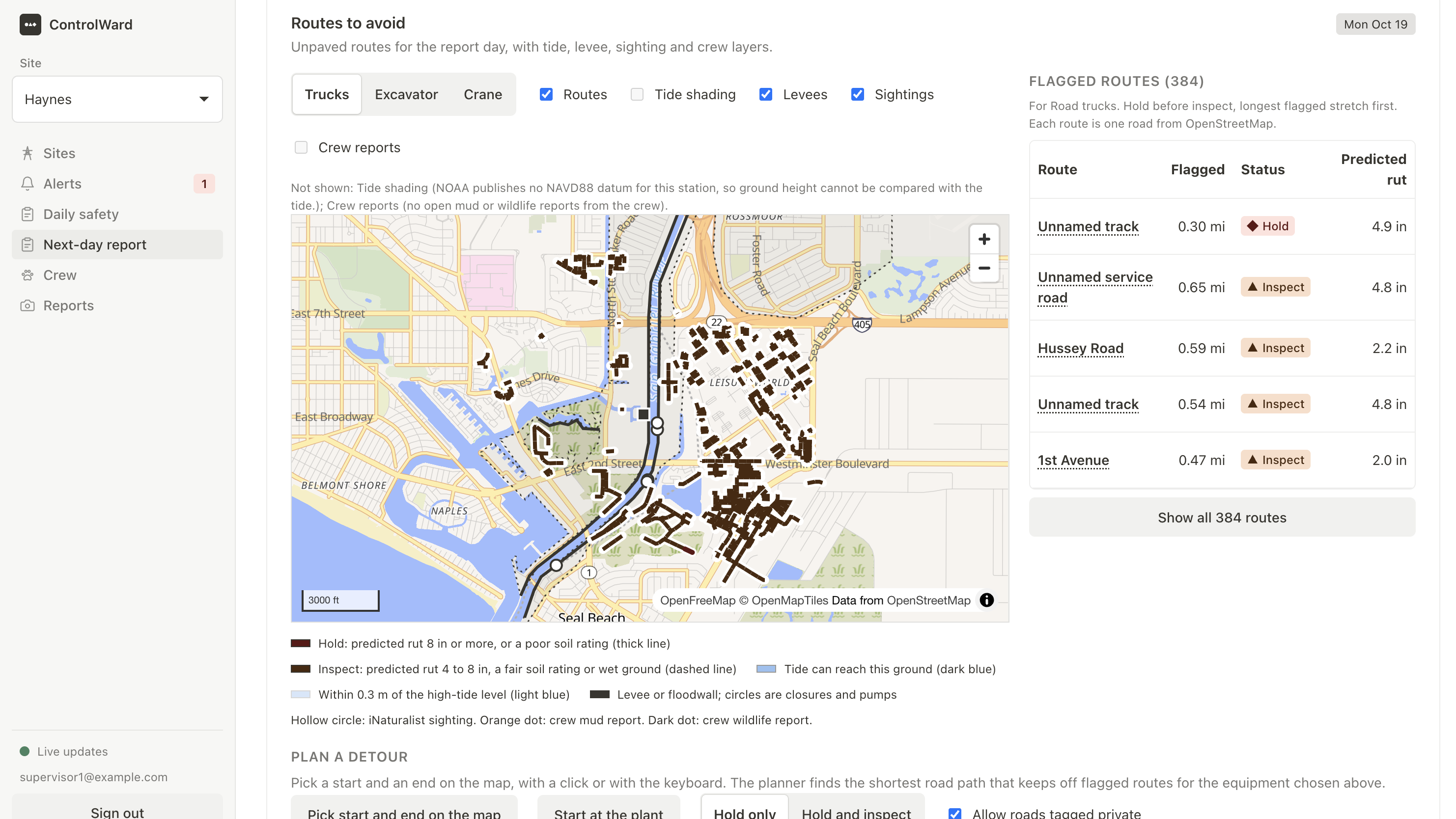
- 6 PM next-day report: Every evening each site gets a report for the next day. It shows the best work window, a heat-index timeline with suggested water breaks, access routes to avoid because of mud (with detours), tide, river, levee and air-quality conditions, wildlife reports, the ML hazard index, and a task planner that matches tasks to safe hours.
- Evening plan: An AI-drafted next-day plan, with suggested work hours and local traffic, school and wildlife context, goes to the supervisor. The supervisor reviews it and approves it to the crew.
- Automatic safety checklists: Each site gets a daily checklist built from current conditions. Every item cites the safety regulation or guidance it comes from. Checklists publish automatically, and every version keeps a receipt.
- Crew hazard reporting: A crew member pins a hazard on the site map with a photo. Duplicate reports merge, other crew members can confirm or clear a hazard, and the history stays as a record for future projects.
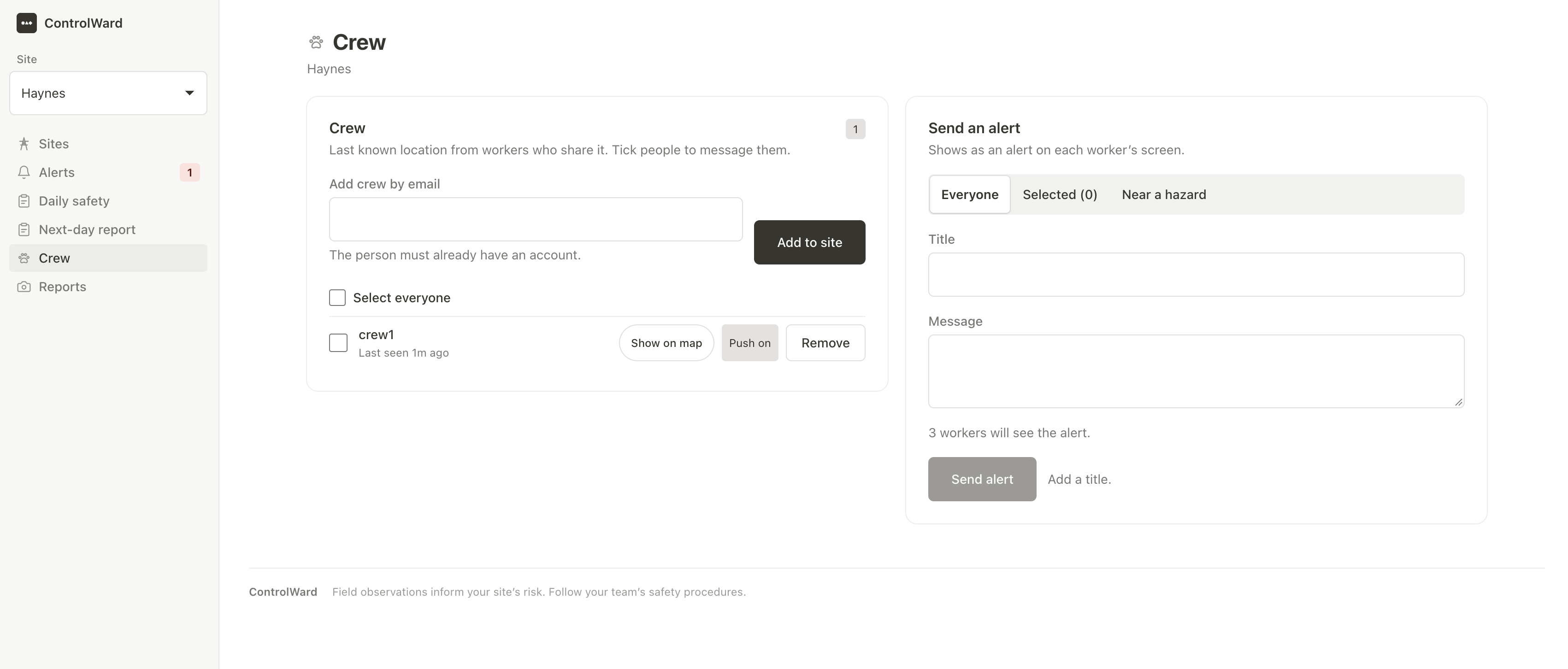
- Supervisor dashboard: It ranks the site's risks and alerts and shows the crew on the map (location sharing is opt-in). Supervisors can message selected crew members or everyone, and add or remove crew.
- Crew view: Workers see the alerts, their site's plan, the safety checklist and the report form. The supervisor tools are hidden.
How we built it
- Backend: Everything runs on Supabase. Postgres with PostGIS holds the data, and Auth with row-level security controls who sees what. Realtime pushes alert changes to the app, and pg_cron starts Edge Functions on a schedule.
- Rules: The Edge Functions fetch data from Open-Meteo, NWS, NOAA, USGS, NIFC and GOES lightning. Postgres applies the rules, raises and clears alerts, and computes the score.
- AI: Gemini drafts the evening plan, using Google Search grounding for local context. The safety checklists come from a CodeAct agent that writes and runs Python in a sandboxed Docker worker. It researches cited regulations and checks its results against current conditions before publishing.
- Frontend: The web app uses React, TypeScript and Vite, with MapLibre for the site map, radar, weather overlays and mud layers.
- ML models:
- Hazard Index: calibrated models for each hazard family. They are trained on NOAA Storm Events (2015–2025) and historical weather, and use OSHA injury reports to weight severity. The output is a 0–10 score for today and tomorrow, and the live risk score uses it.
- Rutting forecast: based on the STRAM method (Jones & Arp, 2019). It combines SSURGO soil data, 3DEP terrain, OpenStreetMap access routes and rain forecasts to flag route segments that need inspection before heavy equipment moves.
- Testing: Node tests for the backend, edge functions and frontend logic, Playwright UI tests, SQL checks against the live database, and Python unit tests for both models. A mock mode runs the whole interface without a backend.
Challenges we ran into
- Many free data sources use different units, update at different rates and sometimes fail. We had to store readings in one shape and show an honest "could not load" state.
- Targeted messages, role-based screens and crew assignment all had to be enforced in the database.
- AI output had to be grounded in real data. Each checklist item has to cite a real source and pass validation before crews see it.
- Training the hazard model meant matching decades of storm records to plant locations and staying within the daily limits of free weather APIs.
Accomplishments that we're proud of
- 60 real sites with a live, scheduled data pipeline running on a hosted project.
- Lightning stop-work logic that follows the brief exactly, including the restarting 30-minute countdown.
- A full next-day report that ends in a clear work window, not just a list of numbers.
- Two working ML models whose scores feed the live risk picture.
- Separate supervisor and crew experiences, with access enforced by database rules.
- A single alert path: automatic safety alerts and supervisor messages appear in the same place and can be acknowledged.
What we learned
- A hazard only helps if it becomes a decision. The work is combining sources and ending in one clear instruction.
- Failure states matter as much as the happy path. "No data" must never look like "all clear".
- Putting the rules in the database, not the app, keeps every screen consistent and secure.
- AI is most useful when it has to cite its sources and stays clear of the rules that stop work.
- Small, quiet interfaces work better than dense dashboards for people in the field.
What's next for ControlWard
-Add an embedding pipeline and cosine similarity for same hazards to categorize them during reporting.
- Check the rutting forecast against real ground conditions to calibrate it.
- Add SMS alerts for crews without data signal.
- Use the hazard history so future project owners can see where a site has had problems.
Built With
- machine-learning
- maplibre
- python
- react
- typescript
- vite


Log in or sign up for Devpost to join the conversation.