-
-
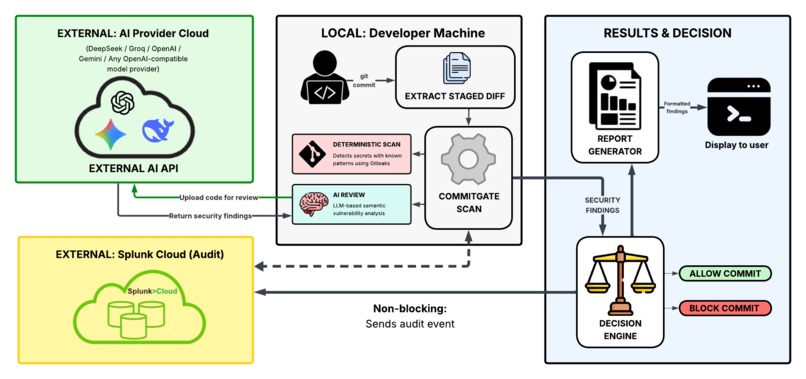
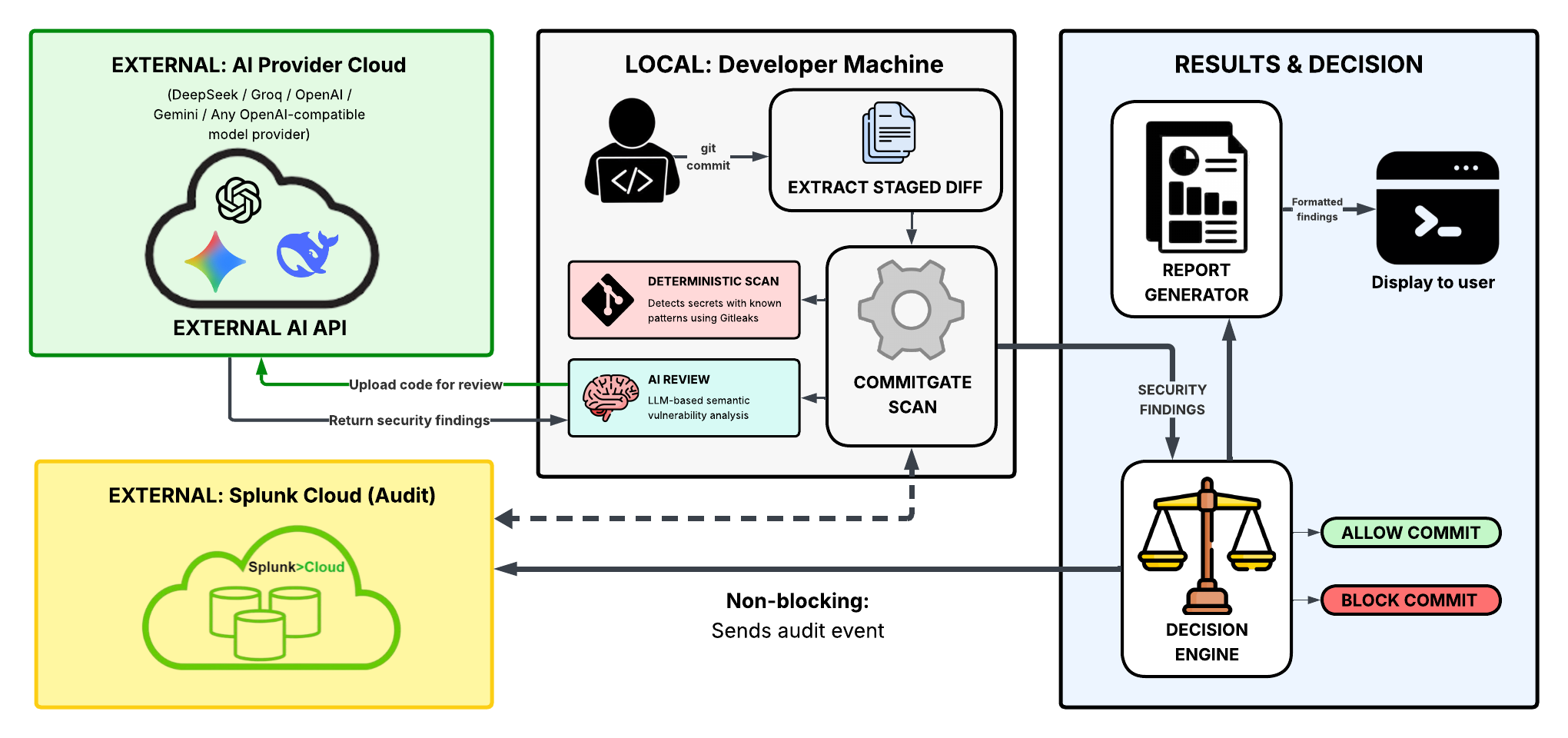
Architecture Diagram
Inspiration
I got the idea for this project when I pushed a MongoDB Atlas API key to GitHub. I panicked as I was bombarded with emails from GitHub and Atlas telling me to immediately get the key off the Internet. I was frustrated and confused since GitHub detected the secret leak, but yet GitHub Push Protection didn't do anything.
Wanting to prevent this from happening in the future, I went out to find a tool that can prevent a commit from going through if the code contains security vulnerabilities. The closest thing I could find was installing a pre-commit hook for Gitleaks, but Gitleaks only detects known patterns and cannot check code for logical vulnerabilities. Other tools like GitHub Push Protection and AI code review tools come in too late when the code has already gone into Git history.
Because of that, I decided to develop my own tool - CommitGate - an AI-powered pre-commit security gate.
What it does
CommitGate retrieves the staged code changes and automatically scans the code every time the user uses git commit. It then runs code through 2 security scans: a Gitleaks deterministic scan for leaked secrets and an AI code review for vulnerability detection. If there are vulnerabilities with a severity equal or higher than the set policy (default is high), CommitGate prevents the commit from happening. The security findings are printed out to the terminal in an easy-to-read format, describing the vulnerability, its location, its severity and suggestions on how to fix it.
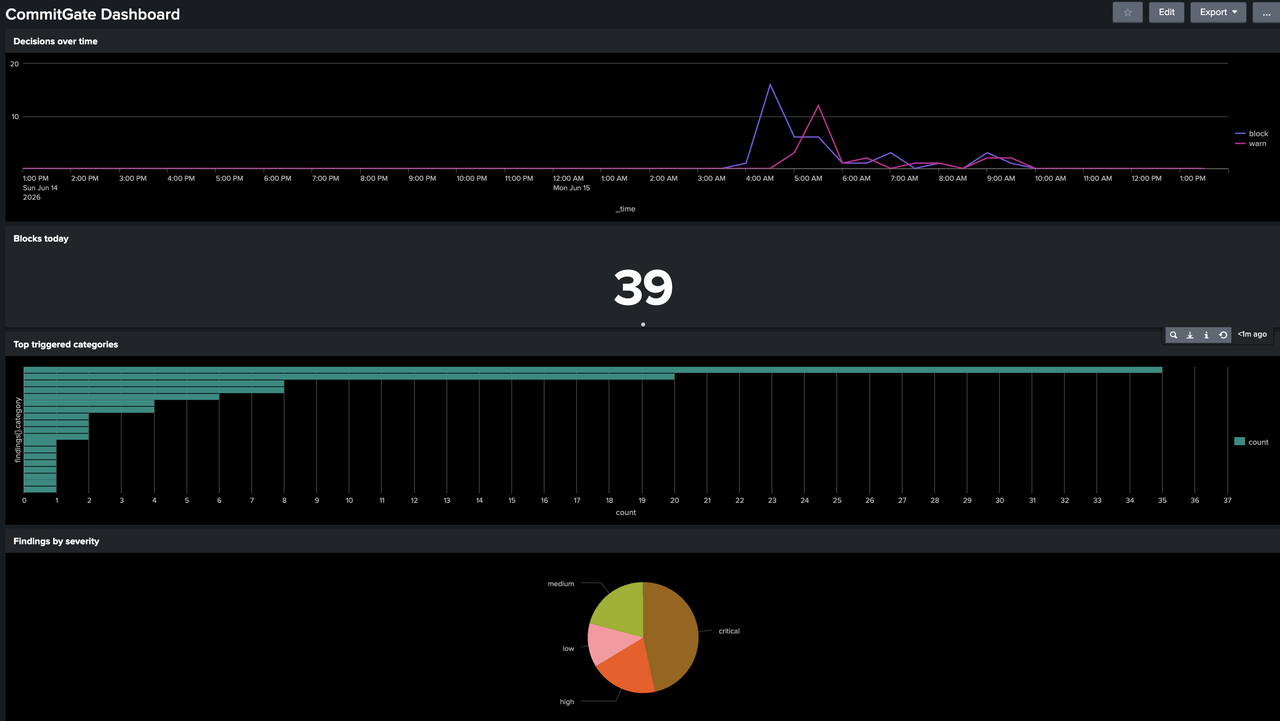
The user also has the ability to integrate Splunk into CommitGate to have a visualized dashboard of data on security findings:
How we built it
CommitGate was built as a lightweight Python CLI using Typer. To have it integrate directly into a developer's Git workflow, we create a command to install a pre-commit hook that runs the commitgate scan command every time git commit is run.
When the scan is called, CommitGate retrieves the staged changes and runs Gitleaks to perform deterministic secret detection using known patterns for API keys, tokens, and credentials. Then, the same code is also sent to an OpenAI-compatible LLM model for semantic analysis. This second layer allows CommitGate to improve upon Gitleaks's capabilities, which helps it detect contextual security issues such as insecure authentication logic, unsafe database queries, hardcoded credentials, and other vulnerabilities that traditional pattern-based scanners may miss.
After that, we combine findings from both scanners, deduplicate them, and then send them to a decision engine. The decision engine determines the highest severity within the findings and compare it against a configurable threshold, which is used to decide whether to allow, warn, or block the commit. A security report is then generated and beatifully displayed in the terminal using the Rich library.
To support security observability, CommitGate optionally integrates with Splunk Cloud through the HTTP Event Collector (HEC). Security findings are sent as audit events, enabling centralized dashboards, trend analysis, and monitoring across repositories.
PyYAML was also used for the configuration file, which allows user to change the settings of the tool based on their needs.
Challenges we ran into
One of the biggest problem we faced was to build CommitGate to be cross-platform. This was especially apparent when implementing Git pre-commit hook installation and Gitleaks integration.
For the pre-commit hook, we don't want to just blindly overwrite user's pre-commit file, but to also check if the file already exists and append the command to the end if suitable. Based on the OS, we have to also handle executable permissions and avoid disrupting existing workflows, which makes implementing the hook installation and running Gitleaks difficult. Finding the balance point for complex and potentially unsafe implementation for the sake of user setup simplicity was more challenging than I expected.
Another problem we faced was building a reliable AI reviewer. LLMs can produce inconsistent outputs, false positives, and findings in different formats. Because of that, we spent significant time refining our prompts, constraining the model's output structure, and validating responses to ensure that security findings could be processed automatically by the rest of the pipeline.
Integrating CommitGate with Splunk also presented a learning curve. We had to understand how to send structured events through the HTTP Event Collector (HEC), design a schema for security findings, and ensure that telemetry collection remained non-blocking so that developers could continue committing code even if Splunk was temporarily unavailable.
Accomplishments that we're proud of
The biggest reason that I'm so proud of this project is that it is a tool that we would personally use, especially since it was helpful during the process of building this project itself. There were many times we forgot to remove the vulnerable test files before committing, and have the tool rightfully blocking the commits itself. As the tool was built to solve a problem that I faced myself, I'm really proud to have built something that I believe would be extremely helpful for many developers.
What we learned
One thing I learned is how important it is to understand the context and the usage of the product we're building. One good example of this is that understanding the Git workflow was crucial for the design of CommitGate for me, as it was thanks to that that I know why it is necessary for CommitGate to be pre-commit, and to have a short enough scan time that it doesn't increase too much friction to the developer workflow.
I also learned that tools are especially powerful if we combine them correctly. Gitleaks excels at reliably detect known patterns for secret, while LLMs are better at understanding code and its context. Combining both allowed us to leverage the strengths of each tool to build an even more powerful one.
What's next for CommitGate
Right now, some of the things that we want to focus on improving after the hackathon is to have CommitGate has a faster scan time. Initially, I wanted it to run within at most 3-5 seconds in order to not obstruct the developer's workflow too much. However, that time frame does not allow the LLM to produce reliable outputs, potentially letting many critical vulnerabilities through. We mediated this by giving user a timeout option, which sets the max number of seconds an LLM can use to analyze the code.
Moreover, Gitleaks scan is running on all of the staged files instead of the staged code difference, as doing the latter makes it hard to determine the location of the leaked secret. With extra time after the hackathon, I want to have it ran strictly on staged code difference so that it can run in less time.
Finally, we also want to give users more configuration options, as the current are very limited.

Log in or sign up for Devpost to join the conversation.