Inspiration
Codex can already build software, run commands, edit files, and use connected services—but it normally requires sitting at a keyboard. I wanted to say “Hey Codex” from across the room and naturally ask it to build, investigate, or check something while I cook, relax, or work away from my desk.
What it does
Codex Voice is a native macOS voice layer for Codex.
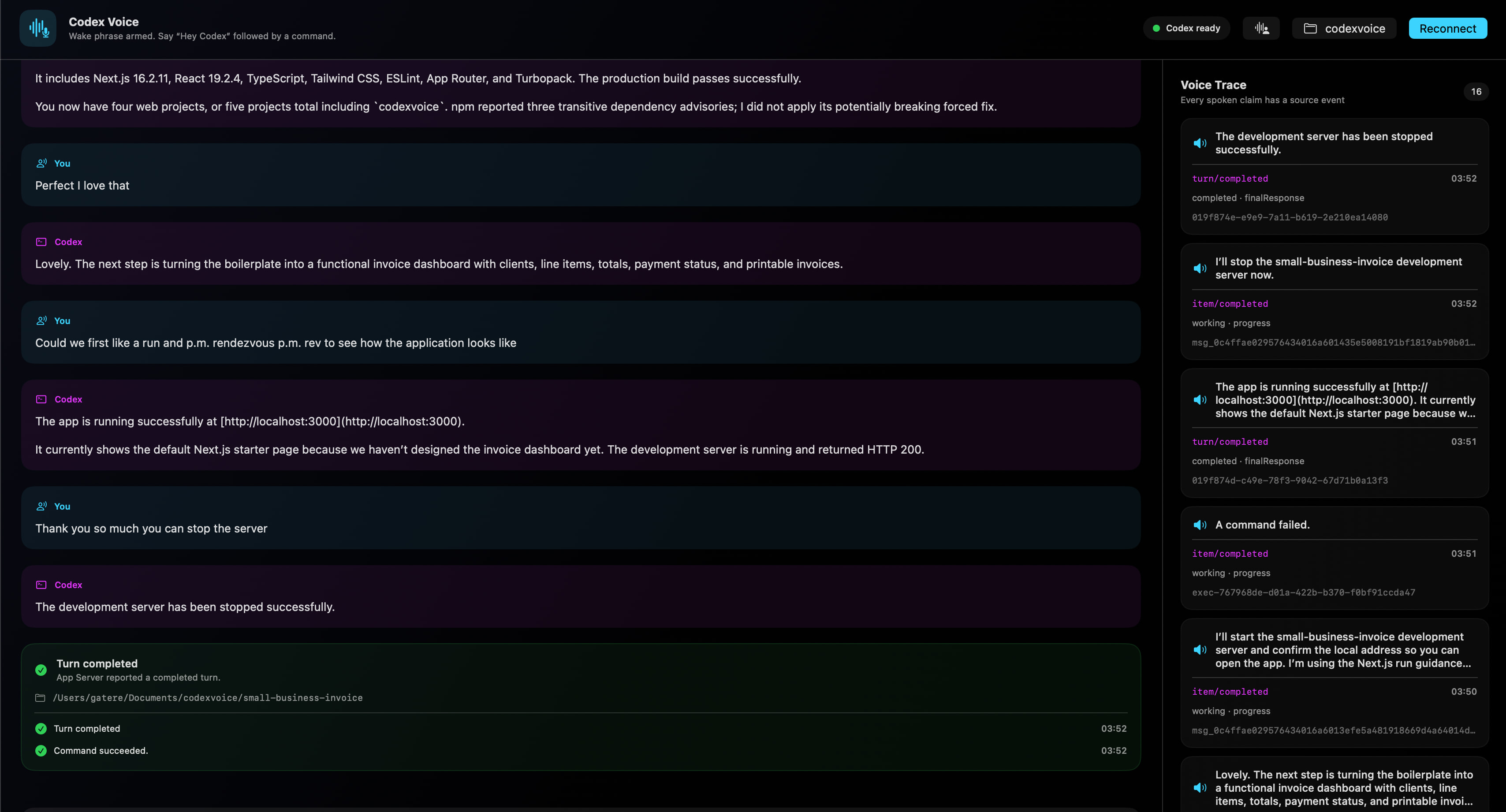
With Hands-free enabled, it detects “Hey Codex” locally, replies “I’m listening,” captures the command, and sends it into a persistent Codex conversation for the selected workspace. Codex remains the only reasoning, coding, and tool authority.
Features include:
- On-device “Hey Codex” wake-phrase detection
- On-device command transcription
- Natural OpenAI speech with Apple speech fallback
- Persistent conversations for each workspace
- Real coding, terminal, file-editing, and verification tasks
- Existing Codex connectors, including Google Calendar
- Spoken, event-grounded progress updates
- Voice Trace linking speech to App Server events
- Natural interruption, Stop, and same-turn steering
- Workspace sandboxing and exact-request approvals
- Optional locally generated focus ambience
How I built it
Codex Voice is written in Swift using SwiftUI, AppKit, AVFoundation, and Apple Speech. One AVAudioEngine coordinates wake monitoring, command recognition, speech playback, interruption, and ambience.
The application launches Codex App Server and communicates using JSONL over stdio. It initializes the server, creates or resumes workspace conversations, starts and steers turns, handles exact-ID approvals, interrupts work, discovers connected apps, and converts streamed events into safe UI and narration states.
Codex with GPT-5.6 performs the reasoning, coding, tool use, connector calls, and final responses. Optional gpt-4o-mini-tts provides streamed natural speech, while credentials remain encrypted in macOS Keychain.
Challenges
The hardest challenge was reliable audio orchestration. Wake monitoring must hand off cleanly to command capture, speech must coexist with interruption, and the wake listener must re-arm afterward.
Another challenge was trustworthy narration. Codex Voice never invents progress: command, connector, file-change, approval, failure, interruption, and completion statements come from authoritative App Server events. Raw reasoning, secrets, terminal output, and connector results are never spoken directly.
Accomplishments
The completed loop is:
“Hey Codex” → spoken acknowledgment → voice command → Codex turn → grounded progress narration → real tool and file activity → spoken result → continued conversation.
It also supports one-shot commands, persistent context across relaunches, active-task steering, natural interruption, Stop, Google Calendar, workspace safety, and visible evidence for every spoken progress claim.
What I learned
A capable voice agent is much more than speech-to-text attached to a chatbot. It requires turn-taking, persistent context, audio ownership, interruption semantics, safety boundaries, and a reliable relationship between what the agent does and what its voice claims.
What’s next
Next steps include a dedicated low-power acoustic wake-word model, Developer ID signing and notarization, broader audio-device testing, additional connector demonstrations, configurable sound themes, and secure remote access.
Built With
- api
- app
- appkit
- apple
- avfoundation
- calendar
- codex
- gpt-4o-mini-tts
- gpt-5.6
- json-rpc
- jsonl
- keychain
- macos
- mcp
- openai
- server
- speech
- swift
- swiftui
- xctest

Log in or sign up for Devpost to join the conversation.