-
-
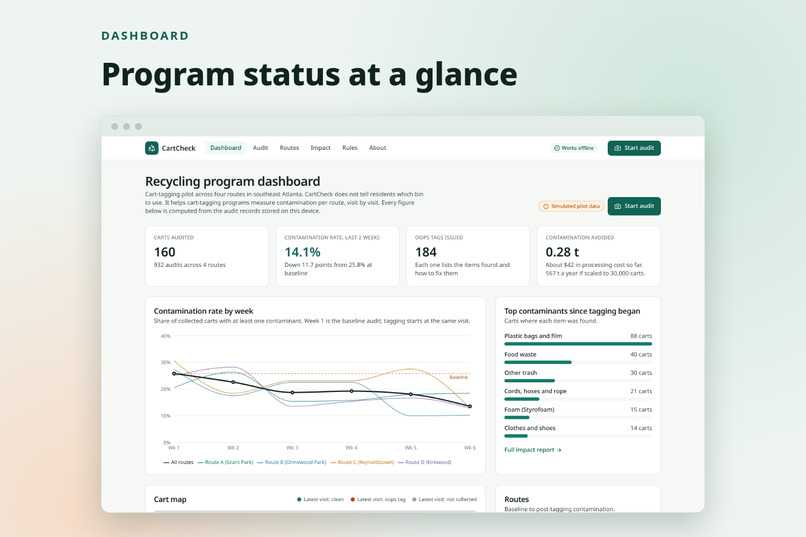
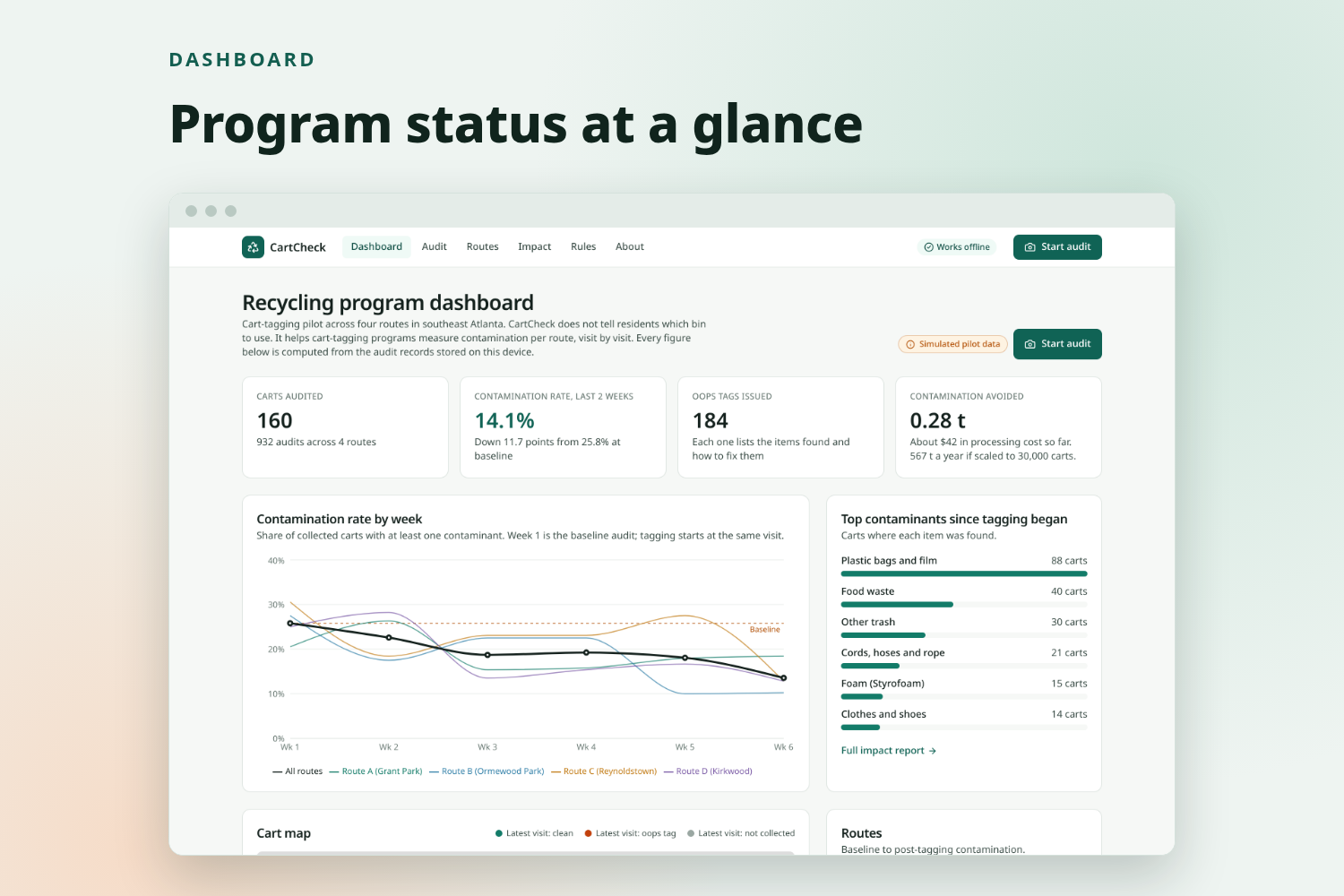
program status for the coordinator
-
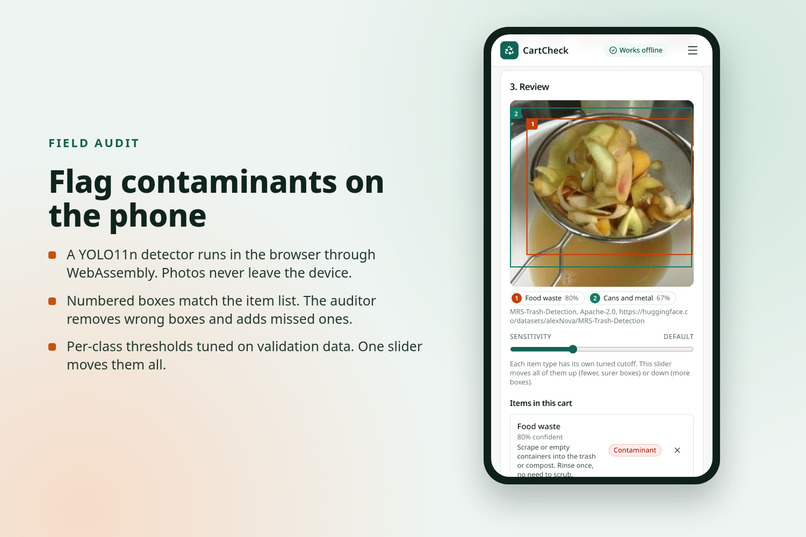
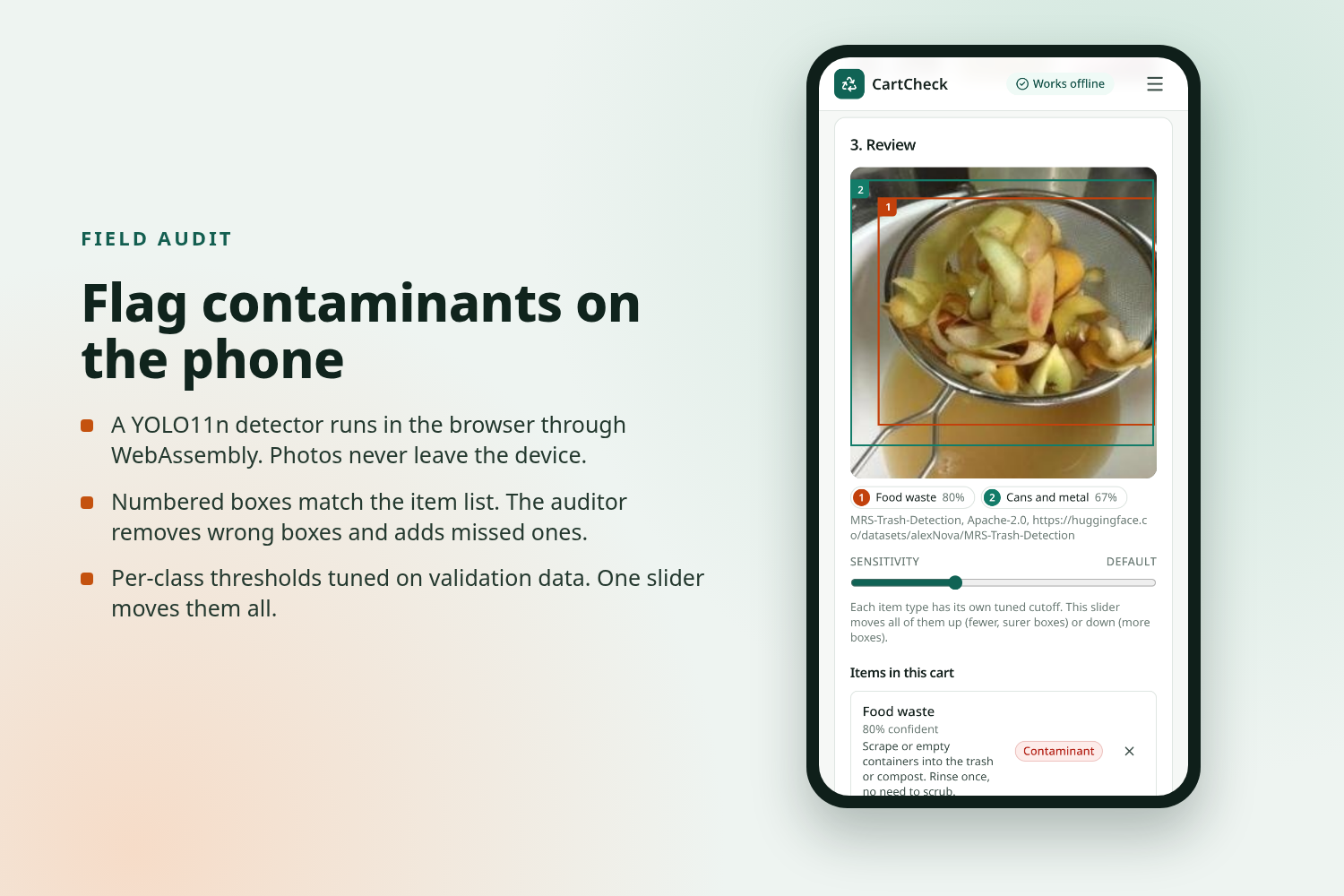
the detector flags food waste and a can in a cart photo, on the phone.
-
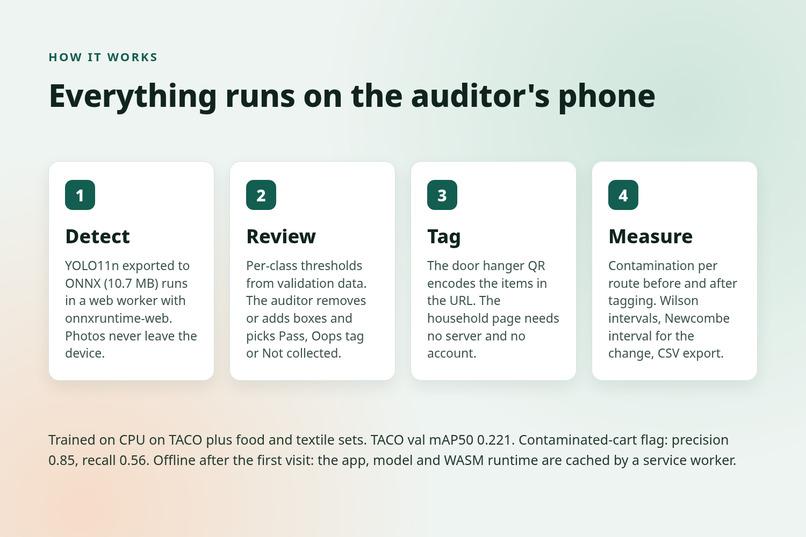
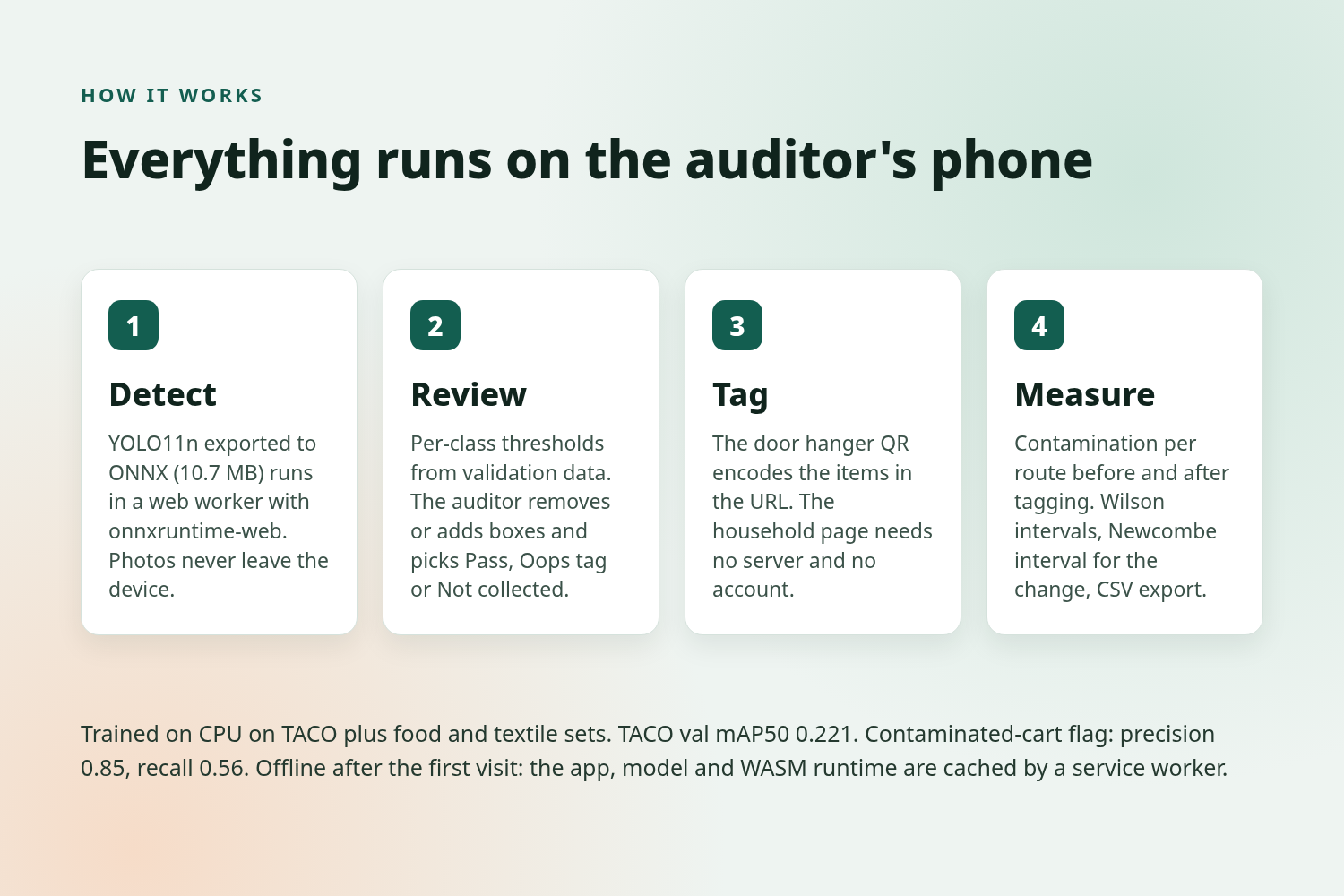
detect, review, tag, measure, plus the model numbers
-
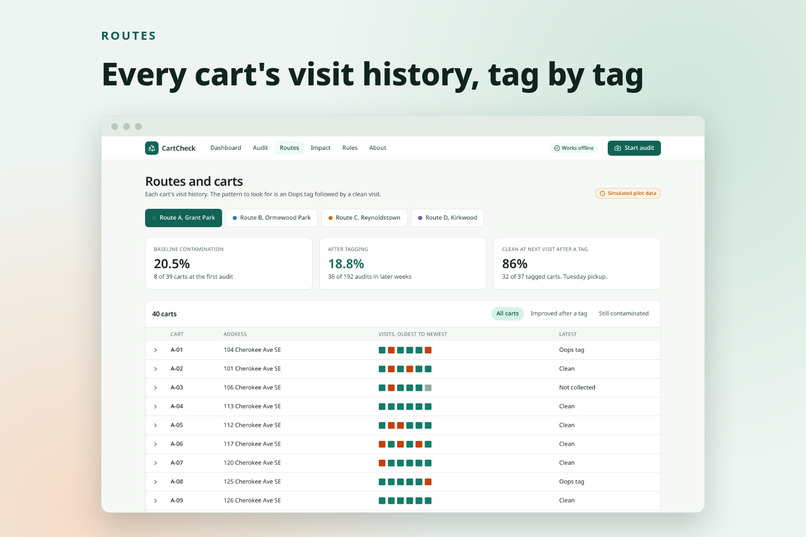
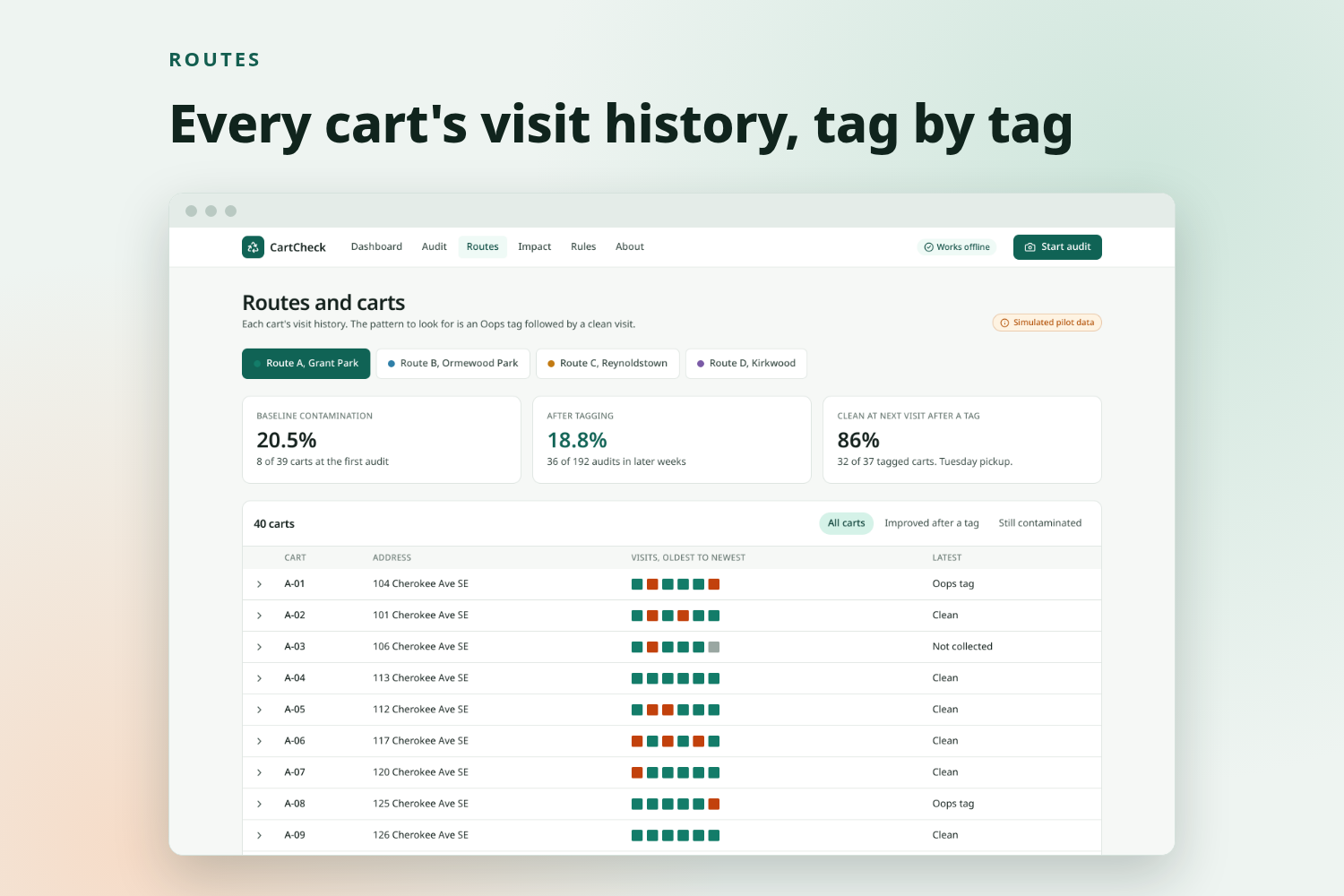
every cart's visit history by route
-
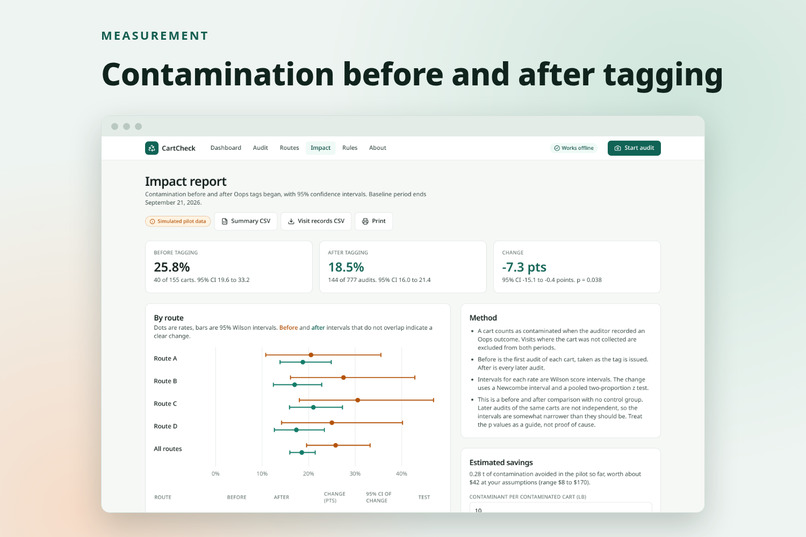
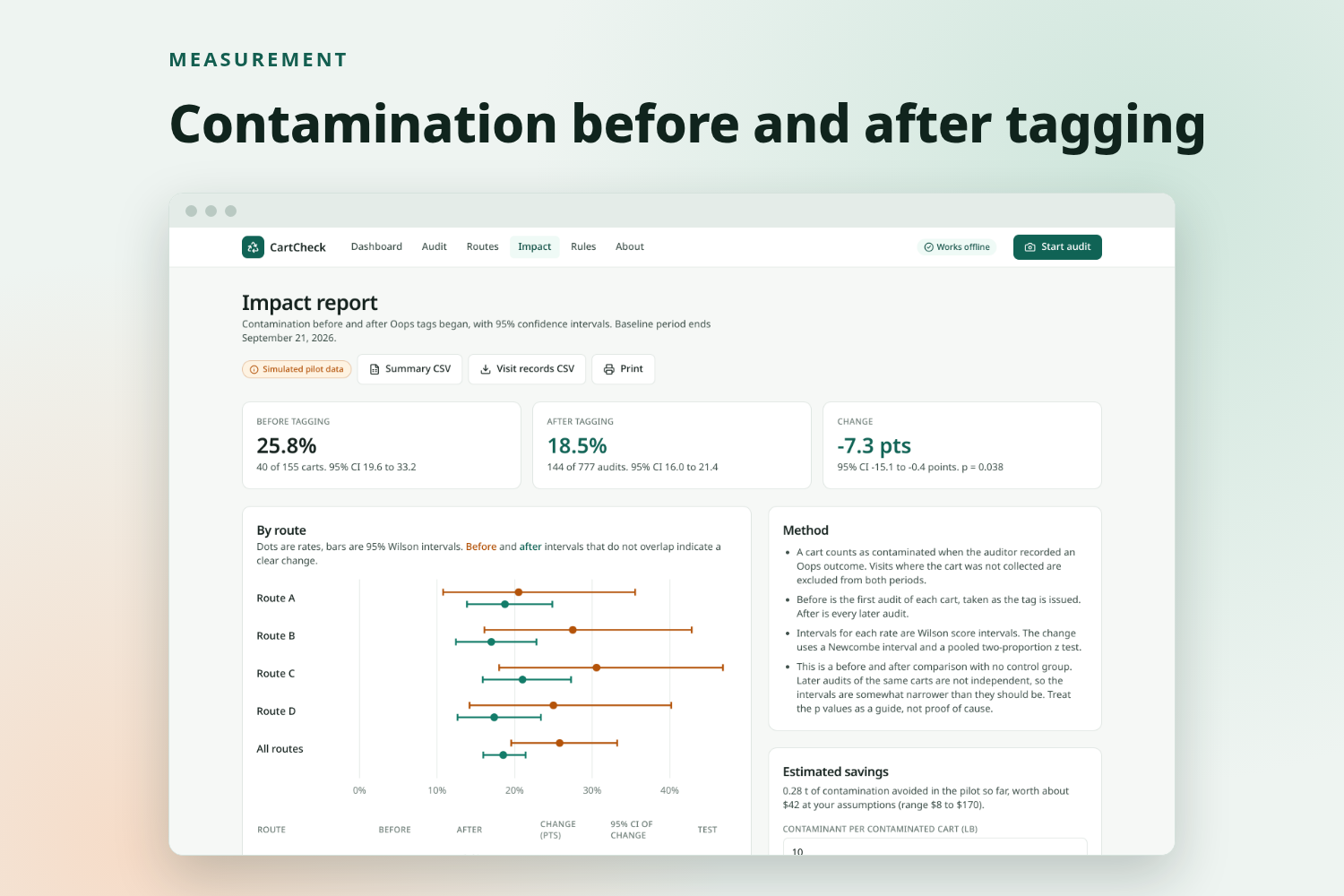
contamination before and after tagging, with 95% intervals
-

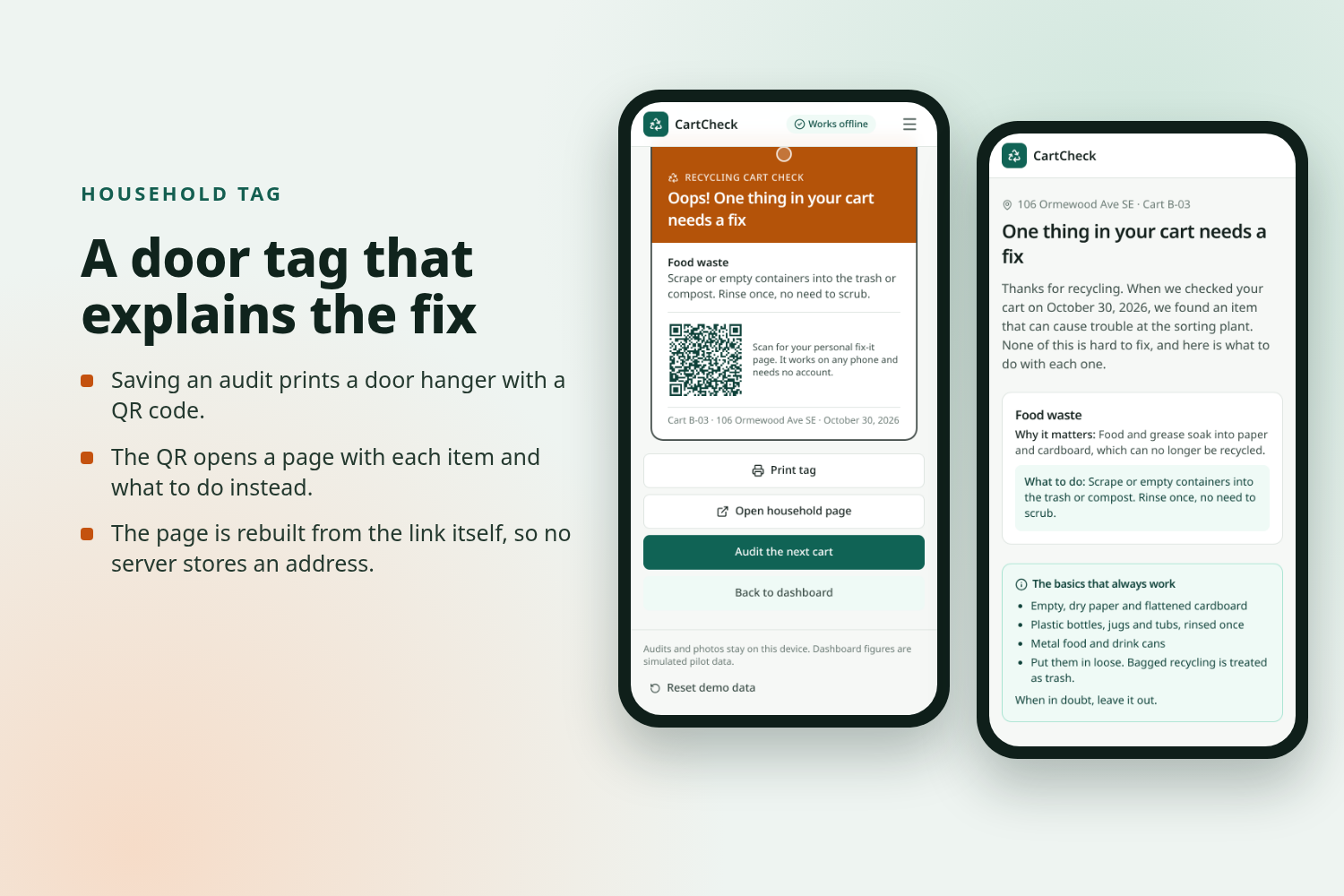
the door hanger with its QR code, and the household page it opens
Inspiration
Curbside recycling fails quietly. People put plastic bags, food, foam, rope and batteries into the recycling cart, and the sorting plant has to deal with it. Bags and rope wrap around sorting machinery. Food soils paper. Batteries start fires. The cost lands on the recycler and the city, and clean material gets sent to landfill with the rest.
The specific problem we target is contamination in curbside recycling carts, and the fact that most programs cannot tell whether their fixes work.
Cart tagging is one of the better-supported fixes. A crew member lifts the lid, looks, and leaves a tag on carts with problems. Programs report solid results. The Recycling Partnership reported a 37% contamination reduction in its Michigan project (source). A Washington, DC pilot reported about 20% fewer bags and film on a targeted route after one week of tagging (source). A York County, VA audit document reported that behaviour changed on about 22% of carts after a tag, and about 45% when the cart was rejected (source). These figures come from program operators, so we treat them as reported, not proven.
The bottleneck is the paperwork. Auditors log carts on paper or tablets, the results are slow to compile, and per-route measurement is rare. The tag is also generic ("no bags"), not specific to the household. So the program runs, but the coordinator cannot show whether it is working.
CartCheck is for that coordinator, not for the household.
What it does
CartCheck is a field tool for city and campus recycling coordinators who run cart-tagging programs. These are the screens in the app.
- Dashboard. Carts audited, contamination rate over the last two weeks against baseline, Oops tags issued, estimated contamination avoided, a weekly trend per route, top contaminants, and a map of carts coloured by latest status. A "Start audit" button leads into field mode.
- Field audit. The auditor picks a route and an address, then takes a photo, uploads one, or picks a bundled sample photo. A detector runs on the device and draws boxes. A badge shows "On-device AI, works offline" and the inference time. Each detected item shows its class, confidence, and whether the local rules call it accepted, a contaminant, or drop-off only. The auditor removes wrong items, adds missed ones by hand, moves a confidence slider, and chooses Pass, Oops tag, or Not collected. The app suggests an outcome from the rules.
- Oops tag and household page. Saving creates a printable door hanger listing what was found and how to fix it, with a QR code. The code opens a household page that explains why each item is a problem and what to do. The page is built from the link itself, so no server stores the address, and no photo is kept.
- Routes and carts. Per-route baseline and post-tagging rates, the share of tagged carts that were clean at the next visit, and each cart's visit history, so an Oops followed by a Pass is visible.
- Impact report. Contamination before and after tagging, per route and overall, with 95% confidence intervals, a plain-language method note, estimated savings with editable assumptions, CSV export, and a print view.
- Rules editor. The coordinator sets which materials are accepted, contaminants, or drop-off only in their program.
The human always confirms. The detector proposes, the auditor decides.
How we built it
Model: We trained a YOLO11n object detector on CPU. Training data is TACO (CC BY 4.0) plus two Apache-2.0 sets, MRS-Trash and a household-waste set, mapped to 11 material classes: plastic film, food waste, foam, tangler, battery, textile, glass, paper and cardboard, plastic container, metal, other trash. Sources and class mappings are in project/ml/SOURCES.md. We export to ONNX (10.7 MB).
Browser app: A static Next.js and TypeScript site. Inference runs with onnxruntime-web (WASM) inside a web worker, so the page stays responsive; the badge reports 0.7 to 2 seconds per photo on a desktop CPU in our runs, depending on load. We wrote the letterboxing, box decoding and non-maximum suppression ourselves, with unit tests. Audits are stored in IndexedDB. A service worker caches the app and model so the audit flow works with no signal. The household link carries a compact encoded payload, so there is no backend at all. Charts use recharts and the map uses Leaflet with OpenStreetMap.
Statistics: Rates use Wilson score intervals. The change uses a Newcombe interval and a two-proportion z test. We have unit tests for these.
Hosting: GitHub Pages. Static files only, so there is no server to fail and hosting costs nothing.
Evaluation: On the 219-image TACO validation split, mAP50 is 0.221. At image level, a "contaminated cart" flag (any contaminant at confidence 0.25) has precision 0.85 and recall 0.56, where 72% of validation images contain a contaminant. On the held-out split of the two extra sets, AP50 is 0.86 for food waste, 0.91 for textile and 0.99 for plastic film. Most of those photos show one item filling the frame, so these numbers say the model knows what food and textile look like, not that it localises them well in a crowded cart. A TACO-only model scored 0.234 mAP50 on TACO but could not find food or textile at all (AP50 0.003 and 0.000), so we shipped the mixed model. Per-class confidence thresholds are calibrated on validation data and stored next to the model.
Challenges we ran into
- Domain gap: Our training photos are litter and household images, not photos looking down into a cart. We expect the detector to be weaker on real cart-top photos than the validation numbers suggest. We have not tested on real carts.
- Thin classes: Battery, tangler and foam have very little labelled data, and we found no permissively licensed bounding-box source beyond TACO. These classes are the weakest. This is why the auditor confirms every detection and can add items by hand.
- CPU-only training: We used a nano model and small image counts to fit the time we had.
- No backend: Making the household page work from the URL alone, and making the audit flow work offline, took more design than a server would have.
Accomplishments that we're proud of
- One complete loop: photo, on-device detection, confirmation, tag with QR, household page, visit history, impact report.
- Everything runs in the browser. No account, no upload, no server to maintain.
- A measurement method with confidence intervals and stated assumptions, not only a count.
- A design that is honest about its data. Simulated data is labelled. The human decides.
- Unit tests for the rules engine, box decoding, link payload and statistics, and a browser test of the main flow.
What we learned
- For this problem, the measurement is the product. A classifier alone does not tell a coordinator whether the program works.
- Detection with boxes plus human confirmation is more useful in the field than a single label for the photo.
- Confidence intervals change the story. Small routes have wide intervals, and the report should say so.
- Being clear about weak classes earlier made the interface better: manual add and a threshold slider are there because the model will miss things.
What's next for CartCheck
- Test with real cart-top photos, ideally from a partner program, and retrain on them. This is the biggest gap.
- Collect battery, tangler and foam examples.
- Run a pilot with untagged control routes so the impact report can support a causal claim.
- Replace the placeholder cost assumptions with a recycler's real residue costs.
- Add optional sync so a team of auditors can share one program, if a city wants it. The current version is deliberately local.
Built With
- dexie
- github
- indexeddb
- leaflet.js
- mrs-trash
- next.js
- onnx
- onnxruntime-web
- openstreetmap
- playwright
- pytest
- python
- pytorch
- qrcode
- react
- recharts
- service-worker
- taco-dataset
- tailwindcss
- typescript
- ultralytics
- vitest
- web-workers
- webassembly
- yolo11n

Log in or sign up for Devpost to join the conversation.