-
-
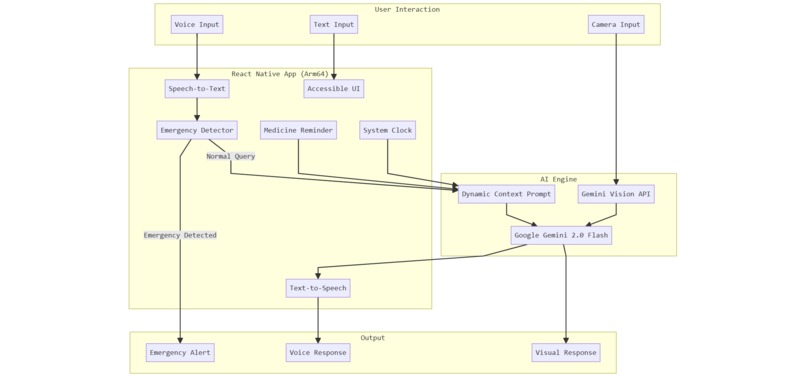
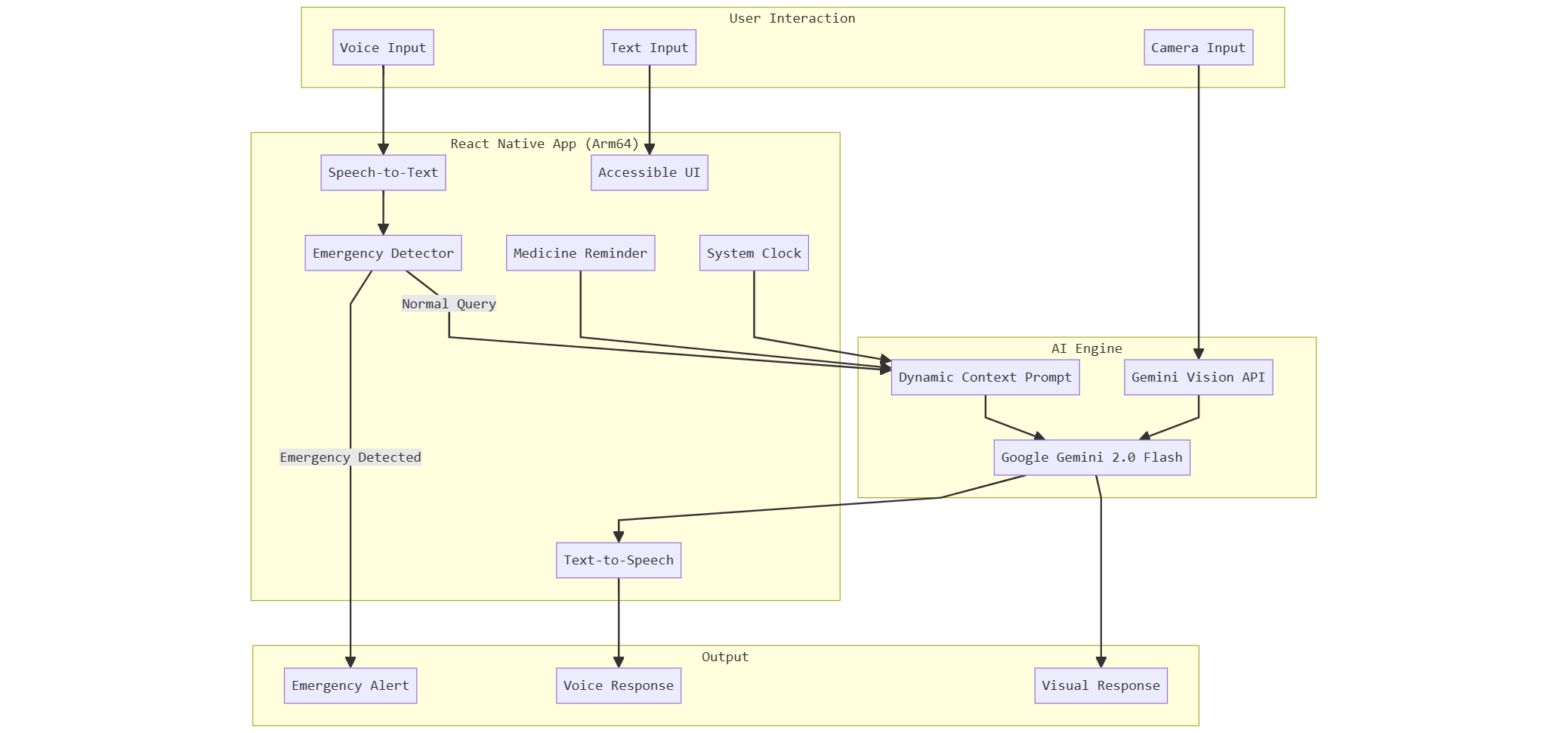
Architecture Diagram
Inspiration
My grandmother lives alone in a small town in India. She speaks regional language, struggles with smartphone apps, and often forgets her blood pressure medicine. One day, she fell and couldn't reach her phone for hours. That moment shocked me and put in in front of a question- What is the use of AI if it cannot save my near dear one.
I realized that 300 million elderly people in India face similar challenges. Modern AI assistants like Alexa and Siri don't understand Indian languages well. Healthcare apps have tiny buttons and complex interfaces. Most solutions require expensive devices or constant internet.
I asked myself: What if we could build an AI companion that speaks like a family member, understands local languages, and works on the budget phones that most Indians already own? That question became CareGiver AI.
What it does
CareGiver AI is a voice-first mobile companion designed specifically for elderly users. It provides:
Intelligent Medicine Management : The app knows your medicine schedule and the current time. When you ask "What medicine should I take now?", it checks the system clock and tells you exactly which medicine is due, in your own language.
Emergency SOS System : If the user says distress keywords like "Help", "Fallen", or their equivalents in Hindi, Tamil, or Telugu, the app immediately triggers an emergency alert. One tap sends an SOS to pre-configured emergency contacts with location information.
Mental Health Support : Loneliness is a silent epidemic among seniors. The AI provides empathetic conversation, tells stories, and offers emotional support through natural chat - available 24/7 without judgment.
Prescription Reader : Users can point their camera at any medicine bottle or prescription. The AI uses vision capabilities to read the text and explain dosage instructions in simple terms.
Multilingual Voice Interface : Full support for English, Hindi, Tamil, and Telugu. The app listens, understands, and responds in the same language the user speaks.
How we built it
The application is built using React Native for cross-platform mobile development, specifically optimized for Android devices running on Arm processors.
AI Architecture :
- Google Gemini 2.0 Flash serves as the primary AI engine for conversation, reasoning, and vision analysis
- The system prompt is dynamically generated with current time context and the user's medicine schedule
- Text cleaning pipelines remove markdown formatting before text-to-speech output
Voice Pipeline :
- react-native-voice handles speech-to-text in multiple Indian languages
- react-native-tts provides natural text-to-speech output
- Language detection ensures responses match the user's spoken language
Native Module Integration :
- Manual linking of all native modules to avoid Windows-specific autolinking issues
- Custom Gradle configuration with dependency resolution strategies for React Native 0.75.4
- Java 17 compatibility across all modules
User Interface :
- Large, high-contrast buttons designed for elderly users with vision impairments
- Tab-based navigation with clear icons
- Hold-to-speak voice input that mimics natural conversation
Challenges we ran into
Build System Complexity : React Native on Windows presented significant challenges. The autolinking system would hang indefinitely during Gradle sync. We solved this by completely disabling autolinking and manually linking all nine native modules in settings.gradle, build.gradle, and MainApplication.java.
Dependency Version Conflicts : Multiple packages had peer dependency conflicts with React Native 0.75.4. We implemented resolutionStrategy blocks to force compatible versions of react-android and hermes-android artifacts.
Java Version Incompatibility : The build would fail with cryptic errors because Windows defaulted to Java 25, which Gradle 8.6 doesn't support. We had to explicitly set JAVA_HOME to Java 17.
Namespace Resolution : Several native modules lacked proper namespace declarations required by Android Gradle Plugin 8.1.4. We created a subprojects block that automatically extracts package names from AndroidManifest.xml files.
Metro Bundler Issues : The Metro watcher would crash when trying to monitor non-existent build directories. Custom metro.config.js and watchmanconfig files were required to block these paths.
Text-to-Speech Quality : The TTS engine was reading markdown formatting symbols aloud. We implemented a text cleaning function that strips all markdown before speech synthesis.
Accomplishments that we're proud of
True Multilingual Support : The app genuinely understands and responds in four Indian languages. This isn't translation - it's native comprehension and generation.
Time-Aware Intelligence : Unlike simple reminder apps, our AI understands context. It knows what time it is, compares it against the medicine schedule, and provides intelligent recommendations.
Production-Ready Build : After solving numerous build issues, we have a stable, reproducible build process documented in Issue_Fix.md that others can follow.
Accessibility-First Design : Every design decision prioritized elderly users - large touch targets, voice-first interaction, high contrast colors, and simple navigation.
Complete Feature Set : In a limited timeframe, we delivered medicine reminders, emergency SOS, mental health chat, prescription scanning, and multilingual voice - all working together cohesively.
What we learned
Arm Optimization Matters : 95% of smartphones in India run on Arm processors. Optimizing for this architecture isn't optional - it's essential for reaching the users who need this technology most.
Voice-First Changes Everything : When we stopped thinking about buttons and started thinking about conversation, the entire user experience transformed. Elderly users don't want to learn apps - they want to talk.
Build Systems Are Hard : A significant portion of development time went into build configuration rather than features. This taught us the importance of thorough documentation and reproducible environments.
Empathy Drives Design : Understanding the daily struggles of elderly users led to features we wouldn't have considered otherwise - like detecting emergency keywords in regional languages or reading medicine bottles aloud.
AI Context Is Powerful : By injecting current time and medicine schedules into the system prompt, we transformed a generic chatbot into a personalized care assistant.
What's next for Care-Giver
On-Device AI : Integrate Llama 3.2 (3B) and Gemma 2B models running locally using ExecuTorch and Arm NN SDK. This enables offline functionality for rural areas without reliable internet.
Fall Detection : Use device accelerometer and gyroscope data to automatically detect falls and trigger emergency alerts without user intervention.
Caregiver Dashboard : A web interface for family members to monitor medicine adherence, view activity patterns, and receive alerts remotely.
Health Vitals Integration : Connect with Bluetooth blood pressure monitors and glucose meters to track health metrics and alert caregivers to concerning trends.
Regional Language Expansion : Add support for Bengali, Marathi, Gujarati, Kannada, and Malayalam to cover more of India's linguistic diversity.
iOS Release : Port the application to iOS to reach users on Apple devices while maintaining the same feature set and voice-first experience.
Built With
- android-sdk-34
- arm64
- google-gemini-2.0-flash
- google-generative-ai-sdk
- gradle
- hermes-engine
- java
- javascript
- kotlin
- node.js
- react-native
- react-native-camera
- react-native-tts
- react-native-voice
- typescript

Log in or sign up for Devpost to join the conversation.