-
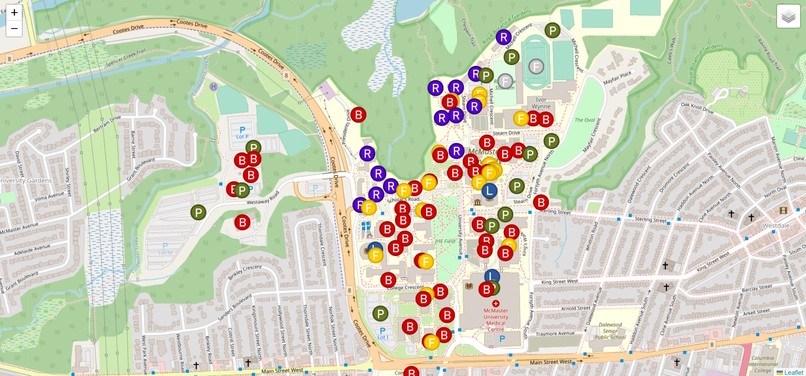
Overall Map of Campus with Important Locations

Inspiration
During first year, our schedules were given to us using building acronyms. Being new to McMaster we had no idea where those buildings were, or how to get to them. The only options we had was to cross referencing the buildings on the campus website with the buildings on google maps. This was very time consuming, and often times frustrating. We wanted to create a solution for this issue.
What it does
Our interactive maps shows every major location, including fields, buildings, food locations, libraries, parking lots, and residences. It has a search bar to find each of these locations (which can be searched for using their acronyms if preferred). It also has a navigation feature, where the user can place two markers on the map (start and end location) and find the fastest route between them.
How we built it
We started by creating a map of campus using the leaflet javascript library. We were able to display the map in satellite view using googlemapapi and openstreetmaps. Then we created markers for each location on campus and labelled them accordingly. We used LayerGroups to seperate each type of building. Then we used leaflet to implement our search function, and used openstreetmap to get our navigation. We edited each of these sections accordingly, to create our desired outcome.
Challenges we ran into
When implementing the search function, we had to find a way to search the markers that we had created rather than the buildings available on a regular map. This proved very difficult as there were many steps associated with implementing this. We also needed to change the routing system in leaflet to one for walking rather than driving. This also required many steps, and we had to fix many bugs along the way.
Accomplishments that we're proud of
We are very proud of the challenges that we were able to overcome as a team. With limited javascript experience, we collaborated and created a working website that will make students' lives easier in the future.
What we learned
We learned how to use leaflet, openstreetmap, in combination with googleapi and javascript to create a working interactive map. After this project, our overall coding knowledge and understanding has increased.
What's next for Campus Interactive Map
In the future we plan to implement new functions allowing the user to simply type in the two locations they wish to travel to and from (rather than clicking them on the map). We would also like to make the UI more user-friendly by adding a street view option, allowing students to see exactly where they are going.
Built With
- googlemapapi
- javascript
- leaflet.js
- openstreetmap


Log in or sign up for Devpost to join the conversation.