Inspiration
Our Google Calendars showed us what was happening, but never when to study, when to rest, or how to recover after a bad night's sleep. We kept manually reshuffling homework blocks around lectures — and still got it wrong. We wanted a calendar that understood us: not just our schedule, but our energy. That's where Cadence came from. Cadence's core differentiator is that Gemini doesn't just suggest — it autonomously reads context, makes decisions, and executes calendar actions on your behalf. That's the definition of an AI agent.
What it does
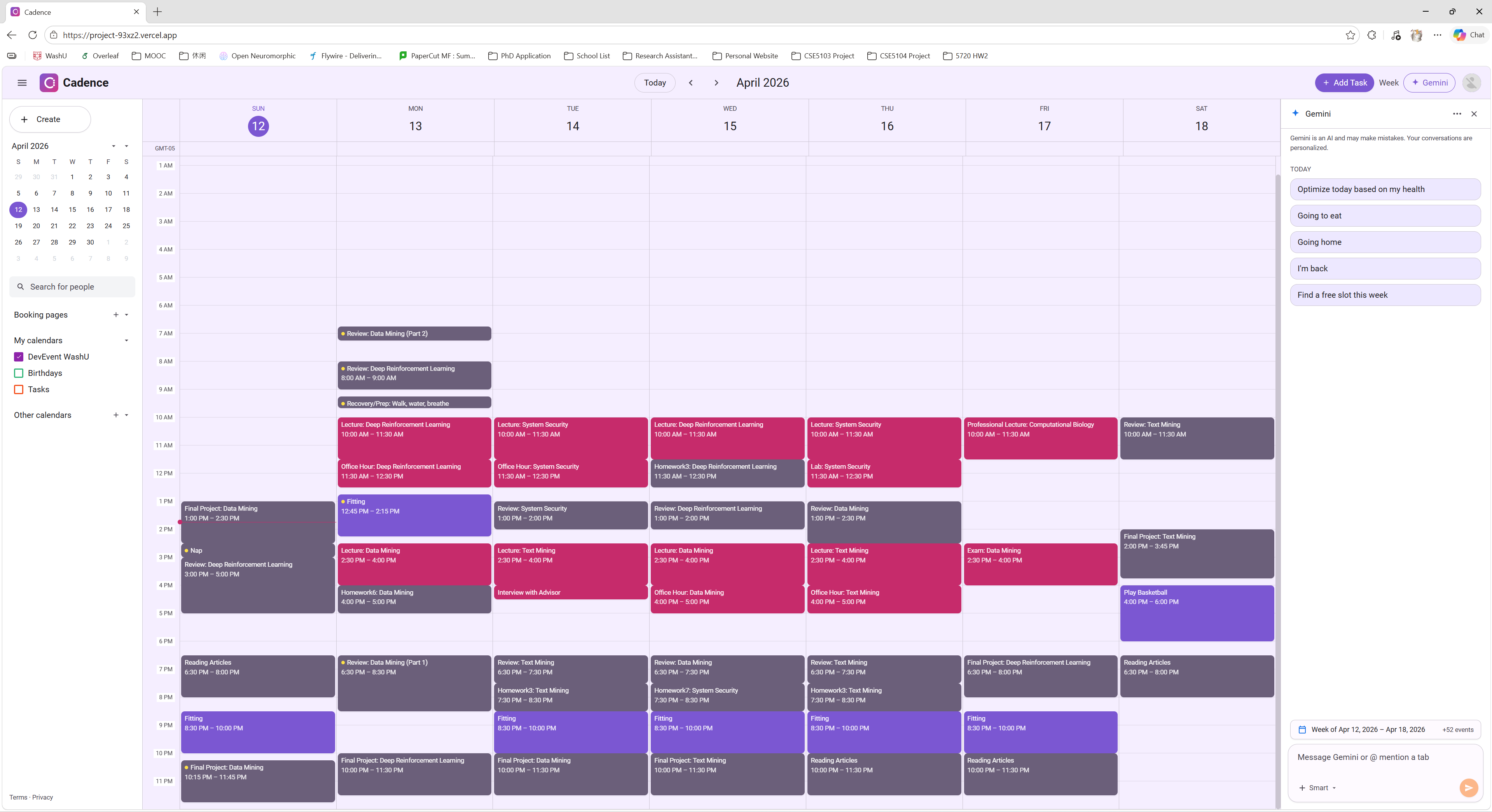
Cadence is a health-aware AI scheduling assistant built on top of Google Calendar. It reads your existing events, classifies every task by category — fixed (lectures, exams), optional (office hours), exercise, and flexible (homework, projects) — and uses your Google Fit sleep and health data to decide when you're best suited for each one.
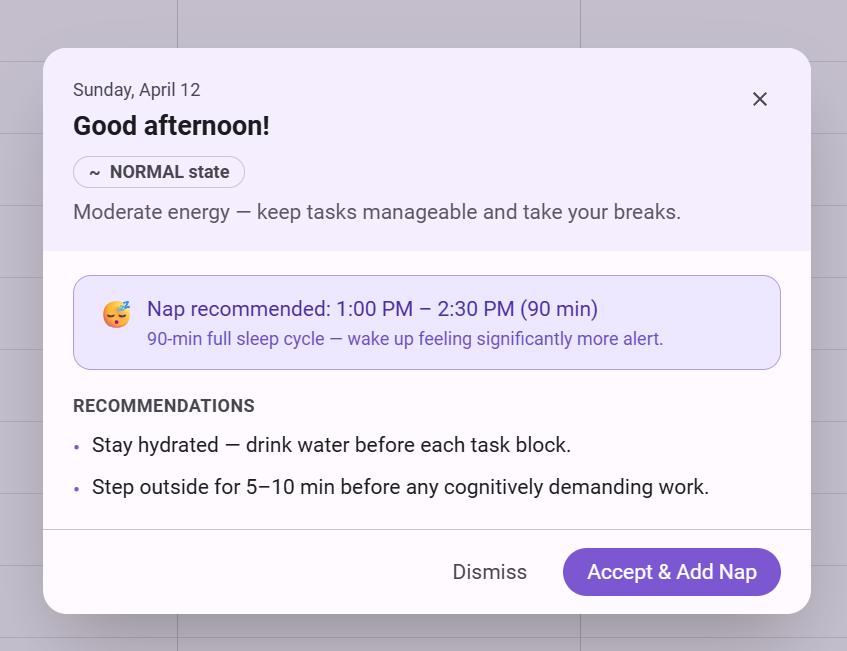
Instead of suggesting changes, the built-in Gemini agent acts on your behalf. You say "optimize today based on my sleep" and your calendar shifts on screen — hard tasks moved to your peak hours, breaks inserted automatically, purple exercise blocks deferred if your energy is low. Nothing is ever written back to Google Calendar, so your real calendar stays untouched.
How we built it
Frontend: Next.js 14 (App Router) + React 18 + TypeScript, styled with Tailwind CSS using a custom Material You purple/pink design system
Auth & Data: NextAuth.js with Google OAuth — scopes for Google Calendar (read-only) and Google Fit (sleep, steps, heart rate)
AI Agent: Google Gemini API (gemini-2.0-flash) with a structured system prompt encoding scheduling rules, task categories, health state levels, and a strict JSON output format the frontend parses and applies locally
Scheduler: A custom TypeScript engine (scheduleDay) that places flexible tasks into real free slots, respects a 6 AM–midnight window, enforces no overlaps, and handles task splitting for long blocks
Health Layer: Google Fit REST API aggregating sleep duration, sleep quality, resting heart rate, HRV, and step count into a StateLevel (peak / good / normal / low) that drives both the scheduler and the Gemini prompt
Challenges we ran into
Gemini rate limits: gemini-2.5-flash (preview) has very tight free-tier quotas and caused frequent overload errors. We built a retry loop with exponential backoff and a fallback to gemini-2.0-flash to keep the experience smooth.
Scheduling correctness: Early builds let Gemini place tasks before 6 AM or double-book slots. We added a client-side sanitizeActions() guard as a hard filter on top of the prompt constraints — belt-and-suspenders.
Google OAuth token expiry: Vercel deployments would sometimes surface stale tokens silently. Surfacing the 401 error clearly to the user (rather than showing an empty calendar) took careful error-boundary work.
Purple task same-day logic: Exercise tasks should only be deferred if they fall today — future purple events must stay untouched. Getting that isSameDay check right without breaking the general scheduler took several iterations.
Accomplishments that we're proud of
The Gemini agent doesn't just talk — it acts. Watching your calendar physically rearrange itself after one natural-language command felt genuinely magical the first time it worked.
Our health-aware scheduler correctly maps sleep quality to task difficulty placement without any manual input from the user.
We built a full local scratch layer: users can add, move, and delete tasks entirely in the browser, with no Google Calendar writes, keeping their real data safe.
The full UI — including the custom Cadence logo, Material You color system, and week grid — was built from scratch without any component library.
What we learned
Prompt engineering is engineering. Vague instructions to Gemini produce vague (and wrong) calendar edits. Precise, rule-based system prompts with explicit hard constraints produce reliable, structured output.
Health data is messier than expected. Google Fit aggregation windows don't always align to calendar days, and missing data needs graceful fallbacks rather than broken states.
The gap between "it works locally" and "it works on Vercel" is real — OAuth scopes, environment variables, and edge-runtime constraints each introduced their own surprises.
What's next for Cadence
Write-back mode: Optional two-way sync so confirmed schedule changes push back to Google Calendar
Multi-day optimization: Reschedule across the full week, not just today, balancing deadlines and energy across days
Wearable integration: Direct Apple Health / Fitbit support for users not on Google Fit
Recurring task intelligence: Learn from past behavior — if the user always skips Tuesday gym when tired, Cadence should start anticipating that
Collaborative scheduling: Share a "busy/free" overlay with classmates for group project coordination
Built With
- gemini
- google-calendar
- google-fit
- next.js
- nextauth-google-oauth
- vercel


Log in or sign up for Devpost to join the conversation.