Inspiration
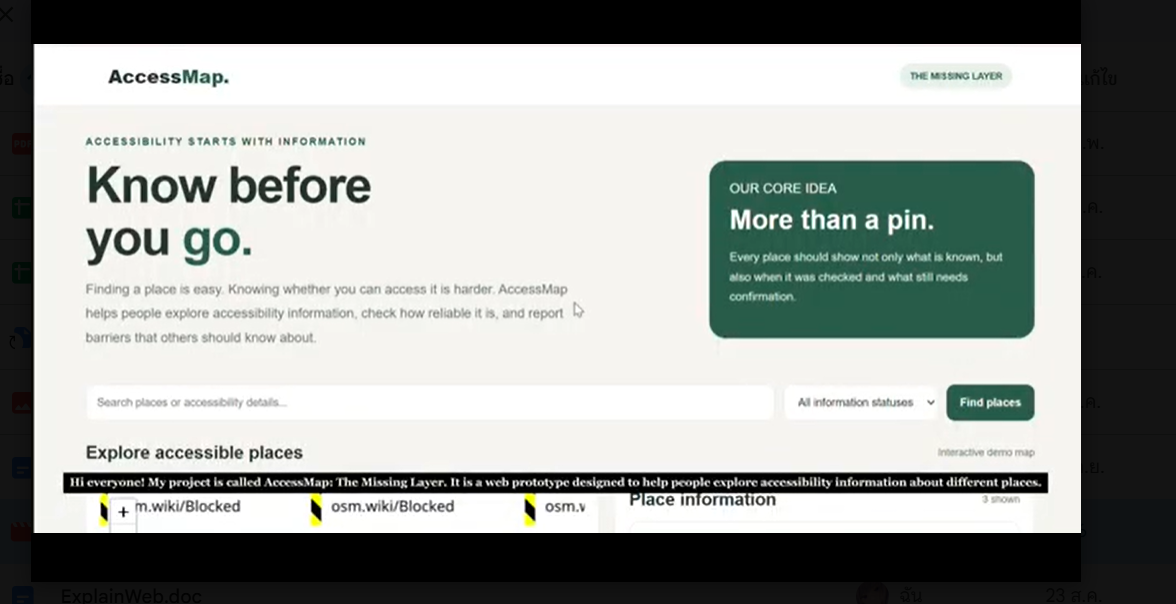
I wanted to explore how technology could make everyday information more useful and accessible. When looking at maps, finding a location is usually easy, but understanding whether a place meets different accessibility needs can be harder. This inspired me to create AccessMap: The Missing Layer.
What It Does
AccessMap is a web prototype that helps users explore accessibility information about places. It includes an interactive map, search and filtering features, accessibility status labels, and a form for reporting possible barriers.
The goal is to make information easier to explore and help users identify details that still need to be checked.
How I Built It
I built the prototype using HTML, CSS, and JavaScript. I used Leaflet and OpenStreetMap to display the map and created the interface for exploring places and submitting reports. I also used AI assistance during development.
Challenges I Faced
One challenge was getting the map and location markers to display correctly. I also had to consider how to present accessibility information without making users think that unverified information was confirmed.
What I Learned
I learned more about building an interactive web interface, working with map libraries, and communicating the limitations of a prototype clearly.
What's Next
In the future, I would like to connect AccessMap to a database, improve location-specific reporting, and create a way for community members to verify information.
The current prototype uses sample information and is not yet a verified accessibility database. Reports are temporary and need further development before they can be stored and reviewed reliably.## What it does
AccessMap: The Missing Layer is a web prototype that helps people explore accessibility information about different places. It includes an interactive map, search and filtering features, accessibility status labels, and a form for reporting possible accessibility barriers.
The goal is to make accessibility information easier to explore and help users identify details that may need further verification.
How we built it
We built the prototype using HTML, CSS, and JavaScript. We used Leaflet to create the interactive map and OpenStreetMap as the map data source. The interface includes place information, search and filtering tools, and a reporting form.
AI assistance was used during development.
Challenges we ran into
One challenge was getting the map and location markers to display correctly. Another challenge was designing the interface to communicate accessibility status without suggesting that unverified information was confirmed.
We also had to work within the limitations of a prototype without a connected database.
Accomplishments that we're proud of
We created a working web prototype that brings map exploration, accessibility status, and barrier reporting together in one interface.
We are proud to have turned an idea into an interactive demonstration and to have considered the importance of making information clear about what is known and what still needs verification.
What we learned
We learned more about building interactive websites with HTML, CSS, and JavaScript, integrating a map library, and designing features around a real-world problem.
We also learned that presenting information responsibly is important, especially when people may rely on it to plan a visit.
What's next for AccessMap: The Missing Layer
Our next steps are to connect the prototype to a database, improve location-specific reporting, and develop a process for community members to verify accessibility information.
We would also like to improve the accuracy of place information and make the platform more useful for people with different accessibility needs.
Currently, the prototype uses sample information that has not been verified as real-world accessibility assessments. Reports are temporary and are not yet stored in a permanent database.


Log in or sign up for Devpost to join the conversation.