-
-
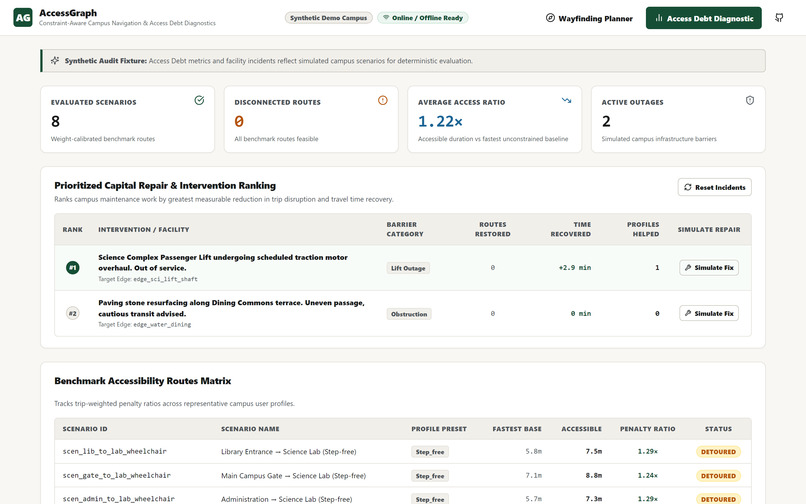
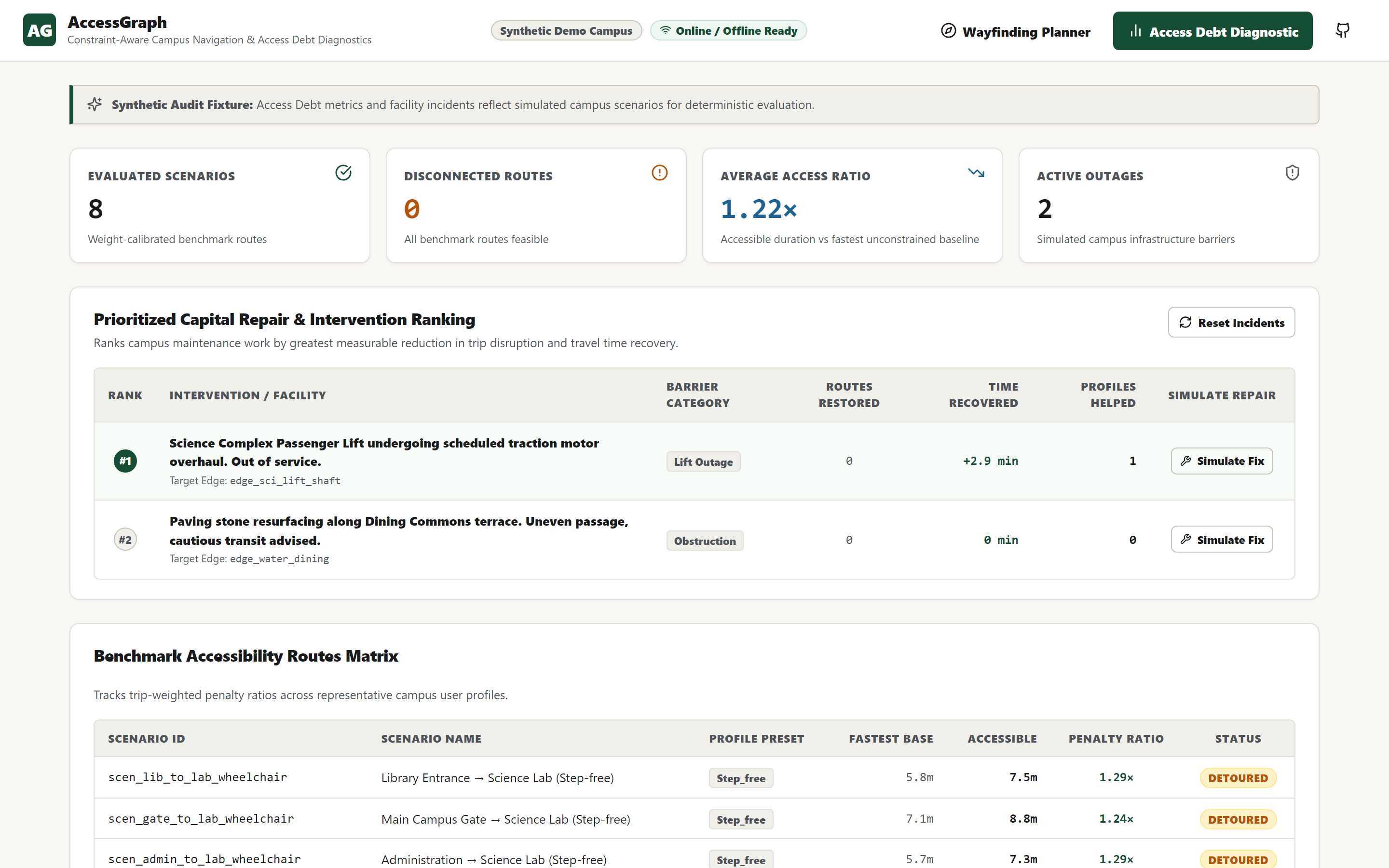
Access Debt Dashboard — network-wide burden metrics and counterfactual repair prioritization
-
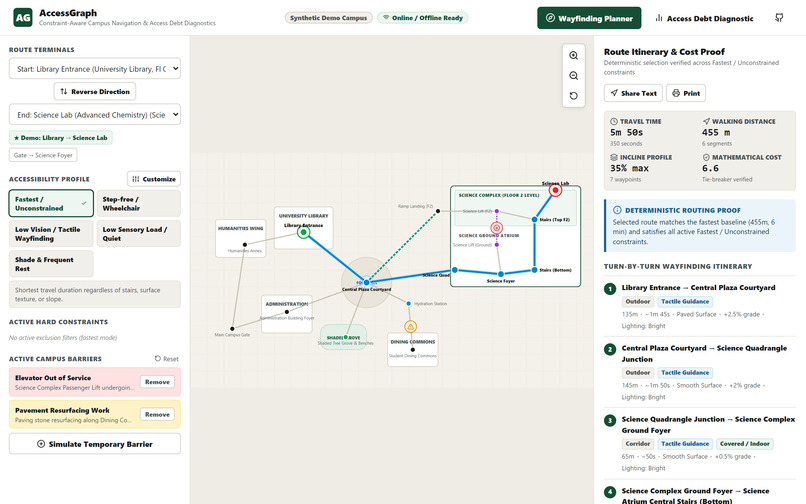
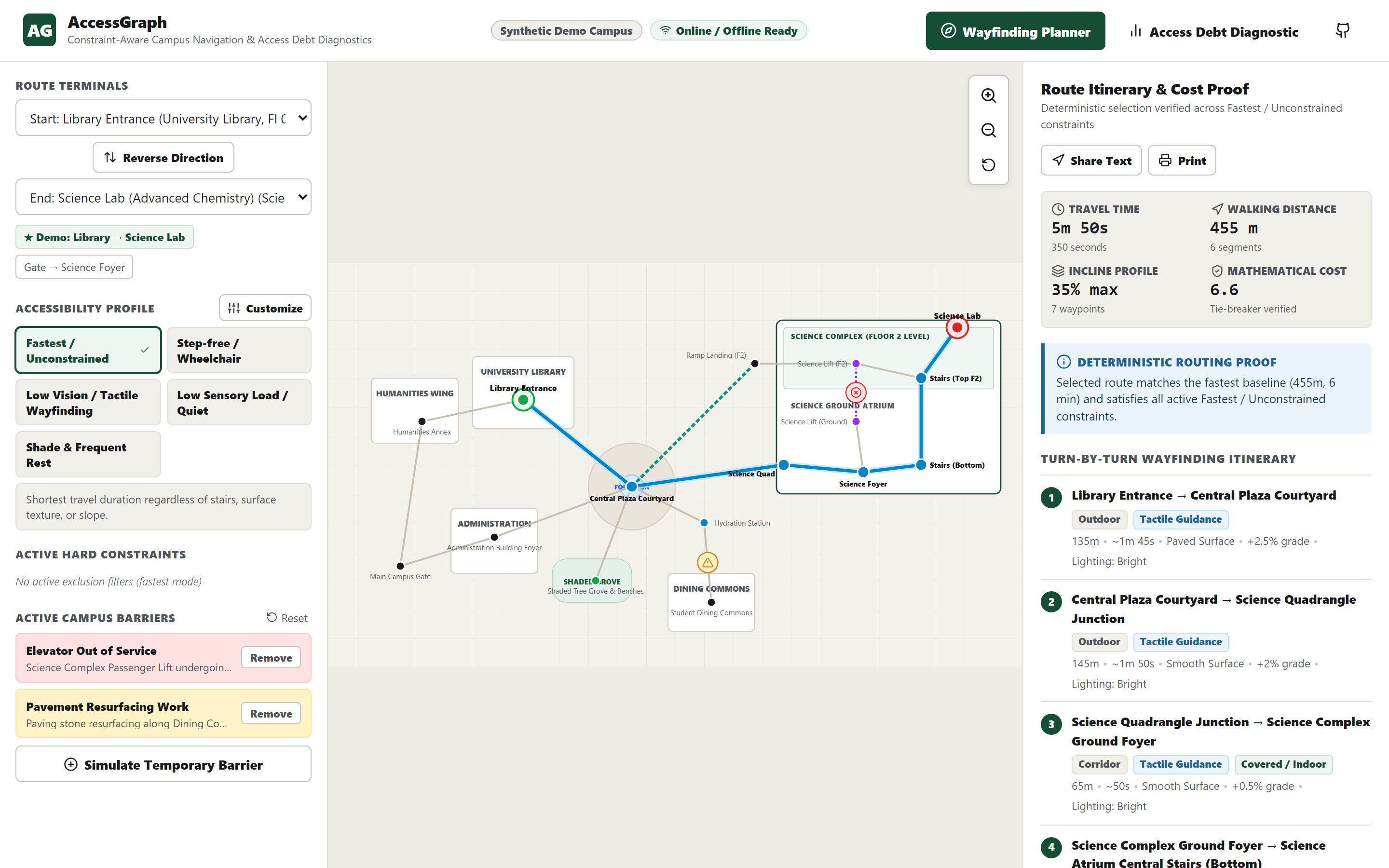
Wayfinding Planner — deterministic route, itinerary, cost proof, and active barrier context
-
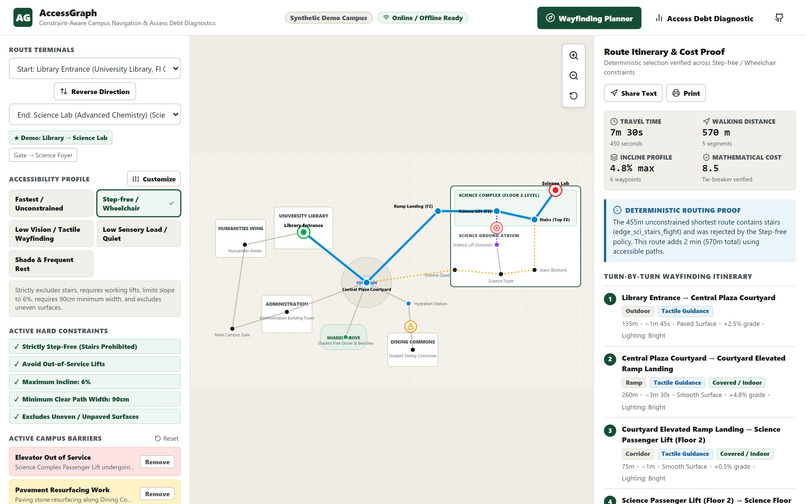
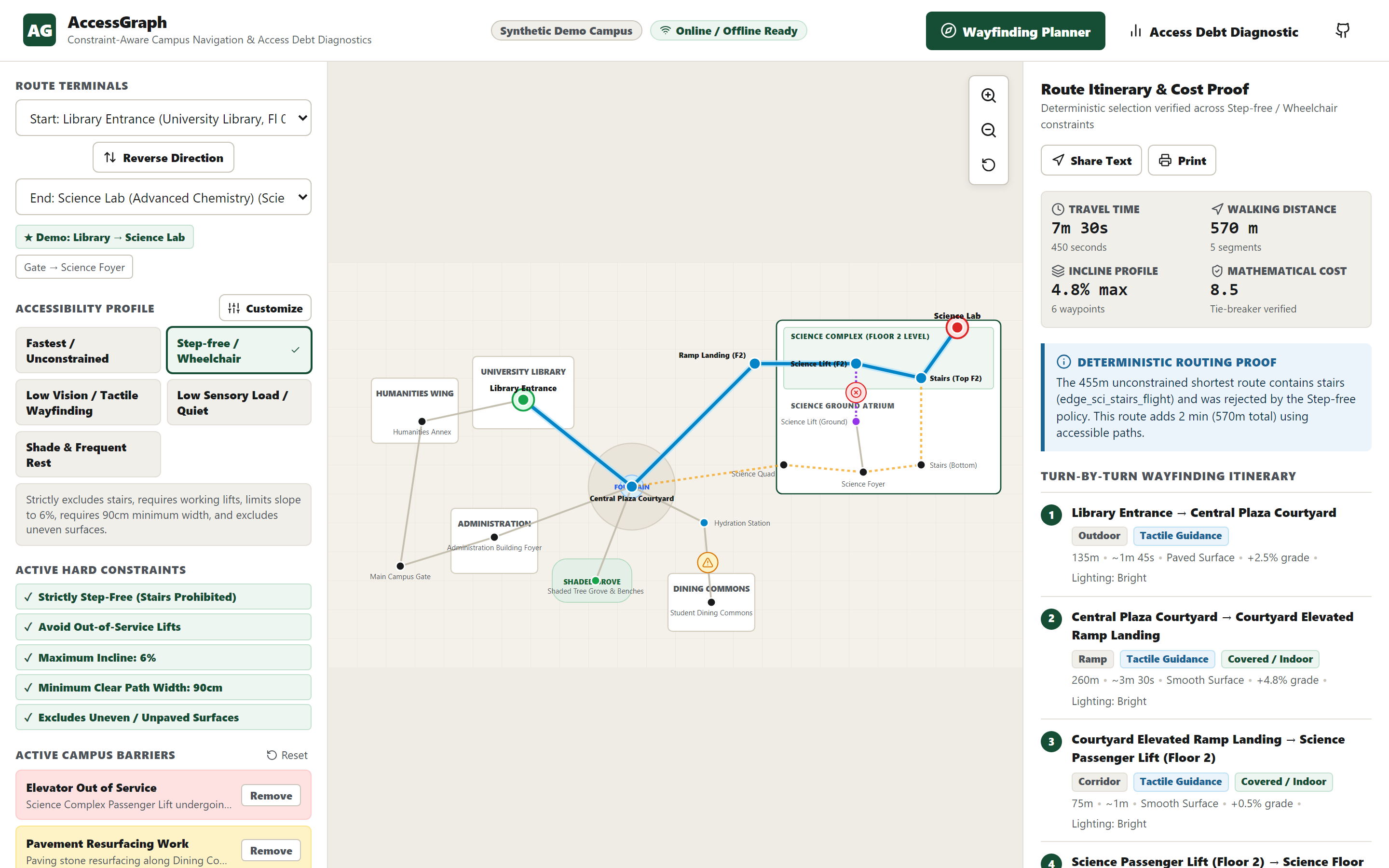
Step-Free Reroute — hard stair exclusion and elevator-outage avoidance with an explained alternative
The problem
Campus maps usually optimize for distance or walking time. For a wheelchair user, someone with a temporary injury, a low-vision traveler, or a person with sensory sensitivities, the mathematically shortest route may still be unusable: it can include stairs, rely on an out-of-service lift, exceed a safe slope, or pass through an overwhelming space. At the same time, facilities teams must decide which accessibility repair will help the most people with limited budgets.
The WHO World Report on Disability and UNICEF Accessible Infrastructure Guidelines describe how physical and information barriers restrict participation. AccessGraph turns those barriers into two actionable products: a safer route for the traveler and an evidence-based repair priority for the institution.
What AccessGraph does
AccessGraph is a local-first progressive web application with two connected engines.
Constraint-aware wayfinding
Travelers can choose Fastest, Step-Free, Low Vision, Low Sensory, or Shade & Rest profiles, then adjust exact constraints such as maximum slope, minimum path width, stair prohibition, lift dependency, and surface exclusions. Hard constraints are enforced before scoring: an unsafe edge is rejected rather than merely penalized. Every result includes a deterministic explanation, itinerary, incline profile, and cost proof so the user can see why the route was selected and what was rejected.
Access Debt diagnostics
Facilities teams see the network-wide burden created by each barrier. AccessGraph computes an Access Penalty ratio between accessible and fastest route times across eight deterministic synthetic benchmark scenarios; disconnected journeys are tracked separately rather than hidden behind an arbitrary number. A counterfactual simulator removes one barrier at a time and ranks repairs by routes reconnected, cumulative minutes recovered, profiles helped, and a deterministic tie-breaker. A planner can therefore test an elevator repair or resurfacing project before committing budget.
Why it is innovative
Most navigation tools stop at finding a path. AccessGraph connects personal mobility constraints to institutional capital planning. The same graph that safely reroutes one student also reveals which repair creates the greatest community-wide benefit. This closes the loop between daily lived experience and infrastructure decisions without collecting personal location history.
How we built it
- React 18 and strict TypeScript for the product interface and routing core
- A custom deterministic Dijkstra engine with lexicographic tie-breaking on cost, duration, distance, and path key
- An accessible SVG campus topology with multi-floor nodes, ramps, stairs, lifts, courtyards, and temporary barriers
- Service Worker caching for tested offline reload after an initial online load
- Local browser persistence for custom profiles and simulated barriers
- Vitest for unit and component verification; Playwright and axe-core for responsive and accessibility checks
The current demo deliberately uses a labeled synthetic campus fixture so judges can reproduce every decision. It does not claim deployment on a real campus or use real student data.
Technical evidence
- 36/36 unit and component tests passing
- 94.07% statement coverage, 89.40% branch coverage, 100% function coverage
- 45/45 Playwright executions across five viewports from 320px to 1920px
- Zero Axe violations across five tested interaction states
- Reproducible benchmark harness: 0.020 ms median single-route calculation and 0.555 ms median eight-scenario Access Debt audit on the recorded test host; performance varies by device
- Full-history secret scan and production dependency audit passing
- Installed Service Worker passed an automated offline reload test after initial online load
Challenges
Multi-story travel required explicit modeling of stair, elevator, and exterior ramp transitions so impossible floor changes could never appear in a route. Equal-cost paths also tended to change when graph edges were reordered, so we added a deterministic path-key tie-breaker and randomized-edge-order regression tests. Finally, we separated automated accessibility evidence from broader certification claims: Axe, keyboard focus, touch targets, overflow, dialog focus trapping, and focus restoration are tested, while no unsupported claim of complete manual certification is made.
What we learned
Campus accessibility is not only a navigation problem. It is an information and resource-allocation problem. Converting barriers into understandable route explanations and measurable community-wide delay gives both travelers and administrators a shared evidence model.
What's next
Next steps are real OpenStreetMap campus imports, facilities work-order integration, live elevator status, participatory accessibility audits, dynamic shade modeling, and BLE-assisted indoor positioning. A pilot would begin with consent-based validation by disabled students and campus accessibility staff before any operational deployment.
References
- World Health Organization, World Report on Disability (2011)
- UNICEF, Accessible Infrastructure Guidelines (2019)
- Source and reproducible evidence: https://github.com/abhijeetnardele24-hash/accessgraph
- Live application: https://abhijeetnardele24-hash.github.io/accessgraph/
Built With
- axe-core
- dijkstra
- github
- openstreetmap
- playwright
- progressive
- pwa
- react
- service
- service-worker
- svg
- typescript
- vite
- vitest
- web


Log in or sign up for Devpost to join the conversation.