-
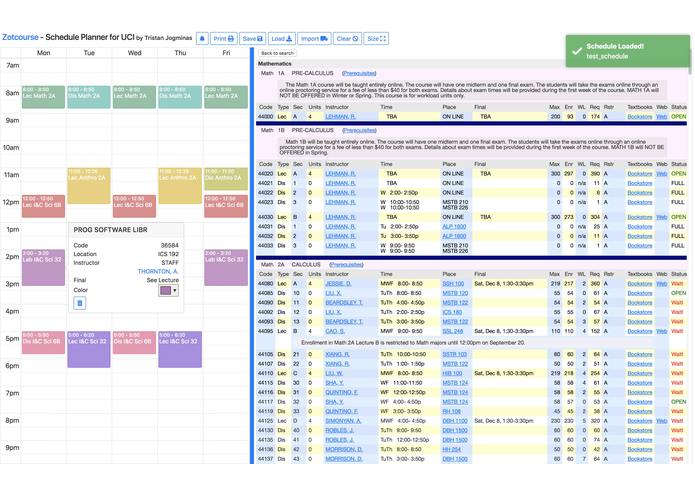
Overview of the schedule planner.

Zotcourse
by Tristan Jogminas
Featured in UCI's newspaper! Averages 400 users a day and has over 1800 schedules saved!
Benefits over Antplanner
- Resizable panes.
- Calendar adjusts to screen size.
- Import schedule from Antplanner.
- Popover for event with additional course information.
- Change course event color.
- RateMyProfessor links in calendar event and Websoc results.
- Cleaner field inputs when saving/loading schedule.
- Toastr notifications after saving/loading schedule.
- Better print formatting. (Calendar fits entirely on one page!)
- View your finals' schedule
- Export your schedule to an iCal file
- View all your courses' info using the List button
- Enrolled unit counter
- Complete redesign of search
This was forked from Antplanner2 by Ryan Hsu
How to run locally for testing
- Create a new Google Cloud Platform project and App Engine application using the GCP Console
- Download and install the Cloud SDK
- Run the following command to install the gcloud component that includes the App Engine extension for Python:
gcloud components install app-engine-python - Make sure you have
pipandvirtualenvinstalled and activate your virutal environment. - Navigate to the root of the zotcourse folder, and run the following:
pip install -r requirements.txt - While still in the root of the zotcourse folder run the following to start the server locally:
dev_appserver.py app.yaml - For information on how to setup debugging with Flask in Visual Studio Code, refer to here.
License
GNU General Public License v3.0
See LICENSE for the full text.

Log in or sign up for Devpost to join the conversation.