Inspiration
The inspiration behind Zoonotic came from real-life concerns in our local communities, where stray dog bites and the fear of rabies have become serious public health issues. In many areas, there is no proper reporting system or awareness mechanism to deal with stray animals or educate people about zoonotic diseases. I wanted to build something meaningful that could address this overlooked but dangerous problem. The idea sparked when I read about increasing rabies cases in local news and how preventable they could be with timely action and public participation. I realized that even a simple mobile-based platform could make a huge difference by allowing users to report stray dog sightings and access safety guidance. This app is not just a tech project; it’s a step toward safer and more informed communities.
What it does
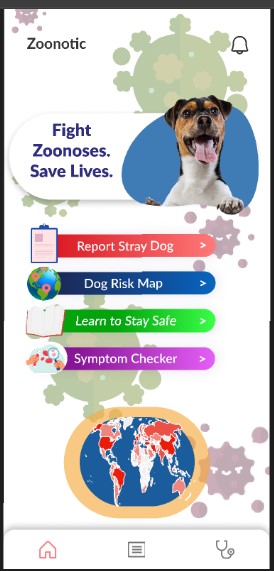
Zoonosis Alert is a mobile app prototype designed to raise awareness and reduce the risks associated with stray dog encounters, which can lead to dangerous zoonotic diseases like rabies. The app empowers users to take part in community safety by reporting sightings of stray dogs in their local areas. Users can submit simple reports by entering their city or area name, describing the situation, and submitting it through a clean and interactive interface. In addition to reporting, the app includes an educational section titled "Learn to Stay Safe," which provides safety tips and guidance to prevent zoonotic transmission. While the current version is a clickable prototype, future features such as a risk map and veterinary consultation are also planned.
How we built it
This was my first experience using Figma, and I used it to build every screen of the app. I began by creating individual frames for each screen, including the welcome carousel, login/signup pages, home screen, report form, and safety education section. I explored Figma Community to find suitable icons and illustrations and customized them to match the overall aesthetic of the app. Interactive elements like button links and scrolling content were implemented to make the prototype feel as close to a real application as possible. Learning how to use components, nesting, and scroll groups helped me build a consistent and user-friendly layout throughout the design.
Challenges we ran into
The biggest challenge I faced was that I had never used Figma before. At the beginning, even creating a simple frame or linking two buttons seemed confusing. I had to experiment with multiple elements before understanding how prototypes work in Figma. Making scrollable content was also a tricky task until I understood the concept of vertical scroll groups. Additionally, I encountered issues when using Community resources, as some elements were not editable or didn’t behave as expected when reused. Despite these challenges, I kept pushing forward and managed to build a fully interactive demo.
Accomplishments that we're proud of
I’m proud that I was able to complete a multi-screen, interactive prototype entirely on my own without any prior Figma knowledge. The project allowed me to create a working user flow that simulates a real-world problem and presents a digital solution. It was exciting to see how my idea could be brought to life visually, and I was especially proud of the form submission flow and the scrollable "Learn to Stay Safe" section. This project helped me gain confidence in design and taught me how to structure and communicate app ideas effectively.
What we learned
Throughout this project, I learned the basics of Figma, including how to design clean UI layouts, connect screens for prototyping, and use scroll groups for dynamic content. More importantly, I gained a better understanding of user experience design, how to keep screens simple, intuitive, and consistent. I also learned how to approach a real-world problem from a designer’s perspective and translate it into a useful and engaging app prototype. This hands-on experience was an incredible way to practice design thinking and explore the power of visual storytelling.
What's next for Zoonotic
In the future, I hope to extend this prototype into a functional mobile application using tools like Flutter or React Native, along with Firebase for real-time data collection. The next version will include a fully functional risk map based on user reports, along with push notifications to alert users in high-risk areas. I also aim to implement a vet consultation feature for emergency advice. Collaborating with animal welfare organizations and public health authorities is another goal to ensure the app has a real-world impact and adoption in communities affected by stray dog issues.
Built With
- figma

Log in or sign up for Devpost to join the conversation.