-
-
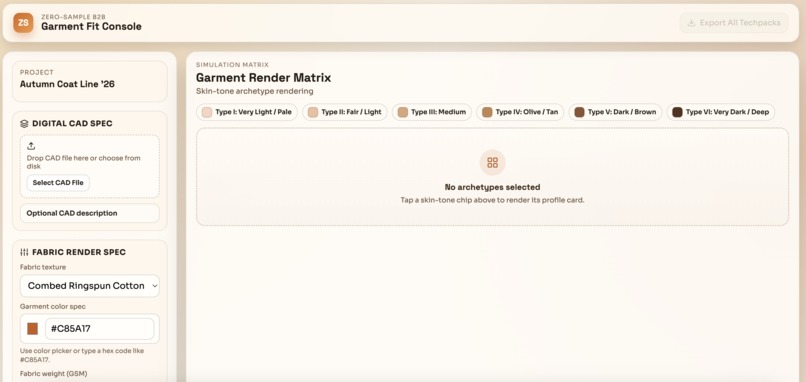
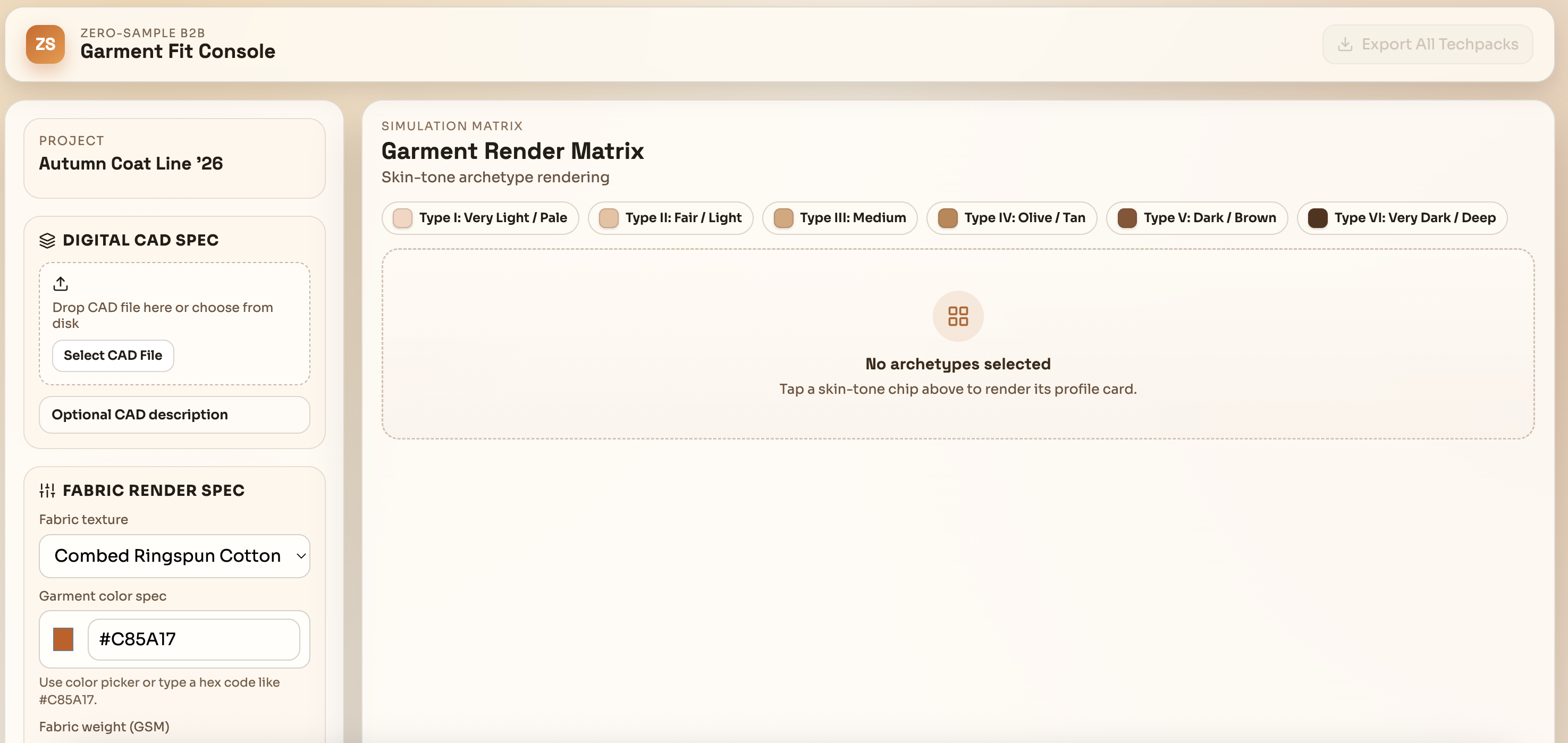
Dashboard for upload and renditions
-
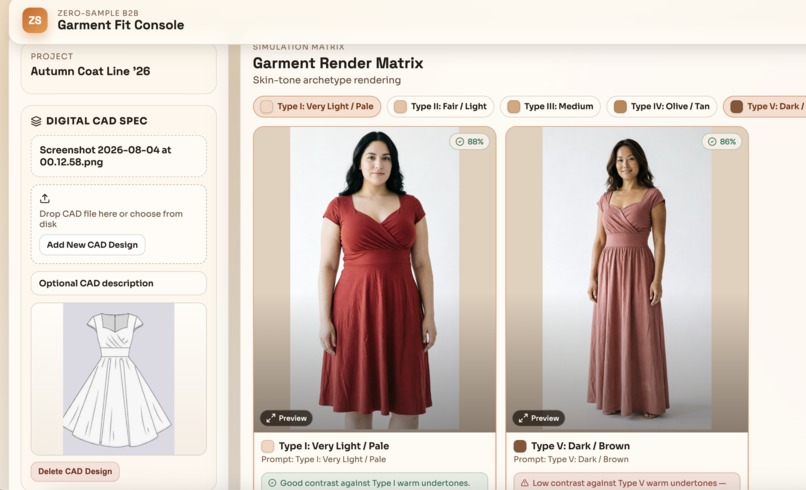
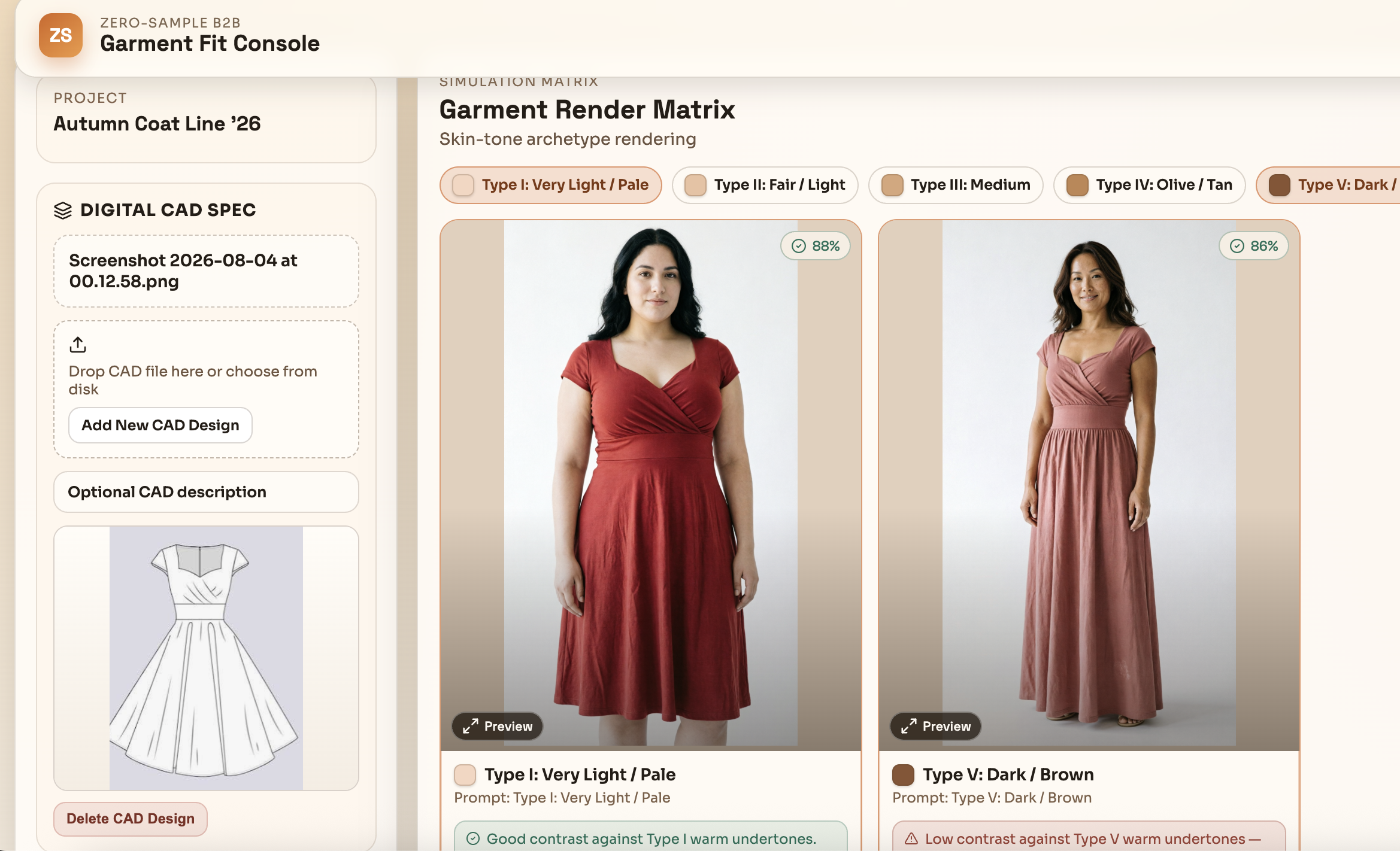
Based on CAD upload and click on VTO pipeline the models images generated
-
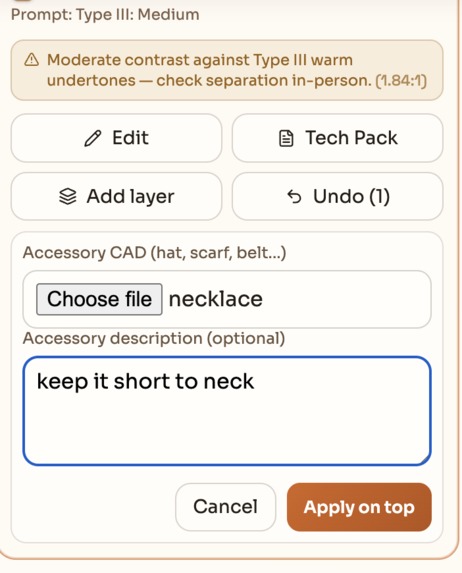
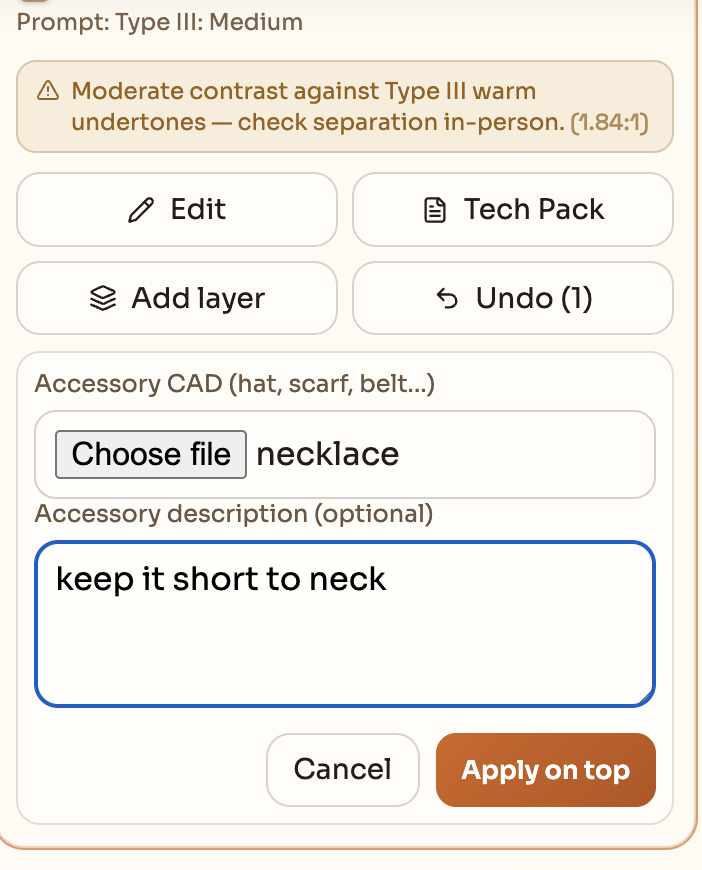
Adding accessory prompt with image of necklace
-
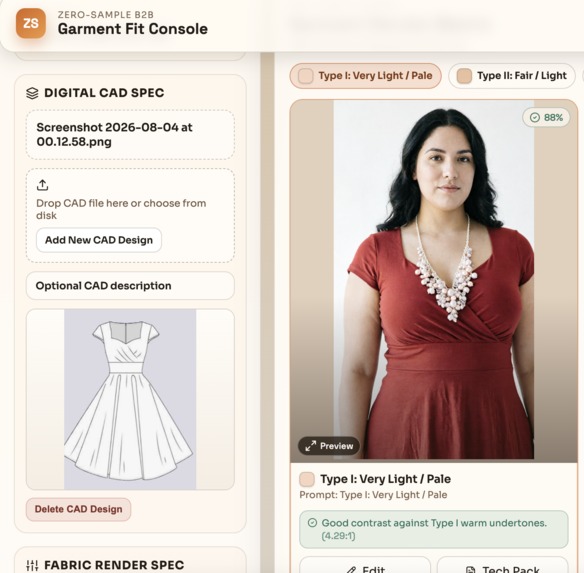
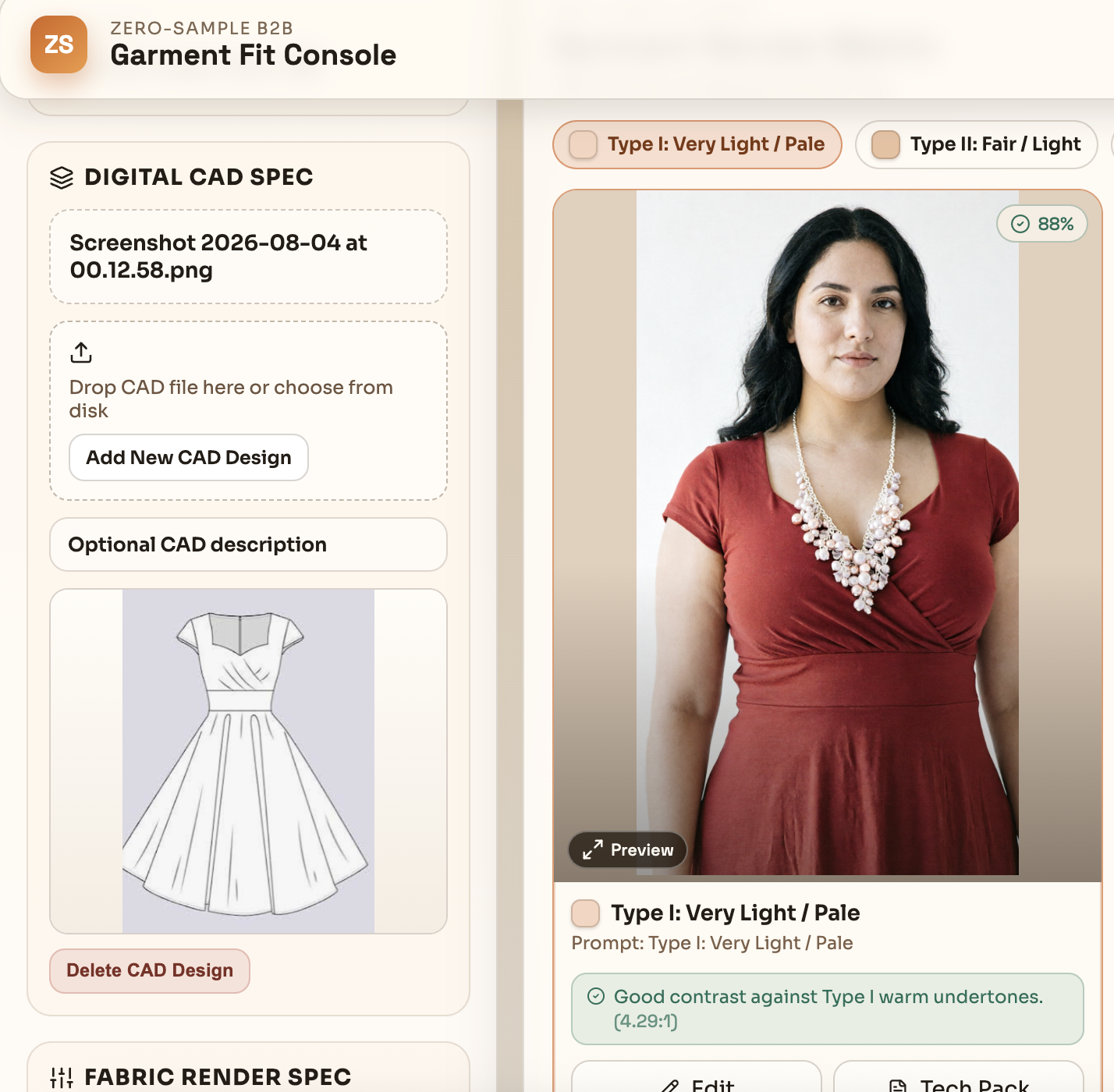
Talking my input with accessory generated new layered model image
Inspiration
Watching a friend launch his Amazon apparel brand opened my eyes to the inefficiencies of fashion retail. As small business, he lost thousands of dollars and over ten weeks waiting on physical samples from overseas vendors, all while guessing which fits and colors would resonate with buyers, not to mention the high cost of model photoshoots. I wanted to eliminate this manual guesswork. Inspired by the YouCam hackathon challenge, I built ZeroSample AI to digitize sampling and e-commerce visuals from day one
What it does
ZeroSampleB2B It turns flat 2D technical CAD drawings into realistic Virtual Try-On (VTO) simulations across diverse skin tones and body types. Instead of ordering expensive physical samples, retail buyers can instantly visualize fabric drape and skin contrast.
How we built it
Try-On Rendering: We generate photorealistic garment try-ons using Perfect Corp's YouCam Image-to-Image (youcam-image-v2) and Cloth-V3 apparel APIs. The buyer's flat CAD sketch is registered through YouCam's File Upload API (/s2s/v2.0/file/image-to-image/youcam), then passed as the source reference to the Image-to-Image task API (/s2s/v2.0/task/image-to-image/youcam) alongside a structured spec prompt encoding fabric weight, drape, lighting, and Fitzpatrick skin tone. For garment/accessory layering onto a model, we call the Cloth-V3 task API (/s2s/v2.0/task/cloth-v3) with src_file_url (model) + ref_file_url (garment). All tasks run through an async start-and-poll flow until task_status: success, returning the final rendered image URL.
Challenges we ran into
1. Contrast scoring vs. real-world garment appearance Our contrast check computes a WCAG relative-luminance ratio plus a warm/cool undertone read between the selected garment color and each Fitzpatrick skin swatch. The hard part: the same color yields a different match ratio per skin tone, but the flat luminance math ignores fabric type, body type, and lighting. So a render can genuinely look great. e.g. a satin sheen under runway spotlight adding specular separation, while the app still flags "low contrast." The purely color-based score can therefore disagree with the actual rendered try-on, since our lighting/drape/fabric context lives only in the generation prompt, not in the scoring model. Reconciling a static color metric with a context-aware visual outcome is an open problem.
2. Stacking multiple garments/accessories requires re-uploading each render The layering flow applies one apparel/accessory item per Cloth-V3 task. To put a second accessory on the same model, the previous render's output image has to be re-registered as a new source before the next layer can be applied. Every additional item means another upload + async task-and-poll cycle, which adds latency and cost, and I haven't found a single-call way to composite multiple garments/accessories in one pass. May be I couldn't figure out that in api document.
3. No public data to match stock by demographic + skin type I wanted to recommend/stock inventory by customer segment (demographic + skin tone + preferred colors), so that the buyers can order with stock better to avoid dead stock, but that mapping isn't publicly available, so it can't be generalized. This is only solvable per-retailer: if a store shares its own customer data (segments and color preferences), we can drive segment-specific renditions on top of the existing archetype pipeline — but there's no universal dataset to bootstrap it.
Accomplishments that we're proud of
Zero-sample try-ons straight from a flat CAD. A buyer drops in a 2D technical sketch and gets photorealistic, on-model renders — no physical sample sewn — powered end-to-end by YouCam's Image-to-Image and Cloth-V3 apparel APIs.
A full 6-tone Fitzpatrick archetype matrix, side by side. Every garment renders across all six skin-tone archetypes (Type I–VI) in one grid — inclusive demographic previews by default, not an afterthought.
Real, explainable fabric-to-skin contrast scoring. A WCAG relative-luminance contrast ratio plus warm/cool undertone analysis gives buyers an objective "will this color wash out on this skin tone?" signal — not a black box.
A spec-to-prompt engine grounded in real apparel physics. We translate GSM fabric weight, drape behavior, print scale, lighting temperature, pose, and body type into a structured render spec, so outputs respect true fabric behavior and venue lighting.
A real-time, buyer-friendly console. Drag-and-drop CAD upload, live parameter swapping, per-archetype re-runs, layered accessory try-ons, and one-click combined tech-pack export — a complete B2B workflow, not just a single render button.
What we learned
Hands-on integration with the YouCam / Perfect Corp API. I learned how to wire up the full server-to-server flow — file registration, uploading, and the async start-and-poll task lifecycle .
The breadth of the YouCam platform. I discovered how extensive the ecosystem already is, with a rich set of ready-built capabilities and models to draw from rather than building rendering from scratch.
Choosing the right model for the job. I explored the different YouCam models (Image-to-Image, Cloth-V3 apparel try-on, skin analysis) and learned what each is best suited for — and how to chain them to achieve a complete try-on pipeline.
Prompt design is a real lever. I learned that translating concrete apparel parameters (fabric weight, drape, lighting, skin tone) into structured prompts has a major impact on how realistic and on-spec the output looks.
What's next for zero-sample-b2b
My ideas went different directions.
Auto-generated model imagery + render cache. Turn a seller's garment photo into on-model images and persist them in a database to serve on storefronts — cheap, studio-quality product shots for small sellers.
Designer → supplier handoff. Polish designer concepts, then auto-share the generated tech pack and specs with suppliers to take a design from sketch to production.
Consent-based personalization. With opt-in body-type and skin-tone scans, recommend best-fit fabrics/garments per customer and generate personalized try-ons with zero inventory.
Segment-driven stocking + outreach. Use customer-segment data to forecast inventory and power targeted campaigns (tailored newsletters, segment-specific drops).

Log in or sign up for Devpost to join the conversation.