-
-
COVERS
-
A
-
B
What If an Agent Could Look at the Same Atom You Are Looking At?
Inspiration
We started with a slightly annoying observation.
LLMs are becoming very good at operating software.
They can call tools. They can edit files. They can write code. They can chain dozens of actions together.
But put an agent inside a scientific 3D modeling environment and ask:
“Move the molecule to that site.”
…and suddenly “that” becomes the hardest word in the sentence.
Humans do not think about molecular structures as lists of Cartesian coordinates.
We look at a surface and say:
- “this atom”
- “the site on the right”
- “the layer underneath”
- “rotate it toward that oxygen”
- “not there — the other bridge site”
Scientific modeling is deeply spatial, visual, and interactive.
Language models, on the other hand, are usually handed something like:
Atom 148: O  3.422  7.183  12.901
Atom 149: H  3.981  7.652  13.441
...
Technically correct.
Also technically miserable.
So we started asking a different question:
What if the 3D viewport itself became a shared workspace between a human and an agent?
That question became this project.
What We Built
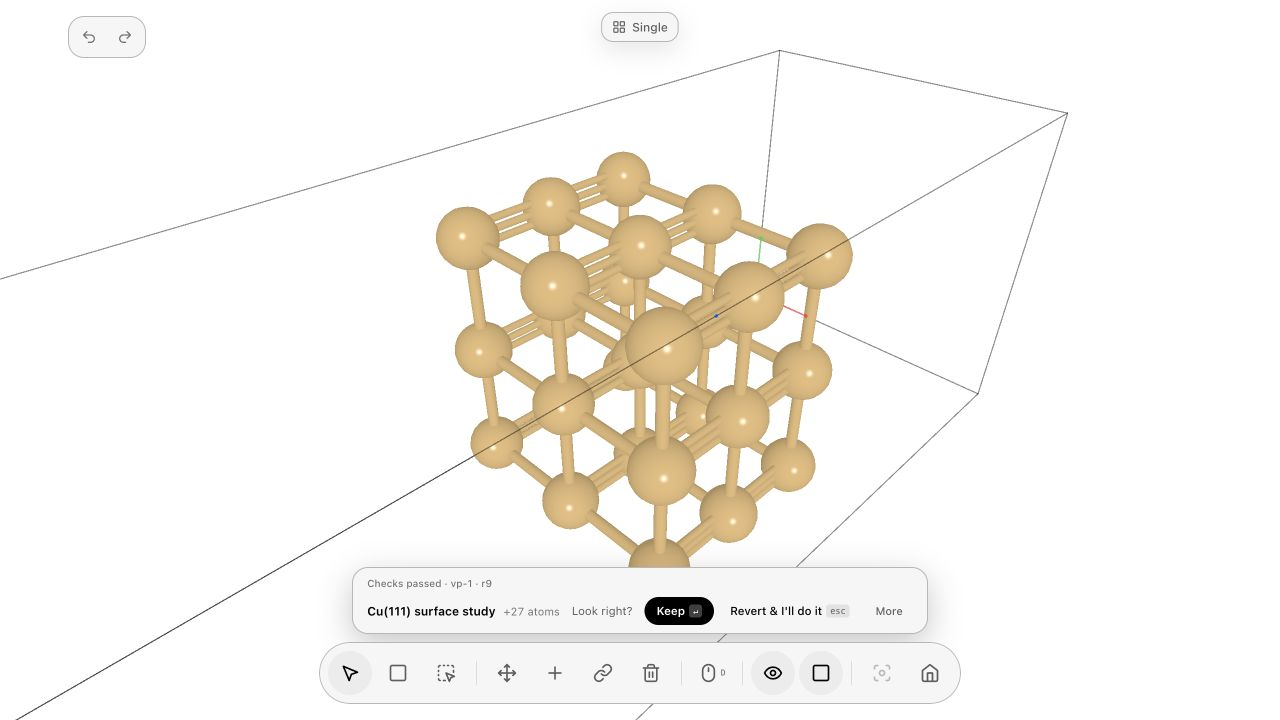
We built WebMCP support for a scientific modeling environment covering molecular and condensed-matter structures.
The goal is not simply to expose every GUI button as a tool.
That would be useful, but it would still leave the agent fundamentally blind.
Instead, we treat WebMCP as a bridge between three things:
scientific structure → agent reasoning → human attention
The agent can inspect the model, reason about its local environment, manipulate geometry, and — importantly — control what the human is looking at.
That last part turned out to be surprisingly important.
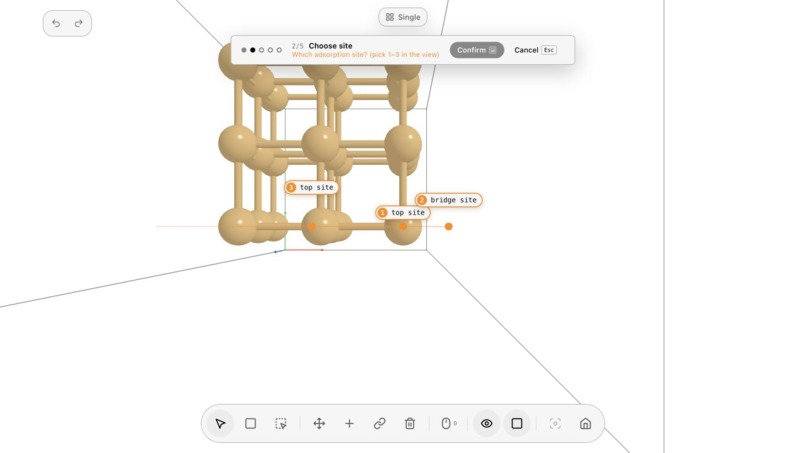
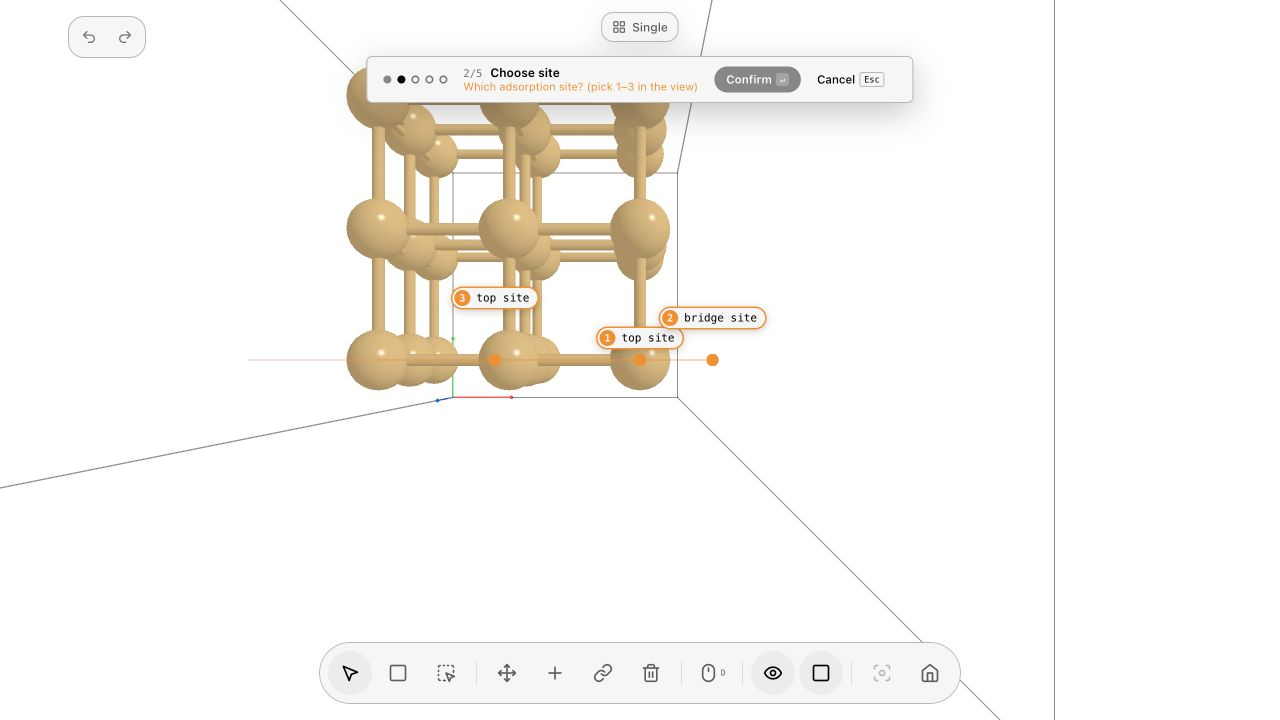
If the agent proposes an adsorption site, it should not respond with:
“Use atoms 102, 117 and 118.”
It should move the camera there.
Highlight the atoms.
Mark the candidate site.
Then ask:
“This one?”
If the user says:
“No, the one on the right.”
the agent should be able to continue from the shared visual context.
That is the interaction we wanted.
Not human or agent modeling.
Human with agent modeling.
Shared Spatial Attention
The concept we kept coming back to while building the project was something we now call shared spatial attention.
An agent needs more than a scene dump.
It needs ways to answer questions such as:
- What structure is currently visible?
- What has the user selected?
- Which atoms are nearby?
- Which direction is the surface normal?
- Which atoms belong to the top layer?
- Where are plausible adsorption sites?
- What did I just highlight?
- What does “the one beside it” refer to?
- What changed after my previous operation?
And the agent also needs to influence the viewport:
observe
  ↓
understand
  ↓
focus
  ↓
propose
  ↓
human confirms
  ↓
act
  ↓
observe again
  ↓
verify
That loop is the core of the project.
A successful MCP call does not necessarily mean the task succeeded.
The resulting scientific structure still has to make sense.
A Tiny Example That Contains the Whole Idea
One of our favorite demos is intentionally simple:
“Help me adsorb a water molecule on this surface. Ask me before important decisions.”
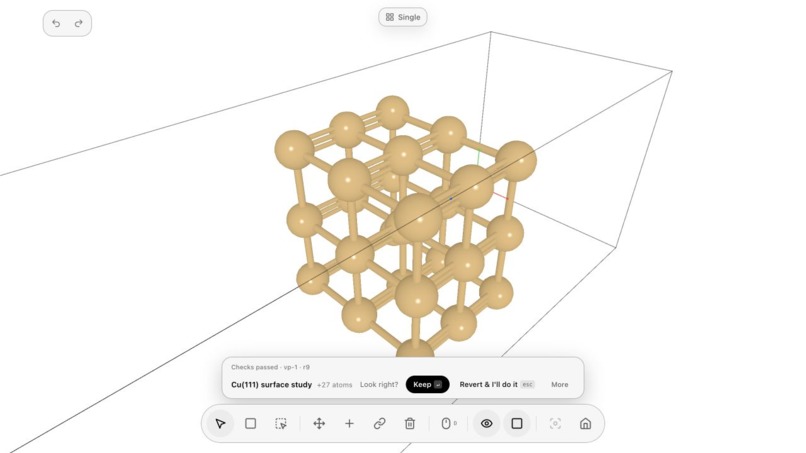
The agent first inspects the surface.
It identifies candidate sites.
It focuses the viewport on one of them.
The user rejects it:
“Not this one. The one on the right.”
The agent shifts focus to another candidate.
The user confirms.
The agent places H₂O using the oxygen as an anchor.
Then the user says:
“Point one hydrogen toward that oxygen.”
The nearby oxygen is highlighted.
The water molecule rotates.
The geometry is checked again.
No atom IDs.
No coordinates.
No copy-pasting between a chat window and a modeling program.
Just shared context.
For us, that interaction captures the entire project better than a hundred tool definitions could.
How We Built It
The modeling application already understands scientific objects: atoms, bonds, molecules, periodic cells, surfaces, selections, transformations, local neighborhoods, and camera state.
WebMCP becomes the layer through which those concepts can be exposed to an agent in a structured and controllable way.
Rather than giving the model the entire universe every time, we try to make spatial reasoning progressive.
For a large system, the agent should be able to go from:
entire system
→ structural region
→ local neighborhood
→ selected atoms
→ target site
This matters because a user may be working with hundreds or thousands of atoms while only caring about three of them.
The agent should not need a 20,000-line coordinate dump just to rotate one functional group.
We also designed operations around reversibility and verification.
Scientific modeling involves experimentation:
“Try this.”
“No, undo that.”
“Actually, the previous orientation was better.”
That means an agent needs to be able to make tentative edits, inspect the result, detect obvious geometric problems, undo them, and try again.
In other words: scientific software should support agent curiosity without turning agent curiosity into structural chaos.
The Hard Part Was Not Tool Calling
The easiest part was exposing actions.
Move atom. Rotate molecule. Create structure. Select object. Measure distance.
The harder problem was grounding.
What does “this” mean?
What does “behind” mean in a rotatable 3D scene?
Does “right” mean screen-right, crystallographic direction, or a neighboring adsorption site?
What happens when the camera moves halfway through the conversation?
How much structure should be sent to the agent?
When should the agent act autonomously, and when should it visually ask for confirmation?
These questions made us realize that agent-native scientific software needs more than APIs.
It needs a language for attention, ambiguity, and shared state.
That was probably the most important thing we learned while building this project.
What We Learned
We originally thought the important question would be:
“How many modeling functions can WebMCP expose?”
We ended up believing the better question is:
“How little internal software machinery does the user need to think about?”
If the user has to know atom IDs, coordinate systems, internal object handles, and tool names to collaborate with the agent, then we have merely moved the command line into a chat box.
The interesting interface appears when users can communicate at the level they naturally think:
“Put it here.”
“Rotate this bond.”
“Show me another possible site.”
“Why did you choose this one?”
And the agent can answer not only with words, but by changing the shared visual world.
That feels much closer to collaboration.
Why WebMCP
WebMCP gave us a useful way to think about the boundary between the application and the agent.
The application remains responsible for being a serious scientific modeling environment.
The model remains responsible for reasoning, interpretation, and planning.
WebMCP connects the two.
We do not want the agent to replace the modeling application.
We do not want the modeling application to pretend to be an AI.
We want both sides to expose what they are good at.
The result is something that feels less like:
“AI controlling software.”
and more like:
“two participants working inside the same scientific workspace.”
What's Next
This project currently focuses on giving agents better access to scientific 3D structure and human visual context.
But the same idea extends much further.
A future agent could move naturally between:
molecular construction, crystal defects, surfaces, interfaces, reaction structures, simulation setup, analysis, and eventually computational workflows.
The long-term goal is not a giant prompt that builds everything automatically.
Scientific work is too exploratory for that.
Instead, we are interested in something more practical:
an agent that can stand beside you while you work.
It can inspect.
It can suggest.
It can point.
It can manipulate.
It can verify.
And when neither side is completely sure, it can simply ask:
“This one?”
That may sound like a tiny interaction.
For 3D scientific software, we think it is a pretty big deal.


Log in or sign up for Devpost to join the conversation.