Inspiration
While watching long YouTube videos, it's easy to lose track of key moments or points you'd like to revisit. Many users need a simple way to bookmark timestamps without relying on pen and paper or copying URLs manually. This extension was inspired by the need for an intuitive, in-browser solution to manage these timestamps efficiently.
What it does
The YouTube Timestamp Bookmark Chrome extension enables users to:
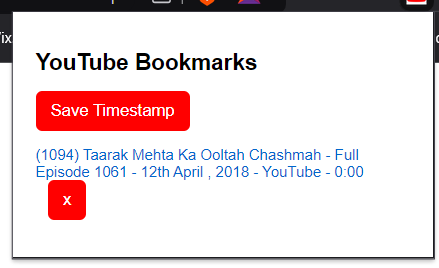
Save Timestamps: Bookmark the current time in a YouTube video with a single click. View Bookmarks: Access all saved bookmarks for the video directly in the popup menu. Quick Navigation: Click on any saved timestamp to resume playback from that specific point. Manage Bookmarks: Easily delete bookmarks you no longer need.
How we built it
The extension was developed using:
HTML, CSS, JavaScript: For designing the user interface and implementing the core logic. Chrome Extension APIs: To interact with browser tabs, store data locally, and manage user actions. Storage API: To save and retrieve bookmark data persistently across browser sessions. The user interface includes a clean popup menu where users can save, view, and manage timestamps seamlessly.
Challenges we ran into
YouTube URL Parsing: Extracting timestamps accurately from URLs was tricky, especially for various scenarios (e.g., &t= vs ?t= parameters). Persistent Storage: Ensuring bookmarks remain available across sessions required a deeper understanding of Chrome's Storage API. UI/UX: Balancing functionality and simplicity in the popup design took several iterations.
Accomplishments that we're proud of
Creating a user-friendly extension that solves a real problem for YouTube users. Efficiently handling multiple bookmarks with a clean and responsive UI. Leveraging Chrome's APIs to provide seamless interaction between the extension and YouTube videos.
What we learned
Deepened our understanding of Chrome's extension development framework. Learned to design intuitive user interfaces for browser extensions. Gained experience with handling persistent data storage and retrieval in web-based projects.
What's next for YouTube Timestamp Bookmark
Sync Across Devices: Allow users to sync bookmarks across devices via a cloud storage service. Custom Notes: Add an option for users to attach notes to their bookmarks for context. Tagging and Categorization: Introduce a feature to organize bookmarks by tags or categories. Video Summarization: Integrate AI to auto-detect and suggest key moments for bookmarking. Mobile Support: Expand functionality to mobile browsers supporting extensions.
Built With
- chrome-local-server
- chromeapi
- css
- html
- javascript


Log in or sign up for Devpost to join the conversation.