-
-
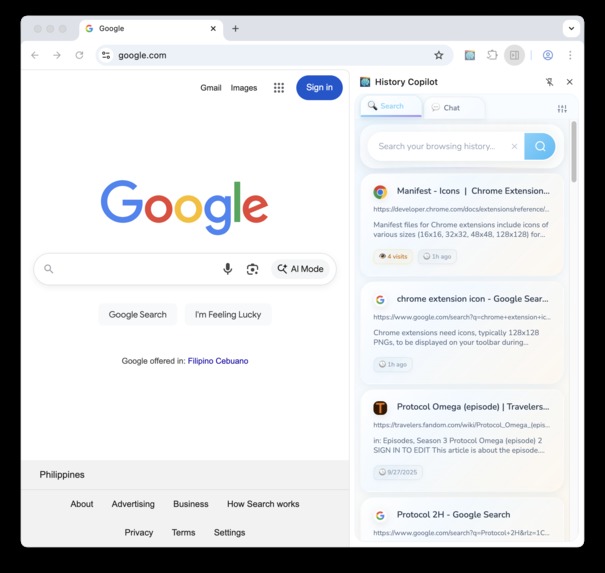
Chrome History Copilot
-
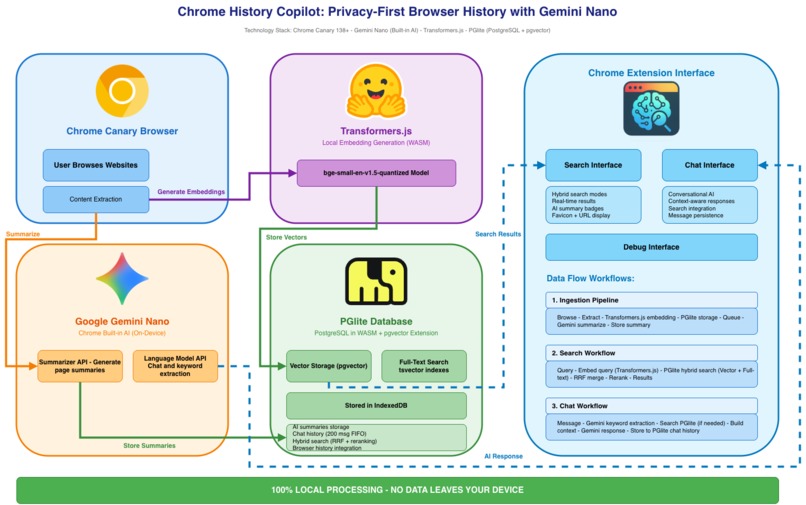
Privacy-first Architecture of the Chrome History Copilot


Chrome History Copilot: AI-Powered Semantic Search for Browser History
Your browsing history is yours. Keep it that way.
The Problem with Cloud-Based AI Browsers
AI-powered browsers from OpenAI, Perplexity, and others promise intelligent search, but at a cost you might not see. Every search query, every page you visit, every question you ask their AI gets sent to their servers. Your browsing patterns, research interests, and private reading habits become training data or potential security liabilities.
For researchers, developers, and privacy-conscious professionals, this isn't acceptable.
A Different Approach: Zero-Knowledge AI
Chrome History Copilot brings AI-powered semantic search and chat to your browser history without sending a single byte of your data to the cloud. Everything runs locally on your device using Chrome's on-device AI APIs and local vector search.
Your history never leaves your machine. No API keys. No cloud services. No data collection. Period.
What It Does
Check out the full video of the screen recording in YouTube
Transform your browser history into an intelligent, searchable knowledge base:
Semantic Search: Find pages by meaning, not just keywords. Search for "eventual consistency patterns" and find that distributed systems article you read months ago, even if those exact words weren't in the title.
AI Chat Interface: Ask natural language questions about your browsing history. "What machine learning frameworks did I research last week?" Get contextual answers with links.
Automatic Summaries: Every page gets an AI-generated summary for quick scanning, eliminating the need to click through dozens of vague titles.
90-Day Retention: Searchable history integrates with Chrome's native 90-day browser history, giving you both semantic and traditional search in one interface.
How It Works
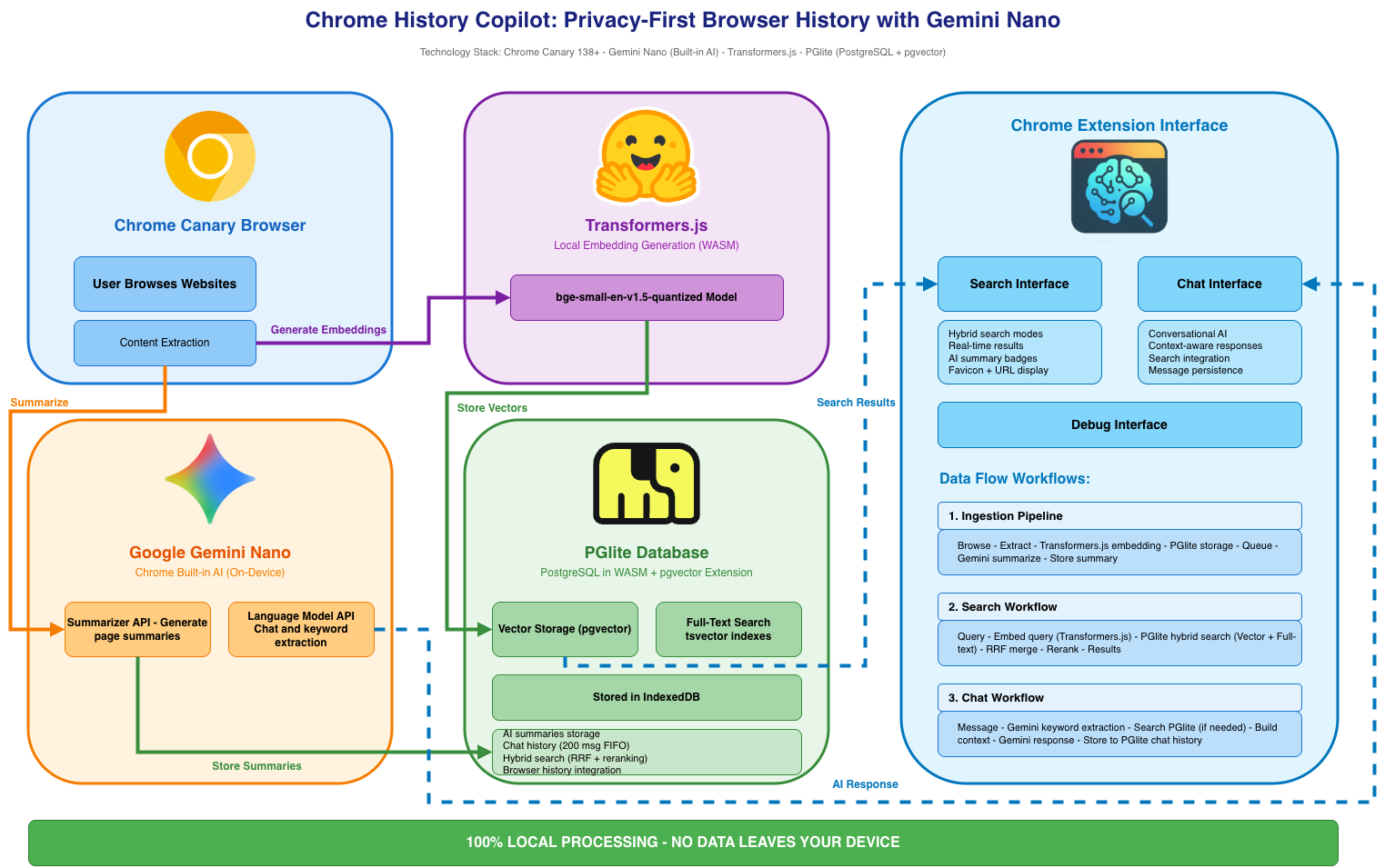
Database: Full PostgreSQL (via PGlite WASM) with pgvector for vector similarity search. Your history gets the same search capabilities as cloud-based systems, but running entirely in your browser's IndexedDB.
AI Stack:
- Chrome's built-in on-device Language Model API (requires Chrome Canary)
- Local Transformers.js for 384-dimensional semantic embeddings
- PostgreSQL full-text search for keyword matching
- Hybrid retrieval with two-stage reranking for optimal results
Architecture: Content extraction runs automatically via content scripts. Every page you visit gets processed locally in four stages: first, text extraction from the page content; second, embedding generation for semantic search; third, full-text indexing for keyword matching; and finally, queueing for AI summarization. All processing happens in an offscreen document to keep your browser responsive.
Search Modes:
- Hybrid + Rerank (default): Combines vector similarity and full-text search, then reranks by semantic relevance, recency, and visit frequency
- Advanced options: Vector-only, text-only, or hybrid without reranking for different use cases
Privacy Architecture
What stays local:
- All browsing history and content
- Vector embeddings and search indexes
- AI-generated summaries
- Chat conversations
- Search queries
What gets downloaded (optional):
- Embedding model files from Hugging Face (cached locally after first download)
- Chrome AI models (handled by Chrome itself, not this extension)
What never leaves your device:
- Everything else
Who It's For
- Researchers who need to recall papers, articles, and documentation without exposing reading lists to third parties
- Developers who want semantic search over technical blogs, Stack Overflow threads, and GitHub repos they've visited
- Security-conscious professionals who can't afford to leak browsing patterns to cloud providers
- Knowledge workers who read extensively and need intelligent recall without sacrificing privacy
Why Local AI Matters
Cloud-based AI browsers are convenient, but they demand trust. You must trust that your data won't be exposed, that your queries won't be stored indefinitely, and that your research habits won't shape how unseen algorithms treat you.
Local AI removes that uncertainty. The code is open, the processing happens on your device, and your data stays with you.
If you value privacy in what you read and search for, local AI is the only way to ensure it.
The Experience
Instead of remembering "that article about neural networks from TechCrunch or maybe Wired," you search for "transformer architecture explained" and find it instantly, even if the page title was something generic like "The Next Big Thing in AI."
Your browsing history becomes a personal knowledge base that gets smarter over time, without trading your privacy for convenience.
Challenges Encountered
Building a privacy-first, on-device AI search engine revealed that search quality is as much art as science.
SQLite WASM Dead End: The project started with SQLite WASM and sqlite-vec, but the prebuilt binaries lacked IndexedDB VFS support. Chrome extensions rely on IndexedDB instead of OPFS due to threading constraints, so building from source with a custom VFS turned out to be more trouble than it was worth. I eventually switched to PGlite, which provides native IndexedDB support out of the box.
Weight Tuning: The initial ranking weights (30% semantic, 40% keywords) with extra boosts for title, domain, and URL added too much noise. Keyword matches dominated the results, and clickbait often ranked higher. The final weights were simplified to 40% semantic, 30% keywords, 20% recency, and 10% popularity, with all explicit boosts removed.
Multi-Word Search Failures: The original AND logic (“foo bar buz qux” required all words to appear) often produced zero results. Switching to OR logic improved recall by allowing any matching words, then ranking results by match count and semantic similarity.
Vector Embedding Quality: The system initially embedded the first 8,000 characters of each page, but this still produced diluted and inconsistent embeddings. AI-generated summaries turned out to be better sources for vector search because they are concise, semantically focused, and consistent in length. The final design combines vector search over summary embeddings with full-text search over the original content.
Proof of Concept
This project is a proof of concept intended to show what an on-device AI search engine could do. Search accuracy and ranking are still rough around the edges, but these can be improved with better models, more data, and fine-tuning.
Built With
- chrome
- javascript
- pglite
- transformers.js
- wasm

Log in or sign up for Devpost to join the conversation.