-
-
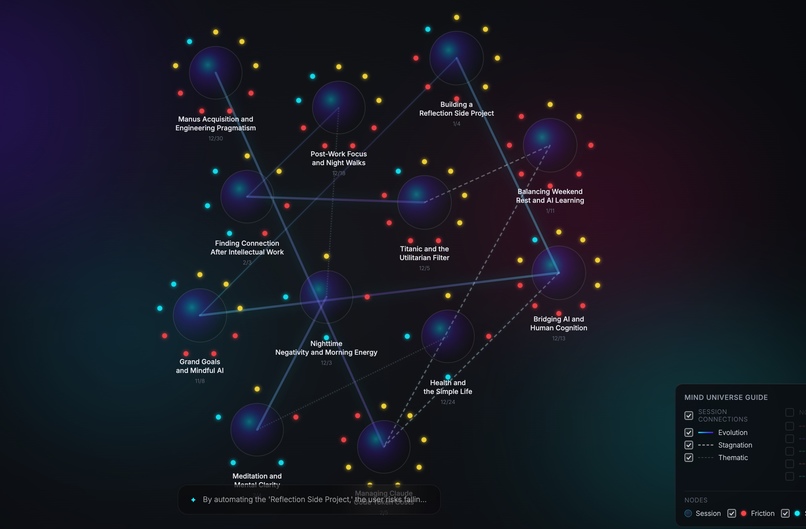
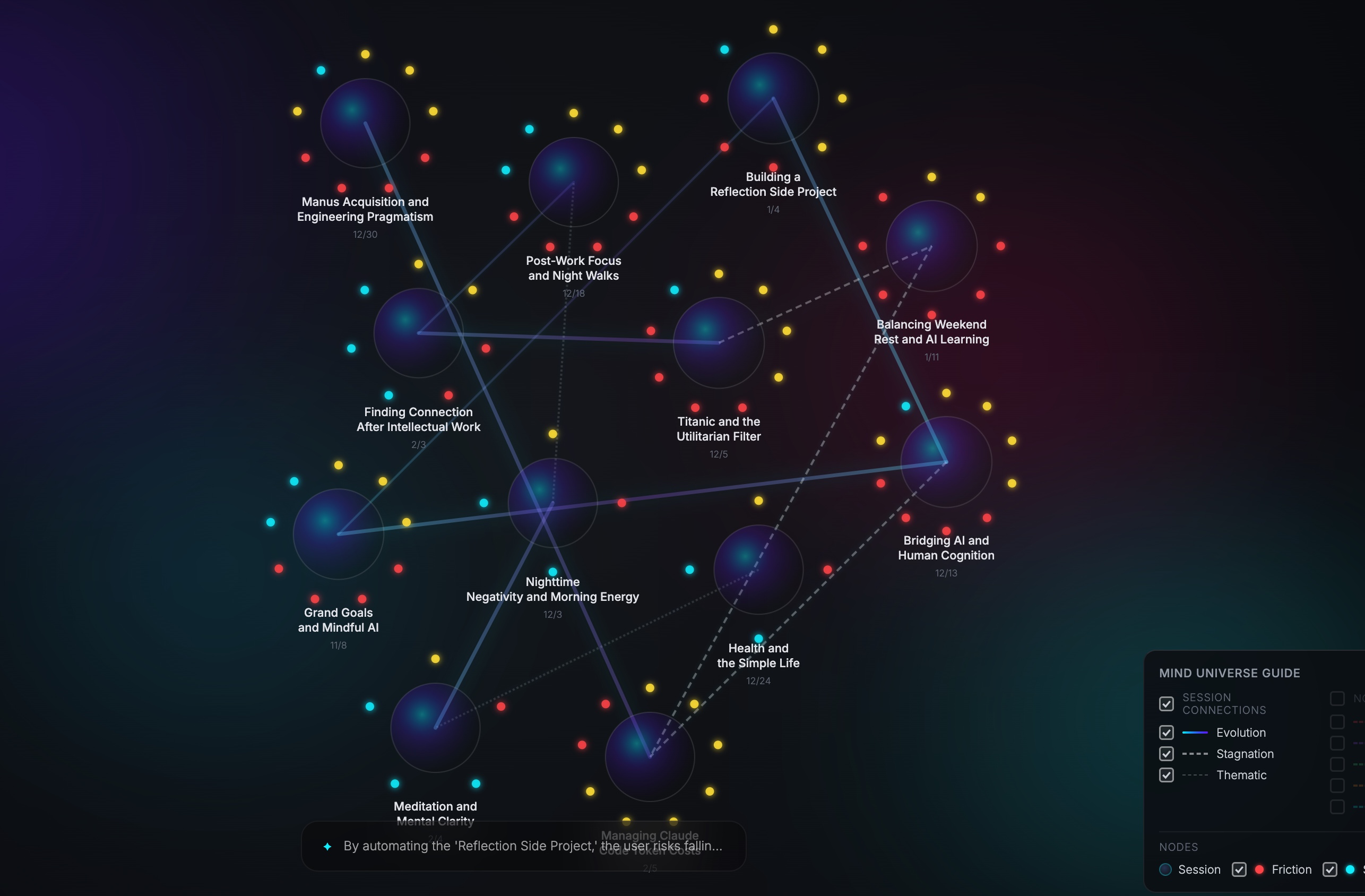
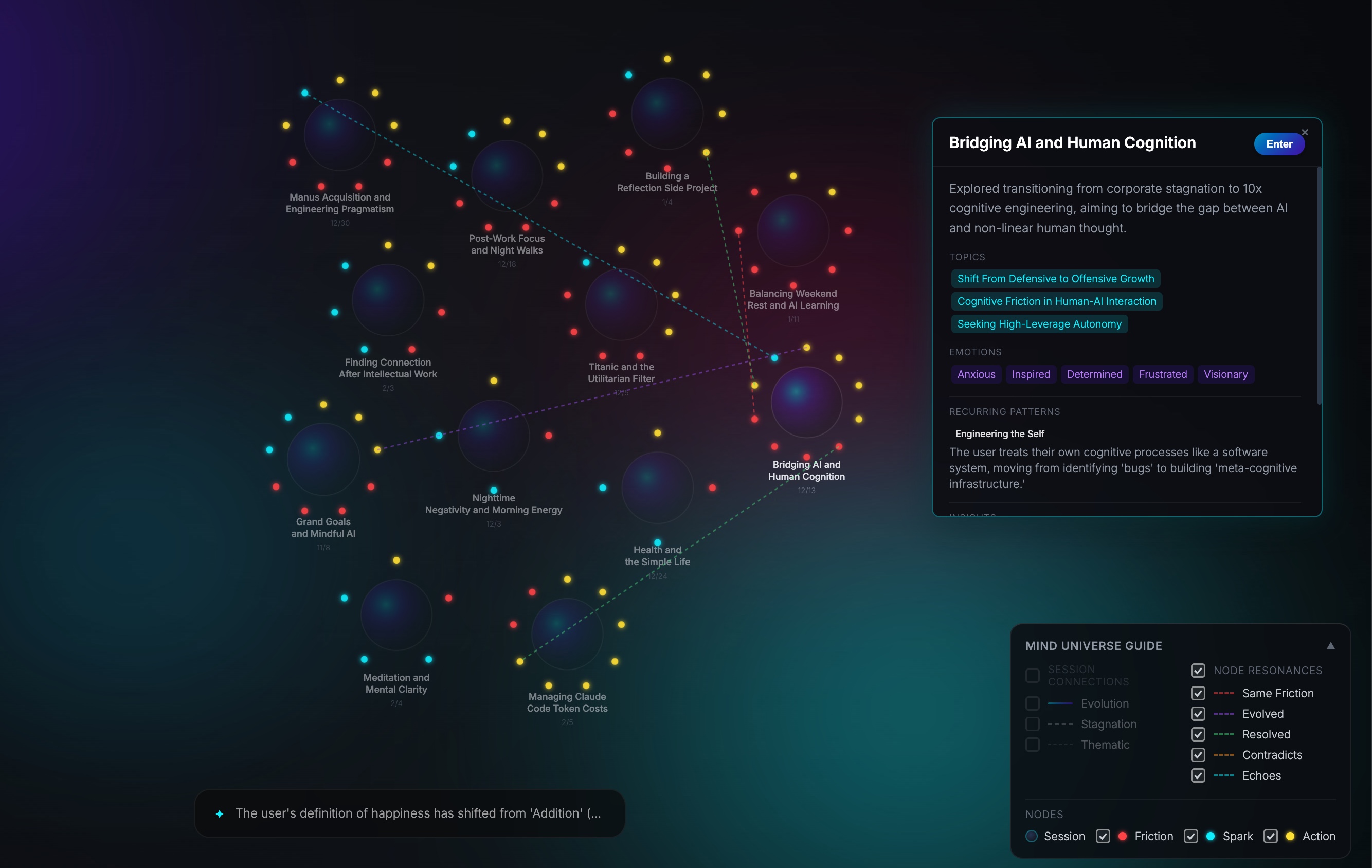
Mind Universe View (multiple sessions)
-
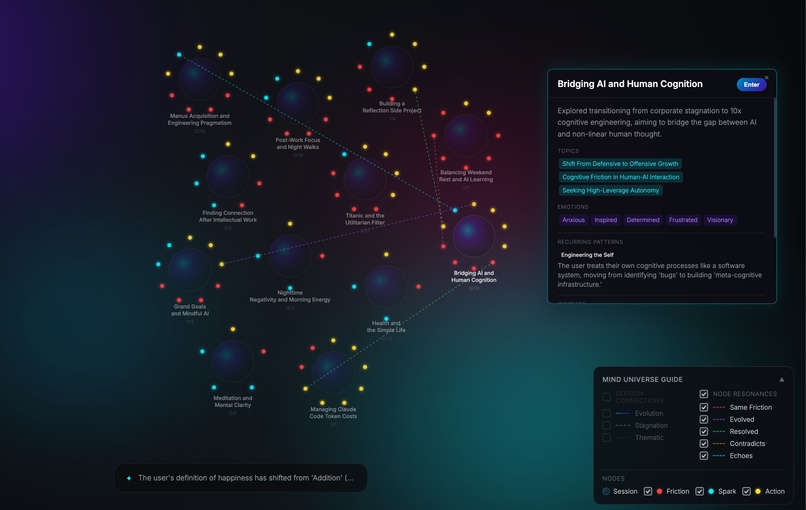
Thoughts connections cross multiple sessions
-
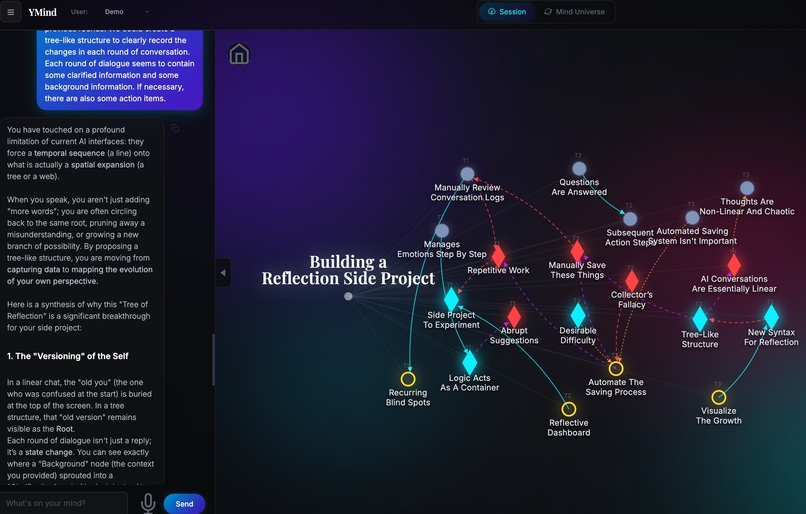
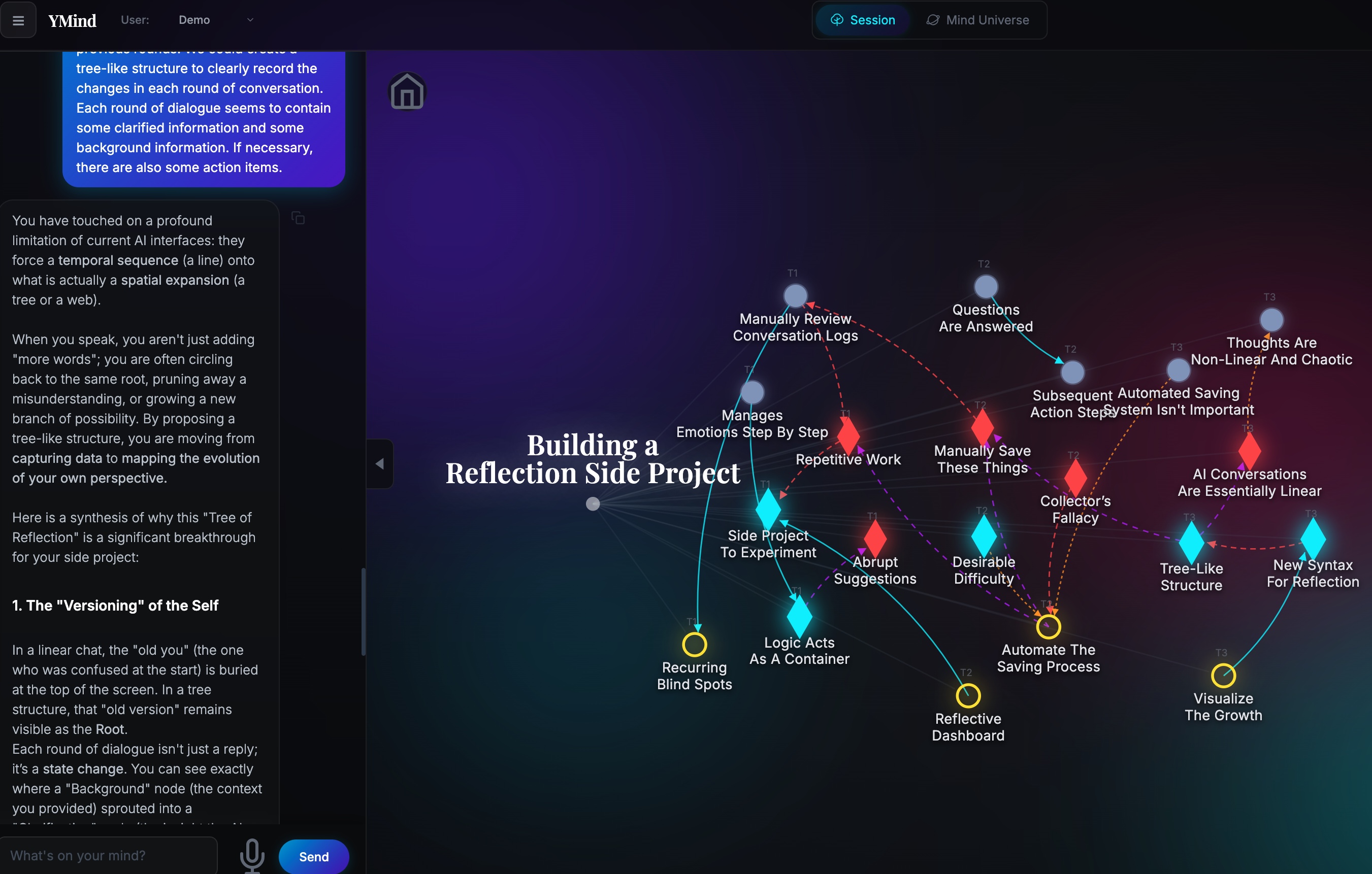
Real time tree view besides the chat box
-
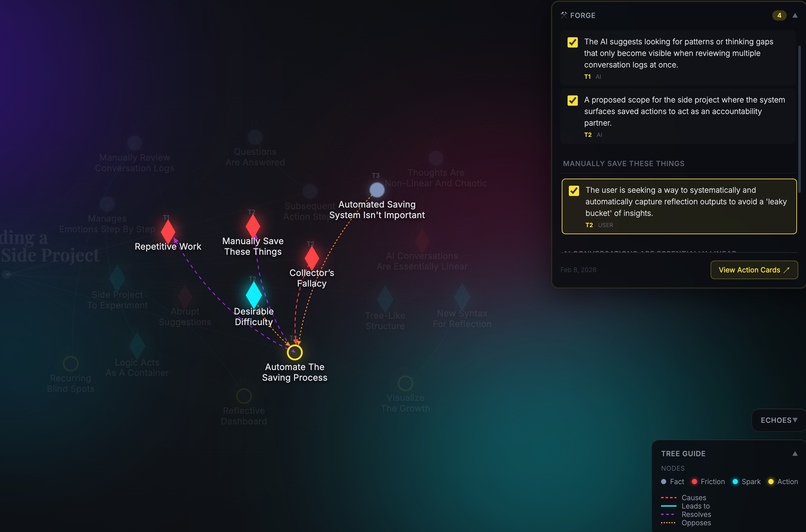
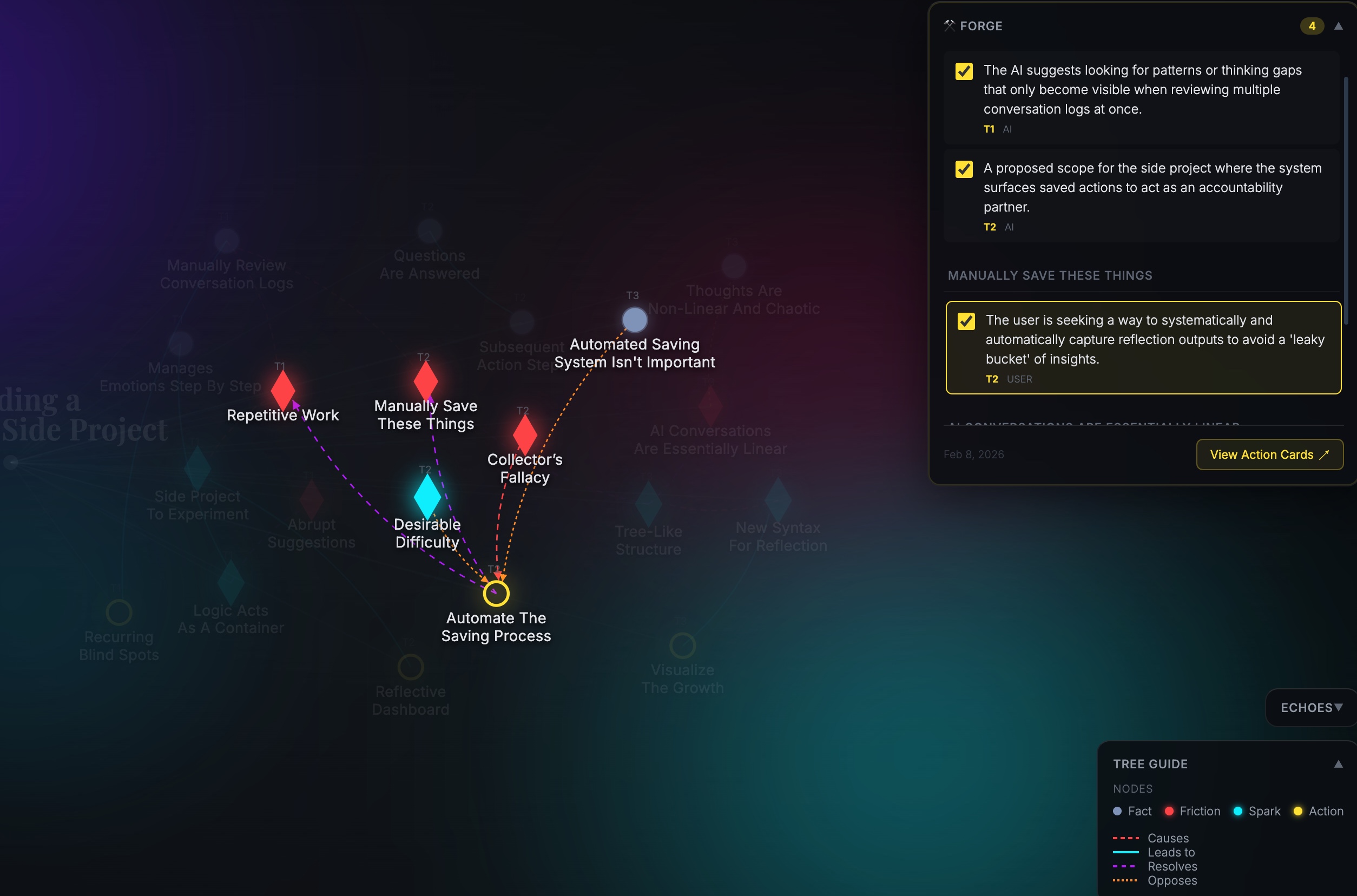
Different conversation topic leads to the same action
-
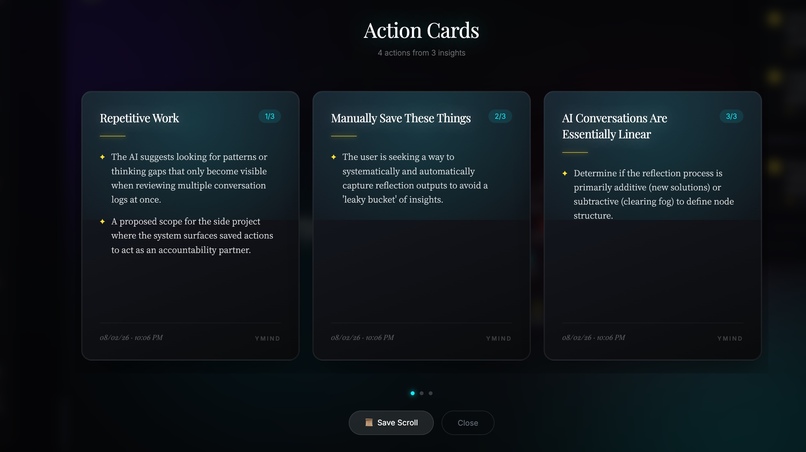
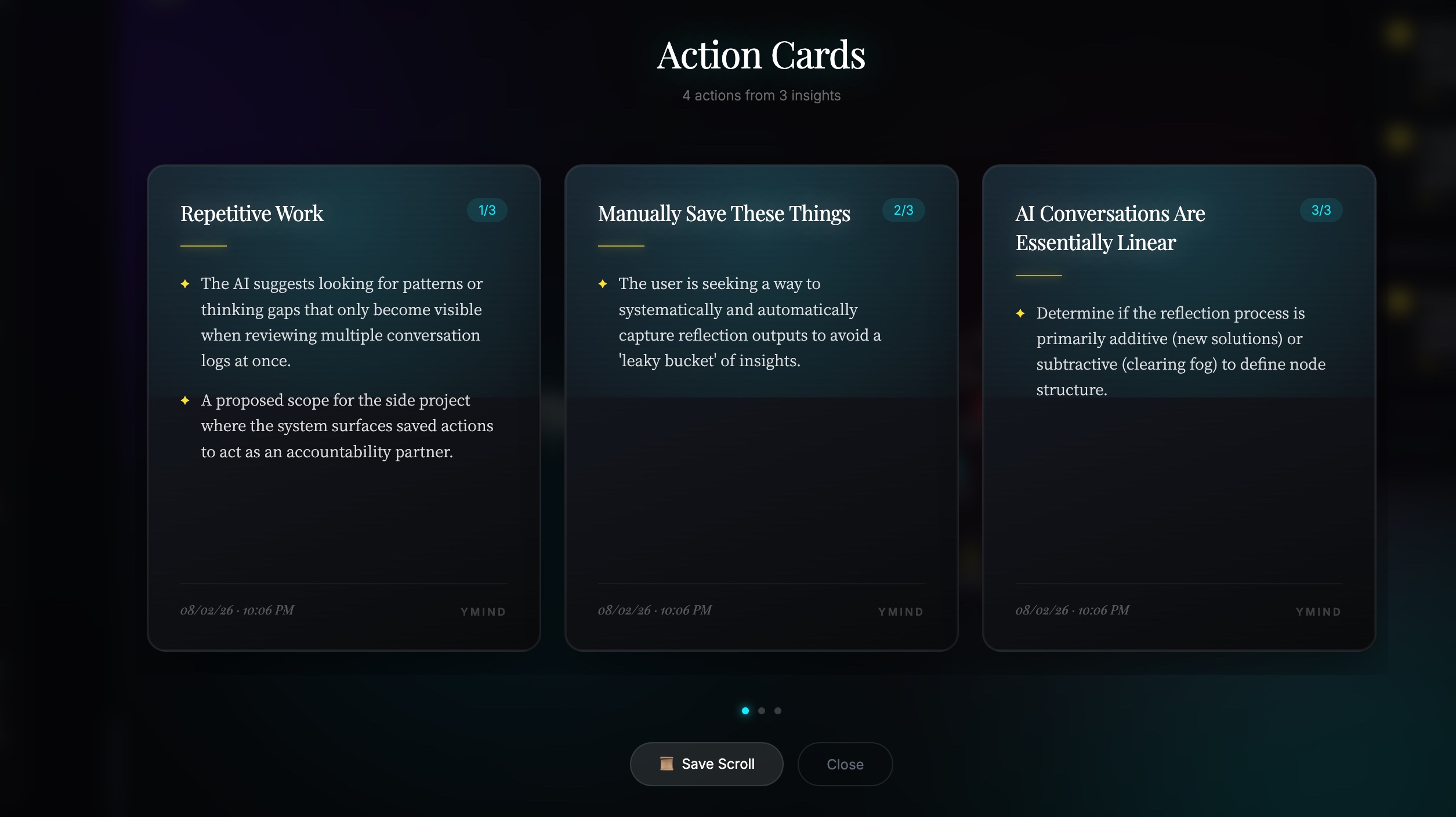
Action cards
Inspiration
We're living in the age of AI conversations. AI isn't just getting smarter at tasks—it's getting better at reflection. It knows how to hold space for your emotions, use evidence-based frameworks, gently guide you from confusion to clarity. For introspection, AI can be incredible: patient, structured, non-judgmental.
But here's the problem: the deeper the conversation, the worse the aftermath.
A single deep session generates dozens of insights—facts, tensions, breakthroughs, next steps. By the end, your head is buzzing with ideas, but they're scattered across a 20-message thread. You know there's gold in there, but extracting it means manually re-reading, copy-pasting, organizing. Most people don't. The insights fade.
Scale this across weeks. You have the same conversation three times without realizing it. That problem from January? Still unresolved in March, just wearing a different mask. You feel like you're growing, but you're circling. The patterns are invisible because chat is linear, and memory isn't.
Some tools are adding "memory" features—background context, auto-tags, search. But they're still text-based, still invisible. Your brain doesn't think in search queries. It thinks in networks: this problem connects to that insight, this theme appears across three contexts, this action resolved that tension.
We needed a tool that treats AI conversations not as disposable exchanges, but as raw material for a visual external memory system—one that shows structure, reveals patterns, and thinks like you do.
What it does
YMind transforms AI conversations into a dynamic, visual knowledge graph using a "Physics of Thought" model.
During a conversation, using Gemini's structured output, YMind extracts four types of thoughts in real-time:
- Facts: Concrete information, background context, anchors
- Frictions: Contradictions, confusion, obstacles, tensions
- Sparks: Insights, "aha moments", realizations, connections
- Actions: Next steps, decisions, commitments
It also captures relationships between thoughts: what causes what, what resolves what, what opposes what. The result is a living knowledge graph that grows as you talk, showing not just what you said, but how your thoughts connect.
Across conversations, when you save meaningful sessions, they become "planets" in your Mind Universe. Click "Analyze," and Gemini's 2M context window reads all your saved sessions—weeks or months of dialogue—to reveal:
- Cross-session patterns: "The Efficiency Tax" appearing in 3 conversations across 6 weeks
- Evolution arcs: How your thinking on a topic shifted from confusion to clarity
- Node-level resonances: This friction from January connects to this spark from last week
Privacy First: Built with a local-first architecture. Your thoughts are stored on your device, not a cloud server. AI is used as a processor, not a vault.
How we built it
YMind is built on LangGraph for multi-agent workflow orchestration, with Google Gemini APIs at its core.
Architecture:
Unified Extractor Agent: Uses Gemini Flash with structured JSON output to parse each conversation turn into nodes and relationships. Runs in real-time as you type, extracting the "physics" of your thinking.
State Updater Service: Mounts new nodes to the graph and manages a three-layer data model (Display / Semantic / Source layers) for visualization, search, and context recovery.
Cross-Session Analyzer: When you click "Analyze" in Mind Universe view, this agent uses Gemini Pro's 2M context window to read all your saved sessions and identify patterns. It doesn't chunk, summarize, or embed—Gemini reads the raw dialogue directly.
Voice Transcription: Gemini's audio API allows users to speak their thoughts directly, lowering the barrier for capturing fleeting insights.
Session Storage: JSON-based local file system. Each user gets a directory, each session gets a file with metadata and full state.
Frontend: Vanilla JavaScript + D3.js force-directed graph. Two views:
- Tree View: Real-time conversation structuring
- Mind Universe (Connectome) View: Multi-session pattern visualization with "planets" (sessions) and "satellites" (key nodes)
Development Tools: Prototyped prompts in Google AI Studio; built with Antigravity for rapid iteration.
Key Technical Decisions:
- LangGraph for clean agent separation and workflow orchestration
- Gemini's structured output mode for reliability
- Hash-based caching for cross-session analysis (don't re-analyze unchanged sessions)
Challenges we ran into
1. Defining the "Physics" of Thought
At the start, I didn't know what patterns to capture for thoughts. I observed how different AIs respond—some gave facts, some explored tensions, some offered breakthroughs. Gradually, a universal structure emerged: Fact (context), Friction (obstacles), Spark (insights), and Action (next steps).
But having Sparks wasn't enough. I realized that without Actions—and the interactions tied to them—insights remain inert. The model evolved from "what's happening" to "what's happening and what to do about it."
2. LangGraph Workflow Optimization
How do you minimize LLM calls while keeping the experience fluid? Early versions of the chat flow made multiple sequential Gemini calls per turn—slow and fragile.
I tried merging prompts to reduce API calls. Some worked (converging tasks), but some didn't—certain prompts need divergence to preserve nuance. After trial and error, I settled on asynchronous execution where possible, and kept critical steps sequential where context matters. The tradeoff: fewer calls, but not at the cost of accuracy.
3. Discovering Cross-Session Analysis
Cross-session wasn't part of the original vision. I built single-conversation structuring first, but it felt incomplete—like building a map of one day instead of a journey.
Stuck in implementation details, I stepped back: What's the real value here? The answer: patterns across time. A friction appearing three times over weeks. An evolution arc from confusion to clarity. That insight shifted the entire product direction—from "chat visualizer" to "thought memory system."
4. Explicit Relationship Extraction
Gemini can infer connections implicitly when analyzing full context. But for users, seeing the connection—this Friction causes that Spark, that Spark leads to this Action—deepens understanding. The graph isn't just a visualization; it's a cognitive tool.
So I added explicit relationship extraction on top of holistic analysis. It's redundant from an AI perspective, but essential from a human one.
Accomplishments that we're proud of
1. Cross-Session Patterns That Surprised Me
This is where YMind truly came alive. Testing it on my own conversations, I didn't notice connections between sessions—but when they converged in Mind Universe, the patterns stopped me cold. Conversations I thought were unrelated turned out to share a recurring friction. A breakthrough in one session echoed a tension from weeks earlier.
It's one thing to build a feature. It's another when the tool reveals something about yourself you couldn't see. That moment—seeing my own thoughts connected across time—was the strongest validation.
2. A Thinking Tool, Not Just a Reflection Tool
I built this for introspection. But when I used it for technical problem-solving, it worked just as well. The Fact/Friction/Spark/Action structure isn't just for emotions—it mirrors how the brain processes any information.
Friends who tested it reported the same: clearer thinking, whether debugging code or untangling life decisions. And crucially, it captures relationships across turns, not just adjacent messages. Even when topics shift or extend, the graph stays coherent. That eliminates the frustration of scrolling through linear chat to reconstruct context.
3. Building a Mirror Taught Me to Think Differently
Developing YMind changed how I approach problems. When the memory is externalized and visualized, I can step outside the current mental state and observe my thinking from a distance. It's metacognition made tangible.
I didn't just build a tool—I internalized a practice: structure your thoughts, see the connections, step back when stuck. YMind became my own cognitive scaffold.
4. Simplicity Through Long Context
Thanks to Gemini's 2M context window, the architecture is radically simple—no RAG, no vector databases, no chunking. But this is Gemini's accomplishment, not mine.
What we learned
1. Long Context Beats Complex Pipelines
When I started building cross-session analysis, my instinct was to use embeddings. I spent an evening implementing it. The results were mediocre—semantic search couldn't capture the nuance of evolving thoughts.
Then I tried something simpler: just send Gemini the full context. All sessions, no chunking. The results were strikingly better. Turns out, long context changes the game—you don't need retrieval if the model can just read everything.
The lesson: sometimes the "obvious" solution (embeddings, RAG, vector DBs) is overthinking it, exactly like "the Bitter Lession". Long context makes complexity obsolete.
2. Gemini's Multimodal Capabilities Feel Natural
Voice: For deep thinking tools, typing is a bottleneck. You slow down to type, and the thought shifts. Voice input removes that friction—speak your raw thoughts, YMind structures them.
When I explored Gemini's Audio API, I realized it's as simple as the Text API. Multimodal isn't a bolt-on feature; it's baked into the model. That fluidity matters.
Structured Output: JSON mode is reliable. The model understands the schema and conforms. It's the difference between a demo and a production tool.
3. Building in Public with AI as a Teacher
I had zero web development experience before this project. I learned HTML, JavaScript, D3.js, and FastAPI while building YMind—starting in AI Studio's visual interface, then moving to a local IDE.
But the bigger lesson wasn't technical—it was methodological. Before tackling unfamiliar problems, I'd step back and discuss the approach with Gemini (the chat version, not the API). Not "write this code," but "what's the strategy?"
Example: when juggling frontend and backend dev, Gemini suggested starting with the frontend. Build the UI first, see immediate feedback, then wire up the backend. Avoid debugging two layers simultaneously. That advice saved me days.
AI isn't just a coding assistant—it's a consultant. When you're entering a new domain, that guidance is invaluable.
What's next for YMind
Near-term (v0.2):
- Quick thought capture: Not every insight needs a full conversation—just jot it down, let it accumulate
- Export/import: Markdown, JSON, interoperability with other tools
- Manual node editing: Fix LLM mistakes, annotate your own thoughts
Mid-term (v0.5):
- Multimodal memory: Text alone can't capture how the brain stores context. Some memories surface as images—visual snapshots that language later retrieves. Support images, PDFs, voice memos as first-class memory units.
- Customizable filters: As sessions grow, so does graph complexity. Let users filter by time, node type, or themes to surface what matters.
- Architecture upgrade: Migrate from JSON to a proper database for performance and scalability.
Long-term (v1.0+):
- AI active intervention: Pattern alerts ("This friction appeared 3 times—ready to explore?"), gamification for cognitive reinforcement, action tracking with reminders and positive feedback loops to sustain behavior change.
- Memory system research: Explore long-term vs. short-term memory models (inspired by systems like OpenClaw). How should memories decay, resurface, or consolidate over time?
Vision: YMind is a cognitive scaffold for thinking itself—not just reflection, but any knowledge that grows over time. I want patterns to surface naturally, and insight to feel inevitable.
Built With
- antigravity
- d3.js
- fastapi
- gemini
- javascript
- langgraph
- pydantic
- python


Log in or sign up for Devpost to join the conversation.