-
-
YesProf! Logo
-
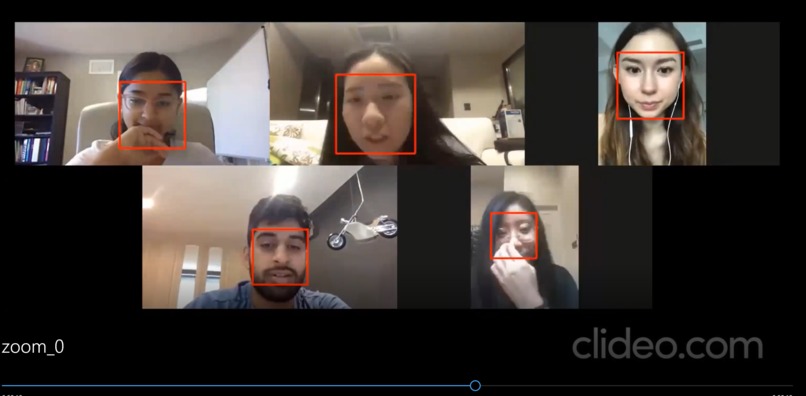
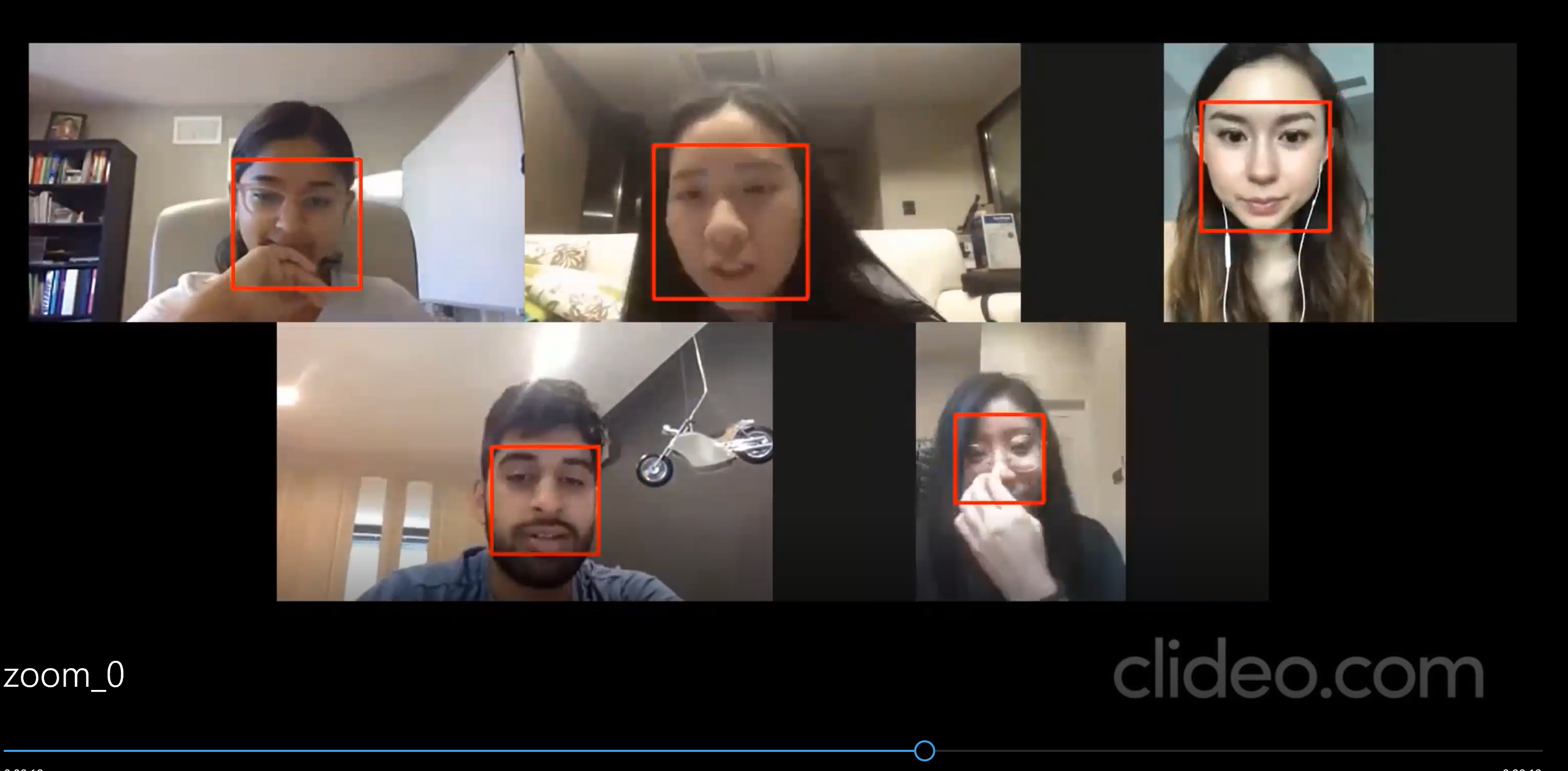
Face Detection Feature on Sample Zoom Recording
-
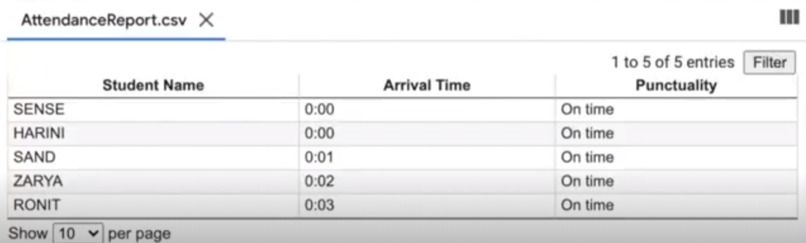
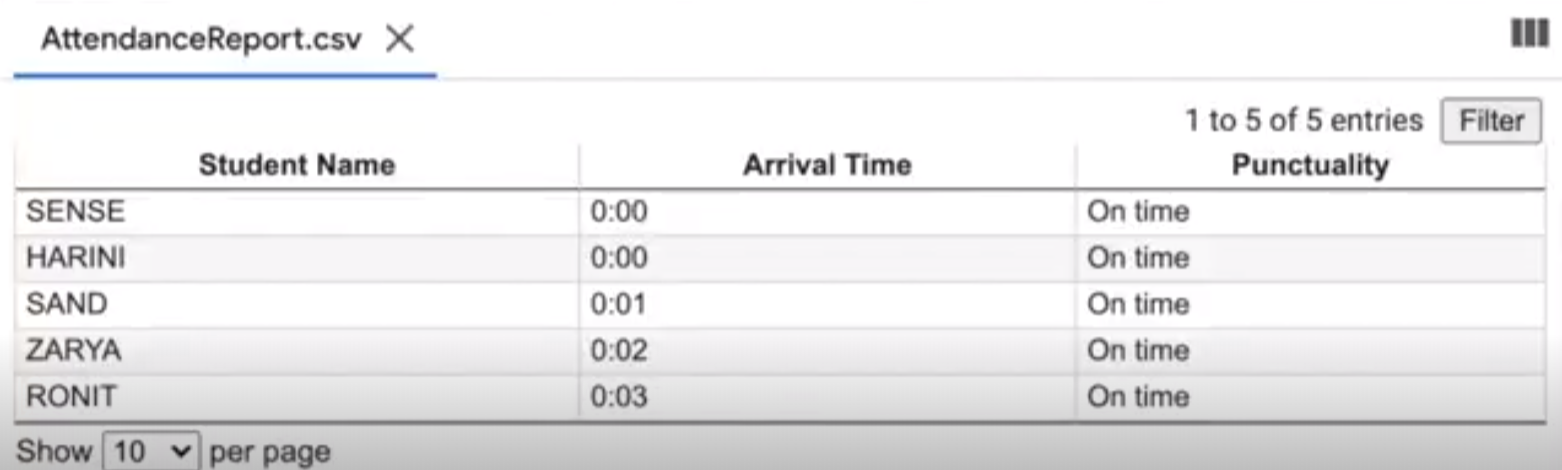
csv File View of Attendance
-
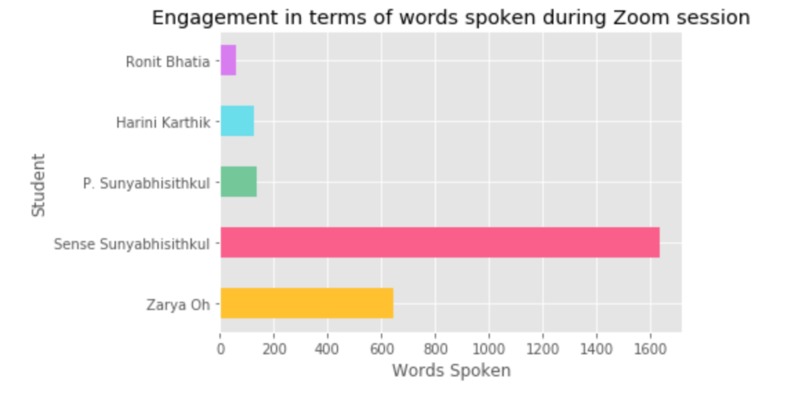
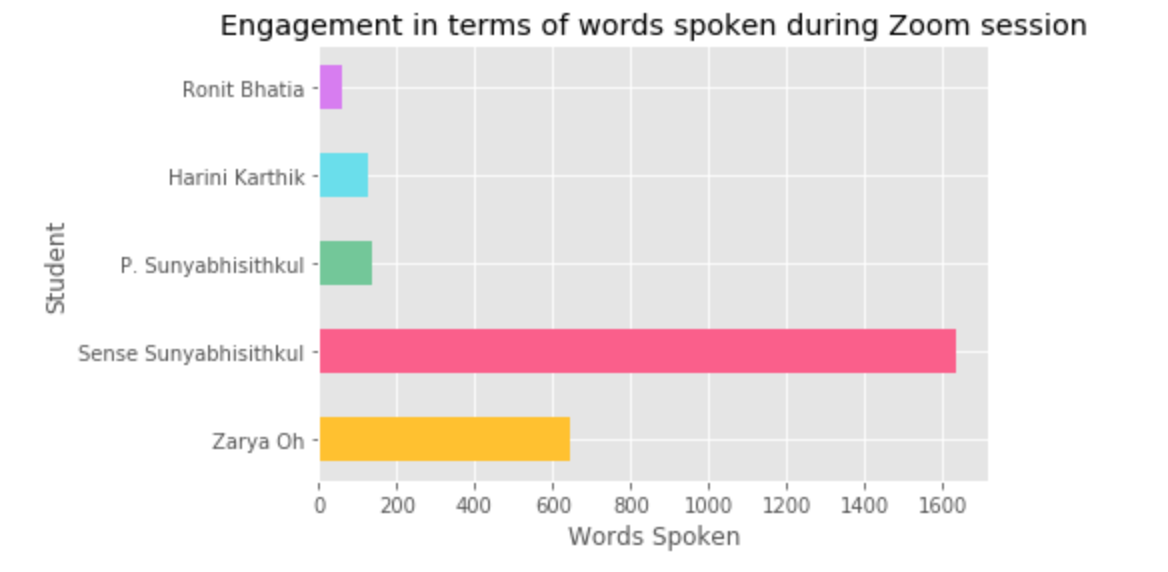
Session Engagement Report_Audio
-
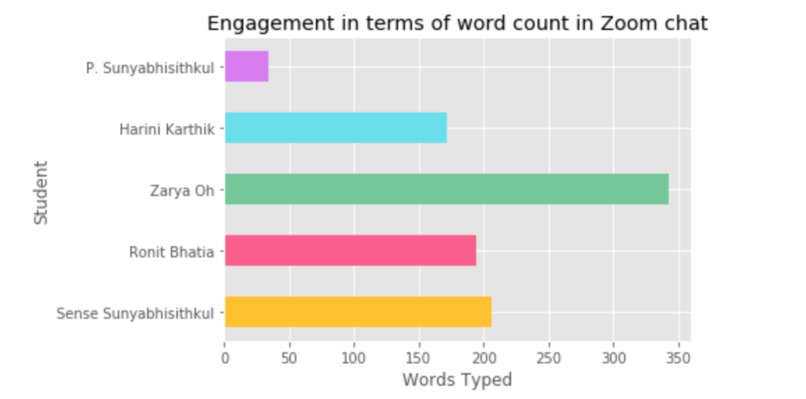
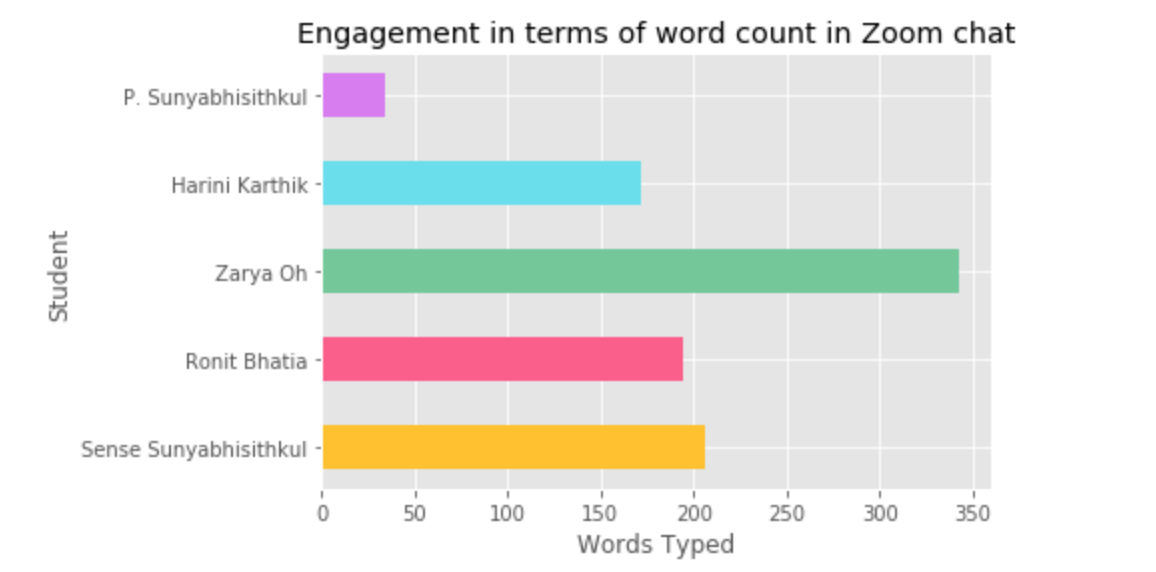
Session Engagement Report_Chat
-
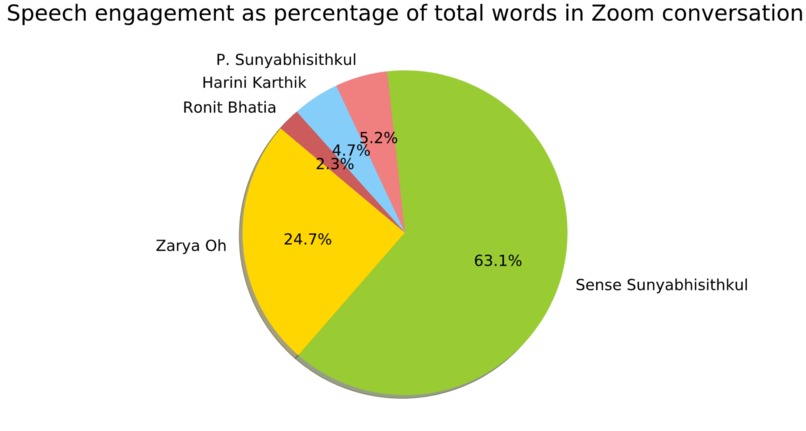
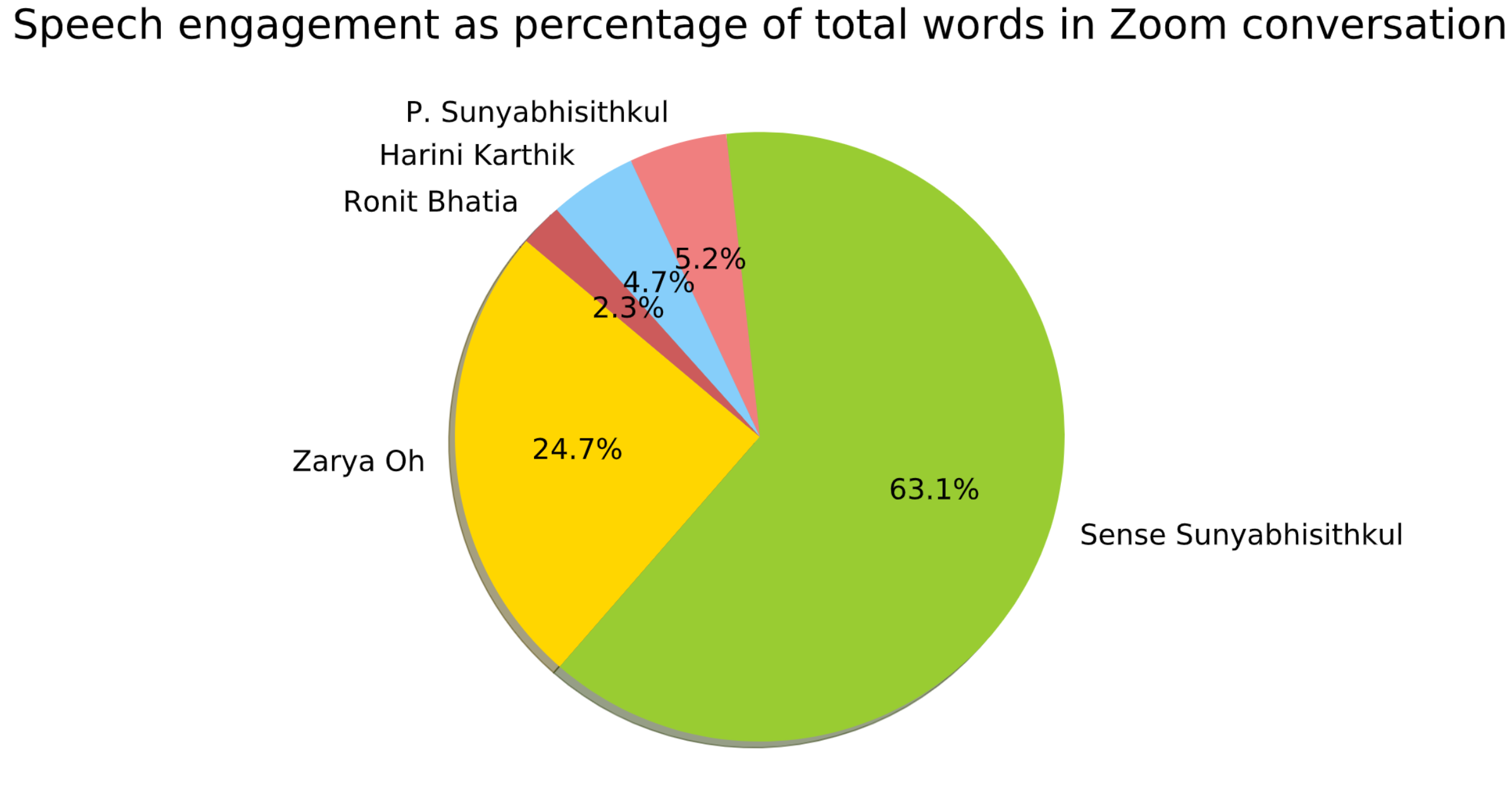
Speech Engagement_Word Count
Inspiration
As a result of the COVID-19 pandemic, there has been a massive rise in the use of video conferencing as a tool for educational institutions to support remote learning. Despite many advanced features that current online platforms offer, there are some issues that we ourselves have encountered when it comes to the virtual learning experience. For instance, when Sense was leading a university preparation workshop through Google Meet, many students were late to the class and refused to turn on cameras during the call. Harini has also experienced changes to her school assessments, with her teachers no longer producing an engagement grade after the implementation of online learning. We believe that working on advanced features that directly tackle these problems would encourage students to participate more and act as a tool to support educational assessments around the world.
What it does
This technology consists of two significant entities that include attendence tracking feature using face recognition and pdf-generated engagement session report. It purely fulfills its purpose of analysing student data such as attendance and engagements, and produces reports to instructors to track students' progress and drive them in the correct path of achievement.
1) Attendance Tracker Use of virtual classrooms through video conferencing has made it more difficult for teachers to track students' attendance and keep note of lateness without wasting some time at the start of the class. Our attendance tracker uses facial recognition technology to detect when a student enters the classroom, which is then noted into the system to track the time they entered and whether they were late or not.
2) Engagement Reports Online learning platforms may prove to be more difficult for teachers to track student engagement during a class. Thus, we produced data-driven reports which summarise students' engagement through spoken and typed words during the session. For speech engagement, we noted the word count of each student by transcribing conversations using speech recognition. We then produced a PDF containing all charts and a CSV file summarising the data (which includes chat contributions from each student). This data-driven tool acts as a objective tool for teachers to conduct student engagement assessments.
How we built it
1) Attendance Tracker To conduct facial recognition on students, we used the cv2 library to read and manipulate media and then utilised available APIs from the face-recognition library. Firstly, we had a folder containing an image from each "student" in the demo. We then detect faces in these images and stored each face encoding in a list. Subsequently, we loaded the videos using OpenCV and conducted an analysis frame-by-frame for face detection and recognition. Once the whole recording was analysed, we write to a CSV file to mark when a student first enters the call and whether they were more than 5 minutes late to the class.
2) Engagement Reports For the chat analysis, we simply read the .txt file which was saved from the demo and presented the word count for each student in various graphs using Matplotlib. However, for the speech analysis, we used the SpeechRecognition library to access Google Cloud Speech API for transcribing the demo conversation. We then ran the same analysis to produce graphs and summaries for speech, which we finally exported to a PDF file using PdfPages and a CSV file using Pandas.
Challenges we ran into
- Initially used CNN to conduct facial recognition (refer to testing notebooks) with 97.05% training accuracy, however this required a large training set of 100 photos per individual, validation accuracy was low and the model would predict an unknown person as an individual from the training set. Thus we searched for a different method in facial recognition and found that calculating the Euclidean distance between two face embeddings is a much better method.
- Difficulties with rendering output video which included the facial detection as our code produced output images frame by frame, resulting in long runtimes and no video exports.
- Trying to quantify how much an individual contributes to a conversation was an initial problem we encountered. However, after exploring many options, we decided to use Speech Recognition to transcribe the conversation which we then used to calculate the word count per person. However, the Google Cloud API only allows requests for clips shorter than 60 seconds, which we therefore had to overcome by splitting our input audio into shorter sections.
- Speaker classification from conversation transcript. If this feature was implemented through video conferencing platforms (i.e. Zoom) the way we initally intended it to, the software should be able to identify different speakers from the audio channel it is coming from. However, due to time constraints, we were not able to properly apply lip tracking to identify speakers and so hard-coded speakers from the transcript for demonstration purposes.
Accomplishments that we're proud of
- We were able to implement the attendance tracker on a live web camera, thus the model works real-time with only one photo needed for correct identification.
- Being able to correctly track and identify face of every "student" in the Zoom Video Demo with a single ID photo.
- Being able to apply speech recognition to track speach engagement for each participant.
- Produce aethetically pleasing graphs to summarize engagement data.
What we learned
- How to apply facial recognition technology on live and recorded videos.
- Working with cv2 library to handle and manupilate videos.
- Learnt how to use Google Speech API as a tool for analysing speech engagement, which meant learning how to work with new libraries such as SpeechRecognition, PyAudio and PyDub.
- Using GitHub for version control and team collaboration.
What's next for YesProf!:Novel-Based Approach to Facilitate Virtual Learning
- Improve on certain bugs in code, such as the model detecting the face on Sense's profile picture in demo and marking its attendance.
- Learn how to integrate this as an advanced feature on video conferencing platforms.
- Improve on existing features, i.e. interface to set custom late time mark, show a statistical report of average contributions, create a calculator with custom inputs to help calculate grades for student engagement
- Add more features that we think could be useful in facilitating virtual learning, particularly through video conferencing.


Log in or sign up for Devpost to join the conversation.