YConstruction
Voice-first construction defect reporting on iPhone, grounded to the building model and reviewed inside Blender.
What problem are we solving?
Construction sites still lose a huge amount of context during handoff. A worker sees an issue, takes a photo, says a few words, and hopes the right person later understands exactly where it is, what element it affects, and what should happen next.
Most of the time, that context gets flattened into loose text, scattered photos, and disconnected updates. We wanted to build a system that keeps the context attached from the moment the issue is reported.
A worker should be able to just speak naturally, capture the issue on-site, and have that report land on the actual building model instead of disappearing into another generic ticket.
What is YConstruction?
YConstruction is a voice-first iPhone app for construction defect reporting. A site worker points their phone at an issue, speaks naturally, and the app captures the photo, transcribes the speech locally, and structures the defect against the project's IFC model.
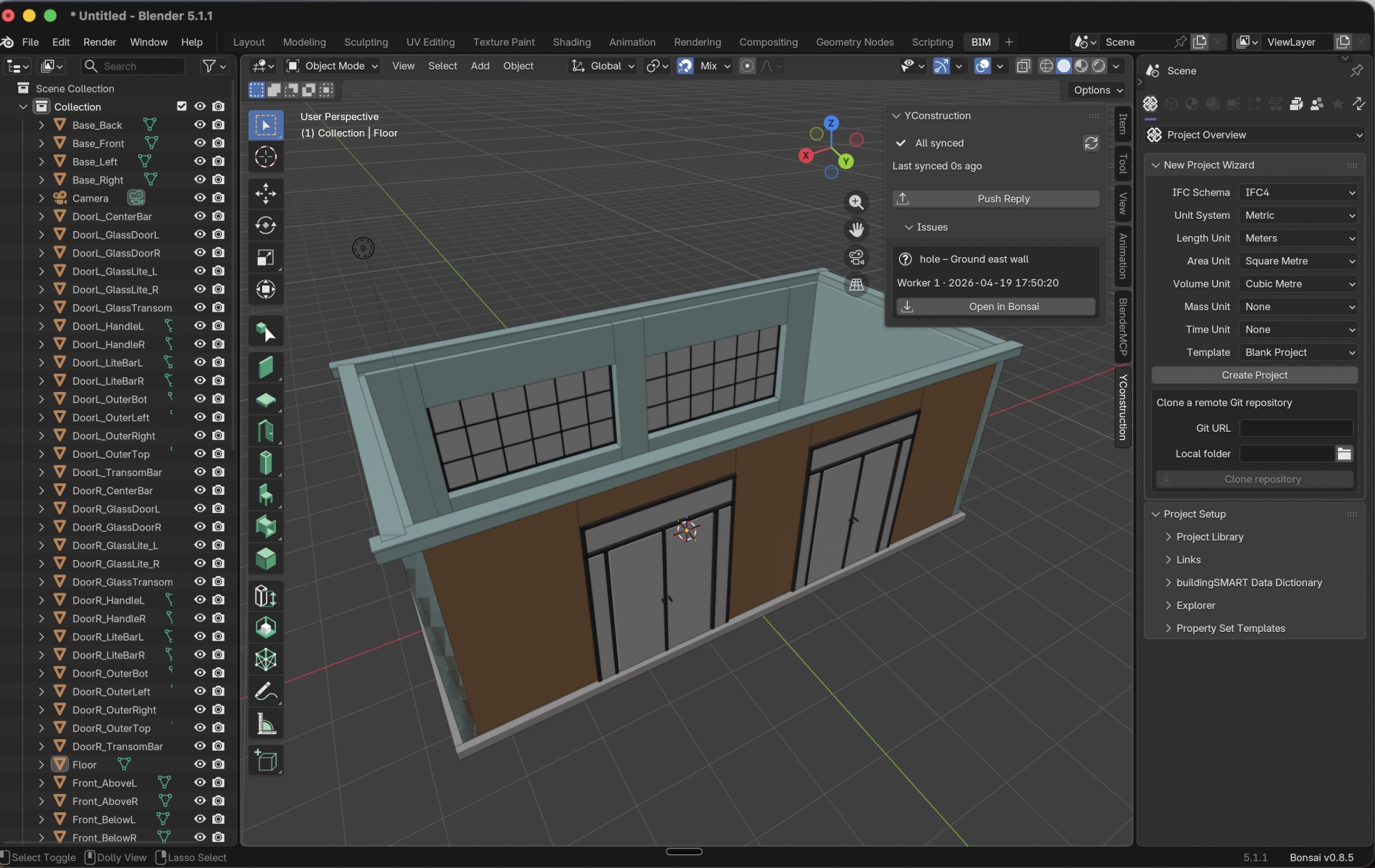
Instead of storing another vague text note, YConstruction maps the report to real project context like storey, space, orientation, element type, and IFC GUID. That issue is then synced through Supabase as a BCF topic and opened directly inside Blender with Bonsai, where the architect can review it, respond, and push the update back to the worker.
This creates a full loop from site to model to architect to site.
How it works
1. Report on-siteThe worker walks the site, takes a photo, and describes the issue by voice on iPhone. No typing, no cloud dependency, no waiting for signal. |
2. Structure locallyOn-device AI transcribes and interprets the report, then grounds it against a closed set of real IFC project data so the issue lands on an actual building element. |
3. Review in BIMThe issue syncs as a BCF topic. In Blender with Bonsai, the architect opens the defect, sees the media and context, updates status or comments, and sends the reply back to the phone. |
Why this is interesting
- Fully on-device field workflow so issue capture still works in messy real jobsite conditions
- IFC-grounded defect structuring so reports are tied to the actual building instead of free text alone
- BCF-based interoperability so the issue fits into real BIM workflows
- Architect stays in Blender instead of being pushed into a random extra dashboard
System architecture
At the field layer, the iPhone app handles voice, photo capture, local transcription, and local defect structuring. At the sync layer, Supabase stores project state, photos, and issue records. At the review layer, a Blender extension polls for updates and loads the issue directly into Bonsai's BCF workflow.
iPhone worker report
→ local transcription + local model reasoning
→ IFC-grounded structuring
→ Supabase sync
→ BCF topic creation
→ Blender + Bonsai architect review
→ reply back to iPhone
Tech stack
- SwiftUI iPhone app for the field workflow
- Cactus as the on-device runtime
- Gemma 3n E2B for local report structuring
- Whisper for on-device speech transcription
- Qwen3 embeddings for optional local RAG-style querying
- Supabase for sync, storage, and project state
- Blender + Bonsai for architect-side BIM review
- BCF + IFC to keep the workflow grounded in real building data and standards
Challenges we ran into
The hard part was not generating text. The hard part was preserving context all the way through the workflow.
We had to make voice input useful, ground the output to real IFC data, sync it cleanly, and then make the architect-side review happen inside a real BIM environment instead of a fake demo dashboard. We also had to work through the realities of local model deployment on iPhone and plugin behavior inside Blender.
What we are proud of
The thing we are proudest of is that this feels like a real product loop, not a one-screen AI demo.
A worker reports a problem naturally from the field. The issue gets structured against the model. The architect reviews it in Blender. The reply comes back to the worker. That full round trip is the point.
What we learned
We learned that multimodal AI becomes much more useful when it is constrained by real project structure. Once the model has access to the actual building vocabulary, it stops being vague and starts becoming operational.
We also learned that adoption matters as much as model quality. Keeping the worker on iPhone and the architect inside Blender makes the workflow feel much more realistic.
What’s next
- better auth and multi-user project roles
- richer collaboration and status flows
- more language support
- deeper BIM interoperability
- stronger project-aware assistance on device


Log in or sign up for Devpost to join the conversation.