XKCD-Archiver-cli


xkcd-dl is inspired by an awesome package called youtube-dl https://github.com/rg3/youtube-dl/ written by Daniel Bolton(Much respect!)
How about you get to download all of the xkcd which have been uploaded till date? This does just that!
Now I don't know about you, but I just love reading xkcd's! I thought why not create something like youtube-dl but for downloading xkcd's!
And hence xkcd-dl
Feautures
- Can download all the xkcd's uploaded till date(1603 as I am writing this!).
- Download individual xkcd's and store them
- Download the latest issue xkcd
- No duplicacy in your XKCD database.
- Stores each xckd in a seperate file named as the
titleof the xkcd at your home directory - Writes a
description.txtfor each xkcd. Storing meta-data likedate-publised- url value
- a small description of that xkcd
- written in
python.
Installation
Option 1: installing through pip
$ pip install xkcd-dl
For python2.*. Use this instead python3 -m pip install xkcd-dl
If you are behind a proxy
$ pip --proxy [username:password@]domain_name:port install xkcd-dl
Option 2: installing from source
$ git clone https://github.com/prodicus/xkcd-dl.git
$ cd xkcd-dl/
$ python setup.py install
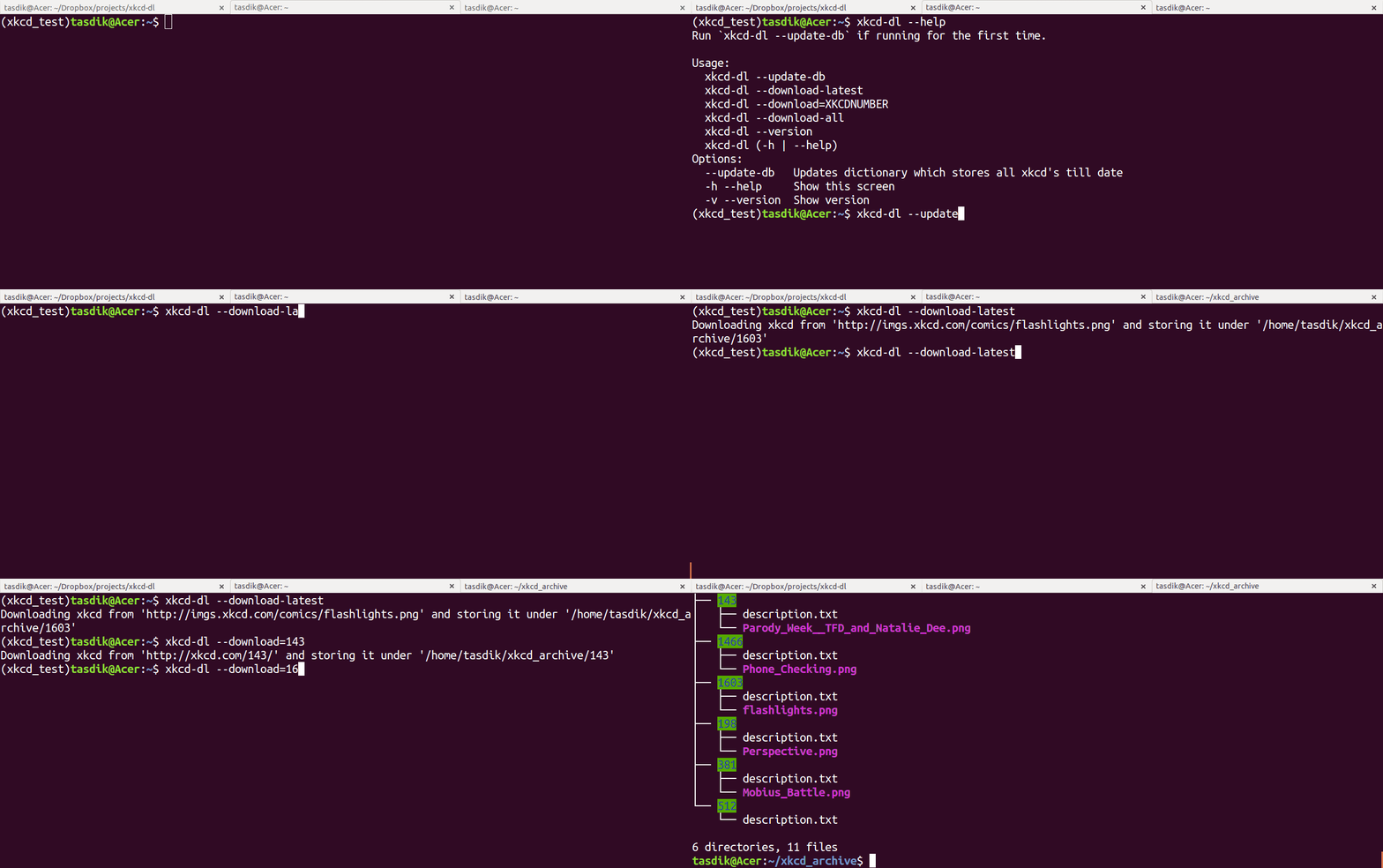
Demo

Each Comic is stored in it's own individual folder with a description.txt placed in it. It contains meta-data like
img-linktitledate-pulblished
Here's a little example for the same

Usage
When running for the first time, do a xkcd-dl --update-db
$ xkcd-dl --update-db
XKCD link database updated
Stored it in 'xkcd_dict.json'. You can start downloading your XKCD's!
Run 'xkcd-dl --help' for more options
$
--download-latest
This downloads the last uploaded xkcd comic and stores under the home directory of the user with a brief description
$ xkcd-dl --download-latest
Downloading xkcd from 'http://imgs.xkcd.com/comics/flashlights.png' and storing it under '/home/tasdik/xkcd_archive/1603'
$
If it has been downloaded, will not do anything
--download=XKCDNUMBER
Downloads the particular XKCDNUMBER(given that it exists and has not been downloaded already) and stores it in the home directory
$ xkcd-dl --download=143
Downloading xkcd from 'http://xkcd.com/143/' and storing it under '/home/tasdik/xkcd_archive/143'
$ xkcd-dl --download=1603
Downloading xkcd from 'http://xkcd.com/1603/' and storing it under '/home/tasdik/xkcd_archive/1603'
xkcd  number '1603' has already been downloaded!
$
--download-all
As the name suggests, will download all the xkcd's uploaded till date and store them under the home directory of the user.
$ xkcd-dl --download-all
Downloading all xkcd's Till date!!
Downloading xkcd from 'http://xkcd.com/1466' and storing it under '/home/tasdik/xkcd_archive/1466'
Downloading xkcd from 'http://xkcd.com/381' and storing it under '/home/tasdik/xkcd_archive/381'
Downloading xkcd from 'http://xkcd.com/198' and storing it under '/home/tasdik/xkcd_archive/198'
Downloading xkcd from 'http://xkcd.com/512' and storing it under '/home/tasdik/xkcd_archive/512'
Downloading xkcd from 'http://xkcd.com/842' and storing it under '/home/tasdik/xkcd_archive/842'
Downloading xkcd from 'http://xkcd.com/920' and storing it under '/home/tasdik/xkcd_archive/920'
....
....
Help menu:
$ xkcd-dl --help
Run `xkcd-dl --update-db` if running for the first time.

Usage:
  xkcd-dl --update-db
  xkcd-dl --download-latest
  xkcd-dl --download=XKCDNUMBER
  xkcd-dl --download-all
  xkcd-dl --version
  xkcd-dl (-h | --help)
Options:
  --update-db   Updates dictionary which stores all xkcd"s till date
  -h --help     Show this screen
  -v --version  Show version
$
To-do
- [x] add
xkcd-dl --download-latest - [x] add
xkcd-dl --download=XKCDNUMBER - [x] add
xkcd-dl --download-all - [ ] add
xkcd-dl --start=XKCDNUMBER --end=XKCDNUMBER [--path=/path/to/directory] - [ ] Remove redundant code in
download_xkcd_number(),download_latest()anddownload_all() - [ ] Adding support to open a particular xkcd at the CLI itself. (Thinking of using img2txt for that)
Contributing
Feel free to contribute
- Fork it.
- Create your feature branch (
git checkout -b my-new-awesome-feature) - Commit your changes (
git commit -am 'Added <xyz> feature') - Push to the branch (
git push origin my-new-awesome-feature) - Create new Pull Request
Bugs
Please report the bugs at the issue tracker
License :
MIT License http://prodicus.mit-license.org/ © Tasdik Rahman

Log in or sign up for Devpost to join the conversation.