
Video Demonstration Links.
Please You can watch the video from the links below. It huggs and its not clear when played from youtube
but it plays nicely in our site as I embed it into html5 video Container.
## Watch Xflux Video
Application Category:
Architecture, Engineering, Construction (AEC) & Development
Inspiration (Problem I solved):
In Building Engineering, Team communications, Collaborations, Files Sharing, real-time models, marks ups, and data between
architects, engineers, and construction manager are mostly done in the old fashioned way via
Email Message which is sometime boring due to series of accumulated mails which takes time for recipient to analyze
thus resulting in waste of time and efforts.
This email as a major way of sending and recieve messages between Building Engineering team
has to be replaced by a Real-Time Communication and Team Management System powered by Nodejs & Socket.Io
Therefore:
1.) There is a need for an application that can allow Design Teams, Engineers, Contractors, Engineering Staffs to
to fast-track the Building Design submittal process, reduce overhead, reduce errors
and omissions between the design teams and construction manager’s contractors, and reduce the overall project duration
by eliminating coordination, review and approval times.
2.) There is also need for an applications that does Realtime Site Monitoring, Sending out Daily Site Real-Time Instructions and Getting back workday
reports all in realtime.
Here is how I solved this problem. I created an application called XFlux: its a Replacement for Google Flux.
Xflux is a Realtime Staff/Team Managements System. Team Collaboration System Powered by SMS Messaging, One to One Chat,
Team/Group Chat System.
It fosters Team communications, Collaborations, Files Sharing, real-time models, marks ups, and data between
architects, engineers, and construction manager. Files could immediately be saved and shared across each Company Members,
Staffs,Teams all in real-time.
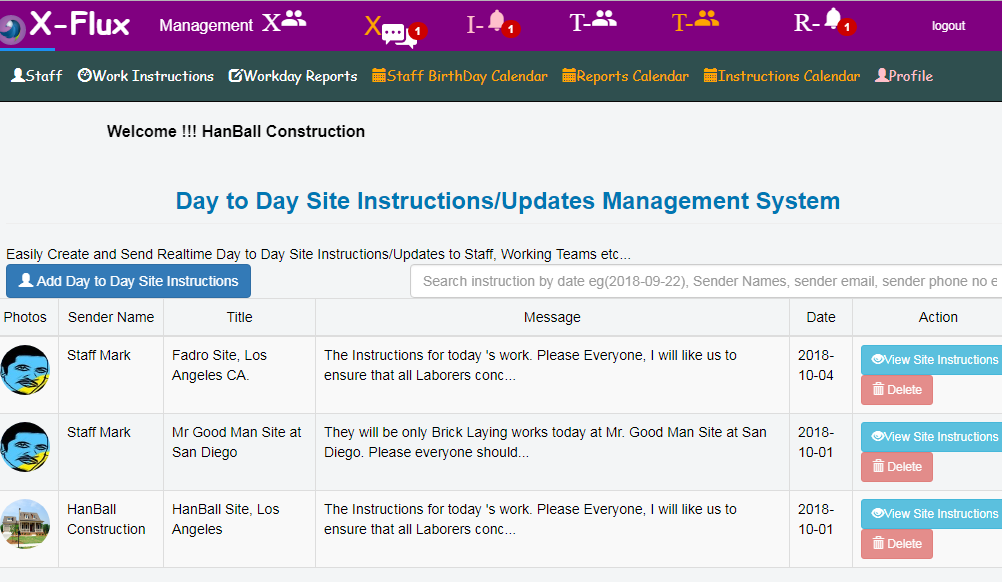
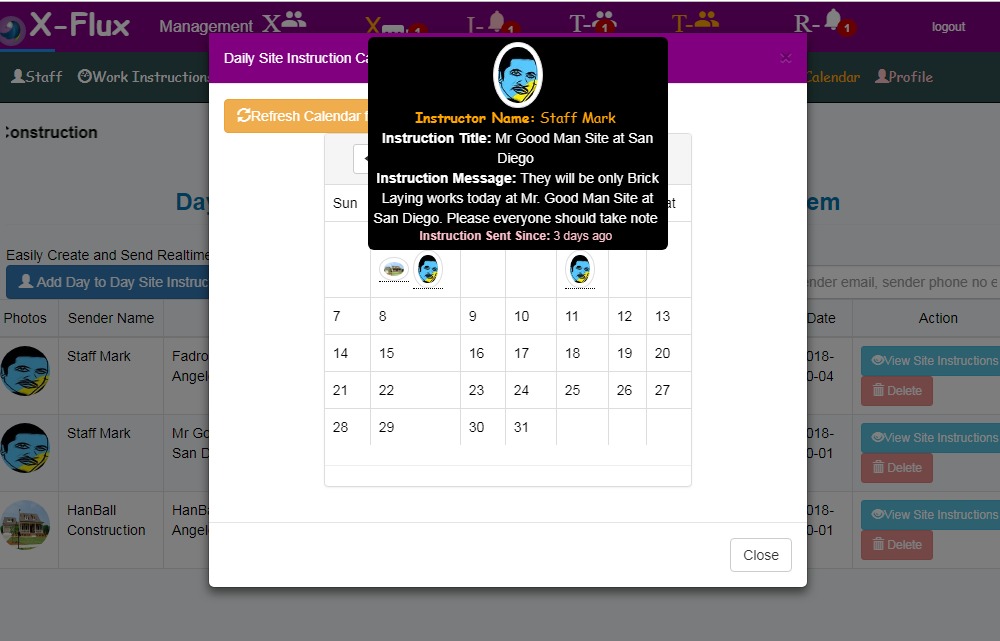
The application also allows Realtime Site Monitoring, Sending out Daily Site Real-Time Instructions and Getting back workday reports all in realtime. This Daily Site Instruction and Reports can be tracked from their respective Calenadars with dates all in realtime.
XFlux Features Integrated:
1.) Signup as Engineering Company or as Company Staff Invitee. Easily signup as a Engineering Company or Companies Admin
2.)Team Members/Staff Email Invitation. When the company Admin Login into the System, He or She will register all
their Company Staffs, assign them to their respective team(Eg. Plumbing Team, Electrical Team etc.) and then
send them an invitation Email link so that they can update their remaining Bio Data to access the system under their Company Entity.
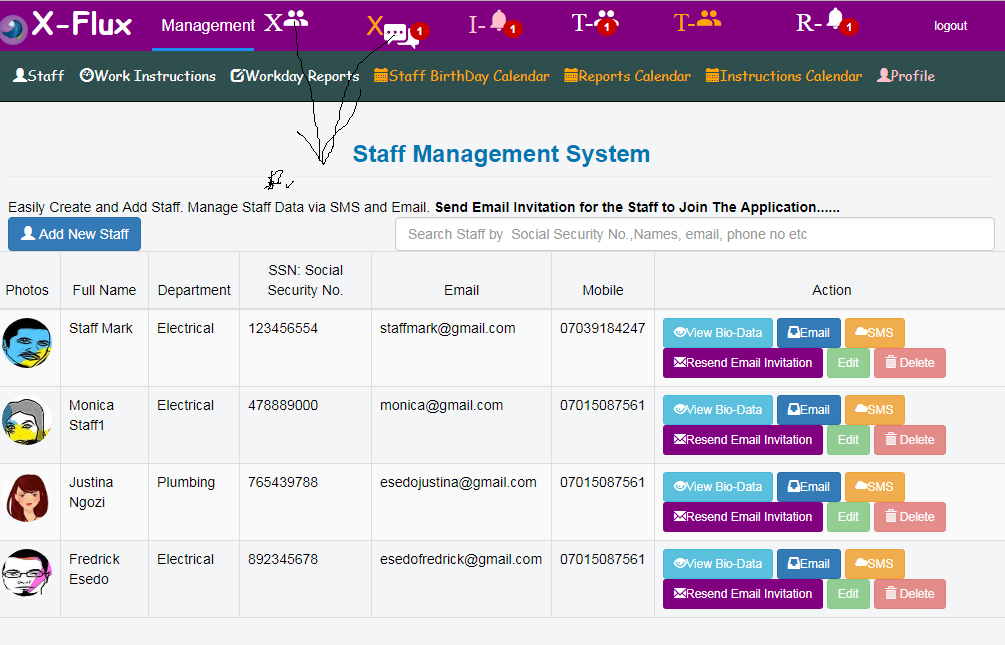
3.)Staff Management System: The Company Admin can easily manage its Staff Members, Update and Delete their Data. Can send them Email and SMS Messages. Can Reassigned them to various Collaboration Teams.
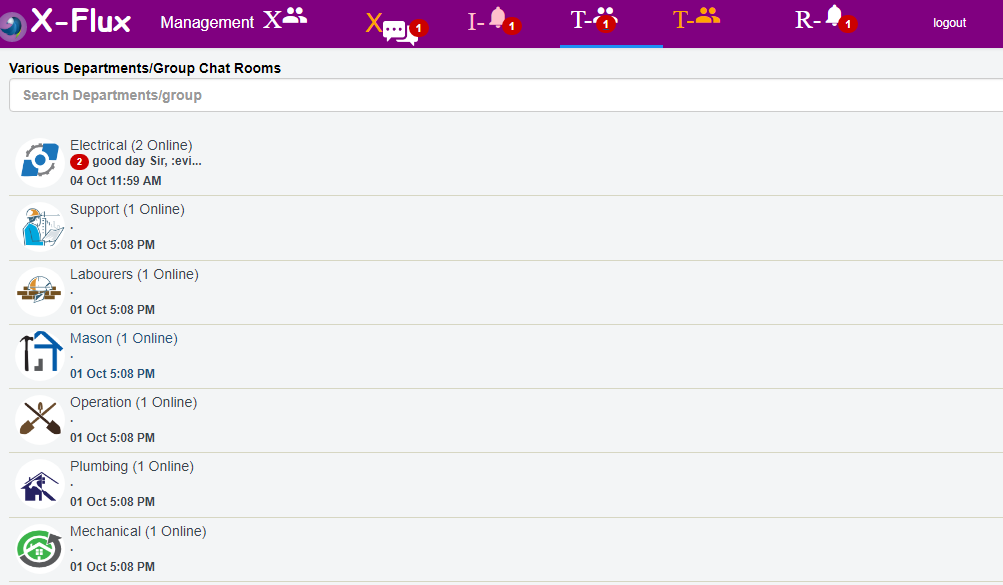
4.)Automatic Team/Group Chat Collaboration Creation for each Registered Company: When any Company gets registered within the Application,
The Application automatically Create 7 different Team/Group Chat Collaboration for that Company so the Company
can then assign all their Engineering Staff to their respective Teams/Groups for realtime Team/Group Collaborations.
Such Team Includes:
Electrical Group/Team
Support Group/Team
Mason Group/Team
Labourers Group/Team
Operations Group/Team
Plumbing Group/Team
Mechanical Group/Team
5.)Team/Group Collaboration System:
Company Admin can create more Team/Groups and assign and reassgin each Company Staff/member
to respective Teams/Groups for Collaborations via UserId.
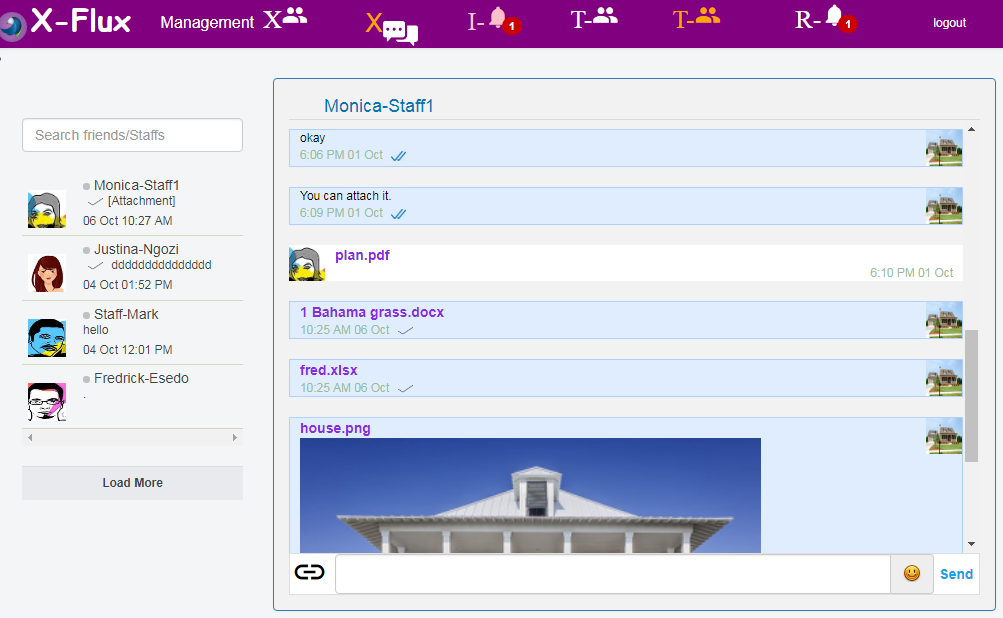
6.)Fully integrated 1 on 1 Chat with File Sharing Options.
This provides real-time Private Chat Collaboration between Company Admin, Contractors and its registered Staff members.
This 1 to 1 Chat system can be used to manage:
a.) Communication work flow
b.) Realtime Files transfer and sharing eg real-time models, marks ups, and data etc. Allowable formats includes(Images, Pdf, MsWord, Excels etc.)
c.) Reports and Issues
d.) All sorts of Real-time Communications and Conversational follow ups between Engineering Contractors and its Staff privately one on one.
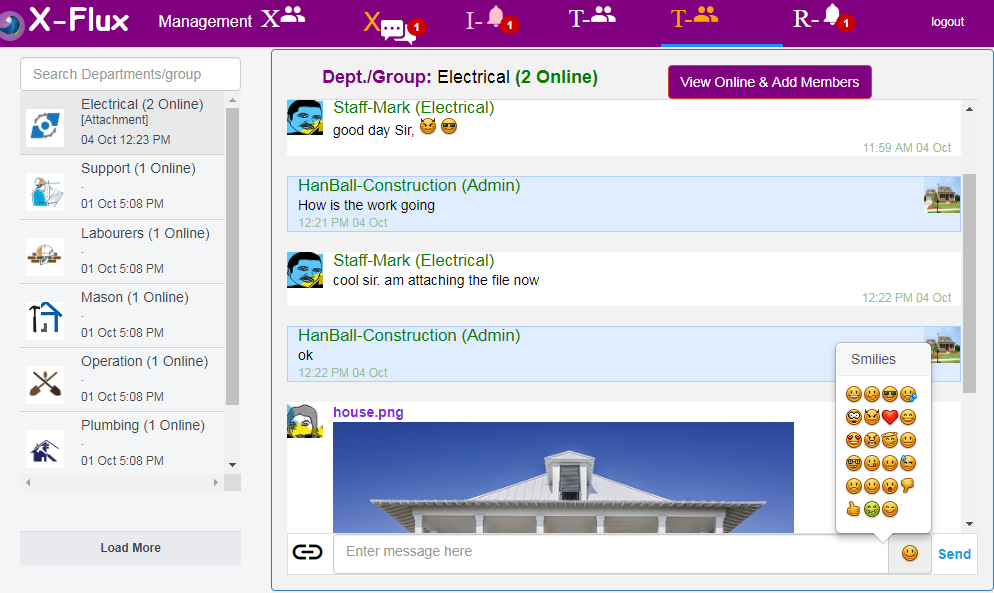
7.)Fully Integrated Group Chat/Team Collaboration.
his provides real-time Group/Team Chat Collaboration between everyone who is a member of that Group/Team.
This Group/Team Chat system can be used to manage:
a.) Communication work flow between all team members
b.) Realtime Files transfer and sharing eg real-time models, marks ups, and data etc between all team members. Allowable formats includes(Images, Pdf, MsWord, Excels etc.)
c.) Reports and Issues between team members
d.) All sorts of Real-time Communications and Conversational follow ups between various Teams/Groups.
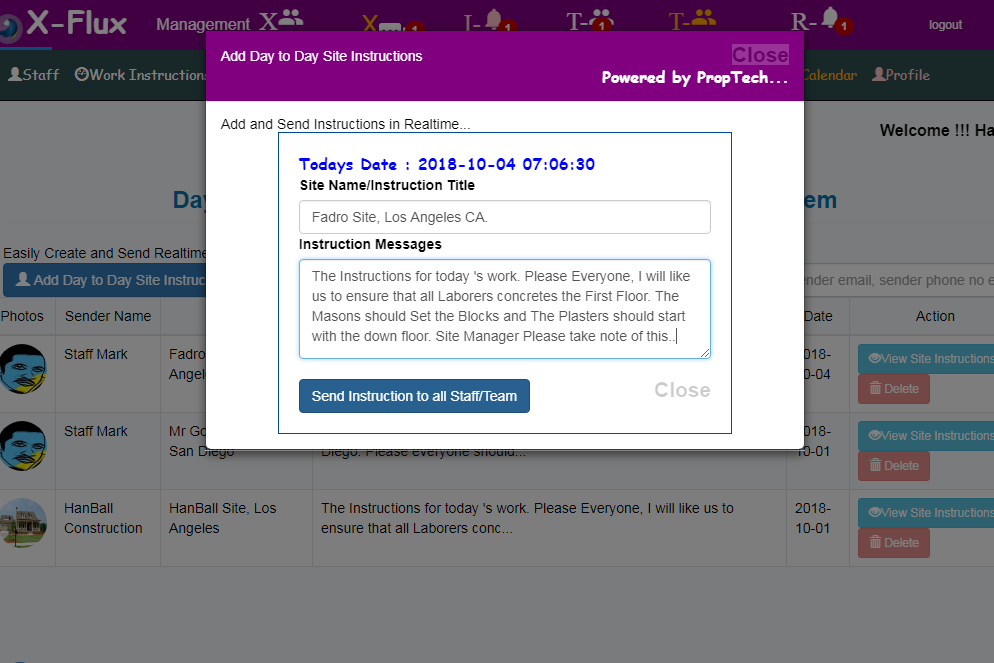
8.)Sending and Recieving Daily Site Instructions in Realtime: The application allows Contractors, Engineers to send real-time daily site Instructions which is broadcasted to all registered staff/member
of that company regarding the daily site events.
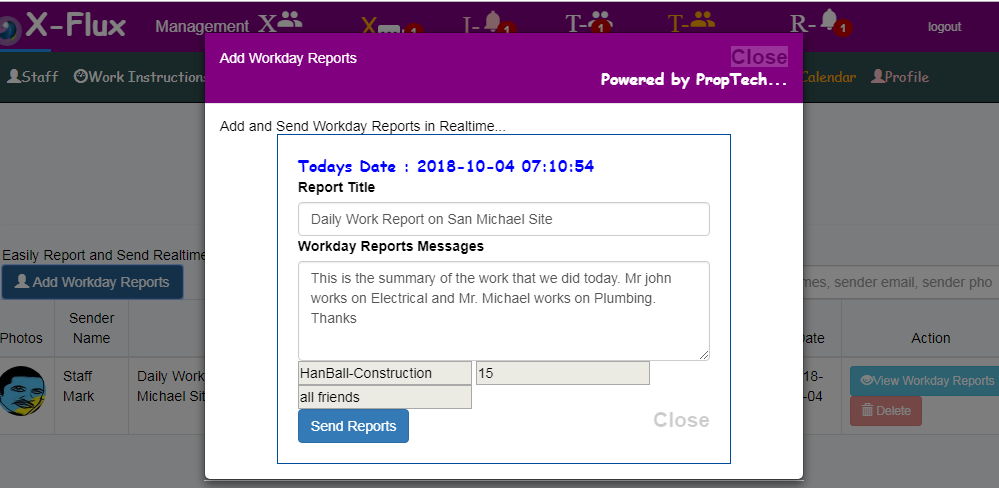
10.)Send and Preview Workday Reports in Real-time: The Applications allows sending and previewing of workday reports all in realtime. This workday reports can also be edited and deleted.
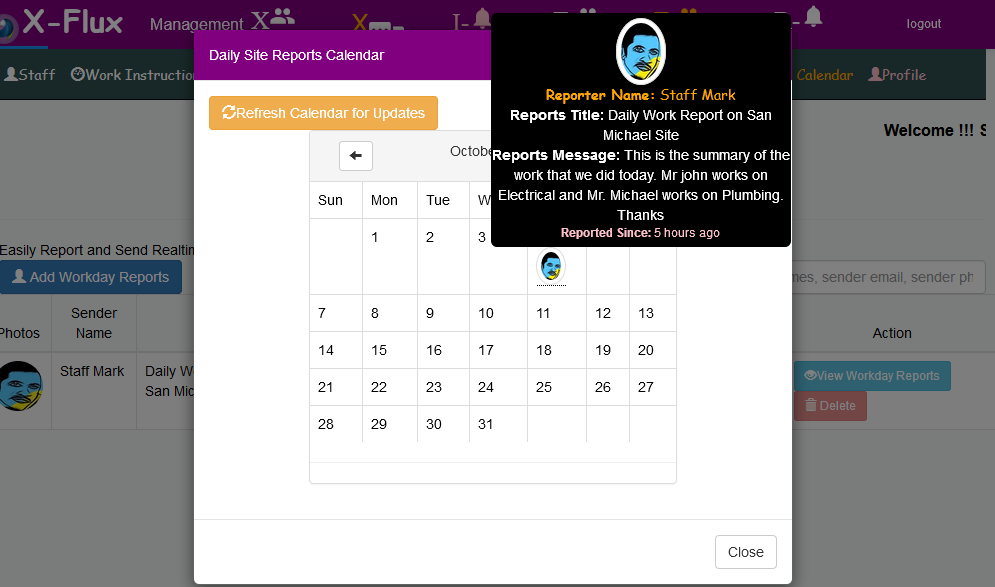
11.)Easily Track Workday Reports, Daily Site Instructions from Calendaring System based on date and time.
Some Real-Time Notification Icons & Its Functions.
1.)  : This pink colored Real-time I-DumBell Icon displays real-time
Daily Site Instructions on the Application.
: This pink colored Real-time I-DumBell Icon displays real-time
Daily Site Instructions on the Application.
2.)  : This white colored Real-time R-DumBell Icon displays real-time
Workday Reports on the Application.
: This white colored Real-time R-DumBell Icon displays real-time
Workday Reports on the Application.
3.)  : This Real-time User Icon displays real-time
One to One Staff/Users Chat Contact List.
: This Real-time User Icon displays real-time
One to One Staff/Users Chat Contact List.
4.)  : This Real-time Message Icon displays real-time
One to One Chat Message with Files Sharing Options.
: This Real-time Message Icon displays real-time
One to One Chat Message with Files Sharing Options.
5.)  : This Real-time T Icon displays real-time
Groups/Team Chat List.
: This Real-time T Icon displays real-time
Groups/Team Chat List.
6.)  : This Real-time T Icon displays real-time
Groups/Teams chat Messages.
: This Real-time T Icon displays real-time
Groups/Teams chat Messages.
How to use this Application vs workflow.
1.)Call up a browser Eg. Chrome, Firefox,UC Browser and Create your Account. You will be required to Enter your
Social Security Number(just anything),Passport, National Id Cards and other details for one time background Check..
2.) Once Logged In, If you are a Contractor or Company Admin, You can then start registering your Company Staff/members one
by one, assigned them to their various Team/Groups(Eg. Plumbing, Electrical Teams etc.) for realtime collaborations and then send them Email link Invitation for them to complete their Registeration under your Engineering company.
The Company Staff then Clicks on the Email Link send to him and completes his/her registeration and thus becomes part of the
company. The Company Admin/Contractor can assign and re-assign each staff to any team/Groups.
3.) The System has 1 on 1 Chat with File Sharing Options.
This provides real-time Private Chat Collaboration between Company Admin, Contractors and its registered Staff members.
This 1 to 1 Chat system can be used to manage:
a.) Communication work flow
b.) Realtime Files transfer and sharing eg real-time models,
marks ups, and data etc. Allowable formats includes(Images, Pdf, MsWord, Excels etc.)
c.) Reports and Issues
d.) All sorts of Real-time Communications and Conversational follow ups between Engineering Contractors
and its Staff privately one on one.
4.)System has Group Chat/Team Collaboration.
his provides real-time Group/Team Chat Collaboration between everyone who is a member of that Group/Team.
This Group/Team Chat system can be used to manage:
a.) Communication work flow between all team members
b.) Realtime Files transfer and sharing eg real-time models, marks ups,
and data etc between all team members. Allowable formats includes(Images, Pdf, MsWord, Excels etc.)
c.) Reports and Issues between team members
d.) All sorts of Real-time Communications and Conversational follow ups between various Teams/Groups.
5.)Sending and Recieving Daily Site Instructions in Realtime: The application allows Contractors, Engineers to send real-time daily site Instructions which is broadcasted to all registered staff/member
of that company regarding the daily site events.
6.)Send and Preview Workday Reports in Real-time: The Applications allows sending and previewing of workday reports all in realtime. This workday reports can also be edited and deleted.
7.)Easily Track Workday Reports, Daily Site Instructions from Calendaring System based on date and time.
Watch Videos from the Link Below.
Please You can watch the video from the links below. It huggs and cracks when uploaded to youtube
but it plays nicely in our site as I embed it into html5 video Container.
## Watch Xflux Video
How I Built It.
Xflux was Powered by AngularJs, Vue.Js, PHP, Nodejs + Socket.Io.
What's next for XFlux
Rebuilding Entire System Less than 7 days to incoporate more features. Coming soon on Android and IOS...
Some App Screenshots Displays:
Staff Members Mangement System: Each Company Admin can Add and Manage their Staff. Easily Send Staff an Invitation Email to join the Collaboration System.
Can Send Email and SMS to Staffs. Easily assign Staff to any Collaboration/Group Chat Teams

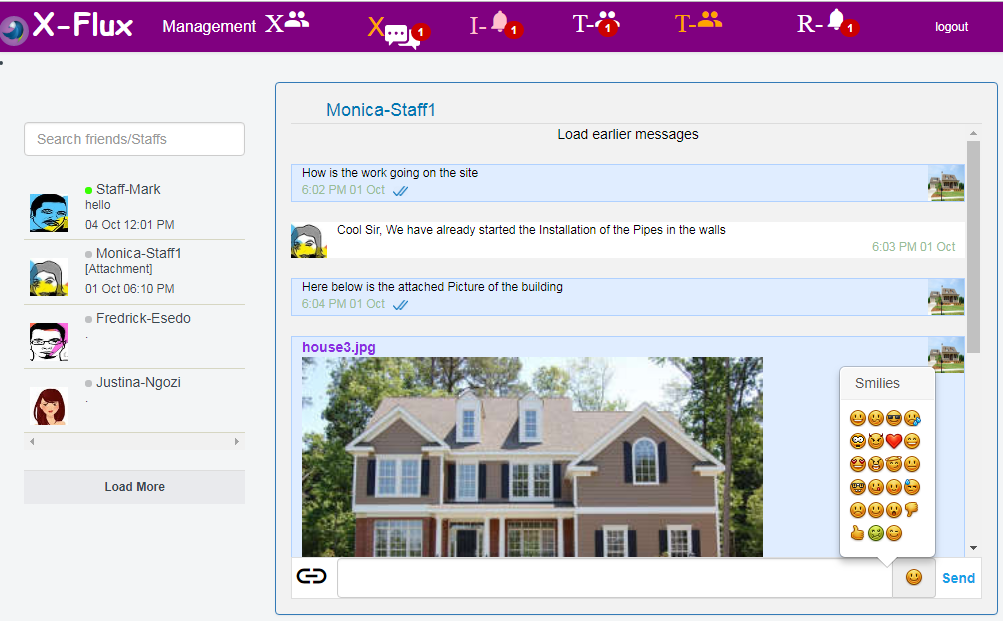
1 on 1 Chat Collaboration: Admin can Chat one to one with any Company Staff. Transfer files like
(Pdf,Images,Excel,Msword) one to one with any Staff. one to one Realtime Chat Notification fully Integrated.
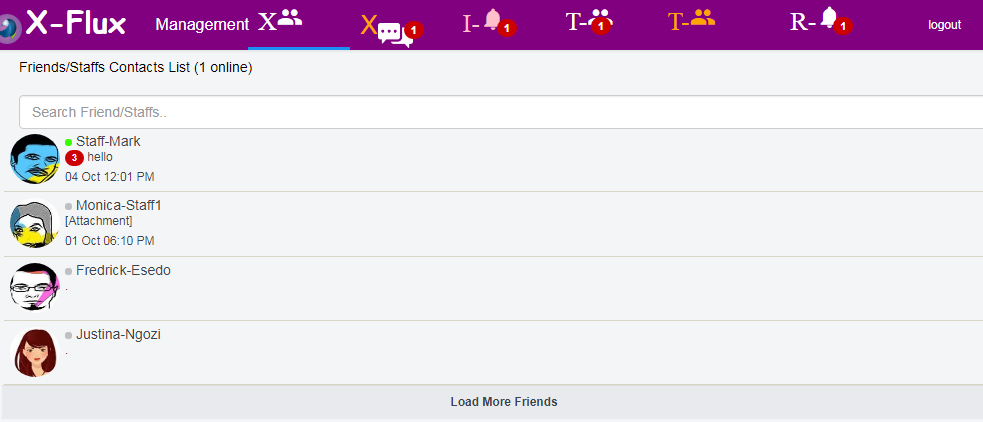
Staff 1 on 1 Chat List with online and Offline Presence.


Group/Team Chat Collaboration Fully Integrated: Seven Teams/Groups Chat Collaborations are automatically assigned to each
Registered Company. Example of the Team includes. Electrical Team, Supports, Operations,
Plumbing etc .Admin can create More Group/Teams and assign each Staff to any Team any time.
Team/Group Chat Communications. Files Upload and Transfer between various Teams in realtime. Each Team can easily share files like
(Pdf,Images,Excel,Msword) all in realtime. Team/Group Member Chat List with online and Offline Presence...


Realtime Daily Site Instruction Schedulings: Admin and Staff can easily Send and and recieve Realtime Daily Site Instructions any
time any Day. Daily Site Instructions are automatically saved and can be searched based on dates.
Daily Site Instructions are automatically saved on the
Calendaring System for future recall.


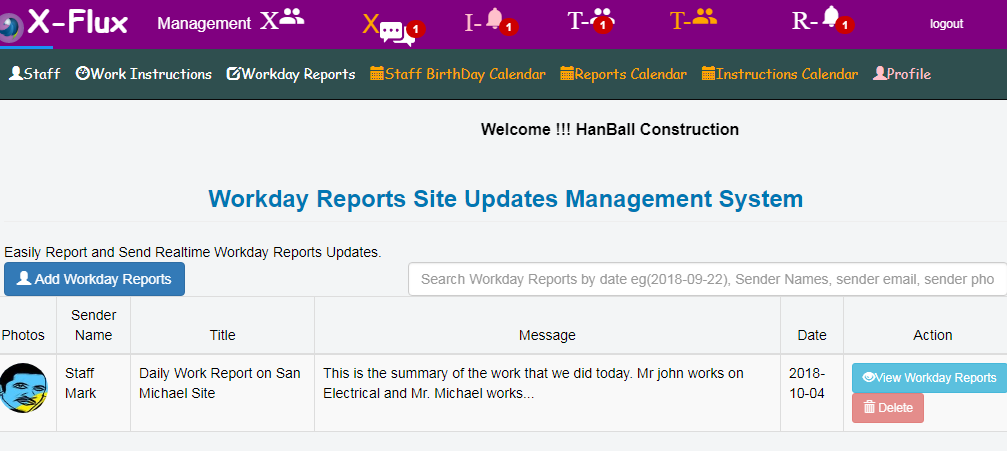
Fully Integrated Realtime Workday Reporting System:
Admin and Staff can easily Send and and recieve Site Workday Reports any time any Day.
Site Workday Reports are automatically saved and can be searched based on dates.
Site Workday Reports are automatically saved on the
Calendaring System for future recall.


Log in or sign up for Devpost to join the conversation.