-
-
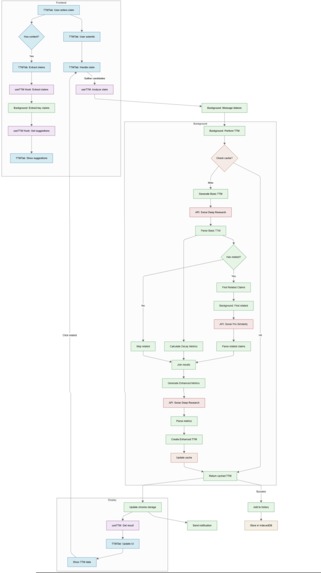
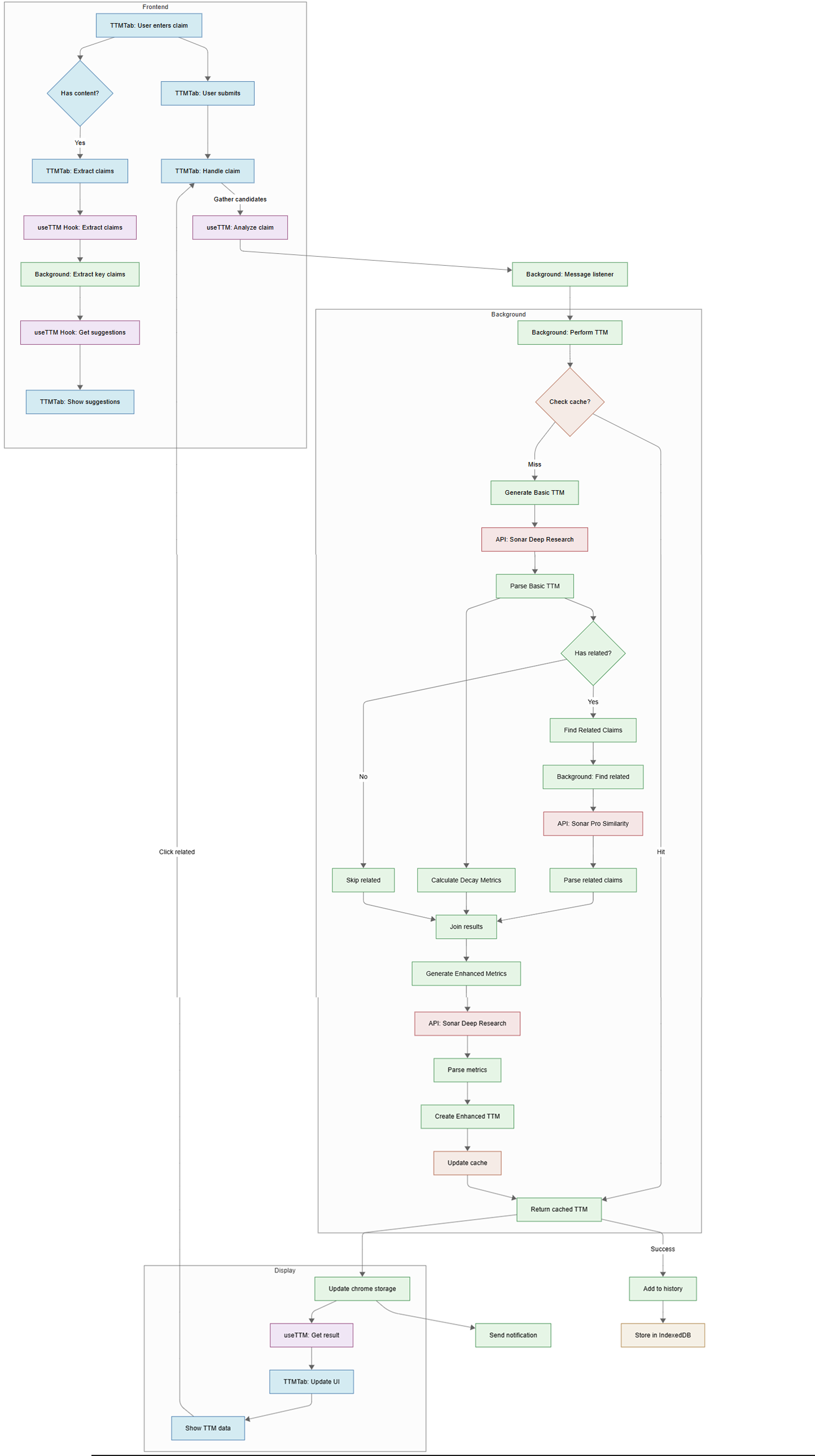
[not in video] Flow Diagram for the TTM Feature
-
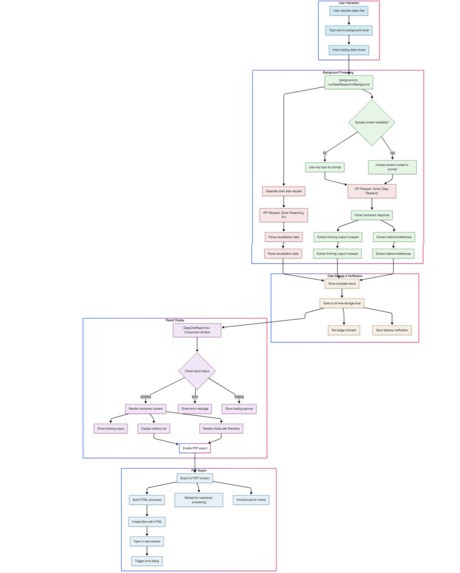
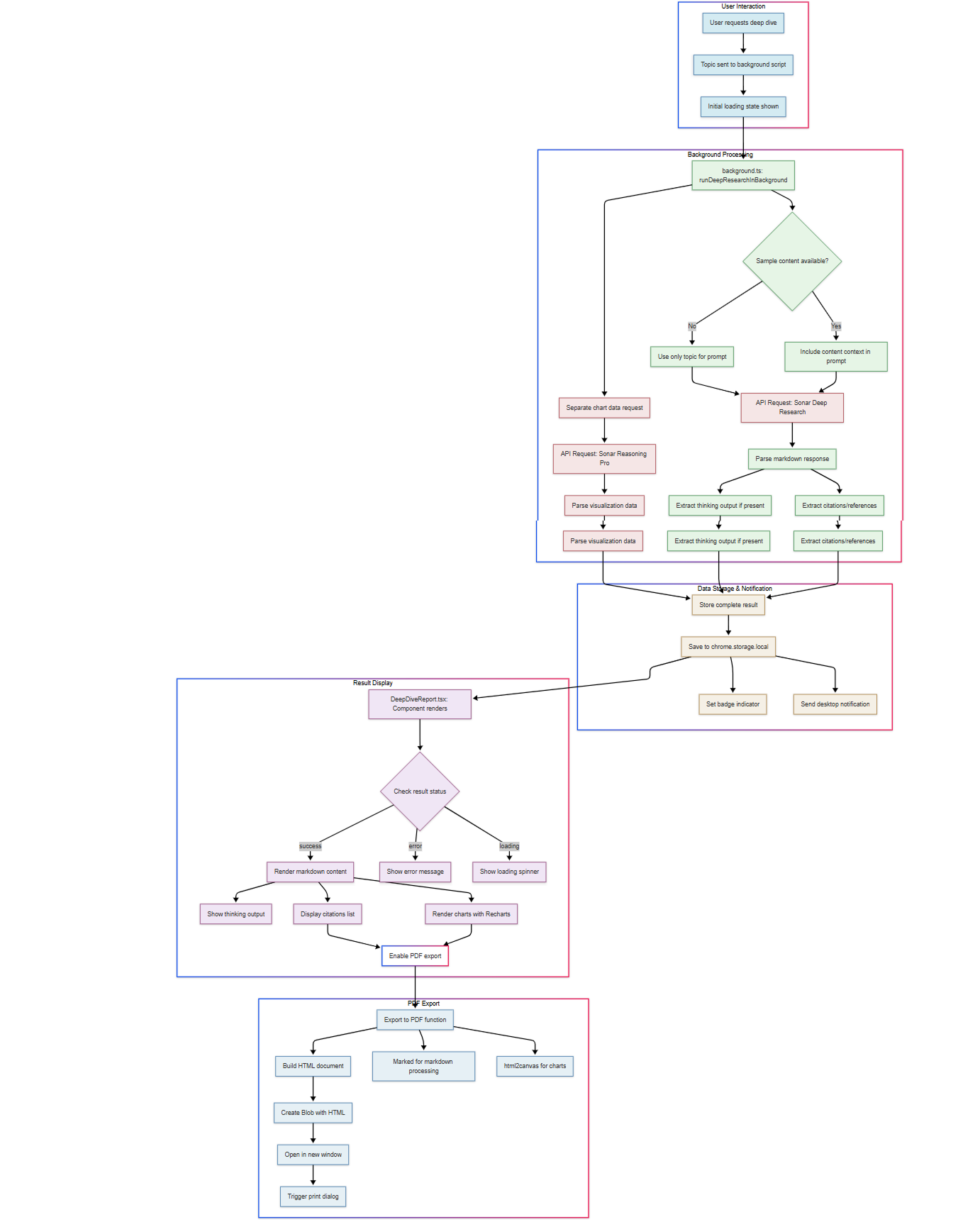
Flow Diagram for the Deep Research Feature
-
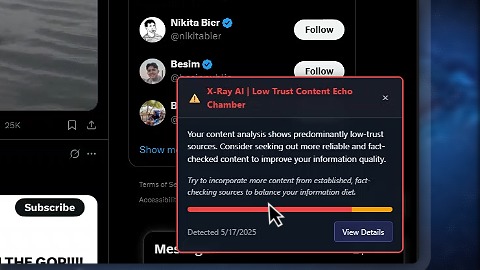
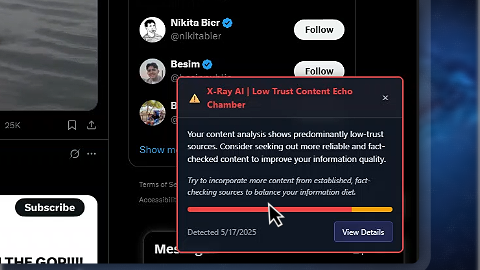
[not in video] Echo Chamber Detection
-
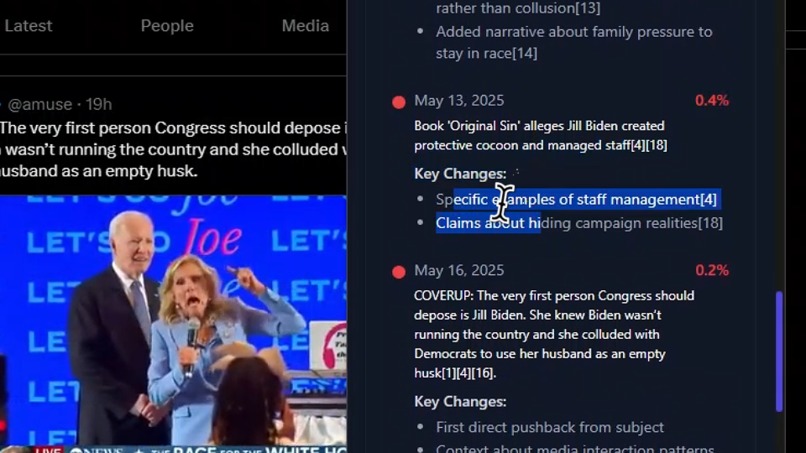
[not in video] TTM Feature
-
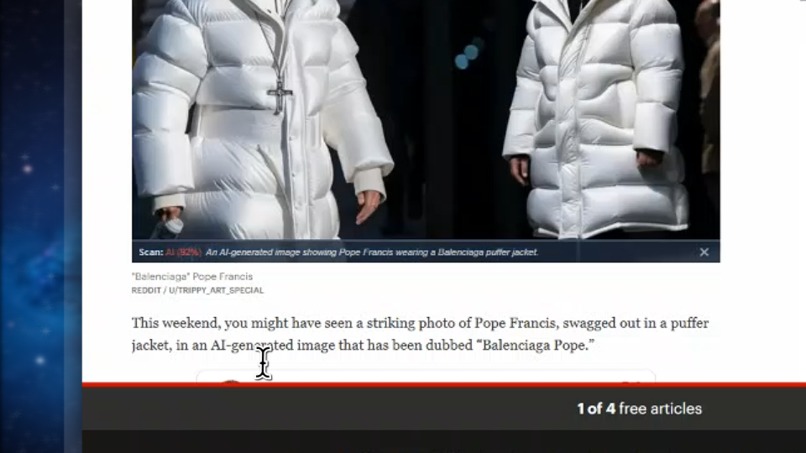
[not in video] Multimodal Image Analysis
💡 Inspiration
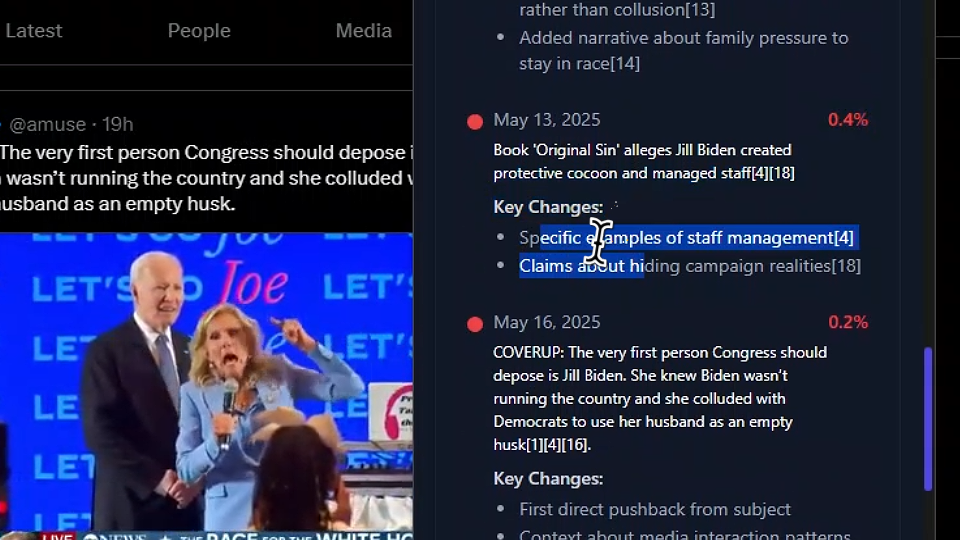
In 2024, a Russian bot farm used AI to generate fake American profiles to influence political discourse.
Facebook saw over 2 million engagements on AI-generated political memes during the U.S. elections.
We built XRay AI to help users see through the noise. Not just misinformation—but the subtle, evolving narratives that shape our perception over time. With Perplexity’s Sonar API, we turned a browser extension into a real-time research assistant that audits content, identifies echo chambers, detects manipulation, and visualizes the lifecycle of online truth.
🛠️ What it does
XRay AI is a browser extension that:
- 🧠 Scans any webpage or tweet for technical, controversial, or misleading content using Perplexity Sonar.
- 📘 Summarizes, explains, and optionally deep dives into any concept.
- 📊 Generates dynamic visualizations from Perplexity’s structured JSON output and renders them using
recharts. - 🧾 Builds a local credibility log of everything you consume—summaries, sources, and scores.
- 🧠 TTM (Temporal Truth Mapping™) traces how a claim evolved over time, tracking distortion and decay across the web.
- 🧠 Echo Chamber Scanner identifies content clusters where all narratives reinforce each other.
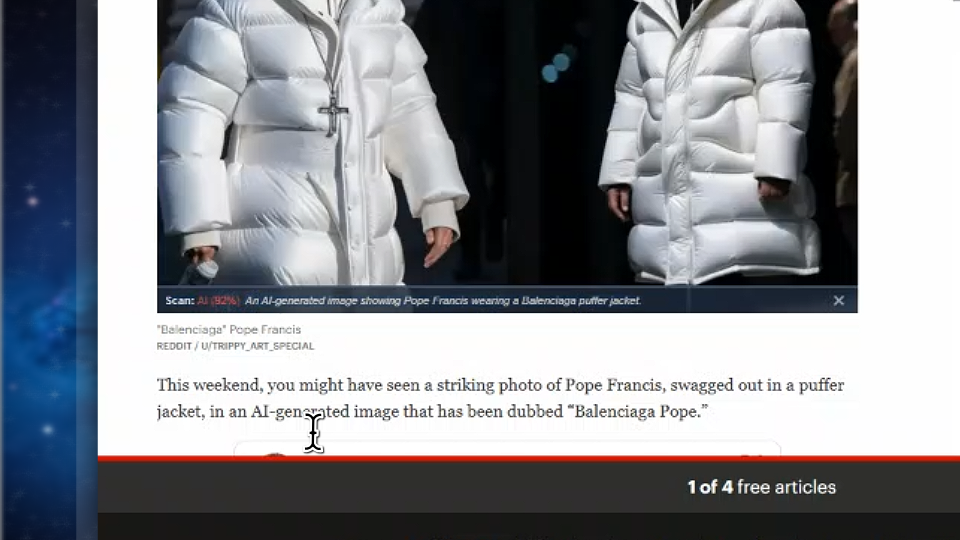
- 🖼️ Multimodal analysis checks images in context to detect AI generation or misleading use.
All of this runs locally, respects user privacy, and is designed to be non-intrusive. If XRay has nothing useful to say, it stays silent.
Note: The demo video could not cover everything due to the 3-minute limit. Features like 🖼️ AI image analysis, 🧠 Temporal Truth Mapping™, and 🧠 Echo Chamber Detection were left out but are fully functional within the extension.
⚙️ How we built it
We used Plasmo to build a cross-browser extension with background workers, content scripts, and a React + Tailwind popup UI.
🧩 Tech Stack
- TypeScript, React, TailwindCSS, shadcn/ui for clean UX
- Recharts for chart rendering
- IndexedDB (via a simple wrapper) for local history storage
- Perplexity Sonar Pro API for all deep research and TTM tasks
- Plasmo + Chrome APIs to sandbox sensitive data
🔐 API Key Management
User pastes their Perplexity API key into a modal. We:
- Save it to extension-only storage (
chrome.storage.local) - Never expose it to websites or other extensions
- Only use it for outbound calls to Perplexity
- Let users clear/reset it anytime from settings
📈 Chart Generation Example
We prompt Sonar like this:
{
  "model": "sonar-reasoning-pro",
  "messages": [{ "role": "user", "content": chartDataPrompt }],
  "response_format": { type: "json_schema", json_schema: DeepDiveVisualizationSchema }
}
And receive a payload like:
{
  "chartData": [
    {
      "chartType": "bar",
      "chartTitle": "Parole Eligibility by Crime Type",
      "description": "Shows avg. parole timelines for different offenses",
      "data": [
        { "name": "1st Degree Murder", "value": 30 },
        { "name": "2nd Degree", "value": 20 }
      ]
    }
  ]
}
Our UI then auto-renders the appropriate chart with tooltips and legends, and embeds it into the deep dive report, which can be exported to PDF.
🚧 Challenges we ran into
- Chart parsing: Getting Perplexity to output reliably formatted JSON took careful prompt engineering and error recovery logic.
- TTM complexity: Merging multiple Sonar calls (for claim, related claims, decay, metrics) into one coherent lifecycle map required building a local cache and recomposition pipeline.
- Balancing UX with depth: We wanted the UI to feel lightweight, but the depth of insight is serious. That tension was a constant design tradeoff.
- Multimodal image analysis: Interpreting model output in terms of visual logic—without hallucination—was hard. Context is key.
🏆 Accomplishments that we're proud of
- Built a privacy-respecting, cross-browser extension with zero server infrastructure.
- Created a full Temporal Truth Mapping pipeline—claim mutation tracking, metric decay, timeline visualization.
- Clean UI with dynamic chart rendering from natural language JSON.
- Non-intrusive UX—XRay only surfaces insights when necessary, not constantly.
🧠 What we learned
- You can build serious intelligence tools inside the browser without hosting infrastructure.
- Prompting matters more than you'd expect—even for charts.
- Caching and pre-emptive fetch strategies are critical when chaining multiple LLM calls for one task.
- Great UX = when the AI disappears and the user just feels smarter.
🔮 What’s next for XRay for Social Intelligence
- 🔐 Move to our own API backend with user auth, for multi-device support and team collaboration
- 🧠 Build a claim tracking dashboard across time and topics (not just per article)
- 🎯 Deploy personal bias and source skew detection using longitudinal reading habits
- 🪞 Integrate cross-platform analysis: compare Reddit, X, news sources in a unified echo chamber map
- 📦 Publish on Chrome and Firefox stores, then scale to Safari
- 🧪 Explore a “Public XRay” mode—where users can share TTM reports and collections
🧩 Installation Instructions
- Download packaged extension: https://github.com/youneslaaroussi/xray/raw/refs/heads/main/chrome-mv3-dev.zip (requires access to repo; only for judges)
- Load the unpacked extension in Chrome via
chrome://extensions. - Paste your Perplexity API key in the extension settings modal.
Or watch this Vidova for more detailed setup instructions.
⚠️ If Perplexity requests are failing, try launching Chrome like this (temporary workaround until we patch it):
& "C:\Program Files\Google\Chrome\Application\chrome.exe" --disable-extensions-http-throttling
Built With
- perplexity
- plasmo
- sonar
- typescript


Log in or sign up for Devpost to join the conversation.